2018 FORD EXPLORER seat
[x] Cancel search: seatPage 59 of 571

2. Twist a thin coin under the tab hidden
behind the key blade head to remove
the battery cover. 3. Insert a suitable tool, for example a
screwdriver, in the position shown and
carefully remove the battery.
4. Install a new battery with the + facing
upward.
5. Reinstall the battery housing cover onto the transmitter and install the key
blade.
Memory Feature
(If Equipped)
You can use the remote control to recall
memory positions.
If programmed to a pre-set position, the
remote control recalls memory positions
when you unlock your vehicle. If you have
the easy entry and exit feature enabled
and the ignition is off, the seat moves to
the easy entry position. The seat moves
to the driver memory position when you
switch the ignition on.
Linking a Preset Position to Your
Remote Control or Intelligent Access
Key
See
Memory Function (page 150).
56
Explorer (TUB) Canada/United States of America, enUSA, Edition date: 201711, Fourth-Printing Keys and Remote ControlsE218401 E218402
Page 62 of 571

PRINCIPLE OF OPERATION
MyKey allows you to program keys with
restricted driving modes to promote good
driving habits. You can only program up to
two keys with the restrictions. Any keys
that you did not program are administrator
keys or admin keys.
You can use admin keys to:
•
Create a MyKey with certain vehicle
restrictions.
• Program certain MyKey settings.
• Clear all MyKey restrictions.
After you program a MyKey, you can view
the following information through the
information display:
• The total number of admin keys and
MyKeys for your vehicle.
• The total distance a MyKey driver
traveled with your vehicle.
Note: Every MyKey receives the same
restrictions and settings. You cannot
program them individually.
Note: For vehicles equipped with a
push-button start switch: When both a
MyKey and an admin key are present when
you start your vehicle, the system recognizes
the admin key only. Standard Settings
Not every vehicle includes the features
listed below. If your vehicle has this
equipment, then you cannot change the
following settings when using a MyKey:
•
Seatbelt reminder or Belt-Minder™.
MyKey mutes the audio system until
drivers, and in some instances,
passengers, fasten their seatbelts.
Note: If your vehicle includes an
AM/FM radio or a very basic audio
system, then the radio may not mute.
• Earlier low-fuel warning. The low-fuel
warning activates earlier for MyKey
drivers, giving them more time to refuel.
• Certain driver alerts, stability systems
or parking aids turn on automatically
when you use the MyKey system. For
example, Blind Spot Information
System (BLIS), cross traffic alert, lane
departure warning or forward collision
warning. Note:
MyKey drivers may be
able to turn the lane departure warning
feature off, but this feature turns back
on automatically with every new key
cycle.
• Restricted touchscreen operation in
some markets. For example, MyKey
may prevent manual navigation
destination input while the vehicle is in
any gear other than park (P) or when
the vehicle reaches a certain rate of
speed.
• Satellite radio adult content
restrictions, if this feature is available
in your market.
Optional Settings
You can configure certain vehicle feature
settings when you first create a MyKey. You
can also change the settings afterward
with an admin key.
59
Explorer (TUB) Canada/United States of America, enUSA, Edition date: 201711, Fourth-Printing MyKey
™
Page 72 of 571

MANUAL LIFTGATE (If Equipped)
WARNING: It is extremely dangerous
to ride in a cargo area, inside or outside of
a vehicle. In a crash, people riding in these
areas are more likely to be seriously injured
or killed. Do not allow people to ride in any
area of your vehicle that is not equipped
with seats and seatbelts. Make sure
everyone in your vehicle is in a seat and
properly using a seatbelt. Failure to follow
this warning could result in serious
personal injury or death. WARNING:
Make sure to close and
latch the liftgate to prevent drawing
exhaust fumes into your vehicle. This will
also prevent passengers and cargo from
falling out. If you must drive with the
liftgate open, keep the vents or windows
open so outside air comes into your vehicle.
Failure to follow this warning could result
in serious personal injury.
Note: Be careful when opening or closing
the liftgate in a garage or other enclosed
area to avoid damaging the liftgate.
Note: Do not hang anything, for example a
bike rack, from the glass or liftgate. This
could damage the liftgate and its
components.
Note: Do not leave the liftgate open while
driving. This could damage the liftgate and
its components. Opening the Liftgate
Manually
Press the button located in the top of the
liftgate pull cup handle to unlatch the
liftgate, and then pull on the outside
handle.
With the Remote Control
Press the button twice within
three seconds.
Closing the Liftgate A handle is located inside the liftgate to
help with closing.
69
Explorer (TUB) Canada/United States of America, enUSA, Edition date: 201711, Fourth-Printing LiftgateE138632 E138630 E155976
Page 73 of 571

POWER LIFTGATE (If Equipped)
WARNING: It is extremely dangerous
to ride in a cargo area, inside or outside of
a vehicle. In a crash, people riding in these
areas are more likely to be seriously injured
or killed. Do not allow people to ride in any
area of your vehicle that is not equipped
with seats and seatbelts. Make sure
everyone in your vehicle is in a seat and
properly using a seatbelt. Failure to follow
this warning could result in serious
personal injury or death. WARNING:
Make sure that you fully
close the liftgate to prevent exhaust fumes
from entering your vehicle. If you are
unable to fully close the liftgate, open the
air vents or the windows to allow fresh air
to enter your vehicle. Failure to follow this
instruction could result in personal injury
or death. WARNING:
Keep keys out of reach
of children. Do not allow children to
operate or play near an open or moving
power liftgate. You should supervise the
operation of the power liftgate at all times.
Note: Make sure that you close the liftgate
before operating or moving your vehicle,
especially in an enclosure, like a garage or
a parking structure. This could damage the
liftgate and its components.
Note: Do not hang anything, for example
a bike rack, from the glass or liftgate. This
could damage the liftgate and its
components.
The liftgate only operates with the
transmission in park (P).
If there is a problem with the open or close
request, a tone sounds for one of the
following reasons: •
The ignition is on and the transmission
is not in park (P).
• The battery voltage is below the
minimum operating voltage.
• The liftgate is not fully closed and your
vehicle speed is at or above
3 mph
(5 km/h).
If the liftgate starts to close after it has
fully opened, this indicates there may be
excessive weight on the liftgate or a
possible strut failure. A repetitive tone
sounds and the liftgate closes under
control. Remove any excessive weight
from the liftgate. If the liftgate continues
to close after opening, have the system
checked by an authorized dealer.
Opening and Closing the Liftgate WARNING:
Make sure all persons
are clear of the power liftgate area before
using the power liftgate control.
Note: Make sure the area behind your
vehicle is free from obstruction and that
there is enough room for you to operate the
liftgate. Objects too close to your vehicle,
for example a wall, garage door or another
vehicle may come into contact with the
moving liftgate. This could damage the
liftgate and its components.
Note: Be careful when opening or closing
the liftgate in a garage or other enclosed
area to avoid damaging the liftgate.
Note: Do not leave the liftgate open when
you are driving. This could damage the
liftgate and its components.
From the Instrument Panel With the transmission in park
(P), press the button on the
instrument panel.
70
Explorer (TUB) Canada/United States of America, enUSA, Edition date: 201711, Fourth-Printing LiftgateE138633
Page 105 of 571

Fasten Safety Belt
It illuminates and a chime
sounds to remind you to fasten
your safety belt. See Seatbelt
Reminder (page 40).
Front Airbag If it fails to illuminate when you
start your vehicle, continues to
flash or remains on, it indicates
a malfunction. Have the system checked
by an authorized dealer.
Front Fog Lamps
(If Equipped) Lights when you switch the front
fog lamps on.
Heads Up Display
(If Equipped) A red beam of lights illuminates
on the windshield in certain
instances when using adaptive
cruise control and/or the collision warning
system. It also illuminates momentarily
when you start your vehicle to make sure
the display works.
High Beam It illuminates when you switch
the high beam headlamps on. It
flashes when you use the
headlamp flasher.
Hood Ajar Displays when the ignition is on
and the hood is not completely
closed.
Lane Keeping Aid
(If Equipped) Lights when the lane keeping
system is activated. Liftgate Ajar Lights when the liftgate is not
completely closed.
Low Fuel Level It illuminates when the fuel level
is low or the fuel tank is nearly
empty. Refuel as soon as
possible.
Low Tire Pressure Warning It illuminates when your tire
pressure is low. If the lamp
remains on with the engine
running or when driving, check your tire
pressure as soon as possible.
It also illuminates momentarily when you
switch the ignition on to confirm the lamp
is functional. If it does not illuminate when
you switch the ignition on, or begins to
flash at any time, have the system checked
by an authorized dealer.
Low Washer Fluid It illuminates when the
windshield washer fluid is low.
Parking Lamps It illuminates when you switch
the parking lamps on.
Powertrain Fault Illuminates when the system
detects a powertrain or an 4WD
fault. Contact an authorized
dealer as soon as possible.
102
Explorer (TUB) Canada/United States of America, enUSA, Edition date: 201711, Fourth-Printing Instrument ClusterE71880 E67017 E156133 E159324 E144813 E162453 E132353
Page 111 of 571
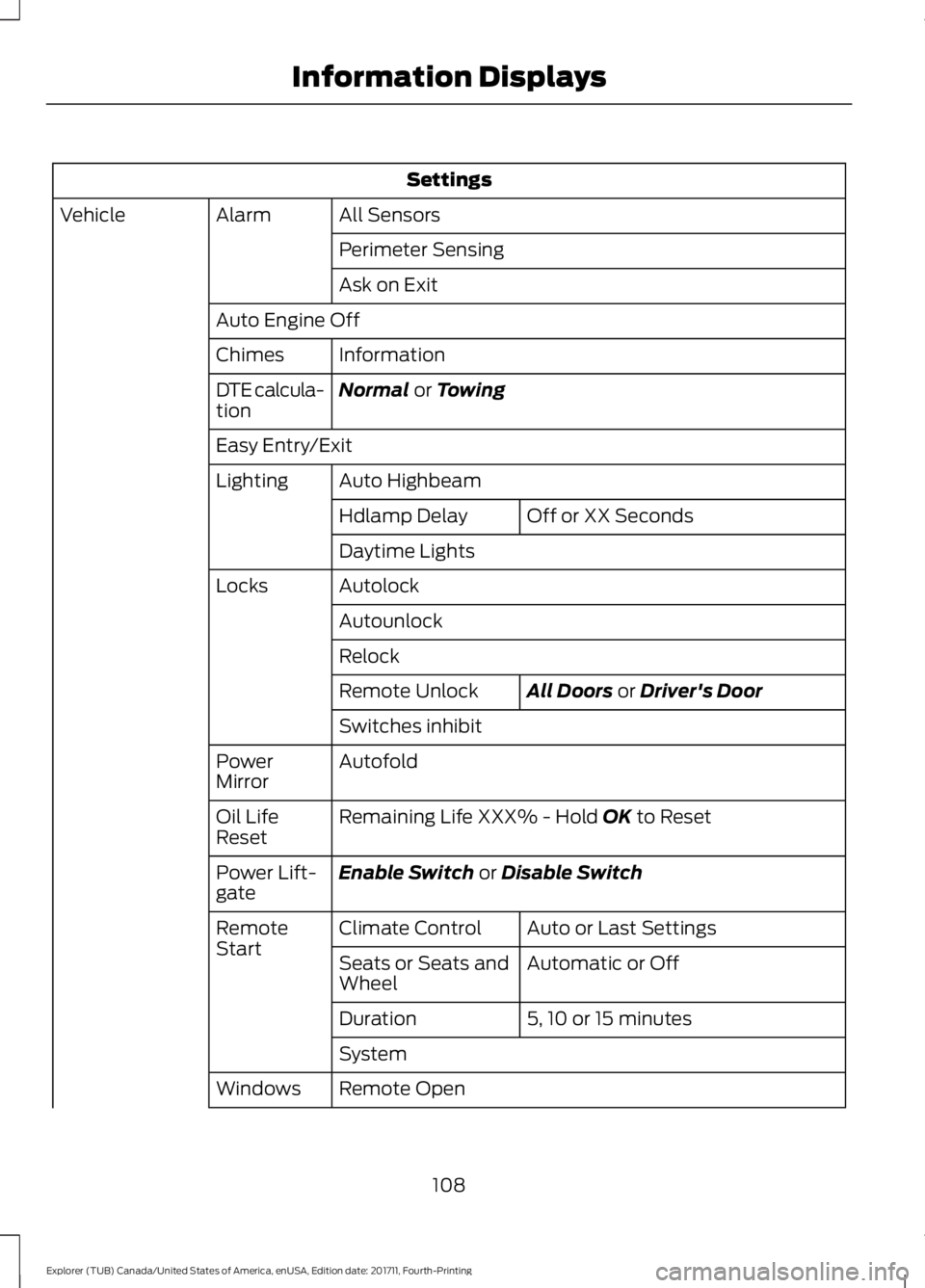
Settings
All Sensors
Alarm
Vehicle
Perimeter Sensing
Ask on Exit
Auto Engine Off Information
Chimes
Normal or Towing
DTE calcula-
tion
Easy Entry/Exit
Auto Highbeam
Lighting
Off or XX Seconds
Hdlamp Delay
Daytime Lights
Autolock
Locks
Autounlock
Relock All Doors
or Driver's Door
Remote Unlock
Switches inhibit
Autofold
Power
Mirror
Remaining Life XXX% - Hold
OK to Reset
Oil Life
Reset
Enable Switch
or Disable Switch
Power Lift-
gate
Auto or Last Settings
Climate Control
Remote
Start
Automatic or Off
Seats or Seats and
Wheel
5, 10 or 15 minutes
Duration
System
Remote Open
Windows
108
Explorer (TUB) Canada/United States of America, enUSA, Edition date: 201711, Fourth-Printing Information Displays
Page 117 of 571

Settings
XXX% - Hold OK to Reset
Oil Life
Reset
Enable Switch
or Disable Switch
Power Lift-
gate
Auto or Last Settings
Climate Control
Remote
Start
Auto or Off
Seats or Seats and
Wheel
5, 10 or 15 minutes
Duration
System
Remote Open
Windows
Courtesy Wipe
Wipers
Rain Sensing
MyKeys Qty
MyKey
MyKey
MyKey Odometer
Admin Key Qty
Hold
OK to Create MyKey
Create
MyKey
Always On or User Selectable
911 Assist
Do Not
Disturb
Traction
Control
Choose desired speed or off
Max Speed
Speed
Minder
Volume Limiter
Hold
OK to Clear All MyKeys
Clear
MyKeys
Miles & Gallons
,L/100km or Km/L
Distance
Display Setup
°Fahrenheit
or °Celsius
Temper-
ature
114
Explorer (TUB) Canada/United States of America, enUSA, Edition date: 201711, Fourth-Printing Information Displays
Page 121 of 571

Settings
Switch Inhibit
Autofold
Mirror
XXX% - Hold OK to Reset
Oil Life
Enable Switch or Disable Switch
Power Lift-
gate
Auto or Last Settings
Climate Control
Remote
Start
Auto or Off
Front Seats &
Wheel
5, 10 or 15 minutes
Duration
System
Remote Open
Windows
Courtesy Wipe
Wipers
Rain Sensing
MyKeys Qty
Mykey
Status
MyKey
MyKey Odometer
Admin Key Qty
Hold
OK to Create MyKey
Create
MyKey
Always On or User Selectable
911 Assist
On or Off
Do Not
Disturb
Always On or User Selectable
Traction
Control
Choose desired speed or off
Max Speed
Speed
Minder
Volume Limiter
Hold
OK to Clear All MyKeys
Clear
MyKeys
Miles & Gallons
,L/100 km or km/L
Distance
Unit
Display
118
Explorer (TUB) Canada/United States of America, enUSA, Edition date: 201711, Fourth-Printing Information Displays