2018 FORD EXPLORER seat
[x] Cancel search: seatPage 382 of 571

Sunday, 10:30am-7:30pm EST.
In the United States, call 1-800-392-3673.
In Canada, call 1-800-565-3673.
Times are subject to change due to
holidays.
SYNC Owner Account
Why do I need a SYNC owner account?
•
Essential for keeping up with the latest
software downloads available for
SYNC.
• Access to customer support for any
questions you may have.
Driving Restrictions
For your safety, certain features are
speed-dependent and restricted when your
vehicle is traveling over 3 mph (5 km/h).
Safety Information WARNING:
Driving while distracted
can result in loss of vehicle control, crash
and injury. We strongly recommend that
you use extreme caution when using any
device that may take your focus off the
road. Your primary responsibility is the safe
operation of your vehicle. We recommend
against the use of any hand-held device
while driving and encourage the use of
voice-operated systems when possible.
Make sure you are aware of all applicable
local laws that may affect the use of
electronic devices while driving. When using SYNC:
•
Do not operate playing devices if the
power cords or cables are broken, split
or damaged. Place cords and cables
out of the way, so they do not interfere
with the operation of pedals, seats,
compartments or safe driving abilities.
• Do not leave playing devices in your
vehicle during extreme conditions as it
could cause them damage. See your
device's manual for further information.
• Do not attempt to service or repair the
system. See an authorized dealer.
Privacy Information
When a cellular phone is connected to
SYNC, the system creates a profile within
your vehicle that is linked to that cellular
phone. This profile is created in order to
offer you more cellular features and to
operate more efficiently. Among other
things, this profile may contain data about
your cellular phone book, text messages
(read and unread), and call history,
including history of calls when your cellular
phone was not connected to the system.
In addition, if you connect a media device,
the system creates and retains an index of
supported media content. The system also
records a short development log of
approximately 10 minutes of all recent
system activity. The log profile and other
system data may be used to improve the
system and help diagnose any problems
that may occur.
The cellular profile, media device index,
and development log will remain in the
vehicle unless you delete them and are
generally accessible only in the vehicle
when the cellular phone or media player
is connected. If you no longer plan to use
the system or the vehicle, we recommend
you perform a Master Reset to erase all
stored information.
379
Explorer (TUB) Canada/United States of America, enUSA, Edition date: 201711, Fourth-Printing SYNC™
(If Equipped)
Page 400 of 571
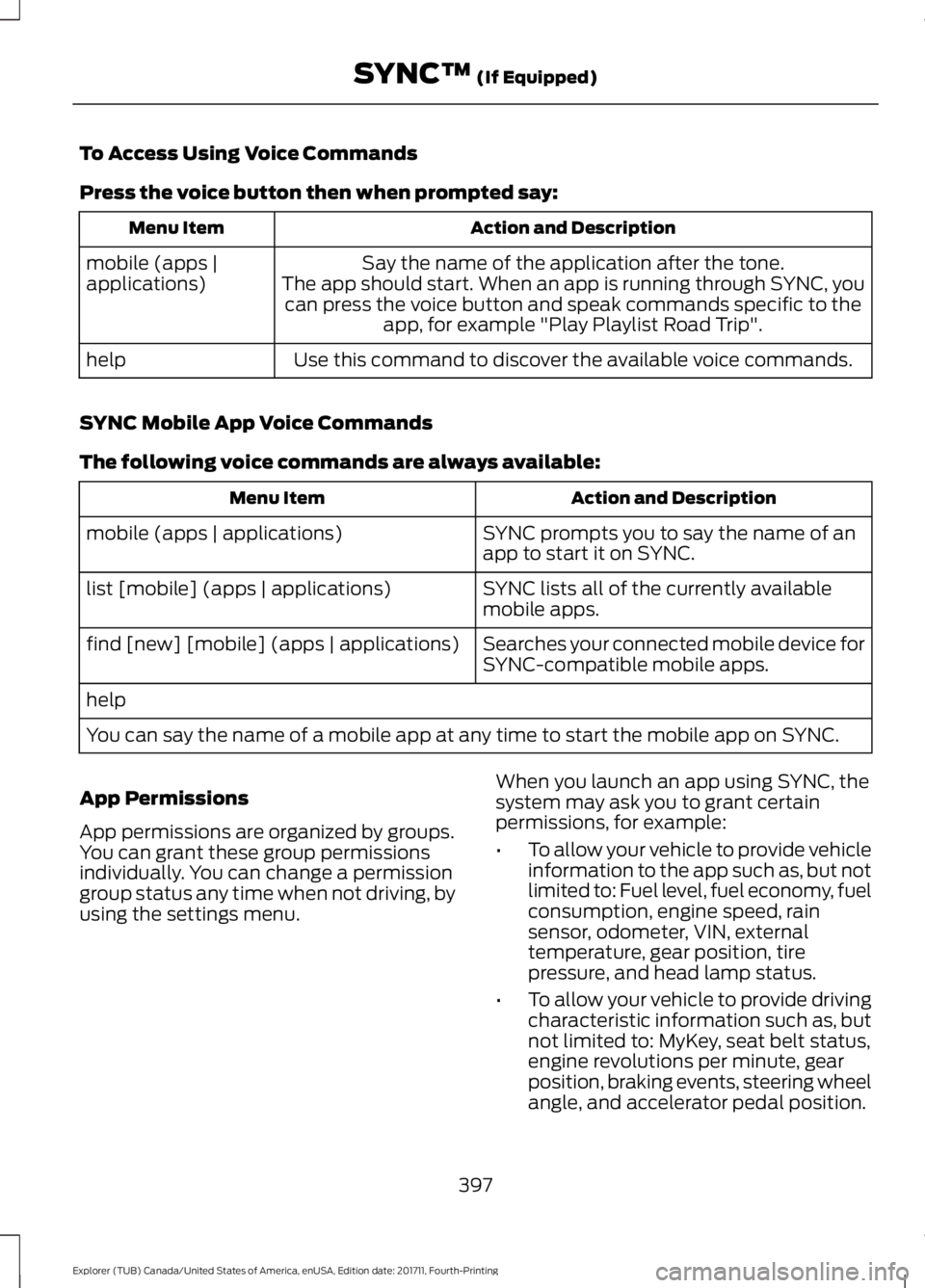
To Access Using Voice Commands
Press the voice button then when prompted say:
Action and Description
Menu Item
Say the name of the application after the tone.
The app should start. When an app is running through SYNC, you can press the voice button and speak commands specific to the app, for example "Play Playlist Road Trip".
mobile (apps |
applications)
Use this command to discover the available voice commands.
help
SYNC Mobile App Voice Commands
The following voice commands are always available: Action and Description
Menu Item
SYNC prompts you to say the name of an
app to start it on SYNC.
mobile (apps | applications)
SYNC lists all of the currently available
mobile apps.
list [mobile] (apps | applications)
Searches your connected mobile device for
SYNC-compatible mobile apps.
find [new] [mobile] (apps | applications)
help
You can say the name of a mobile app at any time to start the mobile app on SYNC.
App Permissions
App permissions are organized by groups.
You can grant these group permissions
individually. You can change a permission
group status any time when not driving, by
using the settings menu. When you launch an app using SYNC, the
system may ask you to grant certain
permissions, for example:
•
To allow your vehicle to provide vehicle
information to the app such as, but not
limited to: Fuel level, fuel economy, fuel
consumption, engine speed, rain
sensor, odometer, VIN, external
temperature, gear position, tire
pressure, and head lamp status.
• To allow your vehicle to provide driving
characteristic information such as, but
not limited to: MyKey, seat belt status,
engine revolutions per minute, gear
position, braking events, steering wheel
angle, and accelerator pedal position.
397
Explorer (TUB) Canada/United States of America, enUSA, Edition date: 201711, Fourth-Printing SYNC™ (If Equipped)
Page 429 of 571

Safety Information
WARNING: Driving while distracted
can result in loss of vehicle control, crash
and injury. We strongly recommend that
you use extreme caution when using any
device that may take your focus off the
road. Your primary responsibility is the safe
operation of your vehicle. We recommend
against the use of any hand-held device
while driving and encourage the use of
voice-operated systems when possible.
Make sure you are aware of all applicable
local laws that may affect the use of
electronic devices while driving.
• Do not attempt to service or repair the
system. Have an authorized dealer
check your vehicle.
• Do not operate playing devices if the
power cords or cables are broken, split
or damaged. Place cords and cables
out of the way, so they do not interfere
with the operation of pedals, seats,
compartments or safe driving abilities. •
Do not leave playing devices in your
vehicle during extreme conditions as it
could cause them damage. See your
device's user guide for further
information.
• For your safety, some SYNC 3 functions
are speed-dependent. Their use is
limited to when your vehicle is traveling
at speeds under 3 mph (5 km/h). Make
sure that you review your device's
manual before using it with SYNC 3.
Speed-restricted Features
Some features of this system may be too
difficult to use while your vehicle is moving
so they are restricted from use unless your
vehicle is stationary.
• Screens crowded with information,
such as Point of Interest reviews and
ratings, SiriusXM Traffic and Travel Link
sports scores, movie times or ski
conditions.
• Any action that requires you to use a
keyboard is restricted, such as entering
a navigation destination or editing
information.
• All lists are limited so the user can view
fewer entries (such as phone contacts
or recent phone call entries).
See the following table for more specific
examples. Restricted features
Pairing a Bluetooth phone.
Cellular Phone
Browsing of list entries is limited for phone contacts and
recent phone calls.
Editing the keypad code.
System Functionality
Enabling Valet Mode.
Editing settings while the rear view camera or active park
assist are active.
426
Explorer (TUB) Canada/United States of America, enUSA, Edition date: 201711, Fourth-Printing SYNC™ 3
Page 452 of 571

Driver temperature: Touch up
or down to adjust the
temperature.
A
Heated steering wheel:
B
Note:
This feature only
functions when you switch the
engine on.
Touch this icon to switch the
heated steering wheel on and
off. It takes about 5 minutes to
warm the steering wheel to 74°F
(23°C) in temperatures as low
as -4°F (-20°C). The wheel
maintains an approximate
temperature of 90°F (32°C) and
operates independently from the
heated seats and other
climate-control functions. The
heating element is in between
the leather covering and foam
core to help provide maximum
heat without adversely affecting
the feel of the steering wheel.
Note: The heated steering wheel
may remain on after remote
starting the vehicle, based on
your remote start settings. The
heated steering wheel may also
turn on when you start your
vehicle, if it was on when you
switched your vehicle off.
Note:
For steering wheels with
wood trim, the heating feature
will not heat the wheel between
the 10 o'clock and 2 o'clock
positions.
Defrost:
A pop up appears on
the screen to display the defrost
options.
C MAX Defrost: Touch the button
to maximize defrosting. Air flows
through the windshield vents,
the fan automatically adjusts to
the highest speed and the driver
and passenger temperatures are
set to HI. You can use this setting
to defog or clear a thin covering
of ice from the windshield. The
heated rear window also
automatically turns on when you
select MAX Defrost.
Defrost:
Distributes air through
the windshield defroster vents
and demister vents.
Heated rear window: Turns the
heated rear window on and off.
See
Heated Windows and
Mirrors (page 141).
AUTO:
Touch the button to
switch on automatic operation.
Select the desired temperature
using the temperature control.
The system adjusts fan speed,
air distribution, air conditioning
operation, and selects outside
air or recirculated air to heat or
cool the vehicle in order to
maintain the desired
temperature.
D
Power:
Touch the button to
switch the system on and off.
Switching off the climate control
system prevents outside air from
entering the vehicle.
E
DUAL:
This button lights up
when the passenger controls are
active. To switch the off and link
the passenger temperature to
the driver temperature, touch the
DUAL button.
F
449
Explorer (TUB) Canada/United States of America, enUSA, Edition date: 201711, Fourth-Printing SYNC™ 3
Page 453 of 571

Note: the passenger side
temperature and the DUAL
indication automatically turn on
when you or your passenger
adjust the passenger
temperature.
Passenger temperature:
Touch up or down to adjust the
temperature.
G
Fan speed:
Touch up or down
to increase or decrease the
volume of air that circulates in
your vehicle.
H
Note:
You cannot adjust the fan
speed when the system is set to
AUTO or MAX A/C.
Rear:
A pop up appears on the
screen to display the rear control
options.
I
Touch Rear Lock to switch the
rear climate control functions off
and on.
Touch
Rear Control to allow
the rear seat passengers to
adjust the rear climate settings.
Touch it again to prevent the rear
seat passengers from adjusting
the settings. Rear Control
automatically turns off when you
use the touchscreen to adjust
the rear climate settings.
If your vehicle has automatic
climate controls, select
Auto to
connect the rear climate settings
to the Auto settings of the driver.
Touch the up and down arrows
to adjust the temperature.
Manual airflow distribution
controls:
Select these controls
individually, together, or with
Defrost to direct the air flow to
the area you desire.
J Panel:
Distributes air through
the instrument panel vents.
Floor: Distributes air through the
demister vents, floor vents and
rear seat floor vents.
A/C:
A pop-up appears on the
screen to display the air
conditioning options.
K
MAX A/C:
Touch the button to
activate and maximize cooling.
The driver and passenger
temperatures are set to LO,
recirculated air flows through the
instrument panel vents, air
conditioning automatically turns
on and the fan automatically
adjusts to the highest speed.
A/C:
Touch to switch the air
conditioning on or off. Use A/C
with recirculated air to improve
cooling performance and
efficiency.
Note:
In certain conditions (for
example, Max Defrost), the air
conditioning compressor may
continue to operate even when
you switch the air conditioning
A/C button off.
450
Explorer (TUB) Canada/United States of America, enUSA, Edition date: 201711, Fourth-Printing SYNC™ 3
Page 498 of 571

For a complete listing of the accessories
that are available for your vehicle, please
contact your authorized dealer or visit the
online store web site:
Web Address (United States)
www.Accessories.Ford.com Web Address (Canada)
www.Accessories.Ford.ca
Ford Motor Company will repair or replace
any properly authorized dealer-installed
Ford Original Accessory found to be
defective in factory-supplied materials or
workmanship during the warranty period,
as well as any component damaged by the
defective accessories.
Ford Motor Company will warrant your
Ford Original Accessory through the
warranty that provides the greatest
benefit:
• 24 months, unlimited mileage.
• The remainder of your new vehicle
limited warranty.
Contact an authorized dealer for details
and a copy of the warranty.
Exterior Style
• Bumper protector.
• Hood deflectors.
• Running boards.
• Side window deflectors*.
• Splash guards.
Interior Style
• Ambient lighting.
• Cargo area protector.
• Floor mats. •
Rear console.
• Seat covers*.
Lifestyle
• Ash cup or smoker's package.
• Camping tent*.
• Car covers*.
• Cargo organization and management.
• Rear seat entertainment*.
• Roof crossbars.
• Roof racks and carriers*.
• Trailer hitch balls.
• Trailer hitch drawbars and towing
accessories.
Peace of Mind
• Cargo shade.
• In-vehicle safe*.
• Keyless entry keypad.
• Parking sensors*.
• Remote start.
• Roadside assistance kits*.
• Vehicle security systems.
• Wheel locks.
*Ford Licensed Accessories. The accessory
manufacturer designs, develops and
therefore warrants Ford Licensed
Accessories, and does not design or test
these accessories to Ford Motor Company
engineering requirements. Contact an
authorized Ford dealer for the
manufacturer ’s limited warranty details,
and request a copy of the Ford Licensed
Accessories product limited warranty from
the accessory manufacturer.
495
Explorer (TUB) Canada/United States of America, enUSA, Edition date: 201711, Fourth-Printing Accessories
Page 504 of 571

Check Every Month
Engine oil level.
Function of all interior and exterior lights.
Tires (including spare) for wear and proper pressure. Windshield washer fluid level.
Fuel and water separator. Drain if necessary (or if indicated by the information display). Holes and slots in the tail pipe to make sure they are functional and clear of debris. Check Every Six Months
Battery connections. Clean if necessary.
Body and door drain holes for obstructions. Clean if necessary. Cooling system fluid level and coolant strength.
Door weatherstrips for wear. Lubricate if necessary.
Hinges, latches and outside locks for proper operation. Lubricate if necessary. Parking brake for proper operation.
Safety belts and seat latches for wear and function.
Safety warning lamps (brake, ABS, airbag and safety belt) for operation.
Washer spray and wiper operation. Clean or replace blades as necessary.
Multi-Point Inspection
In order to keep your vehicle running right,
it is important to have the systems on your
vehicle checked regularly. This can help
identify potential issues and prevent major
problems. We recommend having the
following multi-point inspection performed
at every scheduled maintenance interval
to help make sure your vehicle keeps
running great.
501
Explorer (TUB) Canada/United States of America, enUSA, Edition date: 201711, Fourth-Printing Scheduled Maintenance
Page 521 of 571

ELECTROMAGNETIC
COMPATIBILITY
WARNING: Do not place objects or
mount equipment on or near the airbag
cover, on the side of the seatbacks (of the
front seats), or in front seat areas that may
come into contact with a deploying airbag.
Failure to follow these instructions may
increase the risk of personal injury in the
event of a crash. WARNING:
Do not fasten antenna
cables to original vehicle wiring, fuel pipes
and brake pipes. WARNING:
Keep antenna and power
cables at least 4 in (10 cm) from any
electronic modules and airbags.
Note: We test and certify your vehicle to
meet electromagnetic compatibility
legislation (UNECE Regulation 10 or other
applicable local requirements). It is your
responsibility to make sure that any
equipment an authorized dealer installs on
your vehicle complies with applicable local
legislation and other requirements.
Note: Any radio frequency transmitter
equipment in your vehicle (such as cellular
telephones and amateur radio transmitters)
must keep to the parameters in the
following table. We do not provide special
provisions or conditions for installations or
use.
Car 518
Explorer (TUB) Canada/United States of America, enUSA, Edition date: 201711, Fourth-Printing AppendicesE239120