2018 FORD EXPEDITION spare wheel
[x] Cancel search: spare wheelPage 377 of 571

When driving with the full-size dissimilar
spare wheel and tire assembly, do not:
•
Exceed 70 mph (113 km/h).
• Use more than one dissimilar spare
wheel and tire assembly at a time.
• Use snow chains on the end of the
vehicle with the dissimilar spare wheel
and tire assembly.
When driving with the full-size dissimilar
spare wheel and tire assembly, it is
recommended that you do not:
• Exceed
50 mph (80 km/h) in 4WD.
• Engage 4WD unless the vehicle is
stationary.
• Use 4WD on dry pavement.
The usage of a full-size dissimilar spare
wheel and tire assembly can lead to
impairment of the following:
• Handling, stability and braking
performance.
• Comfort and noise. •
Ground clearance and parking at curbs.
• Winter weather driving capability.
• Wet weather driving capability.
• Four-wheel driving capability.
When driving with the full-size dissimilar
spare wheel and tire assembly additional
caution should be given to:
• Towing a trailer.
• Driving vehicles equipped with a
camper body.
• Driving vehicles with a load on the
cargo rack.
Drive cautiously when using a full-size
dissimilar spare wheel and tire assembly
and seek service as soon as possible.
Location of the Spare Tire and
Tools
The spare tire is located under the vehicle,
just forward of the rear bumper. The jack,
swivel wrench and lug wrench are in the
following locations: Location
Item
Under the vehicle, just forward of the rearbumper
Spare tire
Under the access panel located in the floorcompartment behind the rear seat
Jack and tool kit bag
Tire Change Procedure WARNING:
Only use replacement
tires and wheels that are the same size,
load index, speed rating and type (such
as P-metric versus LT-metric or
all-season versus all-terrain) as those
originally provided by Ford. The
recommended tire and wheel size may
be found on either the Safety
Compliance Certification Label (affixed to either the door hinge pillar, door-latch
post, or the door edge that meets the
door-latch post, next to the driver's
seating position), or the Tire Label which
is located on the B-Pillar or edge of the
driver's door. If this information is not
found on these labels, then you should
contact your authorized dealer as soon
374
Expedition (TB8) Canada/United States of America, enUSA, Edition date: 201708, Third-Printing- Wheels and Tires
Page 378 of 571
as possible. Use of any tire or wheel not
recommended by Ford can affect the
safety and performance of your vehicle,
which could result in an increased risk of
loss of vehicle control, vehicle rollover,
personal injury and death.
WARNING: When one of the front
wheels is off the ground, the
transmission alone will not prevent the
vehicle from moving or slipping off the
jack, even if the transmission is in park
(P). WARNING:
To help prevent your
vehicle from moving when changing a
wheel, shift the transmission into park
(P), set the parking brake and use an
appropriate block or wheel chock to
secure the wheel diagonally opposite to
the wheel being changed. For example,
when changing the front left wheel,
place an appropriate block or wheel
chock on the right rear wheel. WARNING:
Do not attempt to
change a tire on the side of the vehicle
close to moving traffic. Pull far enough
off the road to avoid the danger of being
hit when operating the jack or changing
the wheel. WARNING:
Always use the jack
provided as original equipment with your
vehicle. If using a jack other than the one
provided, make sure the jack capacity is
adequate for the vehicle weight,
including any vehicle cargo or
modifications. If you are unsure if the jack
capacity is adequate, contact the
authorized dealer. WARNING:
Switch off the running
boards before jacking or placing any
object under your vehicle. Never place
your hand between the extended running
board and your vehicle. A moving running
board may cause injury. WARNING:
Only use the spare
wheel carrier to stow the wheel provided
with your vehicle. Other wheel sizes
could cause the spare wheel carrier to
fail if it does not fit securely or is too
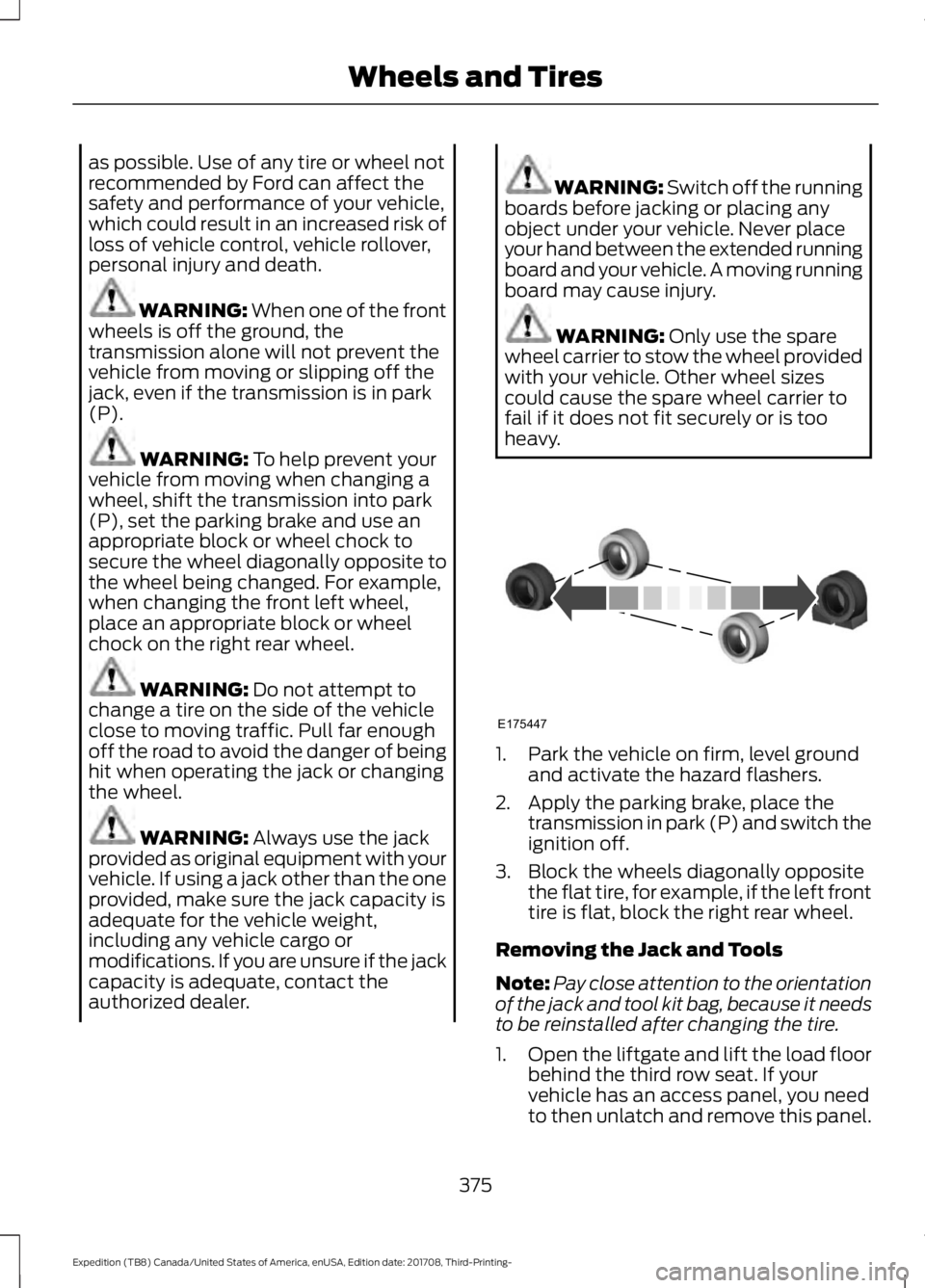
heavy. 1. Park the vehicle on firm, level ground
and activate the hazard flashers.
2. Apply the parking brake, place the transmission in park (P) and switch the
ignition off.
3. Block the wheels diagonally opposite the flat tire, for example, if the left front
tire is flat, block the right rear wheel.
Removing the Jack and Tools
Note: Pay close attention to the orientation
of the jack and tool kit bag, because it needs
to be reinstalled after changing the tire.
1. Open the liftgate and lift the load floor
behind the third row seat. If your
vehicle has an access panel, you need
to then unlatch and remove this panel.
375
Expedition (TB8) Canada/United States of America, enUSA, Edition date: 201708, Third-Printing- Wheels and TiresE175447
Page 379 of 571
2. Remove the wing nut by turning it
counterclockwise.
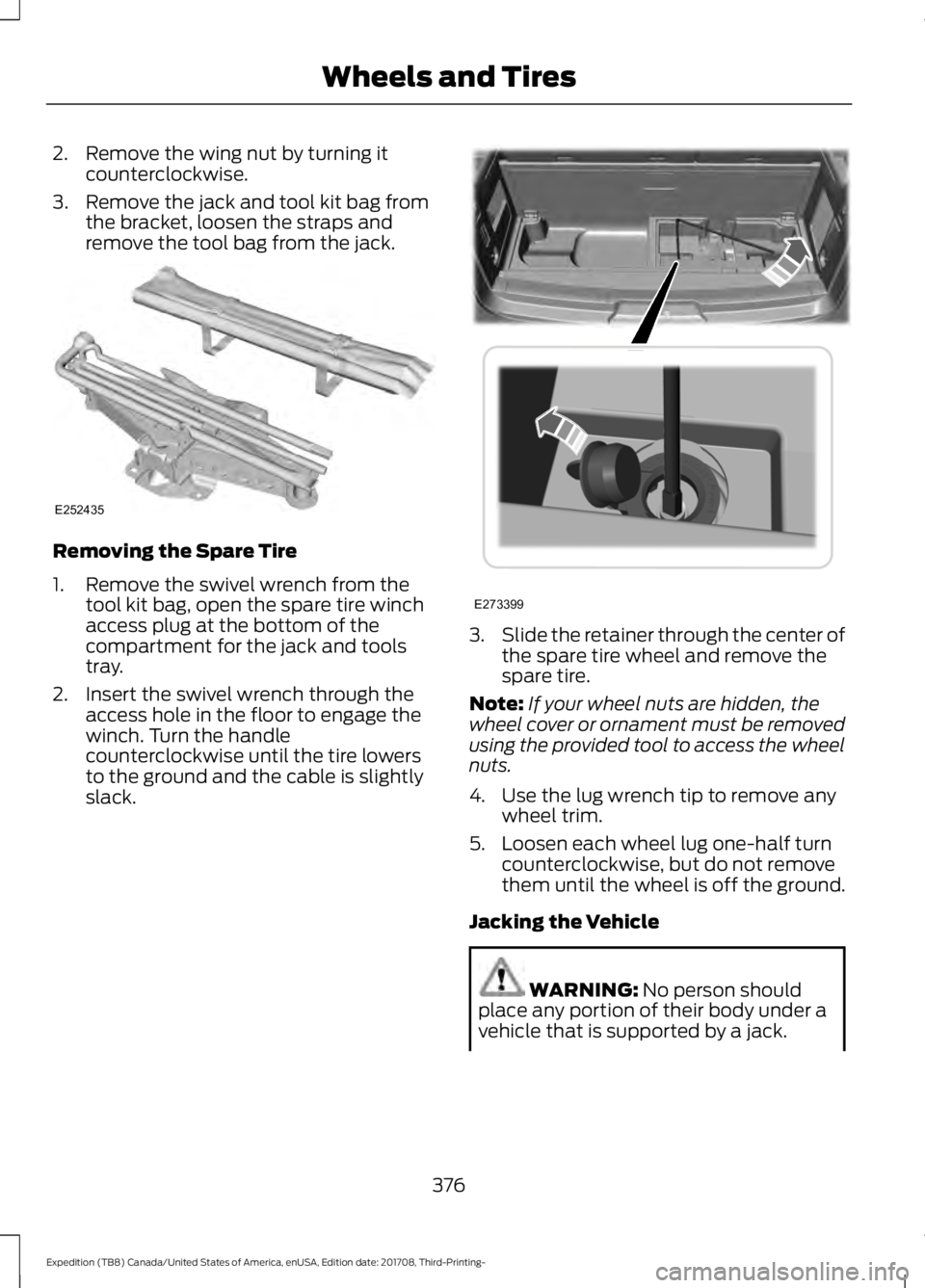
3. Remove the jack and tool kit bag from the bracket, loosen the straps and
remove the tool bag from the jack. Removing the Spare Tire
1. Remove the swivel wrench from the
tool kit bag, open the spare tire winch
access plug at the bottom of the
compartment for the jack and tools
tray.
2. Insert the swivel wrench through the access hole in the floor to engage the
winch. Turn the handle
counterclockwise until the tire lowers
to the ground and the cable is slightly
slack. 3.
Slide the retainer through the center of
the spare tire wheel and remove the
spare tire.
Note: If your wheel nuts are hidden, the
wheel cover or ornament must be removed
using the provided tool to access the wheel
nuts.
4. Use the lug wrench tip to remove any wheel trim.
5. Loosen each wheel lug one-half turn counterclockwise, but do not remove
them until the wheel is off the ground.
Jacking the Vehicle WARNING: No person should
place any portion of their body under a
vehicle that is supported by a jack.
376
Expedition (TB8) Canada/United States of America, enUSA, Edition date: 201708, Third-Printing- Wheels and TiresE252435 E273399
Page 381 of 571
Rear jacking point
1. Remove the lug nuts with the lug
wrench. Replace the flat tire with the
spare tire, making sure the valve stem
is facing outward.
2. Reinstall the lug nuts until the wheel is
snug against the hub. Do not fully
tighten the lug nuts until the wheel has
been lowered.
3. Completely lower the vehicle by turning
the jack drive counterclockwise.
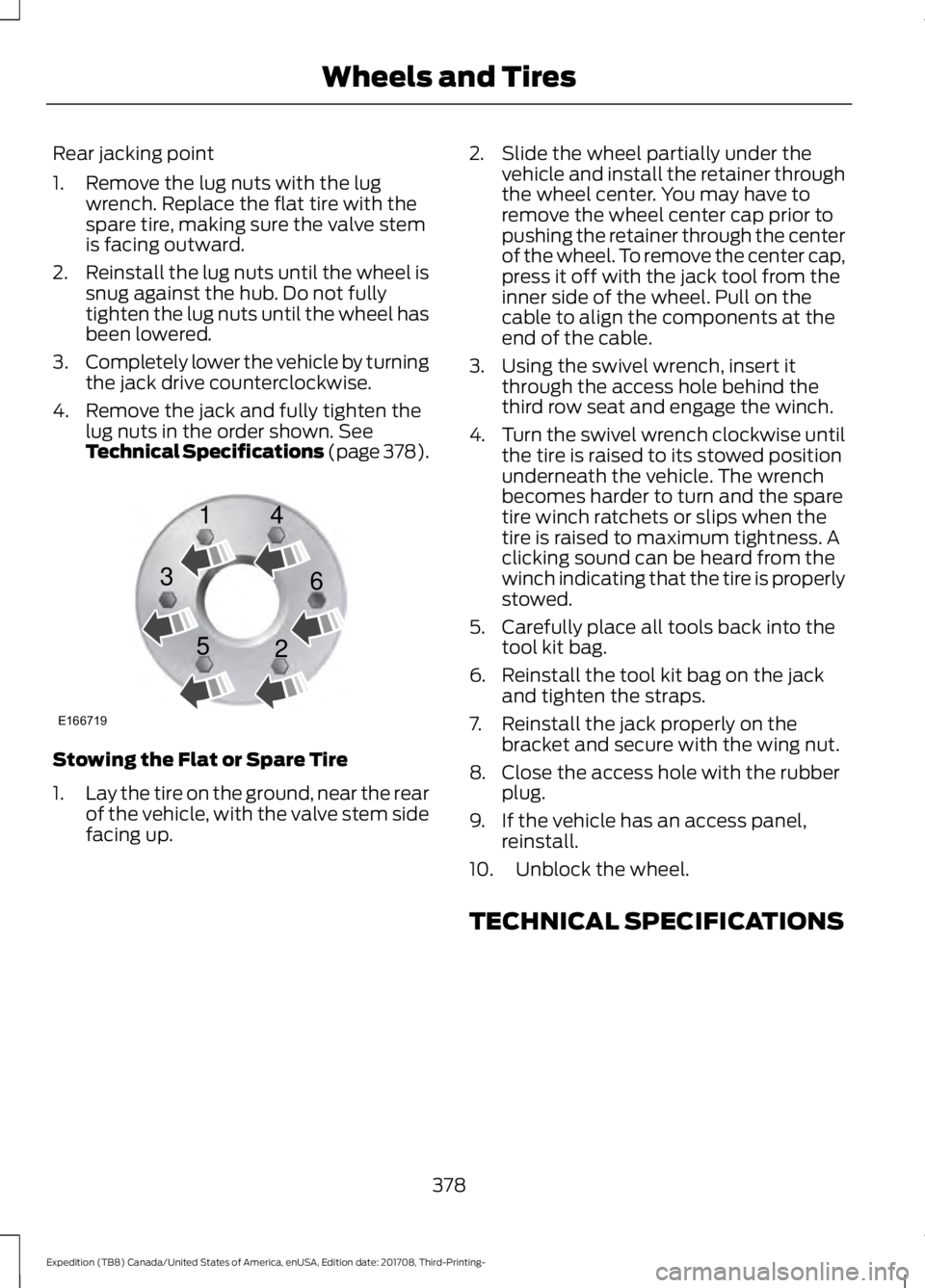
4. Remove the jack and fully tighten the lug nuts in the order shown. See
Technical Specifications (page 378). Stowing the Flat or Spare Tire
1.
Lay the tire on the ground, near the rear
of the vehicle, with the valve stem side
facing up. 2. Slide the wheel partially under the
vehicle and install the retainer through
the wheel center. You may have to
remove the wheel center cap prior to
pushing the retainer through the center
of the wheel. To remove the center cap,
press it off with the jack tool from the
inner side of the wheel. Pull on the
cable to align the components at the
end of the cable.
3. Using the swivel wrench, insert it through the access hole behind the
third row seat and engage the winch.
4. Turn the swivel wrench clockwise until
the tire is raised to its stowed position
underneath the vehicle. The wrench
becomes harder to turn and the spare
tire winch ratchets or slips when the
tire is raised to maximum tightness. A
clicking sound can be heard from the
winch indicating that the tire is properly
stowed.
5. Carefully place all tools back into the tool kit bag.
6. Reinstall the tool kit bag on the jack and tighten the straps.
7. Reinstall the jack properly on the bracket and secure with the wing nut.
8. Close the access hole with the rubber plug.
9. If the vehicle has an access panel, reinstall.
10. Unblock the wheel.
TECHNICAL SPECIFICATIONS
378
Expedition (TB8) Canada/United States of America, enUSA, Edition date: 201708, Third-Printing- Wheels and TiresE166719
1
3
5 4
6
2
Page 561 of 571

SelectShift™ Automatic
Transmission................................................... 199
Understanding the Shift Positions of your Automatic Transmission............................. 195
Automatic Transmission Fluid Check.............................................................333
Auto-Start-Stop............................................181 Disabling Auto-Start-Stop.............................. 182
Enabling Auto-Start-Stop................................ 181
Autowipers........................................................87 Autowipers Settings........................................... 88
Auxiliary Power Points................................170 110 Volt AC Power Point................................... 170
12 Volt DC Power Point..................................... 170
USB Port and Power Point Locations.........170
B
Battery See: Changing the 12V Battery..................... 335
Blind Spot Information System.............250 ........................................................................\
.......... 250
Blind Spot Information System with Trailer Tow...................................................................... 251
Switching the System On and Off...............253
System Errors...................................................... 253
Using the Blind Spot Information System.............................................................. 250
BLIS See: Blind Spot Information System.........250
Bonnet Lock See: Opening and Closing the Hood..........325
Booster Seats..................................................28 Types of Booster Seats...................................... 29
Brake Fluid Check........................................334
Brakes.................................................................211 General Information............................................ 211
Breaking-In.....................................................297
Bulb Specification Chart............................341
C
Cabin Air Filter...............................................148
Capacities and Specifications...............384 Alternative Engine Oil for Extremely Cold
Climates........................................................... 388
Specifications..................................................... 385
Cargo Nets
.....................................................266 Car Wash
See: Cleaning the Exterior.............................. 344
Catalytic Converter......................................192 On-Board Diagnostics (OBD-II)...................193
Readiness for Inspection and Maintenance
(I/M) Testing................................................... 193
Center Console
...............................................174
Changing a Bulb...........................................339 Fog Lamp Bulb................................................... 340
Front Direction Indicator Bulb......................340
Headlamp Bulb.................................................. 339
LED Bulbs.............................................................. 341
LED Direction Indicator and Side Marker Bulbs................................................................. 340
LED Headlamp Bulb......................................... 339
Rear Lamp, Brake Lamp, Rear Direction Indicator and Reverse Lamp
Bulbs................................................................. 340
Changing a Fuse
...........................................323
Fuses....................................................................... 323
Changing a Road Wheel............................373 Dissimilar Spare Wheel and Tire Assembly
Information...................................................... 373
Location of the Spare Tire and Tools.........374
Tire Change Procedure.................................... 374
Changing the 12V Battery
.........................335
Battery Management System....................... 336
Changing the Engine Air Filter................343
Changing the Wiper Blades.....................337
Checking MyKey System Status...............63 MyKey Distance.................................................... 63
Number of Admin Keys...................................... 63
Number of MyKeys.............................................. 63
Checking the Wiper Blades......................337
Childminder Mirror........................................101
Child Restraint and Seatbelt Maintenance.................................................42
Child Restraint Positioning
.........................30
Child Safety........................................................17
General Information............................................. 17
Child Safety Locks..........................................32 Left-Hand Side...................................................... 33
Right-Hand Side................................................... 33
Cleaning Leather Seats.............................348
Cleaning Products
.......................................344
Materials............................................................... 344
Cleaning the Engine
...................................346
558
Expedition (TB8) Canada/United States of America, enUSA, Edition date: 201708, Third-Printing- Index
Page 565 of 571
Doors and Locks..................................................
127
Driver Alert............................................................. 127
Drivetrain................................................................ 127
Engine..................................................................... 128
Four-Wheel Drive................................................ 128
Fuel........................................................................\
.. 129
Keys and Intelligent Access............................ 130
Lane Keeping System......................................... 131
Maintenance.......................................................... 131
MyKey...................................................................... 132
Off Road................................................................. 132
Park Aid................................................................... 133
Park Brake............................................................. 134
Power Steering.................................................... 134
Pro Trailer Backup Assist™............................. 135
Remote Start........................................................ 136
Seats....................................................................... 136
Starting System ................................................. 136
Tire Pressure Monitoring System.................. 137
Trailer....................................................................... 137
Transmission........................................................ 138
Installing Child Restraints............................18
Child Seats............................................................... 18
Combining Seatbelt and LATCH Lower Anchors for Attaching Child Safety
Seats.................................................................... 25
Using Lap and Shoulder Belts.......................... 19
Using Lower Anchors and Tethers for CHildren (LATCH)........................................... 24
Using Tether Straps............................................. 25
Instrument Cluster.......................................104
Instrument Lighting Dimmer.....................90
Instrument Panel Overview
.........................15
Interior Lamps.................................................93
Battery Saver......................................................... 94
Front Interior Lamps........................................... 93
Rear Interior Lamps............................................. 94
Interior Mirror
.................................................100
Auto-Dimming Mirror....................................... 100
Introduction.........................................................7
J
Jump Starting the Vehicle........................302 Connecting the Jumper Cables.................... 302
Jump Starting..................................................... 303
Preparing Your Vehicle.................................... 302
Removing the Jumper Cables....................... 303K
Keyless Entry
...................................................68
Displaying the Factory-Set Code................... 70
Locking and Unlocking....................................... 70
SECURICODE™ KEYLESS ENTRY KEYPAD.............................................................. 68
Keyless Starting.............................................176 Ignition Modes...................................................... 176
Keys and Remote Controls.........................53
L
Lane Keeping System
................................246
Switching the System On and Off...............247
System Display................................................... 248
System Settings.................................................. 247
Troubleshooting................................................. 249
Liftgate................................................................72
Liftgate Window...........................................102 Opening the Liftgate Window....................... 102
Lighting Control
..............................................89
Flashing the Headlamp High Beam.............90
Headlamp High Beam....................................... 89
Lighting..............................................................89 General Information........................................... 89
Limited Slip Differential
.............................210
Locking Function................................................ 210
Spare Tire.............................................................. 210
Trailer Towing....................................................... 210
Load Carriers See: Roof Racks and Load Carriers.............267
Load Carrying................................................264
Load Limit
......................................................268
Special Loading Instructions for Owners of
Pick-up Trucks and Utility-type
Vehicles............................................................. 272
Vehicle Loading - with and without a Trailer................................................................ 268
Locking and Unlocking.................................65 Activating Intelligent Access........................... 66
Autolock................................................................... 67
Battery Saver......................................................... 68
Illuminated Entry.................................................. 68
Illuminated Exit..................................................... 68
Locking and Unlocking the Doors with the Key Blade............................................................ 67
Power Door Locks................................................ 65
562
Expedition (TB8) Canada/United States of America, enUSA, Edition date: 201708, Third-Printing- Index
Page 568 of 571

Roadside Assistance.................................300
Vehicles Sold in Canada: Getting Roadside
Assistance........................................................ 301
Vehicles Sold in Canada: Roadside Assistance Program Coverage.................301
Vehicles Sold in Canada: Using Roadside Assistance........................................................ 301
Vehicles Sold in the United States: Getting Roadside Assistance.................................. 300
Vehicles Sold in the United States: Using Roadside Assistance.................................. 300
Roadside Emergencies.............................300
Roof Racks and Load Carriers.................267 Adjusting the Crossbar.................................... 268
Maximum Recommended Load Amounts........................................................... 267
Running-In See: Breaking-In................................................. 297
Running Out of Fuel
....................................185
Adding Fuel From a Portable Fuel
Container.......................................................... 186
Filling a Portable Fuel Container.................. 185
S
Safety Canopy ™
............................................49
Safety Precautions......................................184
Satellite Radio..............................................395 Satellite Radio Electronic Serial Number
(ESN)................................................................ 396
Satellite Radio Reception Factors..............396
SiriusXM Satellite Radio Service.................396
Troubleshooting................................................. 397
Scheduled Maintenance Record...........506
Scheduled Maintenance
..........................498
Seatbelt Extension........................................42
Seatbelt Height Adjustment......................39
Seatbelt Reminder
........................................40
Belt-Minder™....................................................... 40
Seatbelts...........................................................34 Principle of Operation........................................ 34
Seatbelt Warning Lamp and Indicator Chime..............................................................40
Conditions of operation.................................... 40
Seats.................................................................149
Security...............................................................77
Settings...........................................................466 911 Assist................................................................ 471Ambient Lighting...............................................
478
Bluetooth............................................................. 468
Clock...................................................................... 468
Display................................................................... 479
General.................................................................. 476
Media Player........................................................ 467
Mobile Apps......................................................... 475
Navigation............................................................. 473
Phone.................................................................... 468
Radio....................................................................... 472
SiriusXM................................................................. 473
Sound.................................................................... 466
Valet Mode.......................................................... 480
Vehicle.................................................................... 478
Voice Control...................................................... 480
Wi-Fi & Hotspot.................................................. 477
Side Airbags
.....................................................48
Side Sensing System..................................223
Obstacle Distance Indicator.......................... 224
Sitting in the Correct Position..................149
Snow Chains See: Using Snow Chains................................. 368
Spare Wheel See: Changing a Road Wheel........................ 373
Special Notices................................................12 New Vehicle Limited Warranty......................... 12
On Board Diagnostics Data Link Connector............................................................ 13
Special Instructions.............................................. 12
Special Operating Conditions Scheduled Maintenance..............................................504
Exceptions........................................................... 505
Speed Control See: Cruise Control............................................ 237
Stability Control
............................................216
Principle of Operation....................................... 216
Starter Switch See: Ignition Switch............................................ 175
Starting a Gasoline Engine........................176 Automatic Engine Shutdown.......................... 177
Failure to Start...................................................... 177
Guarding Against Exhaust Fumes................179
Important Ventilating Information...............179
Stopping the Engine When Your Vehicle is Moving................................................................ 178
Stopping the Engine When Your Vehicle is Stationary......................................................... 178
Vehicles with an Ignition Key..........................176
565
Expedition (TB8) Canada/United States of America, enUSA, Edition date: 201708, Third-Printing- Index
Page 570 of 571

Unique Driving Characteristics.................181
Universal Garage Door Opener...............166 HomeLink Wireless Control System...........166
USB Port
.........................................................398
Using Adaptive Cruise Control...............238
Automatic Cancellation................................... 241
Blocked Sensor................................................... 243
Canceling the Set Speed................................. 241
Changing the Set Speed.................................. 241
Detection Issues................................................. 242
Following a Vehicle........................................... 239
Following a Vehicle to a Complete Stop................................................................... 240
Hilly Condition and Trailer Tow Usage................................................................. 242
Overriding the Set Speed................................ 241
Park Brake Application..................................... 241
Resuming the Set Speed................................. 241
Setting the Adaptive Cruise Speed.............239
Setting the Adaptive Cruise Speed When Your Vehicle is Stationary.......................... 239
Setting the Gap Distance............................... 240
Switching Adaptive Cruise Control Off....................................................................... 242
Switching Adaptive Cruise Control On....................................................................... 239
Switching to Normal Cruise Control...........244
System Not Available....................................... 243
Using Cruise Control...................................237 Switching Cruise Control Off.........................237
Switching Cruise Control On.......................... 237
Using Four-Wheel Drive
............................202
4WD Switch Selections.................................. 202
4X4 Indicator Lights......................................... 202
Driving Off-Road With Truck and Utility Vehicles............................................................ 205
How Your Vehicle Differs From Other Vehicles............................................................ 204
Operating 4WD Vehicles With Spare or Mismatched Tires......................................... 204
Using Hill Descent Control........................219 Hill Descent Modes............................................ 219
Using MyKey With Remote Start Systems..........................................................63
Using Power Running Boards
...................80
Automatic Power Deploy.................................. 80
Automatic Power Stow..................................... 80
Bounce-back.......................................................... 81Enabling and Disabling.....................................
80
Manual Power Deploy........................................ 80
Using Snow Chains
....................................368
Using Stability Control................................217 Stability Control and Traction Control with
Roll Stability Control ™ (RSC™)..............217
Using SYNC™ With Your Media Player............................................................407
Audio Voice Commands................................. 407
Media Sources.................................................... 407
Using SYNC™ With Your Phone............402 Accessing Features through the Phone
Menu................................................................. 403
Pairing a Phone.................................................. 402
Phone Controls.................................................. 403
Phone Voice Commands............................... 403
Using Traction Control
................................215
Switching the System Off ............................... 215
System Indicator Lights and Messages.......................................................... 215
Using Voice Recognition
..........................400
Audio Voice Commands.................................. 431
Climate Voice Commands............................. 432
Initiating a Voice Session............................... 400
Mobile App Voice Commands...................... 435
Navigation Voice Commands.......................433
Phone Voice Commands................................ 432
SiriusXM Traffic and Travel Link Voice Commands..................................................... 435
System Interaction and Feedback..............401
Voice Settings Commands............................ 436
Utilizing the Mediation/Arbitration Program (Canada Only).........................310
V
Vehicle Care
...................................................344
General Information......................................... 344
Vehicle Certification Label.......................383
Vehicle Identification Number................382
Vehicle Storage
............................................349
Battery................................................................... 350
Body....................................................................... 349
Brakes.................................................................... 350
Cooling system................................................... 350
Engine.................................................................... 350
Fuel system......................................................... 350
General.................................................................. 349
567
Expedition (TB8) Canada/United States of America, enUSA, Edition date: 201708, Third-Printing- Index