2018 FORD EXPEDITION pairing phone
[x] Cancel search: pairing phonePage 472 of 571
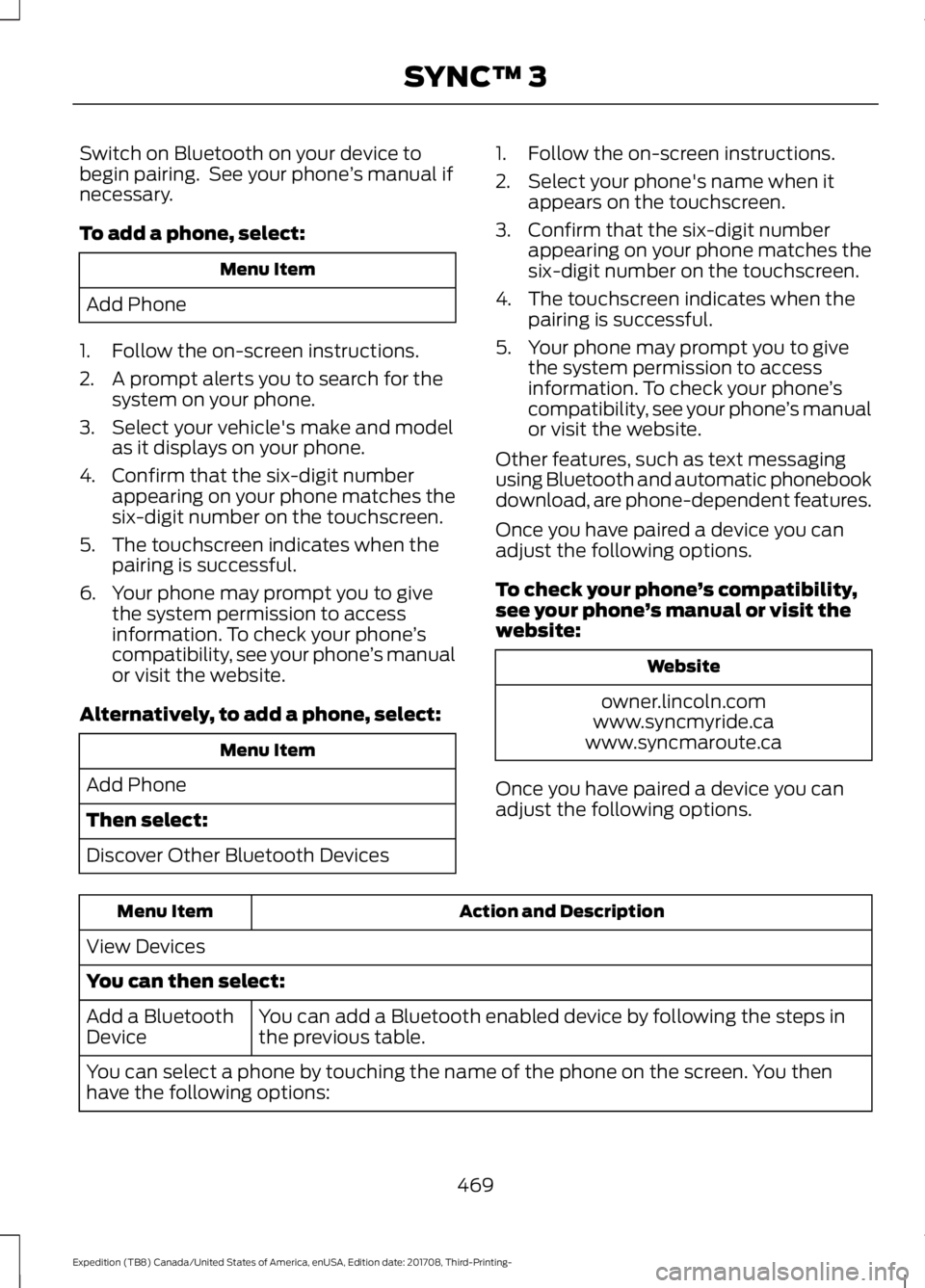
Switch on Bluetooth on your device to
begin pairing. See your phone
’s manual if
necessary.
To add a phone, select: Menu Item
Add Phone
1. Follow the on-screen instructions.
2. A prompt alerts you to search for the system on your phone.
3. Select your vehicle's make and model as it displays on your phone.
4. Confirm that the six-digit number appearing on your phone matches the
six-digit number on the touchscreen.
5. The touchscreen indicates when the pairing is successful.
6. Your phone may prompt you to give the system permission to access
information. To check your phone ’s
compatibility, see your phone ’s manual
or visit the website.
Alternatively, to add a phone, select: Menu Item
Add Phone
Then select:
Discover Other Bluetooth Devices 1. Follow the on-screen instructions.
2. Select your phone's name when it
appears on the touchscreen.
3. Confirm that the six-digit number appearing on your phone matches the
six-digit number on the touchscreen.
4. The touchscreen indicates when the pairing is successful.
5. Your phone may prompt you to give the system permission to access
information. To check your phone ’s
compatibility, see your phone ’s manual
or visit the website.
Other features, such as text messaging
using Bluetooth and automatic phonebook
download, are phone-dependent features.
Once you have paired a device you can
adjust the following options.
To check your phone ’s compatibility,
see your phone ’s manual or visit the
website: Website
owner.lincoln.com
www.syncmyride.ca
www.syncmaroute.ca
Once you have paired a device you can
adjust the following options. Action and Description
Menu Item
View Devices
You can then select: You can add a Bluetooth enabled device by following the steps in
the previous table.
Add a Bluetooth
Device
You can select a phone by touching the name of the phone on the screen. You then
have the following options:
469
Expedition (TB8) Canada/United States of America, enUSA, Edition date: 201708, Third-Printing- SYNC™ 3
Page 486 of 571
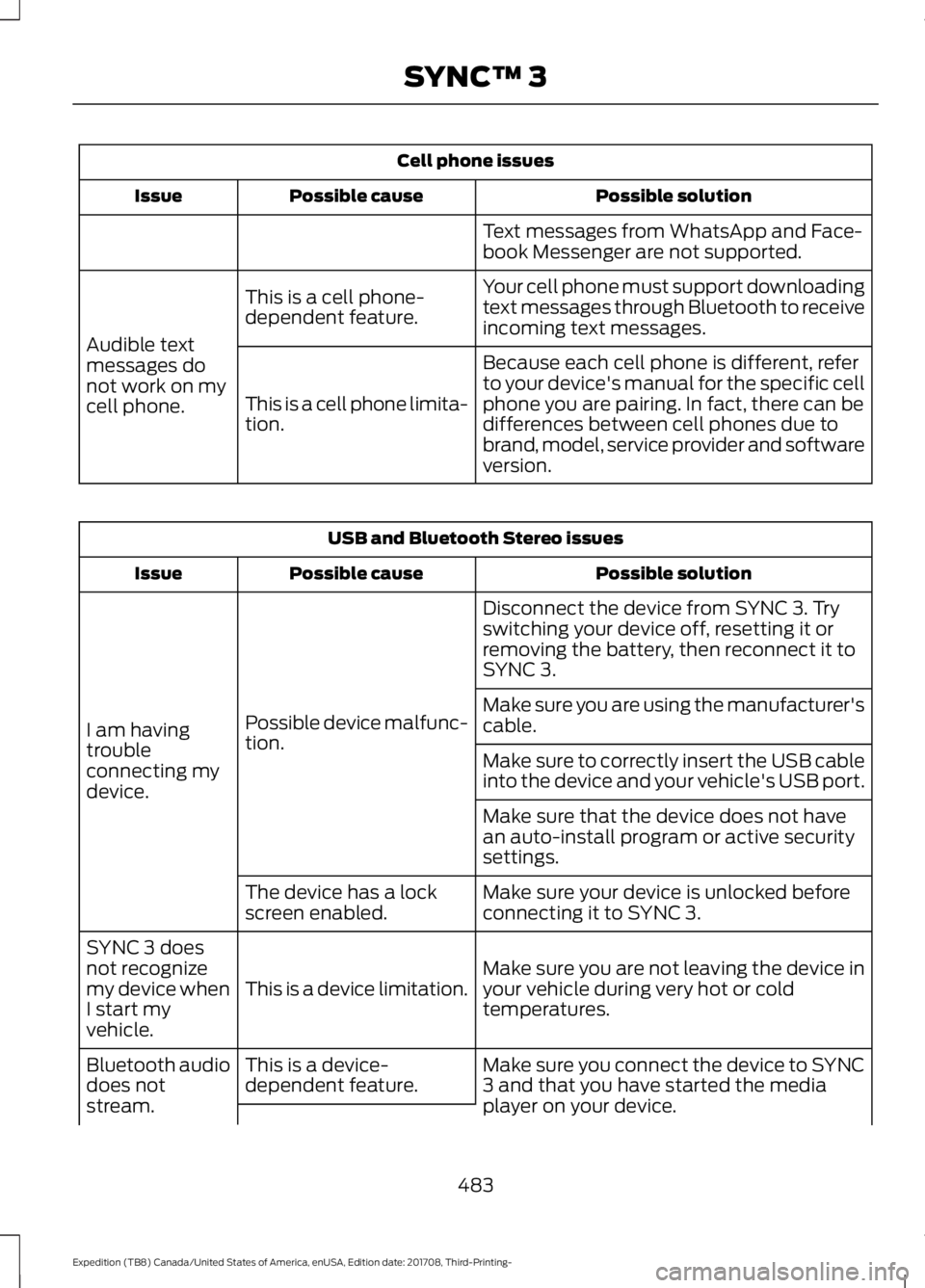
Cell phone issues
Possible solution
Possible cause
Issue
Text messages from WhatsApp and Face-
book Messenger are not supported.
Your cell phone must support downloading
text messages through Bluetooth to receive
incoming text messages.
This is a cell phone-
dependent feature.
Audible text
messages do
not work on my
cell phone. Because each cell phone is different, refer
to your device's manual for the specific cell
phone you are pairing. In fact, there can be
differences between cell phones due to
brand, model, service provider and software
version.
This is a cell phone limita-
tion. USB and Bluetooth Stereo issues
Possible solution
Possible cause
Issue
Disconnect the device from SYNC 3. Try
switching your device off, resetting it or
removing the battery, then reconnect it to
SYNC 3.
Possible device malfunc-
tion.
I am having
trouble
connecting my
device. Make sure you are using the manufacturer's
cable.
Make sure to correctly insert the USB cable
into the device and your vehicle's USB port.
Make sure that the device does not have
an auto-install program or active security
settings.
Make sure your device is unlocked before
connecting it to SYNC 3.
The device has a lock
screen enabled.
Make sure you are not leaving the device in
your vehicle during very hot or cold
temperatures.
This is a device limitation.
SYNC 3 does
not recognize
my device when
I start my
vehicle.
Make sure you connect the device to SYNC
3 and that you have started the media
player on your device.
This is a device-
dependent feature.
Bluetooth audio
does not
stream.
483
Expedition (TB8) Canada/United States of America, enUSA, Edition date: 201708, Third-Printing- SYNC™ 3
Page 566 of 571
Remote Control....................................................
65
Smart Unlocks for Integrated Keyhead Transmitter......................................................... 67
Smart Unlocks for Intelligent Access Keys....................................................................... 67
Lug Nuts See: Changing a Road Wheel........................ 373
M
Maintenance..................................................325 General Information......................................... 325
Manual Climate Control.............................139
Manual Liftgate...............................................72 Closing the Liftgate.............................................. 73
Opening the Liftgate............................................ 72
Manual Seats
.................................................153
Manual Lumbar .................................................. 153
Moving the Seat Backward and Forward............................................................. 153
Recline Adjustment........................................... 153
Memory Function
.........................................156
Easy Entry and Exit Feature............................. 157
Linking a PreSet Position to your Remote Control or Intelligent Access Key
Fob...................................................................... 156
Saving a PreSet Position................................. 156
Message Center See: Information Displays.................................. 111
Mirrors See: Heated Windows and Mirrors...............147
See: Windows and Mirrors............................... 96
Mobile Communications Equipment.......13
Moonroof - Vehicles With: Vista Roof Opening Panel
.............................................101
Bounce-Back........................................................102
Opening and Closing the Moonroof............102
Motorcraft Parts
..........................................380
MyKey — Troubleshooting..........................63
MyKey ™..............................................................61
Principle of Operation......................................... 61
N
Navigation......................................................455 cityseeker.............................................................. 462
Destination Mode.............................................. 457
Map Mode............................................................ 455Navigation Map Updates................................
463
Navigation Menu............................................... 460
SiriusXM Traffic and Travel Link...................463
SYNC AppLink.................................................... 462
Waypoints............................................................. 461
Normal Scheduled Maintenance
...........501
Intelligent Oil-Life Monitor.............................. 501
Normal Maintenance Intervals.................... 502
O
Oil Change Indicator Reset......................328
Oil Check See: Engine Oil Check....................................... 327
Opening and Closing the Hood..............325
Ordering Additional Owner's Literature.......................................................312
Obtaining a French Owner ’s Manual...........312
Overhead Console
........................................174
P
Parking Aids
....................................................221
Principle of Operation....................................... 221
Passive Anti-Theft System
..........................77
SecuriLock ™........................................................... 77
PATS See: Passive Anti-Theft System......................77
Pedals................................................................86
Perchlorate.........................................................11
Personal Safety System ™
..........................43
How Does the Personal Safety System
Work?.................................................................. 43
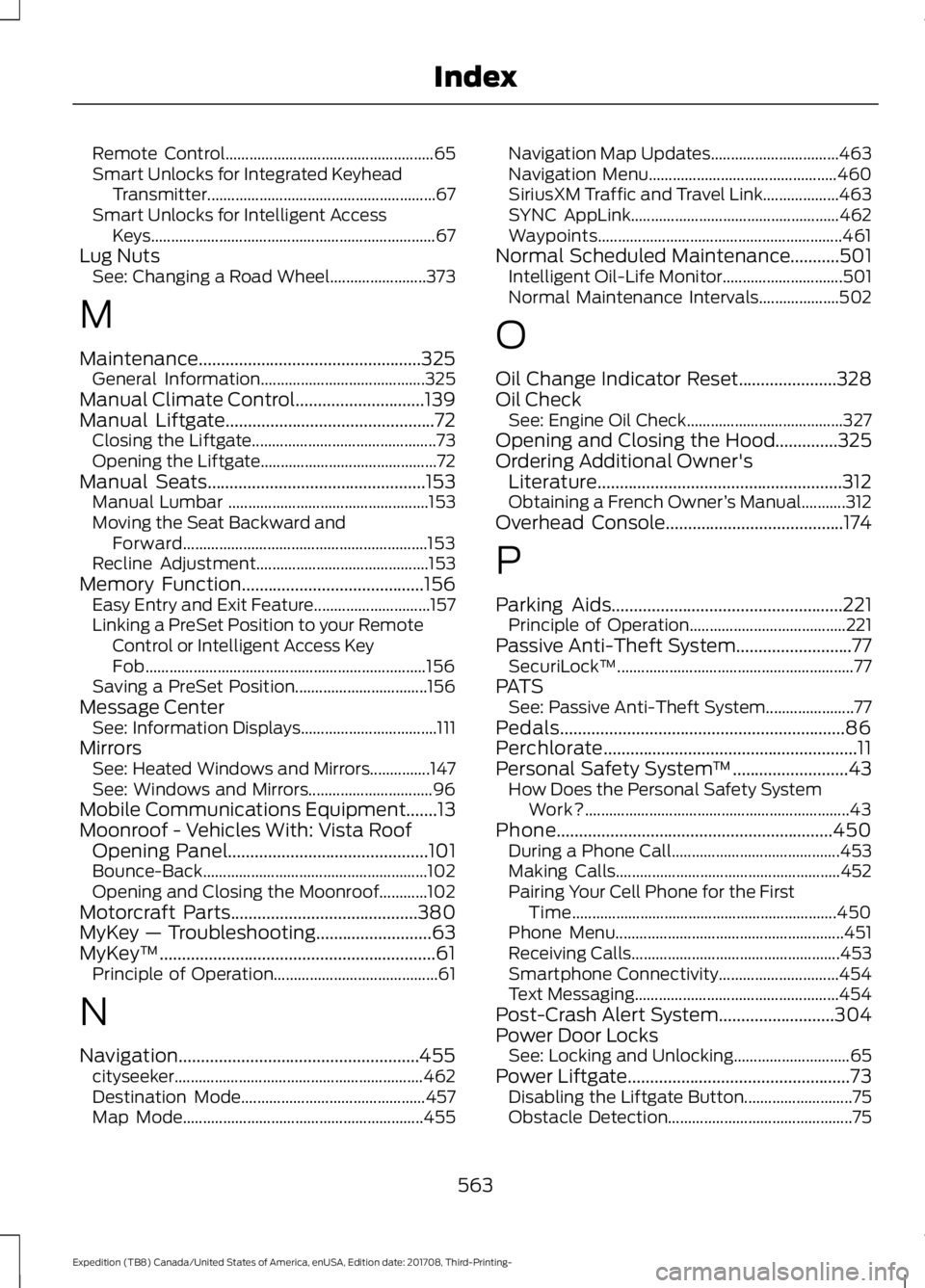
Phone..............................................................450 During a Phone Call.......................................... 453
Making Calls........................................................ 452
Pairing Your Cell Phone for the First Time.................................................................. 450
Phone Menu......................................................... 451
Receiving Calls.................................................... 453
Smartphone Connectivity.............................. 454
Text Messaging................................................... 454
Post-Crash Alert System
..........................304
Power Door Locks See: Locking and Unlocking............................. 65
Power Liftgate..................................................73 Disabling the Liftgate Button........................... 75
Obstacle Detection.............................................. 75
563
Expedition (TB8) Canada/United States of America, enUSA, Edition date: 201708, Third-Printing- Index
Page 570 of 571

Unique Driving Characteristics.................181
Universal Garage Door Opener...............166 HomeLink Wireless Control System...........166
USB Port
.........................................................398
Using Adaptive Cruise Control...............238
Automatic Cancellation................................... 241
Blocked Sensor................................................... 243
Canceling the Set Speed................................. 241
Changing the Set Speed.................................. 241
Detection Issues................................................. 242
Following a Vehicle........................................... 239
Following a Vehicle to a Complete Stop................................................................... 240
Hilly Condition and Trailer Tow Usage................................................................. 242
Overriding the Set Speed................................ 241
Park Brake Application..................................... 241
Resuming the Set Speed................................. 241
Setting the Adaptive Cruise Speed.............239
Setting the Adaptive Cruise Speed When Your Vehicle is Stationary.......................... 239
Setting the Gap Distance............................... 240
Switching Adaptive Cruise Control Off....................................................................... 242
Switching Adaptive Cruise Control On....................................................................... 239
Switching to Normal Cruise Control...........244
System Not Available....................................... 243
Using Cruise Control...................................237 Switching Cruise Control Off.........................237
Switching Cruise Control On.......................... 237
Using Four-Wheel Drive
............................202
4WD Switch Selections.................................. 202
4X4 Indicator Lights......................................... 202
Driving Off-Road With Truck and Utility Vehicles............................................................ 205
How Your Vehicle Differs From Other Vehicles............................................................ 204
Operating 4WD Vehicles With Spare or Mismatched Tires......................................... 204
Using Hill Descent Control........................219 Hill Descent Modes............................................ 219
Using MyKey With Remote Start Systems..........................................................63
Using Power Running Boards
...................80
Automatic Power Deploy.................................. 80
Automatic Power Stow..................................... 80
Bounce-back.......................................................... 81Enabling and Disabling.....................................
80
Manual Power Deploy........................................ 80
Using Snow Chains
....................................368
Using Stability Control................................217 Stability Control and Traction Control with
Roll Stability Control ™ (RSC™)..............217
Using SYNC™ With Your Media Player............................................................407
Audio Voice Commands................................. 407
Media Sources.................................................... 407
Using SYNC™ With Your Phone............402 Accessing Features through the Phone
Menu................................................................. 403
Pairing a Phone.................................................. 402
Phone Controls.................................................. 403
Phone Voice Commands............................... 403
Using Traction Control
................................215
Switching the System Off ............................... 215
System Indicator Lights and Messages.......................................................... 215
Using Voice Recognition
..........................400
Audio Voice Commands.................................. 431
Climate Voice Commands............................. 432
Initiating a Voice Session............................... 400
Mobile App Voice Commands...................... 435
Navigation Voice Commands.......................433
Phone Voice Commands................................ 432
SiriusXM Traffic and Travel Link Voice Commands..................................................... 435
System Interaction and Feedback..............401
Voice Settings Commands............................ 436
Utilizing the Mediation/Arbitration Program (Canada Only).........................310
V
Vehicle Care
...................................................344
General Information......................................... 344
Vehicle Certification Label.......................383
Vehicle Identification Number................382
Vehicle Storage
............................................349
Battery................................................................... 350
Body....................................................................... 349
Brakes.................................................................... 350
Cooling system................................................... 350
Engine.................................................................... 350
Fuel system......................................................... 350
General.................................................................. 349
567
Expedition (TB8) Canada/United States of America, enUSA, Edition date: 201708, Third-Printing- Index