2018 FORD EXPEDITION Blind
[x] Cancel search: BlindPage 237 of 571

The system will provide an image of your
vehicle and the sensor zones. The zones
will highlight green, yellow and red when
the parking aid sensors detect an object in
the coverage area.
Manual Zoom
WARNING: When manual zoom
is on, the full area behind your vehicle
may not show. Be aware of your
surroundings when using the manual
zoom feature.
Note: Manual zoom is only available when
the transmission is in reverse (R).
Note: When you enable manual zoom, only
the centerline is shown.
Selectable settings for this feature are
Zoom in (+) and Zoom out (-). Press the
symbol in the camera screen to change the
view. The default setting is Zoom OFF.
This allows you to get a closer view of an
object behind your vehicle. The zoomed
image keeps the bumper in the image to
provide a reference. The zoom is only
active while the transmission is in reverse
(R).
Rear Camera Delay
Selectable settings for this feature are ON
and OFF.
The default setting for the rear camera
delay is OFF.
When shifting the transmission out of
reverse (R) and into any gear other than
park (P), the camera image remains in the
display until:
• Your vehicle speed reaches
approximately
6 mph (10 km/h).
• You shift your vehicle into park (P). 360 DEGREE CAMERA
(IF
EQUIPPED) WARNING:
The 360 degree
camera system still requires the driver
to use it in conjunction with looking out
of the windows, and checking the interior
and exterior mirrors for maximum
coverage. WARNING: Objects that are close
to either corner of the bumper or under
the bumper, might not be seen on the
screen due to the limited coverage of the
camera system. WARNING:
Use caution when
turning camera features on or off when
the transmission is not in park (P). Make
sure your vehicle is not moving.
Note: The 360 degree camera system turns
off when your vehicle is in motion at low
speed, except when in reverse (R).
The 360 degree camera system consists
of front, side and rear cameras. The
system:
• Allows you to see what is directly in
front or behind your vehicle.
• Provides cross traffic view in front and
behind your vehicle.
• Allows you to see a top-down view of
the area outside your vehicle, including
the blind spots.
• Provides visibility around your vehicle
to you in parking maneuvers such as:
•Centering in a parking space.
• Obstacles near vehicle.
• Parallel parking.
234
Expedition (TB8) Canada/United States of America, enUSA, Edition date: 201708, Third-Printing- Parking Aids
Page 253 of 571
Why does the vehicle not come back toward the middle of the lane, as expected, in the
Aid or Aid + Alert mode?
High cross winds are present.
There is a large road crown.
Rough roads, grooves or shoulder drop-offs.
Heavy uneven loading of the vehicle or improper tire inflation pressure.
The tires have been changed, or the suspension has been modified.
BLIND SPOT INFORMATION
SYSTEM (IF EQUIPPED) WARNING:
Do not use the blind
spot information system as a
replacement for using the interior and
exterior mirrors or looking over your
shoulder before changing lanes. The
blind spot information system is not a
replacement for careful driving. WARNING:
The system may not
operate properly during severe weather
conditions, for example snow, ice, heavy
rain and spray. Always drive with due
care and attention. Failure to take care
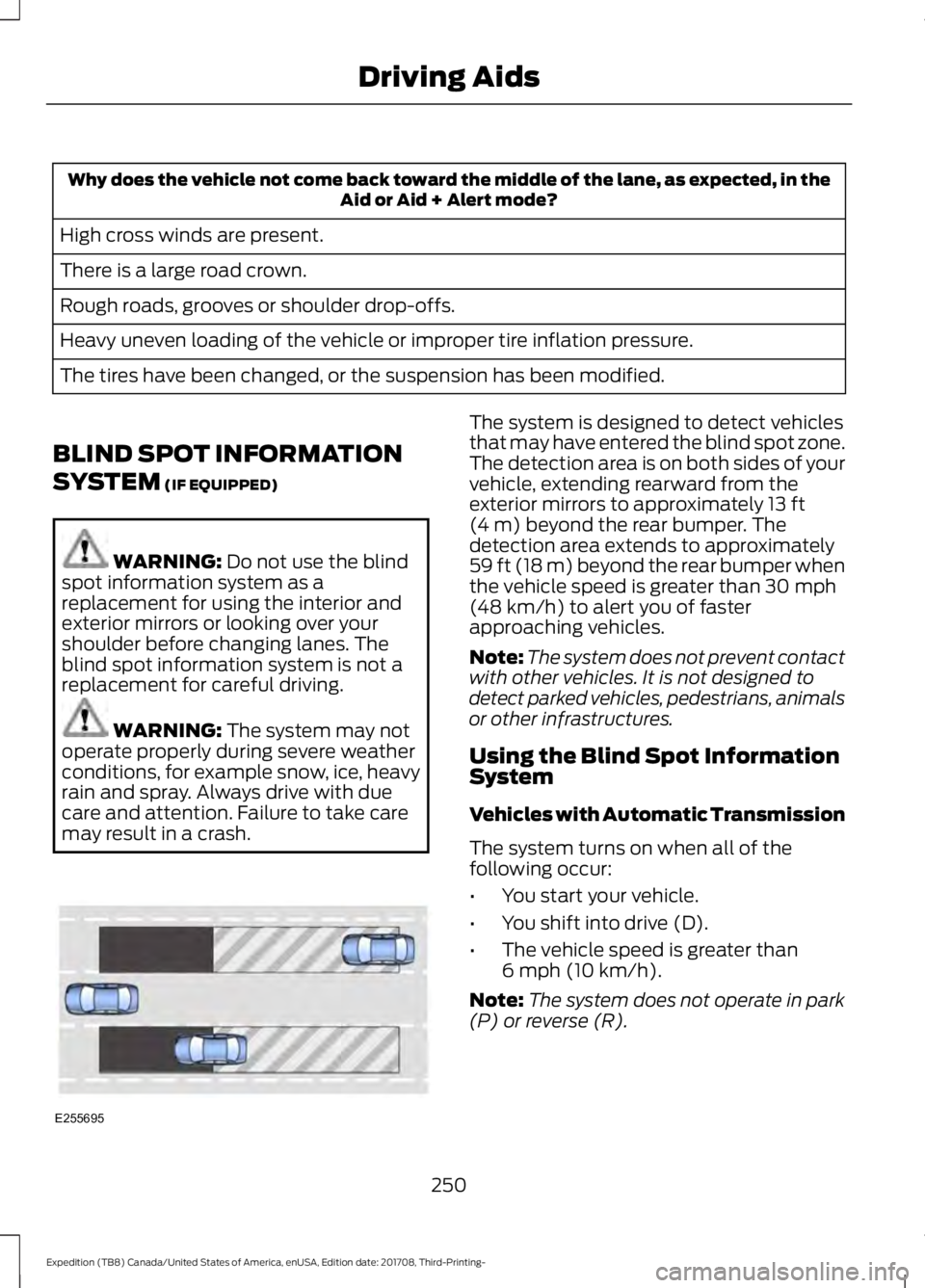
may result in a crash. The system is designed to detect vehicles
that may have entered the blind spot zone.
The detection area is on both sides of your
vehicle, extending rearward from the
exterior mirrors to approximately
13 ft
(4 m) beyond the rear bumper. The
detection area extends to approximately
59 ft (18 m)
beyond the rear bumper when
the vehicle speed is greater than 30 mph
(48 km/h) to alert you of faster
approaching vehicles.
Note: The system does not prevent contact
with other vehicles. It is not designed to
detect parked vehicles, pedestrians, animals
or other infrastructures.
Using the Blind Spot Information
System
Vehicles with Automatic Transmission
The system turns on when all of the
following occur:
• You start your vehicle.
• You shift into drive (D).
• The vehicle speed is greater than
6 mph (10 km/h)
.
Note: The system does not operate in park
(P) or reverse (R).
250
Expedition (TB8) Canada/United States of America, enUSA, Edition date: 201708, Third-Printing- Driving AidsE255695
Page 254 of 571

Vehicles with Manual Transmission
The system turns on when all of the
following occur:
•
You start your vehicle.
• The vehicle speed is greater than
6 mph (10 km/h).
Note: The system does not operate in
reverse (R).
System Lights and Messages When the system detects a vehicle, an
alert indicator illuminates in the exterior
mirror on the side the approaching vehicle
is coming from. If you turn the direction
indicator on for that side of your vehicle,
the alert indicator flashes.
Note:
The system may not alert you if a
vehicle quickly passes through the detection
zone.
Blocked Sensors The sensors are behind the rear bumper
on both sides of your vehicle.
Note:
Keep the sensors free from snow, ice
and large accumulations of dirt.
Note: Do not cover the sensors with bumper
stickers, repair compound or other objects.
Note: Blocked sensors could affect system
performance.
If the sensors become blocked, a message
may appear in the information display. See
Information Messages
(page 123). The
alert indicators remain illuminated but the
system does not alert you.
Blind Spot Information System
with Trailer Tow
(If Equipped) The system is designed to detect vehicles
that may have entered the blind spot zone
(A). The detection area is on both sides of
your vehicle and trailer, extending rearward
from the exterior mirrors to the end of your
trailer.
The system turns on when all of the
following occur:
•
You attach a trailer to your vehicle.
• You have set up the trailer to work with
the system through the information
display.
• You start your vehicle.
251
Expedition (TB8) Canada/United States of America, enUSA, Edition date: 201708, Third-Printing- Driving AidsE142442 E205199 E225007
Page 255 of 571
•
You shift into drive (D).
• The vehicle speed is greater than
6 mph (10 km/h).
Note: If you switch the Blind Spot
Information System off, the Blind Spot
Information System with Trailer Tow
automatically turns off.
Note: If you connect a trailer to your vehicle
and do not set up the trailer through the
information display, the system turns off
and a warning message appears.
See
Information Messages (page 123).
Note: When towing a trailer, the extended
blind spot zone range decreases to a short
fixed or non-variable distance behind the
trailer. The extended blind spot zone range
returns to
59 ft (18 m) when the trailer is
disconnected.
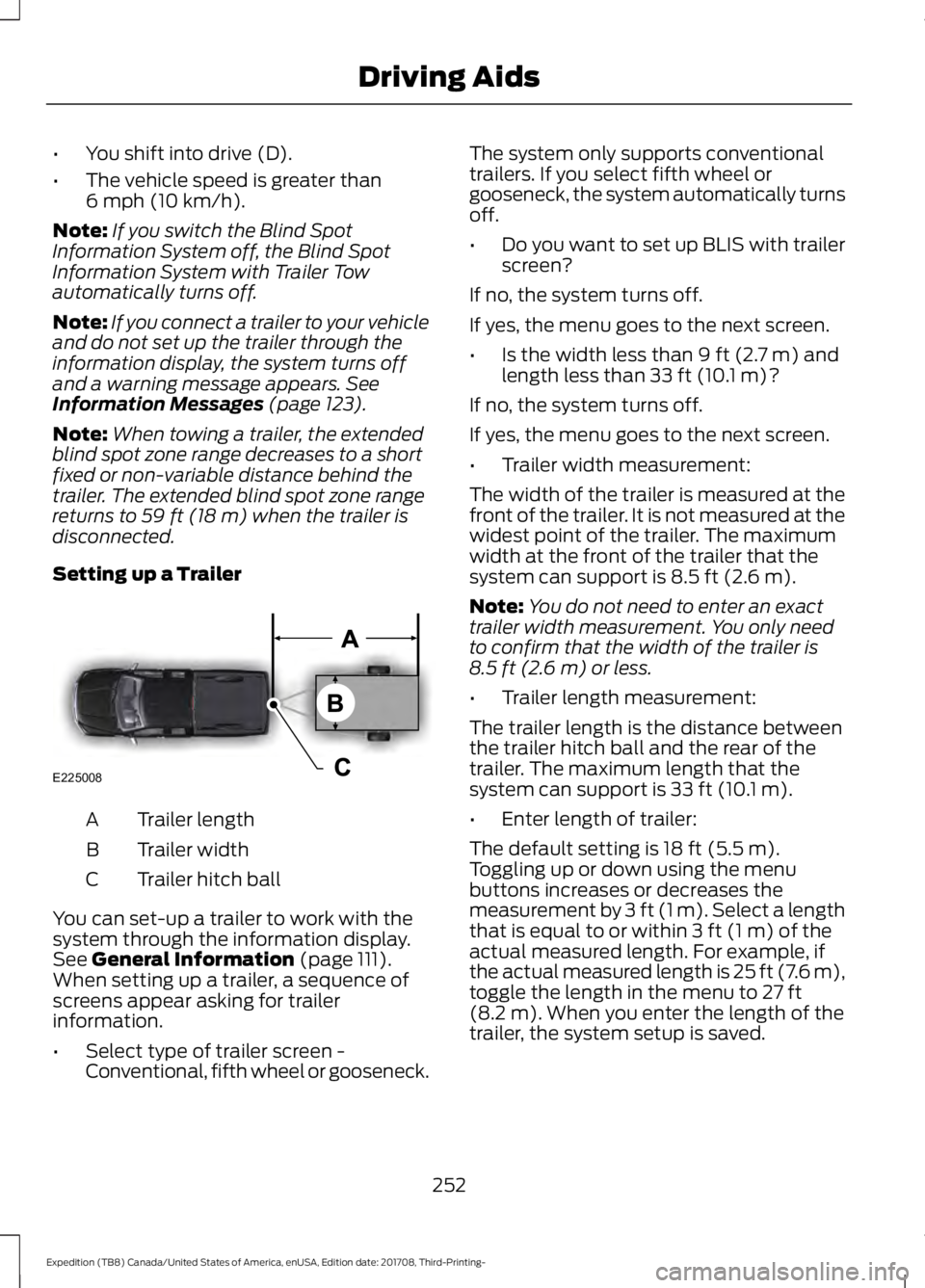
Setting up a Trailer Trailer length
A
Trailer width
B
Trailer hitch ball
C
You can set-up a trailer to work with the
system through the information display.
See
General Information (page 111).
When setting up a trailer, a sequence of
screens appear asking for trailer
information.
• Select type of trailer screen -
Conventional, fifth wheel or gooseneck. The system only supports conventional
trailers. If you select fifth wheel or
gooseneck, the system automatically turns
off.
•
Do you want to set up BLIS with trailer
screen?
If no, the system turns off.
If yes, the menu goes to the next screen.
• Is the width less than
9 ft (2.7 m) and
length less than 33 ft (10.1 m)?
If no, the system turns off.
If yes, the menu goes to the next screen.
• Trailer width measurement:
The width of the trailer is measured at the
front of the trailer. It is not measured at the
widest point of the trailer. The maximum
width at the front of the trailer that the
system can support is
8.5 ft (2.6 m).
Note: You do not need to enter an exact
trailer width measurement. You only need
to confirm that the width of the trailer is
8.5 ft (2.6 m)
or less.
• Trailer length measurement:
The trailer length is the distance between
the trailer hitch ball and the rear of the
trailer. The maximum length that the
system can support is
33 ft (10.1 m).
• Enter length of trailer:
The default setting is
18 ft (5.5 m).
Toggling up or down using the menu
buttons increases or decreases the
measurement by
3 ft (1 m). Select a length
that is equal to or within 3 ft (1 m) of the
actual measured length. For example, if
the actual measured length is 25 ft (7.6 m),
toggle the length in the menu to
27 ft
(8.2 m). When you enter the length of the
trailer, the system setup is saved.
252
Expedition (TB8) Canada/United States of America, enUSA, Edition date: 201708, Third-Printing- Driving AidsE225008
Page 256 of 571
Note:
If the trailer is actually a bike rack or
cargo rack with electrical lighting, enter a
length of 3 ft (1 m). Cross Traffic Alert
remains on for trailers with a length of 3 ft
(1 m) or less.
Note: Proper measurement and
measurement entry is required for the
system to function as designed.
System Operation
When you connect a trailer to your vehicle,
the trailer set up menu appears in the
information display. This menu allows you
to set up a new trailer or choose from a
previously set up trailer. A warning
message appears and the system turns off
if you do not choose or add a new trailer.
Note: The warning message may not
appear until your vehicle speed reaches
22 mph (35 km/h)
.
If you select a trailer in the information
display before connecting a trailer to your
vehicle, the system loads the configuration
for the selected trailer. When a trailer is
connected, a warning message appears.
Note: A second warning message may
appear stating that the Cross Traffic Alert
system has turned off. The Blind Spot
Information System with Trailer Tow
continues to function normally in this
situation.
Note: The system remembers the last
selected trailer set up when you start your
vehicle.
Trailer Considerations
The system is designed to work with a
trailer with a front width of
8.5 ft (2.6 m)
or less, and a total length from the trailer
hitch ball to the rear of the trailer of
33 ft
(10.1 m) or less. Some trailers may cause a slight change
in system performance:
•
Large box trailers may cause false
alerts to occur when driving next to
infrastructures or near parked cars. A
false alert may also occur while making
a 90-degree turn.
• Trailers that have a width greater than
8.5 ft (2.6 m)
at the front and have a
total length greater than 20 ft (6 m)
may cause delayed alerts when a
vehicle is passing at high speed.
• Box trailers that have a width greater
than
8.5 ft (2.6 m) at the front may
cause early alerts when you pass a
vehicle.
• Clam shell or V-Nose box trailers with
a width greater than
8.5 ft (2.6 m) at
the front may cause delayed alerts
when a vehicle traveling the same
speed as your vehicle merges lanes.
System Errors
If the system detects a fault, a warning
lamp illuminates and a message displays.
See
Information Messages (page 123).
Switching the System On and Off
You can switch the system off using the
information display.
See General
Information (page 111). When you switch
the system off, a warning lamp illuminates
and a message displays. When you switch
the system on or off, the alert indicators
flash twice.
Note: The system remembers the last
setting when you start your vehicle.
Note: The system may not correctly operate
when towing a trailer. For vehicles with a
trailer tow module and tow bar approved
by us, the system turns off when you attach
a trailer. For vehicles with an aftermarket
trailer tow module or tow bar, we
recommend that you switch the system off
when you attach a trailer.
253
Expedition (TB8) Canada/United States of America, enUSA, Edition date: 201708, Third-Printing- Driving Aids
Page 319 of 571

Protected Component
Fuse Rating
Fuse Number
4x4 module.
10A 1
13
Heated backlite.
Heated mirror relay coil.
Heated wiper park relay coil.
Transmission isolation relay coil.
Transmission control module.
15A 1
14
Voltage quality module run/start power.
15A 1
15
Blindspot information system.
Head Up Display.
Image processing module B.
Front view camera.
Rear view camera.
Cruise control module.
Powertrain control module (PCM) run/
start feed.
10A 1
16
Antilock brake system run/ start feed.
10A 1
17
Electronic power assist steering run / start
feed.
10A 1
18
Not used.
—
19
Front blower.
40A 2
20
Passenger seat motors.
40A 2
21
Not used.
20A 1
22
Alternator A-line.
10A 1
23
Trailer brake control module.
30A 2
24
Body control module power 1.
50A 2
25
Electronic fan 3.
50A 2
26
Driver seat motors.
40A 2
27
Rear heated seats.
15A 1
28
Integrated wheel end solenoid.
10A 1
29
316
Expedition (TB8) Canada/United States of America, enUSA, Edition date: 201708, Third-Printing- Fuses
Page 556 of 571
United Arab Emirates
United States of America
FCC ID: LTQF03AM315RX
FCC ID: LTQF04AM902TRX
Radio Frequency Certifications for
Blind Spot Information System
Canada
RSS-310 compliant, per FCC Test report
no.: 1-8707/14-01-03
Ghana Malaysia
South Africa
United Arab Emirates
553
Expedition (TB8) Canada/United States of America, enUSA, Edition date: 201708, Third-Printing- AppendicesE272196 E269695 E269697 E269696 E269694
Page 561 of 571

SelectShift™ Automatic
Transmission................................................... 199
Understanding the Shift Positions of your Automatic Transmission............................. 195
Automatic Transmission Fluid Check.............................................................333
Auto-Start-Stop............................................181 Disabling Auto-Start-Stop.............................. 182
Enabling Auto-Start-Stop................................ 181
Autowipers........................................................87 Autowipers Settings........................................... 88
Auxiliary Power Points................................170 110 Volt AC Power Point................................... 170
12 Volt DC Power Point..................................... 170
USB Port and Power Point Locations.........170
B
Battery See: Changing the 12V Battery..................... 335
Blind Spot Information System.............250 ........................................................................\
.......... 250
Blind Spot Information System with Trailer Tow...................................................................... 251
Switching the System On and Off...............253
System Errors...................................................... 253
Using the Blind Spot Information System.............................................................. 250
BLIS See: Blind Spot Information System.........250
Bonnet Lock See: Opening and Closing the Hood..........325
Booster Seats..................................................28 Types of Booster Seats...................................... 29
Brake Fluid Check........................................334
Brakes.................................................................211 General Information............................................ 211
Breaking-In.....................................................297
Bulb Specification Chart............................341
C
Cabin Air Filter...............................................148
Capacities and Specifications...............384 Alternative Engine Oil for Extremely Cold
Climates........................................................... 388
Specifications..................................................... 385
Cargo Nets
.....................................................266 Car Wash
See: Cleaning the Exterior.............................. 344
Catalytic Converter......................................192 On-Board Diagnostics (OBD-II)...................193
Readiness for Inspection and Maintenance
(I/M) Testing................................................... 193
Center Console
...............................................174
Changing a Bulb...........................................339 Fog Lamp Bulb................................................... 340
Front Direction Indicator Bulb......................340
Headlamp Bulb.................................................. 339
LED Bulbs.............................................................. 341
LED Direction Indicator and Side Marker Bulbs................................................................. 340
LED Headlamp Bulb......................................... 339
Rear Lamp, Brake Lamp, Rear Direction Indicator and Reverse Lamp
Bulbs................................................................. 340
Changing a Fuse
...........................................323
Fuses....................................................................... 323
Changing a Road Wheel............................373 Dissimilar Spare Wheel and Tire Assembly
Information...................................................... 373
Location of the Spare Tire and Tools.........374
Tire Change Procedure.................................... 374
Changing the 12V Battery
.........................335
Battery Management System....................... 336
Changing the Engine Air Filter................343
Changing the Wiper Blades.....................337
Checking MyKey System Status...............63 MyKey Distance.................................................... 63
Number of Admin Keys...................................... 63
Number of MyKeys.............................................. 63
Checking the Wiper Blades......................337
Childminder Mirror........................................101
Child Restraint and Seatbelt Maintenance.................................................42
Child Restraint Positioning
.........................30
Child Safety........................................................17
General Information............................................. 17
Child Safety Locks..........................................32 Left-Hand Side...................................................... 33
Right-Hand Side................................................... 33
Cleaning Leather Seats.............................348
Cleaning Products
.......................................344
Materials............................................................... 344
Cleaning the Engine
...................................346
558
Expedition (TB8) Canada/United States of America, enUSA, Edition date: 201708, Third-Printing- Index