2018 FORD ESCAPE liftgate
[x] Cancel search: liftgatePage 4 of 517

Introduction
About This Manual
..........................................7
Symbols Glossary ............................................
7
Data Recording .................................................
9
Perchlorate ........................................................
11
Ford Credit .........................................................
11
Replacement Parts Recommendation ........................................................................\
....
12
Special Notices ...............................................
12
Mobile Communications Equipment ........................................................................\
....
13
Export Unique Options ................................
14
Environment
Protecting the Environment .......................
15
At a Glance
Instrument Panel Overview .......................
16
Child Safety
General Information ......................................
18
Installing Child Restraints ...........................
19
Booster Seats .................................................
25
Child Restraint Positioning .........................
27
Child Safety Locks ........................................
29
Seatbelts
Principle of Operation ...................................
31
Fastening the Seatbelts ..............................
32
Seatbelt Height Adjustment .....................
34
Seatbelt Warning Lamp and Indicator Chime ............................................................
35
Seatbelt Reminder ........................................
35
Child Restraint and Seatbelt Maintenance ...............................................
37
Seatbelt Extension ........................................
37
Personal Safety System ™
Personal Safety System ™.........................
38 Supplementary Restraints
System
Principle of Operation .................................
39
Driver and Passenger Airbags ..................
40
Front Passenger Sensing System ............
41
Side Airbags ....................................................
43
Driver Knee Airbag ........................................
45
Safety Canopy ™...........................................
45
Crash Sensors and Airbag Indicator ......
46
Airbag Disposal ..............................................
47
Keys and Remote Controls
General Information on Radio Frequencies ................................................
48
Remote Control .............................................
48
Replacing a Lost Key or Remote Control ........................................................................\
...
52
MyKey ™
Principle of Operation .................................
53
Creating a MyKey ..........................................
54
Clearing All MyKeys ......................................
54
Checking MyKey System Status ..............
56
Using MyKey With Remote Start Systems ........................................................
57
MyKey Troubleshooting ..............................
57
Doors and Locks
Locking and Unlocking ................................
59
Keyless Entry ...................................................
62
Liftgate
Manual Liftgate .............................................
65
Power Liftgate ................................................
66
Security
Passive Anti-Theft System .......................
69
Anti-Theft Alarm ...........................................
70
1
Escape (TM2) Canada/United States of America, JJ5J 19A321 AC enUSA, Edition date: 201706, Fourth-Printing Table of Contents
Page 20 of 517

Keyless start button. See
Keyless Starting (page 131).
N
Audio control. See
Audio
Control (page 71). Voice
control. See Voice Control
(page 72).
O
Steering wheel adjustment. See
Adjusting the Steering Wheel
(page
71).
P
Horn.
Q
Cruise control buttons. See
Using Cruise Control
(page
182). Adaptive cruise control
(ACC) buttons. See Using
Adaptive Cruise Control (page
183
).
R
Information display controls.
See
Information Displays
(page 93).
S
Lighting control. See
Lighting
Control (page 77). Front fog
lamps. See Front Fog Lamps
(page 80). Instrument lighting
dimmer. See Instrument
Lighting Dimmer (page 78).
Liftgate. See Power Liftgate
(page 66).
T
17
Escape (TM2) Canada/United States of America, JJ5J 19A321 AC enUSA, Edition date: 201706, Fourth-Printing At a Glance
Page 54 of 517

Car Finder
Press the button twice within
three seconds. The horn sounds
and the direction indicators
flash. We recommend you use this method
to locate your vehicle, rather than using
the panic alarm.
Note: If locking was not successful or if any
door or the liftgate is open, or if the hood is
open on vehicles with a perimeter alarm or
remote start, the horn sounds twice and the
lamps do not flash.
Sounding a Panic Alarm
Note: The panic alarm only operates when
the ignition is off. Press the button to sound the
panic alarm. Press the button
again to switch it off.
Remote Start (If Equipped) WARNING:
To avoid exhaust fumes,
do not use remote start if your vehicle is
parked indoors or in areas that are not well
ventilated.
Note: Do not use remote start if your fuel
level is low. The remote start button is on the
transmitter.
This feature allows you to start your
vehicle from outside the vehicle. The
transmitter has an extended operating
range.
Vehicles with automatic climate control
can be configured to operate when the
vehicle is remote started. See Automatic
Climate Control
(page 109). Many states and provinces have
restrictions for the use of remote start.
Check your local and state or provincial
laws for specific requirements regarding
remote start systems.
The remote start system does not work if:
•
The ignition is on.
• The alarm system is triggered.
• You disable the feature.
• The hood is open.
• The transmission is not in park (P).
• The vehicle battery voltage is too low.
• The service engine soon indicator was
on the last time your vehicle was
driven.
Remote Starting the Vehicle
Note: You must press each button within
three seconds of each other. If you do not
follow this sequence, your vehicle does not
start remotely, the direction indicators do
not flash twice and the horn does not sound. The label on your transmitter details the
starting procedure.
To remote start your vehicle:
1. Press the lock button to lock all the
doors.
2. Press the remote start button twice. The direction indicator lamps flash
twice.
51
Escape (TM2) Canada/United States of America, JJ5J 19A321 AC enUSA, Edition date: 201706, Fourth-Printing Keys and Remote ControlsE138623 E138624 E138625 E138626
Page 62 of 517

LOCKING AND UNLOCKING
You can use the power door lock control
or the remote control to lock and unlock
your vehicle.
Note:
Always take your keys and lock all
doors when leaving your vehicle.
Power Door Locks
The power door lock control is on the driver
and front passenger door panels. Unlock.
A
Lock.
B
Door Lock Indicator
An LED on the power door lock control
illuminates when you lock the door.
Remote Control
Unlocking the Doors (Two-Stage
Unlock) Press the button to unlock the
driver door.
Press the button again within
three seconds to unlock all doors. The
direction indicators will flash. With the ignition off, press and hold both
the lock and unlock buttons on the remote
control for three seconds to change
between driver door or all door unlock
mode. The direction indicators will flash
twice to indicate a change to the unlocking
mode. Driver door mode only unlocks the
driver door when you press the unlock
button once. All door mode unlocks all
doors when you press the unlock button
once. The unlocking mode applies to the
remote control, keyless entry keypad and
intelligent access.
Locking the Doors
Press the button to lock all
doors. The direction indicators
will flash.
Press the button again within three
seconds to confirm that all the doors are
closed. The doors will lock again, the horn
will sound and the direction indicators will
flash if all the doors and the luggage
compartment are closed.
Mislock
If any door or the liftgate is open, or if the
hood is open on vehicles with an anti-theft
alarm or remote start, the horn will sound
twice and the direction indicators will not
flash.
Opening the Liftgate Press the button twice within
three seconds.
Locking and Unlocking the Doors
with the Key Blade
Turn the top of the key toward the front of
your vehicle once to lock all doors. Turn
the top of the key toward the rear of your
vehicle once to unlock the driver door only.
59
Escape (TM2) Canada/United States of America, JJ5J 19A321 AC enUSA, Edition date: 201706, Fourth-Printing Doors and LocksE196954 E138629 E138623 E138630
Page 64 of 517

Locking Using Intelligent Access
With your intelligent access key within 3 ft
(1 m) of your vehicle, touch the outer door
handle lock sensor for approximately one
second to lock, being careful to not touch
the unlock sensor on the back of the door
handle at the same time. After locking, you
can immediately pull on the door handle
to confirm locking occurred without
inadvertently unlocking.
At the Liftgate
Press the button located in the top of the
liftgate pull cup handle to unlatch the
liftgate, and then pull on the outside
handle.
Smart Unlocks for Integrated
Keyhead Transmitter
(If Equipped)
This helps to prevent you from locking
yourself out of your vehicle if the key is still
in the ignition.
When you open one of the front doors and
lock your vehicle with the power door lock
control, all the doors will lock then unlock
and the horn will sound twice if the key is
still in the ignition.
You can still lock your vehicle with the key
in the ignition by either:
• Using the keyless entry keypad with the
driver door closed.
• Pressing the lock button on the
transmitter even if the doors are not
closed.
If both front doors are closed, you can lock
your vehicle by any method, regardless of
whether the key is in the ignition or not. Smart Unlocks for Intelligent
Access Keys
(If Equipped)
This feature helps to prevent you from
locking your intelligent access key inside
your vehicle ’s passenger compartment or
rear cargo area. When you electronically
lock your vehicle with any door open, the
transmission is in park (P) and the ignition
is off, the system searches for an intelligent
access key inside your vehicle after you
close the last door. If the system finds a
key, all of the doors will immediately
unlock and the horn will sound twice,
indicating that a key is inside.
When you open one of the front doors and
lock your vehicle using the power door lock
control, all doors will lock then unlock if
the ignition is on.
Autolock
(If Equipped)
Autolock locks all the doors when:
• All doors are closed.
• The ignition is on.
• You shift into any gear putting your
vehicle in motion.
• Your vehicle reaches a speed greater
than
4 mph (7 km/h).
Autolock repeats when:
• You open then close any door while the
ignition is on and your vehicle speed is
4 mph (7 km/h)
or lower.
• Your vehicle reaches a speed greater
than
4 mph (7 km/h).
61
Escape (TM2) Canada/United States of America, JJ5J 19A321 AC enUSA, Edition date: 201706, Fourth-Printing Doors and LocksE248556
Page 68 of 517
MANUAL LIFTGATE (If Equipped)
WARNING: It is extremely dangerous
to ride in a cargo area, inside or outside of
a vehicle. In a crash, people riding in these
areas are more likely to be seriously injured
or killed. Do not allow people to ride in any
area of your vehicle that is not equipped
with seats and seatbelts. Make sure
everyone in your vehicle is in a seat and
properly using a seatbelt. Failure to follow
this warning could result in serious
personal injury or death. WARNING:
Make sure to close and
latch the liftgate to prevent drawing
exhaust fumes into your vehicle. This will
also prevent passengers and cargo from
falling out. If you must drive with the
liftgate open, keep the vents or windows
open so outside air comes into your vehicle.
Failure to follow this warning could result
in serious personal injury.
Note: Be careful when opening or closing
the liftgate in a garage or other enclosed
area to avoid damaging the liftgate.
Note: Do not hang anything, for example a
bike rack, from the glass or liftgate. This
could damage the liftgate and its
components.
Note: Do not leave the liftgate open while
driving. This could damage the liftgate and
its components. Opening the Liftgate
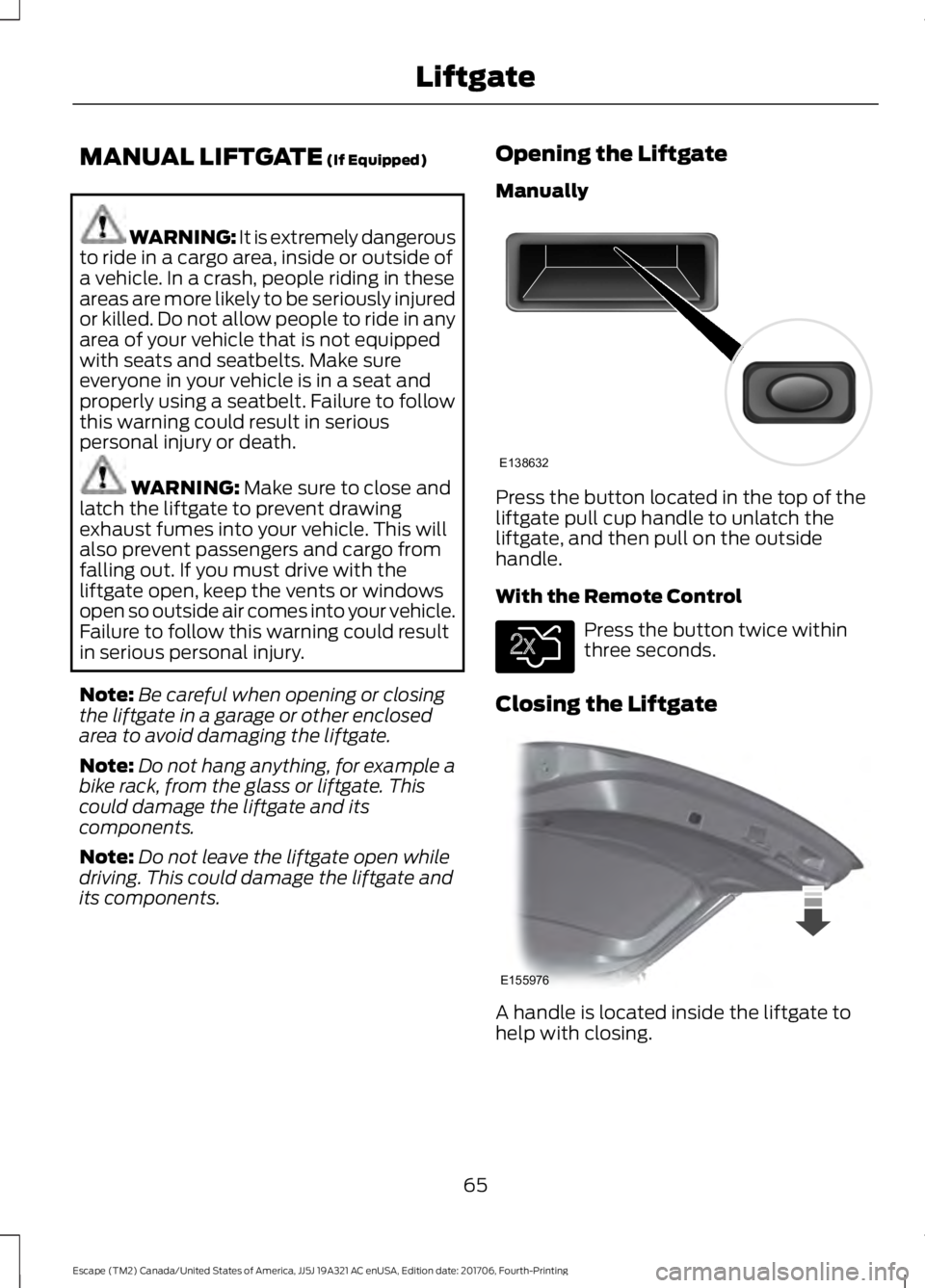
Manually
Press the button located in the top of the
liftgate pull cup handle to unlatch the
liftgate, and then pull on the outside
handle.
With the Remote Control
Press the button twice within
three seconds.
Closing the Liftgate A handle is located inside the liftgate to
help with closing.
65
Escape (TM2) Canada/United States of America, JJ5J 19A321 AC enUSA, Edition date: 201706, Fourth-Printing LiftgateE138632 E138630 E155976
Page 69 of 517

POWER LIFTGATE (If Equipped)
WARNING: It is extremely dangerous
to ride in a cargo area, inside or outside of
a vehicle. In a crash, people riding in these
areas are more likely to be seriously injured
or killed. Do not allow people to ride in any
area of your vehicle that is not equipped
with seats and seatbelts. Make sure
everyone in your vehicle is in a seat and
properly using a seatbelt. Failure to follow
this warning could result in serious
personal injury or death. WARNING:
Make sure to close and
latch the liftgate to prevent drawing
exhaust fumes into your vehicle. This will
also prevent passengers and cargo from
falling out. If you must drive with the
liftgate open, keep the vents or windows
open so outside air comes into your vehicle.
Failure to follow this warning could result
in serious personal injury. WARNING:
Keep keys out of reach
of children. Do not allow children to
operate or play near an open or moving
power liftgate. You should supervise the
operation of the power liftgate at all times.
Note: Make sure that you close the liftgate
before operating or moving your vehicle,
especially in an enclosure, like a garage or
a parking structure. This could damage the
liftgate and its components.
Note: Do not hang anything, for example
a bike rack, from the glass or liftgate. This
could damage the liftgate and its
components.
The liftgate only operates with the
transmission in park (P). Three warning tones sound once as the
liftgate begins to power close. Five short
chimes indicate a problem with the open
or close request, caused by:
•
The ignition is on and the transmission
is not in park (P).
• The battery voltage is below the
minimum operating voltage.
• The vehicle speed is at or above 1 mph
(1 km/h)
If the liftgate starts to close after it has
fully opened, this indicates there may be
excessive weight on the liftgate or a
possible strut failure. A repetitive chime
sounds and the liftgate closes under
control. Remove any excessive weight
from the liftgate. If the liftgate continues
to close after opening, have the system
checked by an authorized dealer.
Opening and Closing the Liftgate WARNING:
Make sure all persons
are clear of the power liftgate area before
using the power liftgate control.
Note: Make sure the area behind your
vehicle is free from obstruction and that
there is enough room for you to operate the
liftgate.
Note: Be careful when opening or closing
the liftgate in a garage or other enclosed
area to avoid damaging the liftgate.
Note: Do not leave the liftgate open when
you are driving. This could damage the
liftgate and its components.
From the Instrument Panel With the transmission in Park,
press the button on the
instrument panel.
66
Escape (TM2) Canada/United States of America, JJ5J 19A321 AC enUSA, Edition date: 201706, Fourth-Printing LiftgateE138633
Page 70 of 517

Remote Control
Press the button twice within
three seconds.
Outside Control Button
Opening the Liftgate
1. Unlock the liftgate with the remote control or power door unlock control.
If an intelligent access key is within 3 ft
(1 m) of the liftgate, the liftgate unlocks
when you press the liftgate release
button. 2. Press and release the liftgate control
button.
Note: Allow the power system to open the
liftgate. Manually pushing or pulling the
liftgate may activate the system ’s obstacle
detection feature and stop the power
operation or reverse its direction, replicate
a strut failure, or damage mechanical
components.
Closing the Liftgate WARNING:
Keep clear of the liftgate
when using the rear switch. Press and release the liftgate control
button.
Stopping the Liftgate Movement
Note:
Do not apply sudden excessive force
to the liftgate while it is in motion. This
could damage the power liftgate and its
components.
You can stop the liftgate movement by
doing any of the following:
• Pressing the liftgate control button.
• Pressing the liftgate button on the
remote control twice.
• Pressing the liftgate button on the
instrument panel.
• Moving your foot under and away from
the center rear bumper in a single-kick
motion. *
* This method only works for vehicles with
the hands-free liftgate feature.
Setting the Liftgate Open Height
1. Open the liftgate.
2. Stop the liftgate by pressing the control
button on the liftgate when it reaches
the desired height.
Note: When the liftgate has stopped
moving, you can also manually move it to
the desired height.
67
Escape (TM2) Canada/United States of America, JJ5J 19A321 AC enUSA, Edition date: 201706, Fourth-Printing LiftgateE138630 E138632 E138636