2018 FORD ESCAPE 165
[x] Cancel search: 165Page 6 of 517

Keyless Starting
.............................................131
Starting a Gasoline Engine .......................
132
Engine Block Heater ...................................
135
Unique Driving Characteristics
Auto-Start-Stop ...........................................
137
Fuel and Refueling
Safety Precautions ......................................
139
Fuel Quality ....................................................
139
Fuel Filler Funnel Location ......................
140
Running Out of Fuel .....................................
141
Refueling .........................................................
142
Fuel Consumption .......................................
145
Engine Emission Control
Emission Law ................................................
147
Catalytic Converter .....................................
148
Transmission
Automatic Transmission ............................
151
Four-Wheel Drive
Principle of Operation ................................
155
Using Four-Wheel Drive ............................
155
Brakes
General Information ...................................
160
Hints on Driving With Anti-Lock Brakes ........................................................................\
160
Parking Brake .................................................
161
Electric Parking Brake .................................
161
Hill Start Assist .............................................
163
Traction Control
Principle of Operation ................................
165
Using Traction Control ...............................
165Stability Control
Principle of Operation
...............................
166
Using Stability Control ...............................
167
Parking Aids
Principle of Operation ...............................
168
Rear Parking Aid ..........................................
168
Front Parking Aid .........................................
169
Side Sensing System ..................................
170
Active Park Assist .........................................
172
Rear View Camera .......................................
178
Cruise Control
Principle of Operation ................................
182
Using Cruise Control ...................................
182
Using Adaptive Cruise Control ...............
183
Driving Aids
Driver Alert .....................................................
189
Lane Keeping System ................................
190
Blind Spot Information System .............
195
Cross Traffic Alert ........................................
196
Steering ...........................................................
199
Collision Warning System ........................
199
Load Carrying
Rear Under Floor Storage ........................
202
Luggage Covers ...........................................
202
Roof Racks and Load Carriers ...............
203
Load Limit .....................................................
204
Towing
Towing a Trailer ...........................................
209
Trailer Sway Control ...................................
210
Recommended Towing Weights ...........
210
Essential Towing Checks ...........................
212
Towing the Vehicle on Four Wheels ......
214
3
Escape (TM2) Canada/United States of America, JJ5J 19A321 AC enUSA, Edition date: 201706, Fourth-Printing Table of Contents
Page 109 of 517

Tire Pressure Monitoring System
Action
Message
Indicator
Message
Displays when one or more tires on your vehiclehave low tire pressure. See Tire Pressure
Monitoring System (page 291).
Amber
Tire Pressure Low
Displays when the tire pressure monitoring
system is malfunctioning. If the warning stays on or continues to come on, contact your
authorized dealer.
See Tire Pressure Monit-
oring System (page 291).
Amber
Tire Pressure Monitor
Fault
Displayed when a tire pressure sensor is
malfunctioning, or your spare tire is in use. If the warning stays on or continues to come on,contact your authorized dealer as soon aspossible. See
Tire Pressure Monitoring
System (page 291).
Amber
Tire Pressure Sensor
Fault
Traction Control Action
Message
Indicator
Message
Displays when the traction control system hasbeen switched off. See
Using Traction
Control (page 165).
-
Traction Control Off
Trailer Action
Message
Indicator
Message
Displays when the trailer sway control has
detected a trailer sway. See
Trailer Sway
Control (page 210).
-
Trailer Sway Reduce
Speed
106
Escape (TM2) Canada/United States of America, JJ5J 19A321 AC enUSA, Edition date: 201706, Fourth-Printing Information Displays
Page 168 of 517

PRINCIPLE OF OPERATION
The traction control system helps avoid
drive wheel spin and loss of traction.
If your vehicle begins to slide, the system
applies the brakes to individual wheels
and, when needed, reduces engine power
at the same time. If the wheels spin when
accelerating on slippery or loose surfaces,
the system reduces engine power in order
to increase traction.
USING TRACTION CONTROL
WARNING: The stability and traction
control light illuminates steadily if the
system detects a failure. Make sure you
did not manually disable the traction
control system using the information
display controls or the switch. If the
stability control and traction control light
is still illuminating steadily, have the
system serviced by an authorized dealer
immediately. Operating your vehicle with
the traction control disabled could lead to
an increased risk of loss of vehicle control,
vehicle rollover, personal injury and death.
The system automatically turns on each
time you switch the ignition on.
If your vehicle is stuck in mud or snow,
switching traction control off may be
beneficial as this allows the wheels to spin.
Note: When you switch traction control off,
stability control remains fully active.
Switching the System Off
When you switch the system off or on, a
message appears in the information
display showing system status.
You can switch the system off by either
using the information display controls or
the switch. Using the Information Display
Controls
You can switch this feature off or on in the
information display. See General
Information (page 93).
Using a Switch
(If Equipped)
Use the traction control switch on the
instrument panel to switch the system off
or on.
System Indicator Lights and
Messages The stability and traction control
light:
• Temporarily illuminates on engine
start-up.
• Flashes when a driving condition
activates either of the systems.
• Illuminates if a problem occurs in either
of the systems. The stability and traction control
off light temporarily illuminates
on engine start-up and stays on
when you switch the traction control
system off.
165
Escape (TM2) Canada/United States of America, JJ5J 19A321 AC enUSA, Edition date: 201706, Fourth-Printing Traction ControlE138639 E130458
Page 170 of 517
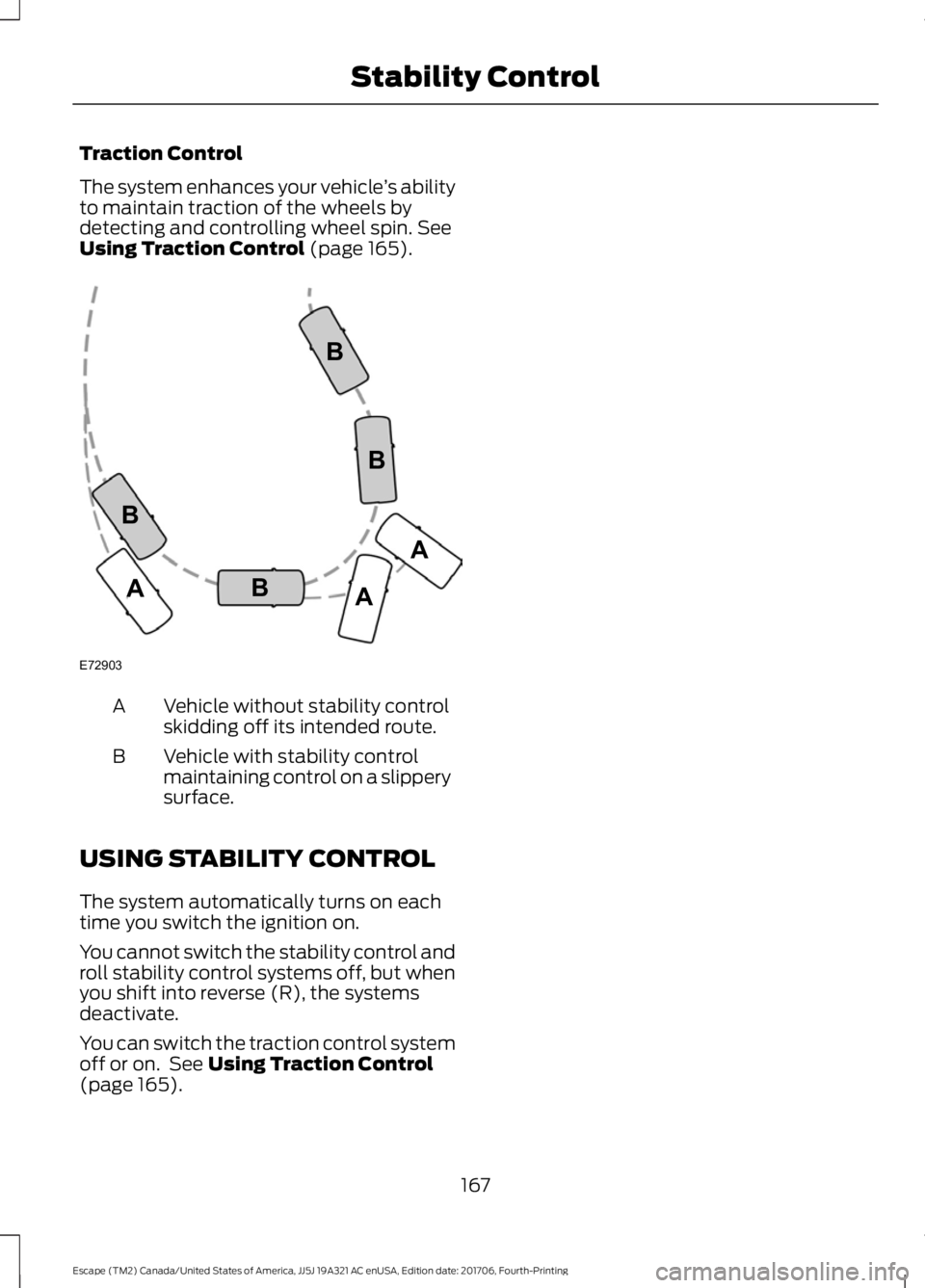
Traction Control
The system enhances your vehicle
’s ability
to maintain traction of the wheels by
detecting and controlling wheel spin. See
Using Traction Control (page 165). Vehicle without stability control
skidding off its intended route.
A
Vehicle with stability control
maintaining control on a slippery
surface.
B
USING STABILITY CONTROL
The system automatically turns on each
time you switch the ignition on.
You cannot switch the stability control and
roll stability control systems off, but when
you shift into reverse (R), the systems
deactivate.
You can switch the traction control system
off or on. See
Using Traction Control
(page 165).
167
Escape (TM2) Canada/United States of America, JJ5J 19A321 AC enUSA, Edition date: 201706, Fourth-Printing Stability ControlE72903A
AA
B
BB
B
Page 195 of 517

Press the button on the direction indicator
stalk to switch the system on or off.
System Settings
The system has optional setting menus
available. The system stores the last
known selection for each of these settings.
You do not need to readjust your settings
each time you switch the system on.
Mode: This setting allows you to select
which of the system features you can
enable. Alert only – Provides a steering wheel
vibration when the system detects an
unintended lane departure.
Aid only – Provides steering assistance
toward the lane center when the system
detects an unintended lane departure. Alert
A
AidB
Alert + Aid – Provides steering assistance
toward the lane center.
If your vehicle continues drifting out of the
lane after the lane keeping aid corrects the
vehicle, the system provides a steering
wheel vibration.
Note: The alert and aid diagrams illustrate
general zone coverage. They do not provide
exact zone parameters.
Intensity: This setting affects the intensity
of the steering wheel vibration used for the
alert and alert + aid modes. This setting
does not affect the aid mode.
• Low.
• Normal.
• High.
192
Escape (TM2) Canada/United States of America, JJ5J 19A321 AC enUSA, Edition date: 201706, Fourth-Printing Driving AidsE165515 E165516 E165517
Page 515 of 517

Towing a Trailer............................................209
Load Placement................................................ 209
Towing the Vehicle on Four Wheels...........................................................214
Emergency Towing............................................. 214
Recreational Towing.......................................... 214
Towing.............................................................209
Traction Control
............................................165
Principle of Operation....................................... 165
Trailer Sway Control
....................................210
Transmission Code Designation............307
Transmission...................................................151
Transporting the Vehicle
...........................223
Trip Computer.................................................96
All Value.................................................................. 96
Average Fuel.......................................................... 96
Digital Speedo...................................................... 96
Distance to E.......................................................... 96
Instantaneous Fuel............................................. 96
Resetting the Trip Computer........................... 96
Trip Odometer....................................................... 96
Trip Timer................................................................ 96
U
Under Hood Overview - 1.5L EcoBoost™.................................................244
Under Hood Overview - 2.0L EcoBoost™
.................................................245
Under Hood Overview - 2.5L...................246
Unique Driving Characteristics
.................137
Universal Garage Door Opener................124 HomeLink Wireless Control System............124
USB Port..........................................................337
Using Adaptive Cruise Control................183 Automatic Cancellation................................... 186
Blocked Sensor.................................................... 187
Canceling the Set Speed................................. 185
Changing the Set Speed.................................. 185
Detection Issues................................................. 186
Following a Vehicle............................................ 184
Hilly Condition Usage....................................... 186
Overriding the Set Speed................................ 185
Resuming the Set Speed................................. 185
Setting the Adaptive Cruise Speed.............184
Setting the Gap Distance................................ 184
Switching Adaptive Cruise Control Off....................................................................... 186Switching Adaptive Cruise Control
On........................................................................\
183
Switching to Normal Cruise Control...........188
System Not Available........................................ 187
Using Cruise Control....................................182 Switching Cruise Control Off.......................... 182
Switching Cruise Control On.......................... 182
Using Four-Wheel Drive.............................155 Driving in Special Conditions With
Four-Wheel Drive........................................... 155
Using MyKey With Remote Start Systems
...........................................................57
Using Snow Chains......................................291
Using Stability Control................................167
Using SYNC™ With Your Media Player............................................................359
Accessing Your USB Song Library...............363
Bluetooth Devices and System Settings............................................................ 365
Connecting Your Digital Media Player to the USB Port.......................................................... 359
Media Menu Features...................................... 362
Media Voice Commands................................ 360
USB 2..................................................................... 365
Voice Commands for Audio Sources.........366
Using SYNC™ With Your Phone............342 Accessing Features through the Phone
Menu.................................................................. 347
Accessing Your Phone Settings................... 350
Bluetooth Devices.............................................. 351
Making Calls........................................................ 346
Pairing a Phone for the First Time...............343
Pairing Subsequent Phones.......................... 344
Phone Options during an Active Call.........346
Phone Voice Commands................................ 344
Receiving Calls................................................... 346
System Settings................................................. 352
Text Messaging.................................................. 348
Using Traction Control
................................165
Switching the System Off............................... 165
System Indicator Lights and Messages.......................................................... 165
Using a Switch..................................................... 165
Using the Information Display Controls............................................................. 165
Using Voice Recognition...........................340 Audio Voice Commands................................. 390
512
Escape (TM2) Canada/United States of America, JJ5J 19A321 AC enUSA, Edition date: 201706, Fourth-Printing Index