2018 FORD ESCAPE seats
[x] Cancel search: seatsPage 68 of 517
MANUAL LIFTGATE (If Equipped)
WARNING: It is extremely dangerous
to ride in a cargo area, inside or outside of
a vehicle. In a crash, people riding in these
areas are more likely to be seriously injured
or killed. Do not allow people to ride in any
area of your vehicle that is not equipped
with seats and seatbelts. Make sure
everyone in your vehicle is in a seat and
properly using a seatbelt. Failure to follow
this warning could result in serious
personal injury or death. WARNING:
Make sure to close and
latch the liftgate to prevent drawing
exhaust fumes into your vehicle. This will
also prevent passengers and cargo from
falling out. If you must drive with the
liftgate open, keep the vents or windows
open so outside air comes into your vehicle.
Failure to follow this warning could result
in serious personal injury.
Note: Be careful when opening or closing
the liftgate in a garage or other enclosed
area to avoid damaging the liftgate.
Note: Do not hang anything, for example a
bike rack, from the glass or liftgate. This
could damage the liftgate and its
components.
Note: Do not leave the liftgate open while
driving. This could damage the liftgate and
its components. Opening the Liftgate
Manually
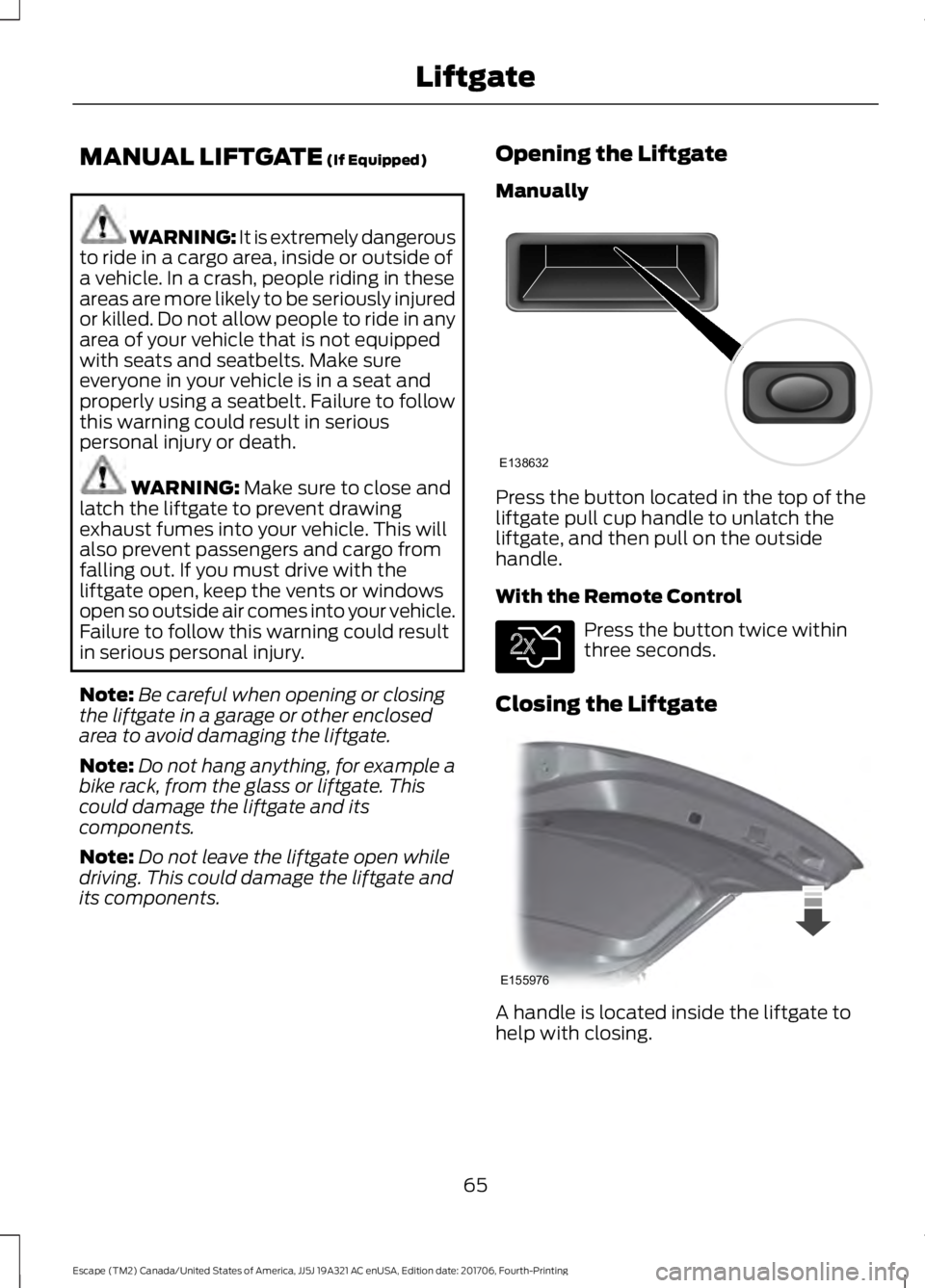
Press the button located in the top of the
liftgate pull cup handle to unlatch the
liftgate, and then pull on the outside
handle.
With the Remote Control
Press the button twice within
three seconds.
Closing the Liftgate A handle is located inside the liftgate to
help with closing.
65
Escape (TM2) Canada/United States of America, JJ5J 19A321 AC enUSA, Edition date: 201706, Fourth-Printing LiftgateE138632 E138630 E155976
Page 69 of 517

POWER LIFTGATE (If Equipped)
WARNING: It is extremely dangerous
to ride in a cargo area, inside or outside of
a vehicle. In a crash, people riding in these
areas are more likely to be seriously injured
or killed. Do not allow people to ride in any
area of your vehicle that is not equipped
with seats and seatbelts. Make sure
everyone in your vehicle is in a seat and
properly using a seatbelt. Failure to follow
this warning could result in serious
personal injury or death. WARNING:
Make sure to close and
latch the liftgate to prevent drawing
exhaust fumes into your vehicle. This will
also prevent passengers and cargo from
falling out. If you must drive with the
liftgate open, keep the vents or windows
open so outside air comes into your vehicle.
Failure to follow this warning could result
in serious personal injury. WARNING:
Keep keys out of reach
of children. Do not allow children to
operate or play near an open or moving
power liftgate. You should supervise the
operation of the power liftgate at all times.
Note: Make sure that you close the liftgate
before operating or moving your vehicle,
especially in an enclosure, like a garage or
a parking structure. This could damage the
liftgate and its components.
Note: Do not hang anything, for example
a bike rack, from the glass or liftgate. This
could damage the liftgate and its
components.
The liftgate only operates with the
transmission in park (P). Three warning tones sound once as the
liftgate begins to power close. Five short
chimes indicate a problem with the open
or close request, caused by:
•
The ignition is on and the transmission
is not in park (P).
• The battery voltage is below the
minimum operating voltage.
• The vehicle speed is at or above 1 mph
(1 km/h)
If the liftgate starts to close after it has
fully opened, this indicates there may be
excessive weight on the liftgate or a
possible strut failure. A repetitive chime
sounds and the liftgate closes under
control. Remove any excessive weight
from the liftgate. If the liftgate continues
to close after opening, have the system
checked by an authorized dealer.
Opening and Closing the Liftgate WARNING:
Make sure all persons
are clear of the power liftgate area before
using the power liftgate control.
Note: Make sure the area behind your
vehicle is free from obstruction and that
there is enough room for you to operate the
liftgate.
Note: Be careful when opening or closing
the liftgate in a garage or other enclosed
area to avoid damaging the liftgate.
Note: Do not leave the liftgate open when
you are driving. This could damage the
liftgate and its components.
From the Instrument Panel With the transmission in Park,
press the button on the
instrument panel.
66
Escape (TM2) Canada/United States of America, JJ5J 19A321 AC enUSA, Edition date: 201706, Fourth-Printing LiftgateE138633
Page 112 of 517

Note: In certain conditions (for
example, maximum defrost), the
air conditioning compressor may
continue to operate even though
you switch off the air
conditioning.
Recirculated air:
Press to
switch between outside air and
recirculated air. The air currently
in the passenger compartment
recirculates. This may reduce the
time needed to cool the interior
(when used with A/C) and
reduce unwanted odors from
entering your vehicle.
H
Note:
Recirculated air may turn
off (or prevent you from
switching on) in all air flow
modes except MAX A/C to
reduce the risk of fogging.
Recirculation may also turn on
and off in Panel or Panel/Floor
air flow modes during hot
weather in order to improve
cooling efficiency.
Heated seats:
Press to switch
the heated seats on and off. See
Heated Seats
(page 123).
I
Power:
Press to switch the
system on and off. When the
system is off, it prevents outside
air from entering the vehicle.
J
AUTOMATIC CLIMATE CONTROL 109
Escape (TM2) Canada/United States of America, JJ5J 19A321 AC enUSA, Edition date: 201706, Fourth-Printing Climate ControlE222398
Page 113 of 517

AUTO: Press to switch on
automatic operation. Adjust to
select the desired temperature.
Fan speed, air distribution, air
conditioning operation, and
outside or recirculated air adjust
to heat or cool the vehicle to
maintain the desired
temperature.
A
Fan speed control: Adjusts the
volume of air circulated in the
vehicle.
B
Climate control display:
Shows the temperature settings
and fan speed.
C
Air distribution control: Press
to switch air flow from the
windshield, instrument panel, or
footwell vents on or off. You can
distribute air through any
combination of these vents.
D
Heated rear window:
Press to
switch the heated rear window
on and off. See
Heated
Windows and Mirrors (page
114).
E
A/C:
Press to switch the air
conditioning on or off. Use A/C
with recirculated air to improve
cooling performance and
efficiency.
F
Note:
In certain conditions, for
example, maximum defrost, the
air conditioning compressor may
continue to operate even though
you switch off the air
conditioning.
Passenger temperature
control:
Adjusts the
temperature setting on the
passenger side.
G Recirculated air:
Press to
switch between outside air and
recirculated air. The air currently
in the passenger compartment
recirculates. This may reduce the
time needed to cool the interior,
when used with A/C, and reduce
unwanted odors from entering
your vehicle.
H
Note:
Recirculated air may turn
off, or prevent you from
switching on, in all air flow
modes except MAX A/C to
reduce the risk of fogging.
Recirculation may also turn on
and off in Panel or Panel/Floor
air flow modes during hot
weather to improve cooling
efficiency.
Heated seats:
Press to switch
the heated seats on and off. See
Heated Seats
(page 123).
I
MAX A/C:
Press for maximum
cooling. The driver and
passenger settings set to LO,
recirculated air flows through the
instrument panel vents, air
conditioning turns on and the fan
adjusts to the highest speed.
J
MAX Defrost:
Press to switch
on defrost. The driver and
passenger settings set to HI, air
flows through the windshield
vents, and the fan adjusts to the
highest speed. You can also use
this setting to defog and clear
the windshield of a thin covering
of ice. The heated rear window
also turns on when you select
maximum defrost.
K
Note:
To prevent window
fogging, you cannot select
recirculated air when maximum
defrost is on.
110
Escape (TM2) Canada/United States of America, JJ5J 19A321 AC enUSA, Edition date: 201706, Fourth-Printing Climate Control
Page 115 of 517

Note:
Do not place objects under the front
seats as this may interfere with the airflow
to the rear seats.
Note: Remove any snow, ice or leaves from
the air intake area at the base of the
windshield.
Note: To improve the time to reach a
comfortable temperature in hot weather,
drive with the windows open until you feel
cold air through the air vents.
Manual Climate Control
Note: To reduce fogging of the windshield
during humid weather, adjust the air
distribution control to the windshield air
vents position. Automatic Climate Control
Note:
Adjusting the settings when your
vehicle interior is extremely hot or cold is
not necessary. The system automatically
adjusts to heat or cool the interior to your
selected temperature as quickly as possible.
For the system to function efficiently, the
instrument panel and side air vents should
be fully open.
Note: If you select AUTO during cold
temperatures, the system directs airflow to
the windshield and side window vents. In
addition, the fan may run at a slower speed
until the engine warms up.
Note: If you select
AUTO during hot
temperatures and the inside of the vehicle
is hot, the system automatically uses
recirculated air to maximize interior cooling.
Fan speed may also reduce until the air
cools.
Quickly Heating the Interior Automatic climate control
Manual climate control
Press
AUTO.
Adjust the fan speed to the highest
setting.
1
Adjust the temperature control to the
desired setting.
Adjust the temperature control to the
full heat setting.
2
Direct air to the footwell using the air
distribution buttons.
3
112
Escape (TM2) Canada/United States of America, JJ5J 19A321 AC enUSA, Edition date: 201706, Fourth-Printing Climate Control
Page 118 of 517

Note:
Make sure you have a cabin air filter
installed at all times. This prevents foreign
objects from entering the system. Running
the system without a filter in place could
result in degradation or damage to the
system.
Replace the filter at regular intervals. See
Scheduled Maintenance (page 455).
For additional cabin air filter information,
or to replace the filter, see an authorized
dealer.
REMOTE START
(If Equipped)
The system adjusts the interior
temperature depending on your chosen
settings during remote start.
You cannot adjust the climate control
setting during remote start operation.
When you switch the ignition on, the
climate control system returns to the
previous settings. You can now make
adjustments.
You need to switch on certain
vehicle-dependent features, such as:
• Heated seats.
• Heated steering wheel.
• Heated mirrors.
• Heated rear window.
You can adjust the default remote start
settings using the information display
controls.
Automatic Settings
You can set the system to operate in AUTO
mode through the information display. The
system sets the interior temperature to
72°F (22°C)
.
In hot weather, the system is set to
72°F
(22°C). The cooled seats are set to high
(if available, and selected to AUTO in the
information display). In cold weather, the system is set to
72°F
(22°C). The heated rear window and
heated mirrors automatically turn on.
Previous Settings
You can set the system to operate using
your previous settings prior to switching
the vehicle off through the information
display. See Information Displays (page
93
).
115
Escape (TM2) Canada/United States of America, JJ5J 19A321 AC enUSA, Edition date: 201706, Fourth-Printing Climate Control
Page 119 of 517
SITTING IN THE CORRECT
POSITION
WARNING: Sitting improperly, out
of position or with the seatback reclined
too far can take weight off the seat cushion
and affect the decision of the passenger
sensing system, resulting in serious injury
or death in the event of a crash. Always sit
upright against your seat back, with your
feet on the floor. WARNING:
Do not recline the
seatback as this can cause the occupant
to slide under the safety belt, resulting in
serious injury in the event of a crash. WARNING:
Do not place objects
higher than the seatback to reduce the risk
of serious injury in the event of a crash or
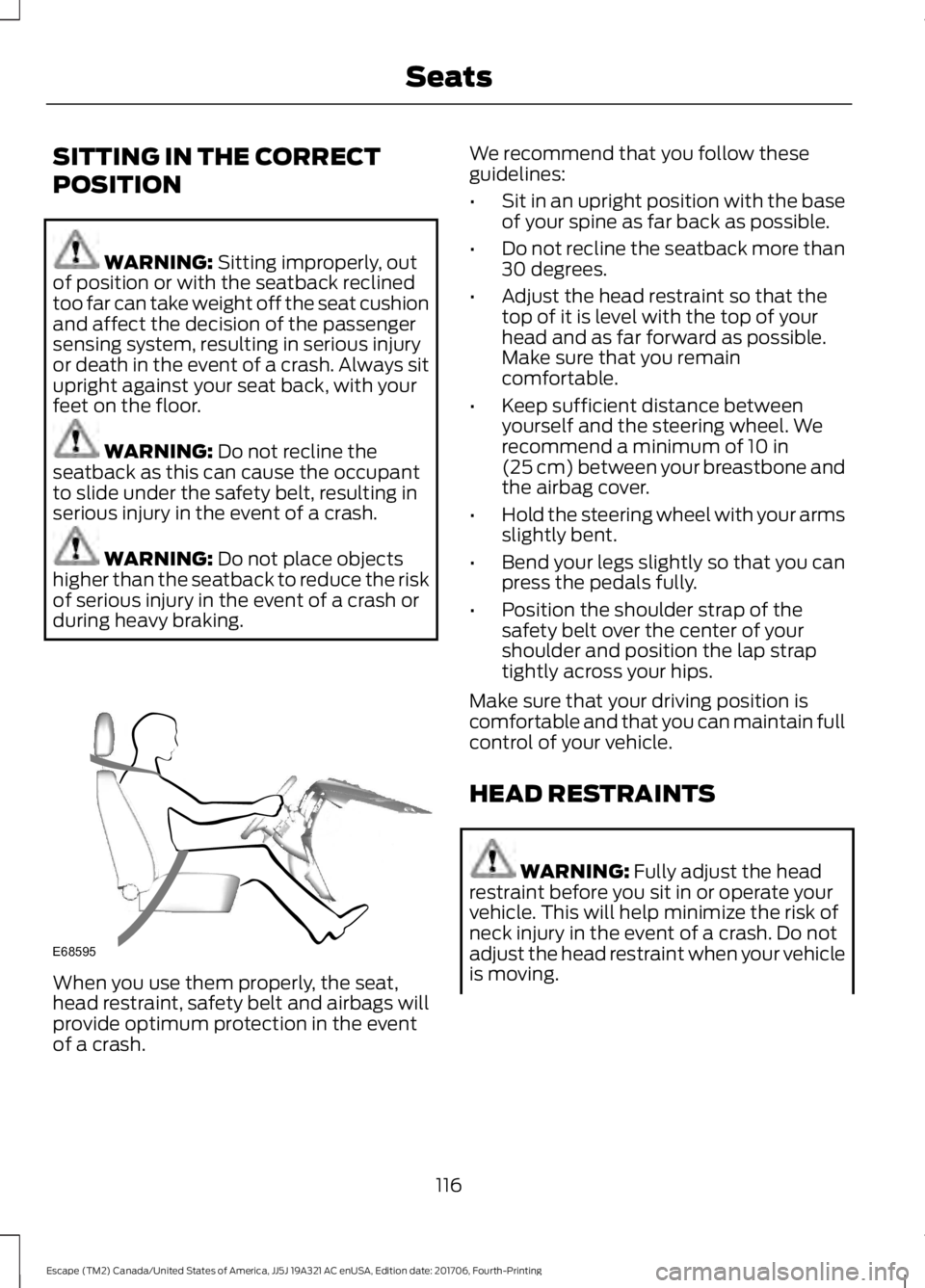
during heavy braking. When you use them properly, the seat,
head restraint, safety belt and airbags will
provide optimum protection in the event
of a crash. We recommend that you follow these
guidelines:
•
Sit in an upright position with the base
of your spine as far back as possible.
• Do not recline the seatback more than
30 degrees.
• Adjust the head restraint so that the
top of it is level with the top of your
head and as far forward as possible.
Make sure that you remain
comfortable.
• Keep sufficient distance between
yourself and the steering wheel. We
recommend a minimum of
10 in
(25 cm) between your breastbone and
the airbag cover.
• Hold the steering wheel with your arms
slightly bent.
• Bend your legs slightly so that you can
press the pedals fully.
• Position the shoulder strap of the
safety belt over the center of your
shoulder and position the lap strap
tightly across your hips.
Make sure that your driving position is
comfortable and that you can maintain full
control of your vehicle.
HEAD RESTRAINTS WARNING:
Fully adjust the head
restraint before you sit in or operate your
vehicle. This will help minimize the risk of
neck injury in the event of a crash. Do not
adjust the head restraint when your vehicle
is moving.
116
Escape (TM2) Canada/United States of America, JJ5J 19A321 AC enUSA, Edition date: 201706, Fourth-Printing SeatsE68595
Page 120 of 517

WARNING: The head restraint is a
safety device. Whenever possible it should
be installed and properly adjusted when
the seat is occupied. Failure to adjust the
head restraint properly could reduce its
effectiveness during certain impacts. WARNING:
Adjust the head
restraints for all passengers before you
drive your vehicle. This will help minimize
the risk of neck injury in the event of a
crash. Do not adjust the head restraints
when your vehicle is moving.
Note: Adjust the seatback to an upright
driving position before adjusting the head
restraint. Adjust the head restraint so that
the top of it is level with the top of your head
and as far forward as possible. Make sure
that you remain comfortable. If you are
extremely tall, adjust the head restraint to
its highest position.
Front seat head restraint Rear seat outboard head restraints
The head restraints consist of:
An energy absorbing head
restraint.
A
Two steel stems.
B
Guide sleeve adjust and unlock
button.
C
Guide sleeve unlock and remove
button.
D
Fold button
E
Rear center head restraint 117
Escape (TM2) Canada/United States of America, JJ5J 19A321 AC enUSA, Edition date: 201706, Fourth-Printing SeatsE138642 E138643 E187325