2018 FORD ESCAPE pairing phone
[x] Cancel search: pairing phonePage 428 of 517

Action and Description
Menu Item
This allows you to view the version level of the Gracenote Database.
Gracenote® Data-
base Info
This allows you to view the manufacturer and model number of your
media device.
Device Informa-
tion
Erase the stored in media information in order to re-index.
Update Media
Index
Clock
To adjust the time, select the up and down
arrows on either side of the screen. The
arrows on the left adjust the hour and
arrows on the right adjust the minute. You
can then select AM or PM. You can adjust the following features: Action and Description
Menu Item
Select how time displays.
Clock Format
When active, the clock adjusts to time zone changes.
Auto Time Zone
Update This feature is only available in vehicles with navigation.
When selected, the vehicle clock resets to GPS satellite time.
Reset Clock to
GPS Time
The system automatically saves any
updates you make to the settings. Bluetooth
Pressing this button allows you to access
the following: Action
Menu Item
Turning Bluetooth off disconnects all devices and does not permit
new connections.
Bluetooth
You must activate Bluetooth to pair a
Bluetooth-enabled device.
The processes of pairing a Bluetooth
device is the same as pairing a phone. See
Pairing a Device in Phone settings for how
to pair a device and the available options. Phone
Pair your Bluetooth-enabled phone with
the system before using the functions in
hands-free mode.
Switch on Bluetooth on your device to
begin pairing. See your phone
’s manual if
necessary.
425
Escape (TM2) Canada/United States of America, JJ5J 19A321 AC enUSA, Edition date: 201706, Fourth-Printing SYNC™ 3
Page 429 of 517

To add a phone, select:
Menu Item
Add Phone
1. Follow the on-screen instructions.
2. A prompt alerts you to search for the system on your phone.
3. Select your vehicle's make and model as it displays on your phone.
4. Confirm that the six-digit number appearing on your phone matches the
six-digit number on the touchscreen.
5. The touchscreen indicates when the pairing is successful.
6. Your phone may prompt you to give the system permission to access
information. To check your phone ’s
compatibility, see your phone ’s manual
or visit the website.
Alternatively, to add a phone, select: Menu Item
Add Phone
Then select:
Discover Other Bluetooth Devices 1. Follow the on-screen instructions.
2. Select your phone's name when it
appears on the touchscreen.
3. Confirm that the six-digit number appearing on your phone matches the
six-digit number on the touchscreen.
4. The touchscreen indicates when the pairing is successful.
5. Your phone may prompt you to give the system permission to access
information. To check your phone ’s
compatibility, see your phone ’s manual
or visit the website.
Other features, such as text messaging
using Bluetooth and automatic phonebook
download, are phone-dependent features.
To check your phone ’s compatibility,
see your phone ’s manual or visit the
website: Website
owner.ford.com
www.syncmyride.ca
www.syncmaroute.ca
Once you have paired a device you can
adjust the following options. Action and Description
Menu Item
View Devices
You can then select: You can add a Bluetooth-enabled device by following the steps in
the previous table.
Add a Bluetooth
Device
You can select a phone by touching the name of the phone on the screen. You then
have the following options:
Depending on the status of the device, you can select either of these
options to interact with the selected device.
Connect
426
Escape (TM2) Canada/United States of America, JJ5J 19A321 AC enUSA, Edition date: 201706, Fourth-Printing SYNC™ 3
Page 442 of 517
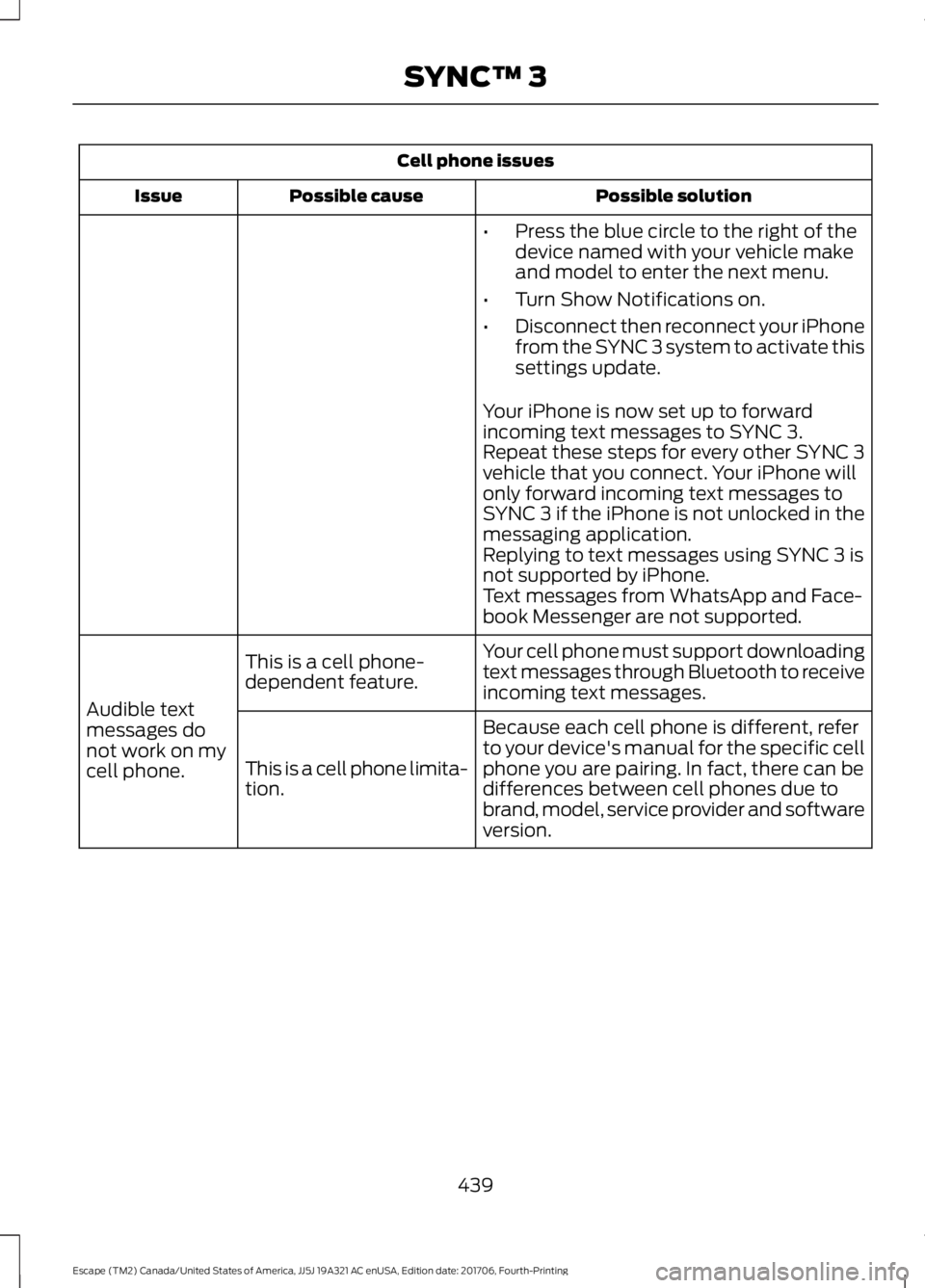
Cell phone issues
Possible solution
Possible cause
Issue
•Press the blue circle to the right of the
device named with your vehicle make
and model to enter the next menu.
• Turn Show Notifications on.
• Disconnect then reconnect your iPhone
from the SYNC 3 system to activate this
settings update.
Your iPhone is now set up to forward
incoming text messages to SYNC 3.
Repeat these steps for every other SYNC 3
vehicle that you connect. Your iPhone will
only forward incoming text messages to
SYNC 3 if the iPhone is not unlocked in the
messaging application.
Replying to text messages using SYNC 3 is
not supported by iPhone.
Text messages from WhatsApp and Face-
book Messenger are not supported.
Your cell phone must support downloading
text messages through Bluetooth to receive
incoming text messages.
This is a cell phone-
dependent feature.
Audible text
messages do
not work on my
cell phone. Because each cell phone is different, refer
to your device's manual for the specific cell
phone you are pairing. In fact, there can be
differences between cell phones due to
brand, model, service provider and software
version.
This is a cell phone limita-
tion.
439
Escape (TM2) Canada/United States of America, JJ5J 19A321 AC enUSA, Edition date: 201706, Fourth-Printing SYNC™ 3
Page 512 of 517

Memory Function...........................................121
Saving a PreSet Position................................... 121
Message Center See: Information Displays................................. 93
Mirrors See: Heated Windows and Mirrors...............114
See: Windows and Mirrors................................ 83
Mobile Communications Equipment.......13
Moonroof..........................................................86 Bounce-Back......................................................... 87
Opening and Closing the Moonroof..............87
Opening and Closing the Sunscreen............86
Venting the Moonroof......................................... 87
Motorcraft Parts - 1.5L EcoBoost™.................................................303
Motorcraft Parts - 2.0L EcoBoost™................................................304
Motorcraft Parts - 2.5L..............................305
MyKey Troubleshooting
................................57
MyKey ™.............................................................53
Principle of Operation......................................... 53
N
Navigation.......................................................412 cityseeker.............................................................. 419
Destination Mode............................................... 414
Map Mode............................................................. 413
Navigation Map Updates............................... 420
Navigation Menu................................................. 417
SiriusXM Traffic and Travel Link.................. 420
SYNC AppLink..................................................... 419
Waypoints............................................................. 418
Normal Scheduled Maintenance..........458 Intelligent Oil-Life Monitor™........................ 458
Normal Maintenance Intervals.................... 459
O
Oil Change Indicator Reset
......................249
Oil Check See: Engine Oil Check...................................... 248
Opening and Closing the Hood..............243 Closing the Hood............................................... 244
Opening the Hood............................................. 243
Ordering Additional Owner's Literature
.....................................................230
Obtaining a French Owner ’s Manual.........230 Overhead Console.......................................130
P
Parking Aids
...................................................168
Principle of Operation...................................... 168
Parking Brake
..................................................161
Passive Anti-Theft System........................69
SecuriLock® ........................................................... 69
PATS See: Passive Anti-Theft System..................... 69
Perchlorate.........................................................11
Personal Safety System ™
..........................38
How Does the Personal Safety System
Work?.................................................................. 38
Phone...............................................................407 During a Phone Call........................................... 410
Making Calls....................................................... 409
Pairing Your Cell Phone for the First Time................................................................... 407
Phone Menu........................................................ 408
Receiving Calls.................................................... 410
Smartphone Connectivity................................ 411
Text Messaging..................................................... 411
Post-Crash Alert System
...........................223
Power Door Locks See: Locking and Unlocking............................. 59
Power Liftgate.................................................66 Hands-Free Feature............................................ 68
Obstacle Detection............................................. 68
Opening and Closing the Liftgate.................. 66
Setting the Liftgate Open Height................... 67
Stopping the Liftgate Movement................... 67
Power Seats....................................................119 Power Lumbar....................................................... 121
Power Steering Fluid Check.....................255
Power Windows
..............................................83
Accessory Delay................................................... 84
Bounce-Back......................................................... 83
One-Touch Close................................................. 83
One-Touch Open................................................. 83
Rear Window Lock............................................... 83
Protecting the Environment........................15
Puncture See: Changing a Road Wheel....................... 295
509
Escape (TM2) Canada/United States of America, JJ5J 19A321 AC enUSA, Edition date: 201706, Fourth-Printing Index
Page 515 of 517

Towing a Trailer............................................209
Load Placement................................................ 209
Towing the Vehicle on Four Wheels...........................................................214
Emergency Towing............................................. 214
Recreational Towing.......................................... 214
Towing.............................................................209
Traction Control
............................................165
Principle of Operation....................................... 165
Trailer Sway Control
....................................210
Transmission Code Designation............307
Transmission...................................................151
Transporting the Vehicle
...........................223
Trip Computer.................................................96
All Value.................................................................. 96
Average Fuel.......................................................... 96
Digital Speedo...................................................... 96
Distance to E.......................................................... 96
Instantaneous Fuel............................................. 96
Resetting the Trip Computer........................... 96
Trip Odometer....................................................... 96
Trip Timer................................................................ 96
U
Under Hood Overview - 1.5L EcoBoost™.................................................244
Under Hood Overview - 2.0L EcoBoost™
.................................................245
Under Hood Overview - 2.5L...................246
Unique Driving Characteristics
.................137
Universal Garage Door Opener................124 HomeLink Wireless Control System............124
USB Port..........................................................337
Using Adaptive Cruise Control................183 Automatic Cancellation................................... 186
Blocked Sensor.................................................... 187
Canceling the Set Speed................................. 185
Changing the Set Speed.................................. 185
Detection Issues................................................. 186
Following a Vehicle............................................ 184
Hilly Condition Usage....................................... 186
Overriding the Set Speed................................ 185
Resuming the Set Speed................................. 185
Setting the Adaptive Cruise Speed.............184
Setting the Gap Distance................................ 184
Switching Adaptive Cruise Control Off....................................................................... 186Switching Adaptive Cruise Control
On........................................................................\
183
Switching to Normal Cruise Control...........188
System Not Available........................................ 187
Using Cruise Control....................................182 Switching Cruise Control Off.......................... 182
Switching Cruise Control On.......................... 182
Using Four-Wheel Drive.............................155 Driving in Special Conditions With
Four-Wheel Drive........................................... 155
Using MyKey With Remote Start Systems
...........................................................57
Using Snow Chains......................................291
Using Stability Control................................167
Using SYNC™ With Your Media Player............................................................359
Accessing Your USB Song Library...............363
Bluetooth Devices and System Settings............................................................ 365
Connecting Your Digital Media Player to the USB Port.......................................................... 359
Media Menu Features...................................... 362
Media Voice Commands................................ 360
USB 2..................................................................... 365
Voice Commands for Audio Sources.........366
Using SYNC™ With Your Phone............342 Accessing Features through the Phone
Menu.................................................................. 347
Accessing Your Phone Settings................... 350
Bluetooth Devices.............................................. 351
Making Calls........................................................ 346
Pairing a Phone for the First Time...............343
Pairing Subsequent Phones.......................... 344
Phone Options during an Active Call.........346
Phone Voice Commands................................ 344
Receiving Calls................................................... 346
System Settings................................................. 352
Text Messaging.................................................. 348
Using Traction Control
................................165
Switching the System Off............................... 165
System Indicator Lights and Messages.......................................................... 165
Using a Switch..................................................... 165
Using the Information Display Controls............................................................. 165
Using Voice Recognition...........................340 Audio Voice Commands................................. 390
512
Escape (TM2) Canada/United States of America, JJ5J 19A321 AC enUSA, Edition date: 201706, Fourth-Printing Index