2018 FORD ESCAPE interior
[x] Cancel search: interiorPage 88 of 517

Integrated Blind Spot Mirrors (If
Equipped) WARNING:
Objects in the mirror are
closer than they appear.
Blind spot mirrors have an integrated
convex mirror built into the upper outboard
corner of the exterior mirrors. They are
designed to increase your visibility along
the side of your vehicle.
Check the main mirror first before a lane
change, then check the blind spot mirror.
If no vehicles are present in the blind spot
mirror and the traffic in the adjacent lane
is at a safe distance, signal that you intend
to change lanes. Glance over your shoulder
to verify traffic is clear and carefully
change lanes. The image of the approaching vehicle is
small and near the inboard edge of the
main mirror when it is at a distance. The
image becomes larger and begins to move
outboard across the main mirror as the
vehicle approaches (A). The image will
transition from the main mirror and begin
to appear in the blind spot mirror as the
vehicle approaches (B). The vehicle will
transition to your peripheral field of view
as it leaves the blind spot mirror (C).
Blind Spot Monitor
(If Equipped)
See
Blind Spot Information System
(page 195).
INTERIOR MIRROR
Manual Dimming Mirror WARNING: Do not adjust the mirrors
when your vehicle is moving. This could
result in the loss of control of your vehicle,
serious personal injury or death.
Pull the tab below the mirror toward you
to reduce the effect of bright light from
behind.
Automatic Dimming Mirror (If Equipped) WARNING: Do not adjust the mirrors
when your vehicle is moving. This could
result in the loss of control of your vehicle,
serious personal injury or death.
The mirror dims to reduce the effect of
bright light from behind. It returns to
normal when the bright light from behind
is no longer present or if you shift into
reverse (R).
Do not block the sensors on the front and
back of the mirror.
85
Escape (TM2) Canada/United States of America, JJ5J 19A321 AC enUSA, Edition date: 201706, Fourth-Printing Windows and MirrorsA
B
C
E138665
Page 112 of 517

Note: In certain conditions (for
example, maximum defrost), the
air conditioning compressor may
continue to operate even though
you switch off the air
conditioning.
Recirculated air:
Press to
switch between outside air and
recirculated air. The air currently
in the passenger compartment
recirculates. This may reduce the
time needed to cool the interior
(when used with A/C) and
reduce unwanted odors from
entering your vehicle.
H
Note:
Recirculated air may turn
off (or prevent you from
switching on) in all air flow
modes except MAX A/C to
reduce the risk of fogging.
Recirculation may also turn on
and off in Panel or Panel/Floor
air flow modes during hot
weather in order to improve
cooling efficiency.
Heated seats:
Press to switch
the heated seats on and off. See
Heated Seats
(page 123).
I
Power:
Press to switch the
system on and off. When the
system is off, it prevents outside
air from entering the vehicle.
J
AUTOMATIC CLIMATE CONTROL 109
Escape (TM2) Canada/United States of America, JJ5J 19A321 AC enUSA, Edition date: 201706, Fourth-Printing Climate ControlE222398
Page 113 of 517

AUTO: Press to switch on
automatic operation. Adjust to
select the desired temperature.
Fan speed, air distribution, air
conditioning operation, and
outside or recirculated air adjust
to heat or cool the vehicle to
maintain the desired
temperature.
A
Fan speed control: Adjusts the
volume of air circulated in the
vehicle.
B
Climate control display:
Shows the temperature settings
and fan speed.
C
Air distribution control: Press
to switch air flow from the
windshield, instrument panel, or
footwell vents on or off. You can
distribute air through any
combination of these vents.
D
Heated rear window:
Press to
switch the heated rear window
on and off. See
Heated
Windows and Mirrors (page
114).
E
A/C:
Press to switch the air
conditioning on or off. Use A/C
with recirculated air to improve
cooling performance and
efficiency.
F
Note:
In certain conditions, for
example, maximum defrost, the
air conditioning compressor may
continue to operate even though
you switch off the air
conditioning.
Passenger temperature
control:
Adjusts the
temperature setting on the
passenger side.
G Recirculated air:
Press to
switch between outside air and
recirculated air. The air currently
in the passenger compartment
recirculates. This may reduce the
time needed to cool the interior,
when used with A/C, and reduce
unwanted odors from entering
your vehicle.
H
Note:
Recirculated air may turn
off, or prevent you from
switching on, in all air flow
modes except MAX A/C to
reduce the risk of fogging.
Recirculation may also turn on
and off in Panel or Panel/Floor
air flow modes during hot
weather to improve cooling
efficiency.
Heated seats:
Press to switch
the heated seats on and off. See
Heated Seats
(page 123).
I
MAX A/C:
Press for maximum
cooling. The driver and
passenger settings set to LO,
recirculated air flows through the
instrument panel vents, air
conditioning turns on and the fan
adjusts to the highest speed.
J
MAX Defrost:
Press to switch
on defrost. The driver and
passenger settings set to HI, air
flows through the windshield
vents, and the fan adjusts to the
highest speed. You can also use
this setting to defog and clear
the windshield of a thin covering
of ice. The heated rear window
also turns on when you select
maximum defrost.
K
Note:
To prevent window
fogging, you cannot select
recirculated air when maximum
defrost is on.
110
Escape (TM2) Canada/United States of America, JJ5J 19A321 AC enUSA, Edition date: 201706, Fourth-Printing Climate Control
Page 114 of 517

Power: Press to switch the
system on and off. When the
system is off, it prevents outside
air from entering the vehicle.
L
Driver temperature control:
Adjusts the temperature setting
on the driver side. This control
also adjusts the passenger side
temperature when you switch
off dual zone mode.
M
Single Zone Temperature Control
In this mode, the climate control system
links the temperature settings for both the
driver side and passenger side. If you adjust
the setting using the rotary control on the
driver side, the system adjusts the
passenger temperature to the same
setting.
Dual Zone Temperature Control
Select a temperature for the passenger
side using the rotary control on the
passenger side. Single zone temperature
control automatically turns off. The
temperature on the driver side remains
unchanged. You can now adjust the driver
and passenger side temperatures
independently. The display shows the
temperature settings for each side.
You can switch off dual zone mode by
pressing and holding
AUTO for more than
two seconds.
Switching Back to Single Zone
Temperature Control
Press and hold AUTO. The passenger side
temperature adjusts to the driver side
temperature setting. Smart Zone
(If Equipped)
If you were previously in dual zone
operation and there is not an occupant in
the front passenger seat, the climate
control system may default to single zone
to improve fuel economy. When this
occurs, dual zone turns off and the
passenger set point changes to match the
driver set point.
Adjust the passenger set point normally if
you desire dual zone operation without a
passenger present. The system remains in
dual zone operation until you switch the
vehicle off.
You can disable or re-enable the Smart
Zone feature by pressing and holding
AUTO
for more than four seconds. Both
set point displays begin flashing to signify
when the feature disables. The system
returns to previous state after you release
AUTO
.
To re-enable the Smart Zone feature, press
and hold
AUTO for more than four
seconds. Only the driver set point display
begins flashing to signify when you
re-enable the feature. The climate control
system returns to the previous state after
you release
AUTO.
HINTS ON CONTROLLING THE
INTERIOR CLIMATE
General Hints
Note: Prolonged use of recirculated air may
cause the windows to fog up.
Note: You may feel a small amount of air
from the footwell air vents regardless of the
air distribution setting.
Note: To reduce humidity build-up inside
your vehicle, do not drive with the system
switched off or with recirculated air always
switched on.
111
Escape (TM2) Canada/United States of America, JJ5J 19A321 AC enUSA, Edition date: 201706, Fourth-Printing Climate Control
Page 115 of 517

Note:
Do not place objects under the front
seats as this may interfere with the airflow
to the rear seats.
Note: Remove any snow, ice or leaves from
the air intake area at the base of the
windshield.
Note: To improve the time to reach a
comfortable temperature in hot weather,
drive with the windows open until you feel
cold air through the air vents.
Manual Climate Control
Note: To reduce fogging of the windshield
during humid weather, adjust the air
distribution control to the windshield air
vents position. Automatic Climate Control
Note:
Adjusting the settings when your
vehicle interior is extremely hot or cold is
not necessary. The system automatically
adjusts to heat or cool the interior to your
selected temperature as quickly as possible.
For the system to function efficiently, the
instrument panel and side air vents should
be fully open.
Note: If you select AUTO during cold
temperatures, the system directs airflow to
the windshield and side window vents. In
addition, the fan may run at a slower speed
until the engine warms up.
Note: If you select
AUTO during hot
temperatures and the inside of the vehicle
is hot, the system automatically uses
recirculated air to maximize interior cooling.
Fan speed may also reduce until the air
cools.
Quickly Heating the Interior Automatic climate control
Manual climate control
Press
AUTO.
Adjust the fan speed to the highest
setting.
1
Adjust the temperature control to the
desired setting.
Adjust the temperature control to the
full heat setting.
2
Direct air to the footwell using the air
distribution buttons.
3
112
Escape (TM2) Canada/United States of America, JJ5J 19A321 AC enUSA, Edition date: 201706, Fourth-Printing Climate Control
Page 116 of 517
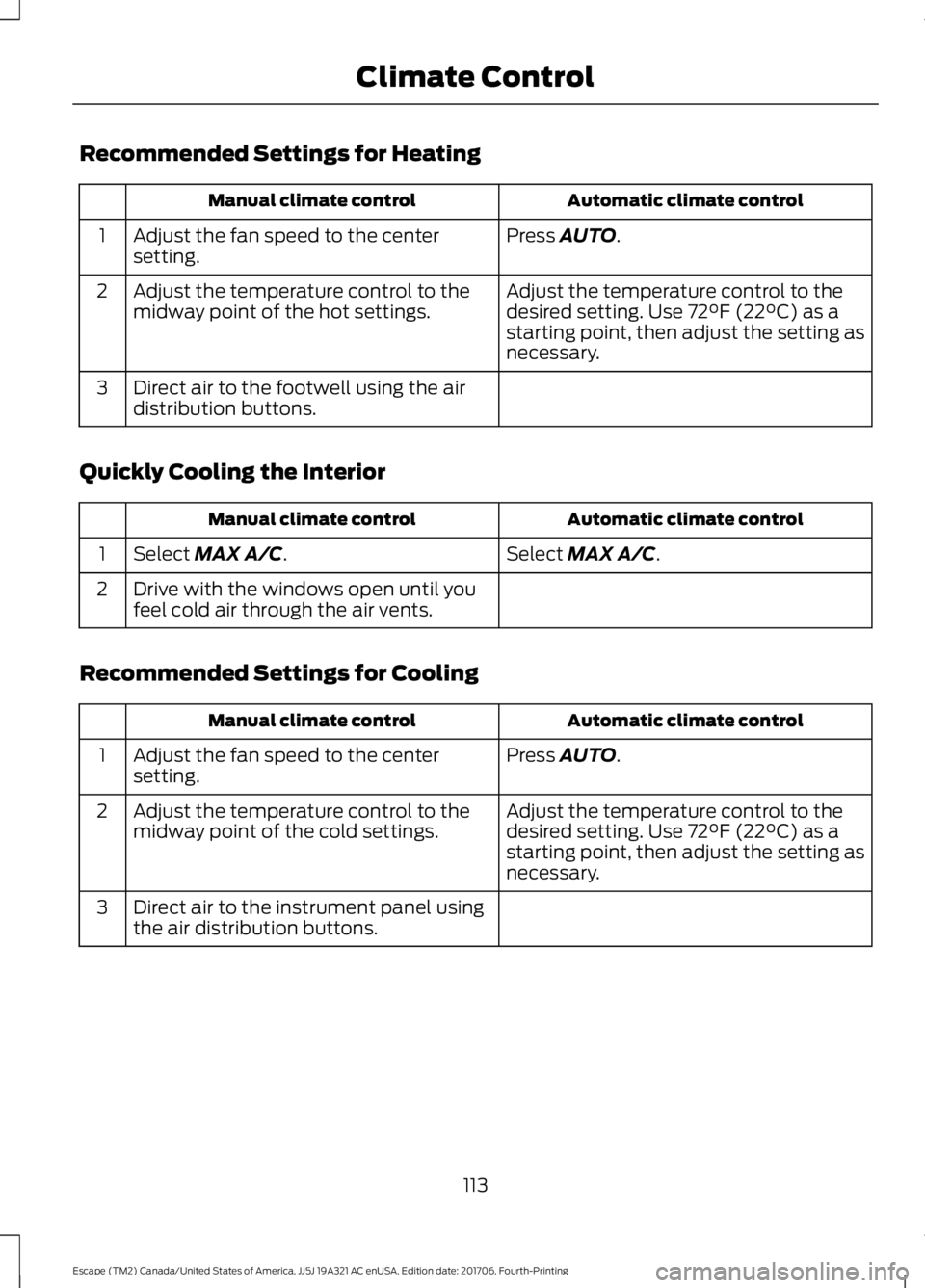
Recommended Settings for Heating
Automatic climate control
Manual climate control
Press AUTO.
Adjust the fan speed to the center
setting.
1
Adjust the temperature control to the
desired setting. Use
72°F (22°C) as a
starting point, then adjust the setting as
necessary.
Adjust the temperature control to the
midway point of the hot settings.
2
Direct air to the footwell using the air
distribution buttons.
3
Quickly Cooling the Interior Automatic climate control
Manual climate control
Select
MAX A/C.
Select MAX A/C.
1
Drive with the windows open until you
feel cold air through the air vents.
2
Recommended Settings for Cooling Automatic climate control
Manual climate control
Press
AUTO.
Adjust the fan speed to the center
setting.
1
Adjust the temperature control to the
desired setting. Use
72°F (22°C) as a
starting point, then adjust the setting as
necessary.
Adjust the temperature control to the
midway point of the cold settings.
2
Direct air to the instrument panel using
the air distribution buttons.
3
113
Escape (TM2) Canada/United States of America, JJ5J 19A321 AC enUSA, Edition date: 201706, Fourth-Printing Climate Control
Page 117 of 517

Defogging the Side Windows in Cold Weather
Automatic climate control
Manual climate control
Press the defrost button.
Direct air to the windshield using the air
distribution buttons.
1
Adjust the temperature control to the
desired setting. Use 72°F (22°C) as a
starting point, then adjust the setting as
necessary.
Press A/C.
2
Adjust the temperature control to the
desired setting.
3
Adjust the fan speed to the highest
setting.
4
HEATED WINDOWS AND
MIRRORS
Note: Make sure the vehicle is running
before operating the heated windows.
Heated Rear Window Press the button to clear the
heated rear window of thin ice
and fog. The heated rear
window automatically turns off after a
short period of time. Press the button
again to switch it off.
Note: Do not use razor blades or other
sharp objects to clean or remove decals
from the inside of the heated rear window.
The vehicle warranty does not cover
damage caused to the heated rear window
grid lines.
Heated Exterior Mirrors
(If Equipped)
When you switch the heated rear window
on, the heated exterior mirrors
automatically turn on. Note:
Do not remove ice from the mirrors
with a scraper or adjust the mirror glass
when it is frozen in place.
Note: Do not clean the mirror housing or
glass with harsh abrasives, fuel or other
petroleum-based cleaning products.
Windshield Wiper De-icer
(If Equipped)
When you switch the heated rear window
on, the windshield wiper de-icer
automatically turns on.
CABIN AIR FILTER
Your vehicle is equipped with a cabin air
filter, which gives you and your passengers
the following benefits:
• It improves your driving comfort by
reducing particle concentration.
• It improves the interior compartment
cleanliness.
• It protects the climate control
components from particle deposits.
You can locate the cabin air filter behind
the glove box.
114
Escape (TM2) Canada/United States of America, JJ5J 19A321 AC enUSA, Edition date: 201706, Fourth-Printing Climate ControlE72507
Page 118 of 517

Note:
Make sure you have a cabin air filter
installed at all times. This prevents foreign
objects from entering the system. Running
the system without a filter in place could
result in degradation or damage to the
system.
Replace the filter at regular intervals. See
Scheduled Maintenance (page 455).
For additional cabin air filter information,
or to replace the filter, see an authorized
dealer.
REMOTE START
(If Equipped)
The system adjusts the interior
temperature depending on your chosen
settings during remote start.
You cannot adjust the climate control
setting during remote start operation.
When you switch the ignition on, the
climate control system returns to the
previous settings. You can now make
adjustments.
You need to switch on certain
vehicle-dependent features, such as:
• Heated seats.
• Heated steering wheel.
• Heated mirrors.
• Heated rear window.
You can adjust the default remote start
settings using the information display
controls.
Automatic Settings
You can set the system to operate in AUTO
mode through the information display. The
system sets the interior temperature to
72°F (22°C)
.
In hot weather, the system is set to
72°F
(22°C). The cooled seats are set to high
(if available, and selected to AUTO in the
information display). In cold weather, the system is set to
72°F
(22°C). The heated rear window and
heated mirrors automatically turn on.
Previous Settings
You can set the system to operate using
your previous settings prior to switching
the vehicle off through the information
display. See Information Displays (page
93
).
115
Escape (TM2) Canada/United States of America, JJ5J 19A321 AC enUSA, Edition date: 201706, Fourth-Printing Climate Control