Page 78 of 557

2. Open the center console lid. With the
buttons facing upward and the unlock
button facing the front of your vehicle,
place the first intelligent access key
into the backup slot.
3. Press the push button ignition switch.
4. Wait five seconds and then press the push button ignition switch again.
5. Remove the intelligent access key.
6. Within 10 seconds, place a second programmed intelligent access key in
the backup slot and press the push
button ignition switch.
7. Wait five seconds and then press the push button ignition switch again.
8. Remove the intelligent access key. 9. Wait five seconds, then place the
unprogrammed intelligent access key
in the backup slot and press the push
button ignition switch.
Programming is now complete. Check that
the remote control functions operate and
your vehicle starts with the new intelligent
access key.
If programming was unsuccessful, wait 10
seconds and repeat steps 1 through 7. If it
still does not work, take your vehicle to an
authorized dealer.
ANTI-THEFT ALARM
The system will warn you of an
unauthorized entry to your vehicle. It will
be triggered if any door, the luggage
compartment or the hood is opened
without using the key, remote control or
keyless entry keypad.
The direction indicators will flash and the
horn will sound if unauthorized entry is
attempted while the alarm is armed.
Take all remote controls to an authorized
dealer if there is any potential alarm
problem with your vehicle.
Arming the Alarm
The alarm is ready to arm when there is
not a key in your vehicle. Electronically lock
your vehicle to arm the alarm.
Disarming the Alarm
Disarm the alarm by any of the following
actions:
75
Edge (CDQ) Canada/United States of America, enUSA, Edition date: 201706, Third-Printing- SecurityE260239
Page 79 of 557
•
Unlock the doors or luggage
compartment with the remote control
or keyless entry keypad.
• Switch your vehicle on or start your
vehicle.
• Use a key in the driver door to unlock
your vehicle, then switch your vehicle
on within 12 seconds.
Note: Pressing the panic button on the
remote control will stop the horn and signal
indicators, but will not disarm the system.
76
Edge (CDQ) Canada/United States of America, enUSA, Edition date: 201706, Third-Printing- Security
Page 90 of 557

Press repeatedly or press and
hold to dim.
A
Press repeatedly or press and
hold to brighten.
B
HEADLAMP EXIT DELAY
After you switch the ignition off, you can
switch the headlamps on by pulling the
direction indicator lever toward you. You
will hear a short tone. The headlamps will
switch off automatically after three
minutes with any door open or 30 seconds
after the last door has been closed. You
can cancel this feature by pulling the
direction indicator toward you again or
switching the ignition on.
DAYTIME RUNNING LAMPS (If
Equipped) WARNING:
The daytime running
lamps system does not activate the rear
lamps and may not provide adequate
lighting during low visibility driving
conditions. Make sure you switch the
headlamps on, as appropriate, during all
low visibility conditions. Failure to do so
may result in a crash. Type One - Conventional (Non-
Configurable)
The daytime running lamps turn on when:
1. Switching the ignition on.
2. The transmission is not in park (P) for
vehicles with automatic transmissions,
or releasing the parking brake for
vehicles with manual transmissions.
3. The lighting control is in the off, parking
lamp or autolamps positions.
4. The headlamps are off.
Type Two - Configurable
Switch the daytime running lamps on or
off using the information display. See
Information Displays
(page 104).
The daytime running lamps turn on when:
1. The lamps are on in the information display.
2. Switching the ignition on.
3. The transmission is not in park (P) for vehicles with automatic transmissions,
or releasing the parking brake for
vehicles with manual transmissions.
4. The lighting control is in the autolamps
position.
5. The headlamps are off.
The other lighting control switch positions
do not turn on the daytime running lamps.
If the daytime running lamps are off in the
information display, the lamps stay off in
all switch positions.
87
Edge (CDQ) Canada/United States of America, enUSA, Edition date: 201706, Third-Printing- LightingE165337AB
Page 92 of 557

Automatic High Beam Indicator (If
Equipped) The indicator lamp illuminates
to confirm when the system is
ready to assist.
DIRECTION INDICATORS Push the lever up or down to use the
direction indicators.
Note:
Tap the lever up or down to make the
direction indicators flash three times to
indicate a lane change.
INTERIOR LAMPS
The lamps turn on under the following
conditions:
• You open any door.
• You press a remote control button.
• You press the all lamps on button on
the front interior lamp.
Front Interior Lamp
Note: The front interior lamp switches are
on the overhead console. The exact location
of each button on the overhead console
depends upon your vehicle features. Note:
Press the button to switch the door
function off when you open any door. When
the door function is off and you open a door,
the courtesy and door lamps stay off. The
indicator lamp lights amber when the door
function is off.
Note: Press the button again to switch the
door function back on. When the door
function is on and you open a door, the
courtesy and door lamps turn on. The
indicator lamp lights blue when the door
function is on.
Type One All lamps on.
A
Door function.
B
All lamps off.
C
Individual dome lamps.
D
89
Edge (CDQ) Canada/United States of America, enUSA, Edition date: 201706, Third-Printing- Lighting E162681 E192153
DDCAB
Page 93 of 557
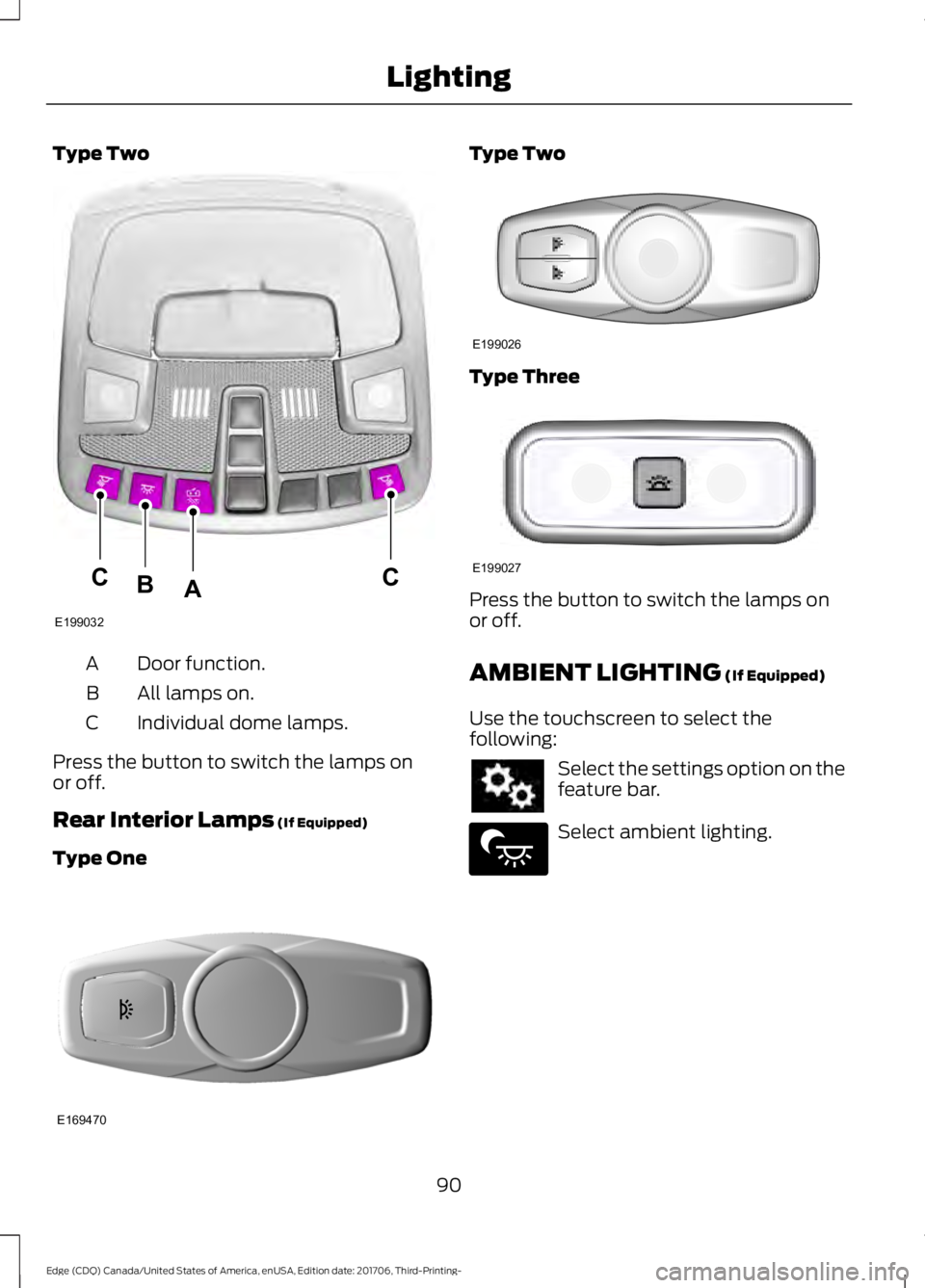
Type Two
Door function.
A
All lamps on.
B
Individual dome lamps.
C
Press the button to switch the lamps on
or off.
Rear Interior Lamps (If Equipped)
Type One Type Two
Type Three
Press the button to switch the lamps on
or off.
AMBIENT LIGHTING
(If Equipped)
Use the touchscreen to select the
following: Select the settings option on the
feature bar.
Select ambient lighting.
90
Edge (CDQ) Canada/United States of America, enUSA, Edition date: 201706, Third-Printing- LightingE199032
CCAB E169470 E199026 E199027 E279027
Page 96 of 557

Window Lock
Press the control to lock or unlock the rear
window controls. It illuminates when you
lock the rear window controls.
Accessory Delay
The window switches remain operational
for several minutes when you switch the
ignition off or until you open either front
door.
GLOBAL OPENING
You can use the remote control to open
the windows and vent the moonroof with
the ignition off.
Note:
You can enable or disable this feature
in the information display, or see an
authorized dealer. See General
Information (page 104).
Note: To operate this feature, accessory
delay must not be active. Remote Control Front Windows
You can open the windows for a short time
after you unlock your vehicle with the
remote control. After you unlock your
vehicle, press and hold the remote control
unlock button to open the windows.
Release the button once movement starts.
Press the lock or unlock button to stop
movement.
Moonroof
(If Equipped)
You can vent the moonroof after you
unlock your vehicle with the remote
control. After you unlock your vehicle, press
and hold the remote control unlock button
to vent the moonroof. Release the button
once movement starts. Press the lock or
unlock button to stop movement.
EXTERIOR MIRRORS
Power Exterior Mirrors WARNING: Do not adjust the mirrors
when your vehicle is moving. Left-hand mirror.
A
Adjustment control.
B
Right-hand mirror.
C
93
Edge (CDQ) Canada/United States of America, enUSA, Edition date: 201706, Third-Printing- Windows and MirrorsE144072 E144073
Page 97 of 557

To adjust your mirrors, switch your vehicle
on (with the ignition in accessory mode or
the engine running) and then:
1. Select the mirror you want to adjust.
The control lights.
2. Use the adjustment control to adjust the position of the mirror.
3. Press the mirror control again. The control light turns off.
Fold-Away Exterior Mirrors
Push the mirror toward the door window
glass. Make sure that you fully engage the
mirror in its support when returning it to its
original position.
Heated Exterior Mirrors (If Equipped)
See Heated Windows and Mirrors (page
138
).
Memory Mirrors
(If Equipped)
You can save and recall the mirror
positions through the memory function.
See
Memory Function (page 145).
Auto-dimming Feature
(If Equipped)
The driver exterior mirror automatically
dims when the interior auto-dimming
mirror turns on.
Direction Indicator Mirrors (If Equipped)
While the vehicle is running, the
forward-facing portion of the appropriate
mirror housing blinks when you switch on
the direction indicator.
Puddle Lamps
(If Equipped)
The lamps on the bottom part of the mirror
housing light when you use your
transmitter to unlock the doors or when
you open a door. Integrated Blind Spot Mirror
(If
Equipped) WARNING:
Objects in the blind spot
mirror are closer than they appear.
Blind spot mirrors have an integrated
convex mirror built into the upper outboard
corner of the exterior mirrors. They can
assist you by increasing visibility along the
side of your vehicle.
Check the main mirror first before a lane
change, then check the blind spot mirror.
If no vehicles are present in the blind spot
mirror and the traffic in the adjacent lane
is at a safe distance, signal that you are
going to change lanes. Glance over your
shoulder to verify traffic is clear, and
carefully change lanes. 94
Edge (CDQ) Canada/United States of America, enUSA, Edition date: 201706, Third-Printing- Windows and MirrorsA
B
C
E138665
Page 101 of 557

Engine Coolant Temperature
Gauge
Shows the temperature of the engine
coolant. At normal operating temperature,
the needle remains in the center section.
If the needle enters the red section, the
engine is overheating. Stop the engine,
switch the ignition off and determine the
cause once the engine has cooled down.
Note:
Do not restart the engine until the
cause of overheating has been resolved. WARNING: Do not remove the
coolant reservoir cap when the cooling
system is hot. Wait 10 minutes for the
cooling system to cool down. Cover the
coolant reservoir cap with a thick cloth to
prevent the possibility of scalding and
slowly remove the cap. Failure to follow
this instruction could result in personal
injury. Fuel Gauge
The fuel gauge indicates about how much
fuel is in the fuel tank.
The arrow adjacent to the fuel pump
symbol indicates on which side of your
vehicle the fuel filler door is located.
Note:
The fuel gauge may vary slightly
when your vehicle is moving or on a slope.
Low Fuel Reminder
A low fuel level reminder displays and
sounds when the distance to empty
reaches 75 mi (120 km) to empty for
MyKey, and at 50 mi (80 km), 25 mi
(40 km), 10 mi (20 km) and 0 mi (0 km)
for all vehicle keys.
Note: The low fuel reminder can appear at
different fuel gauge positions depending on
fuel economy conditions. This variation is
normal.
98
Edge (CDQ) Canada/United States of America, enUSA, Edition date: 201706, Third-Printing- Instrument Cluster