2018 FORD EDGE steering
[x] Cancel search: steeringPage 453 of 557

Action and Description
Menu Item
Item
You can also sort the calls by selecting the drop down
menu at the top of the screen. You can choose: Missed
Outgoing
Incoming
All
All of your contacts from your phone display in alphabet-
ical order.
Contacts
B
Selecting this button allows
you to choose a specific letter
to view.
A-Z Jump
Displays the name of your phone and takes you to the
phone settings options.
Phone
Settings
C
From this menu, you can pair subsequent devices, set ring
tones and alerts.
Gives you access to the list of paired or connected
Bluetooth devices allowing you to change or select a
device.
Change
Device
D
Displays all recent text messages.
Text
Messages
E
Use this keypad to dial in a phone number.
Phone
Keypad
F
Use the backspace button to delete numbers.
Press this button to begin a
call.
Call
Touch this button to reject all incoming calls automatic-
ally. Text message notifications do not display on the
screen. All ringtones and alerts are set to silent.
Do Not
Disturb
G
Users with phones having voice services
may see a button to access the feature.
For example, iPhone users see a Siri button.
A press and hold of the voice button on the
steering wheel also accesses this feature.
Making Calls
There are many ways to make calls from
the SYNC 3 system, including using voice
commands. See Using Voice
Recognition (page 427). You can use the
touchscreen to place calls as well.
450
Edge (CDQ) Canada/United States of America, enUSA, Edition date: 201706, Third-Printing- SYNC™ 3
(If Equipped)
Page 454 of 557

To call a number in your contacts,
select:
Action and Description
Menu Item
You can then select the
name of the contact you
want to call. Any numbers
stored for that contact
display along with any
stored contact photos. You
can then select the
number that you want to
call. The system begins the
call.
Contacts
To call a number from your recent calls,
select: Action and Description
Menu Item
You can then select an
entry that you want to call.
The system begins the call.
Recent Call
List
To call a number that is not stored in
your phone, select: Action and Description
Menu Item
Select the digits of the
number you wish to call.
Phone
Keypad
The system begins the call.
Call
Pressing the backspace button deletes the
last digit you typed.
Receiving Calls
During an incoming call, an audible tone
sounds. Caller information appears in the
display if it is available. To accept the call, select: Menu Item
Accept
Note: You can also accept the call by
pressing the phone button on the steering
wheel.
To reject the call, select: Menu Item
Reject
Note: You can also reject the call by
pressing the phone button on the steering
wheel.
Ignore the call by doing nothing. SYNC 3
logs it as a missed call.
During a Phone Call
During a phone call, the contacts name
and number display on the screen along
with the call duration.
The phone status items are also visible:
• Signal Strength.
• Battery.
• 911 Assist (United States and Canada
only). See Settings (page 464).
You can select any of the following during
an active phone call:
451
Edge (CDQ) Canada/United States of America, enUSA, Edition date: 201706, Third-Printing- SYNC™ 3
(If Equipped)
Page 455 of 557

Item
Immediately end a
phone call. You can
also press the
button on the
steering wheel.
End Call
Press this to access
the phone keypad.
Keypad
You can switch the
microphone off so
the caller does not
hear you.
Mute Item
Privacy Transfer the call to
the cell phone or
back to SYNC 3.
Text Messaging
Note: Downloading and sending text
messages using Bluetooth are cell
phone-dependent features.
Note: Certain features in text messaging
are speed-dependent and not available
when your vehicle is traveling at speeds over
3 mph (5 km/h).
Receiving a Text Message
When a new message arrives, an audible tone sounds and the screen displays a
pop-up with the caller name and ID, if supported by your cell phone. You can select: Action and Description
Menu Item
Have SYNC 3 read the message to you.
Hear It
View the text on the touchscreen.
View
To call the sender.
Call
You can select from 15 preset messages. Press the message
that you would like to use and confirm to send the message.
SYNC 3 confirms when the message is sent successfully.
Reply
To exit the screen.
Close
Smartphone Connectivity (If Equipped)
SYNC 3 allows you to use Apple CarPlay
and Android Auto to access your phone.
When you use Apple CarPlay or Android
Auto, you can:
• Make calls.
• Send and receive messages.
• Listen to music.
• Use your phone's voice assistant. Apple CarPlay and Android Auto disable
some SYNC 3 features.
Most Apple CarPlay and Android Auto
features use mobile data.
Apple CarPlay
Apple CarPlay requires an iPhone 5 or
newer with iOS 7.1 or newer. Updating to
the latest iOS version is recommended.
1. Plug your phone into a USB port. See
USB Port
(page 374).
452
Edge (CDQ) Canada/United States of America, enUSA, Edition date: 201706, Third-Printing- SYNC™ 3
(If Equipped)
Page 464 of 557

For restaurants, cityseeker can provide
information such as star rating, average
cost, review, handicap access, hours of
operation, and website address.
For hotels, cityseeker can provide
information such as star rating, price
category, review, check-in and checkout
times, hotel service icons and website
address. Hotel service icons include:
•
Restaurant
• Business center
• Handicap facilities
• Laundry
• Refrigerator
• 24 hour room service
• Fitness center
• Internet access
• Pool
• Wi-Fi
Attractions include nearby landmarks,
amusement parks, historic buildings and
more. cityseeker can provide information
such as star rating, reviews, hour of
operation and admission price.
SiriusXM Traffic and Travel Link (If
Equipped)
SiriusXM Traffic and Travel Link is available
on vehicles equipped with navigation and
only in select markets. You must activate
and subscribe to receive SiriusXM Traffic
and Travel Link information. It helps you
locate the best gas prices, find movie
listings, get current traffic alerts, view the
weather map, get accurate ski conditions
and see current sports scores. See Apps
(page 461). The system calculates a reasonable
efficient route based on available speed
limits, traffic, and road conditions. You may
know a local short cut that is more efficient
at a given time than the route provided by
SYNC 3, but you should expect a slight
difference in minutes or miles with the
SYNC 3 route.
Navigation Map Updates
Annual navigation map updates are
available for purchase through your
dealership, by calling 1-866-462-8837 in
the United States and Canada or
01-800-557-5539 in Mexico. You can also
visit:
Website
www.navigation.com/sync
You need to specify the make and model
of your vehicle to determine if there is an
update available.
HERE is the digital map provider for the
navigation application. If you find map data
errors, you may report them directly to
HERE by going to
www.here.com/mapcreator. HERE
evaluates all reported map errors and
responds with the result of their
investigation by e-mail.
Map coverage includes the USA (including
Puerto Rico and the US Virgin Islands),
Canada and Mexico.
APPS
The system enables voice, steering wheel,
and touch screen control of SYNC 3
AppLink enabled smartphone apps.
Once an app is running through AppLink,
you can control main features of the app
through voice commands and steering
wheel controls.
461
Edge (CDQ) Canada/United States of America, enUSA, Edition date: 201706, Third-Printing- SYNC™ 3
(If Equipped)
Page 502 of 557

Multi-Point Inspection
Hazard warning system operation
Accessory drive belt(s)
Horn operation
Battery performance
Radiator, cooler, heater and air conditioninghoses
Engine air filter
Suspension components for leaks ordamage
Exhaust system
Steering and linkage
Exterior lamps operation
Tires (including spare) for wear and properpressure2
Fluid levels 1
; fill if necessary
Windshield for cracks, chips or pits
For oil and fluid leaks
Washer spray and wiper operation
Half-shaft dust boots
1 Brake, coolant recovery reservoir, automatic transmission and window washer
2 If your vehicle is equipped with a temporary mobility kit, check the tire sealant expiration
Use By date on the canister. Replace as needed.
Be sure to ask your dealership service
advisor or technician about the multi-point
vehicle inspection. It is a comprehensive
way to perform a thorough inspection of
your vehicle. Your checklist gives you
immediate feedback on the overall
condition of your vehicle.
NORMAL SCHEDULED
MAINTENANCE
Intelligent Oil-Life Monitor™
Your vehicle is equipped with an Intelligent
Oil-Life Monitor that determines when you
should change the engine oil based on how
you use your vehicle. By using several
important factors in its calculations, the
monitor helps reduce the cost of owning
your vehicle and reduces environmental
waste at the same time. This means you do not have to remember
to change the oil on a mileage-based
schedule. Your vehicle lets you know when
an oil change is due by displaying a
message in the information display.
The following table provides examples of
vehicle use and its impact on oil change
intervals. It is a guideline only. Actual oil
change intervals depend on several factors
and generally decrease with severity of
use.
499
Edge (CDQ) Canada/United States of America, enUSA, Edition date: 201706, Third-Printing- Scheduled Maintenance
Page 503 of 557
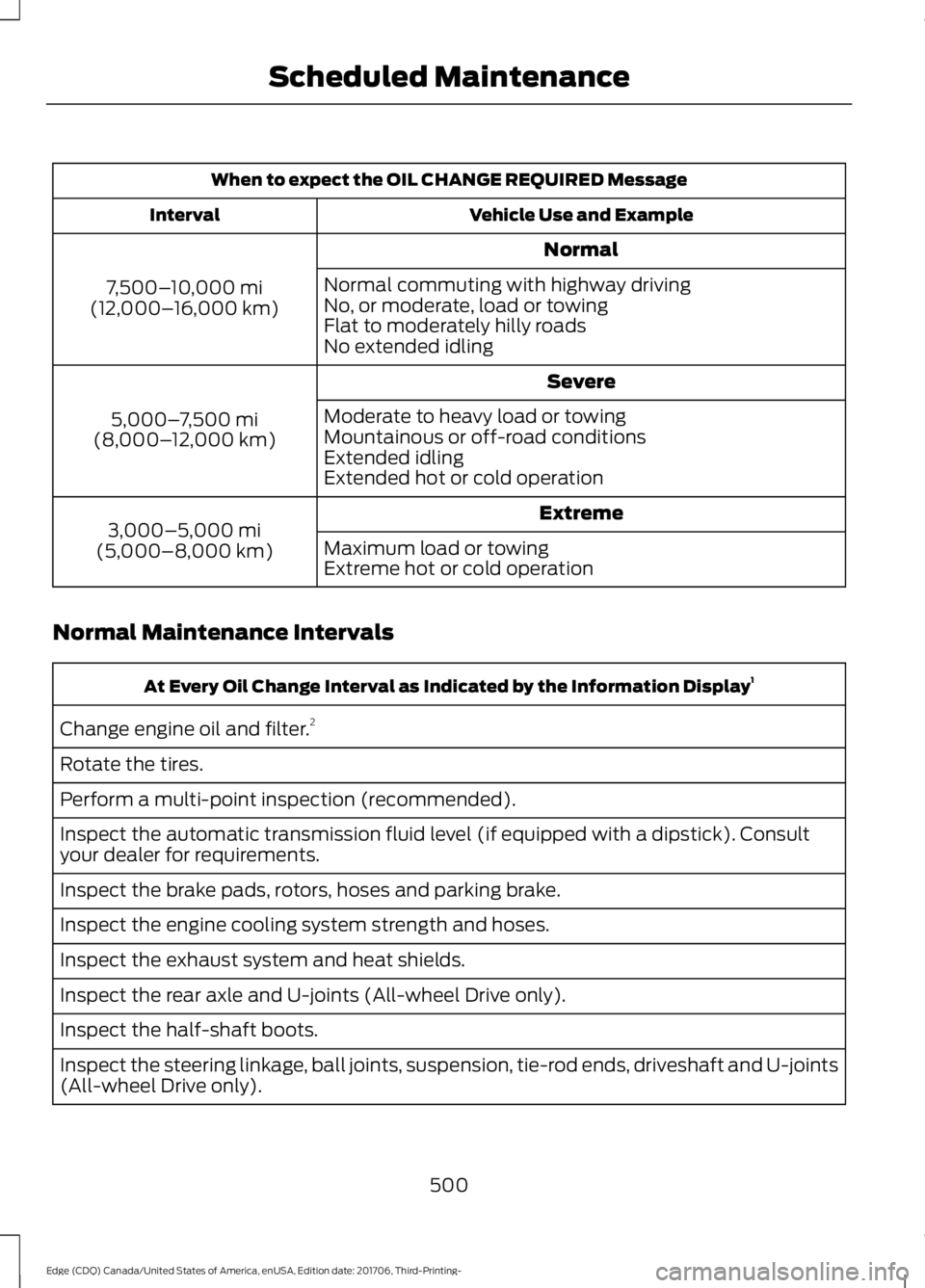
When to expect the OIL CHANGE REQUIRED Message
Vehicle Use and Example
Interval
Normal
7,500– 10,000 mi
(12,000– 16,000 km) Normal commuting with highway driving
No, or moderate, load or towing
Flat to moderately hilly roads
No extended idling
Severe
5,000– 7,500 mi
(8,000– 12,000 km) Moderate to heavy load or towing
Mountainous or off-road conditions
Extended idling
Extended hot or cold operation
Extreme
3,000–5,000 mi
(5,000–8,000 km) Maximum load or towing
Extreme hot or cold operation
Normal Maintenance Intervals At Every Oil Change Interval as Indicated by the Information Display
1
Change engine oil and filter. 2
Rotate the tires.
Perform a multi-point inspection (recommended).
Inspect the automatic transmission fluid level (if equipped with a dipstick). Consult
your dealer for requirements.
Inspect the brake pads, rotors, hoses and parking brake.
Inspect the engine cooling system strength and hoses.
Inspect the exhaust system and heat shields.
Inspect the rear axle and U-joints (All-wheel Drive only).
Inspect the half-shaft boots.
Inspect the steering linkage, ball joints, suspension, tie-rod ends, driveshaft and U-joints
(All-wheel Drive only).
500
Edge (CDQ) Canada/United States of America, enUSA, Edition date: 201706, Third-Printing- Scheduled Maintenance
Page 546 of 557

1
180 Degree Camera....................................207
Camera Views.................................................... 208
Using the 180 degree camera system.............................................................. 208
A
A/C See: Climate Control......................................... 128
About This Manual
...........................................7
ABS See: Brakes........................................................... 186
ABS driving hints See: Hints on Driving With Anti-Lock
Brakes................................................................. 187
Accessories....................................................492 Exterior Style....................................................... 492
Interior Style........................................................ 492
Lifestyle................................................................. 492
Peace of Mind..................................................... 492
Accessories See: Replacement Parts
Recommendation............................................ 12
ACC See: Using Adaptive Cruise Control.............210
Active Park Assist.........................................198 Using Active Park Assist.................................. 199
Adjusting the Headlamps........................289 Vertical Aim Adjustment................................ 289
Adjusting the Steering Wheel - Vehicles With: Manual Adjustable Steering
Column .............................................................
77
Adjusting the Steering Wheel - Vehicles With: Power Adjustable Steering
Column .............................................................
77
End of Travel Position......................................... 78
Memory Feature.................................................... 78
Airbag Disposal..............................................50
Air Conditioning See: Climate Control......................................... 128
Air Filter See: Changing the Engine Air Filter.............295
Alarm See: Anti-Theft Alarm......................................... 75
All-Wheel Drive
..............................................181 Ambient Lighting...........................................90
Adjusting the Brightness.................................... 91
Changing the Color............................................... 91
Switching Ambient Lighting Off...................... 91
Switching Ambient Lighting On....................... 91
Anti-Theft Alarm............................................75 Arming the Alarm................................................. 75
Disarming the Alarm........................................... 75
Appendices.....................................................514
Apps..................................................................461 ........................................................................\
........... 461
SiriusXM Traffic and Travel Link...................463
At a Glance........................................................15
Audible Warnings and Indicators...........103 Headlamps On Warning Chime....................103
Key in Ignition Warning Chime.......................103
Keyless Warning Alert....................................... 103
Parking Brake On Warning Chime................103
Audio Control...................................................78 Type One.................................................................. 79
Type Two................................................................. 79
Audio System
...............................................360
General Information......................................... 360
Audio Unit - Vehicles With: AM/FM/CD/ SYNC/Touchscreen Display
.................366
Audio Unit - Vehicles With: AM/FM/CD/ SYNC..............................................................361
Menu Structure................................................... 363
Audio Unit - Vehicles With: Sony Audio System
..........................................................367
Autolamps........................................................86
Windshield Wiper Activated
Headlamps........................................................ 86
Automatic Climate Control - Vehicles With: AM/FM/CD/SYNC/Touchscreen
Display/Dual Automatic Temperature
Control (DATC)...........................................129
Automatic Climate Control - Vehicles With: AM/FM/CD/SYNC.........................133
Automatic Climate Control - Vehicles With: Sony Audio System
........................131
Automatic High Beam Control.................88 Automatic High Beam Indicator....................89
Switching the System On and Off................88
Automatic Transmission
.............................177
Automatic Transmission Adaptive
Learning............................................................ 180
Brake-Shift Interlock.......................................... 179
543
Edge (CDQ) Canada/United States of America, enUSA, Edition date: 201706, Third-Printing- Index
Page 548 of 557

Child Safety........................................................17
General Information............................................. 17
Child Safety Locks.........................................30 Left-Hand Side....................................................... 31
Right-Hand Side.................................................... 31
Cleaning Leather Seats
............................300
Cleaning Products.......................................296
Materials............................................................... 296
Cleaning the Engine...................................298
Cleaning the Exterior..................................296 Cleaning the Headlamps................................ 297
Exterior Chrome Parts...................................... 297
Exterior Plastic Parts......................................... 297
Stripes or Graphics............................................ 297
Underbody............................................................ 297
Under Hood.......................................................... 297
Cleaning the Instrument Panel and Instrument Cluster Lens........................299
Cleaning the Interior...................................299 Mirrors.................................................................... 299
Cleaning the Wheels...................................301
Cleaning the Windows and Wiper Blades
...........................................................298
Clearing All MyKeys.......................................59
Climate............................................................444
Climate Control
.............................................128
Climate Controlled Seats..........................149 Cooled Seats........................................................ 149
Cold Weather Precautions.......................246
Coolant Check See: Engine Coolant Check............................ 279
Crash Sensors and Airbag Indicator.......49
Creating a MyKey
...........................................58
Programming and Changing Configurable
Settings............................................................... 58
Cross Traffic Alert
........................................223
Blocked Sensors................................................. 225
Switching the System Off and On...............225
System Errors...................................................... 225
System Lights, Messages and Audible Alerts.................................................................. 225
System Limitations........................................... 225
Using the Cross Traffic Alert System..........223
Cruise Control
.................................................80
Principle of Operation..................................... 209
Type One................................................................. 80
Type Two................................................................ 80Cruise control
See: Using Cruise Control.............................. 209
Customer Assistance
.................................253
D
Data Recording
..................................................9
Event Data Recording.......................................... 10
Service Data Recording........................................ 9
Daytime Running Lamps
.............................87
Type One - Conventional
(Non-Configurable)........................................ 87
Type Two - Configurable................................... 87
Digital Radio
..................................................369
HD Radio Reception and Station
Troubleshooting............................................ 370
Direction Indicators
.......................................89
Doors and Locks.............................................63
Drive Control
.................................................230
Adaptive Steering.............................................. 230
Driver Alert
......................................................216
PRINCIPLE OF OPERATION........................... 216
USING DRIVER ALERT...................................... 216
Driver and Passenger Airbags....................43 Children and Airbags.......................................... 44
Proper Driver and Front Passenger Seating Adjustment........................................................ 43
Driver and Passenger Knee Airbags.........47
Driving Aids
.....................................................216
Driving Hints..................................................246
Driving Through Water...............................246
DRL See: Daytime Running Lamps......................... 87
E
Economical Driving
.....................................246
Electric Parking Brake.................................187 Applying the Electric Parking brake.............187
Battery With No Charge................................... 189
Releasing the Electric Parking Brake..........188
Electromagnetic Compatibility...............514
Emission Law
..................................................173
Noise Emissions Warranty, Prohibited
Tampering Acts and Maintenance..........174
Tampering With a Noise Control System............................................................... 173
545
Edge (CDQ) Canada/United States of America, enUSA, Edition date: 201706, Third-Printing- Index