2018 FORD E-450 fuel pressure
[x] Cancel search: fuel pressurePage 145 of 323

Only use oils certified for gasoline engines
by the American Petroleum Institute (API).
An oil with this trademark symbol
conforms to the current engine and
emission system protection standards and
fuel economy requirements of the
International Lubricants Specification
Advisory Committee (ILSAC).
To top up the engine oil level do the
following:
1. Clean the area surrounding the engine
oil filler cap before you remove it.
2. Remove the engine oil filler cap. See Under Hood Overview (page 139).
Turn it counterclockwise and remove
it.
3. Add engine oil that meets Ford specifications. See
Capacities and
Specifications (page 199). You may
have to use a funnel to pour the engine
oil into the opening.
4. Recheck the oil level.
5. If the oil level is correct, replace the dipstick and make sure it is fully seated.
6. Replace the engine oil filler cap. Turn it clockwise until you feel a strong
resistance.
Note: Do not add oil further than the
maximum mark. Oil levels above the
maximum mark may cause engine damage.
Note: Make sure you install the oil filler cap
correctly.
Note: Soak up any spillage with an
absorbent cloth immediately.
OIL CHANGE INDICATOR
RESET
(If Equipped)
Resetting the Oil Life Monitoring
System
Only reset the oil life monitoring system
after changing the engine oil and oil filter. To reset the oil life monitoring system do
the following:
1.
Switch the ignition on. Do not start the
engine.
2. Fully press the accelerator and brake pedals at the same time.
3. Keep the accelerator and brake pedals
fully pressed.
4. After three seconds, a message displays confirming the reset procedure
is in progress.
5. After 25 seconds, a message displays confirming the reset procedure is
complete.
6. Release the accelerator and brake pedals.
7. Switch the ignition off.
ENGINE COOLANT CHECK WARNINGS
Never remove the coolant reservoir
cap when the engine is running or
hot.
Do not put coolant in the windshield
washer reservoir. If sprayed on the
windshield, coolant could make it
difficult to see through the windshield. To reduce the risk of personal injury,
make sure the engine is cool before
unscrewing the coolant pressure
relief cap. The cooling system is under
pressure. Steam and hot liquid can come
out forcefully when you loosen the cap
slightly. Do not add coolant further than the
MAX mark.
When the engine is cold, check the
concentration and level of the coolant at
the intervals listed in the scheduled
maintenance information. See Scheduled
Maintenance
(page 270).
142
E-Series (TE4) Canada/United States of America, enUSA, Edition date: 201712, Second Printing Maintenance
Page 154 of 323
CHANGING THE 12V BATTERY
WARNINGS
This vehicle may be fitted with more
than one battery, removal of cable
from only one battery does not
disconnect the vehicle electrical system.
Be sure to disconnect cables from all
batteries when disconnecting power.
Failure to do so may cause serious
personal injury or property damage. Batteries normally produce explosive
gases which can cause personal
injury. Therefore, do not allow
flames, sparks or lighted substances to
come near the battery. When working near
the battery, always shield your face and
protect your eyes. Always provide proper
ventilation. When lifting a plastic-cased battery,
excessive pressure on the end walls
could cause acid to flow through the
vent caps, resulting in personal injury
and/or damage to the vehicle or battery.
Lift the battery with a battery carrier or
with your hands on opposite corners. Keep batteries out of reach of
children. Batteries contain sulfuric
acid. Avoid contact with skin, eyes or
clothing. Shield your eyes when working
near the battery to protect against possible
splashing of acid solution. In case of acid
contact with skin or eyes, flush
immediately with water for a minimum of
15 minutes and get prompt medical
attention. If acid is swallowed, call a
physician immediately. Battery posts, terminals and related
accessories contain lead and lead
compounds. Wash hands after
handling. Note:
If your vehicle battery has a cover,
make sure it is reinstalled after the battery
has been cleaned or replaced. Note:
Electrical or electronic accessories
or components added to the vehicle by the
dealer or the owner may adversely affect
battery performance and durability.
Your vehicle is fitted with a Motorcraft®
maintenance-free battery which normally
does not require additional water during
its life of service.
For longer, trouble-free operation, keep the
top of the battery clean and dry. Also,
make certain the battery cables are always
tightly fastened to the battery terminals.
If you see any corrosion on the battery or
terminals, remove the cables from the
terminals and clean with a wire brush. You
can neutralize the acid with a solution of
baking soda and water.
Always dispose of automotive batteries in
a responsible manner. Follow your local
authorized standards for disposal. Call your
local authorized recycling center to find
out more about recycling automotive
batteries.
Reconnecting the Battery
Because your vehicle ’s engine is
electronically controlled by a computer,
some control conditions are maintained
by power from the battery. When the
battery is disconnected or a new battery
is installed, the engine must relearn its idle
and fuel trim strategy for optimum
driveability and performance. Flexible fuel
vehicles (FFV) must also relearn the
ethanol content of the fuel for optimum
driveability and performance.
To begin this process.
1. Switch off all accessories and start the
engine.
2. Run the engine until it reaches normal operating temperature.
3. Allow the engine to idle for at least one
minute.
151
E-Series (TE4) Canada/United States of America, enUSA, Edition date: 201712, Second Printing Maintenance
Page 163 of 323

•
Dry your vehicle with a chamois or soft
terry cloth towel to eliminate water
spotting.
• Immediately remove fuel spillages, bird
droppings, insect deposits and road tar.
These may cause damage to your
vehicle ’s paintwork or trim over time.
We recommend Motorcraft Bug and
Tar Remover.
• Remove any exterior accessories, for
example antennas, before entering a
car wash.
• When filling with AdBlue®, remove any
residue on painted surfaces
immediately.
Note: Suntan lotions and insect repellents
can damage painted surfaces. If these
substances come in contact with your
vehicle, wash the affected area as soon as
possible.
Cleaning the Headlamps
Note: Do not scrape the headlamp lenses
or use abrasives, alcoholic solvents or
chemical solvents to clean them.
Note: Do not wipe the headlamps when
they are dry.
Exterior Chrome Parts
• Apply a high quality-cleaning product
to bumpers and other chrome parts.
Follow the manufacturer ’s instructions.
We recommend Motorcraft Custom
Bright Metal Cleaner.
• Do not apply the cleaning product to
hot surfaces. Do not leave the cleaning
product on chrome surfaces longer
than the time recommended.
• Using non-recommended cleaners can
result in severe and permanent
cosmetic damage.
Note: Never use abrasive materials, for
example steel wool or plastic pads as they
can scratch the chrome surface. Note:
Do not use chrome cleaner, metal
cleaner or polish on wheels or wheel covers.
Exterior Plastic Parts
For routine cleaning we recommend
Motorcraft Detail Wash. If tar or grease
spots are present, we recommend
Motorcraft Bug and Tar Remover.
Stripes or Graphics (If Equipped)
Hand washing your vehicle is preferred
however, pressure washing may be used
under the following conditions:
• Do not use water pressure higher than
2,000 psi (14,000 kPa)
.
• Do not use water hotter than
179°F
(82°C).
• Use a spray with a
40° wide spray
angle pattern.
• Keep the nozzle at a
12 in (305 mm)
distance and 90° angle to your
vehicle's surface.
Note: Holding the pressure washer nozzle
at an angle to the vehicle's surface may
damage graphics and cause the edges to
peel away from the vehicle's surface.
Underbody
Regularly clean the underside of your
vehicle using water. Keep body and door
drain holes free of debris or foreign
material.
Under Hood
For removing black rubber marks from
under the hood we recommend Motorcraft
Wheel and Tire Cleaner or Motorcraft Bug
and Tar Remover.
160
E-Series (TE4) Canada/United States of America, enUSA, Edition date: 201712, Second Printing Vehicle Care
Page 185 of 323

WARNINGS
Always inflate steel carcass
tires with a remote air fill with
the person inflating standing at a
minimum of 12 ft (3.66 m) away
from the wheel and tire assembly. When inflating the tire for
mounting pressures up to
20 psi (1.38 bar)
greater than the
maximum pressure on the tire
sidewall, the following
precautions must be taken to
protect the person mounting the
tire: •
Make sure that you have the
correct tire and wheel size.
• Lubricate the tire bead and
wheel bead seat area again.
• Stand at a minimum of
12 ft
(3.6 m) away from the wheel
and tire assembly.
• Use both eye and ear
protection.
Important: Remember to replace
the wheel valve stems when the
road tires are replaced on your
vehicle
The two front tires or two rear tires
should generally be replaced as a
pair.
The tire pressure sensors mounted
in the wheels are not designed to
be used in aftermarket wheels. The use of wheels or tires not
recommended by Ford Motor
Company may affect the
operation of your tire pressure
monitoring system.
If the tire pressure monitoring
system indicator is flashing, the
system is malfunctioning. Your
replacement tire might be
incompatible with your tire
pressure monitoring system, or
some component of the system
may be damaged.
Replacing a Tire That is
Greenhouse Gas Certified
The tires installed on this vehicle
at the factory as original
equipment are certified for
Greenhouse Gas and Fuel
Efficiency regulations.
Replacement tires must be of
equal or lower rolling resistance
level (TRRL or Crr). Consult with
your tire supplier(s) for
appropriate replacement tires.
Safety Practices
WARNINGS
If your vehicle is stuck in
snow, mud or sand, do not
rapidly spin the tires; spinning the
tires can tear the tire and cause
an explosion. A tire can explode in
as little as three to five seconds. Do not spin the wheels at
over
34 mph (55 km/h). The
tires may fail and injure a
passenger or bystander. 182
E-Series (TE4) Canada/United States of America, enUSA, Edition date: 201712, Second Printing Wheels and Tires
Page 188 of 323
If your vehicle is equipped with
dual rear wheels it is
recommended that the front and
rear tires (in pairs) be rotated only
side to side. We do not
recommend splitting up the dual
rear wheels. Rotate them side to
side as a set. After tire rotation,
inflation pressures must be
adjusted for the tires new
positions in accordance with
vehicle requirements.
USING SNOW CHAINS
WARNING
Snow tires must be the same size,
load index, and speed rating as those
originally provided by Ford. Use of
any tire or wheel not recommended by
Ford can affect the safety and
performance of your vehicle, which could
result in an increased risk of loss of vehicle
control, vehicle rollover, personal injury,
and death. Additionally, the use of
non-recommended tires and wheels could
cause steering, suspension, axle, transfer
case, or power transfer unit failure. It is also
strongly advised to follow the Ford
recommended tire inflation pressure found
on the Safety Compliance Certification
Label (affixed to either the door hinge
pillar, door-latch post, or the door edge
that meets the door-latch post, next to the
driver ’s seating position), or Tire Label
which is located on the B-Pillar or the edge
of the driver door. Failure to follow the tire
pressure recommendations can cause
uneven treadwear patterns and adversely
affect the way your vehicle handles. The tires on your vehicle have all-weather
treads to provide traction in rain and snow.
However, in some climates, you may need
to use snow tires and cables. If you need
to use cables, it is recommended that steel
wheels (of the same size and
specifications) be used, as cables may chip
aluminum wheels.
Note:
The suspension insulation and
bumpers help prevent vehicle damage. Do
not remove these components from your
vehicle when using snow tires and chains.
Follow these guidelines when using snow
tires and chains:
• If possible, avoid fully loading your
vehicle.
• Use only SAE Class S chains.
• Install chains securely, verifying that
the chains do not touch any wiring,
brake lines or fuel lines.
• Drive cautiously. If you hear the chains
rub or bang against your vehicle, stop
and retighten the chains. If this does
not work, remove the chains to prevent
damage to your vehicle.
• Remove the tire chains when they are
no longer needed. Do not use tire
chains on dry roads.
If you have any questions regarding snow
chains or cables, please contact your
authorized dealer.
185
E-Series (TE4) Canada/United States of America, enUSA, Edition date: 201712, Second Printing Wheels and Tires
Page 189 of 323

TIRE PRESSURE MONITORING
SYSTEM (If Equipped)
WARNING
The tire pressure monitoring system
is not a substitute for manually
checking tire pressures. You should
periodically check tire pressures using a
pressure gauge. Failure to correctly
maintain tire pressures could increase the
risk of tire failure, loss of control, vehicle
rollover and personal injury. Note:
You should only use tire sealants in
roadside emergencies as they may cause
damage to the tire pressure monitoring
system sensor.
Note: If the tire pressure monitoring system
sensor becomes damaged, it may not
function. Each tire, including the spare (if
provided), should be checked
monthly when cold and inflated
to the inflation pressure recommended by
the vehicle manufacturer on the vehicle
placard or tire inflation pressure label. (If
your vehicle has tires of a different size
than the size indicated on the vehicle
placard or tire inflation pressure label, you
should determine the proper tire inflation
pressure for those tires).
As an added safety feature, your vehicle
has been equipped with a Tire Pressure
Monitoring System (TPMS) that
illuminates a low tire pressure telltale
when one or more of your tires is
significantly under-inflated. Accordingly,
when the low tire pressure telltale
illuminates, you should stop and check
your tires as soon as possible, and inflate them to the proper pressure. Driving on a
significantly under-inflated tire causes the
tire to overheat and can lead to tire failure.
Under-inflation also reduces fuel efficiency
and tire tread life, and may affect the
vehicle
’s handling and stopping ability.
Please note that the TPMS is not a
substitute for proper tire maintenance, and
it is the driver ’s responsibility to maintain
correct tire pressure, even if under-inflation
has not reached the level to trigger
illumination of the TPMS low tire pressure
telltale.
Your vehicle has also been equipped with
a TPMS malfunction indicator to indicate
when the system is not operating properly.
The TPMS malfunction indicator is
combined with the low tire pressure
telltale. When the system detects a
malfunction, the telltale will flash for
approximately one minute and then remain
continuously illuminated. This sequence
will continue upon subsequent vehicle
start-ups as long as the malfunction exists.
When the malfunction indicator is
illuminated, the system may not be able
to detect or signal low tire pressure as
intended. TPMS malfunctions may occur
for a variety of reasons, including the
installation of replacement or alternate
tires or wheels on the vehicle that prevent
the TPMS from functioning properly.
Always check the TPMS malfunction
telltale after replacing one or more tires or
wheels on your vehicle to ensure that the
replacement or alternate tires and wheels
allow the TPMS to continue to function
properly.
This device complies with Part 15 of the
FCC Rules and with License exempt RSS
Standards of Industry Canada. Operation
is subject to the following two conditions:
1. This device may not cause harmful interference, and
186
E-Series (TE4) Canada/United States of America, enUSA, Edition date: 201712, Second Printing Wheels and Tires
Page 202 of 323
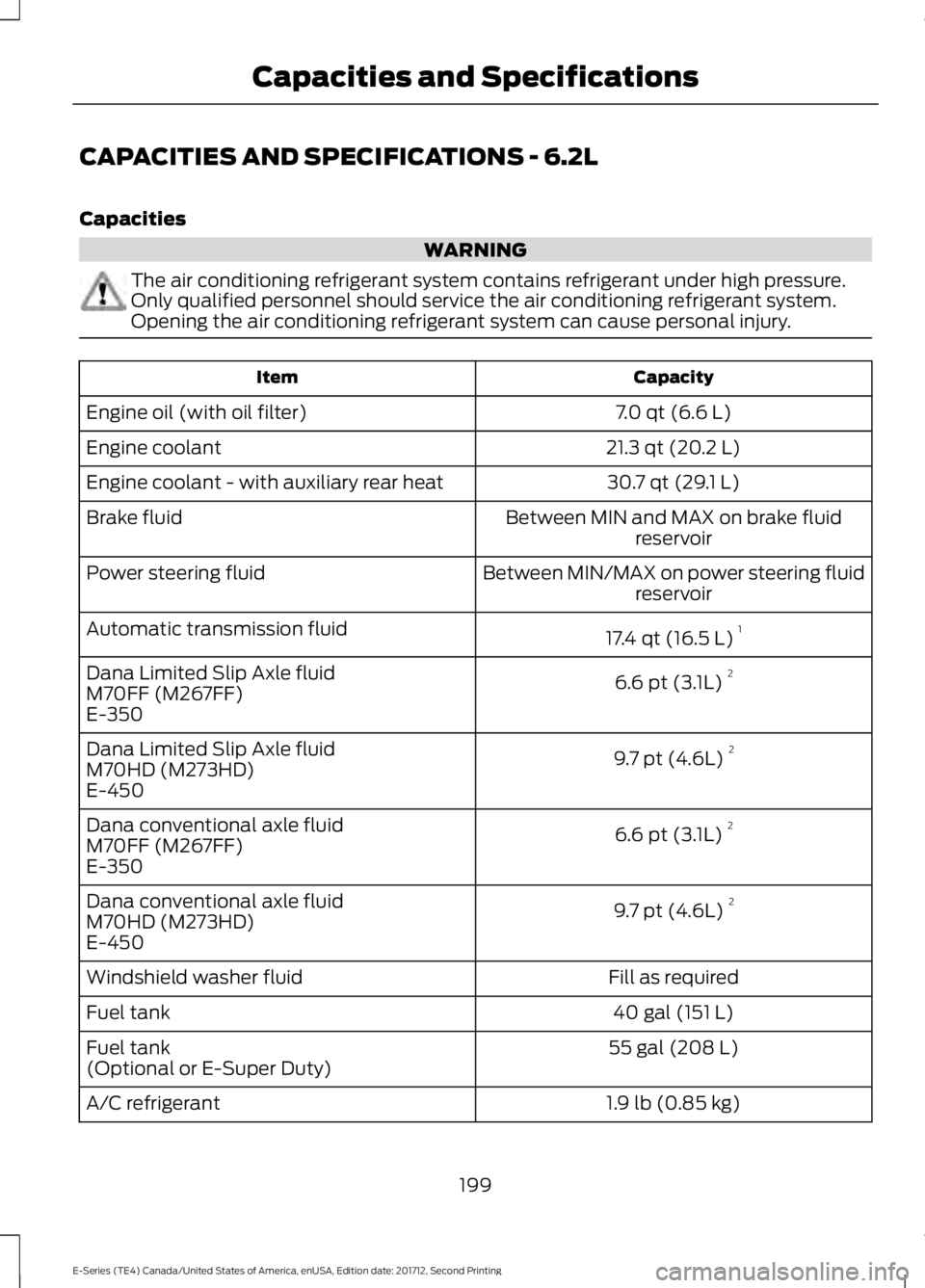
CAPACITIES AND SPECIFICATIONS - 6.2L
Capacities
WARNING
The air conditioning refrigerant system contains refrigerant under high pressure.
Only qualified personnel should service the air conditioning refrigerant system.
Opening the air conditioning refrigerant system can cause personal injury.
Capacity
Item
7.0 qt (6.6 L)
Engine oil (with oil filter)
21.3 qt (20.2 L)
Engine coolant
30.7 qt (29.1 L)
Engine coolant - with auxiliary rear heat
Between MIN and MAX on brake fluidreservoir
Brake fluid
Between MIN/MAX on power steering fluidreservoir
Power steering fluid
17.4 qt (16.5 L)1
Automatic transmission fluid
6.6 pt (3.1L) 2
Dana Limited Slip Axle fluid
M70FF (M267FF)
E-350
9.7 pt (4.6L) 2
Dana Limited Slip Axle fluid
M70HD (M273HD)
E-450
6.6 pt (3.1L) 2
Dana conventional axle fluid
M70FF (M267FF)
E-350
9.7 pt (4.6L) 2
Dana conventional axle fluid
M70HD (M273HD)
E-450
Fill as required
Windshield washer fluid
40 gal (151 L)
Fuel tank
55 gal (208 L)
Fuel tank
(Optional or E-Super Duty)
1.9 lb (0.85 kg)
A/C refrigerant
199
E-Series (TE4) Canada/United States of America, enUSA, Edition date: 201712, Second Printing Capacities and Specifications
Page 322 of 323

U
Under Hood Overview................................139
USB Port..........................................................218
Using Cruise Control.....................................95 Switching Cruise Control Off........................... 95
Switching Cruise Control On............................ 95
Using Snow Chains......................................185
Using SYNC™ With Your Media Player............................................................246
Accessing Your Play Menu............................... 251
Connecting Your Digital Media Player to the USB Port.......................................................... 246
Media Menu Features...................................... 249
Media Voice Commands................................ 248
System Settings................................................. 253
What's Playing?................................................. 248
Using SYNC™ With Your Phone............224 Accessing Features Through the Phone
Menu.................................................................. 228
Accessing Your Phone Settings.................... 233
Making a Call........................................................ 227
Pairing Subsequent Cell Phones.................225
Pairing Your Cell Phone for the First Time ........................................................................\
......224
Phone Options during an Active Call..........227
Phone Voice Commands................................ 225
Receiving Calls.................................................... 227
System Settings................................................. 234
Text Messaging.................................................... 231
Using Traction Control
.................................92
Switching the System Off ................................ 92
System Indicator Lights and Messages............................................................ 92
Using Voice Recognition.............................221 Initiating a Voice Session................................. 221
System Interaction and Feedback..............222
Utilizing the Mediation/Arbitration Program (Canada Only)
.........................125
V
Vehicle Care
....................................................159
General Information.......................................... 159
Vehicle Certification Label........................198
Vehicle Identification Number.................197
Vehicle Storage
.............................................164
Battery.................................................................... 164Body........................................................................\
164
Brakes..................................................................... 165
Cooling system.................................................... 164
Engine..................................................................... 164
Fuel system.......................................................... 164
General................................................................... 164
Miscellaneous...................................................... 165
Removing Vehicle From Storage.................. 165
Tires........................................................................\
. 165
Ventilation See: Climate Control.......................................... 64
VIN See: Vehicle Identification Number.............197
Voice Control
...................................................45
W
Warning Lamps and Indicators
.................52
Airbag Warning Lamp......................................... 53
Anti-Lock Brake System Warning Lamp.................................................................... 53
Anti-Theft System............................................... 53
Battery...................................................................... 53
Brake System Warning Lamp.......................... 53
Check Fuel Cap..................................................... 53
Cruise Control Indicator..................................... 53
Direction Indicator................................................ 53
Engine Coolant Temperature Warning Lamp.................................................................... 53
Engine Oil................................................................ 54
Fasten Seatbelt Warning Lamp...................... 54
Headlamp High Beam Indicator..................... 54
Low Fuel Level Warning Lamp........................ 54
Low Tire Pressure Warning Lamp.................. 54
Powertrain Malfunction/Electronic Throttle Control................................................................. 54
Service Engine Soon........................................... 54
Tow Haul Indicator............................................... 55
Traction Control System................................... 54
Traction Control System Off............................ 55
Washer Fluid Check.....................................150
Washers See: Cleaning the Exterior............................... 159
See: Wipers and Washers................................. 46
Waxing...............................................................161
Wheel Nuts See: Changing a Road Wheel........................ 189
319
E-Series (TE4) Canada/United States of America, enUSA, Edition date: 201712, Second Printing Index