“Browse” for a USB source, opens
browsing;
/: select previous/next
track;
: pause track being played;
"Audio": access to the "Audio
settings" screen.
Track selection
The “Tracks” function allows you to
open a window with the list of tracks
being played.
The choices available depend on the
device connected. For example, on a
USB device you can also scroll through
the list of artists, genres and albums
available on the device depending on
the information present on the tracks
using the BROWSE ENTER
button/knob or by means of the
andgraphic buttons.
Within each list, the "ABC" button
allows the user to skip to the desired
letter in the list.
NOTE This button might be disabled
for someApple®
devices.
NOTE The BROWSE ENTER button
does not allow any operation on an
AUX device (where provided).
This mode is activated by pairing a
Bluetooth®
device containing music
tracks with the system.To pair a
Bluetooth®
audio device,
proceed as follows:
activate theBluetooth®
function on
the device;
press the “Media” button on the
display;
press the "Select device" button;
select theBluetooth®
Media
source;
press the "Add device" button;
search forUconnect™on the
Bluetooth®
audio device (during the
pairing stage a screen is displayed
showing the progress of the operation);
when requested by the audio device,
enter the PIN code shown on the
system display or confirm on the device
the PIN displayed;
if the pairing procedure is completed
successfully, a screen is displayed.
Answer "Yes" to the question to pair the
Bluetooth®
audio device as favourite
(the device will have priority over all
other devices to be paired
subsequently). If "No" is selected, the
priority is determined according to the
order of connection. The last device
connected will have the highest priority;
an audio device can also be paired
by pressing the "Phone" graphic button
on the display and by selecting
"Settings" or, from the "Settings" menu,
selecting "Phone/Bluetooth".
IMPORTANT If theBluetooth®
connection between mobile phone and
system is lost, consult the mobile
phone handbook.
USB SOURCE
To activate the USB mode, insert the
corresponding USB device into the
USB port on the central console.
When a USB device is inserted with the
radio on, it starts to play the tracks on
the device if the “AutoPlay” is set to ON
in the “Audio” menu.
NOTE The Radio may change the track
being played by modifying the
name-device in the Bluetooth settings
of the phone (where provided), if the
device is connected via USB after the
Bluetooth connection.
IMPORTANT After using a USB
recharging socket, we recommend
disconnecting the device (smartphone),
always removing the cable from the
vehicle socket first, never from the
device fig. 234. Cables left flying or
connected incorrectly could
compromise correct recharging and/or
the USB socket condition.
267
Bluetooth SOURCEPAIRING A Bluetooth
AUDIO DEVICE®®
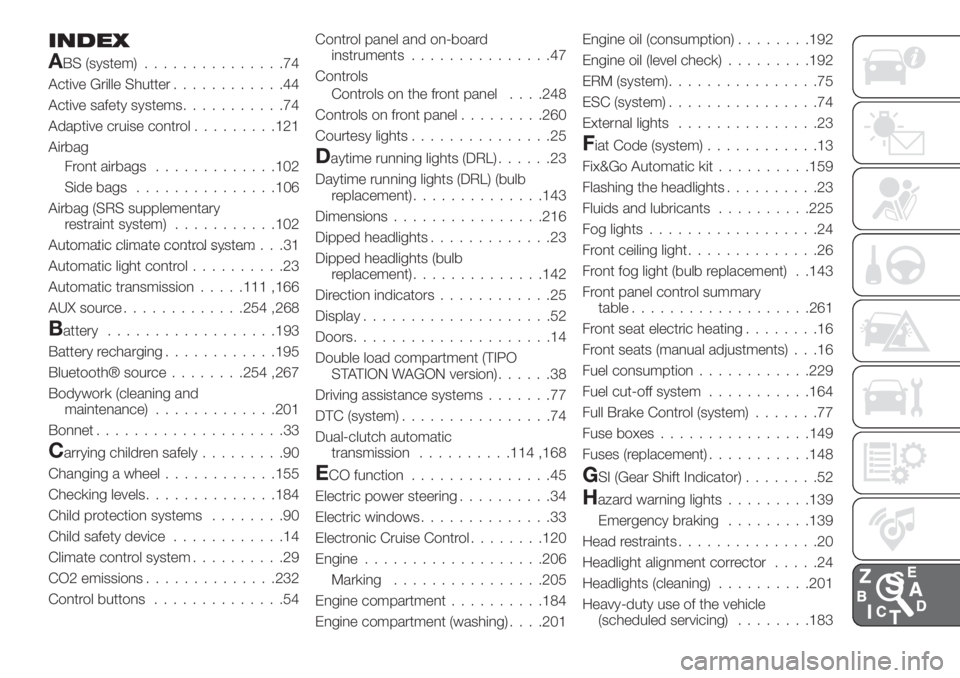
INDEX
ABS (system)...............74
Active Grille Shutter............44
Active safety systems...........74
Adaptive cruise control.........121
Airbag
Front airbags.............102
Side bags...............106
Airbag (SRS supplementary
restraint system)...........102
Automatic climate control system.......................31
Automatic light control..........23
Automatic transmission.....111 ,166
AUX source.............254 ,268
Battery..................193
Battery recharging............195
Bluetooth® source........254 ,267
Bodywork (cleaning and
maintenance).............201
Bonnet....................33
Carrying children safely.........90
Changing a wheel............155
Checking levels..............184
Child protection systems........90
Child safety device............14
Climate control system..........29
CO2 emissions..............232
Control buttons..............54Control panel and on-board
instruments...............47
Controls
Controls on the front panel. . . .248
Controls on front panel.........260
Courtesy lights...............25
Daytime running lights (DRL)......23
Daytime running lights (DRL) (bulb
replacement)..............143
Dimensions................216
Dipped headlights.............23
Dipped headlights (bulb
replacement)..............142
Direction indicators............25
Display....................52
Doors.....................14
Double load compartment (TIPO
STATION WAGON version)......38
Driving assistance systems.......77
DTC (system)................74
Dual-clutch automatic
transmission..........114 ,168
ECO function...............45
Electric power steering..........34
Electric windows..............33
Electronic Cruise Control........120
Engine...................206
................205
Engine compartment..........184
Engine compartment (washing). . . .201Engine oil (consumption)........192
Engine oil (level check).........192
ERM (system)................75
ESC (system)................74
External lights...............23
Fiat Code (system)............13
Fix&Go Automatic kit..........159
Flashing the headlights..........23
Fluids and lubricants..........225
Fog lights..................24
Front ceiling light..............26
Front fog light (bulb replacement) . .143
Front panel control summary
table...................261
Front seat electric heating........16
Front seats (manual adjustments) . . .16
Fuel consumption............229
Fuel cut-off system...........164
Full Brake Control (system).......77
Fuse boxes................149
Fuses (replacement)...........148
GSI (Gear Shift Indicator)........52
Hazard warning lights.........139
Emergency braking.........139
Head restraints...............20
Headlight alignment corrector.....24
Headlights (cleaning)..........201
Heavy-duty use of the vehicle
(scheduled servicing)........183
Marking
Scheduled Servicing Plan.......173
Screen wiper/washer...........27
Smart washing function.......27
Seat belts..................84
Seats.....................16
Servicing procedures..........196
Side bag..................106
Side direction indicators (bulb
replacement)..............143
Sideboards (TIPO STATION
WAGON version)............39
Snow chains...............200
Speed Limiter...............118
SRS (supplementary restraint
system).................102
Starting the engine...........109
Steering lock................13Steering wheel...............21
Steering wheel controls.........263
Stop/Start system............116
TC (system)................75
Technical data..............205
Third brake light (bulb
replacement)..............147
Toolbox...................36
Towing the vehicle............169
Towing trailers..............133
Trip Computer...............55
TSC (system)................76
Tyres (inflation pressure)........212
Uconnect™ 5” LIVE —
Uconnect™ 5” Nav LIVE......248
Uconnect™ 7" HD LIVE -
Uconnect™ 7" HD Nav LIVE. . . .260Uconnect™ Radio............238
Use of the Owner Handbook.......3
Vehicle changes/alterations.......4
Version with LPG system........41
Warning lights and messages.....56
Weights..................218
Wheels...................209
Wheels and tyres.............200
Window bag...............106
Windows (cleaning)...........201
Windscreen wiper
replacing blades...........197
Windscreen/rear window wiper....27
Xenon gas discharge main
beam/dipped beam headlights
(bulb replacement)..........145