Page 446 of 568

•Cover the vehicle with an appropriate cover taking care
not to damage the painted surface by dragging across
dirty surfaces. Do not use plastic sheeting which will not
allow the evaporation of moisture present on the surface
of the vehicle.
• Inflate the tires at a pressure of +7.25 psi (+0.5 bar)
higher than recommended on the tire placard and check
it periodically.
• Do not drain the engine cooling system.
•
Whenever you leave the vehicle is stationary for two weeks
or more, run idle the engine for approximately five minutes,
with the air conditioning system on and high fan speed.
This will ensure a proper lubrication of the system, thus
minimizing the possibility of damage to the compressor
when the vehicle is put back into operation.
CAUTION!
Before removal of the positive and negative terminals
to the battery, wait at least a minute with ignition
switch in the OFF position and close the driver ’s door.
When reconnecting the positive and negative terminals
to the battery be sure the ignition switch is in the OFF
position and the driver ’s door is closed.
Battery Storage Mode
With the ignition in the ON position, engine not running,
navigate to the battery gauge page on the instrument cluster
display, then press and hold the OK button. The vehicle will be
put into battery storage mode, which will greatly increase the
amount of time the vehicle can sit and restart without needing
to disconnect the battery. Going into battery storage mode will
increase the amount of time between starts to about 60 days.
NOTE: The key fob buttons will not work while the
vehicle is in battery storage mode, pulling the door handle
will wake the vehicle and allow it to recognize the key fob
to unlock the door.
BODYWORK
Protection From Atmospheric Agents
Vehicle body care requirements vary according to geographic
locations and usage. Chemicals that make roads passable in
snow and ice and those that are sprayed on trees and road
surfaces during other seasons are highly corrosive to the metal
in your vehicle. Outside parking, which exposes your vehicle
to airborne contaminants, road surfaces on which the vehicle
is operated, extreme hot or cold weather and other extreme
conditions will have an adverse effect on paint, metal trim,
and underbody protection.
444 SERVICING AND MAINTENANCE
Page 488 of 568
2. Select the following option from the menu:•Set Widget: Top Left
• Set Widget: Top Right
• Set Widget: Bottom Left
• Set Widget: Bottom Right
3. After selecting a Widget location: select the gauge or timer to display:
• Gauge: Oil Temp
• Gauge: Oil Pressure
• Gauge: Coolant Temp
• Gauge: Battery Voltage
• Gauge: Trans Temp
• Gauge: Boost Pressure
• Gauge: Air/Fuel Ratio — If Equipped
• Gauge: I/C Coolant Temp
• Gauge: Intake Air Temp
• Gauge: Engine Torque •
Gauge: Engine Power
• Gauge: G-Force
• Gauge: Steering Angle
• Gauge: Current Gear
• Gauge: Current Speed
• Timer: 0–60 MPH
• Timer: 0–100 MPH
• Timer: 1/8 Mile
• Timer: 1/4 Mile
• Timer: Brake Distance
• Timer: Reaction Time
NOTE: Pressing the “Camera” icon in the upper right
corner of the Performance Pages screen will take a screen-
shot of the current screen and save it to a USB that is
connected.
486 MULTIMEDIA
Page 492 of 568
•Coolant Temperature
Shows the actual coolant temperature.
• Battery Voltage
Shows the actual battery voltage.
• Trans Oil Temp
Shows the current transmission oil temperature.
• Intake Air Temperature
Shows the actual air intake temperature.
If a gauge is selected, the Gauge Detail View page will
appear on the screen. This page shows further information
on the selected gauge.
Pressing the left or right arrows will cycle through the
details for each gauge. Pressing the lower X button in the
top right corner will return to the gauge main menu.
Gauge Detail View Page
490 MULTIMEDIA
Page 506 of 568
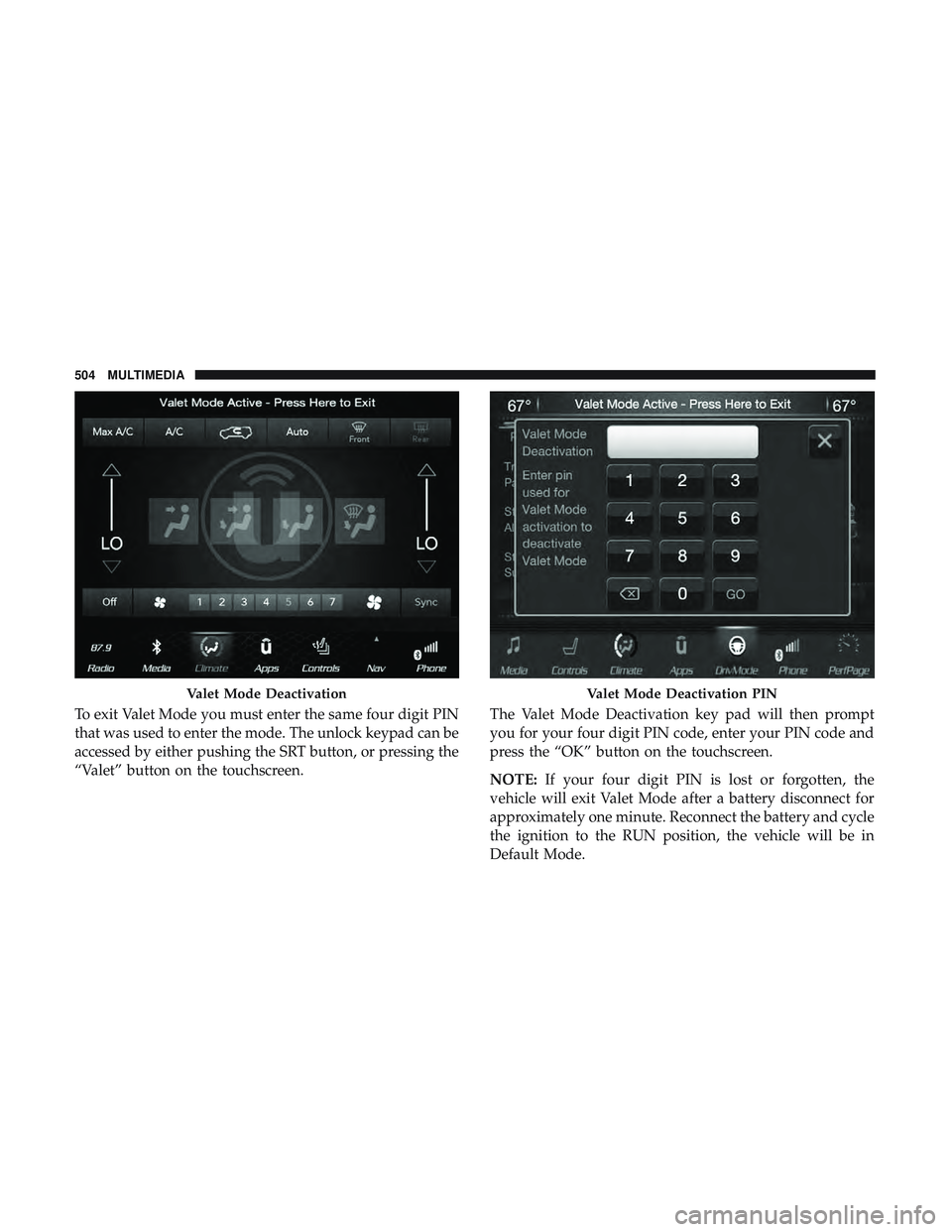
To exit Valet Mode you must enter the same four digit PIN
that was used to enter the mode. The unlock keypad can be
accessed by either pushing the SRT button, or pressing the
“Valet” button on the touchscreen.The Valet Mode Deactivation key pad will then prompt
you for your four digit PIN code, enter your PIN code and
press the “OK” button on the touchscreen.
NOTE:
If your four digit PIN is lost or forgotten, the
vehicle will exit Valet Mode after a battery disconnect for
approximately one minute. Reconnect the battery and cycle
the ignition to the RUN position, the vehicle will be in
Default Mode.
Valet Mode DeactivationValet Mode Deactivation PIN
504 MULTIMEDIA
Page 509 of 568

IPOD/USB/MP3 CONTROL — IF EQUIPPED
This feature allows an iPod or external USB device to be
plugged into the USB port, located in the lower section of
the front integrated center stack, in front of the rotary
transmission gear selector.
iPod control supports Mini, 4G, Photo, Nano, 5G iPod and
iPhone devices. Some iPod software versions may not fully
support the iPod control features. Please visit Apple’s
website for software updates.
For further information, refer to the Uconnect Owner ’s
Manual Supplement.
Connecting The iPod Or External USB Device
Use the connection cable to connect an iPod or external
USB device to the vehicles USB/AUX connector port which
is located in the center console.
The USB ports on the Media Hub are equipped with a
Smart Electronic Voltage Regulator (Smart Charge) feature.
This feature allows a device to charge for up to one hour
after the vehicle is powered off.Once the audio device is connected and synchronized to
the vehicles iPod/USB/MP3 control system (iPod or exter-
nal USB device may take a few minutes to connect), the
audio device starts charging and is ready for use.
NOTE:
If the audio device battery is completely dis-
charged, it may not communicate with the iPod/USB/MP3
control system until a minimum charge is attained. Leav-
ing the audio device connected to the iPod/USB/MP3
control system may charge it to the required level.
Integrated Center Console USB/AUX Media HUB
10
MULTIMEDIA 507
Page 510 of 568
Using This Feature
By using an iPod cable, or an external USB device to
connect to the USB port:
•The audio device can be played on the vehicle’s sound
system, providing metadata (artist, track title, album,
etc.) information on the radio display.
• The audio device can be controlled using the radio
buttons to Play, Browse, and List the iPod contents.
• The audio device battery charges when plugged into the
USB/AUX connector (if supported by the specific audio
device).
NOTE: For further information, refer to the Uconnect
Owner ’s Manual Supplement.
Second Row USB Charging Port
Second row USB connector ports can be used for charging
purposes only. Use the connection cable to connect an iPod
or external USB device to the vehicle’s USB charging ports
which are located either on the rear of the front center
console and/or in the second row center console.
Front Center Console Rear USB Ports
508 MULTIMEDIA
Page 521 of 568

Controls
The headphone power indicator and controls are located
on the right ear cup.
NOTE:The rear video system must be turned on before
sound can be heard from the headphones. To conserve
battery life, the headphones will automatically turn off
approximately three minutes after the rear video system is
turned off.
Changing the Audio Mode for Headphones
1. Ensure the Remote Control channel/screen selector switch is in the same position as the headphone selector
switch.
NOTE: •When both the headphone and the remote control
channel selector switches are on Channel 1, the Re-
mote is controlling Channel 1 and the headphones are
tuned to the audio on Channel 1.
• When both the headphone and the remote control
channel selector switches are on Channel 2, the Re-
mote is controlling Channel 2 and the headphones are
tuned to the audio on Channel 2. 2. Push the SOURCE button on the remote control.
3. Pushing the SOURCE button will advance to the next
mode.
4. When the Mode Selection menu appears on screen, use the cursor buttons on the remote control to navigate to
the available modes and push the OK button to select
the new mode.
5. To cancel out of the Mode Selection menu, push the BACK button on the remote control.
Replacing The Headphone Batteries
Each set of headphones requires two AAA batteries for
operation. To replace the batteries:
1. Locate the battery compartment on the left ear cup ofthe headphones, and then slide the battery cover down-
ward.
2. Replace the batteries, making sure to orient them ac- cording to the polarity diagram shown.
3. Replace the battery compartment cover.
10
MULTIMEDIA 519
Page 553 of 568

Anti-Lock Warning Light.....................159
Apple CarPlay ............................539
Arming System Security Alarm ...........................30
Assist, Hill Start .......................... .170
Audio Systems (Radio) .......................462
Auto Down Power Windows ...................98
Automatic Headlights ........................70
Automatic High Beams .......................70
Automatic Temperature Control (ATC) ............94
Automatic Transmission ..................257, 268
Adding Fluid ........................419, 458
Autostick ............................. .274
Fluid And Filter Change ...................419
Fluid Change .......................... .419
Fluid Level Check ........................418
Fluid Type ..........................418, 458
Gear Ranges ............................269
Special Additives ........................ .418
Automatic Transmission Limp Home Mode ........273
Autostick ............................... .274
Auxiliary Electrical Outlet (Power Outlet) .........122
Auxiliary Power Outlet ..................... .122
Axle Lubrication .......................... .458Battery
...............................153, 397
Charging System Light ....................153
Keyless Key Fob Replacement ................19
Belts, Seat ............................... .249
Blind Spot Monitoring .......................179
Body Mechanism Lubrication ..................405
B-Pillar Location .......................... .426
Brake Assist System ........................ .170
Brake Control System, Electronic ................169
Brake Fluid .......................... .417, 458
Brake System ..........................416, 451
Anti-Lock (ABS) ........................ .451
Fluid Check ........................ .417,458
Master
Cylinder ........................ .417
Parking ...............................264
Warning Light .......................... .151
Brake/Transmission Interlock ..................267
Bulb Replacement .......................358, 359
Bulbs, Light ............................. .251
Camera, Rear ............................ .330
Capacities, Fluid .......................... .456
Caps, Filler Oil (Engine) ..................... .395, 398, 399
Radiator (Coolant Pressure) .................415
12
INDEX 551