Page 461 of 568

MULTIMEDIA
CONTENTS
�UCONNECT SYSTEMS ...................462
� DRAG & DROP MENU BAR ................462
� CYBERSECURITY .......................463
� UCONNECT SETTINGS ...................464
▫ Customer Programmable Features — Uconnect
4C/4C NAV Settings ....................465
� SRT PERFORMANCE PAGES — IF EQUIPPED . . .484
▫ Home ...............................485
▫ Timers ...............................487
▫ Gauges ............................. .489
▫ G-Force ............................. .491
▫ Engine ............................. .492
▫ Dynamometer (Dyno) ....................493
� SRT DRIVE MODES ..................... .494▫
Track Mode .......................... .495
▫ Sport Mode .......................... .496
▫ Tow Mode ............................496
▫ Snow Mode .......................... .497
▫ Auto Mode .......................... .498
▫ Custom Mode ........................ .499
� RACE OPTIONS ........................ .500
▫ Launch Control ........................500
▫ Shift Light ............................502
� VALET MODE ..........................503
� ECO MODE ............................505
� STEERING WHEEL AUDIO CONTROLS — IF
EQUIPPED ............................506
▫ Radio Operation ........................506
10
Page 467 of 568
Customer Programmable Features — Uconnect
4C/4C NAV Settings
Press the “Apps” button, then press the “Settings”
button on the touchscreen to display the menu setting
screen. In this mode the Uconnect system allows you to
access programmable features that may be equipped
such as Display, Units, Voice, Clock, Safety & Driving
Assistance, Lights, Doors & Locks, Auto-On Comfort,
Engine Off Options, Audio, Phone/Bluetooth, SiriusXM
Setup, Restore Settings, Clear Personal Data, and Sys-
tem Information.
NOTE: Depending on the vehicles options, feature settings
may vary.
When making a selection, press the button on the touch-
screen to enter the desired mode. Once in the desired mode, press and release the preferred setting “option” until
a check-mark appears next to the setting, showing that
setting has been selected. Once the setting is complete,
either press the “Back” Arrow button on the touchscreen to
return to the previous menu, or press the “X” button on the
touchscreen to close out of the settings screen. Pressing the
“Up” or “Down” Arrow button on the right side of the
screen will allow you to toggle up or down through the
available settings.
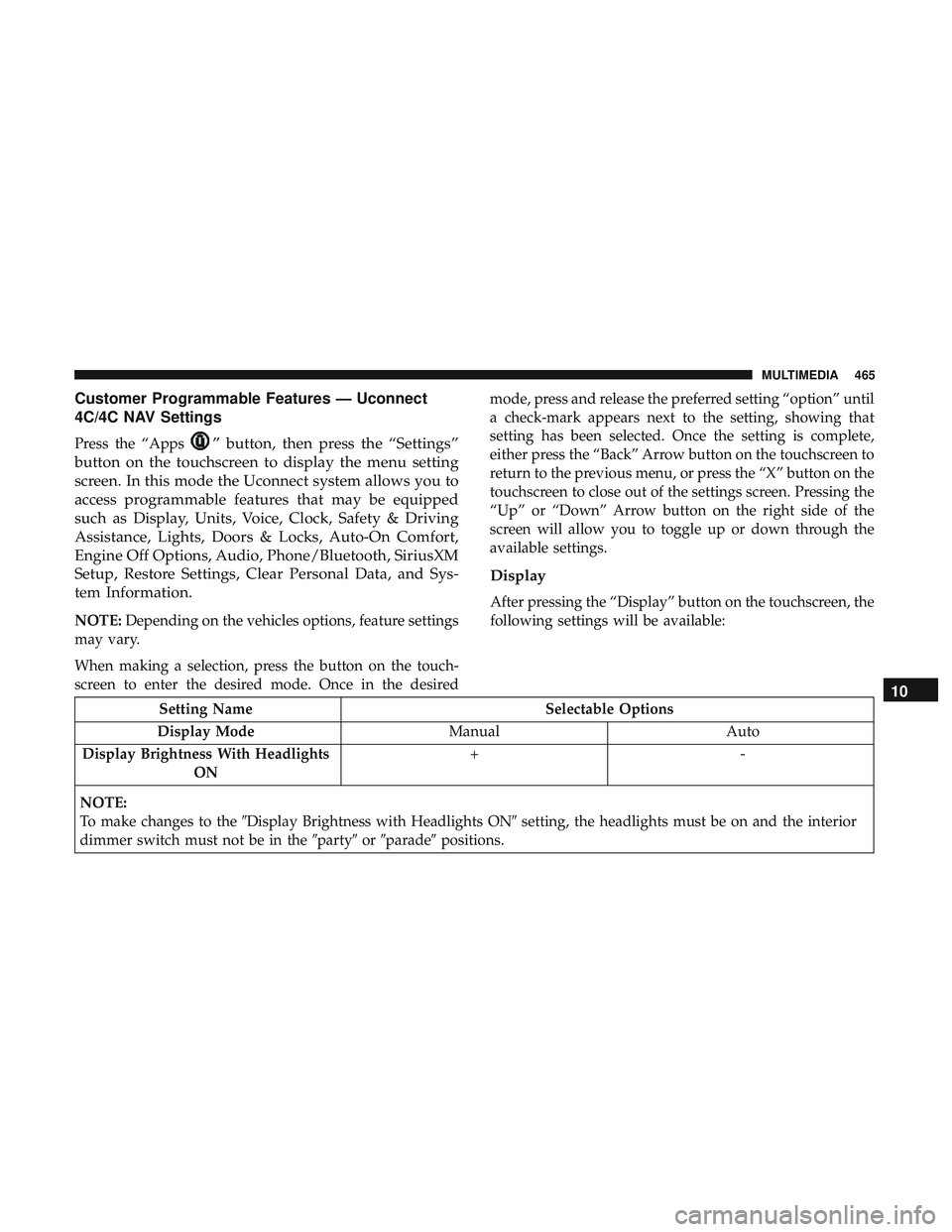
Display
After pressing the “Display” button on the touchscreen, the
following settings will be available:
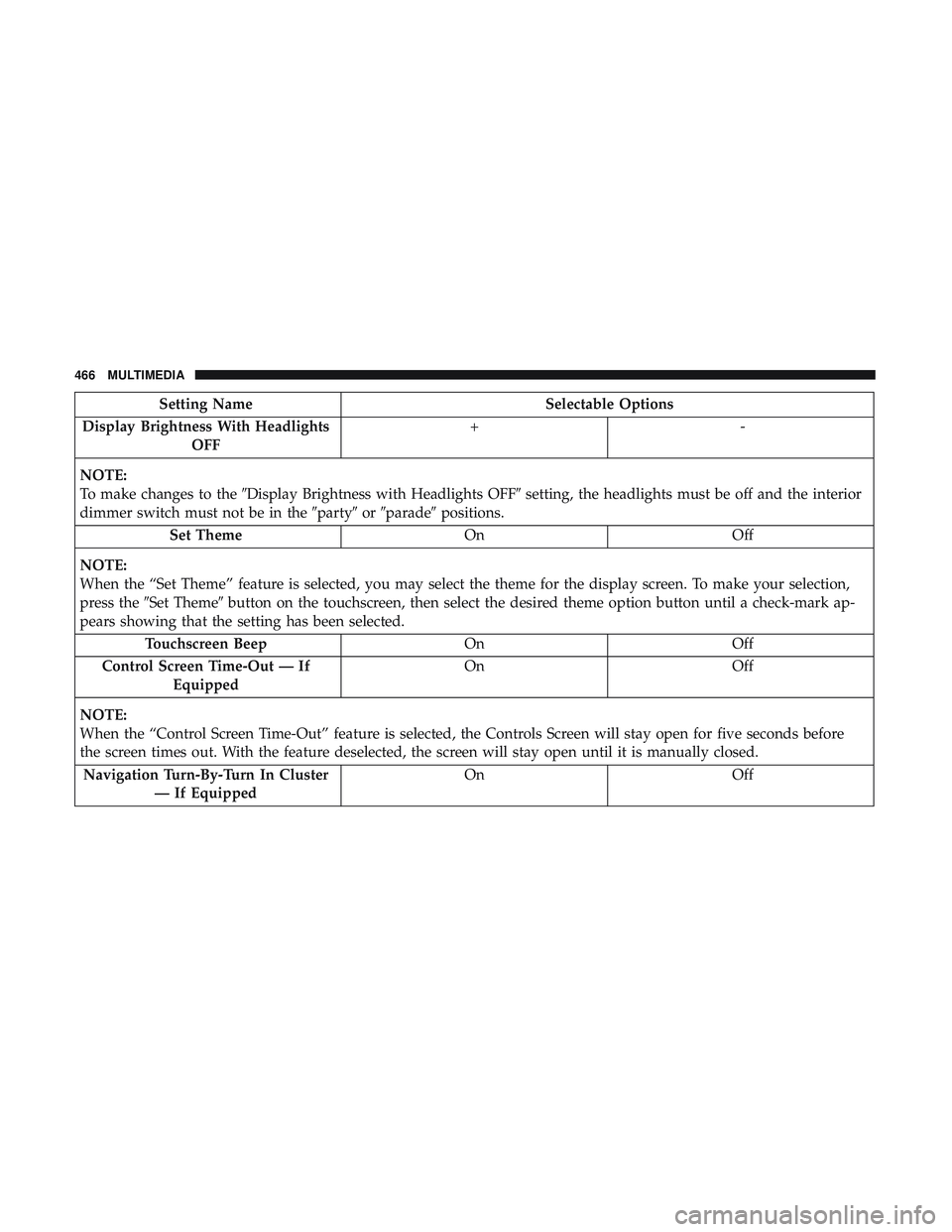
Setting Name
Selectable Options
Display Mode ManualAuto
Display Brightness With Headlights ON +-
NOTE:
To make changes to the �Display Brightness with Headlights ON� setting, the headlights must be on and the interior
dimmer switch must not be in the �party�or�parade� positions.
10
MULTIMEDIA 465
Page 468 of 568
Setting NameSelectable Options
Display Brightness With Headlights OFF +-
NOTE:
To make changes to the �Display Brightness with Headlights OFF� setting, the headlights must be off and the interior
dimmer switch must not be in the �party�or�parade� positions.
Set Theme OnOff
NOTE:
When the “Set Theme” feature is selected, you may select the theme for the display screen. To make your selection,
press the �Set Theme� button on the touchscreen, then select the desired theme option button until a check-mark ap-
pears showing that the setting has been selected.
Touchscreen Beep OnOff
Control Screen Time-Out — If Equipped On
Off
NOTE:
When the “Control Screen Time-Out” feature is selected, the Controls Screen will stay open for five seconds before
the screen times out. With the feature deselected, the screen will stay open until it is manually closed. Navigation Turn-By-Turn In Cluster — If Equipped On
Off
466 MULTIMEDIA
Page 474 of 568

Setting NameSelectable Options
LaneSense Warning — If Equipped Early
Medium Late
NOTE:
The “LaneSense Warning” setting determines at what distance the LaneSense system warns you, through steering
wheel feedback, of a possible lane departure. LaneSense Strength — If Equipped Low
Medium High
Blind Spot Alert — If Equipped Off
LightsLights & Chime
NOTE:
When the “Blind Spot Alert” feature is selected, the Blind Spot Alert system is activated and shows a visual alert in
the outside mirrors, or it shows a visual alert in the outside mirrors as well as play an audible alert when the turn
signal is on. When “Off” is selected, the Blind Spot Alert system is deactivated.
If your vehicle has experienced any damage in the area where the sensor is located, even if the fascia is not damaged,
the sensor may have become misaligned. Take your vehicle to an authorized dealer to verify sensor alignment. A sen-
sor that is misaligned results in the Blind Spot Alert System not operating to specification. Electronic Power Steering Default — If Equipped Normal
SportComfort
NOTE:
When the “Electronic Power Steering Default” is selected, it allows you to change the default setting of your vehicle
to either normal, sport, or comfort.
472 MULTIMEDIA
Page 475 of 568
Setting NameSelectable Options
Hill Start Assist — If Equipped On
Off
Mirrors & Wipers
After pressing the “Mirror and Wipers” button on the
touchscreen, the following settings will be available:
Setting Name Selectable Options
Rain Sensing Auto Wipers OnOff
Tilt Side Mirrors in Reverse OnOff
Headlights with Wipers OnOff
Lights
After pressing the “Lights” button on the touchscreen, the
following settings will be available.
Setting Name Selectable Options
Headlight Off Delay 0 sec30 sec
60 sec 90 sec
NOTE:
When the “Headlight Off Delay” feature is selected, it allows the adjustment of the amount of time the headlights
remain on after the engine is shut off.
10
MULTIMEDIA 473
Page 476 of 568
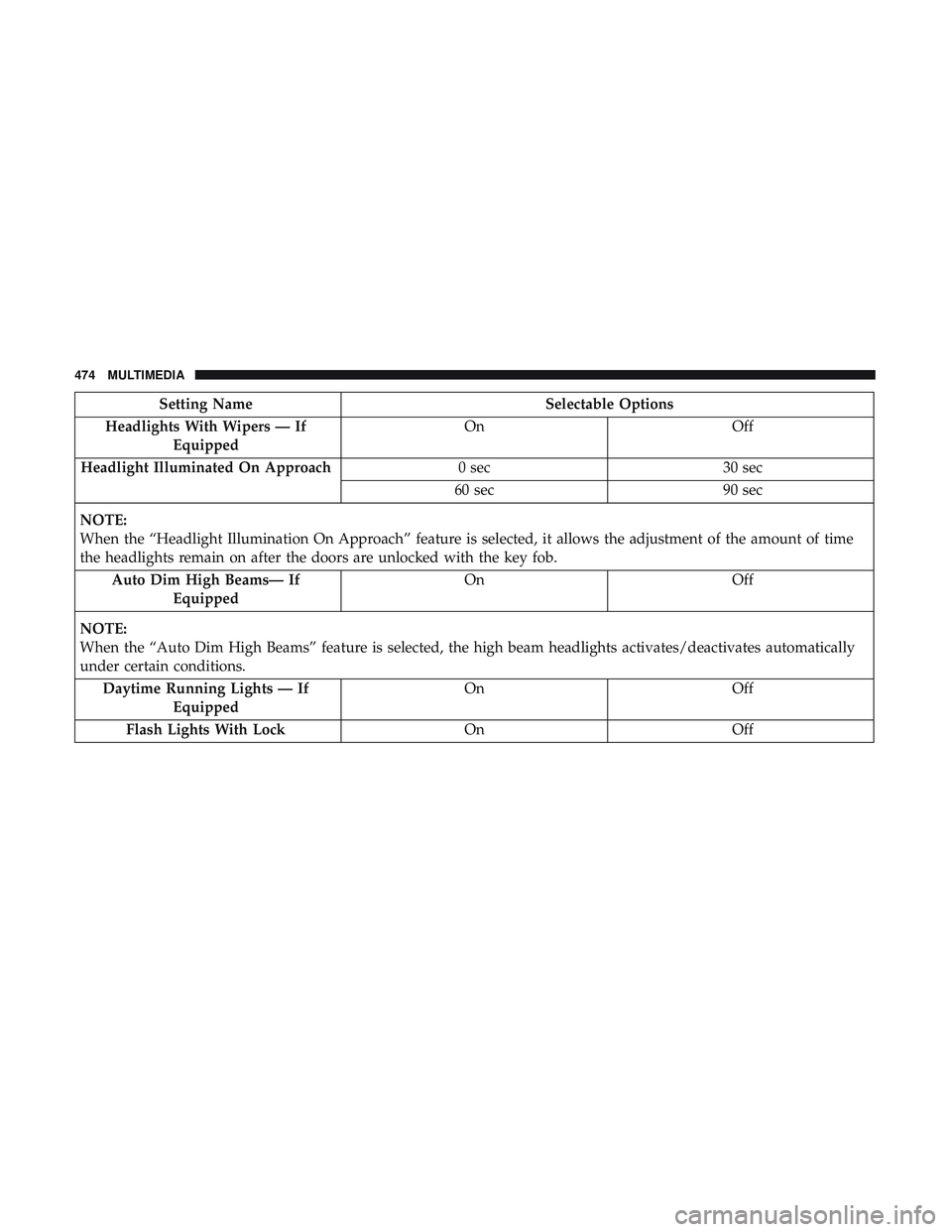
Setting NameSelectable Options
Headlights With Wipers — If Equipped On
Off
Headlight Illuminated On Approach 0 sec30 sec
60 sec 90 sec
NOTE:
When the “Headlight Illumination On Approach” feature is selected, it allows the adjustment of the amount of time
the headlights remain on after the doors are unlocked with the key fob. Auto Dim High Beams— If Equipped On
Off
NOTE:
When the “Auto Dim High Beams” feature is selected, the high beam headlights activates/deactivates automatically
under certain conditions. Daytime Running Lights — If Equipped On
Off
Flash Lights With Lock OnOff
474 MULTIMEDIA
Page 477 of 568
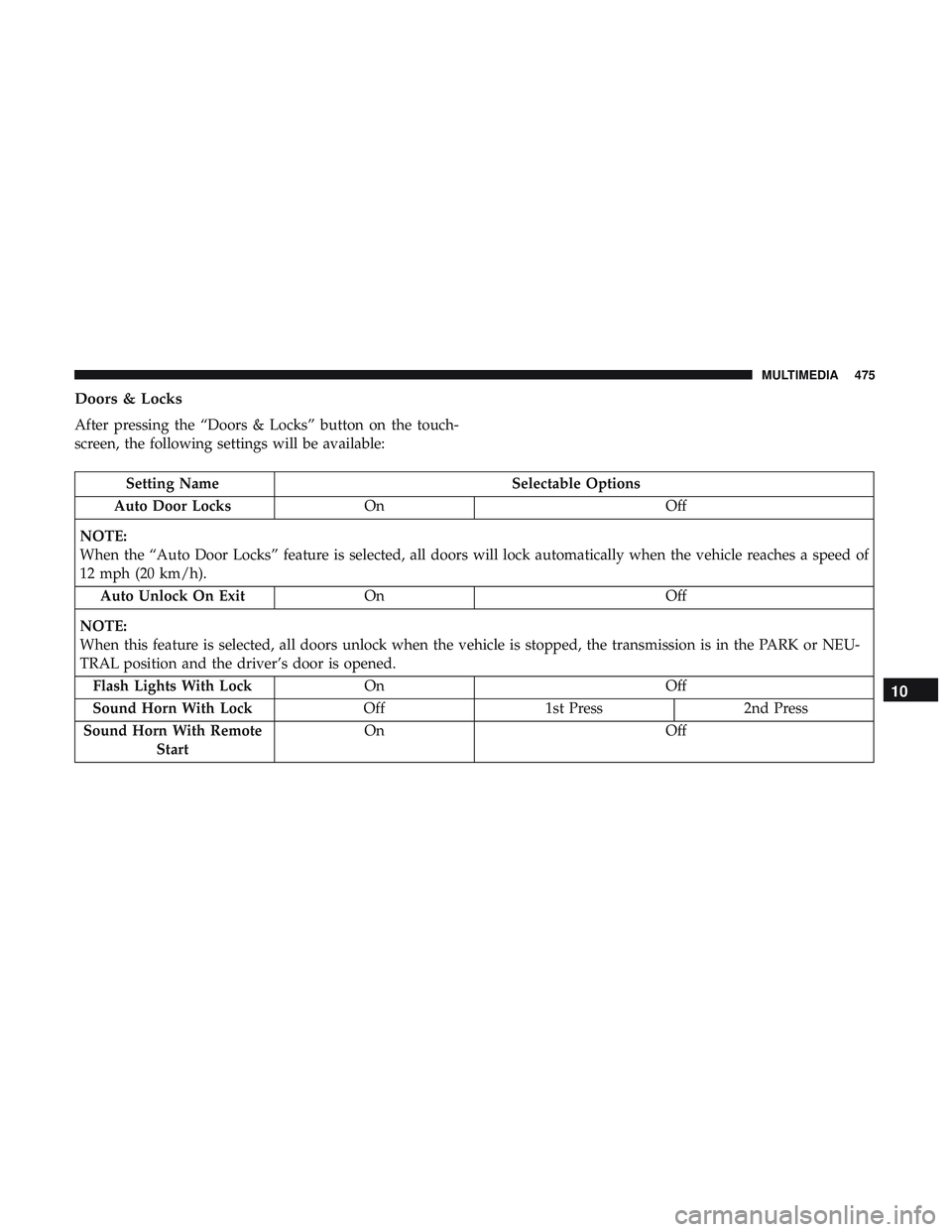
Doors & Locks
After pressing the “Doors & Locks” button on the touch-
screen, the following settings will be available:
Setting NameSelectable Options
Auto Door Locks On Off
NOTE:
When the “Auto Door Locks” feature is selected, all doors will lock automatically when the vehicle reaches a speed of
12 mph (20 km/h). Auto Unlock On Exit On Off
NOTE:
When this feature is selected, all doors unlock when the vehicle is stopped, the transmission is in the PARK or NEU-
TRAL position and the driver’s door is opened. Flash Lights With Lock On Off
Sound Horn With Lock Off1st Press 2nd Press
Sound Horn With Remote Start On
Off
10
MULTIMEDIA 475
Page 480 of 568
Engine Off Options
After pressing the “Engine Off Options” button on the
touchscreen, the following settings will be available:
Setting NameSelectable Options
Engine Off Power Delay — If Equipped 0 sec
45 sec
5 min 10 min
NOTE:
When the “Engine Off Power Delay” feature is selected, the power window switches, radio, Uconnect phone system
(if equipped), DVD video system (if equipped), power sunroof (if equipped), and power outlets remains active for up
to ten minutes after the ignition is cycled to OFF. Opening either front door cancels this feature. Headlight Off Delay 0 sec30 sec
60 sec 90 sec
NOTE:
When the “Headlight Off Delay” feature is selected, it allows the adjustment of the amount of time the headlights
remain on after the engine is shut off. Easy Exit Seat — If Equipped OnOff
NOTE:
When the “Easy Exit Seat” feature is selected, it provides automatic driver seat positioning to enhance driver mobility
when entering and exiting the vehicle.
478 MULTIMEDIA