Page 10 of 490
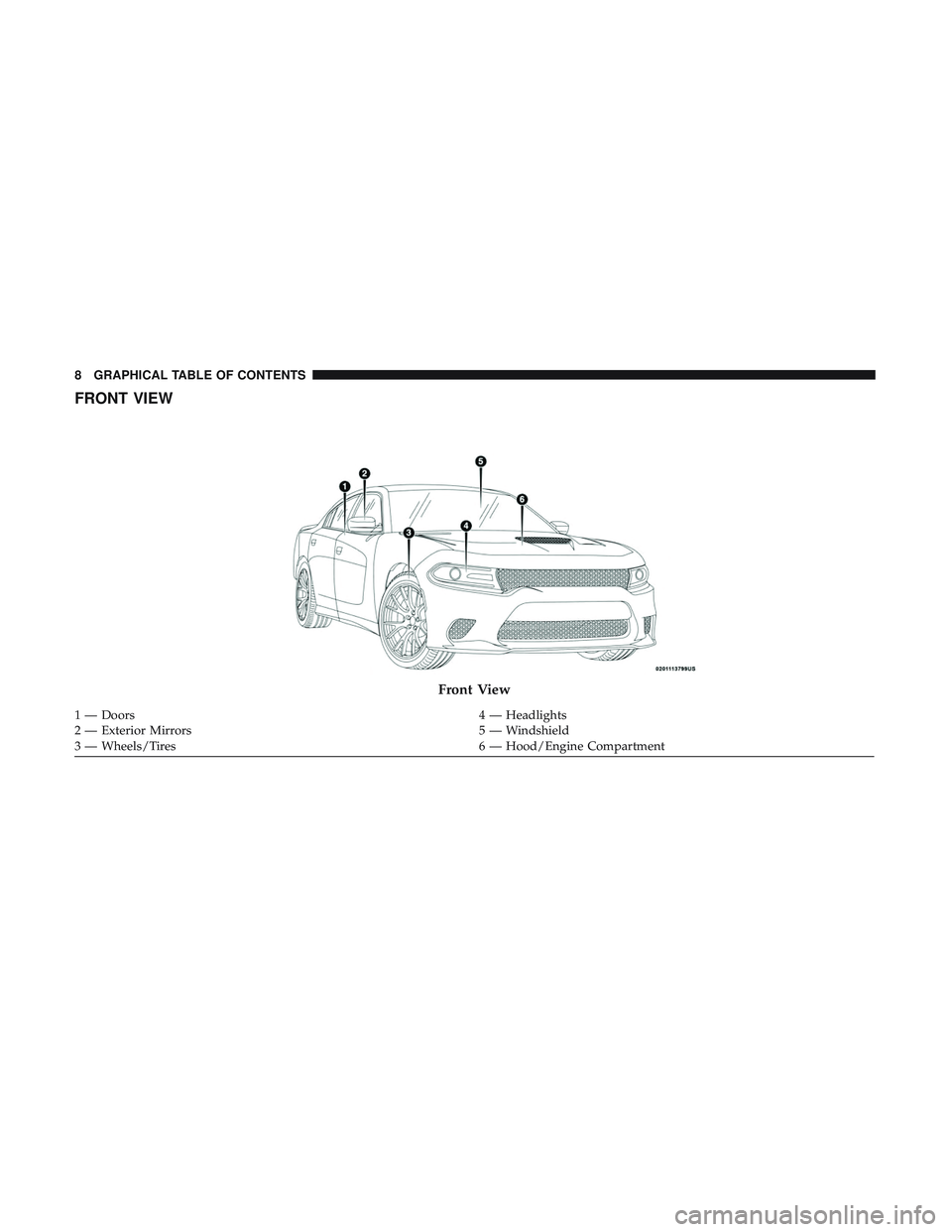
FRONT VIEW
Front View
1 — Doors4 — Headlights
2 — Exterior Mirrors 5 — Windshield
3 — Wheels/Tires 6 — Hood/Engine Compartment
8 GRAPHICAL TABLE OF CONTENTS
Page 12 of 490
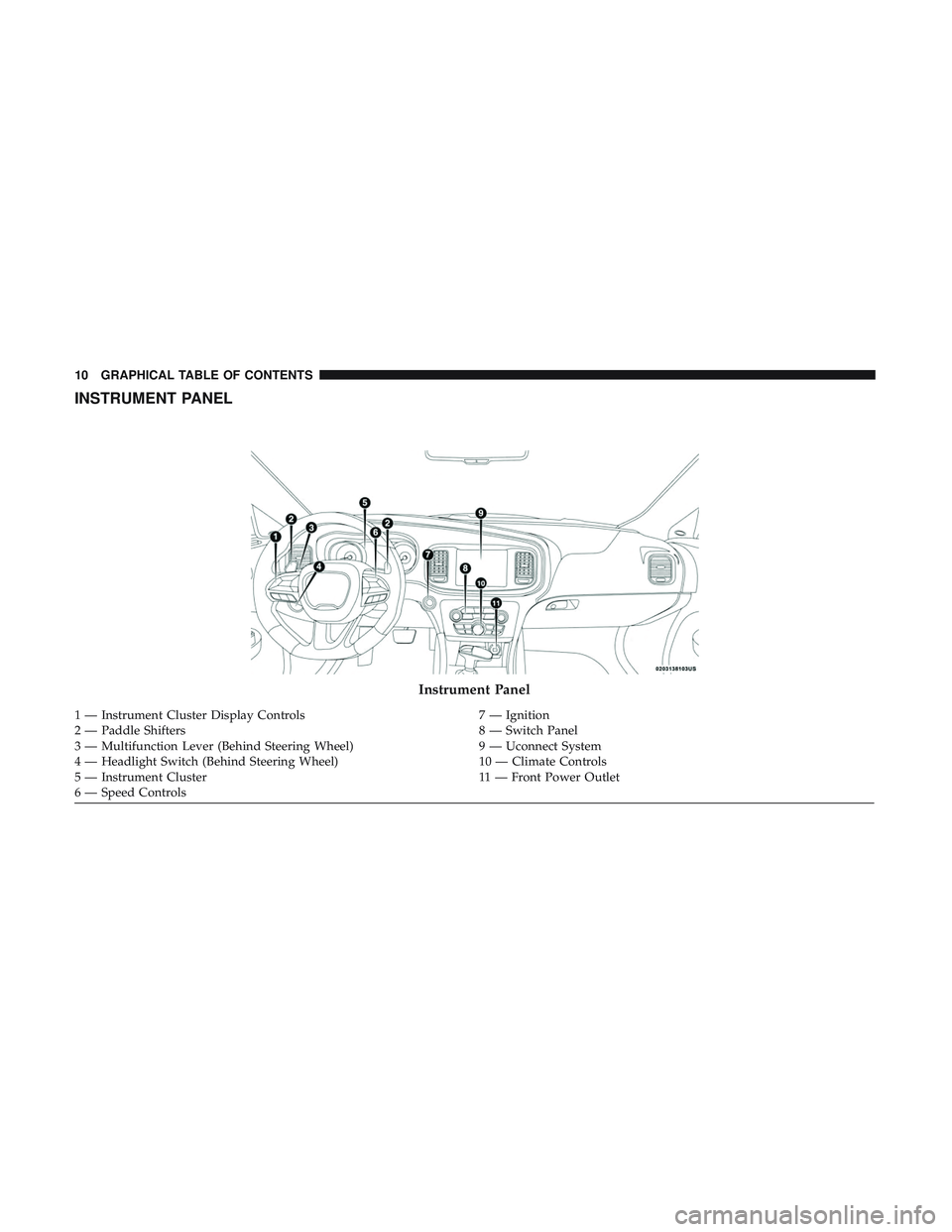
INSTRUMENT PANEL
Instrument Panel
1 — Instrument Cluster Display Controls7 — Ignition
2 — Paddle Shifters 8 — Switch Panel
3 — Multifunction Lever (Behind Steering Wheel) 9 — Uconnect System
4 — Headlight Switch (Behind Steering Wheel) 10 — Climate Controls
5 — Instrument Cluster 11 — Front Power Outlet
6 — Speed Controls 10 GRAPHICAL TABLE OF CONTENTS
Page 16 of 490

▫Automatic Unlock Doors On Exit ............40
▫ Automatic Door Locks — If Equipped ........41
▫ Child-Protection Door Lock System —
Rear Doors ............................41
� SEATS ................................42
▫ Power Seats ...........................42
▫ Driver Memory Seat — If Equipped ..........44
▫ Heated Seats — If Equipped ...............47
▫ Front Ventilated Seats — If Equipped .........49
▫ Folding Rear Seat .......................50
� HEAD RESTRAINTS ......................51
▫ Reactive Head Restraints — Front Seats .......52
▫ Rear Head Restraints ....................53
▫ Front Head Restraint Removal ..............54
� STEERING WHEEL .......................54
▫ Power Tilt/Telescoping Steering Column .......54
▫ Heated Steering Wheel — If Equipped .........55�
MIRRORS ..............................56
▫ Automatic Dimming Mirror — If Equipped .....56
▫ Outside Mirrors ........................57
▫ Driver’s Outside Automatic Dimming Mirror —
If Equipped ............................57
▫ Outside Mirrors Approach Light — If Equipped . .58
▫ Power Mirrors .........................58
▫ Heated Mirrors — If Equipped .............59
▫ Tilt Side Mirrors In Reverse — If Equipped .....59
▫ Illuminated Vanity Mirrors — If Equipped .....59
� EXTERIOR LIGHTS .......................60
▫ Headlight Switch .......................60
▫ Multifunction Lever .....................61
▫ Daytime Running Lights (DRL) — If Equipped . .61
▫ High/Low Beam Switch ..................61
▫ Automatic High Beam — If Equipped ........61
▫ Flash-To-Pass ..........................62
14 GETTING TO KNOW YOUR VEHICLE
Page 33 of 490

To Cancel Remote Start
Remote Starting will also cancel if any of the following
occur:
•The engine stalls or engine speed exceeds 2500 rpm.
• Any engine warning lights come on.
• Low Fuel Light turns on.
• The hood is opened.
• The hazard switch is pushed.
• The gear selector is moved out of PARK.
• The brake pedal is pushed.
Remote Start Comfort Systems — If Equipped
When remote start is activated, the heated steering wheel
and driver heated seat features will automatically turn on
in cold weather. In warm weather, the driver vented seat
feature will automatically turn on when the remote start is
activated. These features will stay on through the duration
of remote start or until the ignition switch is cycled to the
ON/RUN position.
General Information
The following regulatory statement applies to all radio
frequency (RF) devices equipped in this vehicle:
This device complies with Part 15 of the FCC Rules and
with Industry Canada license-exempt RSS standard(s).
Operation is subject to the following two conditions:
1. This device may not cause harmful interference, and
2. This device must accept any interference received, in-
cluding interference that may cause undesired opera-
tion.
NOTE: Changes or modifications not expressly approved
by the party responsible for compliance could void the
user ’s authority to operate the equipment.
SENTRY KEY
The Sentry Key Immobilizer System prevents unauthor-
ized vehicle operation by disabling the engine. The system
does not need to be armed or activated. Operation is
automatic, regardless of whether the vehicle is locked or
unlocked.
3
GETTING TO KNOW YOUR VEHICLE 31
Page 56 of 490

WARNING!
ALL the head restraints MUST be reinstalled in the
vehicle to properly protect the occupants. Follow the
re-installation instructions above prior to operating the
vehicle or occupying a seat.
Front Head Restraint Removal
To remove the head restraint, raise it up as far as it can go.
Then, push the adjustment button and the release button at
the base of each post while pulling the head restraint up. To
reinstall the head restraint, put the head restraint posts into
the holes. Then, adjust it to the appropriate height.
NOTE:Do not reposition the head restraint 180 degrees to
the incorrect position in an attempt to gain additional
clearance to the back of the head.
WARNING!
• A loose head restraint thrown forward in a collision
or hard stop could cause serious injury or death to
occupants of the vehicle. Always securely stow re-
moved head restraints in a location outside the
occupant compartment.
(Continued)
WARNING! (Continued)
•ALL the head restraints MUST be reinstalled in the
vehicle to properly protect the occupants. Follow the
re-installation instructions above prior to operating
the vehicle or occupying a seat.
STEERING WHEEL
Power Tilt/Telescoping Steering Column
This feature allows you to tilt the steering column upward
or downward. It also allows you to lengthen or shorten the
steering column. The power tilt/telescoping steering col-
umn switch is located below the multifunction lever on the
steering column.
54 GETTING TO KNOW YOUR VEHICLE
Page 57 of 490

To tilt the steering column, move the switch up or down as
desired. To lengthen or shorten the steering column, pull
the switch toward you or push the switch away from you
as desired.
NOTE:For vehicles equipped with Driver Memory Seat,
you can use your remote keyless entry key fob or the
memory switch on the driver’s door trim panel to return
the tilt/telescopic steering column to pre-programmed
positions. Refer to “Driver Memory Seat” in this section.
WARNING!
Do not adjust the steering column while driving.
Adjusting the steering column while driving or driv-
ing with the steering column unlocked, could cause the
driver to lose control of the vehicle. Failure to follow
this warning may result in serious injury or death.
Heated Steering Wheel — If Equipped
The steering wheel contains a heating element that helps
warm your hands in cold weather. The heated steering
wheel has only one temperature setting. Once the heated
steering wheel has been turned on, it will stay on for an
average of 80 minutes or more before automatically shut-
ting off. This time will vary based on environmental
temperatures. The heated steering wheel can shut off early
or may not turn on when the steering wheel is already
warm.
The heated steering wheel control button is located within
the Uconnect system. You can gain access to the control
button through the climate screen or the controls screen.
• Press the heated steering wheel button
once to turn
the heating element on.
Power Tilt/Telescoping Switch
3
GETTING TO KNOW YOUR VEHICLE 55
Page 58 of 490

•Press the heated steering wheel buttona second time
to turn the heating element off.
NOTE: The engine must be running for the heated steering
wheel to operate.
Vehicles Equipped With Remote Start
On models that are equipped with remote start, the heated
steering wheel can be programmed to come on during a
remote start through the Uconnect system. Refer to
“Uconnect Settings” in “Multimedia” for further informa-
tion.
WARNING!
• Persons who are unable to feel pain to the skin
because of advanced age, chronic illness, diabetes,
spinal cord injury, medication, alcohol use, exhaus-
tion, or other physical conditions must exercise care
when using the steering wheel heater. It may cause
burns even at low temperatures, especially if used
for long periods.
• Do not place anything on the steering wheel that
insulates against heat, such as a blanket or steering
wheel covers of any type and material. This may
cause the steering wheel heater to overheat.
MIRRORS
Automatic Dimming Mirror — If Equipped
The mirror head can be adjusted up, down, left, and right
for various drivers. The mirror should be adjusted to center
on the view through the rear window.
This mirror automatically adjusts for headlight glare from
vehicles behind you.
NOTE: The Automatic Dimming feature is disabled when
the vehicle is in REVERSE to improve rear view viewing.
The Automatic Dimming feature can be turned on or off
through the touchscreen.
• Press the mirror dimmer button once to turn the feature
on.
• Press the mirror dimmer button a second time to turn
the feature off.
56 GETTING TO KNOW YOUR VEHICLE
Page 77 of 490

IconDescription
Faceplate Knob
Touchscreen Buttons
Blower Control
Blower Control is used to regulate the amount of air forced through the climate system. There
are seven blower speeds available. The speeds can be selected using either the blower control
knob on the faceplate or the buttons on the touchscreen.
• Faceplate: The blower speed increases as you turn the blower control knob clockwise from
the lowest blower setting. The blower speed decreases as you turn the blower control knob
counterclockwise.
• Touchscreen: Use the small blower icon to reduce the blower setting and the large blower
icon to increase the blower setting. Blower can also be selected by pressing the blower bar
area between the icons.
Panel ModePanel Mode
Air comes from the outlets in the instrument panel. Each of these outlets can be individually
adjusted to direct the flow of air. The air vanes of the center outlets and outboard outlets can be
moved up and down or side to side to regulate airflow direction. There is a shut off wheel lo-
cated below the air vanes to shut off or adjust the amount of airflow from these outlets.
Bi-Level Mode
Bi-Level Mode
Air comes from the instrument panel outlets and floor outlets. A slight amount of air is directed
through the defrost and side window demister outlets.
NOTE: Bi-Level mode is designed under comfort conditions to provide cooler air out of the
panel outlets and warmer air from the floor outlets.
3
GETTING TO KNOW YOUR VEHICLE 75