Page 406 of 490

Setting NameSelectable Options
Blind Spot Alert — If Equipped Off
LightsLights & Chime
NOTE:
•When the “Blind Spot Alert” feature is selected, the Blind Spot Alert feature Provides alerts, visual and/or audible,
to indicate objects in your blind spot. The Blind Spot Alert feature can be activated in “Lights” mode. When this
mode is selected, the Blind Spot Monitor (BSM) system is activated and only shows a visual alert in the exterior
mirrors. When “Lights & Chime” mode is activated, the Blind Spot Monitor (BSM) will show a visual alert in the
exterior mirrors as well as an audible alert when the turn signal is on.
•If your vehicle has experienced any damage in the area where the sensor is located, even if the fascia is not dam-
aged, the sensor may have become misaligned. Take your vehicle to an authorized dealer to verify sensor align-
ment. Having a sensor that is misaligned results in the BSM not operating to specification. Hill Start Assist — If Equipped On Off
NOTE:
When the “Hill Start Assist” feature is selected, the Hill Start Assist (HSA) system is active.
404 MULTIMEDIA
Page 407 of 490
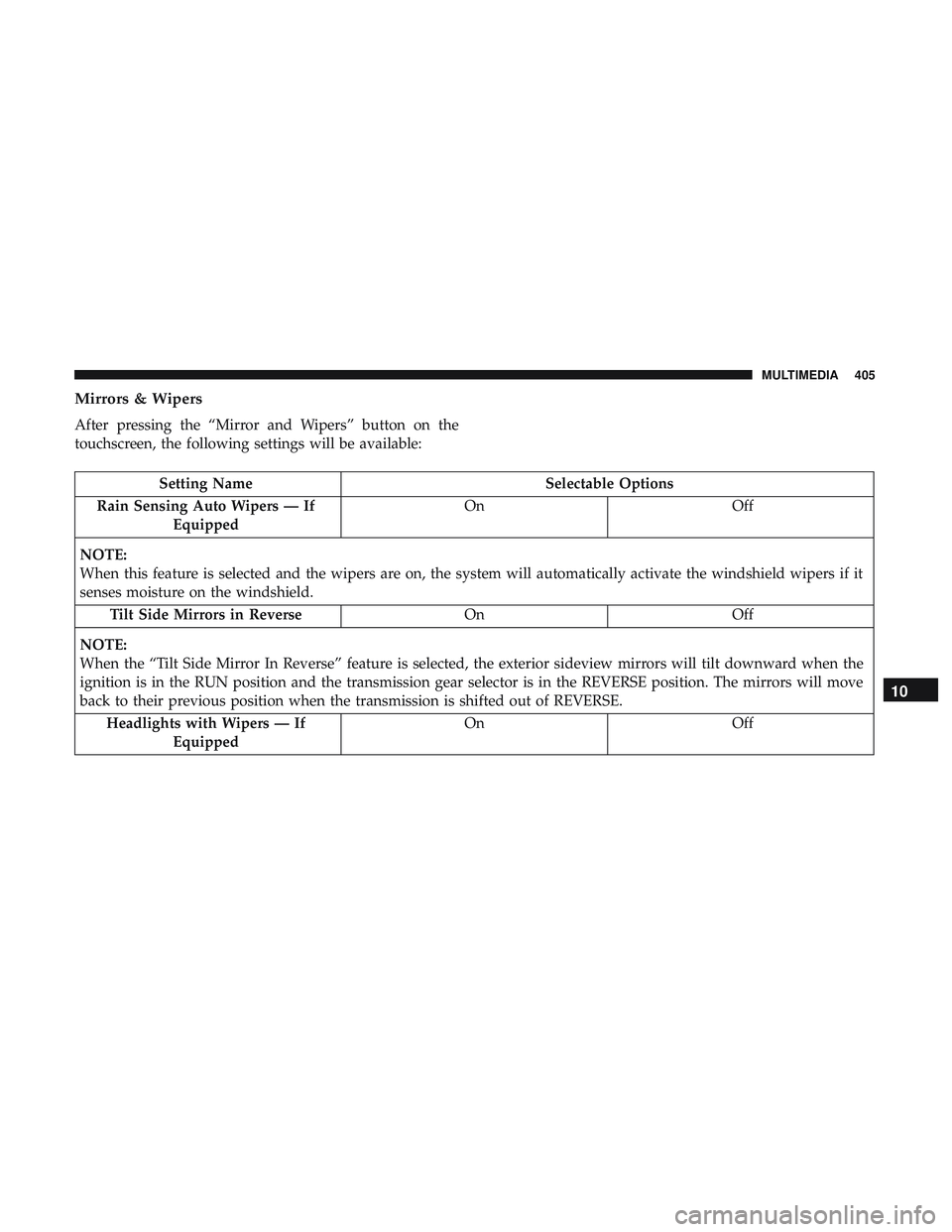
Mirrors & Wipers
After pressing the “Mirror and Wipers” button on the
touchscreen, the following settings will be available:
Setting NameSelectable Options
Rain Sensing Auto Wipers — If Equipped On
Off
NOTE:
When this feature is selected and the wipers are on, the system will automatically activate the windshield wipers if it
senses moisture on the windshield. Tilt Side Mirrors in Reverse OnOff
NOTE:
When the “Tilt Side Mirror In Reverse” feature is selected, the exterior sideview mirrors will tilt downward when the
ignition is in the RUN position and the transmission gear selector is in the REVERSE position. The mirrors will move
back to their previous position when the transmission is shifted out of REVERSE. Headlights with Wipers — If Equipped On
Off
10
MULTIMEDIA 405
Page 408 of 490
Lights
After pressing the “Lights” button on the touchscreen, the
following settings will be available:
Setting NameSelectable Options
Headlight Off Delay “0 sec, 30 sec” etc.
Headlight Illumination On Ap- proach 03
0
60 90
Headlights With Wipers — If Equipped On
Off
Auto Dim High Beams — If Equipped On
Off
Daytime Running Lights — If Equipped On
Off
Steering Directed Lights — If Equipped On
Off
Flash Lights With Lock OnOff
406 MULTIMEDIA
Page 409 of 490
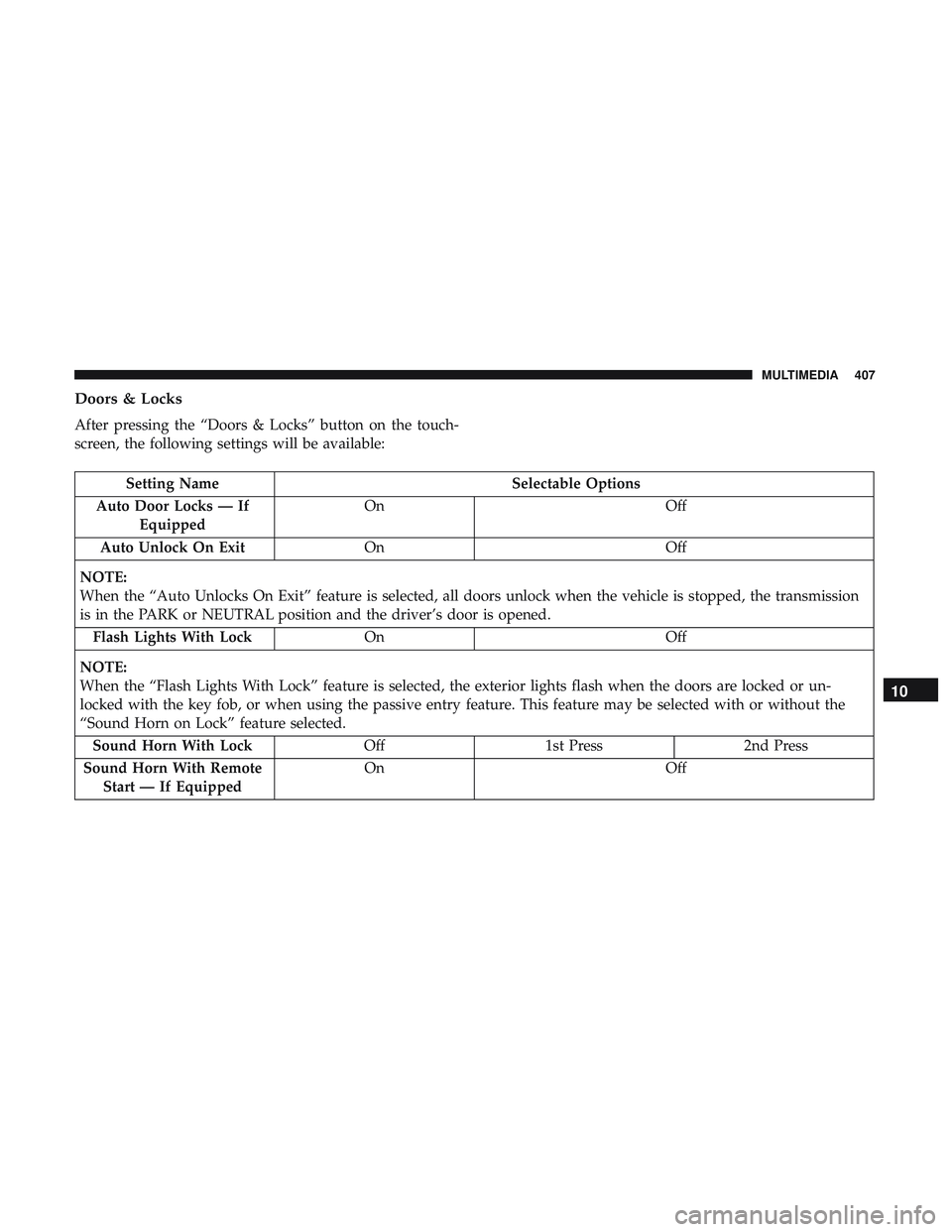
Doors & Locks
After pressing the “Doors & Locks” button on the touch-
screen, the following settings will be available:
Setting NameSelectable Options
Auto Door Locks — If Equipped On
Off
Auto Unlock On Exit On Off
NOTE:
When the “Auto Unlocks On Exit” feature is selected, all doors unlock when the vehicle is stopped, the transmission
is in the PARK or NEUTRAL position and the driver’s door is opened. Flash Lights With Lock On Off
NOTE:
When the “Flash Lights With Lock” feature is selected, the exterior lights flash when the doors are locked or un-
locked with the key fob, or when using the passive entry feature. This feature may be selected with or without the
“Sound Horn on Lock” feature selected. Sound Horn With Lock Off1st Press 2nd Press
Sound Horn With Remote Start — If Equipped On
Off
10
MULTIMEDIA 407
Page 413 of 490
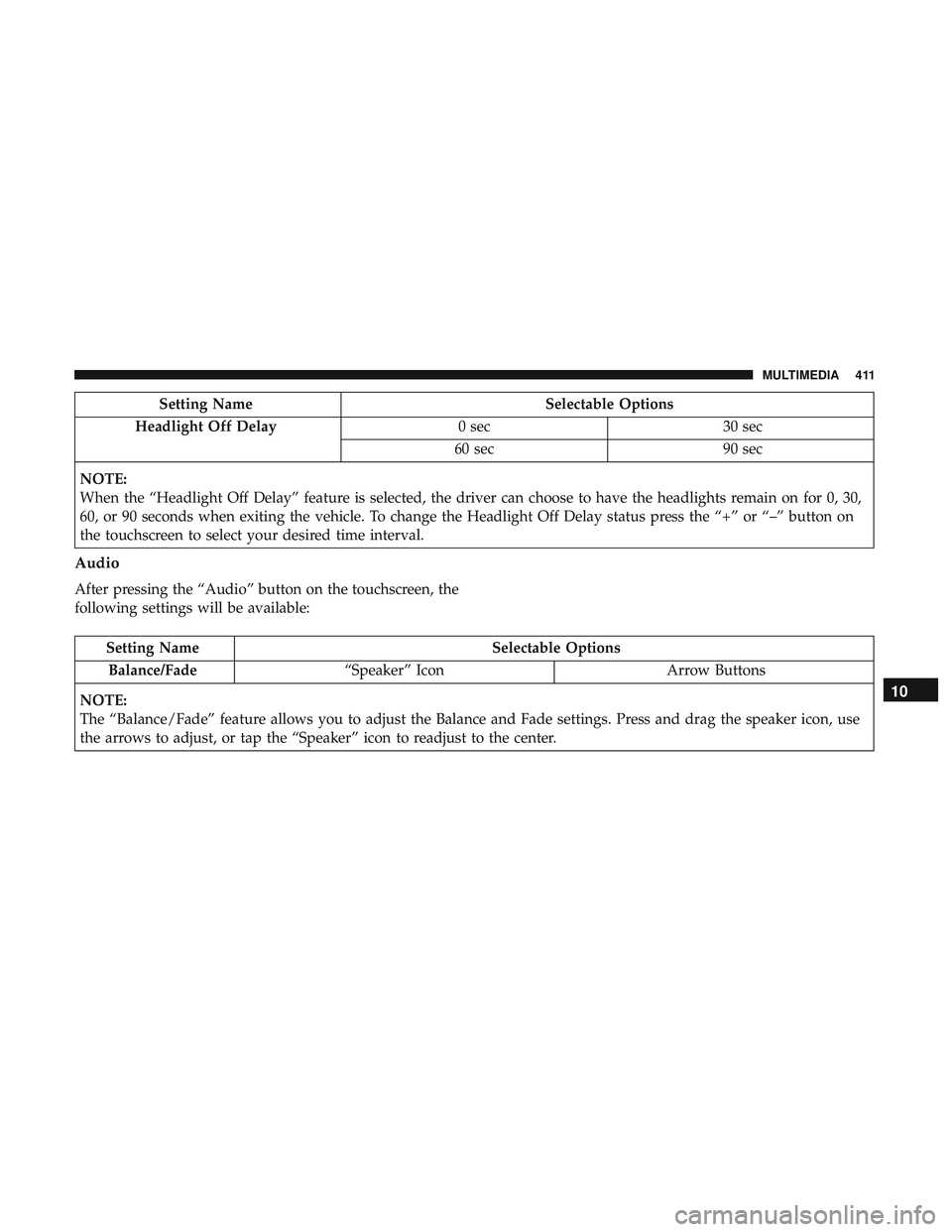
Setting NameSelectable Options
Headlight Off Delay 0 sec30 sec
60 sec 90 sec
NOTE:
When the “Headlight Off Delay” feature is selected, the driver can choose to have the headlights remain on for 0, 30,
60, or 90 seconds when exiting the vehicle. To change the Headlight Off Delay status press the “+” or “–” button on
the touchscreen to select your desired time interval.
Audio
After pressing the “Audio” button on the touchscreen, the
following settings will be available:
Setting Name Selectable Options
Balance/Fade “Speaker” Icon Arrow Buttons
NOTE:
The “Balance/Fade” feature allows you to adjust the Balance and Fade settings. Press and drag the speaker icon, use
the arrows to adjust, or tap the “Speaker” icon to readjust to the center.
10
MULTIMEDIA 411
Page 459 of 490

SiriusXM Guardian (4C/4C NAV)— If Equipped
CAUTION!
Some SiriusXM Guardian services, including SOS Call
and Roadside Assistance Call will NOT work without
an operable LTE (voice/data) or 3G or 4G (data) net-
work connection compatible with your device.
NOTE: Your vehicle may be transmitting data as autho-
rized by the subscriber.
An included trial and/or subscription is required to take
advantage of the SiriusXM Guardian services in the next
section of this guide. To register with SiriusXM Guardian,
press the Apps button on the Uconnect 4C/4C NAV
touchscreen to get started.
NOTE: SiriusXM Guardian is available only on equipped
vehicles purchased within the continental United States,
Alaska, Hawaii and Canada. Services can only be used
where coverage is available; see coverage map for details.
SOS Call
Theft Alarm Notification
Remote Door Lock/Unlock
Send & Go
Vehicle Finder
Stolen Vehicle Assistance
Remote Vehicle Start**
Remote Horn & Lights
Roadside Assistance Call
Vehicle Health Reports**
Vehicle Health Alert**
Performance Pages Plus**
**If vehicle is equipped.
Register (4C/4C NAV)
To unlock the full potential of SiriusXM Guardian in your
vehicle, you must activate your SiriusXM Guardian ser-
vices.
1. Press the Apps icon on the bottom of your in-vehicle touchscreen.
2. Select the Activate Services icon from your list of apps.10
MULTIMEDIA 457
Page 460 of 490

3. Select “Customer Care” to speak with a SiriusXMGuardian Customer Care agent who will activate ser-
vices in your vehicle, or select “Enter Email” to activate
on the web.
• U.S. residents visit: www.siriusxm.com/guardian.
• Canadian residents visit: www.siriusxm.ca/guardian.
Vehicle Health Report/Alert (4C/4C NAV)
Your vehicle will send you a monthly email report, which
summarizes the performance of your vehicle’s key systems
so you can stay on top of your vehicle’s maintenance needs
if you are registered for SiriusXM Guardian. Your vehicle
will also send you Vehicle Health Alerts when it detects
issues with its key systems that need your attention. For
further information, refer to your Uconnect Owner ’s
Manual Supplement.
Mobile App (4C/4C NAV)
You’re only a few steps away from using remote com-
mands and sending a destination from your phone to your
vehicle.
To use the Uconnect Mobile App:
•
Once you have registered your SiriusXM Guardian services,
download the Uconnect App to your mobile device. Use
your Owner Account login and password to open the app.
•Once on the “Remote” screen, you can begin using
Remote Door Lock/Unlock, Remote Vehicle Start, and
activate your horn and lights remotely, if equipped.
Mobile App
458 MULTIMEDIA
Page 475 of 490

Arming SystemSecurity Alarm ...........................33
Assist, Hill Start .......................... .143
Audio Systems (Radio) .......................391
Auto Down Power Windows ...................81
Automatic Door Locks .....................40, 41
Automatic Headlights ........................62
Automatic High Beams .......................61
Automatic Temperature Control (ATC) ..........72, 77
Automatic Transmission ..................... .221
Adding Fluid .....................346, 385, 387
Fluid And Filter Change ...................346
Fluid Change .......................... .346
Fluid Level Check ........................345
Fluid Type .......................345, 385, 387
Special Additives ........................ .345
Automatic Transmission Limp Home Mode .....40, 226
Autostick Operation ............................. .226
Auto Up Power Windows .....................81
AuxCord............................... .447
Auxiliary Electrical Outlet (Power Outlet) .........101
Axle Fluid ............................385, 387
Axle Lubrication ........................385, 387 Back-Up
.................................269
Battery ...............................121, 327
Charging System Light ....................121
Keyless Key Fob Replacement ................21
Location ...............................327
Belts, Seat ............................... .204
Body Mechanism Lubrication ..................336
B-Pillar Location .......................... .352
Brake Assist System ........................ .137
Brake Control System ........................137
Brake Fluid ........................343, 385, 387
Brake System ..........................343, 377
Fluid Check ..................... .343, 385, 387
Master Cylinder ........................ .343
Parking ...............................217
W arning
Light .......................120, 377
Brake/Transmission Interlock ..................221
Brightness, Interior Lights .....................67
Bulb Replacement ..........................285
Bulbs, Light .......................... .206, 285
Camera, Rear ............................ .269
Capacities, Fluid .......................... .384
Caps, Filler Oil (Engine) ........................ .325, 330
12
INDEX 473