Page 270 of 490
yellow. At this time torque is applied to the steering
wheel in the opposite direction of the lane boundary.
• For example, if approaching the left side of the lane the
steering wheel will turn to the right.
• When the LaneSense system senses the lane has been
approached and is in a lane departure situation, the left
thick lane line flashes yellow (on/off) and the left thin
line remains solid yellow. The LaneSense telltale changes
from solid yellow to flashing yellow. At this time torque
is applied to the steering wheel in the opposite direction
of the lane boundary. •
For example, if approaching the left side of the lane the
steering wheel will turn to the right.
NOTE: The LaneSense system operates with the similar
behavior for a right lane departure.
Lane Sensed (Solid Yellow Thick Line, Solid Yellow Thin
Line/Solid Yellow Telltale)
Lane Approached (Flashing Yellow Thick Line, SolidYellow Thin Line/Flashing Yellow Telltale)
268 STARTING AND OPERATING
Page 271 of 490

Changing LaneSense Status
The LaneSense system settings can be configured through
the Uconnect system screen.
Follow these steps to change the LaneSense settings:
1. Press the “Controls” button located on the bottom of theUconnect touchscreen display.
2. Press the “Settings” button.
3. Press the “Safety & Driving Assistance” button.
When in the Safety & Driving Assistance screen, you can
configure the intensity of the torque warning and the
warning zone sensitivity (early/late) through the person-
alization settings.
NOTE:
• When enabled the system operates above 37 mph
(60 km/h) and below 112 mph (180 km/h).
• Use of the turn signal suppresses the warnings.
• The system will not apply torque to the steering wheel
whenever a safety system engages. (anti-lock brakes,
traction control system, electronic stability control, for-
ward collision warning, etc.)
PARKVIEW REAR BACK UP CAMERA
Your vehicle is equipped with the ParkView Rear Back Up
Camera that allows you to see an on-screen image of the
rear surroundings of your vehicle whenever the gear
selector is put into REVERSE. The ParkView camera is
located on the rear of the vehicle above the rear license
plate. The image will be displayed in the touchscreen
display along with a caution note to “check entire sur-
roundings” across the top of the screen. After five seconds,
this note will disappear.
NOTE: The ParkView Rear Back Up Camera has program-
mable modes of operation that may be selected through the
Uconnect System. Refer to “Uconnect Settings” in “Multi-
media” for further information.
If your vehicle is equipped with the Camera Delay feature
and it is turned on, the rear camera image will be displayed
for up to 10 seconds when the vehicle is shifted out of
REVERSE. However, this feature is canceled if the forward
vehicle speed exceeds 8 mph (13 km/h), the transmission is
shifted into PARK, the vehicle’s ignition is cycled to OFF, or
by pressing the image defeat [X] button.
When the vehicle is shifted out of REVERSE (with Camera
Delay turned off), the rear camera mode is exited and the
last touchscreen appears again.
6
STARTING AND OPERATING 269
Page 347 of 490

Automatic Transmission
Selection Of Lubricant
It is important to use the proper transmission fluid to
ensure optimum transmission performance and life. Use
only the manufacturer’s specified transmission fluid. Refer
to “Fluids And Lubricants” in “Technical Specifications”
for fluid specifications. It is important to maintain the
transmission fluid at the correct level using the recom-
mended fluid.
NOTE:No chemical flushes should be used in any trans-
mission; only the approved lubricant should be used.
CAUTION!
Using a transmission fluid other than the manufactur-
er ’s recommended fluid may cause deterioration in
transmission shift quality and/or torque converter
shudder. Refer to “Fluids And Lubricants” in “Techni-
cal Specifications” for fluid specifications.
Special Additives
The manufacturer strongly recommends against using any
special additives in the transmission. Automatic Transmis-
sion Fluid (ATF) is an engineered product and its perfor-
mance may be impaired by supplemental additives. There-
fore, do not add any fluid additives to the transmission.
Avoid using transmission sealers as they may adversely
affect seals.
CAUTION!
Do not use chemical flushes in your transmission as
the chemicals can damage your transmission compo-
nents. Such damage is not covered by the New Vehicle
Limited Warranty.
Fluid Level Check
The fluid level is preset at the factory and does not require
adjustment under normal operating conditions. Routine
fluid level checks are not required; therefore the transmis-
sion has no dipstick. An authorized dealer can check your
transmission fluid level using special service tools. If you
notice fluid leakage or transmission malfunction, visit an
authorized dealer immediately to have the transmission
8
SERVICING AND MAINTENANCE 345
Page 377 of 490
TECHNICAL SPECIFICATIONS
CONTENTS
�IDENTIFICATION DATA ...................376
▫ Vehicle Identification Number .............376
� BRAKE SYSTEM ........................377
� WHEEL AND TIRE TORQUE SPECIFICATIONS . .377
▫ Torque Specifications ....................377
� FUEL REQUIREMENTS ...................379
▫ 6.2L Supercharged Engine .................379
▫ 6.4L Engine .......................... .379
▫ Reformulated Gasoline ..................380
▫ Materials Added To Fuel .................380 ▫
Gasoline/Oxygenate Blends ...............381
▫ Do Not Use E-85 In Non-Flex Fuel Vehicles . . . .381
▫ CNG And LP Fuel System Modifications ......381
▫ MMT In Gasoline .......................382
▫ Fuel System Cautions ....................382
▫ Carbon Monoxide Warnings ...............383
� FLUID CAPACITIES ..................... .384
� FLUIDS AND LUBRICANTS ................385
▫ Engine ............................. .385
▫ Chassis ............................ .387
9
Page 379 of 490

BRAKE SYSTEM
Your vehicle is equipped with dual hydraulic brake sys-
tems. If either of the two hydraulic systems loses normal
capability, the remaining system will still function. There
will be some loss of overall braking effectiveness. This may
be evident by increased pedal travel during application,
greater pedal force required to slow or stop, and potential
activation of the Brake Warning Light.
In the event power assist is lost for any reason (for
example, repeated brake applications with the engine
OFF), the brakes will still function. The effort required to
brake the vehicle will be much greater than that required
with the power system operating.
NOTE:Your vehicle is equipped with a high performance
braking system. The brake pads are a semi-metallic com-
pound, which offer superior fade resistance for consistent
operation. A compromise to using this type of brake pad is
that the brakes may produce more brake dust and may
squeal slightly under certain weather and operating con-
ditions (i.e., during light brake applications). These are
considered normal conditions.
WHEEL AND TIRE TORQUE SPECIFICATIONS
Proper lug nut/bolt torque is very important to ensure that
the wheel is properly mounted to the vehicle. Any time a
wheel has been removed and reinstalled on the vehicle, the
lug nuts/bolts should be torqued using a properly cali-
brated torque wrench using a high quality six sided (hex)
deep wall socket.
Torque Specifications
Lug Nut/Bolt Torque **Lug Nut/Bolt
Size Lug Nut/Bolt
Socket Size
111 Ft-Lbs (150 N·m) M14 x 1.50 22 mm
**Use only your authorized dealer recommended lug nuts/
bolts and clean or remove any dirt or oil before tightening.
9
TECHNICAL SPECIFICATIONS 377
Page 380 of 490
Inspect the wheel mounting surface prior to mounting the
tire and remove any corrosion or loose particles.
Tighten the lug nuts/bolts in a star pattern until each
nut/bolt has been tightened twice. Ensure that the socket is
fully engaged on the lug nut/bolt (do not insert it half-
way).
NOTE:If in doubt about the correct tightness, have them
checked with a torque wrench by your authorized dealer or
service station. After 25 miles (40 km), check the lug nut/bolt torque to be
sure that all the lug nuts/bolts are properly seated against
the wheel.
WARNING!
To avoid the risk of forcing the vehicle off the jack, do
not tighten the lug nuts/bolts fully until the vehicle has
been lowered. Failure to follow this warning may
result in personal injury.
Wheel Mounting Surface
Torque Patterns
378 TECHNICAL SPECIFICATIONS
Page 420 of 490
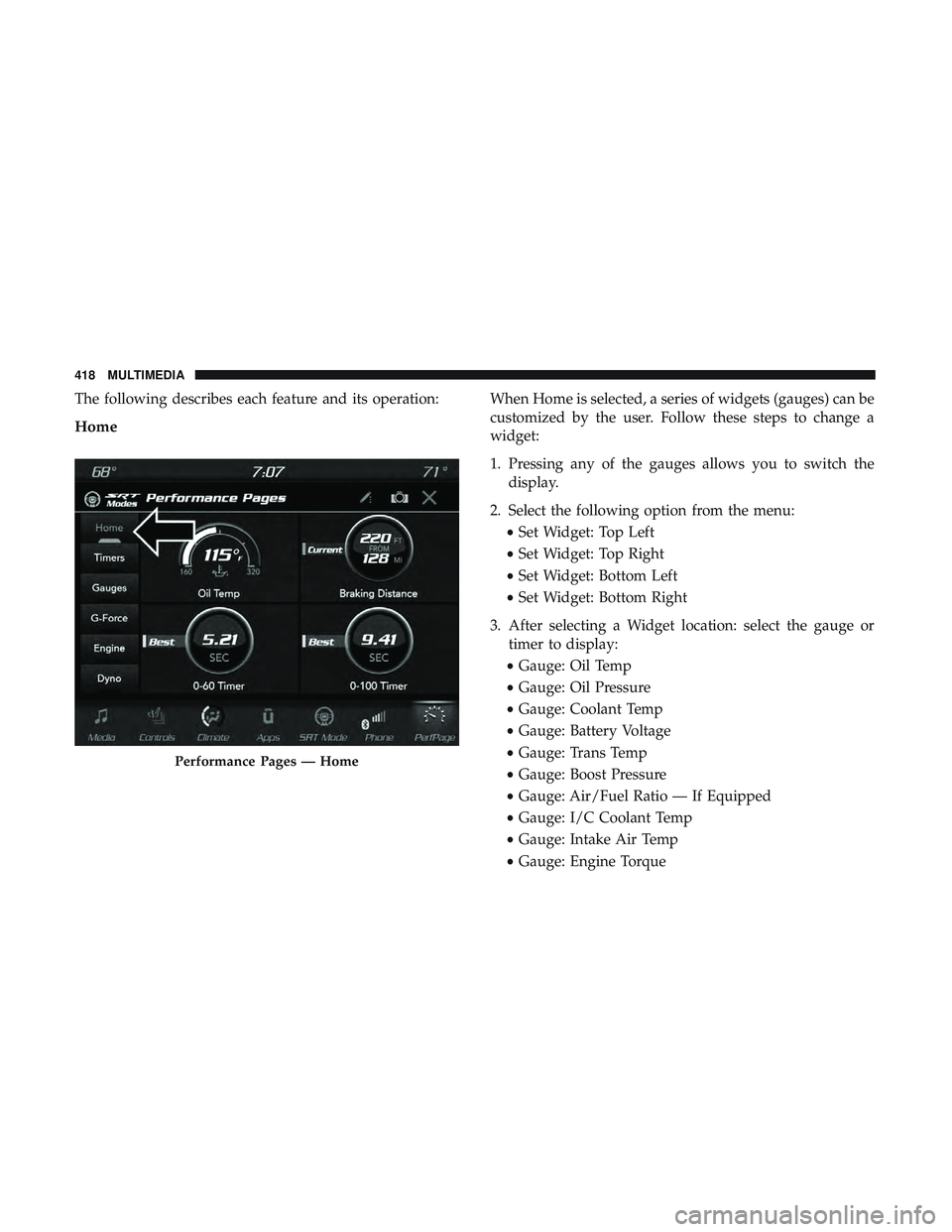
The following describes each feature and its operation:
Home
When Home is selected, a series of widgets (gauges) can be
customized by the user. Follow these steps to change a
widget:
1. Pressing any of the gauges allows you to switch thedisplay.
2. Select the following option from the menu: •Set Widget: Top Left
• Set Widget: Top Right
• Set Widget: Bottom Left
• Set Widget: Bottom Right
3. After selecting a Widget location: select the gauge or timer to display:
• Gauge: Oil Temp
• Gauge: Oil Pressure
• Gauge: Coolant Temp
• Gauge: Battery Voltage
• Gauge: Trans Temp
• Gauge: Boost Pressure
• Gauge: Air/Fuel Ratio — If Equipped
• Gauge: I/C Coolant Temp
• Gauge: Intake Air Temp
• Gauge: Engine Torque
Performance Pages — Home
418 MULTIMEDIA
Page 427 of 490
Engine
When selected, this screen displays the following values:
•Vehicle Speed
Shows the actual vehicle speed. •
Instantaneous Power
Shows the instantaneous power.
• Instantaneous Torque
Shows the instantaneous torque.
• Oil Pressure (6.4L Only)
Shows the actual engine oil pressure.
• Gear (Automatic Transmission Only)
Shows the current (or pending) operating gear of the
vehicle.
• Boost Pressure (6.2L Only)
Shows the actual boost pressure.
Engine
10
MULTIMEDIA 425