Page 405 of 490
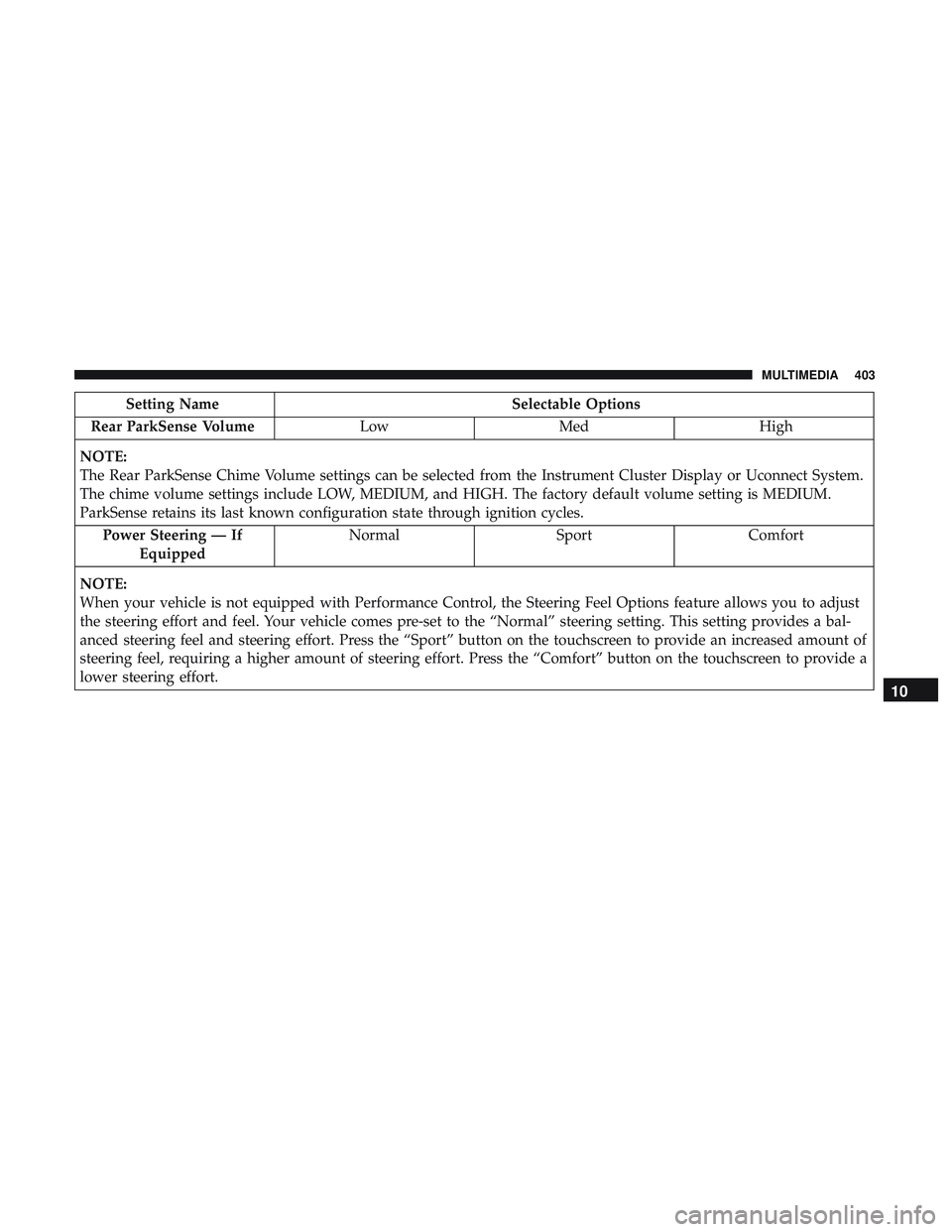
Setting NameSelectable Options
Rear ParkSense Volume LowMed High
NOTE:
The Rear ParkSense Chime Volume settings can be selected from the Instrument Cluster Display or Uconnect System.
The chime volume settings include LOW, MEDIUM, and HIGH. The factory default volume setting is MEDIUM.
ParkSense retains its last known configuration state through ignition cycles. Power Steering — If Equipped Normal
SportComfort
NOTE:
When your vehicle is not equipped with Performance Control, the Steering Feel Options feature allows you to adjust
the steering effort and feel. Your vehicle comes pre-set to the “Normal” steering setting. This setting provides a bal-
anced steering feel and steering effort. Press the “Sport” button on the touchscreen to provide an increased amount of
steering feel, requiring a higher amount of steering effort. Press the “Comfort” button on the touchscreen to provide a
lower steering effort.
10
MULTIMEDIA 403
Page 407 of 490
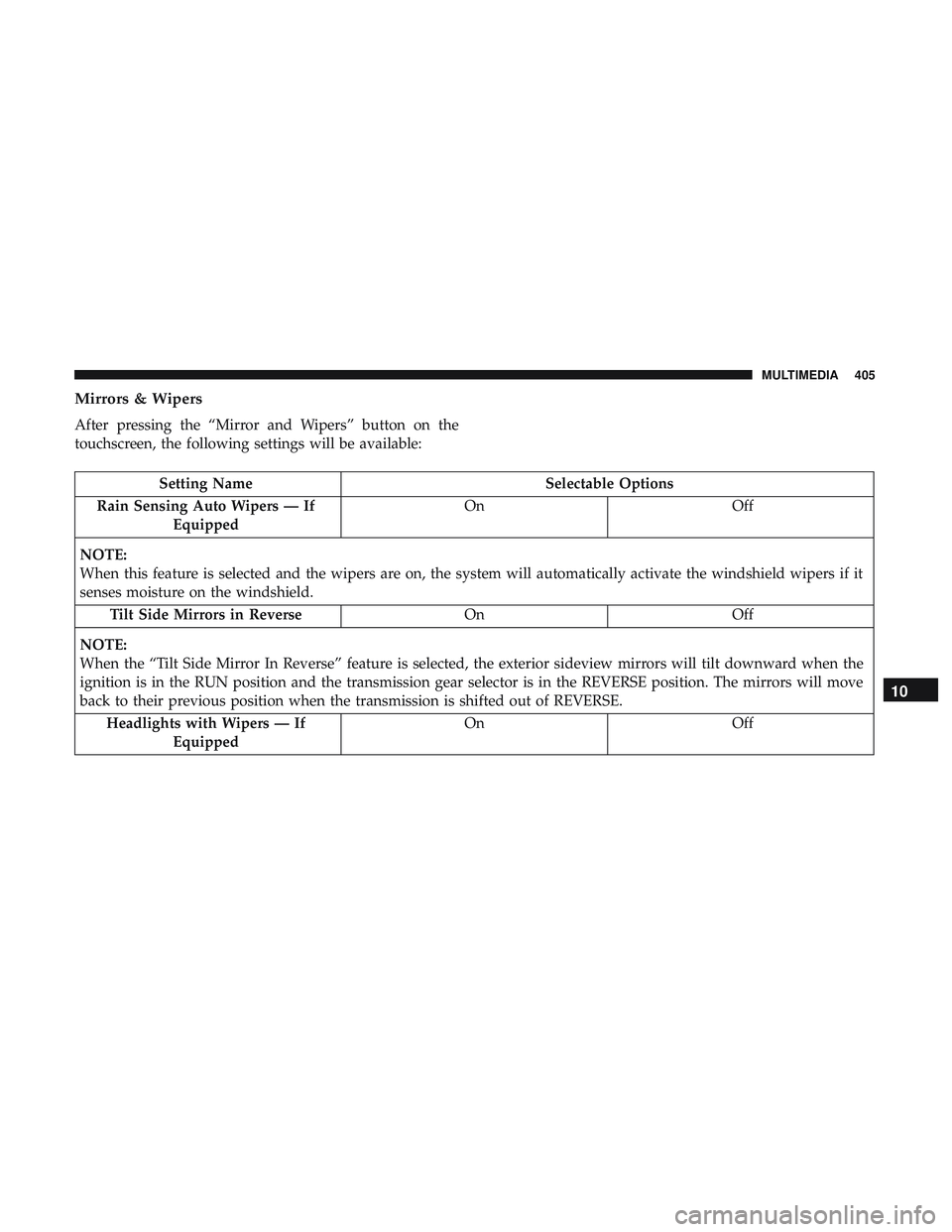
Mirrors & Wipers
After pressing the “Mirror and Wipers” button on the
touchscreen, the following settings will be available:
Setting NameSelectable Options
Rain Sensing Auto Wipers — If Equipped On
Off
NOTE:
When this feature is selected and the wipers are on, the system will automatically activate the windshield wipers if it
senses moisture on the windshield. Tilt Side Mirrors in Reverse OnOff
NOTE:
When the “Tilt Side Mirror In Reverse” feature is selected, the exterior sideview mirrors will tilt downward when the
ignition is in the RUN position and the transmission gear selector is in the REVERSE position. The mirrors will move
back to their previous position when the transmission is shifted out of REVERSE. Headlights with Wipers — If Equipped On
Off
10
MULTIMEDIA 405
Page 412 of 490
Key Off Options
After pressing the “Key Off Options” button on the touch-
screen, the following settings will be available:
Setting NameSelectable Options
Easy Exit Seat — If Equipped OnOff
NOTE:
When the “Easy Exit Seat” feature is selected, the driver ’s seat will automatically move rearward once the engine is
shut off. Key Off Power Delay 0 sec45 sec
5 mins 10 mins
NOTE:
When the “Key Off Power Delay” feature is selected, the power window switches, radio, Uconnect Phone system (if
equipped), DVD video system (if equipped), power sunroof (if equipped), and power outlets will remain active for
up to ten minutes after the ignition is cycled to OFF. Opening either front door will cancel this feature. To change the
Key Off Power Delay setting, press the “+” or “-” button on the touchscreen to select your desired time interval, and
choose from “0 seconds,” “45 seconds,” “5 minutes” or “10 minutes.”
410 MULTIMEDIA
Page 446 of 490
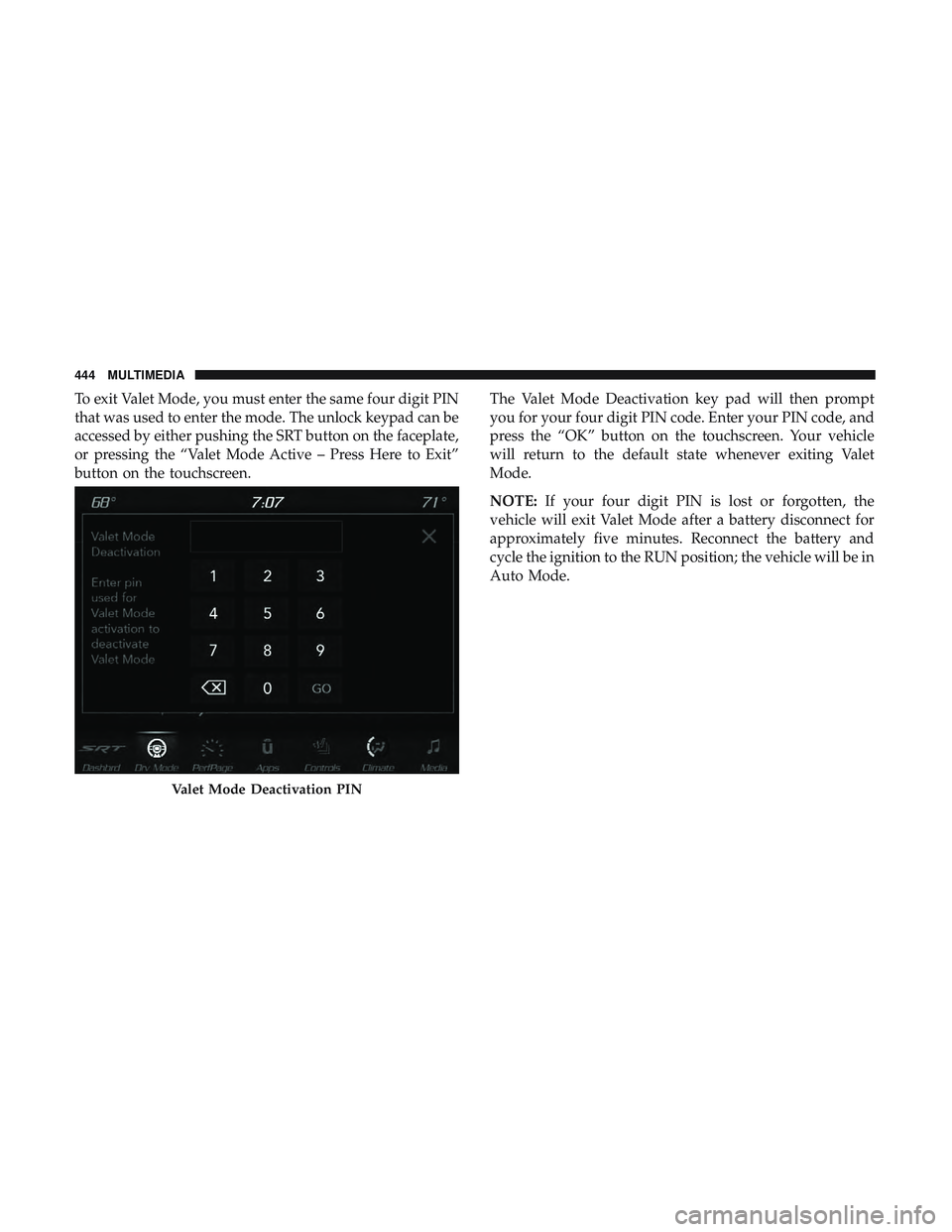
To exit Valet Mode, you must enter the same four digit PIN
that was used to enter the mode. The unlock keypad can be
accessed by either pushing the SRT button on the faceplate,
or pressing the “Valet Mode Active – Press Here to Exit”
button on the touchscreen.The Valet Mode Deactivation key pad will then prompt
you for your four digit PIN code. Enter your PIN code, and
press the “OK” button on the touchscreen. Your vehicle
will return to the default state whenever exiting Valet
Mode.
NOTE:
If your four digit PIN is lost or forgotten, the
vehicle will exit Valet Mode after a battery disconnect for
approximately five minutes. Reconnect the battery and
cycle the ignition to the RUN position; the vehicle will be in
Auto Mode.
Valet Mode Deactivation PIN
444 MULTIMEDIA
Page 480 of 490

Hood Release..............................86
Ignition ..................................25
Switch .................................25
Immobilizer (Sentry Key) ......................31
Information Center, Vehicle ...................109
Inside Rearview Mirror ....................56, 280
Instrument Cluster ..................... .106, 107
Descriptions ............................129
Display ............................109, 112
Instrument Panel Lens Cleaning ................373
Interior Appearance Care .....................372
Interior Lights ..............................65
Intermittent Wipers (Delay Wipers) ...............69
Introduction ................................4
Jack Operation ............................346
Jump Starting ..........................309, 310
Key Fob Arm The System ..........................33
Panic Alarm .............................20
Programming Additional Key Fobs ..........24, 32
Unlatch The Trunk ........................19
Key Fob Battery Service (Remote Keyless Entry) .....21Key Fob Programming (Remote Keyless Entry)
......24
Key-In Reminder ............................27
Keyless Enter-N-Go ..................... .37, 214
Enter The Trunk ..........................19
Passive Entry ............................37
Passive Entry Programming ..................37
Keys ....................................17
Replacement ..........................24, 32
Key, Sentry (Immobilizer) ......................31
Lane Change And Turn Signals .................64
Lane Change Assist ..........................65
LaneSense ............................... .265
Lap/Shoulder Belts ........................ .165
Latches ................................. .207
Hood ..................................86
Lead Free Gasoline ........................ .379
Leaks, Fluid ............................. .207
Life Of Tires ............................. .360
Light Bulbs .......................... .206, 285
Lights .................................. .206
A i
rBag .........................120, 174, 204
Automatic Headlights ......................62
Brake Assist Warning ..................... .142
Brake Warning .......................120, 377
478 INDEX