Page 3 of 553

TABLE OF CONTENTSSECTIONPAGE
1INTRODUCTION
...................................................................3
2GRAPHICAL TABLE OF CONTENTS
......................................................7
3GETTING TO KNOW YOUR VEHICLE
...................................................13
4GETTING TO KNOW YOUR INSTRUMENT PANEL
.........................................117
5SAFETY
........................................................................\
145
6STARTINGANDOPERATING.........................................................219
7INCASEOFEMERGENCY ...........................................................299
8SERVICING AND MAINTENANCE
.....................................................351
9TECHNICAL SPECIFICATIONS
........................................................419
10MULTIMEDIA ....................................................................435
11CUSTOMER ASSISTANCE
............................................................527
12INDEX........................................................................\
..533
1
2
3
4
5
6
7
8
9
10 11
12
Page 7 of 553

HOW TO USE THIS MANUAL
Essential Information
Consult the Table of Contents to determine which section
contains the information you desire.
Since the specification of your vehicle depends on the items
of equipment ordered, certain descriptions and illustra-
tions may differ from your vehicle’s equipment.
The detailed index at the back of this Owner’s Manual
contains a complete listing of all subjects.
Symbols
Some vehicle components have colored labels whose sym-
bols indicate precautions to be observed when using this
component. Refer to “Warning Lights and Messages” in
“Getting To Know Your Instrument Panel” for further
information on the symbols used in your vehicle.
WARNINGS AND CAUTIONS
This Owner ’s Manual containsWARNINGSagainst oper-
ating procedures that could result in a collision, bodily
injury and/or death. It also contains CAUTIONSagainst
procedures that could result in damage to your vehicle. If
you do not read this entire Owner ’s Manual, you may miss
important information. Observe all Warnings and Cau-
tions.
VEHICLE MODIFICATIONS/ALTERATIONS
WARNING!
Any modifications or alterations to this vehicle could
seriously affect its roadworthiness and safety and may
lead to a collision resulting in serious injury or death.
1
INTRODUCTION 5
Page 9 of 553
GRAPHICAL TABLE OF CONTENTS
CONTENTS
�FRONT VIEW ............................8
� REAR VIEW .............................9 �
INSTRUMENT PANEL .....................10
� INTERIOR .............................11
2
Page 12 of 553
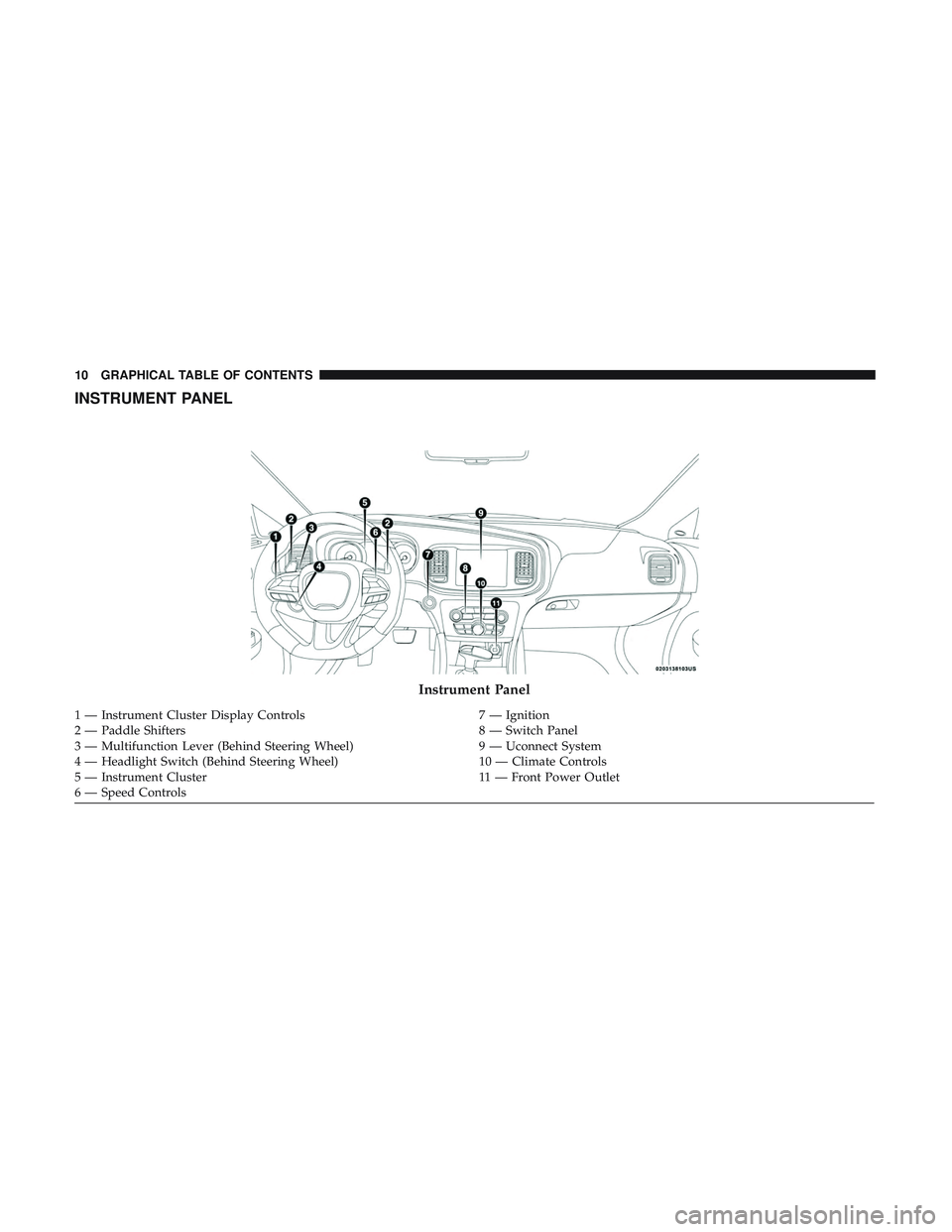
INSTRUMENT PANEL
Instrument Panel
1 — Instrument Cluster Display Controls7 — Ignition
2 — Paddle Shifters 8 — Switch Panel
3 — Multifunction Lever (Behind Steering Wheel) 9 — Uconnect System
4 — Headlight Switch (Behind Steering Wheel) 10 — Climate Controls
5 — Instrument Cluster 11 — Front Power Outlet
6 — Speed Controls 10 GRAPHICAL TABLE OF CONTENTS
Page 66 of 553
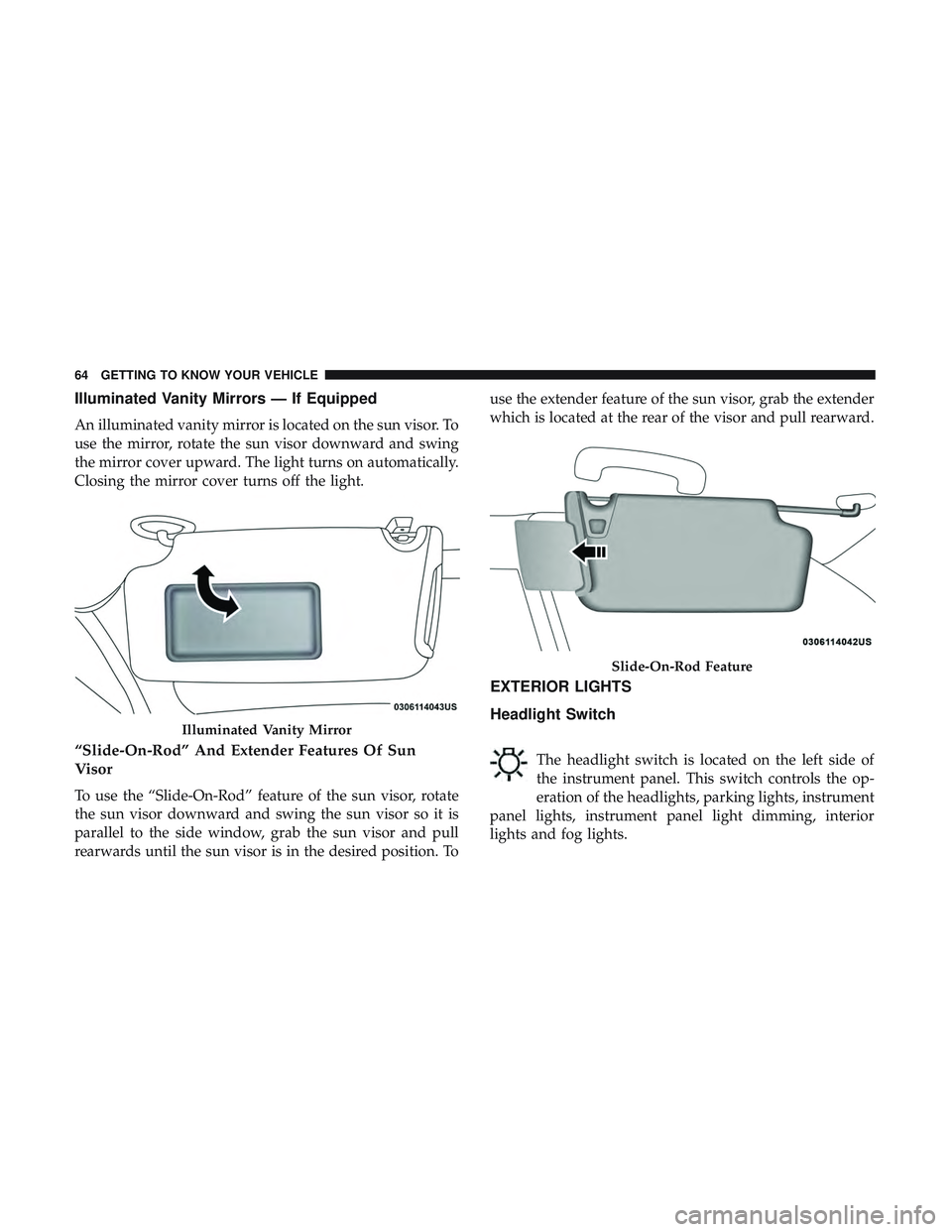
Illuminated Vanity Mirrors — If Equipped
An illuminated vanity mirror is located on the sun visor. To
use the mirror, rotate the sun visor downward and swing
the mirror cover upward. The light turns on automatically.
Closing the mirror cover turns off the light.
“Slide-On-Rod” And Extender Features Of Sun
Visor
To use the “Slide-On-Rod” feature of the sun visor, rotate
the sun visor downward and swing the sun visor so it is
parallel to the side window, grab the sun visor and pull
rearwards until the sun visor is in the desired position. Touse the extender feature of the sun visor, grab the extender
which is located at the rear of the visor and pull rearward.
EXTERIOR LIGHTS
Headlight Switch
The headlight switch is located on the left side of
the instrument panel. This switch controls the op-
eration of the headlights, parking lights, instrument
panel lights, instrument panel light dimming, interior
lights and fog lights.
Illuminated Vanity Mirror
Slide-On-Rod Feature
64 GETTING TO KNOW YOUR VEHICLE
Page 67 of 553
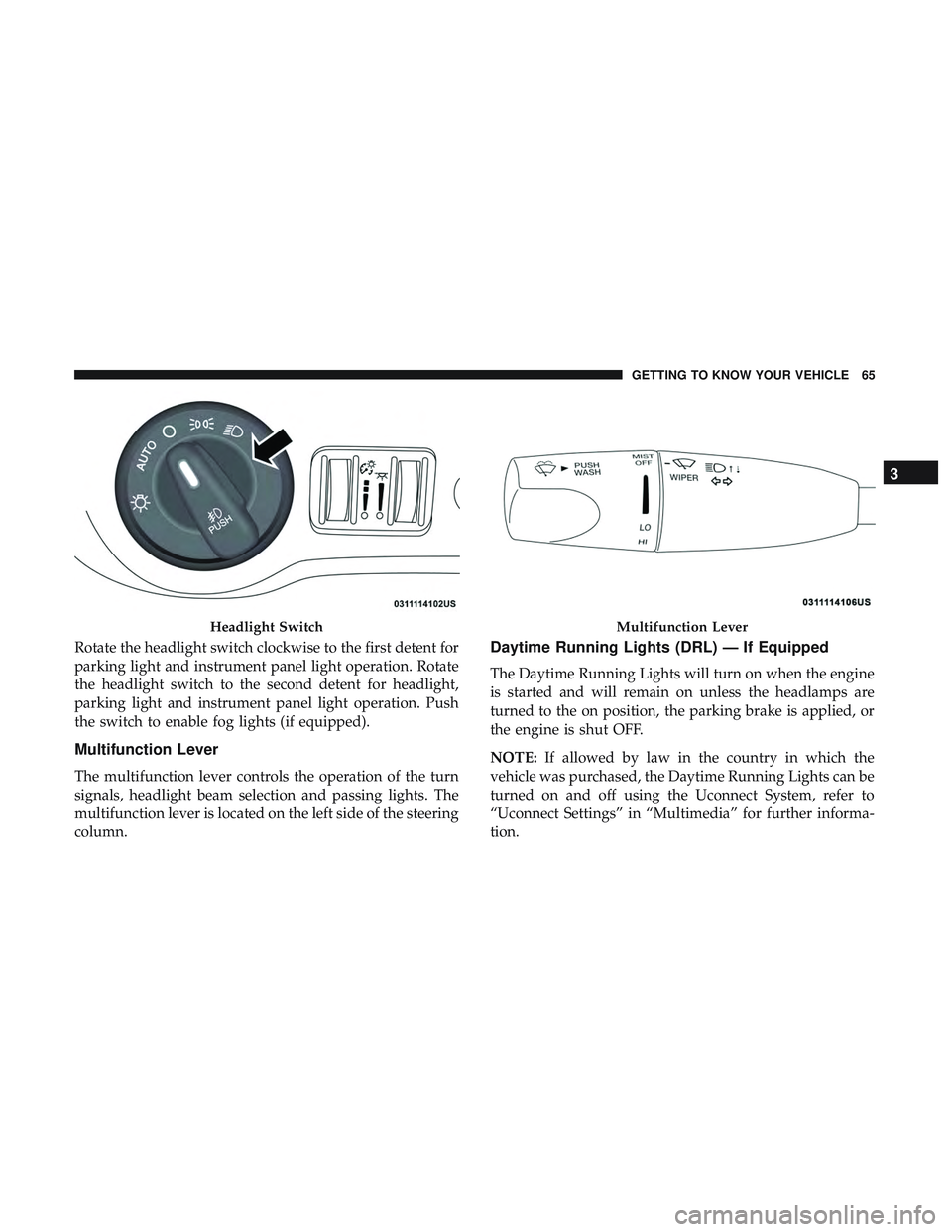
Rotate the headlight switch clockwise to the first detent for
parking light and instrument panel light operation. Rotate
the headlight switch to the second detent for headlight,
parking light and instrument panel light operation. Push
the switch to enable fog lights (if equipped).
Multifunction Lever
The multifunction lever controls the operation of the turn
signals, headlight beam selection and passing lights. The
multifunction lever is located on the left side of the steering
column.
Daytime Running Lights (DRL) — If Equipped
The Daytime Running Lights will turn on when the engine
is started and will remain on unless the headlamps are
turned to the on position, the parking brake is applied, or
the engine is shut OFF.
NOTE:If allowed by law in the country in which the
vehicle was purchased, the Daytime Running Lights can be
turned on and off using the Uconnect System, refer to
“Uconnect Settings” in “Multimedia” for further informa-
tion.
Headlight SwitchMultifunction Lever
3
GETTING TO KNOW YOUR VEHICLE 65
Page 69 of 553
To Deactivate
1. Pull the multifunction lever toward you (or rearward invehicle) to manually deactivate the system (normal
operation of low beams).
2. Push back on the multifunction lever to reactivate the system.
Flash-To-Pass
You can signal another vehicle with your headlights by
lightly pulling the multifunction lever toward you. This
will turn on the high beam headlights until the lever is
released.
NOTE: If the multifunction lever is held in the flash-to pass
position for more than 20 seconds, the high beams will shut
off.
Automatic Headlights
This system automatically turns the headlights on or off
according to ambient light levels. To turn the system on,
rotate the headlight switch counterclockwise to the AUTO
position. When the system is on, the headlight time delay
feature is also on. This means the headlights will stay on for up to 90 seconds after you place the ignition into the
OFF position. The headlight time delay can be pro-
grammed 0/30/60/90 seconds.
Refer to “Uconnect Settings” in “Multimedia” for further
information.
To turn the automatic system off, move the headlight
switch out of the AUTO position.
NOTE:
The engine must be running before the headlights
will come on in the automatic mode.
Parking Lights
Turn the headlight switch knob to the first detent to
turn the parking lights on. This also turns on all
instrument panel lighting.
Headlights On With Wipers
When this feature is active, the headlights will turn on after
the wipers are turned on if the headlight switch is placed in
the AUTO position and programmable feature is set to on.
In addition, the headlights will turn off when the wipers
are turned off if they were turned on by this feature.
3
GETTING TO KNOW YOUR VEHICLE 67
Page 74 of 553
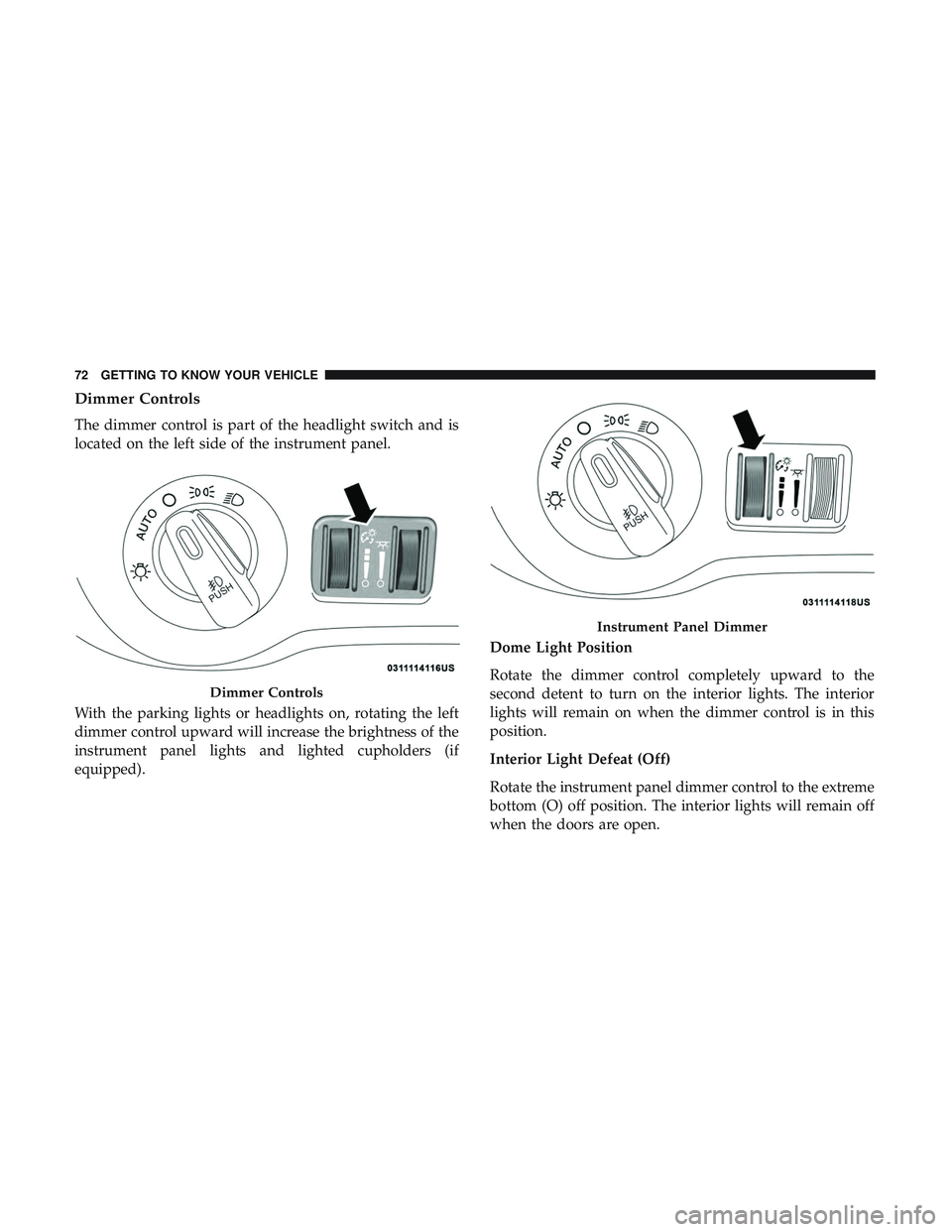
Dimmer Controls
The dimmer control is part of the headlight switch and is
located on the left side of the instrument panel.
With the parking lights or headlights on, rotating the left
dimmer control upward will increase the brightness of the
instrument panel lights and lighted cupholders (if
equipped).Dome Light Position
Rotate the dimmer control completely upward to the
second detent to turn on the interior lights. The interior
lights will remain on when the dimmer control is in this
position.
Interior Light Defeat (Off)
Rotate the instrument panel dimmer control to the extreme
bottom (O) off position. The interior lights will remain off
when the doors are open.
Dimmer Controls
Instrument Panel Dimmer
72 GETTING TO KNOW YOUR VEHICLE