Page 415 of 516

Setting NameSelectable Options
Rear ParkSense Volume — If Equipped On
Off
NOTE:
The Rear ParkSense Chime Volume settings can be selected from the instrument cluster display or Uconnect System.
The chime volume settings include LOW, MEDIUM, and HIGH. The factory default volume setting is MEDIUM. To
make your selection, press the “Rear ParkSense Vol.” button on the touchscreen, until a check-mark appears next to
setting, indicating that the setting had been selected. ParkSense will retain its last known configuration state through
ignition cycles. Blind Spot Alert — If Equipped Off
LightsLights and Chimes
NOTE:
•When this feature is selected, the Blind Spot Alert feature Provides alerts, visual and/or audible, to indicate objects
in your blind spot. The Blind Spot Alert feature can be activated in “Lights” mode. When this mode is selected, the
Blind Spot Monitor (BSM) system is activated and will only show a visual alert in the exterior mirrors. When
“Lights & Chime” mode is activated, the Blind Spot Monitor (BSM) will show a visual alert in the exterior mirrors
as well as an audible alert when the turn signal is on. When “Off” is selected, the Blind Spot Monitor (BSM) sys-
tem is deactivated.
•If your vehicle has experienced any damage in the area where the sensor is located, even if the fascia is not dam-
aged, the sensor may have become misaligned. Take your vehicle to an authorized dealer to verify sensor align-
ment. Having a sensor that is misaligned will result in the BSM not operating to specification.
10
MULTIMEDIA 413
Page 423 of 516
Compass CalibrationYe s
NOTE:
Press “Compass Calibration” on the touchscreen to enter calibration. To start calibration of the compass, press the “Yes” but-
ton on the touchscreen and complete one or more 360-degree turns (in an area free from large metal or metallic objects).
A message will appear on the touchscreen when the compass has been successfully calibrated.
Keep magnetic materials away from the rear view mirror, such as Mobile Phones, Laptops and Radar Detectors. This is where
the compass module is located, and it can cause interference with the compass sensor, and it may give false readings.
Compass Variance Zone Map10
MULTIMEDIA 421
Page 438 of 516

Setting NameSelectable Options
Blind Spot Alert — If Equipped Off
LightsLights & Chime
NOTE:
•When this feature is selected, the Blind Spot Alert feature Provides alerts, visual and/or audible, to indicate objects
in your blind spot. The Blind Spot Alert feature can be activated in “Lights” mode. When this mode is selected, the
Blind Spot Monitor (BSM) system is activated and will only show a visual alert in the exterior mirrors. When
“Lights & Chime” mode is activated, the Blind Spot Monitor (BSM) will show a visual alert in the exterior mirrors
as well as an audible alert when the turn signal is on. When “Off” is selected, the Blind Spot Monitor (BSM) sys-
tem is deactivated.
•If your vehicle has experienced any damage in the area where the sensor is located, even if the fascia is not dam-
aged, the sensor may have become misaligned. Take your vehicle to an authorized dealer to verify sensor align-
ment. Having a sensor that is misaligned will result in the BSM not operating to specification. Hill Start Assist — If Equipped On Off
NOTE:
When this feature is selected, the Hill Start Assist (HSA) system is active. Power Steering Default NormalSportComfort
436 MULTIMEDIA
Page 439 of 516
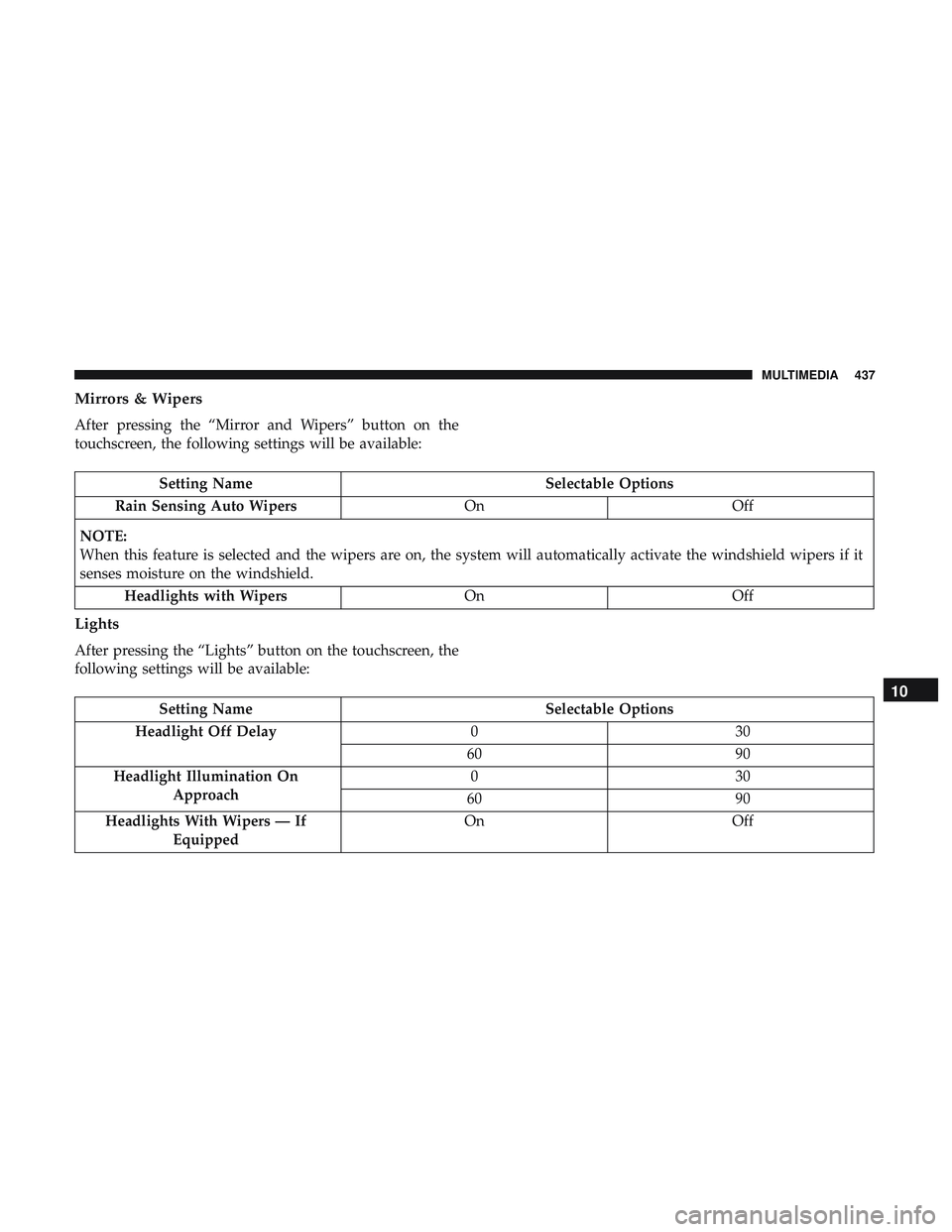
Mirrors & Wipers
After pressing the “Mirror and Wipers” button on the
touchscreen, the following settings will be available:
Setting NameSelectable Options
Rain Sensing Auto Wipers OnOff
NOTE:
When this feature is selected and the wipers are on, the system will automatically activate the windshield wipers if it
senses moisture on the windshield. Headlights with Wipers OnOff
Lights
After pressing the “Lights” button on the touchscreen, the
following settings will be available:
Setting Name Selectable Options
Headlight Off Delay 030
60 90
Headlight Illumination On Approach 03
0
60 90
Headlights With Wipers — If Equipped On
Off
10
MULTIMEDIA 437
Page 442 of 516
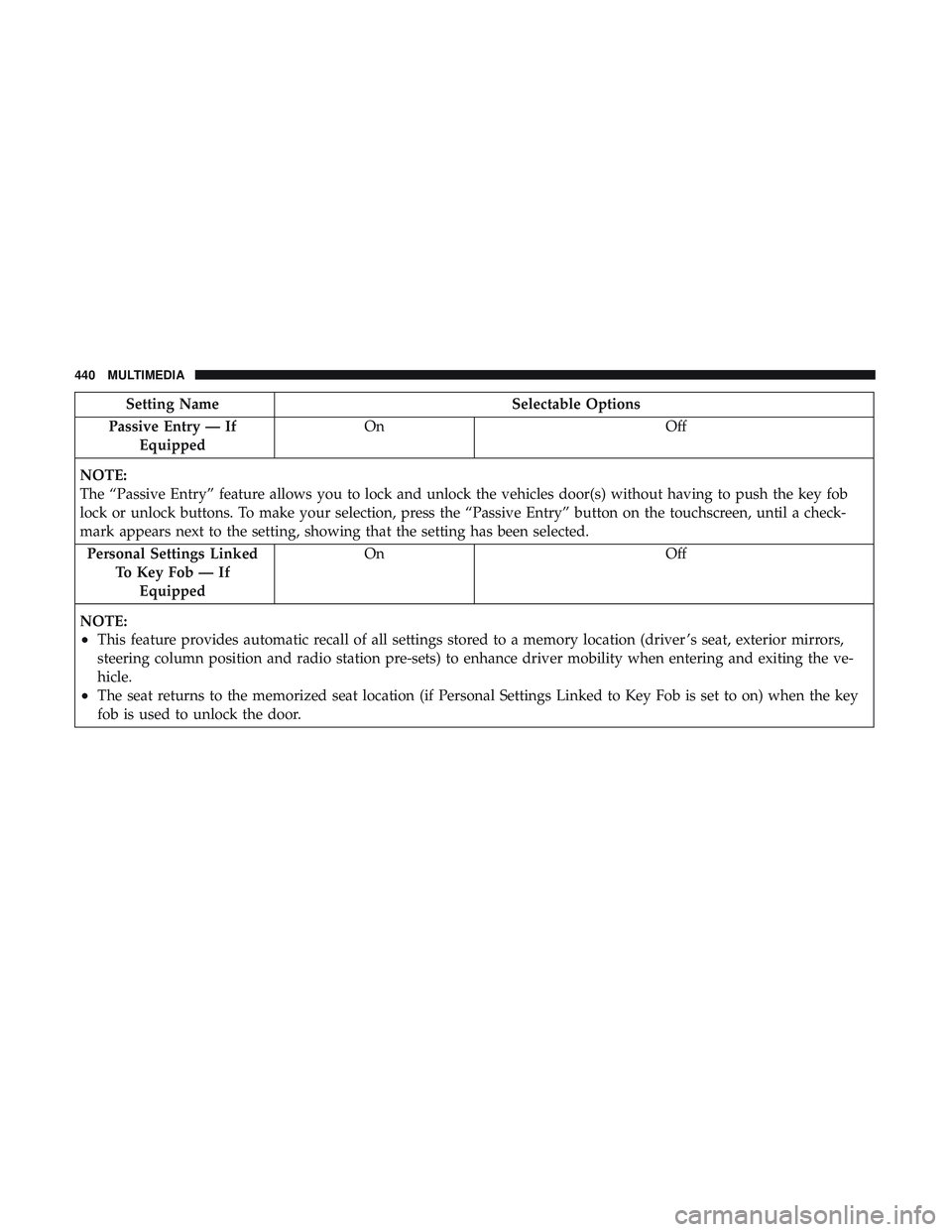
Setting NameSelectable Options
Passive Entry — If Equipped On
Off
NOTE:
The “Passive Entry” feature allows you to lock and unlock the vehicles door(s) without having to push the key fob
lock or unlock buttons. To make your selection, press the “Passive Entry” button on the touchscreen, until a check-
mark appears next to the setting, showing that the setting has been selected. Personal Settings Linked To Key Fob — IfEquipped On
Off
NOTE:
•This feature provides automatic recall of all settings stored to a memory location (driver ’s seat, exterior mirrors,
steering column position and radio station pre-sets) to enhance driver mobility when entering and exiting the ve-
hicle.
•The seat returns to the memorized seat location (if Personal Settings Linked to Key Fob is set to on) when the key
fob is used to unlock the door.
440 MULTIMEDIA
Page 474 of 516
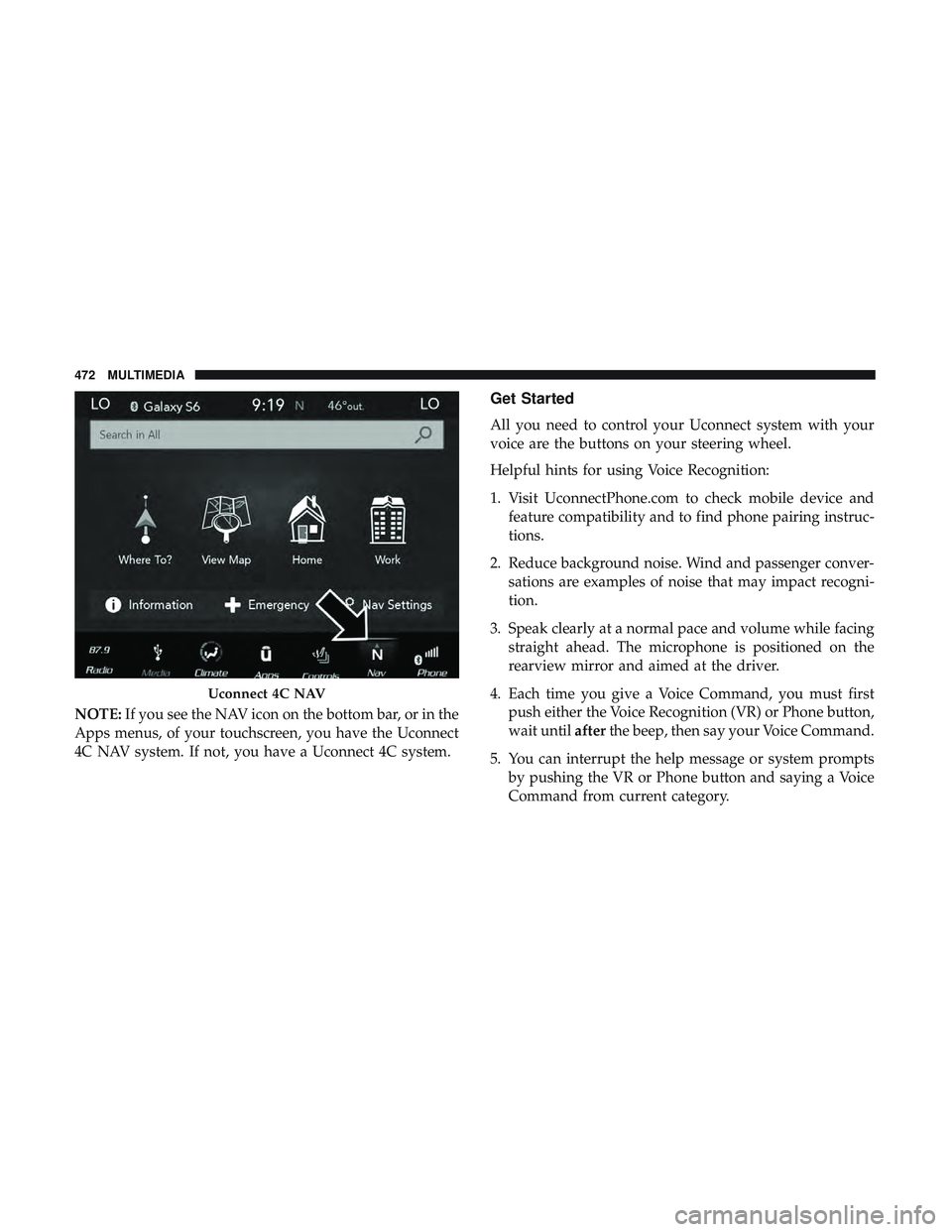
NOTE:If you see the NAV icon on the bottom bar, or in the
Apps menus, of your touchscreen, you have the Uconnect
4C NAV system. If not, you have a Uconnect 4C system.
Get Started
All you need to control your Uconnect system with your
voice are the buttons on your steering wheel.
Helpful hints for using Voice Recognition:
1. Visit UconnectPhone.com to check mobile device and feature compatibility and to find phone pairing instruc-
tions.
2. Reduce background noise. Wind and passenger conver- sations are examples of noise that may impact recogni-
tion.
3. Speak clearly at a normal pace and volume while facing straight ahead. The microphone is positioned on the
rearview mirror and aimed at the driver.
4. Each time you give a Voice Command, you must first push either the Voice Recognition (VR) or Phone button,
wait until afterthe beep, then say your Voice Command.
5. You can interrupt the help message or system prompts by pushing the VR or Phone button and saying a Voice
Command from current category.
Uconnect 4C NAV
472 MULTIMEDIA
Page 503 of 516

Cybersecurity............................ .404
Daytime Running Lights ......................55
Dealer Service ............................ .334
Deck Lid Power Release ...........................79
Defroster, Windshield ....................... .189
Delay (Intermittent) Wipers ....................61
Diagnostic System, Onboard ...................118
Dimmer Switch Headlight ...............................55
Dipsticks Oil (Engine) ........................... .332
Disable Vehicle Towing ..................... .313
Disposal Antifreeze (Engine Coolant) .................352
Disturb ................................. .484
Door Ajar ................................112
Door Ajar Light ............................112
Door Locks Automatic ..............................39
Door Opener, Garage .........................82
Doors ....................................32
Drag And Drop Menu ...................... .403
Drive Modes ............................. .458Driver ’s Seat Back Tilt
........................39
Driving Through Flowing, Rising, Or Shallow Standing
Water ................................ .264
Electrical Power Outlets .......................91
Electric Brake Control System ..................123
Anti-Lock Brake System ....................122
Electronic Roll Mitigation ...............124, 131
Electric Remote Mirrors .......................52
Electronic Power Distribution Center (Fuses) .......280
Electronic Speed Control (Cruise Control) ......220, 222
Electronic Stability Control (ESC) ...............125
Electronic Throttle Control Warning Light .........111
Emergency, In Case Of Freeing Vehicle When Stuck .................311
Jacking ........................... .290, 358
Jump Starting ....................305, 306, 307
Towing ............................... .313
Emission Control System Maintenance ............119
Engine .......................... .329, 330, 331
Air Cleaner ............................ .339
Block
Heater ........................... .199
Break-In Recommendations .................200
Checking Oil Level ...................... .332
12
INDEX 501
Page 505 of 516
Additives............................. .393
Clean Air ............................. .393
Ethanol .............................. .394
Filler Cap (Gas Cap) ..................... .250
Gasoline .............................. .391
Materials Added ........................ .393
Methanol ............................. .394
Octane Rating ....................... .391, 398
Requirements .......................... .391
Specifications .......................... .398
Tank Capacity .......................... .396
Fueling ................................. .250
Fuses .................................. .278
Garage Door Opener (HomeLink) ................82
Gas Cap (Fuel Filler Cap) .....................250
Gasoline, Clean Air ........................ .393
Gasoline, Reformulated ..................... .393
Gear Ranges ..............................211
Glass Cleaning ........................... .386
Gross Axle Weight Rating .................252, 254
Gross Vehicle Weight Rating ...............252, 253
GVWR ................................. .252Hazard
Driving Through Flowing, Rising, Or Shallow
Standing Water ......................... .264
Hazard Warning Flashers .....................269
Headlights Automatic ..............................56
Cleaning .............................. .383
High Beam/Low Beam Select Switch ...........55
Lights On Reminder .......................57
On With Wipers ..........................56
Passing ................................55
Switch .................................54
Time Delay ..............................56
Washers .............................. .333
Head Restraints ......................... .46, 47
Head Rests ............................ .46, 47
Heated Mirrors .............................52
Heater ...................................64
Heater
, Engine Block ....................... .199
High Beam/Low Beam Select (Dimmer) Switch ......55
Hill Start Assist ........................... .129
Hitches Trailer Towing .......................... .256
HomeLink (Garage Door Opener) ................82
Hood Prop ................................78
12
INDEX 503