Page 401 of 516

CAUTION!
•Mixing of engine coolant (antifreeze) other than
specified Organic Additive Technology (OAT) en-
gine coolant (antifreeze), may result in engine dam-
age and may decrease corrosion protection. Organic
Additive Technology (OAT) engine coolant is differ-
ent and should not be mixed with Hybrid Organic
Additive Technology (HOAT) engine coolant (anti-
freeze) or any “globally compatible” coolant (anti-
freeze). If a non-OAT engine coolant (antifreeze) is
introduced into the cooling system in an emergency,
the cooling system will need to be drained, flushed,
(Continued)
CAUTION! (Continued)
and refilled with fresh OAT coolant (conforming
to MS.90032), by an authorized dealer as soon as
possible.
• Do not use water alone or alcohol-based engine
coolant (antifreeze) products. Do not use additional
rust inhibitors or antirust products, as they may not
be compatible with the radiator engine coolant and
may plug the radiator.
• This vehicle has not been designed for use with
propylene glycol-based engine coolant (antifreeze).
Use of propylene glycol-based engine coolant (anti-
freeze) is not recommended.
9
TECHNICAL SPECIFICATIONS 399
Page 402 of 516
Chassis
ComponentFluid, Lubricant, or Genuine Part
8-Speed Automatic Transmission Use only Mopar ZF 8&9 Speed ATF Automatic Transmission Fluid, or equiva- lent. Failure to use the correct fluid may affect the function or performance of
your transmission.
Manual Transmission – If Equipped We recommend you use Mopar ATF+4 Automatic Transmission Fluid.
Brake Master Cylinder We recommend you use Mopar DOT 3, SAE J1703. If DOT 3 brake fluid is
not available, then DOT 4 is acceptable.
Front Axle We recommend you use Mopar Synthetic Gear Lubricant SAE 75W90
(API GL-5).
Rear Axle – 3.6L/5.7L Engine With
Automatic Transmission We recommend you use Mopar OD Synthetic Gear Lubricant SAE 75W85
(API GL-5).
Rear Axle – 6.4 Engine or 5.7 With
Manual Transmission We recommend you use Mopar LSD Synthetic Gear Lubricant SAE 75W85
(API GL-5).
Transfer Case — AWD (If Equipped)
We recommend you use Mopar Transfer Case Lubricant for BorgWarner 44–40.
400 TECHNICAL SPECIFICATIONS
Page 421 of 516
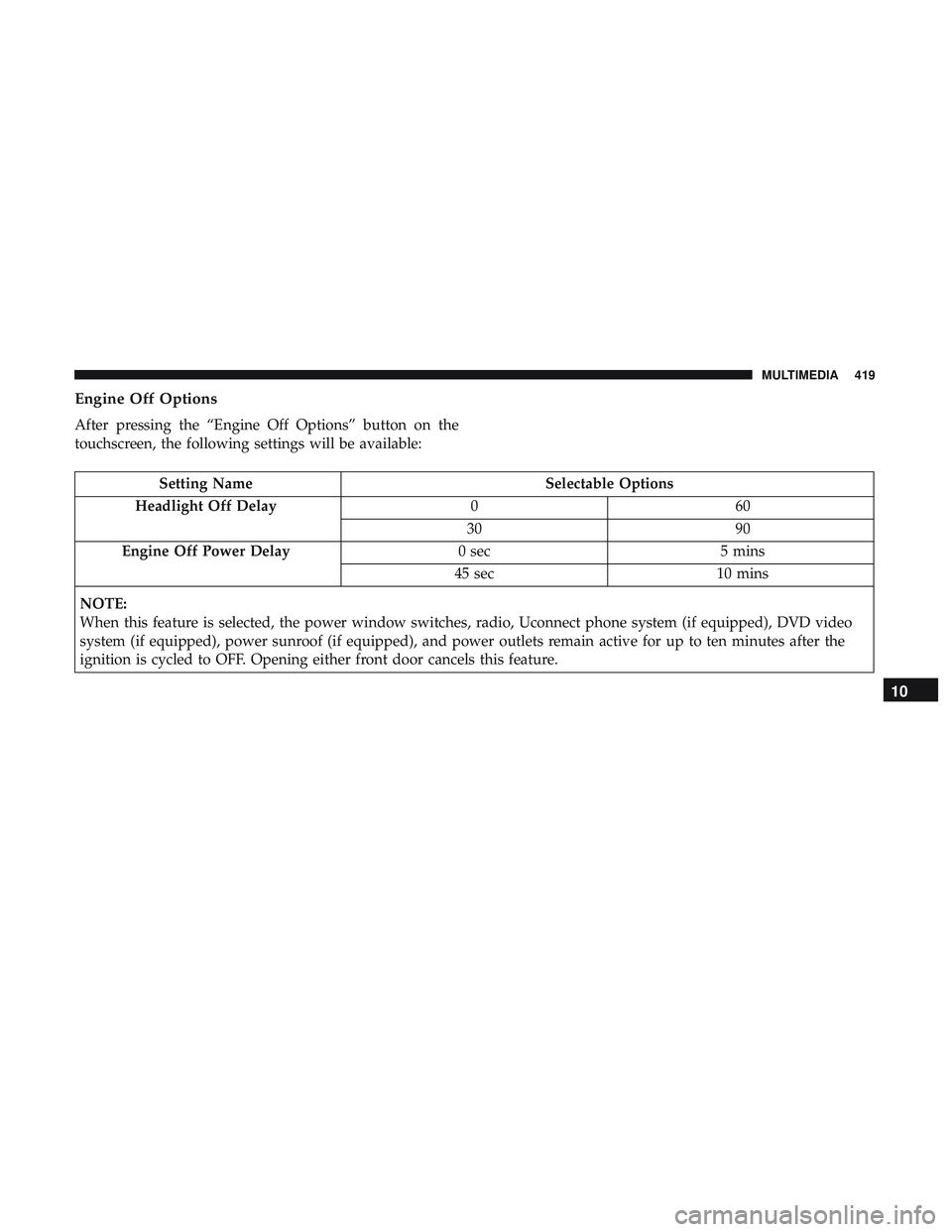
Engine Off Options
After pressing the “Engine Off Options” button on the
touchscreen, the following settings will be available:
Setting NameSelectable Options
Headlight Off Delay 060
30 90
Engine Off Power Delay 0 sec5 mins
45 sec 10 mins
NOTE:
When this feature is selected, the power window switches, radio, Uconnect phone system (if equipped), DVD video
system (if equipped), power sunroof (if equipped), and power outlets remain active for up to ten minutes after the
ignition is cycled to OFF. Opening either front door cancels this feature.
10
MULTIMEDIA 419
Page 429 of 516

Customer Programmable Features — Uconnect
4C/4C NAV Settings
Press the “Apps” button (If Equipped), and then
press the “Settings” button on the touchscreen to dis-
play the menu setting screen. In this mode, the
Uconnect system allows you to access programmable
features that may be equipped such as Language, Dis-
play, Units, Voice, Clock, Safety & Driving Assistance,
Lights, Doors & Locks, Auto-On Comfort, Engine Off
Options, Audio, Phone, SiriusXM Setup, Restore Set-
tings, Clear Personal Data and System Information.
NOTE: Depending on the vehicles options, feature settings
may vary. When making a selection, press the button on the touch-
screen to enter the desired mode. Once in the desired
mode, press and release the preferred setting “option” until
a check-mark appears next to the setting, showing that
setting has been selected. Once the setting is complete,
either press the back arrow button on the touchscreen to
return to the previous menu, or press the “X” button on the
touchscreen to close out of the settings screen. Pressing the
up or down arrow button on the right side of the screen
will allow you to toggle up or down through the available
settings.
10
MULTIMEDIA 427
Page 443 of 516
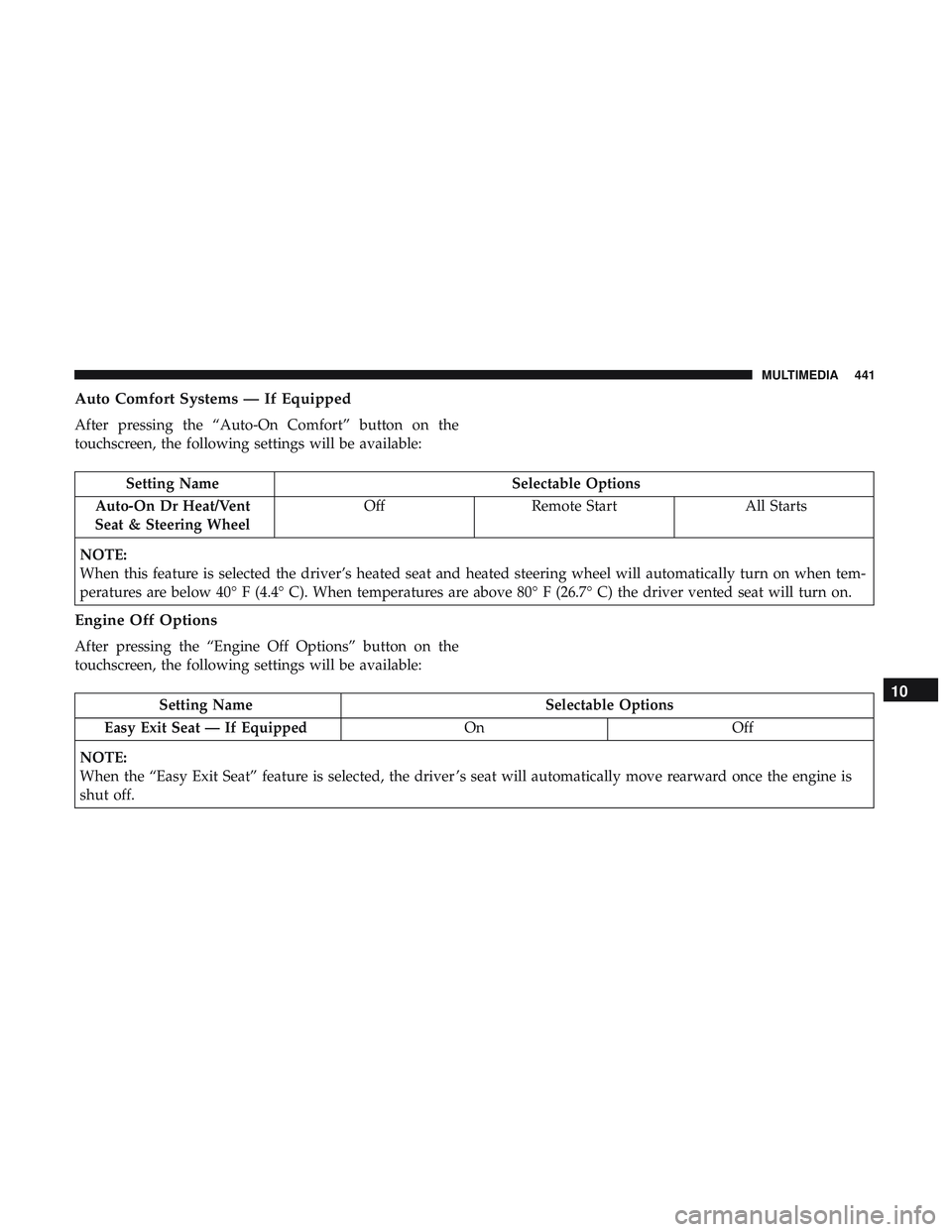
Auto Comfort Systems — If Equipped
After pressing the “Auto-On Comfort” button on the
touchscreen, the following settings will be available:
Setting NameSelectable Options
Auto-On Dr Heat/Vent
Seat & Steering Wheel Off
Remote Start All Starts
NOTE:
When this feature is selected the driver’s heated seat and heated steering wheel will automatically turn on when tem-
peratures are below 40° F (4.4° C). When temperatures are above 80° F (26.7° C) the driver vented seat will turn on.
Engine Off Options
After pressing the “Engine Off Options” button on the
touchscreen, the following settings will be available:
Setting Name Selectable Options
Easy Exit Seat — If Equipped OnOff
NOTE:
When the “Easy Exit Seat” feature is selected, the driver ’s seat will automatically move rearward once the engine is
shut off.10
MULTIMEDIA 441
Page 444 of 516
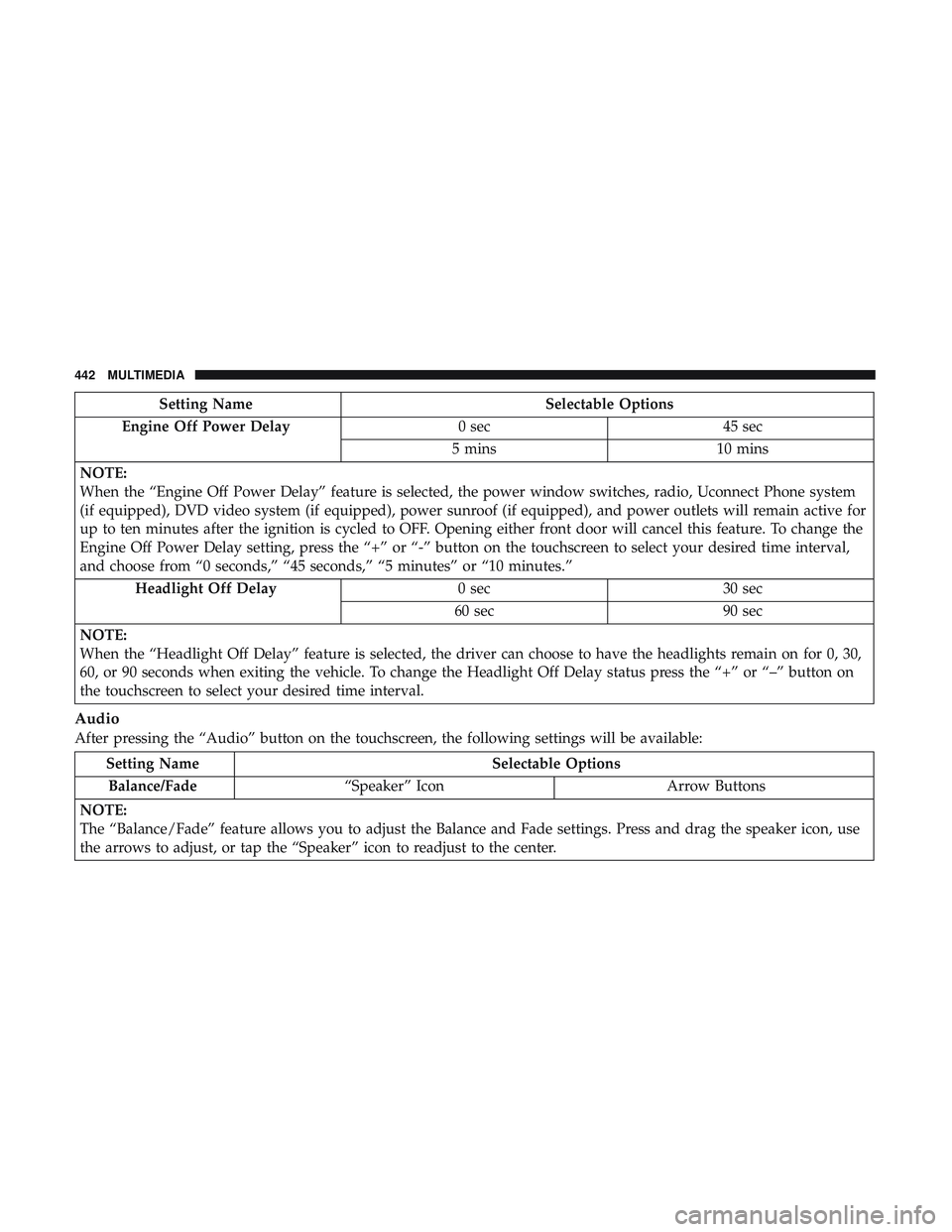
Setting NameSelectable Options
Engine Off Power Delay 0 sec45 sec
5 mins 10 mins
NOTE:
When the “Engine Off Power Delay” feature is selected, the power window switches, radio, Uconnect Phone system
(if equipped), DVD video system (if equipped), power sunroof (if equipped), and power outlets will remain active for
up to ten minutes after the ignition is cycled to OFF. Opening either front door will cancel this feature. To change the
Engine Off Power Delay setting, press the “+” or “-” button on the touchscreen to select your desired time interval,
and choose from “0 seconds,” “45 seconds,” “5 minutes” or “10 minutes.” Headlight Off Delay 0 sec30 sec
60 sec 90 sec
NOTE:
When the “Headlight Off Delay” feature is selected, the driver can choose to have the headlights remain on for 0, 30,
60, or 90 seconds when exiting the vehicle. To change the Headlight Off Delay status press the “+” or “–” button on
the touchscreen to select your desired time interval.
Audio
After pressing the “Audio” button on the touchscreen, the following settings will be available:
Setting Name Selectable Options
Balance/Fade “Speaker” Icon Arrow Buttons
NOTE:
The “Balance/Fade” feature allows you to adjust the Balance and Fade settings. Press and drag the speaker icon, use
the arrows to adjust, or tap the “Speaker” icon to readjust to the center.
442 MULTIMEDIA
Page 451 of 516
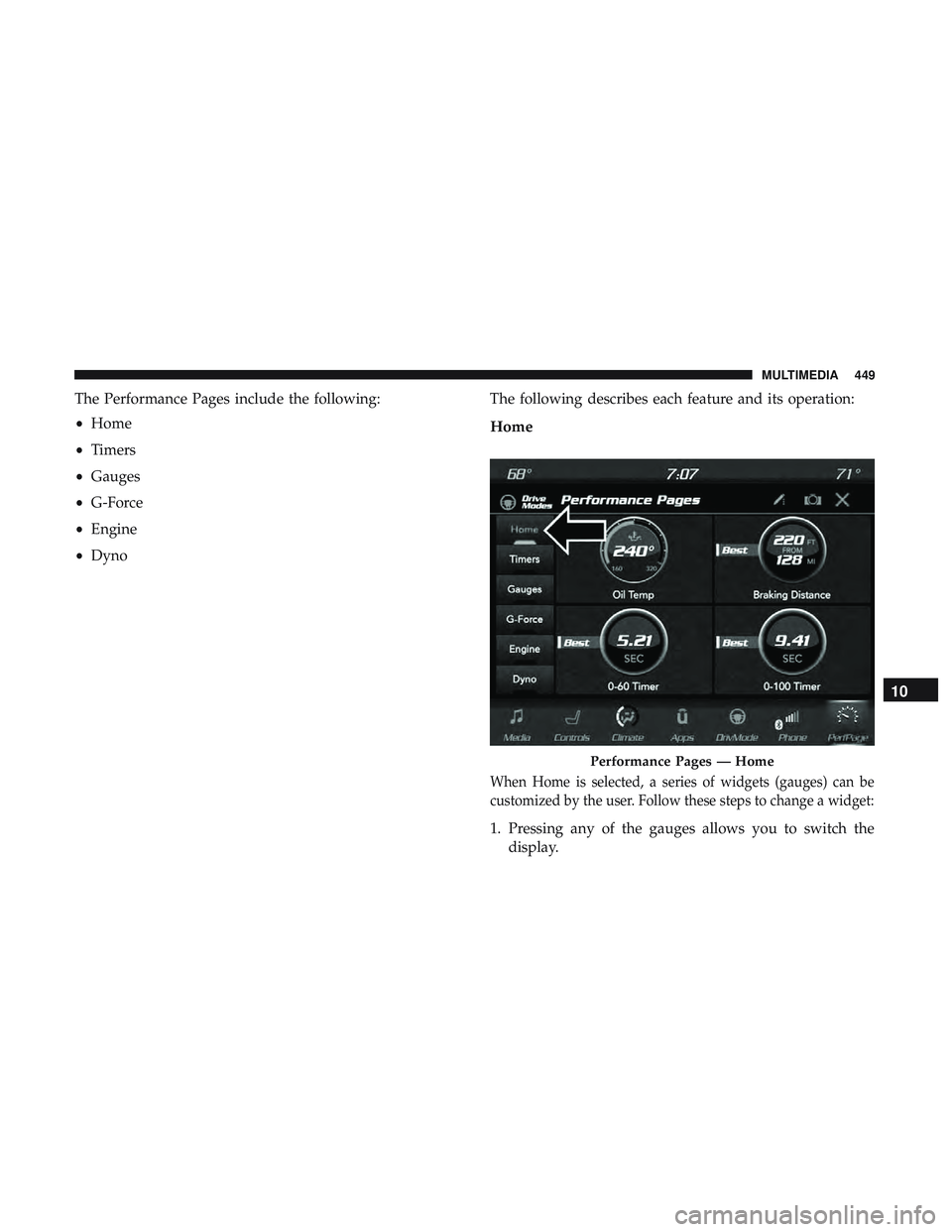
The Performance Pages include the following:
•Home
• Timers
• Gauges
• G-Force
• Engine
• Dyno The following describes each feature and its operation:
Home
When Home is selected, a series of widgets (gauges) can be
customized by the user. Follow these steps to change a widget:
1. Pressing any of the gauges allows you to switch the
display.
Performance Pages — Home
10
MULTIMEDIA 449
Page 452 of 516
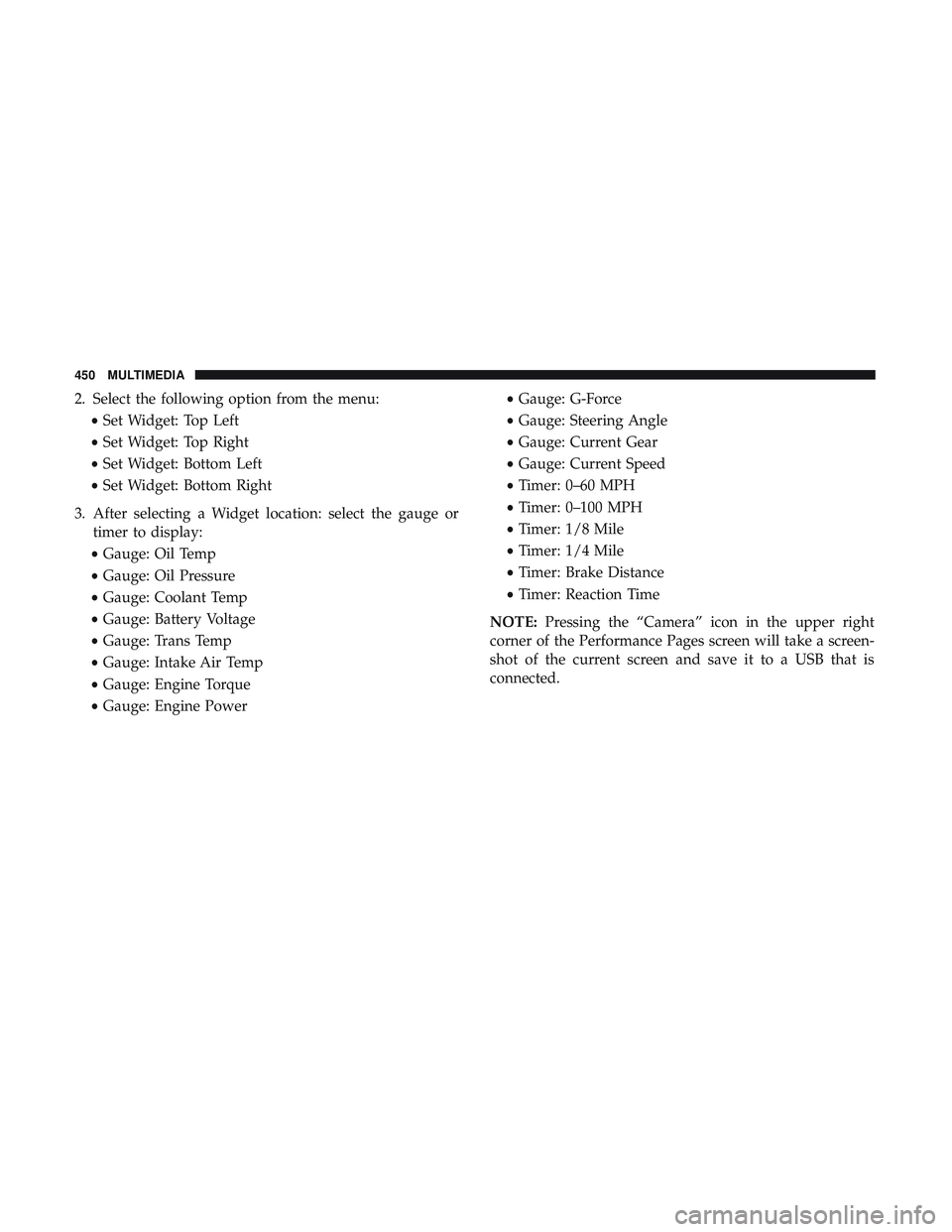
2. Select the following option from the menu:•Set Widget: Top Left
• Set Widget: Top Right
• Set Widget: Bottom Left
• Set Widget: Bottom Right
3. After selecting a Widget location: select the gauge or timer to display:
• Gauge: Oil Temp
• Gauge: Oil Pressure
• Gauge: Coolant Temp
• Gauge: Battery Voltage
• Gauge: Trans Temp
• Gauge: Intake Air Temp
• Gauge: Engine Torque
• Gauge: Engine Power •
Gauge: G-Force
• Gauge: Steering Angle
• Gauge: Current Gear
• Gauge: Current Speed
• Timer: 0–60 MPH
• Timer: 0–100 MPH
• Timer: 1/8 Mile
• Timer: 1/4 Mile
• Timer: Brake Distance
• Timer: Reaction Time
NOTE: Pressing the “Camera” icon in the upper right
corner of the Performance Pages screen will take a screen-
shot of the current screen and save it to a USB that is
connected.
450 MULTIMEDIA