2018 CITROEN DS7 CROSSBACK media
[x] Cancel search: mediaPage 125 of 244
123
Driving06
Stop function
"Cruise paused" (for a few
seconds).
The system has brought the vehicle to a complete
stop and is keeping it immobilised: cruise control
is paused.
The driver must accelerate to move off again,
then reactivate cruise control.
Stop & Go function
"To pick up again: accelerate or
press the II button".
The system has brought the vehicle to a complete
stop.
Within 3 seconds, the vehicle gradually and
automatically begins moving again.
Beyond 3 seconds, the driver must accelerate or
press 4-II to move off again.
While the vehicle is immobilised, the
following recommendations apply:
–
The driv
er should not leave the vehicle.
–
Do no
t open the boot.
–
Do no
t drop off or pick up passengers.
–
Do no
t engage reverse gear.
When moving off again, watch out for
cyclists, pedestrians and animals, as they
may not be detected properly.
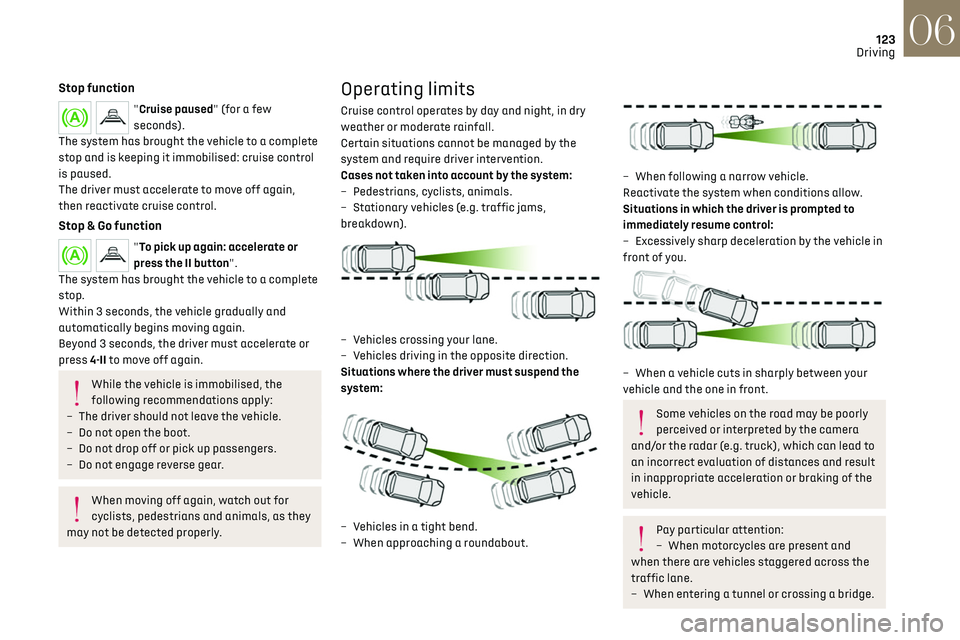
Operating limits
Cruise control operates by day and night, in dry
weather or moderate rainfall.
Certain situations cannot be managed by the
system and require driver intervention.
Cases not taken into account by the system:
–
Pede
strians, cyclists, animals.
–
St
ationary vehicles (e.g. traffic jams,
breakdown).
– Vehicles crossing your lane.
– V ehicles driving in the opposite direction.
Situations where the driver must suspend the
system:
– Vehicles in a tight bend.
– When approaching a roundabout.
– When follo wing a narrow vehicle.
Reactivate the system when conditions allow.
Situations in which the driver is prompted to
immediately resume control:
–
Ex
cessively sharp deceleration by the vehicle in
front of you.
– When a vehicle cuts in sharply between your
vehicle and the one in front.
Some vehicles on the road may be poorly
perceived or interpreted by the camera
and/or the radar (e.g. truck), which can lead to
an incorrect evaluation of distances and result
in inappropriate acceleration or braking of the
vehicle.
Pay particular attention:
– When mo torcycles are present and
when there are vehicles staggered across the
traffic lane.
–
When en
tering a tunnel or crossing a bridge.
Page 135 of 244

133
Driving06
Lane keeping assist
For more information, refer to the General
recommendations on the use of driving
and manoeuvring aids.
The system corrects the vehicle's trajectory by
alerting the driver as soon as it detects a risk of
involuntary lane departure or crossing of a verge
or hard shoulder (depending on version).
To do this, the system uses a camera, placed on
the upper part of the windscreen, identifying the
lane markings on the ground and the side of the
road (depending on version).
This system is particularly useful on motorways
and main roads.
Operating conditions
– Vehicle speed between 43 and 112 mph (70 and
180 km/h).
–
R
oad marked with a central dividing line.
–
St
eering wheel held with both hands.
–
Direction indic
ators off upon activation of the
system.
–
ESC s
ystem activated and operational.
The system helps the driver only if there is
a risk of the vehicle unintentionally
wandering from the lane it is being driven in. It
does not manage the safe driving distance,
vehicle speed or braking.
The driver must hold the steering wheel with
both hands so that they can maintain control
when the conditions no longer allow the
system to intervene (e.g. in the event that
the central dividing line marking on the road
surface disappears).
Operation
As soon as the system identifies a risk of
involuntarily crossing one of the lane markings
detected on the ground or a lane boundary
(e.g. grass verge), it performs the trajectory
correction necessary to restore the vehicle to its
original lane.
The driver will notice a turning movement of the
steering wheel.
This warning lamp flashes during
trajectory correction.
The driver can prevent the correction by
firmly holding the steering wheel
(e.g. during an emergency manoeuvre).
The correction is interrupted immediately if
the direction indicators are operated.
While the direction indicators are activated and
for a few seconds after switching them off, the
system considers that a change of trajectory is intentional and no correction is triggered during
this period.
Page 137 of 244
135
Driving06
Operating limits
The system goes into standby automatically in
the following cases:
–
ESC deactiv
ated or operation triggered.
–
Speed belo
w 43 mph (70 km/h) or greater than
112 mph (180 km/h).
–
Electric
al connection to a trailer.
–
U
se of a"space-saver" spare wheel detected (as
detection is not immediate, deactivation of the
system is recommended).
–
Dynamic driving style det
ected, pressure on the
brake or accelerator pedal.
–
D
riving over lane markings.
–
Activ
ation of the direction indicators.
–
C
rossing the inside line on a bend.
–
D
riving on a tight bend.
–
Inactivity b
y the driver detected during
correction.
The following situations may interfere
with the operation of the system or
prevent it from working:
–
Insufficien
t contrast between the road
surface and the verge or hard shoulder
(e.g. shade).
–
Lane markings w
orn, hidden (snow, mud) or
multiple (roadworks, etc.),
–
C
lose proximity to the vehicle in front (lane
markings may not be detected).
–
R
oads that are narrow, winding.
Risk of undesirable operation
The system should be deactivated in the following
situations:
–
When changing a wheel or w
orking near a
wheel.
–
T
owing or with a bicycle carrier on a towing
device, especially with trailer not plugged in or
not approved.
–
R
oad in poor condition, unstable or with very
poor grip (risk of aquaplaning, snow, ice).
–
Adv
erse weather conditions.
–
D
riving on racing circuits.
–
D
riving on a rolling road.
Deactivation/Activation
By default, the system is automatically activated
at every engine start.
It is configured in the ADAS touch screen
application.
or
Direct access to the Shortcuts for driving aids.
Deactivation is confirmed by the
illumination of this indicator lamp on the
instrument panel.
Malfunction
In the event of a malfunction, these
warning lamps light up on the
instrument panel, accompanied by the display of
a message and an audible signal.
Have it checked by a dealer or a qualified
workshop.
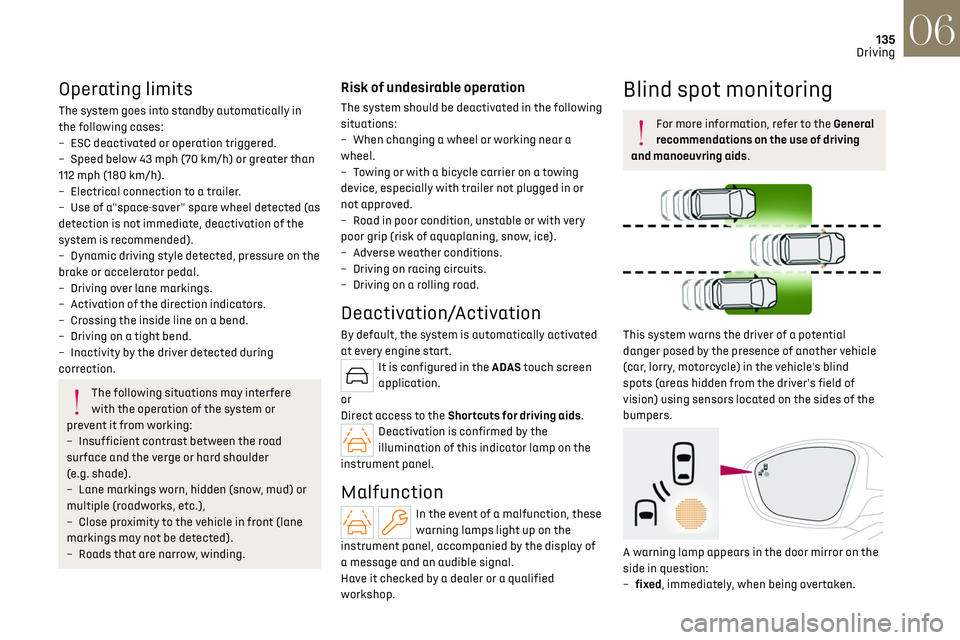
Blind spot monitoring
For more information, refer to the General
recommendations on the use of driving
and manoeuvring aids.
This system warns the driver of a potential
danger posed by the presence of another vehicle
(car, lorry, motorcycle) in the vehicle's blind
spots (areas hidden from the driver's field of
vision) using sensors located on the sides of the
bumpers.
A warning lamp appears in the door mirror on the
side in question:
–
fix
ed, immediately, when being overtaken.
Page 147 of 244
145
Practical information07
Before travelling abroad, it is advisable to
check with a dealer if the vehicle is suitable
for the distribution equipment of the countries
visited.
Rechargeable hybrid
system
Electrical system
The electrical circuit of the rechargeable hybrid
system is identified by orange cables and its
components are marked with this symbol:
The rechargeable hybrid powertrain uses
a voltage of between 240 V and 400 V.
This system may be hot both when the ignition
is on and after switching it off.
Comply with the warning messages shown on
the labels, particularly inside the charging flap.
High voltage system voltage is dangerous
and can cause burns or other injuries or
even fatal electric shock.
Since damage to high voltage components is
not visible, the Manufacturer recommends
that you:
–
Ne
ver touch the components, damaged
or not, and never let your jewelry or other
metallic objects come into contact with these
components.
–
Ne
ver work on the orange high voltage
cables or on any other high voltage component
marked with the Electric risk label. Any
intervention on the high voltage system
must be carried out by qualified persons in
workshops qualified and approved to carry out
this type of work.
–
Ne
ver damage, modify or remove the orange
high voltage cables or disconnect them from
the high voltage network.
–
Ne
ver open, modify or remove the cover of
the traction battery.
–
Ne
ver work with cutting and forming tools
or heat sources near high voltage components
and cables.
In case of low level of fluid in the cooling
tank, the refilling shall only be performed in a
qualified and trained workshop to verify that
the leakage is not in the traction battery.
Any intervention on the high voltage system
must be carried out by qualified persons in
workshops qualified and approved to carry out
this type of work.Damage to the vehicle or the traction battery
could result in the leakage of toxic gases
or fluids either immediately or later. The
Manufacturer recommends that you:
–
Alw
ays inform the fire and emergency
services in the event of an incident, warning
that the vehicle is equipped with a traction
battery.
–
Ne
ver touch the liquids leaking from the
traction battery.
–
Do no
t inhale the gases emitted by the
traction battery which are toxic.
–
Mo
ve away from the vehicle in the event of
incident or accident, the gases emitted being
flammable and could cause a fire.
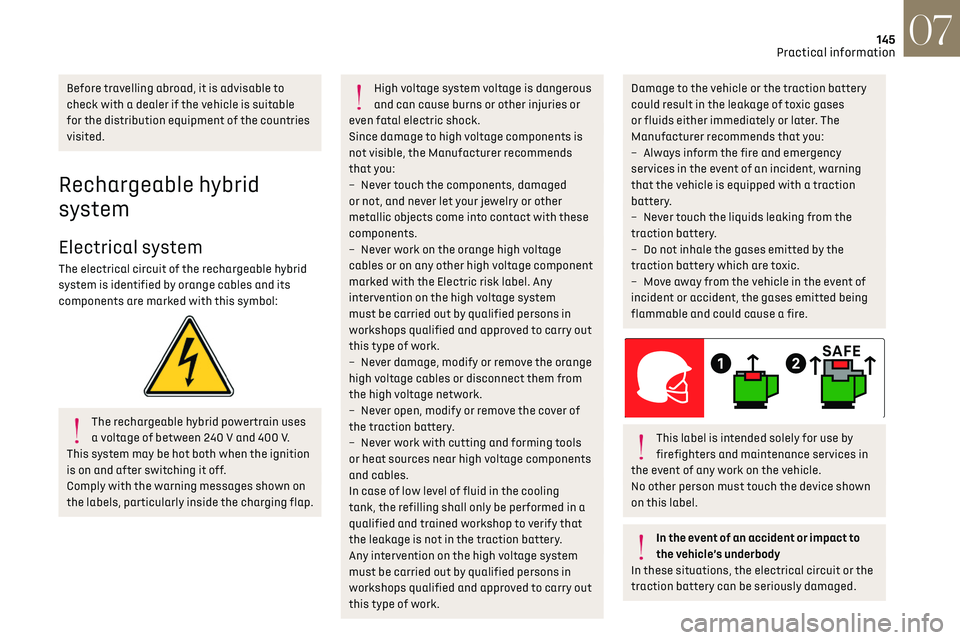
This label is intended solely for use by
firefighters and maintenance services in
the event of any work on the vehicle.
No other person must touch the device shown
on this label.
In the event of an accident or impact to
the vehicle’s underbody
In these situations, the electrical circuit or the
traction battery can be seriously damaged.
Page 152 of 244

150
Practical information07
Type 2POWER
Green: electrical connection established;
charging can begin.
CHARGE
Flashing green: charging in progress or
temperature pre-conditioning activated.
Fixed green: charging complete.
FA U LT
Red: fault; charging not permitted or must
be stopped immediately. Check that everything
is connected correctly and that the electrical
system is not faulty.
If the indicator lamp does not go off, contact a
dealer or a qualified workshop.
Upon plugging the charging cable into a domestic
socket, all of the indicator lamps come on briefly.
If no indicator lamps come on, check the domestic
socket's circuit-breaker. –
If the circ
uit-breaker has tripped, contact a
professional to check that your electricity supply
is compatible and carry out any necessary repairs.
–
If the circ
uit-breaker has not tripped, stop
using the charging cable and contact a dealer or a
qualified workshop.
Type 1 control unit label - Recommendations
1. Refer to the handbook before use.
2. Incorrect use of this charging cable may
result in fire, property damage and serious
injury or death by electrocution!
3. Always use a correctly earthed power socket,
protected by a 30 mA residual current device.
4. Always use an electrical socket protected
by a circuit-breaker appropriate for the
electrical circuit’s current rating.
5. The weight of the control unit must not be
borne by the electrical socket, plug and
cables.
6. Never use this charging cable if it is defective
or in any way damaged. 7.
Never attempt to repair or open this charging
cable. It contains no repairable parts -
replace the charging cable if it is damaged.
8. Never immerse this charging cable in water.
9. Never use this charging cable with an
extension cable, a multi-plug socket,
a conversion adaptor or on a damaged
electrical socket.
10. Do not unplug the plug from the wall as a
means of stopping charging.
11. Do not force the connector if it is locked into
the vehicle.
12. Immediately stop charging, by locking and
then unlocking the vehicle using the remote
control key, if the charging cable or wall
socket feel burning hot to the touch.
13. This charging cable includes components
liable to cause electrical arcing or sparks. Do
not expose to flammable vapours.
14. Only use this charging cable with DS
AUTOMOBILES vehicles.
15. Never plug the cable into the wall socket (or
unplug it) with wet hands.
Type 2 control unit label - State of indicator
lamps
State of the indicator
lamp
Off
Page 154 of 244

152
Practical information07
POWERCHARGE FA U LT SymbolDescription
(red)
Control unit malfunction. No charging allowed.
If an error indicator reappears after a manual reset,
the control unit must be checked by a dealer before
the next charge.
(green)
(green)
(red)
The control unit is in diagnostic mode.
Manual reset procedure
The control unit can be reset by simultaneously disconnecting the charging connector and the wall socket.
Then, reconnect the wall socket first. For more information, refer to the handbook.
Type 2 control unit label - Recommendations
Refer to the handbook before use.
1. Incorrect use of this charging cable may
result in fire, property damage and serious
injury or death by electrocution!
2. Always use a correctly earthed power socket,
protected by a 30 mA residual current device.
3. Always use an electrical socket protected
by a circuit-breaker appropriate for the
electrical circuit’s current rating. 4.
The weight of the control unit must not be
borne by the electrical socket, plug and
cables.
5. Never use this charging cable if it is defective
or in any way damaged.
6. Never attempt to repair or open this charging
cable. It contains no repairable parts -
replace the charging cable if it is damaged.
7. Never immerse this charging cable in water.
8. Never use this charging cable with an
extension cable, a multi-plug socket,
a conversion adaptor or on a damaged
electrical socket.
9. Do not unplug the plug from the wall as a
means of stopping charging. 10.
Immediately stop charging, by locking and
then unlocking the vehicle using the remote
control key, if the charging cable or wall
socket feel burning hot to the touch.
11. This charging cable includes components
liable to cause electrical arcing or sparks. Do
not expose to flammable vapours.
12. Only use this charging cable with DS
AUTOMOBILES vehicles.
13. Never plug the cable into the wall socket (or
unplug it) with wet hands.
14. Do not force the connector if it is locked into
the vehicle.
Page 155 of 244

153
Practical information07
Charging the traction
battery (Rechargeable
hybrid)
For a full charge, follow the charging
procedure without interrupting it, until it stops
automatically. Charging may be performed either
immediately (by default) or deferred.
Deferred charging is set via the touch
screen or the MyDS App application.
When the vehicle is connected, the following
information is displayed on the instrument panel:
–
Traction ba
ttery charge status (%).
–
R
emaining range (miles or km).
–
Estima
ted charging time (calculation may take
a few seconds).
–
C
harging speed (miles or km gained per hour).
After the instrument panel has been put into
standby mode, this information can be displayed
again by unlocking the vehicle or opening a door.
It is also possible to monitor the charging
progress using the MyDS App application.
For more information on Remotely
operable additional functions, refer to the
corresponding section.
Low charging / Driving
Driving when the charge level of the
traction battery is too low can lead to the
vehicle breaking down and can lead to
accidents or serious injuries. ALWAYS make
sure the traction battery has a sufficient
charge level.
Low charging / Parking
If the outside temperature is negative,
it is recommended not to park your vehicle
outside for several hours at a low charging
(less than 20%).
Vehicle in storage for more than 1 month
In the event of a long period of non-use
of the vehicle (beyond 4 weeks) without the
possibility of charging when restarting, the
self-discharge may make it impossible to
restart if the traction battery charge level is a
low or very low, especially at negative ambient
temperatures. ALWAYS make sure that the
traction battery has a charge between 20%
and 40% if you do not plan to use your vehicle
for several weeks.
Do not connect the charging cable.
Always park the vehicle in a place with
temperatures between -10°C and 30°C
(parking in a place with extreme temperatures
can damage the traction battery).
Refer to the Accessory battery (Rechargeable
hybrid) section for the battery disconnection
procedure.
Precautions
Rechargeable hybrid vehicles have
been developed in accordance with the
recommendations for maximum electromagnetic
field limits established by the ICNIRP
(International Commission on Non-Ionizing
Radiation Protection - 1998 Guidelines).
Wearers of pacemakers or equivalent
devices should consult a doctor to enquire
about any applicable precautionary measures, or
contact the manufacturer of their implanted
electronic medical device to check that it is
guaranteed to operate in an environment
compliant with the ICNIRP guidelines.
If in doubt, during charging, do not remain inside
or near the vehicle, near the charging cable or the
charging unit, even for a short time.
Before charging
Depending on the context:
► Have a professional check that the
electrical system to be used complies with
applicable standards and is compatible with
the vehicle.
► Have a professional electrician install
a dedicated domestic power socket or
accelerated charging unit (Wallbox)
compatible with the vehicle.
Use the charging cable supplied with the
vehicle.
For more information, contact a dealer or a
qualified workshop.
During charging
As a safety measure, the engine will not
start if the charging cable is plugged into
Page 161 of 244

159
Practical information07
For more information, contact a dealer or a
qualified workshop.
Installation tips
► To fit the snow chains during a journey, stop
the vehicle on a flat surface at the side of the
road.
► Apply the parking brake and position any
wheel chocks under the wheels to prevent
movement of the vehicle.
► Fit the snow chains following the instructions
provided by the manufacturer.
► Move off gently and drive for a few moments,
without exceeding 31 mph (50 km/h).
► Stop the vehicle and check that the snow
chains are correctly tightened.
It is strongly recommended that you
practise fitting the snow chains on a level
and dry surface before setting off.
Avoid driving with snow chains on roads
that have been cleared of snow to avoid
damaging the vehicle's tyres and the road
surface. If the vehicle is fitted with alloy
wheels, check that no part of the chain or its
fixings is in contact with the wheel rim.
Rechargeable hybrid vehicles
The use of snow chains is only authorised
on the front wheels.
The driving mode selector must be on the 4WD
position (depending on version).
Energy economy mode
This system manages the duration of use of
certain functions, in order to conserve a sufficient
level of charge in the battery with the ignition off.
After switching off the engine and for a maximum
cumulative period of around 30 minutes, you can
continue to use functions such as the audio and
telematics system, dipped beam headlamps or
courtesy lamps.
Selecting the mode
A confirmation message is displayed when
energy economy mode is entered, and the active
functions are placed on standby.
If a telephone call is in progress at the
time, it will be maintained for around 10
minutes via the audio system’s hands-free
system.
Exiting the mode
These functions are automatically reactivated the
next time the vehicle is used.
To restore the use of these functions immediately,
start the engine and let it run:
–
For le
ss than 10 minutes, to use the equipment
for approximately 5 minutes.
–
For more than 10 minut
es, to use the equipment
for approximately 30 minutes.
Let the engine run for the specified duration to
ensure that the battery charge is sufficient.
To recharge the battery, avoid repeatedly or
continuously restarting the engine.
A flat battery prevents the engine from
starting.
For more information on the 12 V battery, refer
to the corresponding section.
Load reduction mode
This system manages the use of certain functions
according to the level of charge remaining in the
battery.
When the vehicle is being driven, the load
reduction function temporarily deactivates
certain functions, such as the air conditioning
and the heated rear screen.
The deactivated functions are reactivated
automatically as soon as conditions permit.
Bonnet
Stop & Start
Before doing anything under the bonnet,
you must switch off the ignition to avoid any
risk of the engine restarting automatically.
Take care with objects or clothing that could
be caught in the blades of the cooling fan