Page 5 of 403
002003004
DS5_en_Chap00a_sommaire_ed01-2015
cOMFORT
A
ccE
SSdR IvI NG
72 Front seats
77
R
ear seats
80
Mirrors
81
S
teering wheel adjustment
82
F
ront fittings
86
R
ear fittings
87
B
oot fittings
88
T
riangle (stowing)
89
H
eating and Ventilation
91
D
ual-zone digital air
conditioning
95
F
ront demist - defrost
95
R
ear screen demist - defrost 98 D
riving recommendations
99
S
tarting-switching off the
engine
102
E
lectric parking brake
108
H
ill start assist
109
M
anual gearbox
110
A
utomatic gearbox
114
E
lectronic gearbox
118
G
ear shift indicator
119
T
yre under-inflation detection
121
St
op & Start
125
L
ane departure warning
system
126
B
lind spot sensors129 H
ead-up display
131
M
emorising speeds
133
Spe
ed limiter
136
C
ruise control
139
P
arking sensors
141
R
eversing camera
52 E
lectronic key - remote
control
54
"
Keyless Entry and Starting"
61
C
entral locking
62
Boot
63
A
larm
66
E
lectric windows
68
C
ockpit glass roof
Page 10 of 403

ExteriorElectronic key / Keyless Entry and Starting 5 2- 60, 99 -101
-
o
pening / closing
-
a
nti-theft protection
-
battery
-
s
tarting
Welcome lighting
1
51
Directional lighting
1
53
Cornering lighting
1
54
Headlamp height adjustment
1
52
Changing bulbs
2
13-217
-
f
ront lamps
-
fo
glamps
-
d
irection indicator repeaters Wipers
155 -15 8
Changing a wiper blade
1
58, 228
Doors
5
2- 61
-
K
eyless Entry and Starting
-
o
pening / closing
-
c
entral locking
-
em
ergency control
Alarm
6
3-65 Cockpit glass roof
6
8 - 69
Roof bars
2
33
Accessories
23
5-236
ESC (ABS, EBA, ASR, DSC)
1
84-187
Tyre under-inflation detection
1
19 -120
Tyre pressures
1
19, 203, 278
Snow chains
2
12
Changing a wheel
2
04-211
-
tools
-
r
emoving / refitting
Temporary puncture repair kit
1
98 -203 Boot
5
3, 62
-
o
pening / closing
-
em
ergency release
Changing bulbs
2
18-220
-
r
ear lamps
-
3
rd brake lamp
-
n
umber plate lamps
-
fo
glamps
Door mirrors
8
0
Door mirror spotlamps
1
51
Fuel tank
2
41-242
Misfuel prevention (Diesel)
2
43 Parking sensors
1
39 -140
Reversing camera
1
41
To w i n g
2
2 9 - 2 3 0
Towbar
23
1-232
DS5_en_Chap00b_vue-ensemble_ed01-2015
Page 12 of 403
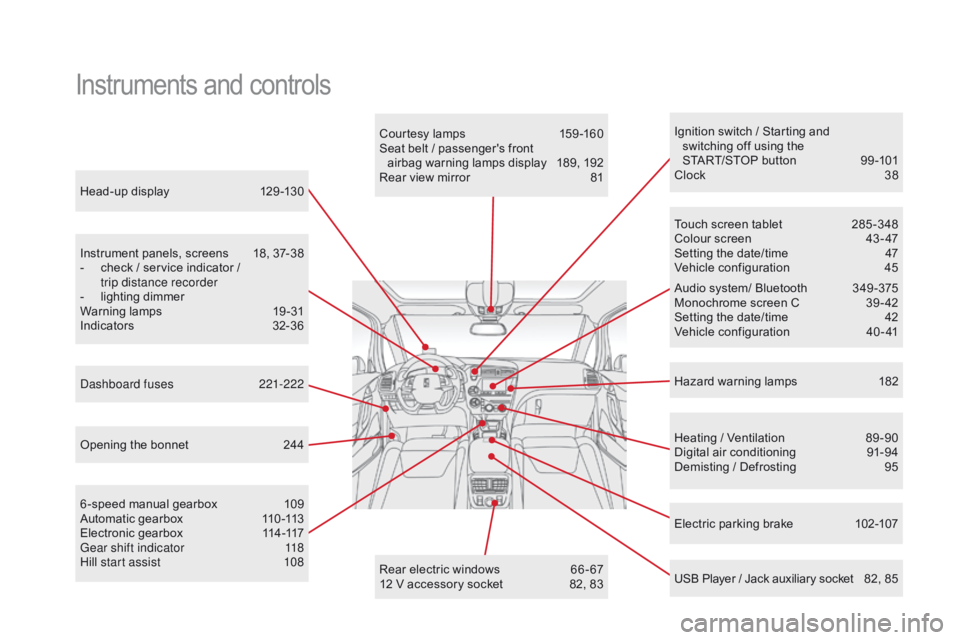
Head-up display 129 -130
Instrument panels, screens
1
8, 37-38
-
c
heck / service indicator /
trip distance recorder
-
l
ighting dimmer
Warning lamps
1
9-31
Indicators
32
-36
Electric parking brake
1
02-107
Ignition switch / Starting and
switching off using the
START/STOP button
9
9 -101
Clock
3
8
Hazard warning lamps
1
82
Instruments and controls
Courtesy lamps 159 -160
Seat belt / passenger's front airbag warning lamps display
1
89, 192
Rear view mirror
8
1
Heating / Ventilation
8
9 -90
Digital air conditioning
9
1-94
Demisting / Defrosting
9
5
USB Player / Jack auxiliary socket
8
2, 85
Dashboard fuses
2
21-222
6 -speed manual gearbox
1
09
Automatic gearbox
1
10 -113
Electronic gearbox
1
14-117
Gear shift indicator
1
18
Hill start assist
1
08 Audio system/ Bluetooth
3
49 -375
Monochrome screen C
3
9 - 42
Setting the date/time
4
2
Vehicle configuration
4
0 - 41
Touch screen tablet
2
85 -348
Colour screen
4
3 - 47
Setting the date/time
4
7
Vehicle configuration
4
5
Opening the bonnet
2
44 Rear electric windows
6
6 - 67
12 V accessory socket
8
2, 83
DS5_en_Chap00b_vue-ensemble_ed01-2015
Page 14 of 403
Instruments and controls
Automatic headlamps 149 -150
Lane departure warning system
1
25
Volumetric alarm monitoring
6
3-65
Electric windows, front /rear
6
6 - 67
Electric child lock
1
78
Central locking
6
1
Opening the fuel filler flap
2
41
Opening the boot
6
2
Parking sensors
1
39 -140
DSC/ASR systems
1
86 -187
Stop & Start
1
21-124
or
Blind spot sensors
1
26 -128
Side switch panel
Localised emergency call 1
83, 282-283
Localised assistance call
1
83, 282-283
Cockpit glass roof
6
8 - 69
Head-up display
1
29 -130Door mirrors
8
0
Headlamp height adjustment
1
52
centre switch panel
DS5_en_Chap00b_vue-ensemble_ed01-2015
Page 15 of 403
13
Maintenance - Technical data
Checking levels 248 -251
- oil
-
b
rake fluid
-
p
ower steering fluid
-
coolant
-
s
creenwash/headlamp wash fluid
Checking components
2
52-254
-
a
ir filter
-
p
assenger compartment filter
-
o
il filter
-
e
lectric parking brake
-
b
rake pads / discs
Changing bulbs
2
13-220
-
front
-
rear Opening the bonnet
2
44
Under the bonnet, petrol
2
45
Under the bonnet, Diesel
2
46Dimensions
2
77
Identification markings
2
78
Running out of fuel (Diesel)
2
47 12V battery
2 24-226
Load reduction, economy mode 2 27
Engine compartment
fuses
2
21, 223
Petrol engines
2 66
Diesel engines 2 69 -271
Petrol weights
2
67-268
Diesel weights
2
72-276
DS5_en_Chap00b_vue-ensemble_ed01-2015
Over view
Page 23 of 403
21
DS5_en_Chap01_controle-de-marche_ed01-2015
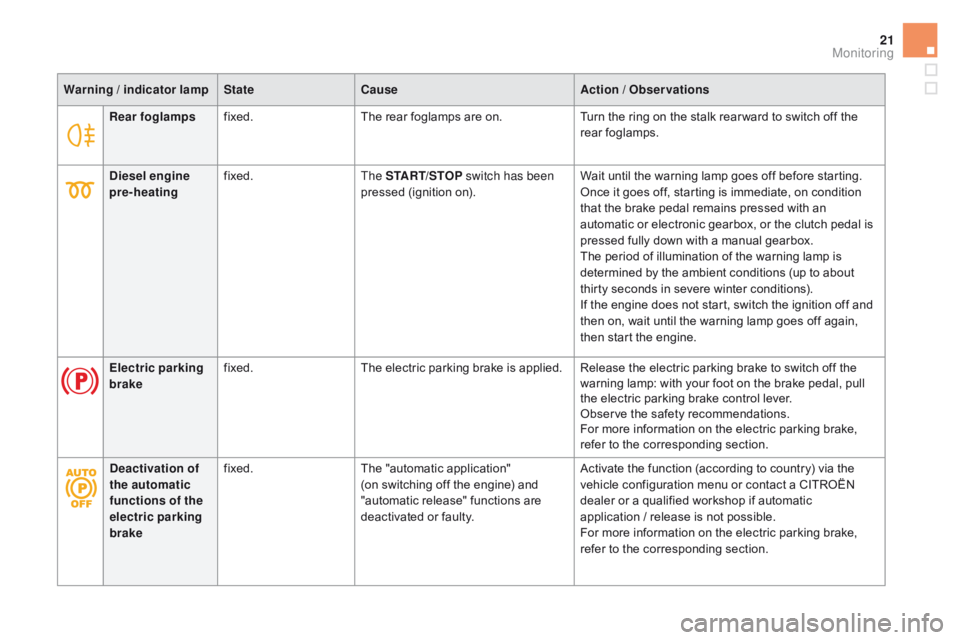
Rear foglampsfixed. The rear foglamps are on. Turn the ring on the stalk rear ward to switch off the
rear foglamps.
Warning / indicator lamp
State
cau
se
Action / Observations
di
esel engine
pre-heating fixed.
The START/STOP switch has been
pressed (ignition on). Wait until the warning lamp goes off before starting.
Once it goes off, starting is immediate, on condition
that the brake pedal remains pressed with an
automatic or electronic gearbox, or the clutch pedal is
pressed fully down with a manual gearbox.
The period of illumination of the warning lamp is
determined by the ambient conditions (up to about
thirty seconds in severe winter conditions).
If the engine does not start, switch the ignition off and
then on, wait until the warning lamp goes off again,
then start the engine.
Electric parking
brake fixed.
The electric parking brake is applied. Release the electric parking brake to switch off the
warning lamp: with your foot on the brake pedal, pull
the electric parking brake control lever.
Observe the safety recommendations.
For more information on the electric parking brake,
refer to the corresponding section.
de
activation of
the automatic
functions of the
electric parking
brake fixed.
The "automatic application"
(on switching off the engine) and
"automatic release" functions are
deactivated or faulty. Activate the function (according to country) via the
vehicle configuration menu or contact a CITROËN
dealer or a qualified workshop if automatic
application
/ release is not possible.
For more information on the electric parking brake,
refer to the corresponding section.
Monitoring
Page 28 of 403

DS5_en_Chap01_controle-de-marche_ed01-2015
Warning / indicator lampStatecau seAction / Observations
Electric parking
brake flashing.
The electric parking brake is not
applied automatically.
The application/release is faulty. You must stop as soon as it is safe to do so.
Park on flat level ground, engage a gear (or place the
lever in position P for an automatic gearbox), switch
off the ignition and contact a CITROËN dealer or a
qualified workshop.
Electric parking
brake fault fixed.
The electric parking brake has a fault. Contact a CITROËN dealer or a qualified workshop
without delay.
For more information on the electric parking brake,
refer to the corresponding section.
de
activation of
the automatic
functions of the
electric parking
brake fixed.
The "automatic application"
(on switching off the engine) and
"automatic release" functions are
deactivated or faulty. Activate the function (according to country) via the
vehicle configuration menu or contact a CITROËN
dealer or a qualified workshop if automatic
application
/ release is not possible.
For more information on the electric parking brake,
refer to the corresponding section.
Page 41 of 403

39
DS5_en_Chap01_controle-de-marche_ed01-2015
Monochrome screen C
Depending on the context, it displays:
- t ime,
-
date,
-
a
mbient temperature (this flashes if there is
a risk of ice),
-
v
isual parking sensor information,
-
c
urrent audio source,
-
t
elephone or Bluetooth system information,
-
s
ettings menus for the screen and the
vehicle equipment. From the control panel of your Audio system,
press:
F
button A to chooses between the display
of audio information in full screen or the
shared display of the audio source and the
time,
F
the "MENU" button for access to the main
menu ,
F
t
he "5" or " 6" buttons to scroll through the
items on the screen,
F
t
he "7" or " 8" buttons to change a setting
value,
F
the "OK" button to confirm,
or
F
the "Back" button to abandon the
operation in progress. F
P
ress the "MENU"
button for access to the
main menu :
-
"
Multimedia",
-
"Telephone",
-
"
Bluetooth connection",
-
"
Personalisation-configuration",
F P ress the "
7" or " 8" button to select the
menu required, then confirm by pressing
the "OK" button.
displays in the screencont rolsMain menu
Monitoring