2018 CITROEN C3 AIRCROSS Parking lamp
[x] Cancel search: Parking lampPage 4 of 308

2
.
.
Instrument panels 8
I nstrument panel displays 1 0
Warning and indicator lamps
1
0
Indicators
25
Distance recorders
3
0
Equipment configuration for vehicles
without
screen
3
1
Monochrome screen C
3
2
Touch screen
3
3
Trip computer
3
7
Lighting dimmer
3
9
Date and time adjustment
3
9Remote control
4
1
K
eyless Entry and Starting
4
3
Back-up procedures
4
5
Doors 48
Boot
4
8
Central locking
49
A
larm
51
Panoramic opening sunroof
5
3
Anti-intrusion security
5
0
Electric windows
5
5
Front seats 5 7
Rear seats
6
0
Steering wheel adjustment
62
M
irrors 63
Ventilation
64
Recommendations for ventilation and air conditioning 65Heating/Manual air conditioning 66
Automatic air conditioning 6 7
Front demist – defrost
6
9
Recirculation of interior air
6
9
Heated windscreen
7
0
Rear screen demist – defrost
7
0
Boot lighting
7
0
Front fittings
7
1
Rear fittings
7
5
Boot fittings
7
6
Courtesy lamps
7
8
Interior mood lighting
7
9Main lighting
8
0
Lighting control
8
0
Direction indicators (flashing)
8
1
Automatic illumination of headlamps
8
2
Daytime running lamps/Sidelamps
8
2
Parking lamps
8
2
Guide-me-home lighting
8
3
Automatic headlamp dipping
8
3
Automatic exterior welcome lighting
8
3
Headlamp adjustment
8
5
Cornering lighting
8
5
Wiper control stalk
8
6
Automatic windscreen wipers
8
8
General safety recommendations
9
0
Hazard warning lamps
9
1
Horn
91
Emergency or assistance call
9
1
Electronic stability control (ESC)
9
3
Grip control
9
5
Hill Assist Descent 9 7
Seat belts 9 8
Airbags
1
02
Child seats
1
05
Deactivating the front passenger airbag
1
06
ISOFIX mountings and child seats
1
12
i-Size mountings and child seats
1
15
Child lock
1
17
Over view
Dashboard instruments Access
Ease of use and comfort Safety
Lighting and visibility
Eco-driving
Eco-driving 6
Instruments and controls
4
Contents
Page 6 of 308

4
Instruments and controls
Steering mounted controls
1
Bonnet release
2
Dashboard fuses
3
Courtesy lamp
Warning lamp display for
the seat belts and front passenger airbag
Panoramic opening sunroof controls
Rear view mirror
Emergency and assistance call buttons
4
Monochrome screen with audio system
Touch screen with
CITROËN Connect Radio
or CITROËN Connect Nav
5
Ventilation
Heating
Manual air conditioning
Automatic air conditioning
Front demist/defrost
Rear screen demist/defrost
6
Stop & Start button
Gearbox controls
7
Parking brake
8
USB port
12 V socket
9
Horn
10
Instrument panel
1
External lighting/direction
indicator control stalk
2
Wiper/screenwash/trip
computer control stalk
3
Audio system adjustment controls
4
Speed limiter controls/cruise control
Over view
Page 7 of 308
5
OFF
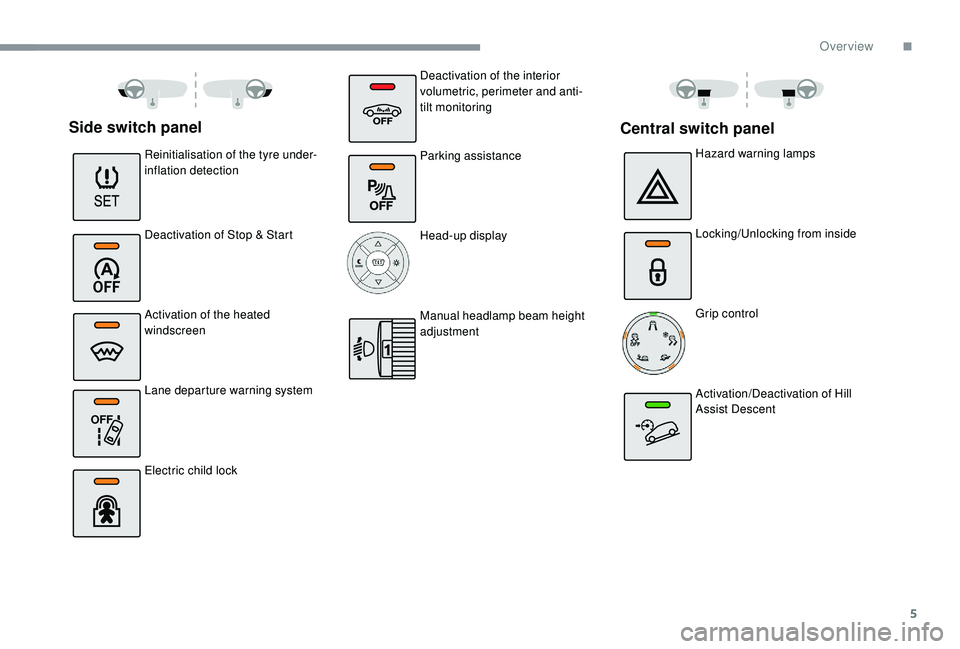
Side switch panel
Reinitialisation of the tyre under-
inflation detection
Deactivation of Stop & Start
Activation of the heated
windscreen
Lane departure warning system
Electric child lockHazard warning lamps
Locking/Unlocking from inside
Grip control
Activation/Deactivation of Hill
Assist Descent
Central switch panel
Deactivation of the interior
volumetric, perimeter and anti-
tilt monitoring
Parking assistance
Head-up display
Manual headlamp beam height
adjustment
.
Over view
Page 14 of 308

12
Warning/indicator lampStateCause Action/Observations
Red warning lamps STOP Fixed, associated
with another warning
lamp, accompanied
by an audible signal
and a message. Illumination of this warning lamp is
related to a serious fault detected
with the engine, the braking system,
the power steering, etc., or a major
electrical fault. You must stop as soon as it is safe to do so.
Park, switch off the ignition and call a CITROËN
dealer or a qualified workshop.
Parking brake Fixed. The parking brake is applied or not
properly released. Release the parking brake to switch off the warning
lamp, keeping your foot on the brake pedal.
Observe the safety recommendations.
For more information on the Parking brake
, refer to
the corresponding section.
Brakes Fixed. The brake fluid level has dropped
significantly. Top up with brake fluid approved by CITROËN.
If the problem persists, have the system checked by a
CITROËN dealer or a qualified workshop.
The braking system is faulty. You must stop as soon as it is safe to do so.
Park, switch off the ignition and contact a CITROËN
dealer or a qualified workshop.
+ Brakes
Fixed, associated
with the (orange) ABS
warning lamp. The electronic brake force
distribution (EBFD) system has a
fault. You must stop as soon as it is safe to do so.
Have it checked by a CITROËN dealer or a qualified
workshop.
Dashboard instruments
Page 26 of 308

24
Warning/indicator lampStateCause Action/Observations
Warning lamps visible in a display Foot on brake Fixed. The brake pedal must be pressed.
With an electronic gearbox, selector in position N , press
the brake pedal to start the engine.
With an automatic gearbox, with the engine running,
press the brake pedal before releasing the parking
brake to unlock the selector and come out of position P .
If you wish to release the parking brake without pressing
the brake pedal, this warning lamp will remain on.
Flashing. With an electronic gearbox, if you
hold the vehicle on an incline using
the accelerator for too long, the
clutch overheats. Use the brake pedal and/or the parking brake.
Automatic
wiping Fixed.
The wiper control stalk has been
pushed down. Automatic front wiping is activated.
To deactivate automatic wiping, operate the control
stalk downwards or put the stalk into another position.
Dashboard instruments
Page 35 of 308

33
"Trip computer" menu
Warning log
It summarises the alert messages of the
functions, displaying them on the screen.
"Connections" menu
"Personalisation-
configuration" menu
Define the vehicle parametersThis menu allows you to consult information
concerning the status of the vehicle.
With the audio system on, this menu allows
a Bluetooth device (telephone, media player)
to be paired and the connection mode to be
defined (hands-free, playing audio files).
For more information on the "Connections"
application, refer to the "Audio and telematics"
section.This menu gives access to the following
functions:
-
"
Define the vehicle parameters",
-
"
Display configuration".
This menu allows the following equipment to
be activated/deactivated, depending on version
and/or country of sale:
-
"Lighting ":
•
"
Directional headlamps",
•
"
Guide-me-home headlamps",
•
"
Welcome lighting".
-
"Comfort ":
•
"
Rear wipe in reverse gear".
-
"Driving assistance ":
•
A
uto. emergency braking,
•
F
atigue Detection System,
•
Spe
ed recommendation.
For more information on the different
equipment, refer to the corresponding sections.
Display configuration
This menu allows you to change the language
used by the display from a defined list.
This menu gives access to the following
settings:
-
"
Choice of units",
-
"
Date and time adjustment",
-
"
Display personalisation",
-
"
Choice of language", As a safety measure, the driver must only
carry out operations that require sustained
attention with the vehicle stationary.
Touch screen
The touch screen gives access to:
- t
he heating/air conditioning controls,
-
m
enus for adjusting settings for vehicle
functions and systems,
-
a
udio system and telephone controls and
the display of associated information,
and, depending on equipment, allows:
-
t
he display of alert messages and the visual
parking sensors information,
-
t
he permanent display of the time and the
exterior temperature (a blue warning lamp
appears when there is a risk of ice),
-
a
ccess to the internet ser vices and
navigation system controls and the display
of associated information.
As a safety measure, the driver must
only carry out operations that require
sustained attention with the vehicle
stationary.
Some functions are not accessible when
driving.
1
Dashboard instruments
Page 38 of 308
36
Configuration
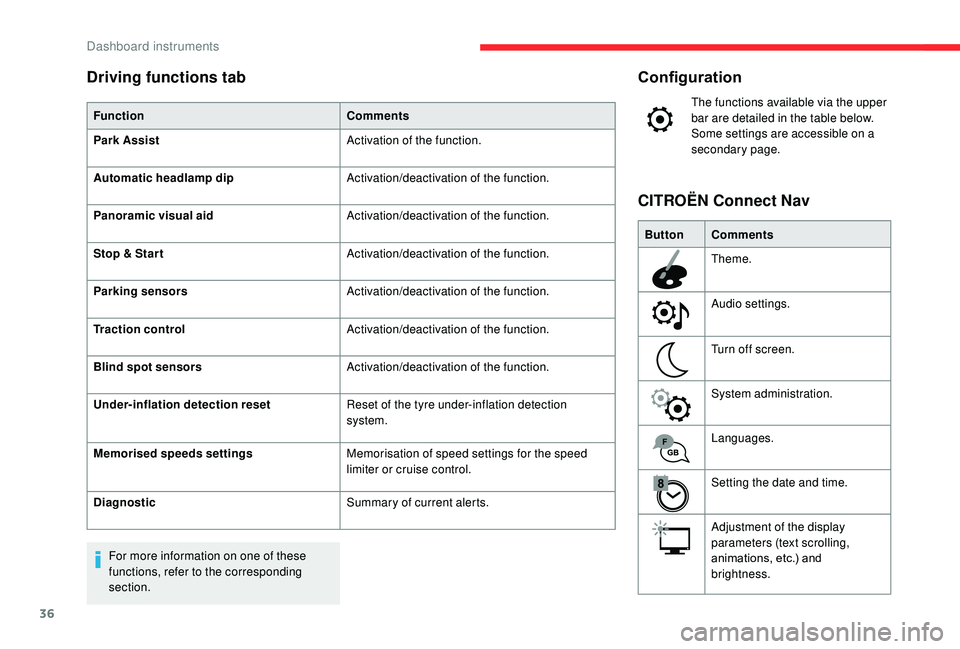
The functions available via the upper
bar are detailed in the table below.
Some settings are accessible on a
secondary page.
Button Comments
Theme.
Audio settings.
Turn off screen.
System administration.
Languages.
Setting the date and time.
Adjustment of the display
parameters (text scrolling,
animations, etc.) and
brightness.
CITROËN Connect Nav
Driving functions tab
Function
Comments
Park Assist Activation of the function.
Automatic headlamp dip Activation/deactivation of the function.
Panoramic visual aid Activation/deactivation of the function.
Stop & Star t Activation/deactivation of the function.
Parking sensors Activation/deactivation of the function.
Traction control Activation/deactivation of the function.
Blind spot sensors Activation/deactivation of the function.
Under-inflation detection reset Reset of the tyre under-inflation detection
system.
Memorised speeds settings Memorisation of speed settings for the speed
limiter or cruise control.
Diagnostic Summary of current alerts.
For more information on one of these
functions, refer to the corresponding
section.
Dashboard instruments
Page 84 of 308

82
Three flashes
F Press briefly upwards or downwards, without going beyond the point of
resistance; the direction indicators will flash
3 times.
Automatic illumination of
headlamps
When the ring is at the " AUTO" position
and a low level of ambient light is detected
by a sunshine sensor, the number plate
lamps,
sidelamps and dipped beam headlamps
are switched on automatically, without any
action on the part of the driver. They can also
come on if rain is detected, at the same time as
automatic operation of the windscreen wipers.
As soon as the brightness returns to a
sufficient level or after the windscreen wipers
are switched off, the lamps are switched off
automatically.
Malfunction
In the event of a malfunction of the
sunshine sensor, the lighting comes
on, this warning lamp is displayed in
the instrument panel accompanied
by an audible signal and/or a
message.
Contact a CITROËN dealer or a
qualified workshop. Do not cover the sunshine sensor,
integrated with the rain sensor and located
at the top centre of the windscreen behind
the rear view mirror; the associated
functions would no longer be controlled.
In fog or snow, the sunshine sensor may
detect sufficient light. In this case, the
lighting will not come on automatically.
Daytime running lamps/
Sidelamps
In daytime running lamps mode, the
diodes are brighter.
The front and rear lamps light up automatically
when the engine starts.
They provide the following functions:
-
D
aytime running lamps (lighting control stalk
in " AUTO " position with adequate light level). -
S
idelamps (lighting control stalk in "
AUTO"
position with low light levels or "Sidelamps
only" or "Dipped/main beam headlamps").
Parking lamps
Vehicle side marking by illumination of the
sidelamps on the traffic side only.
F
D
epending on version, within one minute
of switching off the ignition, operate the
lighting control stalk up or down depending
on the traffic side (for example, when
parking on the left: lighting control stalk
upwards; the right-hand sidelamps come
o n).
Lighting and visibility