Page 359 of 696
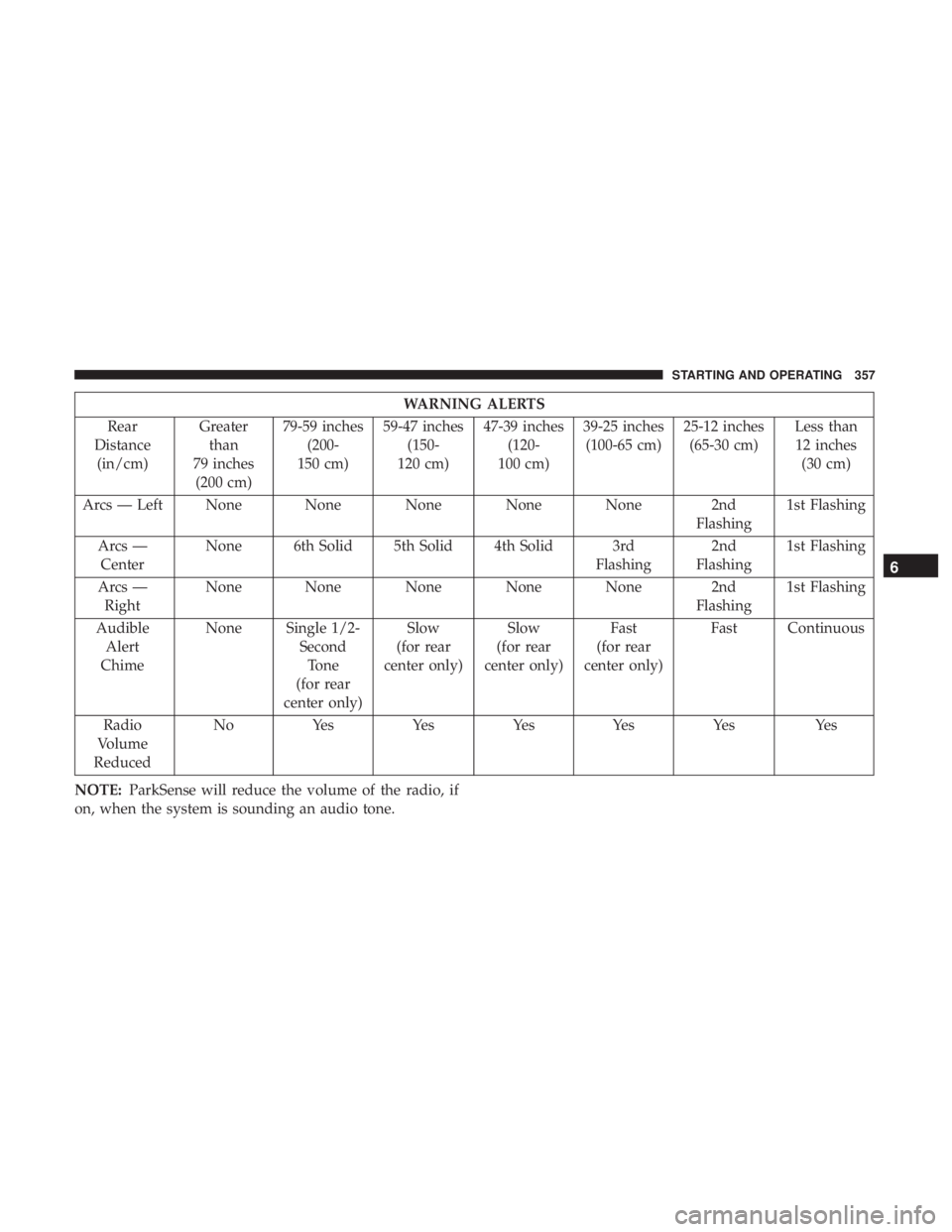
WARNING ALERTS
Rear
Distance (in/cm) Greater
than
79 inches (200 cm) 79-59 inches
(200-
150 cm) 59-47 inches
(150-
120 cm) 47-39 inches
(120-
100 cm) 39-25 inches
(100-65 cm) 25-12 inches
(65-30 cm) Less than
12 inches (30 cm)
Arcs — Left None None None None None 2nd Flashing1st Flashing
Arcs — Center None 6th Solid 5th Solid 4th Solid 3rd
Flashing2nd
Flashing 1st Flashing
Arcs — Right None None None None None 2nd
Flashing1st Flashing
Audible Alert
Chime None Single 1/2-
SecondTone
(for rear
center only) Slow
(for rear
center only) Slow
(for rear
center only) Fast
(for rear
center only) Fast Continuous
Radio
Volume
Reduced No
Yes YesYesYes Yes Yes
NOTE: ParkSense will reduce the volume of the radio, if
on, when the system is sounding an audio tone.
6
STARTING AND OPERATING 357
Page 362 of 696

WARNING!
•Drivers must be careful when backing up even when
using ParkSense. Always check carefully behind
your vehicle, look behind you, and be sure to check
for pedestrians, animals, other vehicles, obstructions,
and blind spots before backing up. You are respon-
sible for safety and must continue to pay attention to
your surroundings. Failure to do so can result in
serious injury or death.
• Before using ParkSense, it is strongly recommended
that the ball mount and hitch ball assembly is
disconnected from the vehicle when the vehicle is
not used for towing. Failure to do so can result in
injury or damage to vehicles or obstacles because the
hitch ball will be much closer to the obstacle than the
rear fascia when the loudspeaker sounds the con-
tinuous tone. Also, the sensors could detect the ball
mount and hitch ball assembly, depending on its size
and shape, giving a false indication that an obstacle
is behind the vehicle.
CAUTION!
•ParkSense is only a parking aid and it is unable to
recognize every obstacle, including small obstacles.
Parking curbs might be temporarily detected or not
detected at all. Obstacles located above or below the
sensors will not be detected when they are in close
proximity.
• The vehicle must be driven slowly when using
ParkSense in order to be able to stop in time when an
obstacle is detected. It is recommended that the
driver looks over his/her shoulder when using
ParkSense.
PARKSENSE FRONT AND REAR PARK ASSIST —
IF EQUIPPED
The ParkSense Park Assist system provides visual and
audible indications of the distance between the rear and/or
front fascia and a detected obstacle when backing up or
moving forward, e.g. during a parking maneuver. If your
vehicle is equipped with an Automatic Transmission, the
vehicle brakes may be automatically applied and released
when performing a reverse parking maneuver if the sys-
tem detects a possible collision with an obstacle.
360 STARTING AND OPERATING
Page 363 of 696
NOTE:
•The driver can override the automatic braking function
by pressing the gas pedal, turning ParkSense off via
ParkSense switch, or changing the gear while the auto-
matic brakes are being applied.
• Automatic brakes will not be available if ESC is not
available.
• Automatic brakes will not be available if there is a
faulted condition detected with the ParkSense Park
Assist system or the Braking System Module.
• The automatic braking function may not provide
enough vehicle deceleration to avoid colliding with a
detected obstacle depending on vehicle speed, road
conditions, and brake capability.
• The automatic braking function may not be applied fast
enough for moving obstacles that approach the rear of
the vehicle from the left and / or right sides.
• The automatic braking function can be enabled/
disabled from the Customer-Programmable Features
section of the Uconnect System.
• ParkSense will retain its last known configuration state
for the automatic braking function through ignition
cycles. The automatic braking function is intended to assist the
driver in avoiding possible collisions with detected ob-
stacles when backing up in REVERSE gear.
NOTE:
•
The driver is always responsible for controlling the
vehicle.
• The system is provided to assist the driver and not to
substitute the driver.
• The driver must stay in full control of the vehicle’s
acceleration and braking and is responsible for the
vehicle’s movements.
Refer to “ParkSense System Usage Precautions” for limita-
tions of this system and recommendations.
ParkSense will retain the last system state (enabled or
disabled) from the last ignition cycle when the ignition is
changed to the ON/RUN position.
ParkSense can be active only when the gear selector is in
REVERSE or DRIVE. If ParkSense is enabled at one of these
gear selector positions, the system will remain active until
the vehicle speed is increased to approximately 7 mph
(11 km/h) or above. When in REVERSE and above the
system’s operating speed, a warning will appear in the
6
STARTING AND OPERATING 361
Page 365 of 696
ParkSense Visual Alert
The ParkSense Warning screen will only be displayed if
Sound and Display is selected from the Customer - Pro-
grammable Features section of the Uconnect System. Refer
to�Uconnect Settings” in “Multimedia” for further infor-
mation.
The ParkSense Warning screen is located within the instru-
ment cluster display. It provides visual warnings to indi-
cate the distance between the rear fascia/bumper and/or
front fascia/bumper and the detected obstacle. Refer to
“Instrument Cluster Display” in “Getting To Know Your
Instrument Panel” for further information.
ParkSense Display
Rear Park Assist
When the vehicle is in REVERSE and an obstacle has been
detected, the warning display will turn ON indicating the
system status.
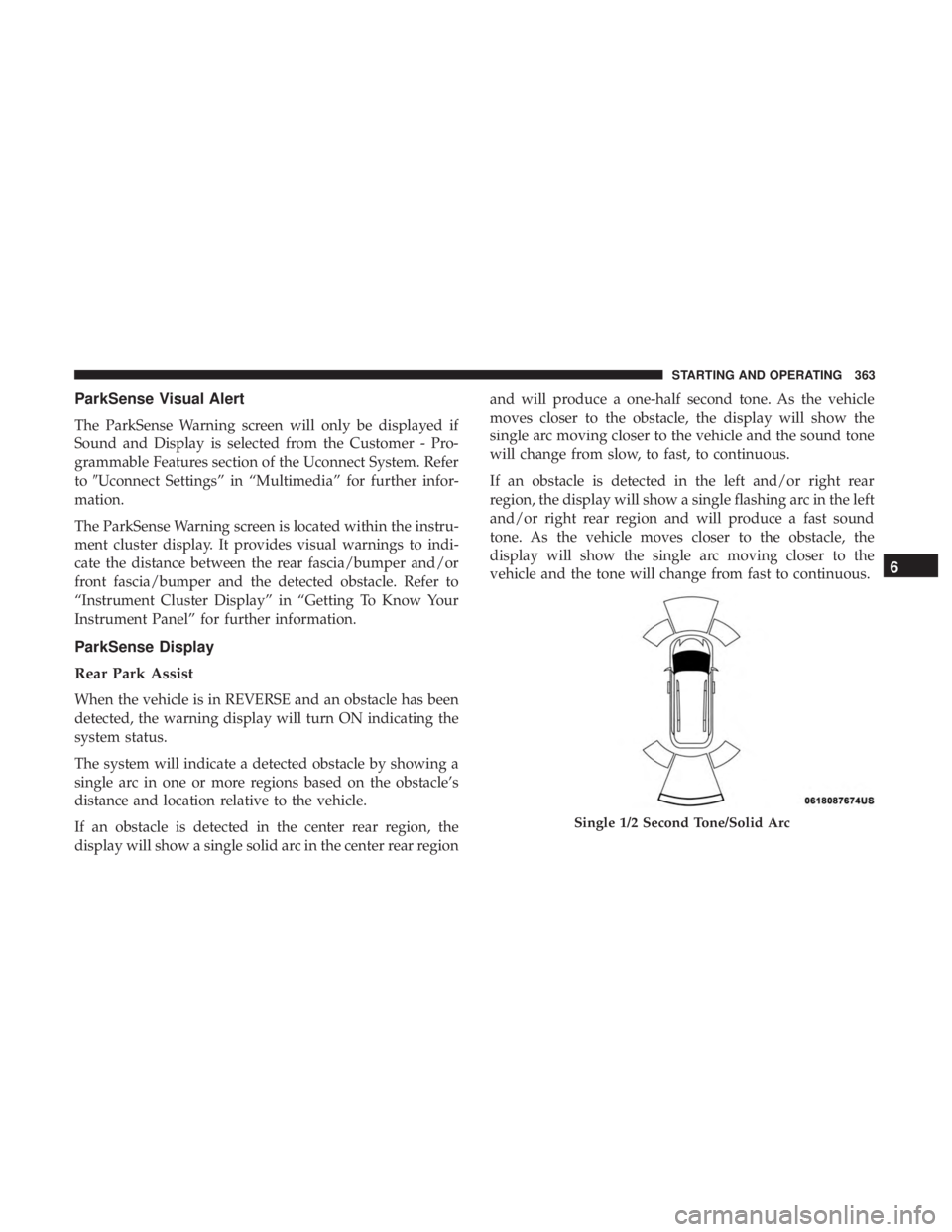
The system will indicate a detected obstacle by showing a
single arc in one or more regions based on the obstacle’s
distance and location relative to the vehicle.
If an obstacle is detected in the center rear region, the
display will show a single solid arc in the center rear region and will produce a one-half second tone. As the vehicle
moves closer to the obstacle, the display will show the
single arc moving closer to the vehicle and the sound tone
will change from slow, to fast, to continuous.
If an obstacle is detected in the left and/or right rear
region, the display will show a single flashing arc in the left
and/or right rear region and will produce a fast sound
tone. As the vehicle moves closer to the obstacle, the
display will show the single arc moving closer to the
vehicle and the tone will change from fast to continuous.
Single 1/2 Second Tone/Solid Arc
6
STARTING AND OPERATING 363
Page 368 of 696
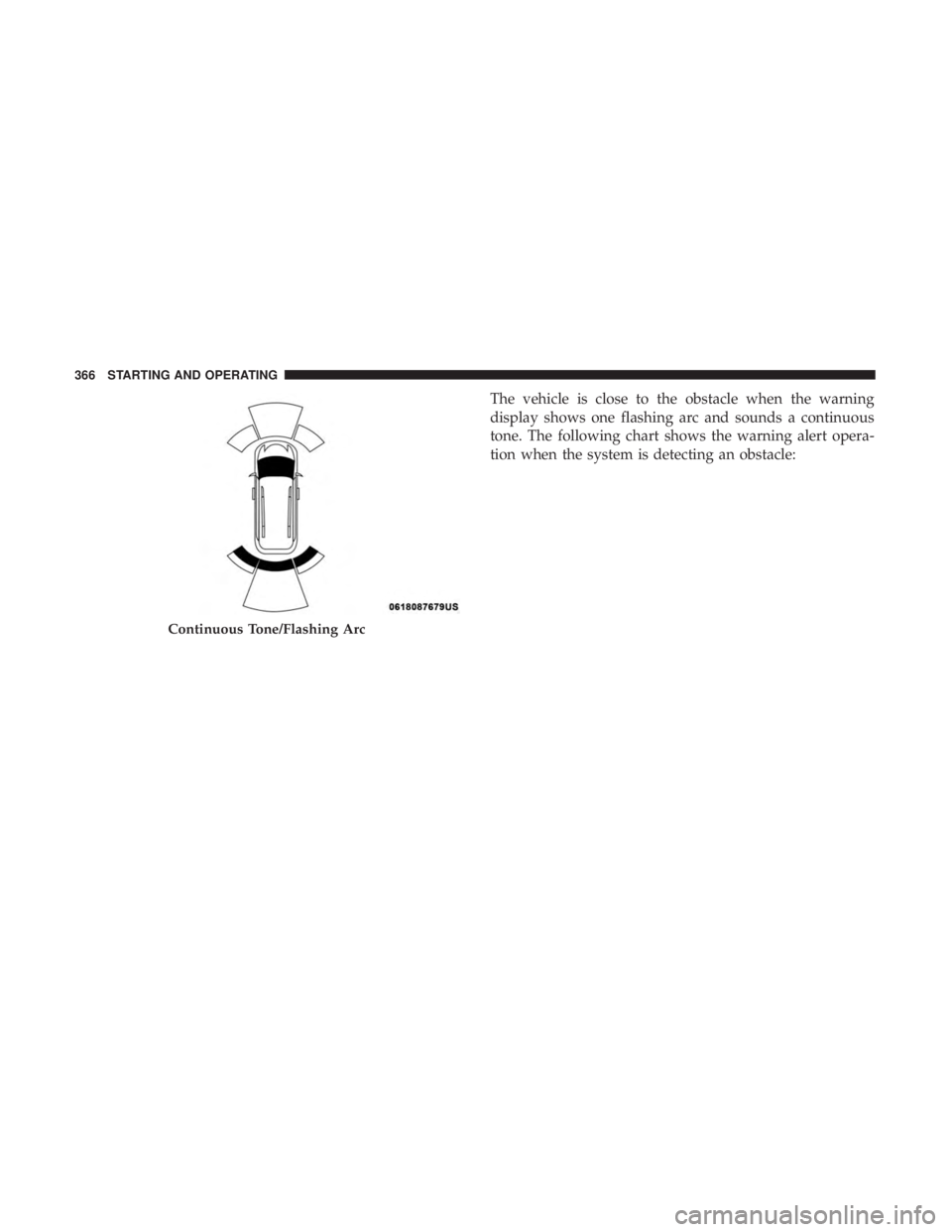
The vehicle is close to the obstacle when the warning
display shows one flashing arc and sounds a continuous
tone. The following chart shows the warning alert opera-
tion when the system is detecting an obstacle:
Continuous Tone/Flashing Arc
366 STARTING AND OPERATING
Page 369 of 696
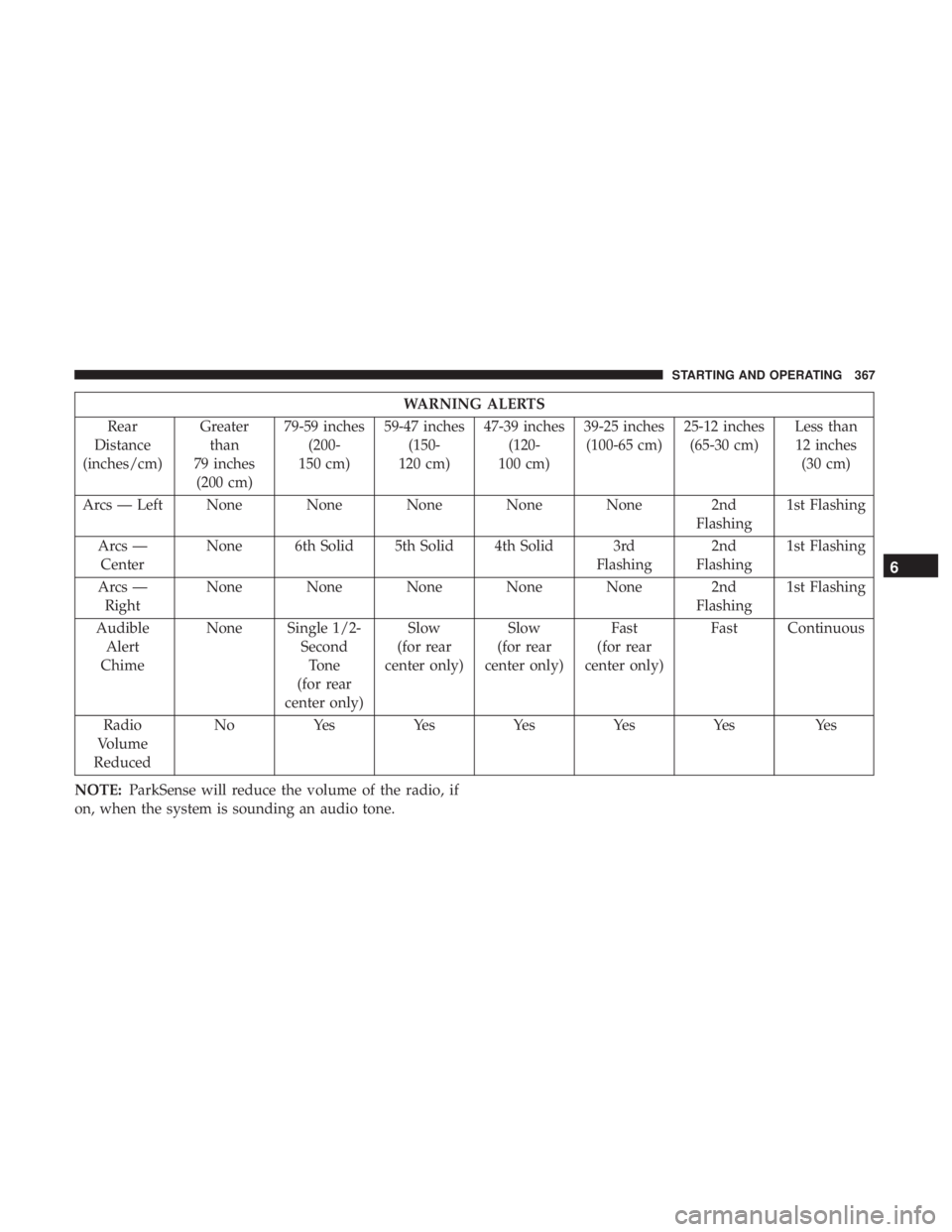
WARNING ALERTS
Rear
Distance
(inches/cm) Greater
than
79 inches (200 cm) 79-59 inches
(200-
150 cm) 59-47 inches
(150-
120 cm) 47-39 inches
(120-
100 cm) 39-25 inches
(100-65 cm) 25-12 inches
(65-30 cm) Less than
12 inches (30 cm)
Arcs — Left None None None None None 2nd Flashing1st Flashing
Arcs — Center None 6th Solid 5th Solid 4th Solid 3rd
Flashing2nd
Flashing 1st Flashing
Arcs — Right None None None None None 2nd
Flashing1st Flashing
Audible Alert
Chime None Single 1/2-
SecondTone
(for rear
center only) Slow
(for rear
center only) Slow
(for rear
center only) Fast
(for rear
center only) Fast Continuous
Radio
Volume
Reduced No
Yes YesYesYesYes Yes
NOTE: ParkSense will reduce the volume of the radio, if
on, when the system is sounding an audio tone.
6
STARTING AND OPERATING 367
Page 370 of 696
Front Park Assist
When the vehicle is in DRIVE the ParkSense Warning
screen will be displayed when an obstacle is detected.
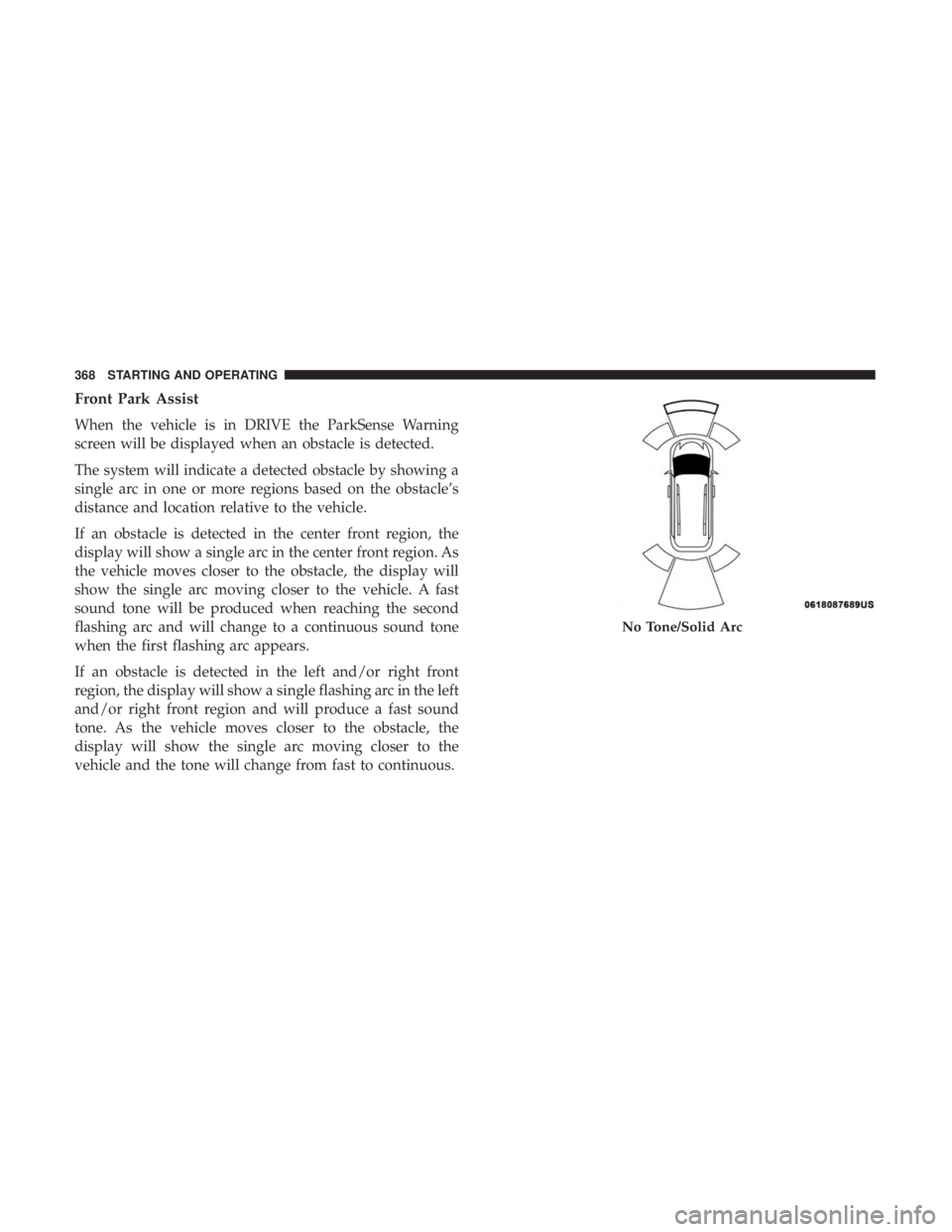
The system will indicate a detected obstacle by showing a
single arc in one or more regions based on the obstacle’s
distance and location relative to the vehicle.
If an obstacle is detected in the center front region, the
display will show a single arc in the center front region. As
the vehicle moves closer to the obstacle, the display will
show the single arc moving closer to the vehicle. A fast
sound tone will be produced when reaching the second
flashing arc and will change to a continuous sound tone
when the first flashing arc appears.
If an obstacle is detected in the left and/or right front
region, the display will show a single flashing arc in the left
and/or right front region and will produce a fast sound
tone. As the vehicle moves closer to the obstacle, the
display will show the single arc moving closer to the
vehicle and the tone will change from fast to continuous.
No Tone/Solid Arc
368 STARTING AND OPERATING
Page 372 of 696
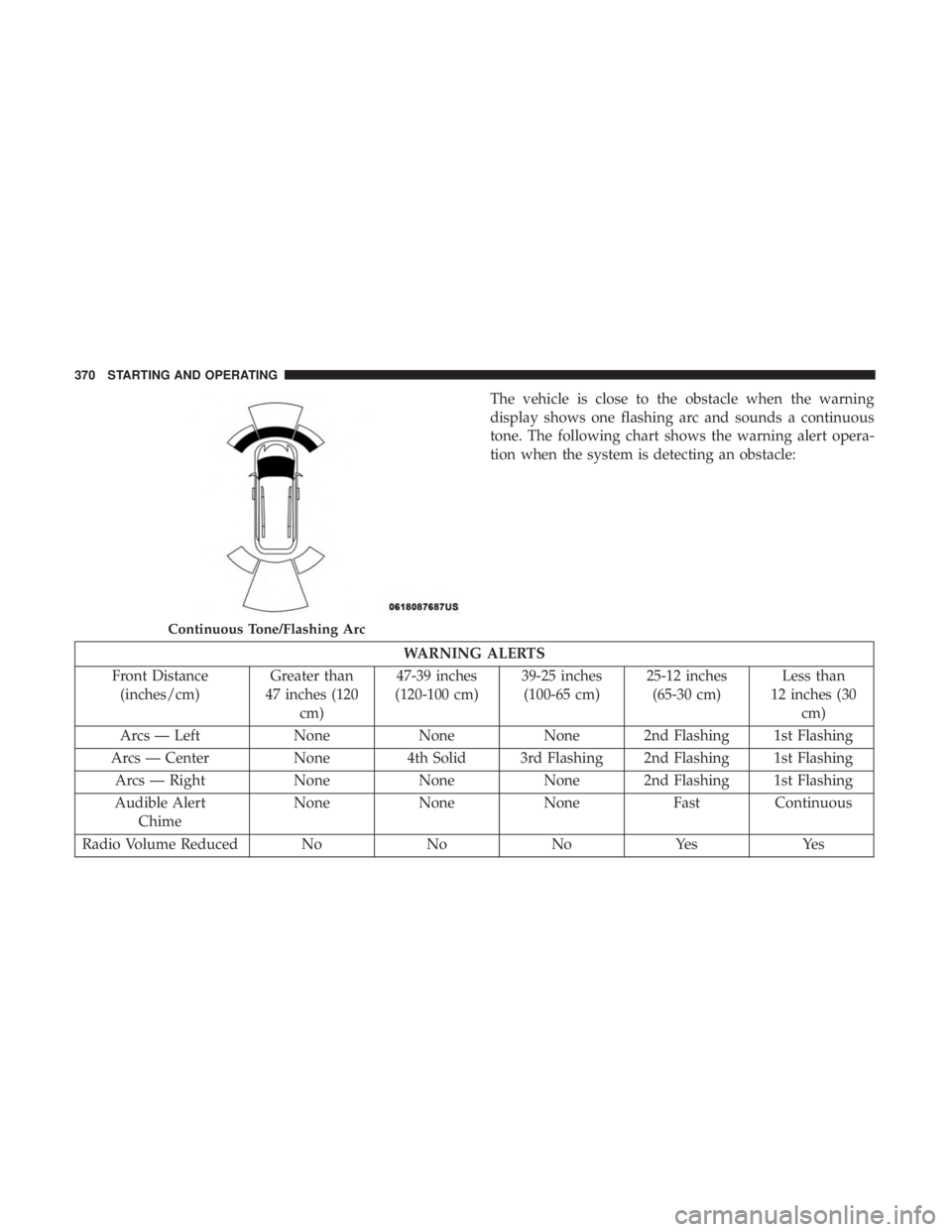
The vehicle is close to the obstacle when the warning
display shows one flashing arc and sounds a continuous
tone. The following chart shows the warning alert opera-
tion when the system is detecting an obstacle:
WARNING ALERTS
Front Distance (inches/cm) Greater than
47 inches (120 cm) 47-39 inches
(120-100 cm) 39-25 inches
(100-65 cm) 25-12 inches
(65-30 cm) Less than
12 inches (30 cm)
Arcs — Left NoneNoneNone 2nd Flashing 1st Flashing
Arcs — Center None4th Solid 3rd Flashing 2nd Flashing 1st Flashing
Arcs — Right NoneNoneNone 2nd Flashing 1st Flashing
Audible Alert Chime None
NoneNone FastContinuous
Radio Volume Reduced No NoNoYes Yes
Continuous Tone/Flashing Arc
370 STARTING AND OPERATING