Page 42 of 492
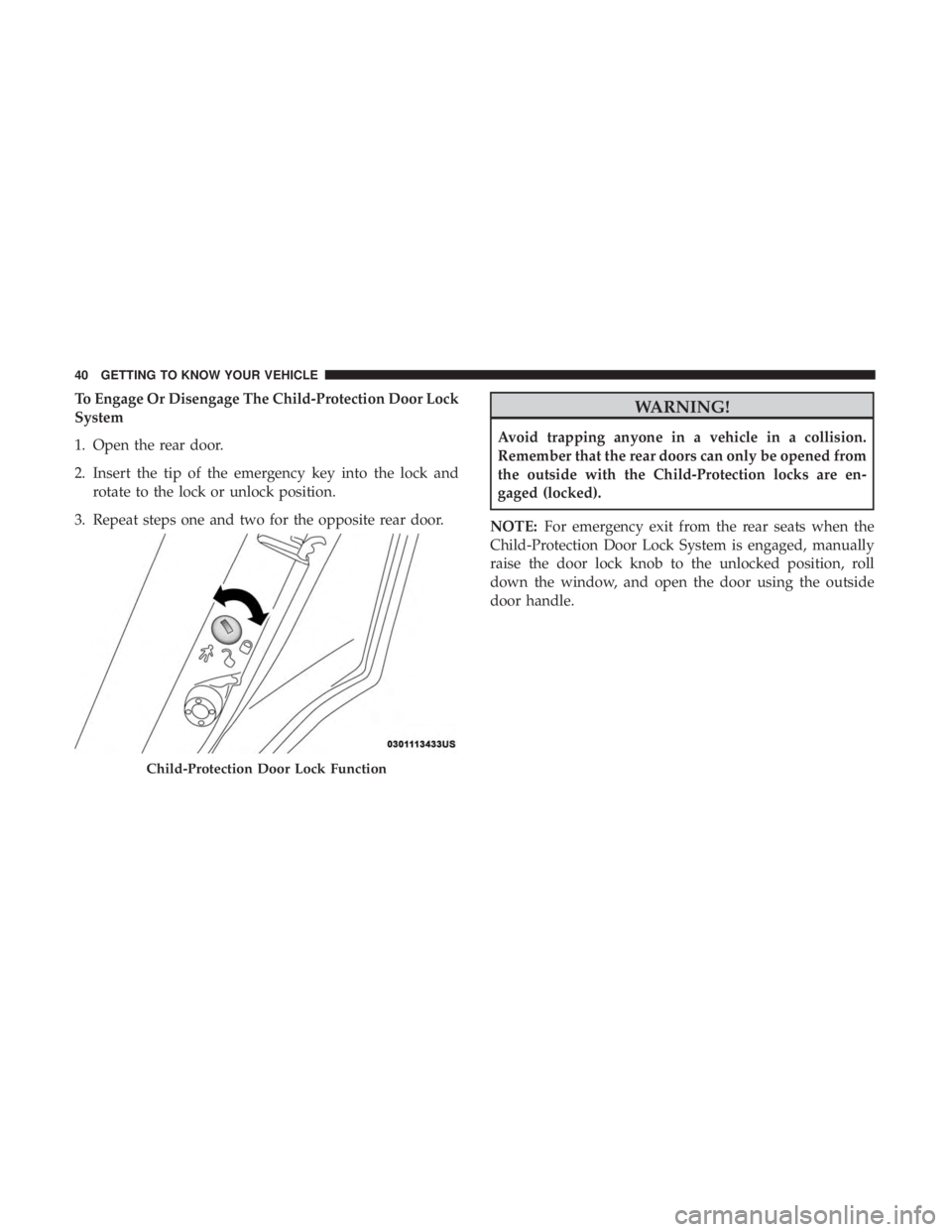
To Engage Or Disengage The Child-Protection Door Lock
System
1. Open the rear door.
2. Insert the tip of the emergency key into the lock androtate to the lock or unlock position.
3. Repeat steps one and two for the opposite rear door.WARNING!
Avoid trapping anyone in a vehicle in a collision.
Remember that the rear doors can only be opened from
the outside with the Child-Protection locks are en-
gaged (locked).
NOTE: For emergency exit from the rear seats when the
Child-Protection Door Lock System is engaged, manually
raise the door lock knob to the unlocked position, roll
down the window, and open the door using the outside
door handle.
Child-Protection Door Lock Function
40 GETTING TO KNOW YOUR VEHICLE
Page 45 of 492
CAUTION!
Do not place any article under a power seat or impede
its ability to move as it may cause damage to the seat
controls. Seat travel may become limited if movement
is stopped by an obstruction in the seat’s path.
Tilting The Seat Up Or Down
The angle of the seat cushion can be adjusted up or down.
Pull upward or push downward on the front of the seat
switch. The front of the seat cushion will move in the
direction of the switch. Release the switch when the
desired position has been reached.
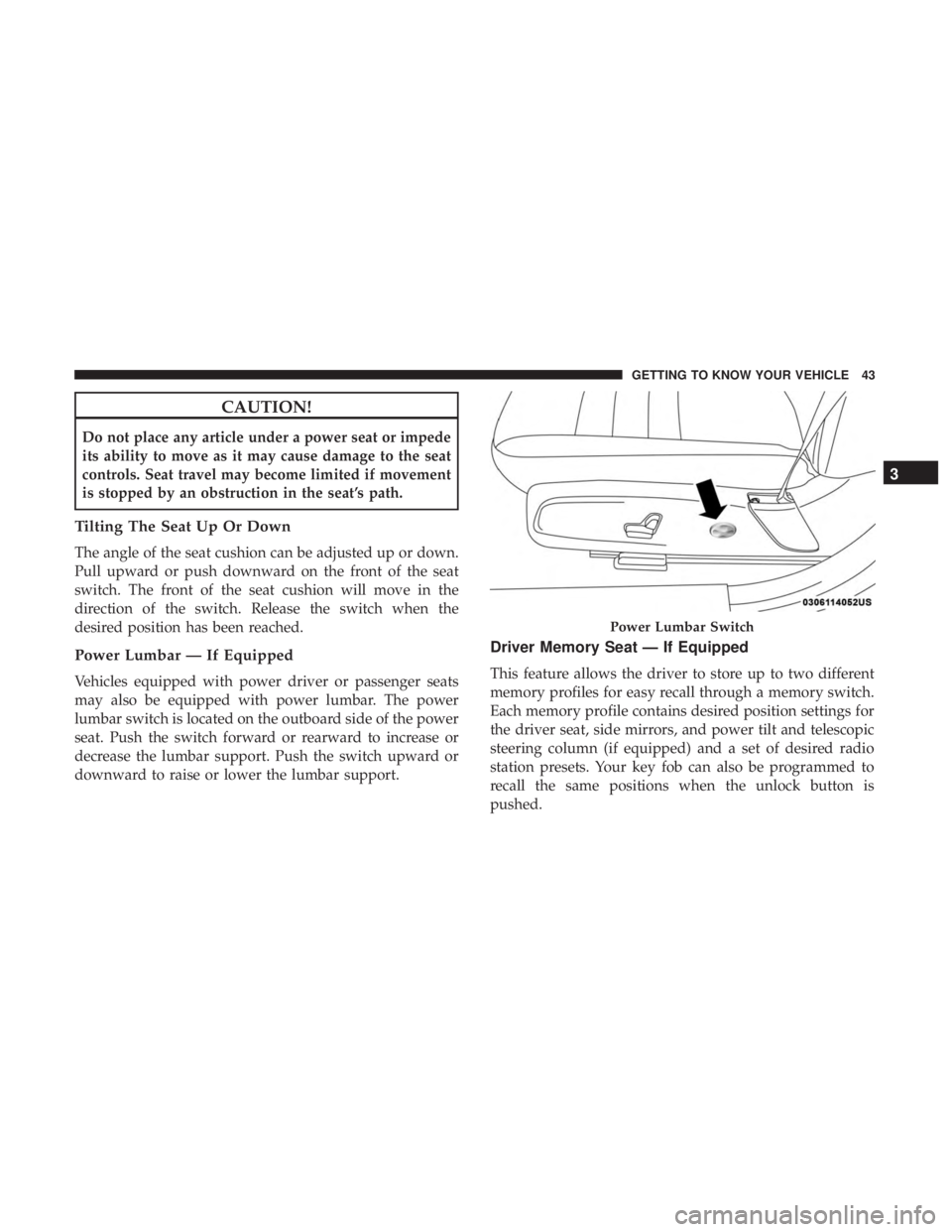
Power Lumbar — If Equipped
Vehicles equipped with power driver or passenger seats
may also be equipped with power lumbar. The power
lumbar switch is located on the outboard side of the power
seat. Push the switch forward or rearward to increase or
decrease the lumbar support. Push the switch upward or
downward to raise or lower the lumbar support.
Driver Memory Seat — If Equipped
This feature allows the driver to store up to two different
memory profiles for easy recall through a memory switch.
Each memory profile contains desired position settings for
the driver seat, side mirrors, and power tilt and telescopic
steering column (if equipped) and a set of desired radio
station presets. Your key fob can also be programmed to
recall the same positions when the unlock button is
pushed.
Power Lumbar Switch
3
GETTING TO KNOW YOUR VEHICLE 43
Page 46 of 492

NOTE:Your vehicle is equipped with two key fobs, one
key fob can be linked to memory position 1 and the other
key fob can be linked to memory position 2.
The memory seat switch is located on the driver ’s door
trim panel. The switch consists of three buttons:
• The set (S) button, which is used to activate the memory
save function.
• The (1) and (2) buttons which are used to recall either of
two pre-programmed memory profiles.Programming The Memory Feature
NOTE: To create a new memory profile, perform the
following:
1. Cycle the vehicle’s ignition to the ON/RUN position (do not start the engine).
2. Adjust all memory profile settings to desired prefer- ences (i.e., seat, side mirror, power tilt and telescopic
steering column [if equipped], and radio station pre-
sets).
3. Push and release the set (S) button on the memory switch.
4. Within five seconds, push and release either of the memory buttons (1) or (2). The instrument cluster dis-
play will display which memory position has been set.
NOTE:
• Memory profiles can be set without the vehicle in PARK,
but the vehicle must be in PARK to recall a memory
profile.
• To set a memory profile to your key fob, refer to
“Linking And Unlinking The Remote Keyless Entry Key
Fob To Memory” in this section.
Memory Seat Switch
44 GETTING TO KNOW YOUR VEHICLE
Page 47 of 492

Linking And Unlinking The Remote Keyless Entry
Key Fob To Memory
Your key fobs can be programmed to recall one of two
pre-programmed memory profiles by pushing the unlock
button on the key fob.
NOTE:Before programming your key fobs you must select
the “Memory Linked To Fob” feature through the Uconnect
system screen. Refer to “Uconnect Settings” in “Multime-
dia” for further information.
To program your key fobs, perform the following:
1. Cycle the vehicle’s ignition to the OFF position.
2. Select a desired memory profile, 1 or 2.
NOTE: If a memory profile has not already been set, refer
to �Programming The Memory Feature� in this section for
instructions on how to set a memory profile.
3. Once the profile has been recalled, push and release the set (S) button on the memory switch.
4. Within five seconds, push and release button (1) or (2) accordingly. “Memory Profile Set” (1 or 2) will display
in the instrument cluster. 5. Push and release the lock button on the key fob within
10 seconds.
NOTE: Your key fobs can be unlinked to your memory
settings by pushing the set (S) button, and within 10
seconds, followed by pushing the unlock button on the key
fob.
Memory Position Recall
NOTE: The vehicle must be in PARK to recall memory
positions. If a recall is attempted when the vehicle is not in
PARK, a message will be displayed in the instrument
cluster display.
Driver One Memory Position Recall
• To recall the memory settings for driver one using the
memory switch, push memory button (1) on the
memory switch.
• To recall the memory settings for driver one using the
key fob, push the unlock button on the key fob linked to
memory position 1.
3
GETTING TO KNOW YOUR VEHICLE 45
Page 48 of 492
Driver Two Memory Position Recall
•To recall the memory setting for driver two using the
memory switch, push memory button (2) on the
memory switch.
• To recall the memory settings for driver two using the
key fob, push the unlock button on the key fob linked to
memory position 2.
A recall can be canceled by pushing any of the memory
buttons during a recall (S, 1, or 2), or by pushing any of the
seat adjustment switches. When a recall is canceled, the
driver’s seat and steering column (if equipped) stop mov-
ing. A delay of one second will occur before another recall
can be selected.
Easy Entry/Exit Seat
This feature provides automatic driver seat positioning to
enhance driver mobility when entering and exiting the
vehicle.
The distance the driver seat moves depends on where you
have the driver seat positioned when you cycle the vehi-
cle’s ignition to the OFF position. •
When you cycle the vehicle’s ignition to the OFF posi-
tion, the driver seat will move about 2.4 inches (60 mm)
rearward if the driver seat position is greater than or
equal to 2.7 inches (67.7 mm) forward of the rear stop.
The seat will return to its previously set position when
you cycle the vehicle’s ignition to the ACC or RUN
position.
• The Easy Entry/Easy Exit feature is disabled when the
driver seat position is less than 0.9 of an inch (22.7 mm)
forward of the rear stop. At this position, there is no
benefit to the driver by moving the seat for Easy Exit or
Easy Entry.
Each stored memory setting will have an associated Easy
Entry and Easy Exit position.
NOTE: The Easy Entry/Exit feature is not enabled when
the vehicle is delivered from the factory. The Easy Entry/
Exit feature is enabled (or later disabled) through the
programmable features in the Uconnect system. Refer to
“Uconnect Settings” in “Multimedia”.
46 GETTING TO KNOW YOUR VEHICLE
Page 57 of 492

WARNING!
Do not adjust the steering column while driving.
Adjusting the steering column while driving or driv-
ing with the steering column unlocked, could cause the
driver to lose control of the vehicle. Failure to follow
this warning may result in serious injury or death.
Power Tilt/Telescoping Steering Column — If
Equipped
This feature allows you to tilt the steering column upward
or downward. It also allows you to lengthen or shorten the
steering column. The power tilt/telescoping steering col-
umn switch is located below the multifunction lever on the
steering column.To tilt the steering column, move the switch up or down as
desired. To lengthen or shorten the steering column, pull
the switch toward you or push the switch away from you
as desired.
NOTE:
For vehicles equipped with Driver Memory Seat,
you can use your remote keyless entry key fob or the
memory switch on the driver’s door trim panel to return
the tilt/telescopic steering column to pre-programmed
positions. Refer to “Driver Memory Seat” in this section.
Power Tilt/Telescoping Steering Switch
3
GETTING TO KNOW YOUR VEHICLE 55
Page 60 of 492

Outside Mirrors
To receive maximum benefit, adjust the outside mirror(s) to
center on the adjacent lane of traffic and a slight overlap of
the view obtained from the inside mirror.
NOTE:The passenger side convex outside mirror will give
a much wider view to the rear, and especially of the lane
next to your vehicle.
WARNING!
Vehicles and other objects seen in an outside convex
mirror will look smaller and farther away than they
really are. Relying too much on side convex mirrors
could cause you to collide with another vehicle or other
object. Use your inside mirror when judging the size or
distance of a vehicle seen in a side convex mirror.
Driver’s Outside Automatic Dimming Mirror — If
Equipped
The driver ’s outside mirror will automatically adjust for
glare from vehicles behind you. This feature is controlled
by the inside automatic dimming mirror and will automati-
cally adjust for headlight glare when the inside mirror
adjusts.
Outside Mirrors With Turn Signal And Approach
Lighting — If Equipped
Driver and passenger outside mirrors with turn signal and
approach lighting contain four LEDs, which are located in
the upper outer corner of each mirror.
Three of the LEDs are turn signal indicators, which flash
with the corresponding turn signal lights in the front and
rear of the vehicle. Turning on the Hazard Warning flashers
will also activate these LEDs.
The fourth LED supplies illuminated entry lighting, which
turns on in both mirrors when you use the remote keyless
entry key fob or open any door. This LED shines outward
to illuminate the front and rear door handles. It also shines
downward to illuminate the area in front of the doors.
The illuminated entry lighting fades to off after about 30
seconds or it will fade to off immediately once the ignition
is placed into the ON/RUN position.
NOTE: The approach lighting will not function when the
gear selector is moved out of the PARK position.
58 GETTING TO KNOW YOUR VEHICLE
Page 71 of 492
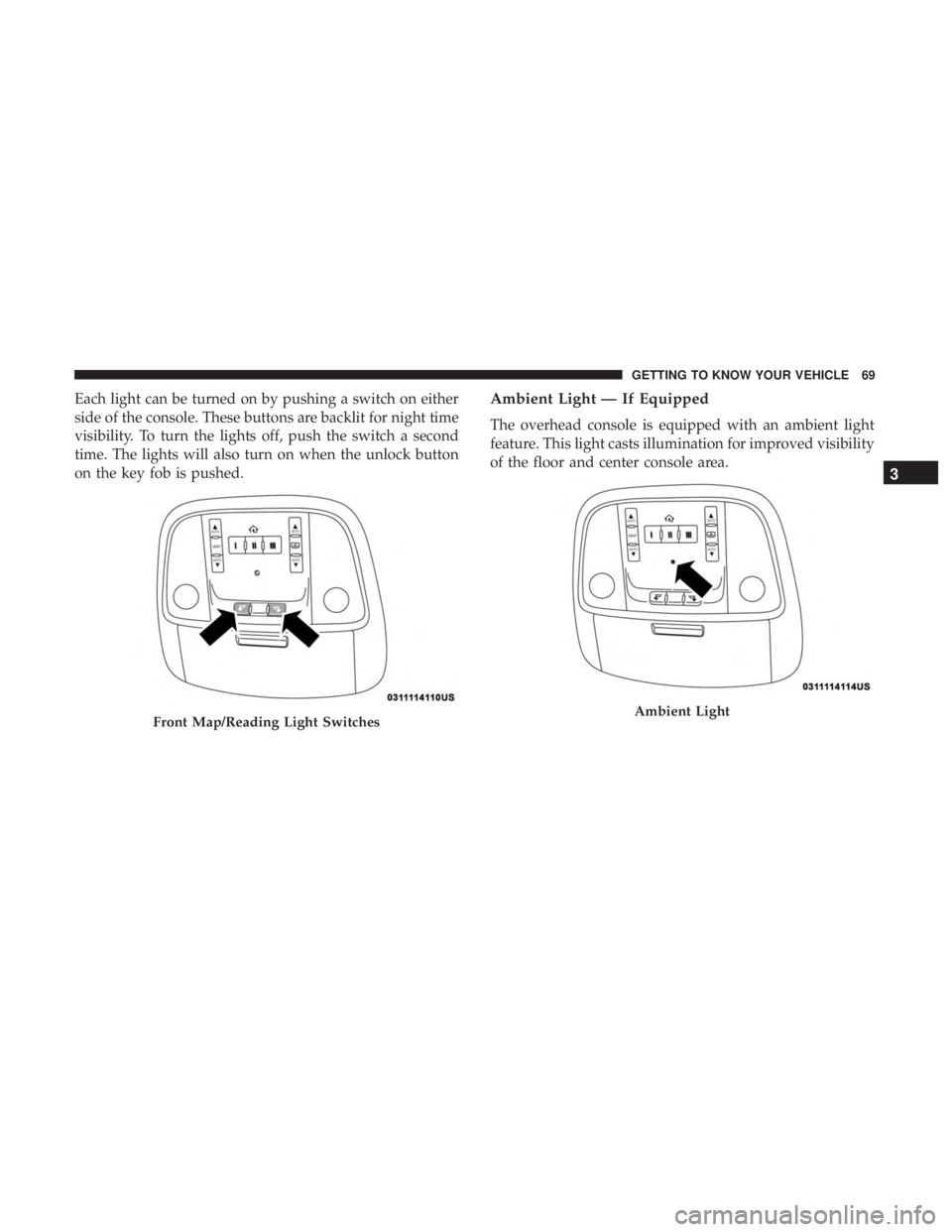
Each light can be turned on by pushing a switch on either
side of the console. These buttons are backlit for night time
visibility. To turn the lights off, push the switch a second
time. The lights will also turn on when the unlock button
on the key fob is pushed.Ambient Light — If Equipped
The overhead console is equipped with an ambient light
feature. This light casts illumination for improved visibility
of the floor and center console area.
Front Map/Reading Light SwitchesAmbient Light
3
GETTING TO KNOW YOUR VEHICLE 69