Page 39 of 492
2. A lock request is made by the Passive Entry door handlewhile a door is open.
3. A lock request is made by the door panel switch while the door is open.
When any of these situations occur, after all open doors are
shut, the FOBIK-Safe search will be executed. If it finds a
Passive Entry key fob inside the car and it does not find
any Passive Entry key fobs outside the car, then the car will
unlock and alert the customer.
NOTE: The vehicle will only unlock the doors when a valid
Passive Entry key fob is detected inside the vehicle, and no
valid Passive Entry key fob is detected outside the vehicle.
The vehicle will not unlock the doors when any of the
following conditions are true:
• The doors are locked manually using the door lock
knobs.
• There is a valid Passive Entry key fob outside the vehicle
and within 5 ft (1.5 m) of either Passive Entry door
handle.
• Three attempts are made to lock the doors using the
door panel switch and then close the doors. To Enter The Trunk
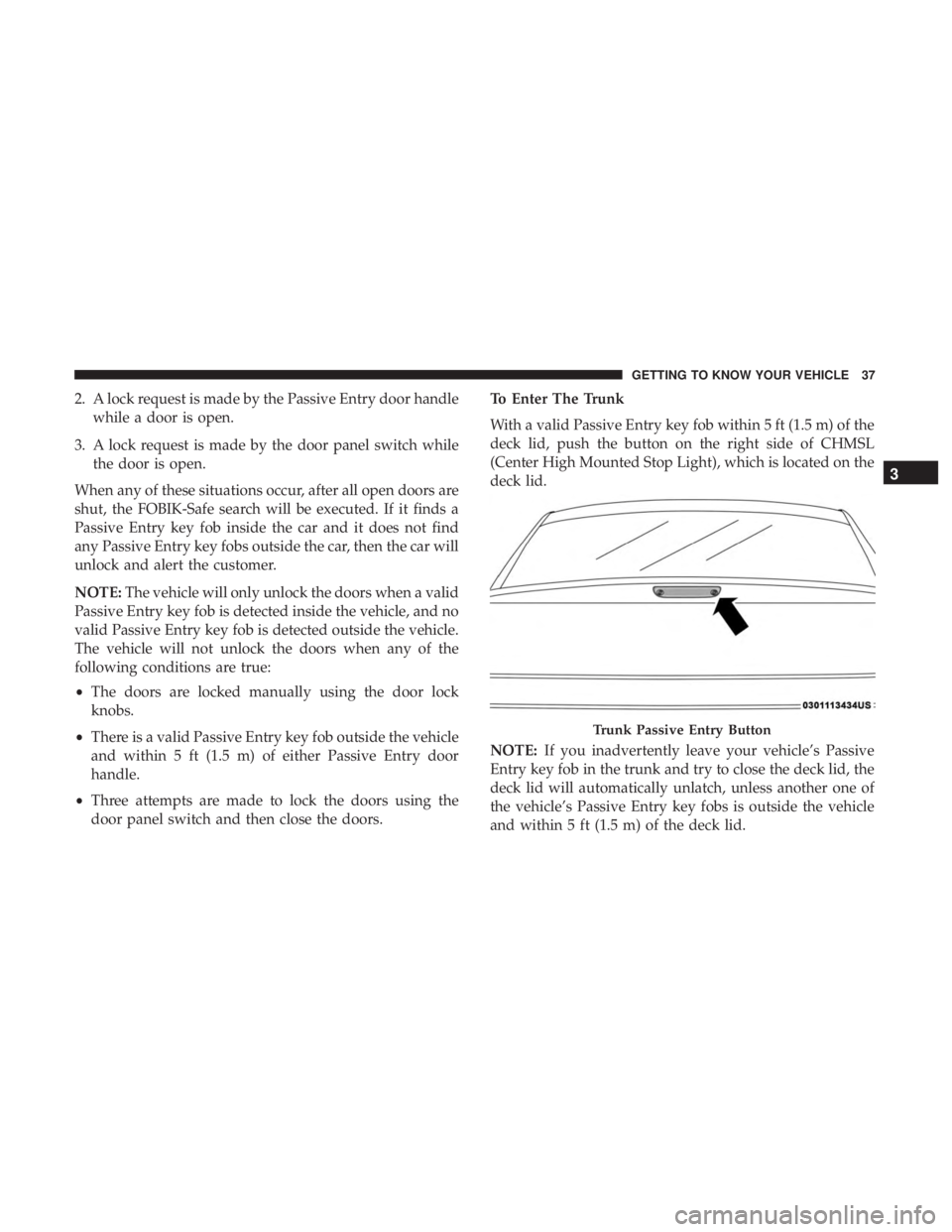
With a valid Passive Entry key fob within 5 ft (1.5 m) of the
deck lid, push the button on the right side of CHMSL
(Center High Mounted Stop Light), which is located on the
deck lid.
NOTE:
If you inadvertently leave your vehicle’s Passive
Entry key fob in the trunk and try to close the deck lid, the
deck lid will automatically unlatch, unless another one of
the vehicle’s Passive Entry key fobs is outside the vehicle
and within 5 ft (1.5 m) of the deck lid.
Trunk Passive Entry Button
3
GETTING TO KNOW YOUR VEHICLE 37
Page 40 of 492
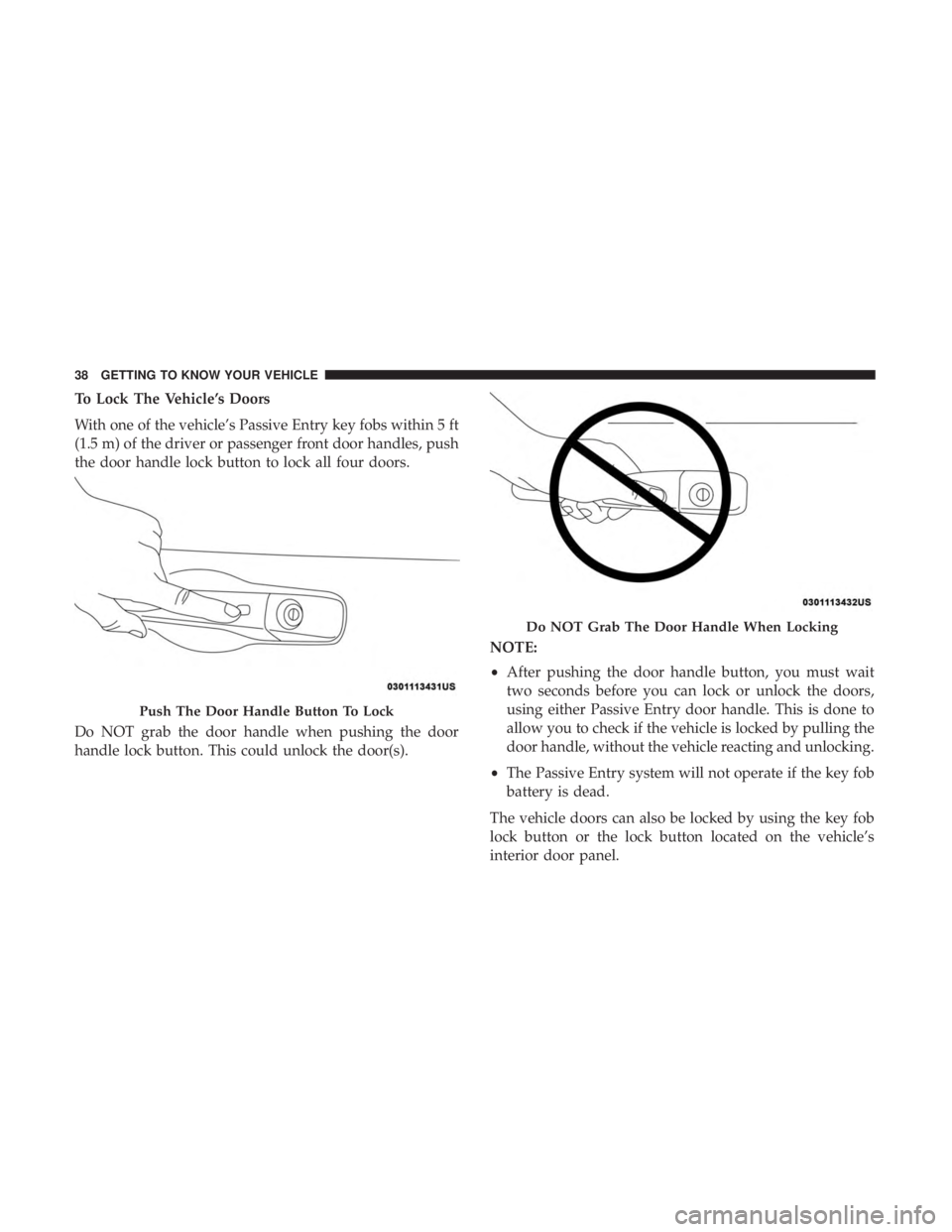
To Lock The Vehicle’s Doors
With one of the vehicle’s Passive Entry key fobs within 5 ft
(1.5 m) of the driver or passenger front door handles, push
the door handle lock button to lock all four doors.
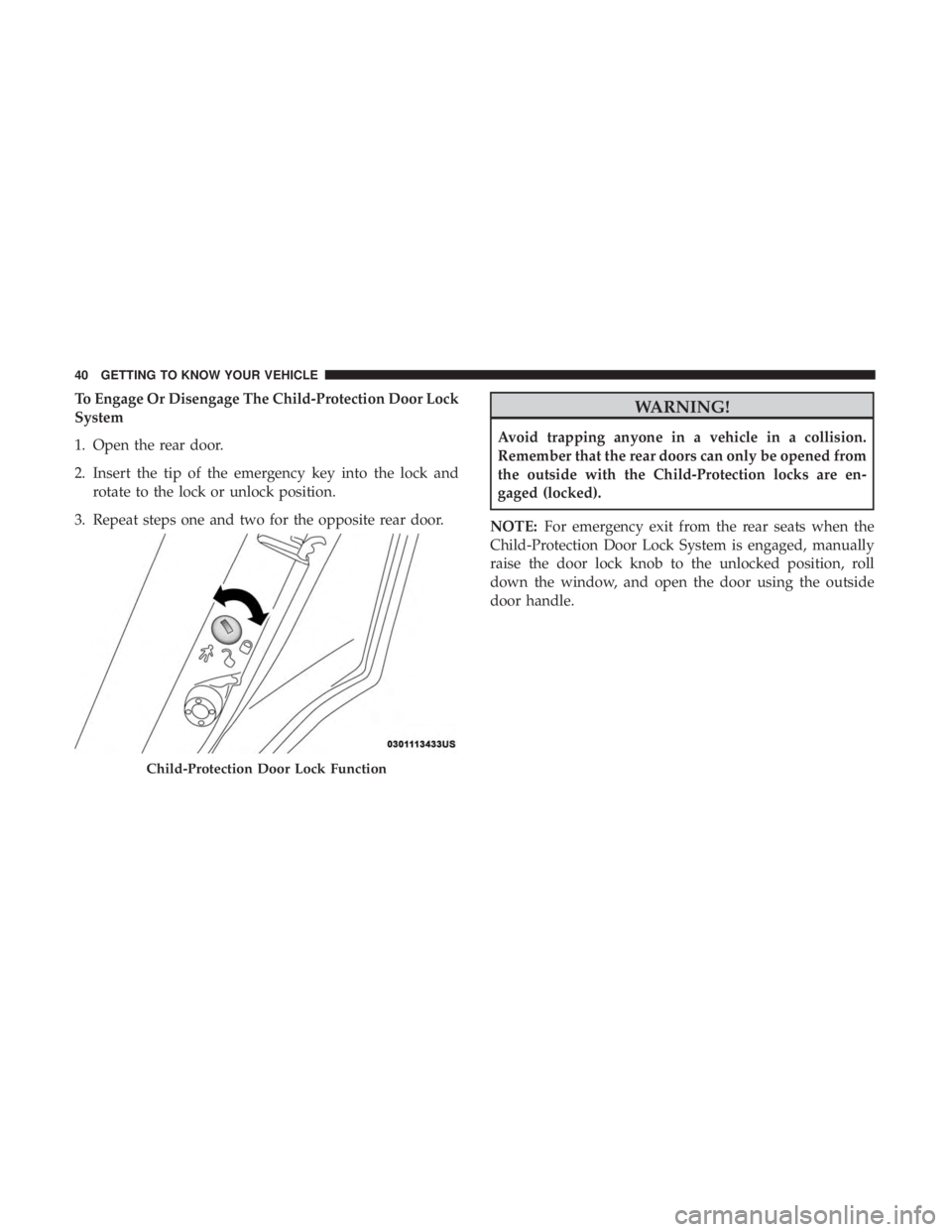
Do NOT grab the door handle when pushing the door
handle lock button. This could unlock the door(s).NOTE:
•
After pushing the door handle button, you must wait
two seconds before you can lock or unlock the doors,
using either Passive Entry door handle. This is done to
allow you to check if the vehicle is locked by pulling the
door handle, without the vehicle reacting and unlocking.
• The Passive Entry system will not operate if the key fob
battery is dead.
The vehicle doors can also be locked by using the key fob
lock button or the lock button located on the vehicle’s
interior door panel.
Push The Door Handle Button To Lock
Do NOT Grab The Door Handle When Locking
38 GETTING TO KNOW YOUR VEHICLE
Page 41 of 492
General Information
The following regulatory statement applies to all radio
frequency (RF) devices equipped in this vehicle:
This device complies with Part 15 of the FCC Rules and
with Industry Canada license-exempt RSS standard(s).
Operation is subject to the following two conditions:
1. This device may not cause harmful interference, and
2. This device must accept any interference received, in-cluding interference that may cause undesired opera-
tion.
NOTE: Changes or modifications not expressly approved
by the party responsible for compliance could void the
user ’s authority to operate the equipment.
Automatic Unlock Doors On Exit
The doors will unlock automatically on vehicles with
power door locks if:
1. The Automatic Unlock Doors On Exit feature is enabled.
2. The vehicle was in motion, then speed returned to 0 mph (0 km/h) and the transmission is placed in PARK.
3. The driver door is opened. 4. The doors were not previously unlocked.
NOTE: Automatic Unlock Doors On Exit Programming
To change the current setting, refer to “Uconnect Settings”
in “Multimedia” for further information.
Use the Automatic Unlock Doors On Exit feature in accor-
dance with local laws.
Automatic Door Locks — If Equipped
The auto door lock feature default condition is enabled.
When enabled, the door locks will lock automatically when
the vehicle’s speed exceeds 15 mph (24 km/h). The auto
door lock feature can be enabled or disabled by an autho-
rized dealer per written request of the customer. Please see
an authorized dealer for service.
Child-Protection Door Lock System — Rear Doors
To provide a safer environment for small children riding in
the rear seats, the rear doors are equipped with Child-
Protection Door Lock system.
3
GETTING TO KNOW YOUR VEHICLE 39
Page 42 of 492
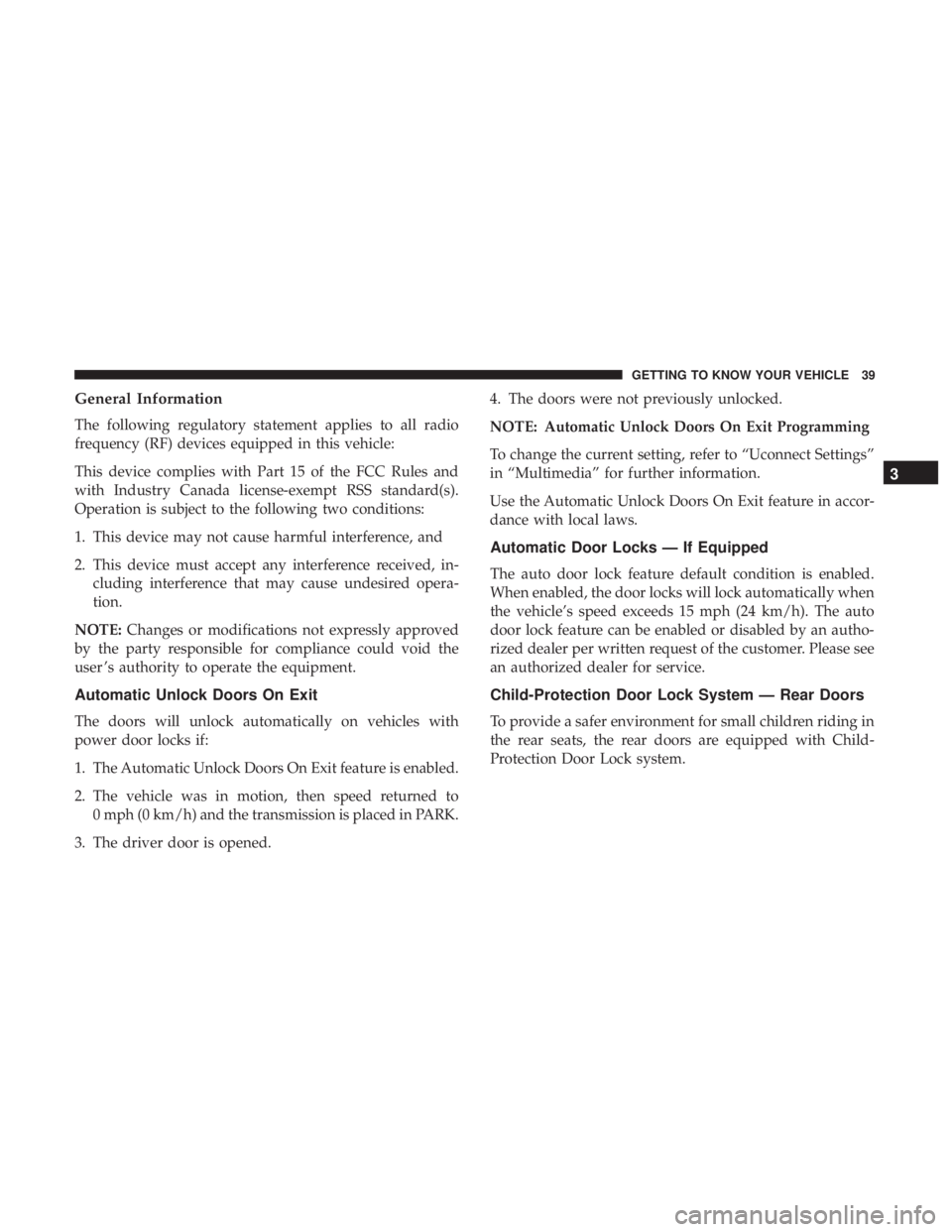
To Engage Or Disengage The Child-Protection Door Lock
System
1. Open the rear door.
2. Insert the tip of the emergency key into the lock androtate to the lock or unlock position.
3. Repeat steps one and two for the opposite rear door.WARNING!
Avoid trapping anyone in a vehicle in a collision.
Remember that the rear doors can only be opened from
the outside with the Child-Protection locks are en-
gaged (locked).
NOTE: For emergency exit from the rear seats when the
Child-Protection Door Lock System is engaged, manually
raise the door lock knob to the unlocked position, roll
down the window, and open the door using the outside
door handle.
Child-Protection Door Lock Function
40 GETTING TO KNOW YOUR VEHICLE
Page 57 of 492

WARNING!
Do not adjust the steering column while driving.
Adjusting the steering column while driving or driv-
ing with the steering column unlocked, could cause the
driver to lose control of the vehicle. Failure to follow
this warning may result in serious injury or death.
Power Tilt/Telescoping Steering Column — If
Equipped
This feature allows you to tilt the steering column upward
or downward. It also allows you to lengthen or shorten the
steering column. The power tilt/telescoping steering col-
umn switch is located below the multifunction lever on the
steering column.To tilt the steering column, move the switch up or down as
desired. To lengthen or shorten the steering column, pull
the switch toward you or push the switch away from you
as desired.
NOTE:
For vehicles equipped with Driver Memory Seat,
you can use your remote keyless entry key fob or the
memory switch on the driver’s door trim panel to return
the tilt/telescopic steering column to pre-programmed
positions. Refer to “Driver Memory Seat” in this section.
Power Tilt/Telescoping Steering Switch
3
GETTING TO KNOW YOUR VEHICLE 55
Page 62 of 492
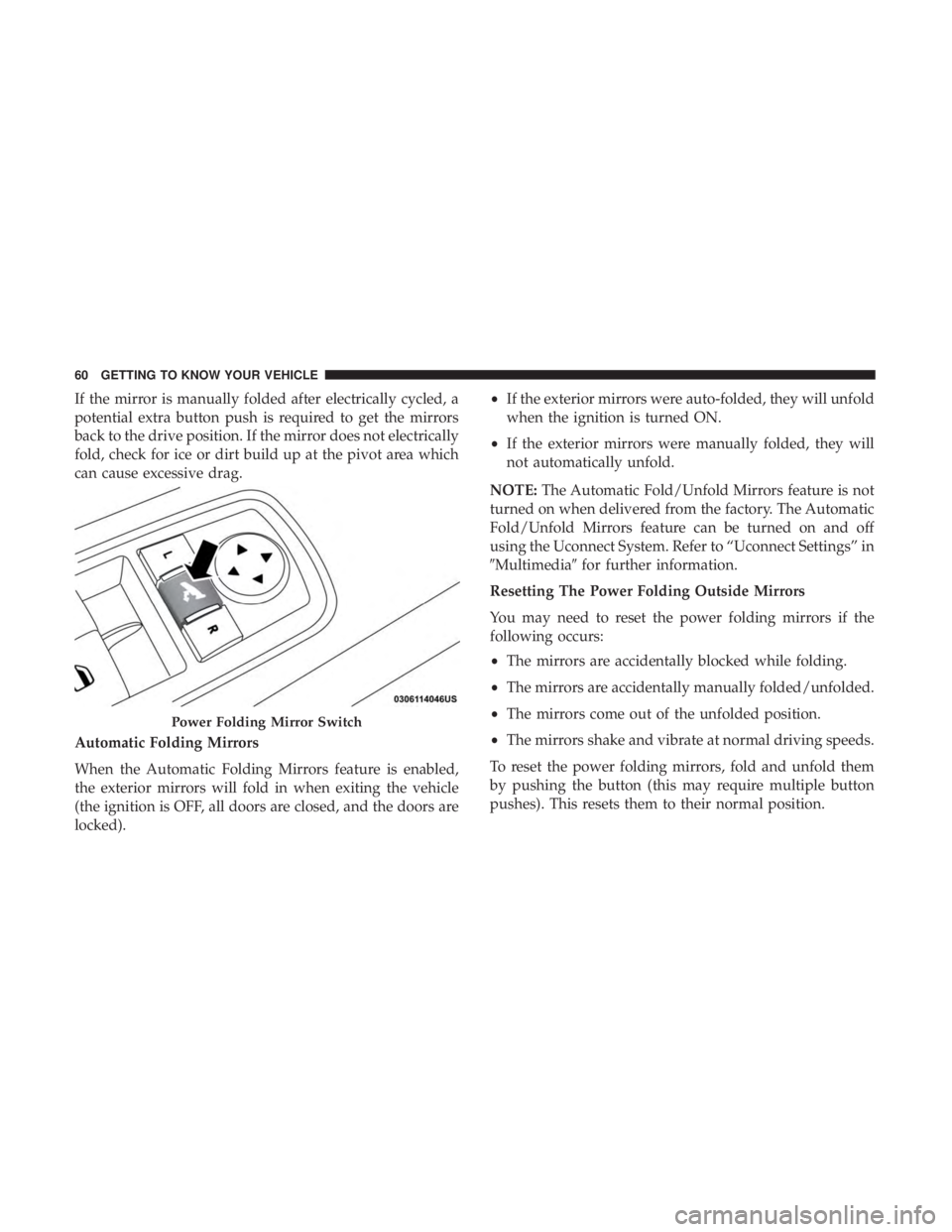
If the mirror is manually folded after electrically cycled, a
potential extra button push is required to get the mirrors
back to the drive position. If the mirror does not electrically
fold, check for ice or dirt build up at the pivot area which
can cause excessive drag.
Automatic Folding Mirrors
When the Automatic Folding Mirrors feature is enabled,
the exterior mirrors will fold in when exiting the vehicle
(the ignition is OFF, all doors are closed, and the doors are
locked).•
If the exterior mirrors were auto-folded, they will unfold
when the ignition is turned ON.
• If the exterior mirrors were manually folded, they will
not automatically unfold.
NOTE: The Automatic Fold/Unfold Mirrors feature is not
turned on when delivered from the factory. The Automatic
Fold/Unfold Mirrors feature can be turned on and off
using the Uconnect System. Refer to “Uconnect Settings” in
�Multimedia� for further information.
Resetting The Power Folding Outside Mirrors
You may need to reset the power folding mirrors if the
following occurs:
• The mirrors are accidentally blocked while folding.
• The mirrors are accidentally manually folded/unfolded.
• The mirrors come out of the unfolded position.
• The mirrors shake and vibrate at normal driving speeds.
To reset the power folding mirrors, fold and unfold them
by pushing the button (this may require multiple button
pushes). This resets them to their normal position.
Power Folding Mirror Switch
60 GETTING TO KNOW YOUR VEHICLE
Page 87 of 492
NOTE:
•If the window runs into any obstacle during Auto-
Closure, it will reverse direction and then go back down.
Remove the obstacle and use the window switch again
to close the window.
• Any impact due to rough road conditions may trigger
the Auto-Reverse function unexpectedly during auto-
closure. If this happens, pull and hold the switch to close
the window manually.
WARNING!
There is no anti-pinch protection when the window is
almost closed. Be sure to clear all objects from the
window before closing.
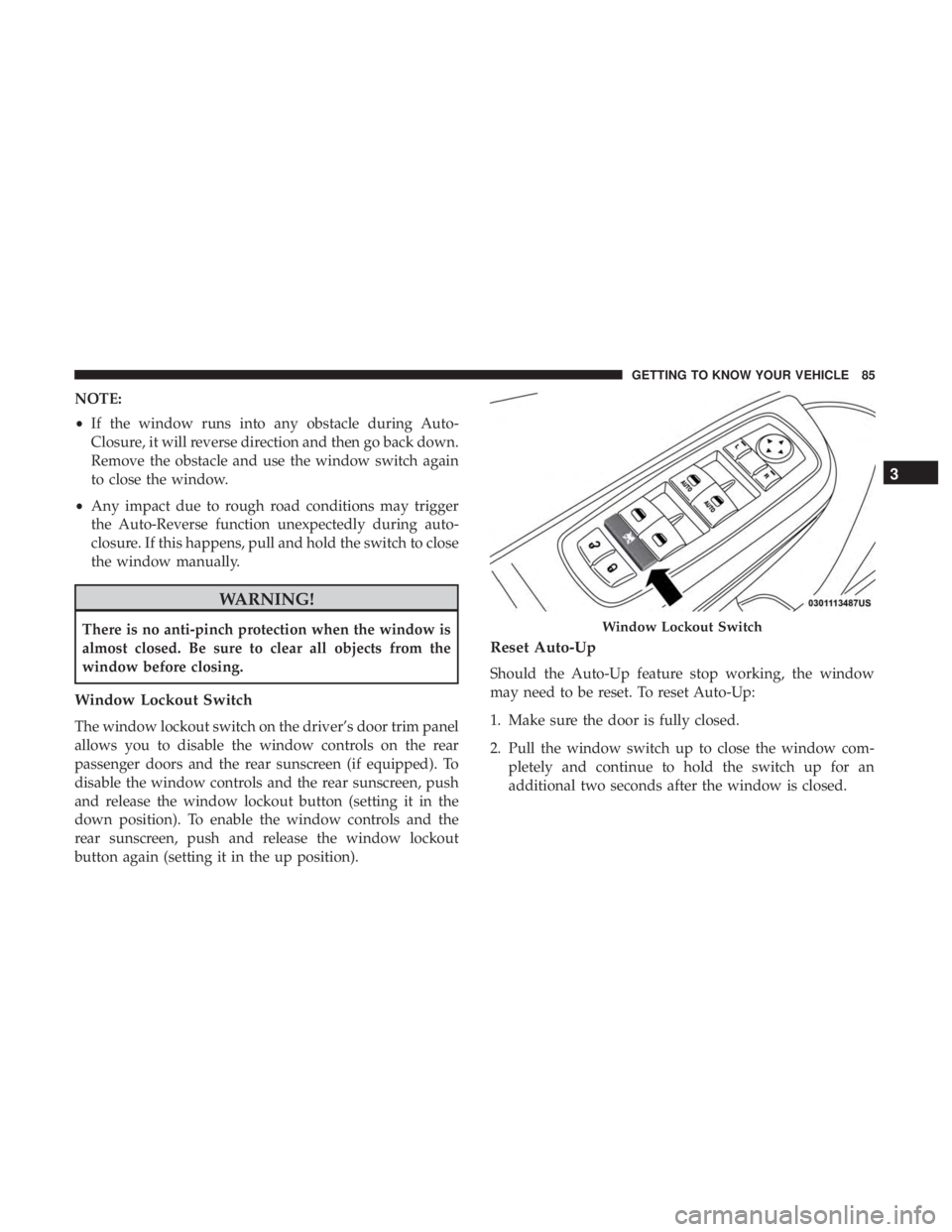
Window Lockout Switch
The window lockout switch on the driver’s door trim panel
allows you to disable the window controls on the rear
passenger doors and the rear sunscreen (if equipped). To
disable the window controls and the rear sunscreen, push
and release the window lockout button (setting it in the
down position). To enable the window controls and the
rear sunscreen, push and release the window lockout
button again (setting it in the up position).
Reset Auto-Up
Should the Auto-Up feature stop working, the window
may need to be reset. To reset Auto-Up:
1. Make sure the door is fully closed.
2. Pull the window switch up to close the window com- pletely and continue to hold the switch up for an
additional two seconds after the window is closed.
Window Lockout Switch
3
GETTING TO KNOW YOUR VEHICLE 85
Page 93 of 492
WARNING!
Be sure the hood is fully latched before driving your
vehicle. If the hood is not fully latched, it could open
when the vehicle is in motion and block your vision.
Failure to follow this warning could result in serious
injury or death.
CAUTION!
To prevent possible damage, do not slam the hood to
close it. Lower hood to approximately 12 inches (30 cm)
and drop the hood to close. Make sure hood is fully
closed for both latches. Never drive vehicle unless
hood is fully closed, with both latches engaged.
TRUNK
Opening
The trunk can be opened from inside the vehicle using the
power trunk button located on the instrument panel to the
left of the steering wheel.
The trunk lid can be released from outside the vehicle by
pushing the trunk button on the key fob twice within five
seconds or by using the external release switch located onthe underside of the decklid overhang. The release feature
will function only when the vehicle is in the unlock
condition.
With the ignition in the ON/RUN position, the trunk open
symbol will display in the instrument cluster indicating
that the trunk is open. The odometer display will reappear
once the trunk is closed.
With the ignition in the OFF position, the trunk open
symbol will display until the trunk is closed.
NOTE:
Refer to “Keyless Enter-N-Go — Passive Entry” in
”Doors” in “Getting To Know Your Vehicle” for further
information on trunk operation with the Passive Entry
feature.
Opening From Inside The Vehicle
Interior Power Trunk Release
The trunk can be opened from inside the
vehicle using the power trunk release
button located on the instrument panel
to the left of the steering wheel.
NOTE:The transmission must be in
PARK before the button will operate.
Power Trunk
Release
3
GETTING TO KNOW YOUR VEHICLE 91