2018 CHRYSLER 300 cruise control
[x] Cancel search: cruise controlPage 259 of 492
General Information
The following regulatory statement applies to all Radio
Frequency (RF) devices equipped in this vehicle:
This device complies with Part 15 of the FCC Rules and
with Industry Canada license-exempt RSS standard(s).
Operation is subject to the following two conditions:
1. This device may not cause harmful interference.
2. This device must accept any interference received, in-cluding interference that may cause undesired opera-
tion.
NOTE: Changes or modifications not expressly approved
by the party responsible for compliance could void the
user ’s authority to operate the equipment.
Normal (Fixed Speed) Cruise Control Mode
In addition to Adaptive Cruise Control mode, a Normal
(Fixed Speed) Cruise Control mode is available for cruising
at fixed speeds. The Normal (Fixed Speed) Cruise Control
mode is designed to maintain a set cruising speed without
requiring the driver to operate the accelerator. Cruise
Control can only be operated if the vehicle speed is above
20 mph (32 km/h). To change between the different control modes, push the
Adaptive Cruise Control (ACC) on/off button which turns
the ACC and the Normal (Fixed Speed) Cruise Control off.
Pushing the Normal (Fixed Speed) Cruise Control on/off
button will result in turning on (changing to) the Normal
(Fixed Speed) Cruise Control mode.
WARNING!
In the Normal (Fixed Speed) Cruise Control mode, the
system will not react to vehicles ahead. In addition, the
proximity warning does not activate and no alarm will
sound even if you are too close to the vehicle ahead
since neither the presence of the vehicle ahead nor the
vehicle-to vehicle distance is detected. Be sure to
maintain a safe distance between your vehicle and the
vehicle ahead. Always be aware which mode is se-
lected.6
STARTING AND OPERATING 257
Page 260 of 492
To Set A Desired Speed
Turn the Normal (Fixed Speed) Cruise Control
on. When the vehicle has reached the desired
speed, push the SET (+) or SET (-) button and
release. Release the accelerator and the vehicle
will operate at the selected speed. Once a speed has been
set a message “CRUISE CONTROL SET TO MPH (km/h)”
will appear indicating what speed was set. This light will
turn on when the system is turned on via the on/off
control. It turns green when the cruise control is set.
To Vary The Speed Setting
To Increase Speed
When the Normal (Fixed Speed) Cruise Control is set, you
can increase speed by pushing the SET (+)button.
The driver’s preferred units can be selected through the
instrument cluster display. Refer to “Getting To Know Your
Instrument Panel” for more information. The speed incre-
ment shown is dependant on the speed of U.S. (mph) or
Metric (km/h) units: U.S. Speed (mph)
•
Pushing the SET (+)button once will result ina1mph
increase in set speed. Each subsequent tap of the button
results in an increase of 1 mph.
• If the button is continually pushed, the set speed will
continue to increase in 5 mph increments until the
button is released. The increase in set speed is reflected
in the instrument cluster display.
Metric Speed (km/h)
• Pushing the SET (+)button once will result in a 1 km/h
increase in set speed. Each subsequent tap of the button
results in an increase of 1 km/h.
• If the button is continually pushed, the set speed will
continue to increase in 10 km/h increments until the
button is released. The increase in set speed is reflected
in the instrument cluster display.
258 STARTING AND OPERATING
Page 261 of 492
To Decrease Speed
When the Normal (Fixed Speed) Cruise Control is set, you
can decrease speed by pushing the SET(-)button.
The driver’s preferred units can be selected through the
instrument cluster display. Refer to “Getting To Know Your
Instrument Panel” for more information. The speed decre-
ment shown is dependant on the speed of U.S. (mph) or
Metric (km/h) units:
U.S. Speed (mph)
• Pushing the SET (-)button once will result in a 1 mph
decrease in set speed. Each subsequent tap of the button
results in a decrease of 1 mph.
• If the button is continually pushed, the set speed will
continue to decrease in 5 mph decrements until the
button is released. The decrease in set speed is reflected
in the instrument cluster display. Metric Speed (km/h)
•
Pushing the SET (-)button once will result in a 1 km/h
decrease in set speed. Each subsequent tap of the button
results in a decrease of 1 km/h.
• If the button is continually pushed, the set speed will
continue to decrease in 10 km/h decrements until the
button is released. The decrease in set speed is reflected
in the instrument cluster display.
To Cancel
The following conditions will cancel the Normal (Fixed
Speed) Cruise Control without clearing the memory:
• The brake pedal is applied.
• The CANC button is pushed.
• The Electronic Stability Control/Traction Control Sys-
tem (ESC/TCS) activates.
• The vehicle parking brake is applied.
• The braking temperature exceeds normal range (over-
heated).
• The gear selector is removed from the DRIVE position.
6
STARTING AND OPERATING 259
Page 262 of 492

To Resume Speed
To resume a previously set speed, push the RES button and
release. Resume can be used at any speed above 20 mph
(32 km/h).
To Turn Off
The system will turn off and erase the set speed in memory
if:
•The Normal (Fixed Speed) Cruise Control on/off button
is pushed.
• The ignition is turned OFF.
• The Adaptive Cruise Control (ACC) on/off button is
pushed.
PARKSENSE FRONT AND REAR PARK ASSIST —
IF EQUIPPED
The ParkSense Park Assist system provides visual and
audible indications of the distance between the rear and/or
front fascia and a detected obstacle when backing up or
moving forward, e.g. during a parking maneuver. Refer to
“ParkSense System Usage Precautions” for limitations of
this system and recommendations. ParkSense will retain the last system state (enabled or
disabled) from the last ignition cycle when the ignition is
changed to the ON/RUN position.
ParkSense can be active only when the gear selector is in
REVERSE or DRIVE. If ParkSense is enabled at one of these
gear selector positions, the system will remain active until
the vehicle speed is increased to approximately 7 mph
(11 km/h) or above. The system will become active again if
the vehicle speed is decreased to speeds less than approxi-
mately 6 mph (9 km/h).
ParkSense Sensors
The four ParkSense sensors, located in the rear fascia/
bumper, monitor the area behind the vehicle that is within
the sensors’ field of view. The sensors can detect obstacles
from approximately 12 inches (30 cm) up to 79 inches (200
cm) from the rear fascia/bumper in the horizontal direc-
tion, depending on the location, type and orientation of the
obstacle.
The six ParkSense sensors, located in the front fascia/
bumper, monitor the area in front of the vehicle that is
within the sensors’ field of view. The sensors can detect
obstacles from approximately 12 inches (30 cm) up to 47
260 STARTING AND OPERATING
Page 474 of 492

About Your Brakes........................ .403
Adaptive Cruise Control (ACC) (Cruise Control) . . . .239
Adding Engine Coolant (Antifreeze) .............364
Adding Fuel ............................. .278
Adding Washing Fluid ...................... .348
Additives, Fuel ........................... .406
Adjust Forward ................................42
Rearward ...............................42
AirBag ................................ .180
Advance Front Air Bag ....................180
Air Bag Operation ....................... .182
Air Bag Warning Light .....................178
Driver Knee Air Bag ..................... .183
Enhanced Accident Response .............188, 338
Event Data Recorder (EDR) .................338
FrontAirBag .......................... .180
If Deployment Occurs .....................187
Knee Impact Bolsters ..................... .182
Maintaining Your Air Bag System .............190
Maintenance ........................... .190
Redundant Air Bag Warning Light ............179
Side Air Bags .......................... .183
Transporting Pets ....................... .208
Air Bag Light ...................... .125, 178, 210Air Cleaner, Engine (Engine Air Cleaner Filter)
......353
Air Conditioner Maintenance ..................354
Air Conditioner Refrigerant ...................354
Air Conditioner System ....................75, 354
Air Conditioning Filter ....................82, 355
Air Conditioning, Operating Tips ................81
Air Filter ............................... .353
Air Pressure Tires................................. .382
Alarm Arm The System ...................... .32, 33
Panic ..................................20
Rearm The System ........................33
Security Alarm....................... .32, 129
Alarm
System
Security Alarm ...........................32
All Wheel Drive Towing ............................... .337
All Wheel Drive (AWD) ..................... .370
Alterations/Modifications, Vehicle ................6
Android Auto ............................ .461
Antifreeze (Engine Coolant) ................363, 412
Disposal .............................. .366
Anti-Lock Brake System (ABS) .................140
Anti-Lock Warning Light .....................133
472 INDEX
Page 477 of 492
Disposal Of Used Coolant..................366
Drain, Flush, And Refill ....................363
Inspection ............................. .366
Points To Remember ..................... .366
Pressure Cap ........................... .365
Radiator Cap .......................... .365
Selection Of Coolant (Antifreeze) .......363, 412, 413
Corrosion Protection ....................... .396
Cruise Control (Speed Control) ..............236, 239
Cruise Light .......................... .134, 135
Cupholders .............................. .105
Customer Assistance ....................... .466
Cybersecurity ............................ .420
Daytime Running Lights ......................63
Dealer Service ............................ .350
Deck Lid Power Release ...........................91
Defroster, Windshield ....................... .210
Delay (Intermittent) Wipers ....................72
Diagnostic System, Onboard ...................136
Dimmer Switch Headlight ...............................63
Dipsticks Oil (Engine) ........................... .348Disable Vehicle Towing
..................... .336
Disposal Antifreeze (Engine Coolant) .................366
Disturb ................................. .460
Door Ajar ............................... .127
Door Ajar Light ........................... .127
Door Locks Automatic ..............................39
Child-Protection Door Lock — Rear Doors .......39
Doors ....................................34
Driver ’s Seat Back Tilt ........................41
Driving Through Flowing, Rising, Or Shallow Standing
Water ................................ .293
E-85 Fuel ............................... .410
Electrical Power Outlets ..................... .109
Electric Brake Control System ..................141
Anti-Lock Brake System ....................140
Electr
onic Roll Mitigation ...............142, 149
Electric Remote Mirrors .......................59
Electronic Power Distribution Center (Fuses) .......310
Electronic Speed Control (Cruise Control) .........237
Electronic Stability Control (ESC) ...............143
Electronic Throttle Control Warning Light .........127
12
INDEX 475
Page 481 of 492
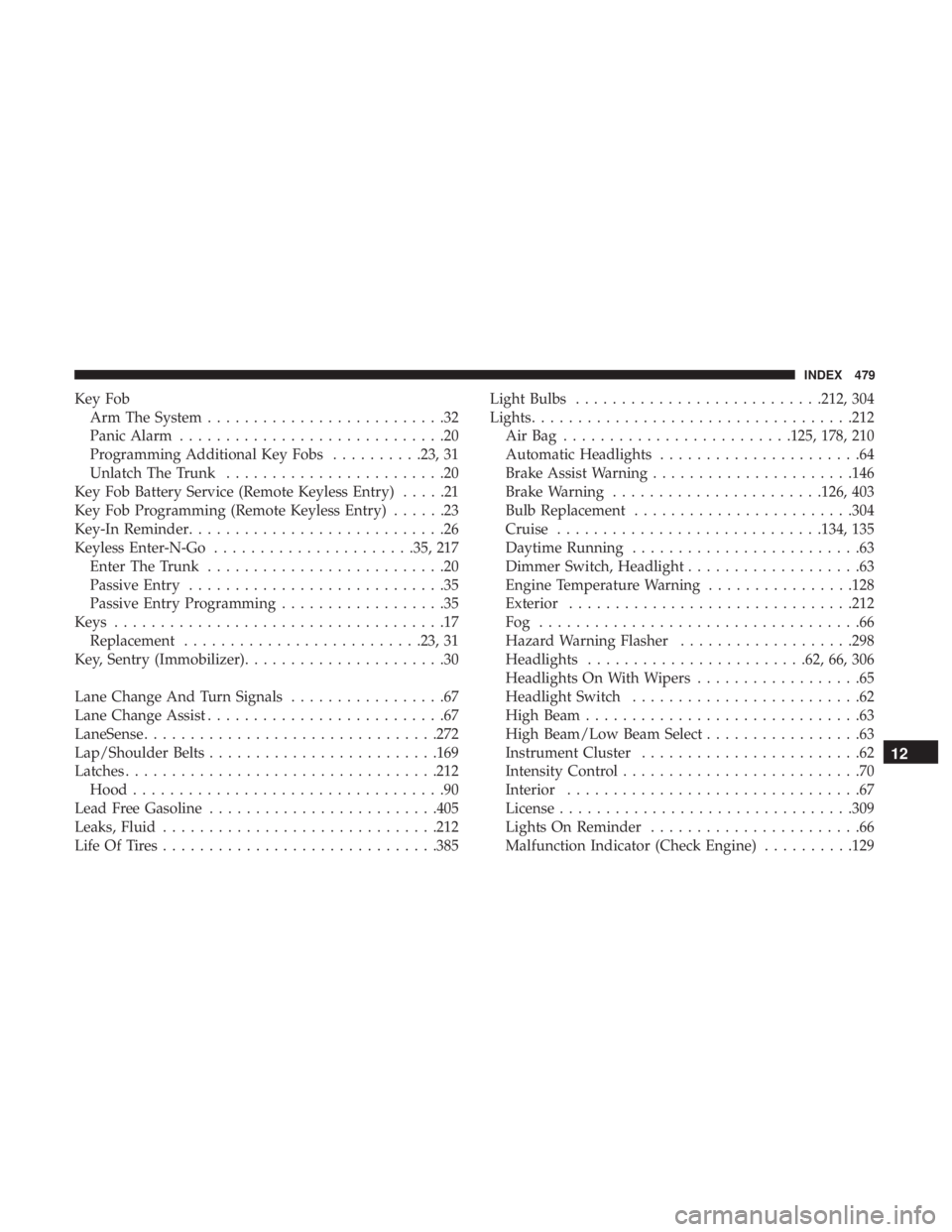
Key FobArm The System ..........................32
Panic Alarm .............................20
Programming Additional Key Fobs ..........23, 31
Unlatch The Trunk ........................20
Key Fob Battery Service (Remote Keyless Entry) .....21
Key Fob Programming (Remote Keyless Entry) ......23
Key-In Reminder ............................26
Keyless Enter-N-Go ..................... .35, 217
Enter The Trunk ..........................20
Passive Entry ............................35
Passive Entry Programming ..................35
Keys ....................................17
Replacement ......................... .23, 31
Key, Sentry (Immobilizer) ......................30
Lane Change And Turn Signals .................67
Lane Change Assist ..........................67
LaneSense ............................... .272
Lap/Shoulder Belts ........................ .169
Latches ................................. .212
Hood ..................................90
Lead Free Gasoline ........................ .405
Leaks, Fluid ............................. .212
Life Of Tires ............................. .385Light Bulbs
.......................... .212, 304
Lights .................................. .212
AirBag .........................125, 178, 210
Automatic Headlights ......................64
Brake Assist Warning ..................... .146
Brake Warning ...................... .126, 403
Bulb Replacement ....................... .304
Cruise ............................ .134, 135
Daytime Running .........................63
Dimmer Switch, Headlight ...................63
Engine Temperature Warning ................128
Exterior .............................. .212
Fog ...................................66
Hazard Warning Flasher ...................298
Headlights ....................... .62, 66, 306
Headlights On With Wipers ..................65
Headlight Switch .........................62
High Beam ..............................63
High Beam/Low Beam Select .................63
Instr
ument Cluster ........................62
Intensity Control ..........................70
Interior ................................67
License ............................... .309
Lights On Reminder .......................66
Malfunction Indicator (Check Engine) ..........129
12
INDEX 479
Page 486 of 492

Security Alarm......................... .32, 129
Arm The System ..........................32
Selection Of Coolant (Antifreeze) ...............413
Sentry Key Key Programming .........................31
Sentry Key (Immobilizer) ......................30
Sentry Key Replacement ....................23, 31
Service Assistance ......................... .466
Service Contract .......................... .468
Service Manuals .......................... .470
Shifting ................................ .224
Automatic Transmission ................224, 226
Shoulder Belts ............................ .169
Side View Mirror Adjustment ...................58
Signals, Turn ....................... .67, 135, 212
Siri .................................... .459
SiriusXM Guardian Vehicle Health Alert ...................... .458
Snow Chains (Tire Chains) ....................392
Snow Tires .............................. .388
Spare Tire ............................... .321
Spare Tires ........................ .388, 389, 390
Spark Plugs ............................. .413Specifications
Fuel (Gasoline) ......................... .413
Oil.................................. .413
Speed Control Accel/Decel ........................ .237, 238
Accel/Decel (ACC Only) ...................244
Cancel ............................... .239
Resume .............................. .239
Set .................................. .237
Speed Control (Cruise Control) ..........236, 237, 239
Sport Mode .............................. .234
Starting ............................. .216, 217
Automatic Transmission ....................216
Button .................................24
Cold Weather .......................... .220
Engine Fails To Start ..................... .220
Starting
And Operating ...................216, 217
Starting Procedures ..................... .216, 217
Steering ..................................54
Column Lock ............................54
Power ............................... .235
Tilt Column .......................... .54, 55
Wheel, Heated ...........................56
Wheel, Tilt .......................... .54, 55
484 INDEX