Page 280 of 492

WARNING!
Drivers must be careful when backing up even when
using the ParkView Rear Back Up Camera. Always
check carefully behind your vehicle, and be sure to
check for pedestrians, animals, other vehicles, obstruc-
tions, or blind spots before backing up. You are re-
sponsible for the safety of your surroundings and must
continue to pay attention while backing up. Failure to
do so can result in serious injury or death.
CAUTION!
•To avoid vehicle damage, ParkView should only be
used as a parking aid. The ParkView camera is
unable to view every obstacle or object in your drive
path.
• To avoid vehicle damage, the vehicle must be driven
slowly when using ParkView to be able to stop in
time when an obstacle is seen. It is recommended
that the driver look frequently over his/her shoulder
when using ParkView.
NOTE: If snow, ice, mud, or any foreign substance builds
up on the camera lens, clean the lens, rinse with water, and
dry with a soft cloth. Do not cover the lens.
REFUELING THE VEHICLE
1. Push the fuel filler door release switch (located in the driver’s door map pocket).
2. Open the fuel filler door.
Fuel Filler Door Release Switch
278 STARTING AND OPERATING
Page 321 of 492
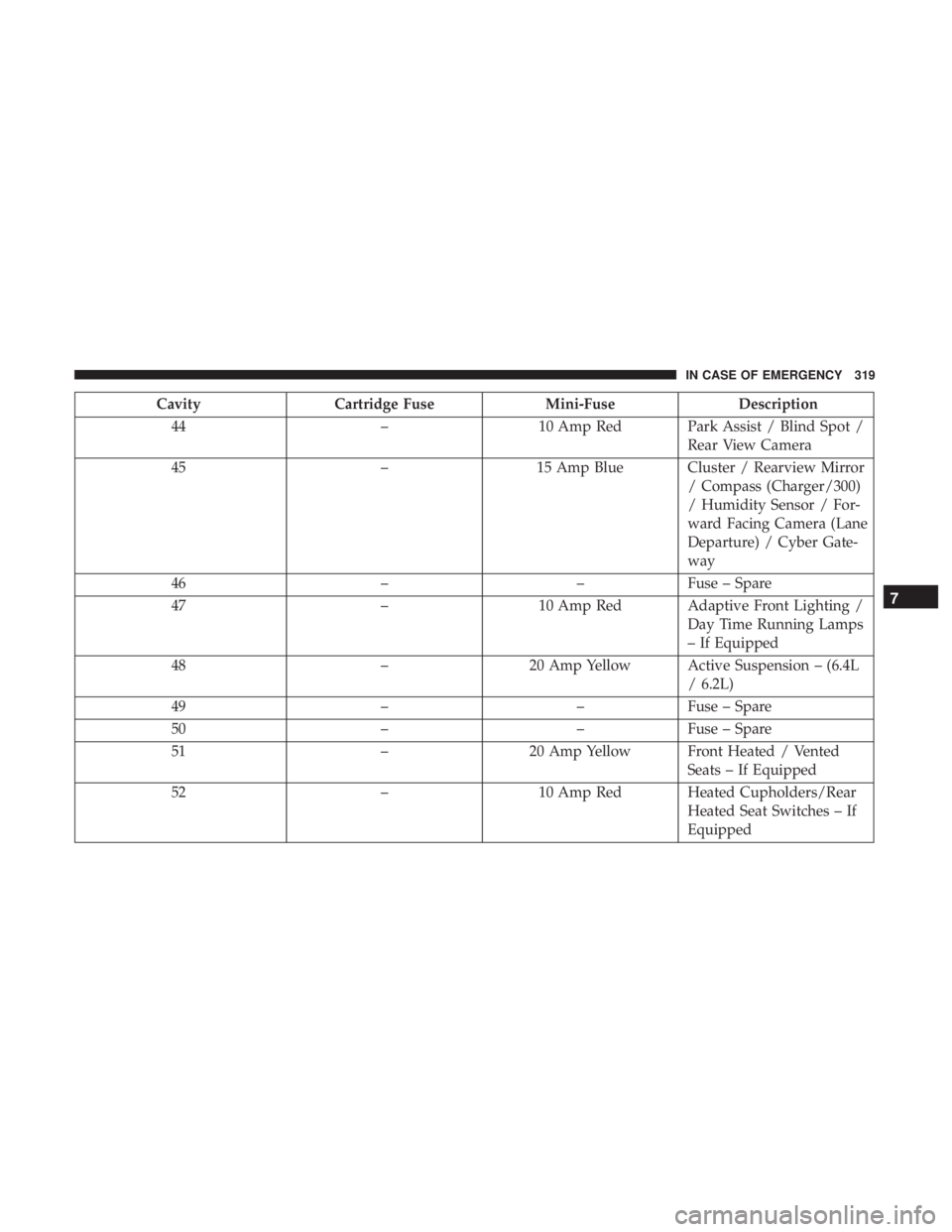
CavityCartridge Fuse Mini-FuseDescription
44 –10 Amp Red Park Assist / Blind Spot /
Rear View Camera
45 –15 Amp Blue Cluster / Rearview Mirror
/ Compass (Charger/300)
/ Humidity Sensor / For-
ward Facing Camera (Lane
Departure) / Cyber Gate-
way
46 ––Fuse – Spare
47 –10 Amp Red Adaptive Front Lighting /
Day Time Running Lamps
– If Equipped
48 –20 Amp Yellow Active Suspension – (6.4L
/ 6.2L)
49 ––Fuse – Spare
50 ––Fuse – Spare
51 –20 Amp Yellow Front Heated / Vented
Seats – If Equipped
52 –10 Amp Red Heated Cupholders/Rear
Heated Seat Switches – If
Equipped
7
IN CASE OF EMERGENCY 319
Page 434 of 492
Setting NameSelectable Options
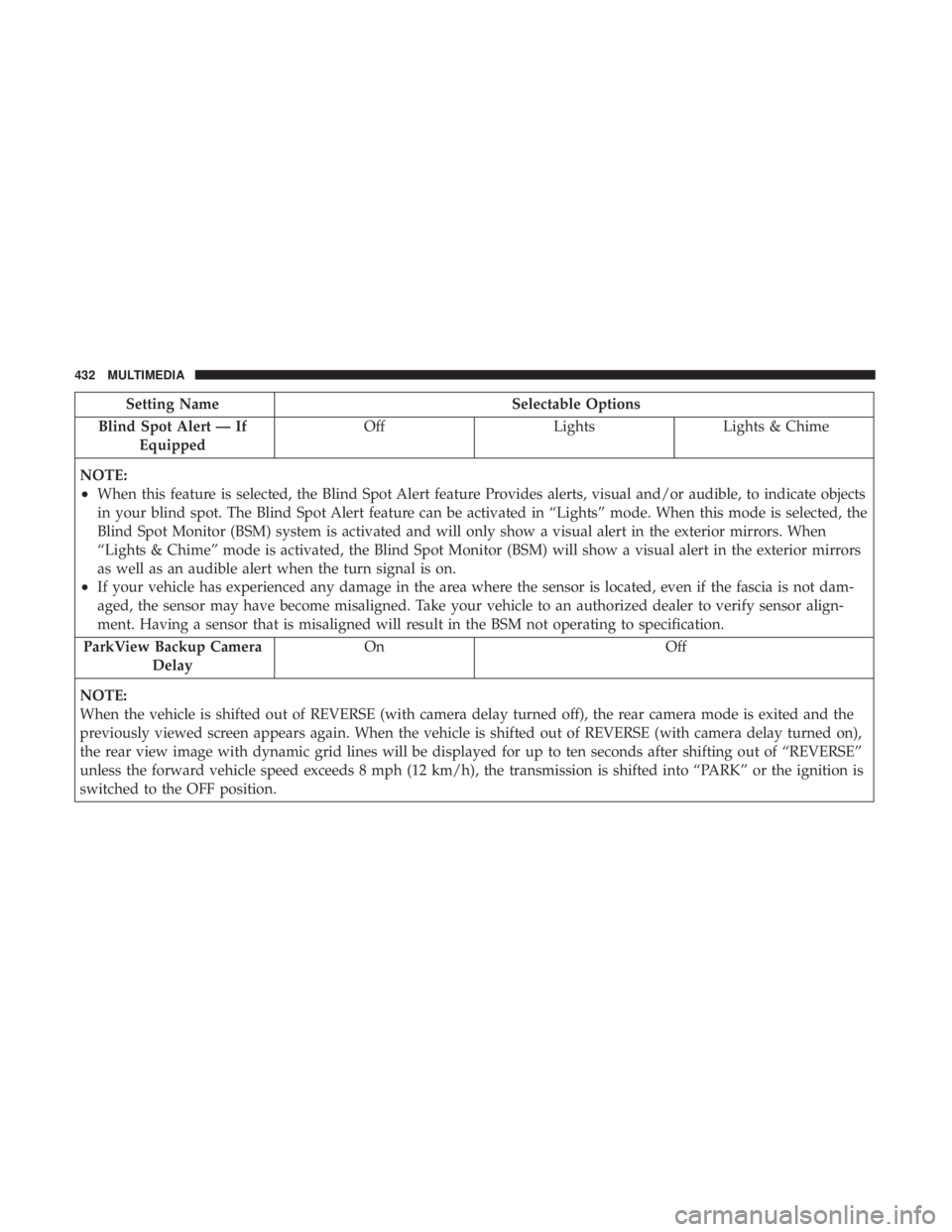
Blind Spot Alert — If Equipped Off
LightsLights & Chime
NOTE:
•When this feature is selected, the Blind Spot Alert feature Provides alerts, visual and/or audible, to indicate objects
in your blind spot. The Blind Spot Alert feature can be activated in “Lights” mode. When this mode is selected, the
Blind Spot Monitor (BSM) system is activated and will only show a visual alert in the exterior mirrors. When
“Lights & Chime” mode is activated, the Blind Spot Monitor (BSM) will show a visual alert in the exterior mirrors
as well as an audible alert when the turn signal is on.
•If your vehicle has experienced any damage in the area where the sensor is located, even if the fascia is not dam-
aged, the sensor may have become misaligned. Take your vehicle to an authorized dealer to verify sensor align-
ment. Having a sensor that is misaligned will result in the BSM not operating to specification.
ParkView Backup Camera Delay On Off
NOTE:
When the vehicle is shifted out of REVERSE (with camera delay turned off), the rear camera mode is exited and the
previously viewed screen appears again. When the vehicle is shifted out of REVERSE (with camera delay turned on),
the rear view image with dynamic grid lines will be displayed for up to ten seconds after shifting out of “REVERSE”
unless the forward vehicle speed exceeds 8 mph (12 km/h), the transmission is shifted into “PARK” or the ignition is
switched to the OFF position.
432 MULTIMEDIA