Page 429 of 492
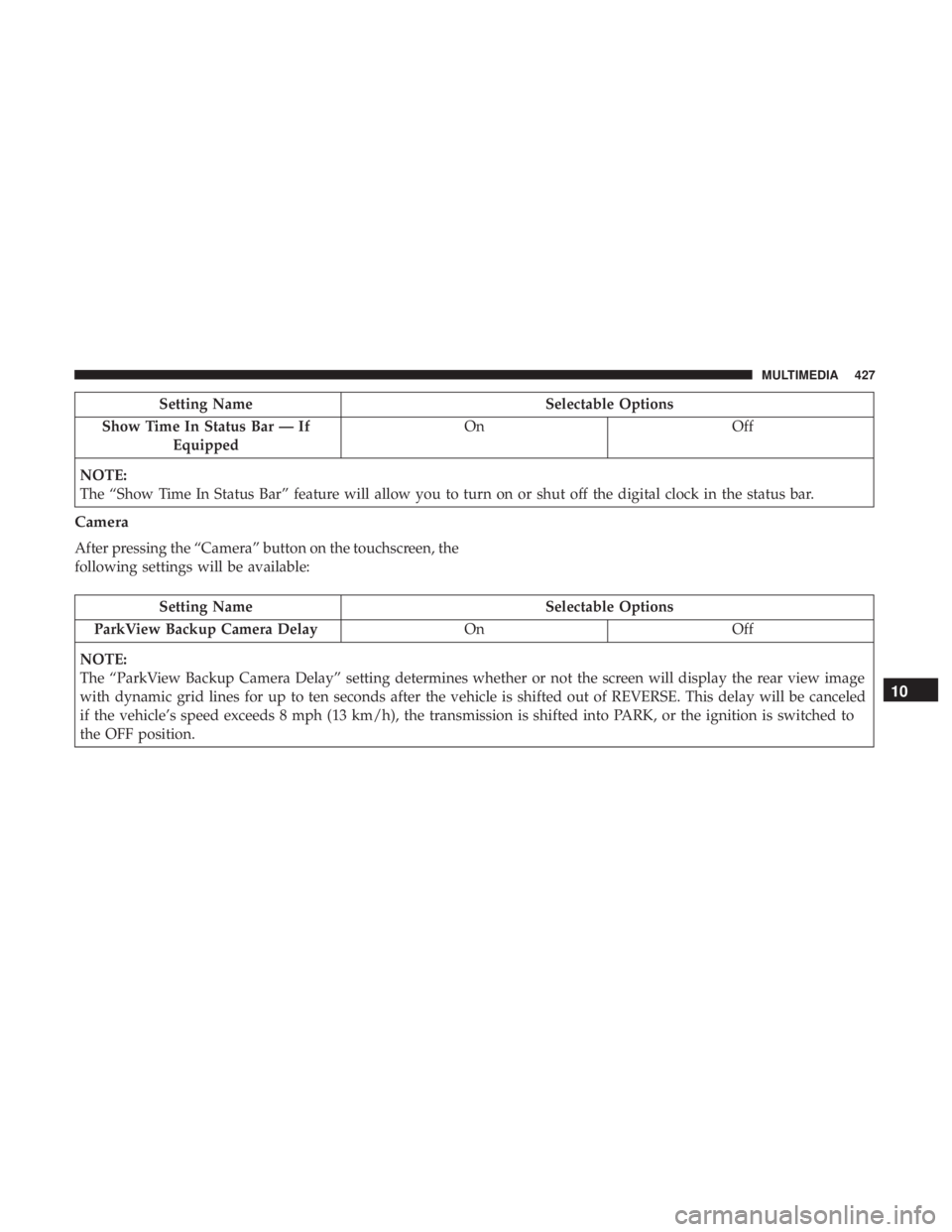
Setting NameSelectable Options
Show Time In Status Bar — If Equipped On
Off
NOTE:
The “Show Time In Status Bar” feature will allow you to turn on or shut off the digital clock in the status bar.
Camera
After pressing the “Camera” button on the touchscreen, the
following settings will be available:
Setting Name Selectable Options
ParkView Backup Camera Delay OnOff
NOTE:
The “ParkView Backup Camera Delay” setting determines whether or not the screen will display the rear view image
with dynamic grid lines for up to ten seconds after the vehicle is shifted out of REVERSE. This delay will be canceled
if the vehicle’s speed exceeds 8 mph (13 km/h), the transmission is shifted into PARK, or the ignition is switched to
the OFF position.
10
MULTIMEDIA 427
Page 437 of 492
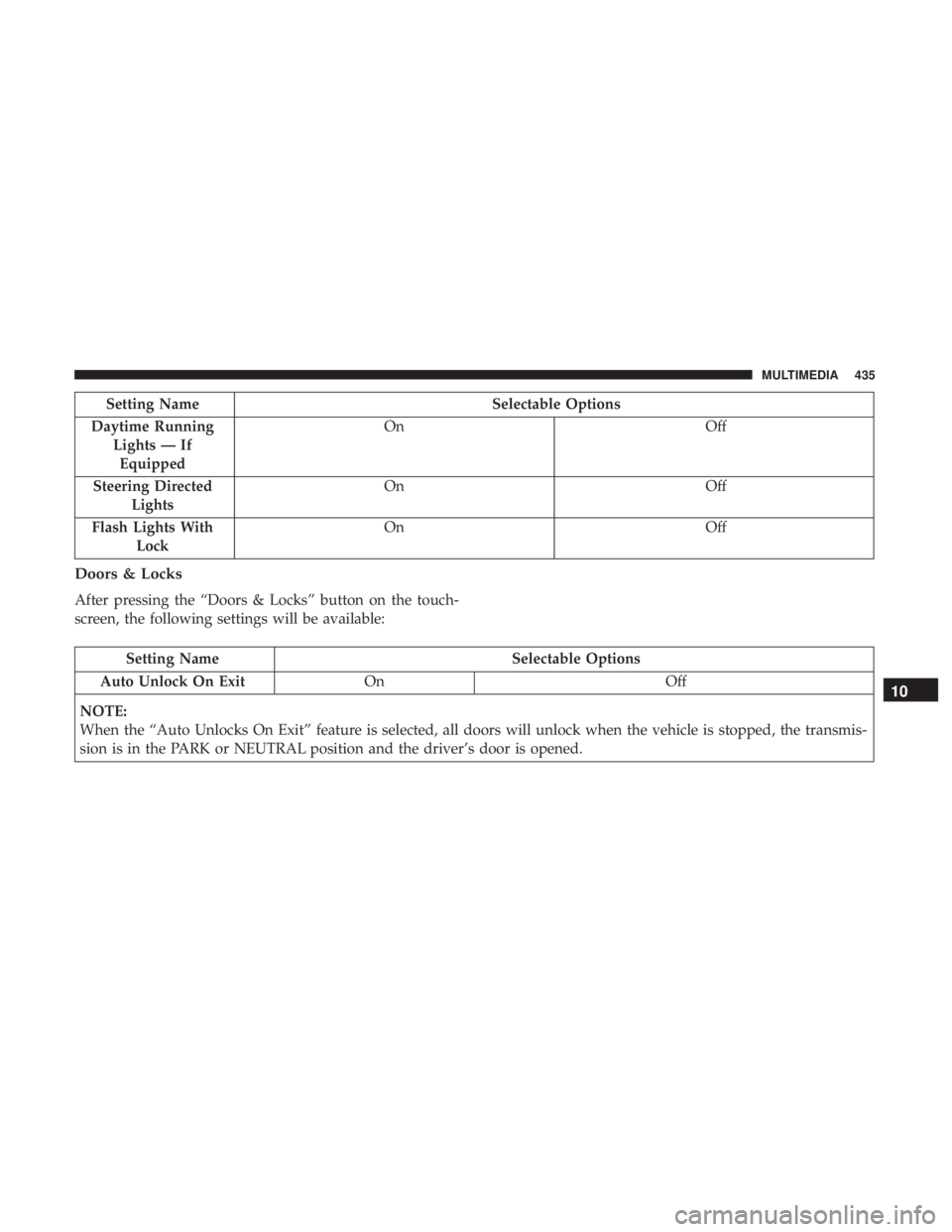
Setting NameSelectable Options
Daytime Running Lights — IfEquipped On
Off
Steering Directed Lights On
Off
Flash Lights With Lock On
Off
Doors & Locks
After pressing the “Doors & Locks” button on the touch-
screen, the following settings will be available:
Setting Name Selectable Options
Auto Unlock On Exit On Off
NOTE:
When the “Auto Unlocks On Exit” feature is selected, all doors will unlock when the vehicle is stopped, the transmis-
sion is in the PARK or NEUTRAL position and the driver’s door is opened.
10
MULTIMEDIA 435
Page 438 of 492
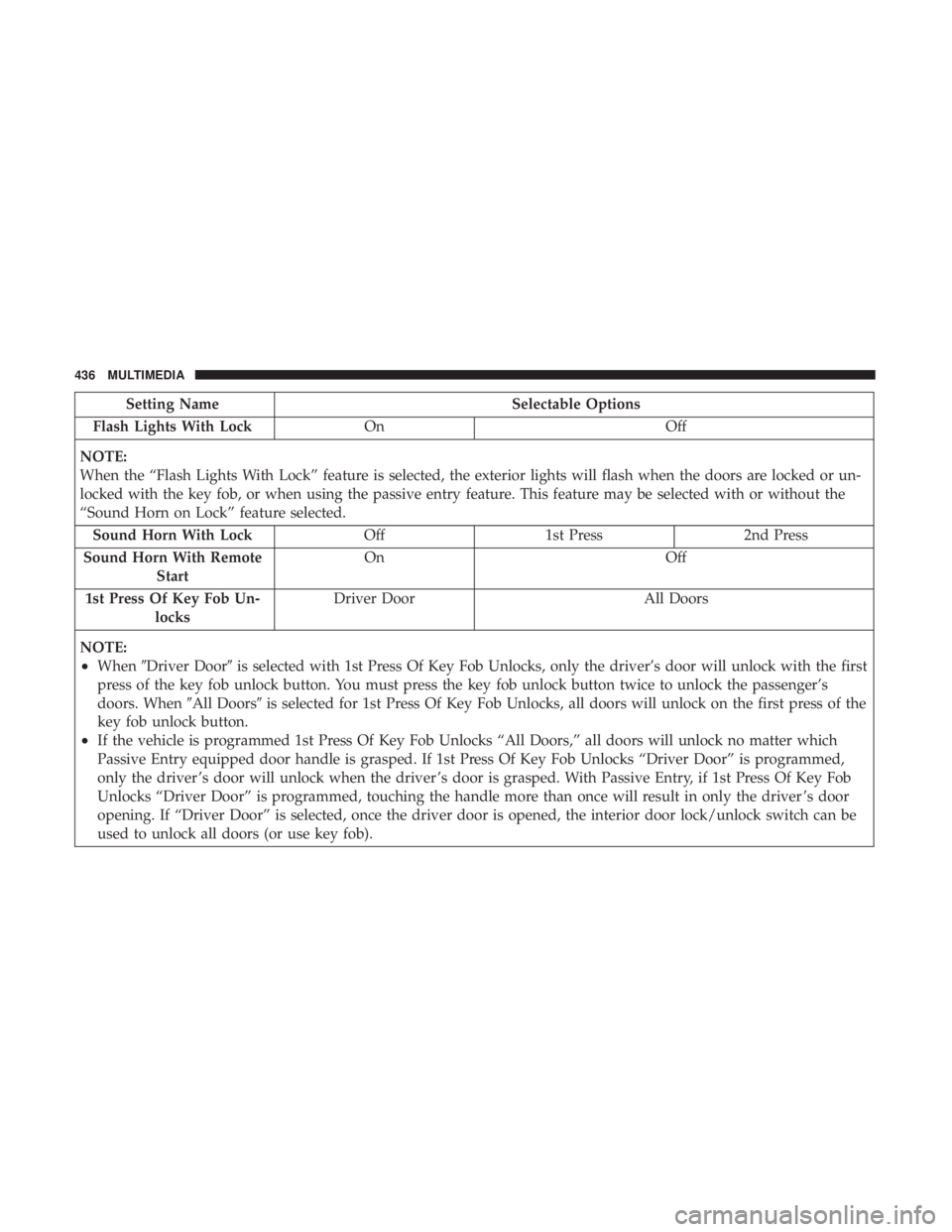
Setting NameSelectable Options
Flash Lights With Lock On Off
NOTE:
When the “Flash Lights With Lock” feature is selected, the exterior lights will flash when the doors are locked or un-
locked with the key fob, or when using the passive entry feature. This feature may be selected with or without the
“Sound Horn on Lock” feature selected. Sound Horn With Lock Off1st Press 2nd Press
Sound Horn With Remote Start On
Off
1st Press Of Key Fob Un- locks Driver Door
All Doors
NOTE:
•When �Driver Door� is selected with 1st Press Of Key Fob Unlocks, only the driver’s door will unlock with the first
press of the key fob unlock button. You must press the key fob unlock button twice to unlock the passenger’s
doors. When �All Doors�is selected for 1st Press Of Key Fob Unlocks, all doors will unlock on the first press of the
key fob unlock button.
•If the vehicle is programmed 1st Press Of Key Fob Unlocks “All Doors,” all doors will unlock no matter which
Passive Entry equipped door handle is grasped. If 1st Press Of Key Fob Unlocks “Driver Door” is programmed,
only the driver ’s door will unlock when the driver ’s door is grasped. With Passive Entry, if 1st Press Of Key Fob
Unlocks “Driver Door” is programmed, touching the handle more than once will result in only the driver ’s door
opening. If “Driver Door” is selected, once the driver door is opened, the interior door lock/unlock switch can be
used to unlock all doors (or use key fob).
436 MULTIMEDIA
Page 439 of 492
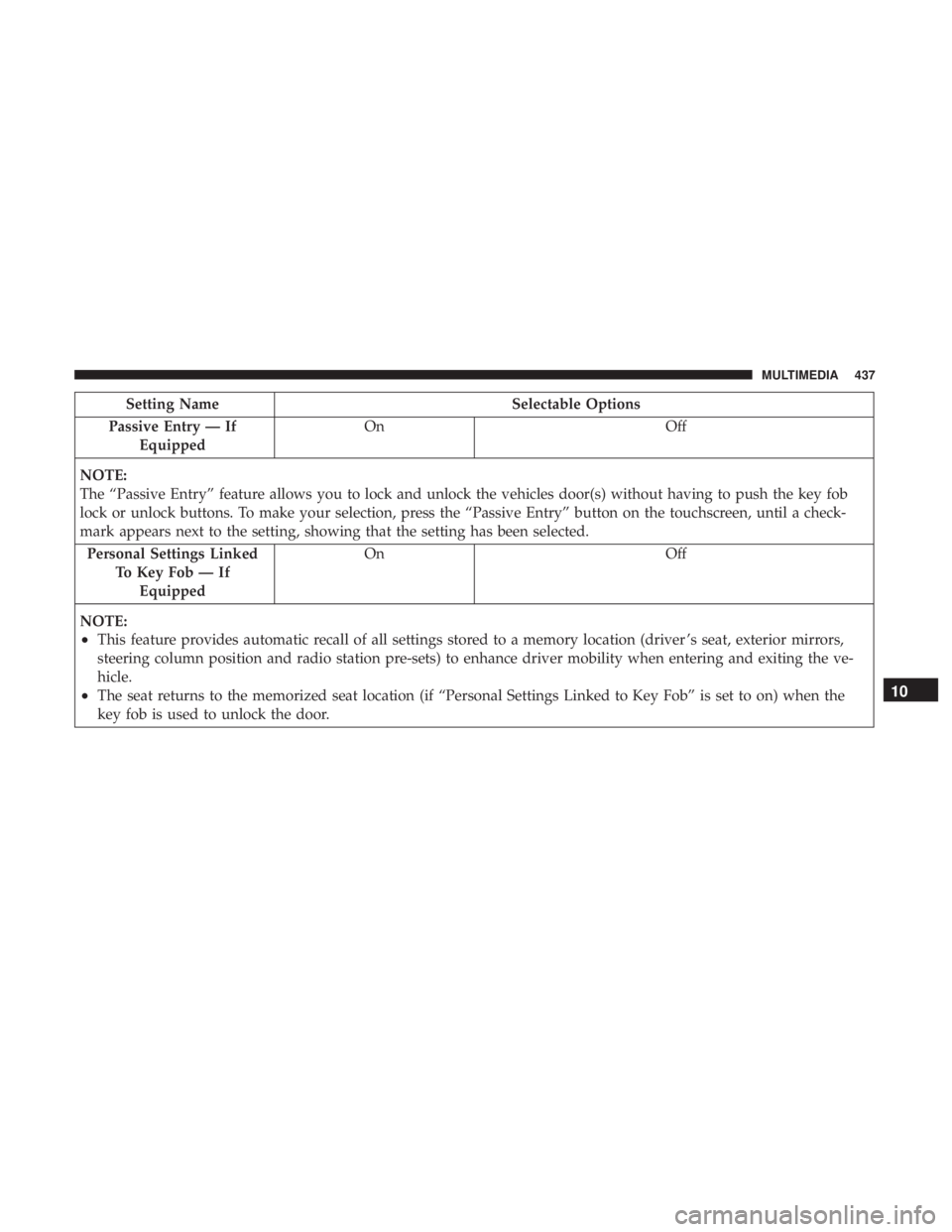
Setting NameSelectable Options
Passive Entry — If Equipped On
Off
NOTE:
The “Passive Entry” feature allows you to lock and unlock the vehicles door(s) without having to push the key fob
lock or unlock buttons. To make your selection, press the “Passive Entry” button on the touchscreen, until a check-
mark appears next to the setting, showing that the setting has been selected. Personal Settings Linked To Key Fob — IfEquipped On
Off
NOTE:
•This feature provides automatic recall of all settings stored to a memory location (driver ’s seat, exterior mirrors,
steering column position and radio station pre-sets) to enhance driver mobility when entering and exiting the ve-
hicle.
•The seat returns to the memorized seat location (if “Personal Settings Linked to Key Fob” is set to on) when the
key fob is used to unlock the door.10
MULTIMEDIA 437
Page 447 of 492
System Information
After pressing the “System Information” button on the
touchscreen, the following settings will be available:
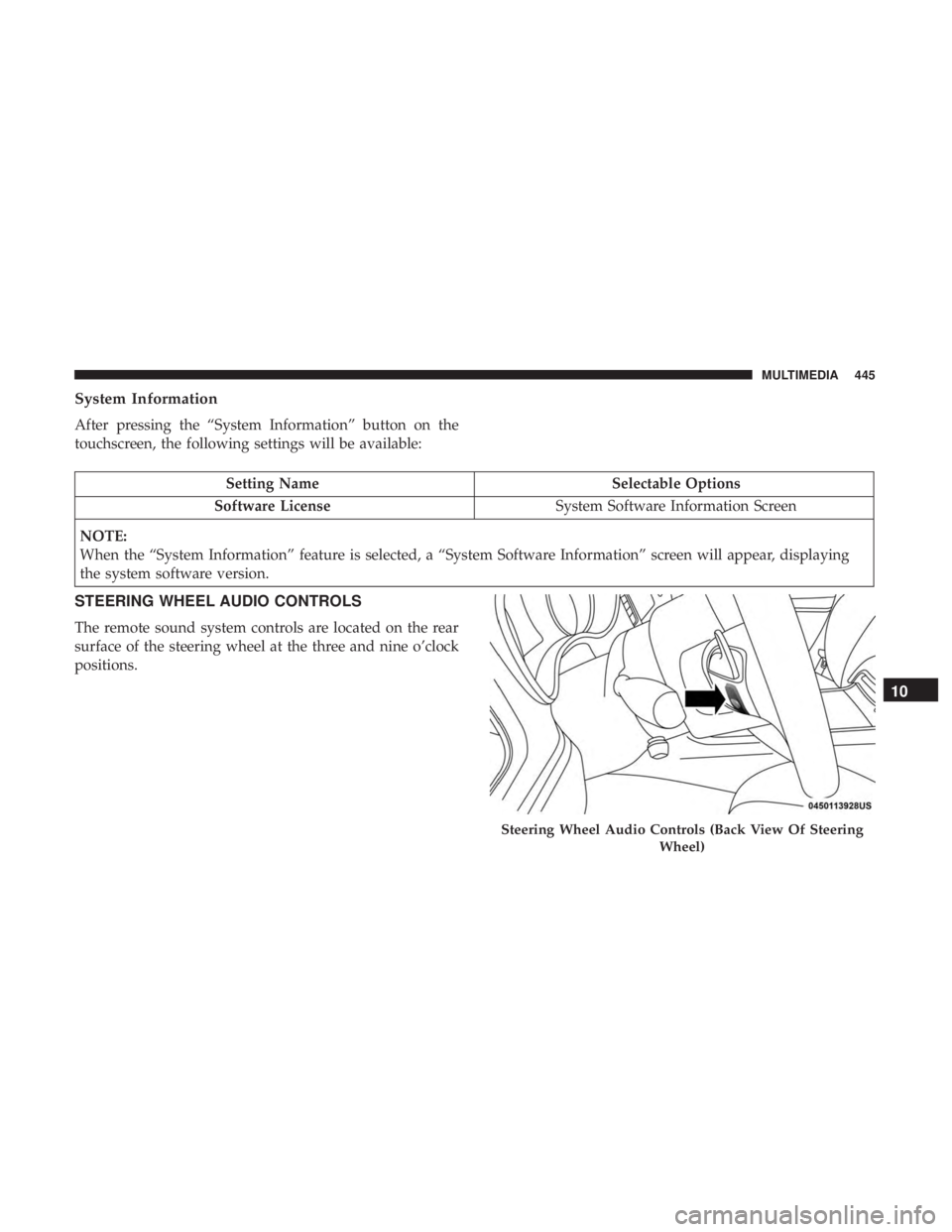
Setting NameSelectable Options
Software License System Software Information Screen
NOTE:
When the “System Information” feature is selected, a “System Software Information” screen will appear, displaying
the system software version.
STEERING WHEEL AUDIO CONTROLS
The remote sound system controls are located on the rear
surface of the steering wheel at the three and nine o’clock
positions.
Steering Wheel Audio Controls (Back View Of Steering Wheel)
10
MULTIMEDIA 445
Page 459 of 492
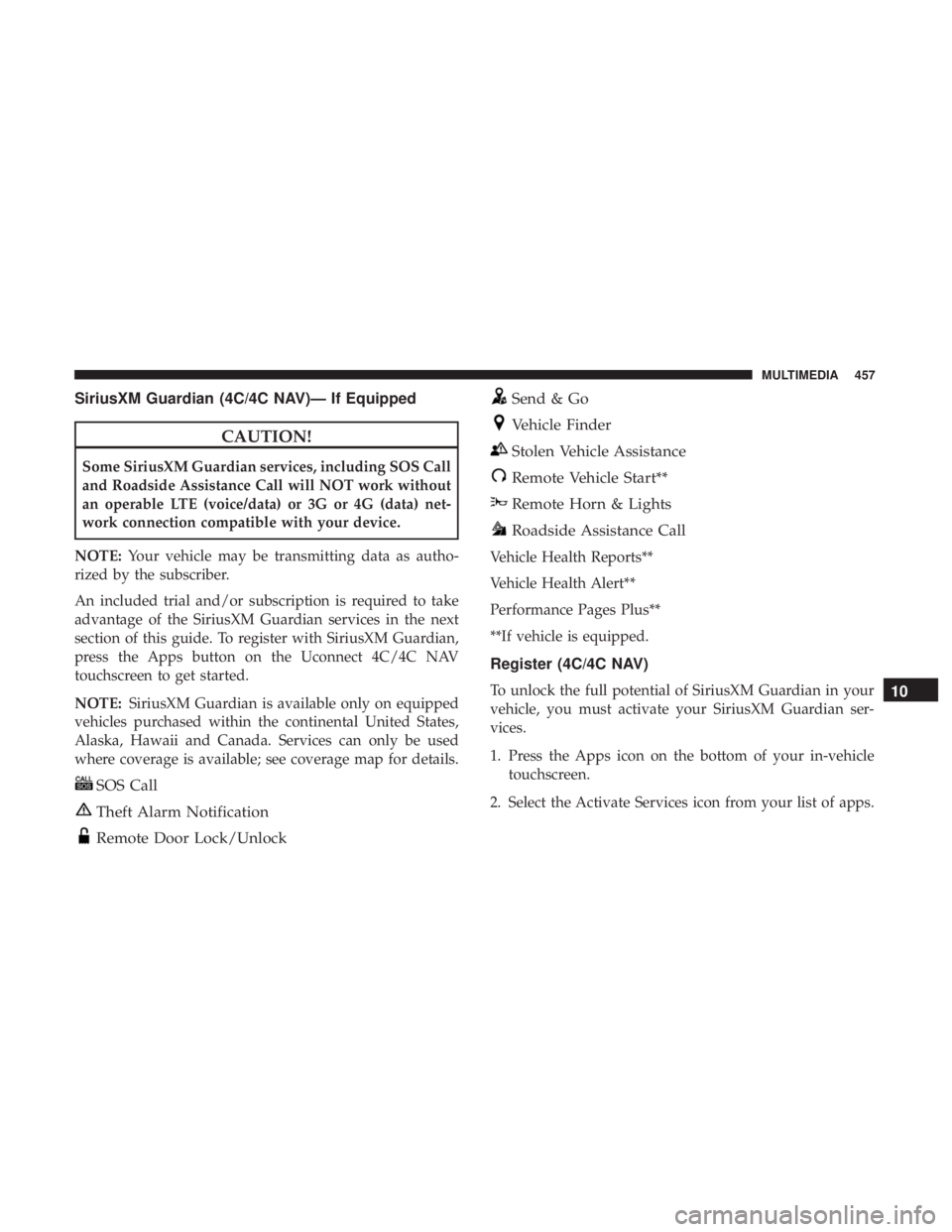
SiriusXM Guardian (4C/4C NAV)— If Equipped
CAUTION!
Some SiriusXM Guardian services, including SOS Call
and Roadside Assistance Call will NOT work without
an operable LTE (voice/data) or 3G or 4G (data) net-
work connection compatible with your device.
NOTE: Your vehicle may be transmitting data as autho-
rized by the subscriber.
An included trial and/or subscription is required to take
advantage of the SiriusXM Guardian services in the next
section of this guide. To register with SiriusXM Guardian,
press the Apps button on the Uconnect 4C/4C NAV
touchscreen to get started.
NOTE: SiriusXM Guardian is available only on equipped
vehicles purchased within the continental United States,
Alaska, Hawaii and Canada. Services can only be used
where coverage is available; see coverage map for details.
SOS Call
Theft Alarm Notification
Remote Door Lock/Unlock
Send & Go
Vehicle Finder
Stolen Vehicle Assistance
Remote Vehicle Start**
Remote Horn & Lights
Roadside Assistance Call
Vehicle Health Reports**
Vehicle Health Alert**
Performance Pages Plus**
**If vehicle is equipped.
Register (4C/4C NAV)
To unlock the full potential of SiriusXM Guardian in your
vehicle, you must activate your SiriusXM Guardian ser-
vices.
1. Press the Apps icon on the bottom of your in-vehicle touchscreen.
2. Select the Activate Services icon from your list of apps.10
MULTIMEDIA 457
Page 460 of 492
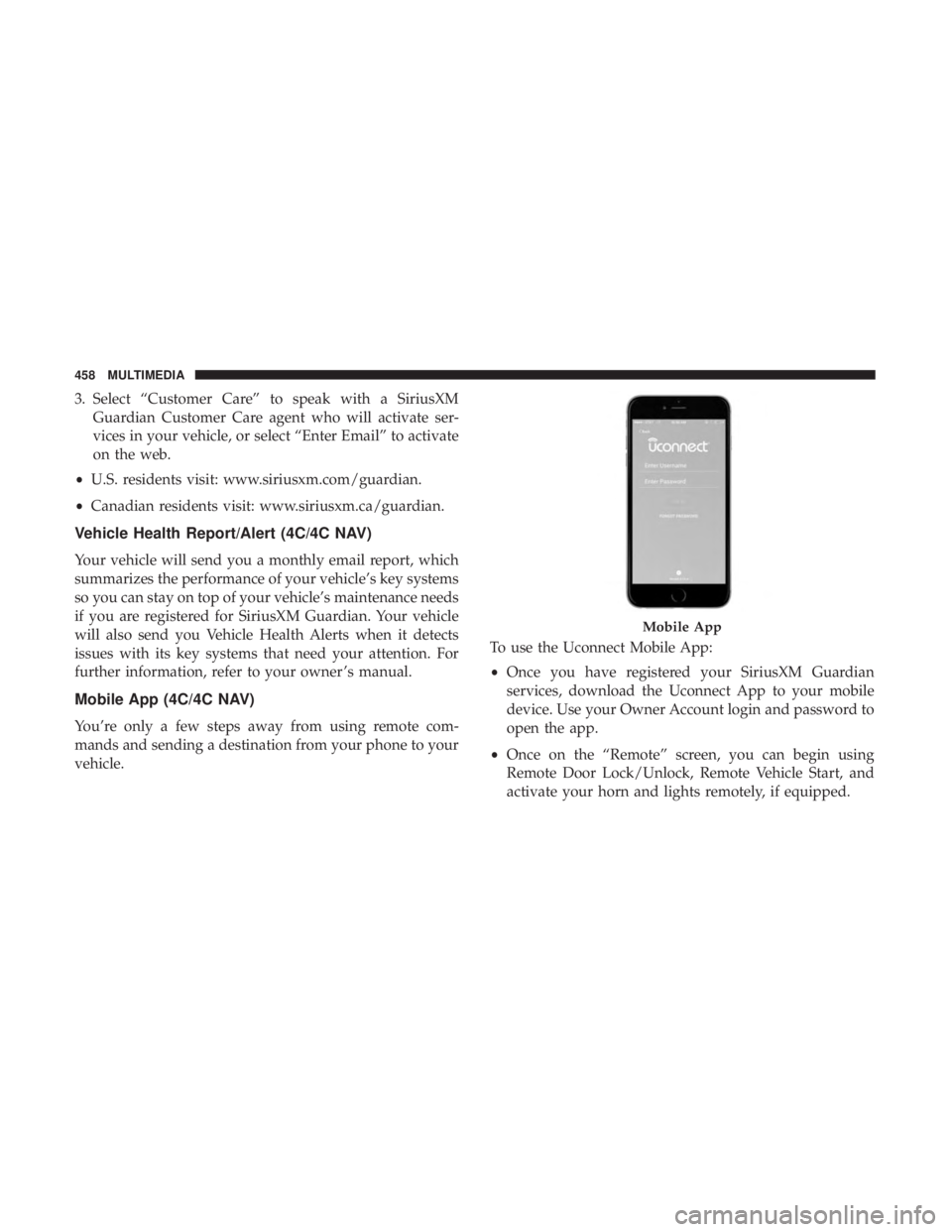
3. Select “Customer Care” to speak with a SiriusXMGuardian Customer Care agent who will activate ser-
vices in your vehicle, or select “Enter Email” to activate
on the web.
• U.S. residents visit: www.siriusxm.com/guardian.
• Canadian residents visit: www.siriusxm.ca/guardian.
Vehicle Health Report/Alert (4C/4C NAV)
Your vehicle will send you a monthly email report, which
summarizes the performance of your vehicle’s key systems
so you can stay on top of your vehicle’s maintenance needs
if you are registered for SiriusXM Guardian. Your vehicle
will also send you Vehicle Health Alerts when it detects
issues with its key systems that need your attention. For
further information, refer to your owner ’s manual.
Mobile App (4C/4C NAV)
You’re only a few steps away from using remote com-
mands and sending a destination from your phone to your
vehicle. To use the Uconnect Mobile App:
•
Once you have registered your SiriusXM Guardian
services, download the Uconnect App to your mobile
device. Use your Owner Account login and password to
open the app.
• Once on the “Remote” screen, you can begin using
Remote Door Lock/Unlock, Remote Vehicle Start, and
activate your horn and lights remotely, if equipped.
Mobile App
458 MULTIMEDIA
Page 474 of 492

About Your Brakes........................ .403
Adaptive Cruise Control (ACC) (Cruise Control) . . . .239
Adding Engine Coolant (Antifreeze) .............364
Adding Fuel ............................. .278
Adding Washing Fluid ...................... .348
Additives, Fuel ........................... .406
Adjust Forward ................................42
Rearward ...............................42
AirBag ................................ .180
Advance Front Air Bag ....................180
Air Bag Operation ....................... .182
Air Bag Warning Light .....................178
Driver Knee Air Bag ..................... .183
Enhanced Accident Response .............188, 338
Event Data Recorder (EDR) .................338
FrontAirBag .......................... .180
If Deployment Occurs .....................187
Knee Impact Bolsters ..................... .182
Maintaining Your Air Bag System .............190
Maintenance ........................... .190
Redundant Air Bag Warning Light ............179
Side Air Bags .......................... .183
Transporting Pets ....................... .208
Air Bag Light ...................... .125, 178, 210Air Cleaner, Engine (Engine Air Cleaner Filter)
......353
Air Conditioner Maintenance ..................354
Air Conditioner Refrigerant ...................354
Air Conditioner System ....................75, 354
Air Conditioning Filter ....................82, 355
Air Conditioning, Operating Tips ................81
Air Filter ............................... .353
Air Pressure Tires................................. .382
Alarm Arm The System ...................... .32, 33
Panic ..................................20
Rearm The System ........................33
Security Alarm....................... .32, 129
Alarm
System
Security Alarm ...........................32
All Wheel Drive Towing ............................... .337
All Wheel Drive (AWD) ..................... .370
Alterations/Modifications, Vehicle ................6
Android Auto ............................ .461
Antifreeze (Engine Coolant) ................363, 412
Disposal .............................. .366
Anti-Lock Brake System (ABS) .................140
Anti-Lock Warning Light .....................133
472 INDEX