2018 CHEVROLET VOLT egr
[x] Cancel search: egrPage 103 of 379

Chevrolet VOLT Owner Manual (GMNA-Localizing-U.S./Canada/Mexico-
11349113) - 2018 - crc - 10/12/17
102 Instruments and Controls
the windshield washer had been
activated. SeeWasher Fluid0250
for information on filling the
windshield washer fluid reservoir.
{Warning
In freezing weather, do not use
the washer until the windshield is
warmed. Otherwise the washer
fluid can form ice on the
windshield, blocking your vision.
Compass
The vehicle may have a compass
display on the Driver Information
Center (DIC). The compass receives
its heading and other information
from the Global Positioning
System (GPS) antenna, StabiliTrak,
and vehicle speed information.
The compass system is designed to
operate for a certain number of
miles or degrees of turn before
needing a signal from the GPS
satellites. When the compass
display shows CAL, drive the
vehicle for a short distance in an open area where it can receive a
GPS signal. The compass system
will automatically determine when a
GPS signal is restored and provide
a heading again.
Clock
Setting the Time and Date
To set the time:
1. Touch SETTINGS on the Home Page, then touch Time
and Date.
2. Touch Set Time, then touch
«
orªto increase or decrease
hours, minutes, and AM or PM.
Touch 12–24 Hr for 12 or
24 hour clock.
3. Touch
Sto go back to the
previous menu.
Autoset requires an active OnStar
service plan.
If auto timing is set, the time
displayed on the clock may not
update immediately when driving
into a new time zone. To set the date:
1. Touch SETTINGS on the Home Page, then touch Time
and Date.
2. Touch Set Date, then touch
«
orªto increase or decrease
month, day, or year.
3. Touch
Sto go back to the
previous menu.
To set the clock display:
1. Touch SETTINGS on the Home Page, then touch Time
and Date.
2. Touch Clock Display, then touch Off or On to turn the
clock display off or on.
3. Touch
Sto go back to the
previous menu.
Page 105 of 379

Chevrolet VOLT Owner Manual (GMNA-Localizing-U.S./Canada/Mexico-
11349113) - 2018 - crc - 10/12/17
104 Instruments and Controls
The operating temperature is−20 °C
(−4 °F) to 60 °C (140 °F) for the
charging system and 0 °C (32 °F) to
35 °C (95 °F) for the phone.
{Warning
Remove all objects from the
charging pocket before charging
your mobile phone. Objects, such
as coins, keys, rings, paper clips,
or cards, between the mobile
phone and the charger will
become very hot. On the rare
occasion that the charging system
does not detect an object, and the
object gets wedged between the
mobile phone and the charger,
remove the mobile phone and
allow the object to cool before
removing it from the charging
pocket, to prevent burns.
To charge a mobile device:
1. Remove all objects from the charging pocket. The system
may not charge if there are any
objects between the mobile
device and the charging
pocket.
2. With the mobile device screen facing the rear of the vehicle,
slowly insert the device into the
charging pocket until
}
appears on the infotainment
display screen. This indicates
that the mobile device is
properly positioned and
charging. If a mobile device is inserted into the pocket and
}
does not display, remove the
mobile device from the pocket,
turn it 180 degrees, and wait
three seconds before inserting
the mobile device into the
pocket again.
Software Acknowledgements
Certain Wireless Charging Module
product from LG Electronics, Inc.
("LGE") contains the open source
software detailed below. Refer to
the indicated open source licenses
(as are included following this
notice) for the terms and conditions
of their use.
OSS Notice Information
To obtain the source code that is
contained in this product, please
visit http://opensource.lge.com. In
addition to the source code, all
referred license terms, warranty
disclaimers and copyright notices
are available for download. LG
Electronics will also provide open
source code to you on CD-ROM for
a charge covering the cost of
performing such distribution (such
Page 136 of 379

Chevrolet VOLT Owner Manual (GMNA-Localizing-U.S./Canada/Mexico-
11349113) - 2018 - crc - 10/12/17
Instruments and Controls 135
system monitoring the oil life,
additional maintenance is
recommended. SeeMaintenance
Schedule 0327.
Remember, the Oil Life display must
be reset after each oil change. It will
not reset itself. Also, be careful not
to reset the Oil Life display
accidentally at any time other than
when the oil has just been changed.
It cannot be reset accurately until
the next oil change. To reset the
engine oil life system, press and
hold
Vfor several seconds while
the Oil Life display is active. See
Engine Oil Life System 0242.
Tire Pressure : Shows the
approximate pressures of all four
tires. Tire pressure is displayed in
either kilopascal (kPa) or in pounds
per square inch (psi). If the pressure
is low, the value for that tire is
shown in amber.
See Tire Pressure Monitor System
0 280 andTire Pressure Monitor
Operation 0281. Average Speed :
Shows the
average speed of the vehicle in
kilometers per hour (km/h) or miles
per hour (mph). This average is
calculated based on the various
vehicle speeds recorded since the
last reset of this value. The average
speed can be reset by pressing and
holding
Vwhile this display is
active.
Timer : This display can be used as
a timer. To start the timer, press
V
while this display is active. The
display will show the amount of time
that has passed since the timer was
last reset. To stop the timer, press
V
briefly while this display is active
and the timer is running. To reset
the timer to zero, press and hold
V
while this display is active.
Speed Limit : Shows the current
speed limit. The information for this
page comes from a roadway
database.
Follow Distance Indicator : The
current follow time to the vehicle
ahead is displayed as a time value
on this page. Coolant Temperature :
Shows the
engine coolant temperature in either
degrees Celsius (°C) or degrees
Fahrenheit (°F).
Blank Page : The Blank Page
display allows for no information to
be displayed in the cluster info
display areas.
Page 164 of 379

Chevrolet VOLT Owner Manual (GMNA-Localizing-U.S./Canada/Mexico-
11349113) - 2018 - crc - 10/12/17
Driving and Operating 163
Steering
Electric Power Steering
The vehicle has electric power
steering. It does not have power
steering fluid. Regular maintenance
is not required.
If power steering assist is lost due
to a system malfunction, the vehicle
can be steered, but may require
increased effort.
If the steering assist is used for an
extended period of time while the
vehicle is not moving, power assist
may be reduced.
If the steering wheel is turned until it
reaches the end of its travel and is
held against that position for an
extended period of time, power
steering assist may be reduced.
Normal use of the power steering
assist should return when the
system cools down.
See your dealer if there is a
problem.
Curve Tips
.Take curves at a reasonable
speed.
. Reduce speed before entering a
curve.
. Maintain a reasonable steady
speed through the curve.
. Wait until the vehicle is out of
the curve before accelerating
gently into the straightaway.
Steering in Emergencies
.There are some situations when
steering around a problem may
be more effective than braking.
. Holding both sides of the
steering wheel allows you to turn
180 degrees without removing
a hand.
. The Antilock Brake System
(ABS) allows steering while
braking.
Off-Road Recovery
The vehicle's right wheels can drop
off the edge of a road onto the
shoulder while driving. Follow
these tips:
1. Ease off the accelerator and then, if there is nothing in the
way, steer the vehicle so that it
straddles the edge of the
pavement.
2. Turn the steering wheel about one-eighth of a turn, until the
right front tire contacts the
pavement edge.
Page 254 of 379

Chevrolet VOLT Owner Manual (GMNA-Localizing-U.S./Canada/Mexico-
11349113) - 2018 - crc - 10/12/17
Vehicle Care 253
When the brake fluid falls to a low
level, the brake warning light comes
on. SeeBrake System Warning
Light 0116.
Brake fluid absorbs water over time
which degrades the effectiveness of
the brake fluid. Replace brake fluid
at the specified intervals to prevent
increased stopping distance. See
Maintenance Schedule 0327.
What to Add
Use only GM approved DOT 3
brake fluid from a clean, sealed
container. See Recommended
Fluids and Lubricants 0335.
{Warning
The wrong or contaminated brake
fluid could result in damage to the
brake system. This could result in
the loss of braking leading to a
possible injury. Always use the
proper GM approved brake fluid.
Caution
If brake fluid is spilled on the
vehicle's painted surfaces, the
paint finish can be damaged.
Immediately wash off any painted
surface.
Battery - North America
The original equipment battery is
maintenance free. Do not remove
the cap and do not add fluid.
This vehicle has a high voltage
battery and a standard 12-volt
battery. The 12-volt battery is in the
rear hatch under the load floor.
If the vehicle is in a crash, the
sensing system may shut down the
high voltage system. When this
occurs, the high voltage battery is
disconnected and the vehicle will
not start. The SERVICE VEHICLE
SOON message in the Driver
Information Center (DIC) will be
displayed. Before the vehicle can be
operated again, it must be serviced
at your dealer. See
“If a Crash Occurs” under
Collision Damage Repair 0348 and
High Voltage Safety Information
0 20. If an airbag has inflated, see
What Will You See after an Airbag
Inflates? 070.
Only a trained service technician
with the proper knowledge and tools
should inspect, test, or replace the
high voltage battery. See your
dealer if the high voltage battery or
12-volt battery needs service. The
dealer has information on how to
recycle the high voltage battery.
There is also information available
at http://www.recyclemybattery.com.
Keep the vehicle plugged in, even
when fully charged, to keep the high
voltage battery temperature ready
for the next drive and prolong
battery life. This is important when
outside temperatures are extremely
hot or cold.
A vehicle cover, which can reduce
sun loading on the vehicle and
improve high voltage battery life, is
available from your dealer.
Page 265 of 379
Chevrolet VOLT Owner Manual (GMNA-Localizing-U.S./Canada/Mexico-
11349113) - 2018 - crc - 10/12/17
264 Vehicle Care
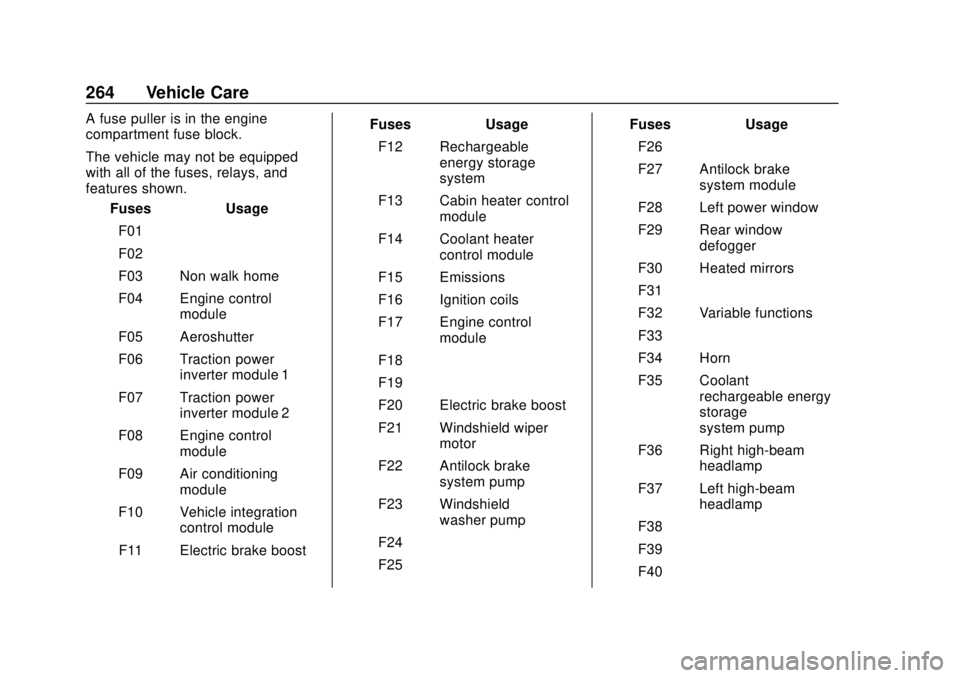
A fuse puller is in the engine
compartment fuse block.
The vehicle may not be equipped
with all of the fuses, relays, and
features shown.Fuses Usage
F01 –
F02 –
F03 Non walk home
F04 Engine control module
F05 Aeroshutter
F06 Traction power inverter module 1
F07 Traction power inverter module 2
F08 Engine control module
F09 Air conditioning module
F10 Vehicle integration control module
F11 Electric brake boost Fuses Usage
F12 Rechargeable energy storage
system
F13 Cabin heater control module
F14 Coolant heater control module
F15 Emissions
F16 Ignition coils
F17 Engine control module
F18 –
F19 –
F20 Electric brake boost
F21 Windshield wiper motor
F22 Antilock brake system pump
F23 Windshield washer pump
F24 –
F25 – Fuses Usage
F26 –
F27 Antilock brake system module
F28 Left power window
F29 Rear window defogger
F30 Heated mirrors
F31 –
F32 Variable functions
F33 –
F34 Horn
F35 Coolant rechargeable energy
storage
system pump
F36 Right high-beam headlamp
F37 Left high-beam headlamp
F38 –
F39 –
F40 –
Page 266 of 379

Chevrolet VOLT Owner Manual (GMNA-Localizing-U.S./Canada/Mexico-
11349113) - 2018 - crc - 10/12/17
Vehicle Care 265
FusesUsage
F41 Miscellaneous run/ Crank
F42 Run/Crank 3
F43 –
F44 Voltage current temperature module
run/Crank
F45 Heated steering wheel
F46 Vehicle integration control module run/
Crank
F47 –
F48 –
F49 –
F50 –
F51 –
F52 Engine control module/Traction
power inverter
module
F53 Left cooling fan Fuses
Usage
F54 Right cooling fan
F55 Electric pump
F56 –
F57 –
Relays Usage
K01 –
K02 –
K03 Engine control module
K04 –
K05 –
K06 –
K07 –
K08 –
K09 –
K10 –
K11 –
K12 High-beam headlamps
K13 – Relays
Usage
K14 Run/Crank
K15 Rear window defogger
K16 Horn PCB relay
K17 –
K18 –
K19 Coolant pump PCB relay
K20 –
K21 –
K22 Front washer
K23 –
Page 269 of 379

Chevrolet VOLT Owner Manual (GMNA-Localizing-U.S./Canada/Mexico-
11349113) - 2018 - crc - 10/12/17
268 Vehicle Care
A fuse puller is in the engine
compartment fuse block.
The vehicle may not be equipped
with all of the fuses, relays, and
features shown.Fuses Usage
F1 –
F2 –
F3 –
F4 Heating, ventilation, and air conditioning
blower
F5 Body control module 2
F6 –
F7 CGM
F8 Body control module 3
F9 Fuel power pump module
F10 –
F11 –
F12 – Fuses Usage
F13 –
F14 –
F15 –
F16 –
F17 Data link connector
F18 Body control module 7
F19 Cluster
F20 Body control module 1
F21 Body control module 4
F22 Body control module 6
F23 OnStar
F24 Airbag
F25 Display
F26 Infotainment Video bypass module
F27 –
F28 – Fuses Usage
F29 Overhead console
F30 Radio
F31 Steering wheel controls
F32 Body control module 8
F33 Heating, ventilation, and air conditioning/
Integrated light solar
sensor
F34 Passive entry/ Passive start
F35 Rear closure
F36 Charger
F37 –
F38 –
F39 –
F40 –
F41 –
F42 –