2018 CHEVROLET TRAX lock
[x] Cancel search: lockPage 142 of 366
Chevrolet TRAX Owner Manual (GMNA-Localizing-U.S./Canada/Mexico-
11354406) - 2018 - crc - 10/12/17
Lighting 141
Turn and Lane-Change
Signals
Move the lever all the way up or
down to signal a turn.
An arrow on the instrument cluster
will flash in the direction of the turn
or lane change.
Raise or lower the lever until the
arrow starts to flash to signal a lane
change. The turn signal flashes
three times.
The lever returns to its starting
position when it is released.
If after signaling a turn or lane
change the arrow flashes rapidly or
does not come on, a signal bulb
may be burned out. Replace anyburned out bulbs. If a bulb is not
burned out, check the fuse. See
Fuses and Circuit Breakers
0261.
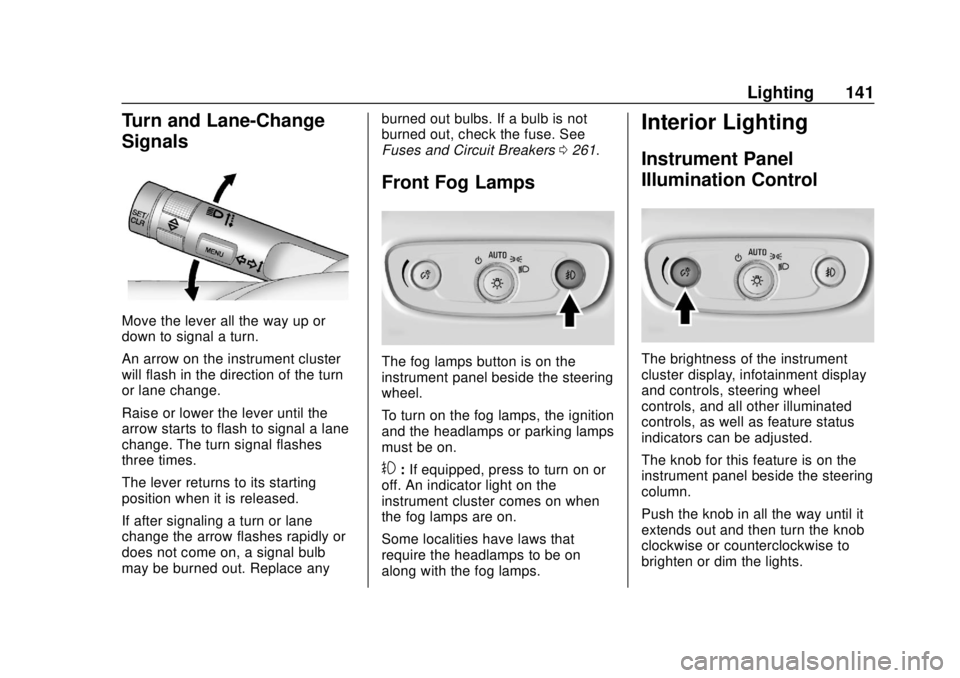
Front Fog Lamps
The fog lamps button is on the
instrument panel beside the steering
wheel.
To turn on the fog lamps, the ignition
and the headlamps or parking lamps
must be on.
#:If equipped, press to turn on or
off. An indicator light on the
instrument cluster comes on when
the fog lamps are on.
Some localities have laws that
require the headlamps to be on
along with the fog lamps.
Interior Lighting
Instrument Panel
Illumination Control
The brightness of the instrument
cluster display, infotainment display
and controls, steering wheel
controls, and all other illuminated
controls, as well as feature status
indicators can be adjusted.
The knob for this feature is on the
instrument panel beside the steering
column.
Push the knob in all the way until it
extends out and then turn the knob
clockwise or counterclockwise to
brighten or dim the lights.
Page 167 of 366

Chevrolet TRAX Owner Manual (GMNA-Localizing-U.S./Canada/Mexico-
11354406) - 2018 - crc - 10/17/17
166 Infotainment System
Settings
The settings menu may be
organized into three categories.
Select the desired category by
touching System, Apps, or Vehicle.
To access the menus:1. Touch the Settings icon on the Home Page on the
infotainment display.
2. Touch the desired category to display a list of available
options.
3. Touch to select the desired feature setting.
4. Touch
9orRto turn off or on a
feature.
5. Touch
zto go to the top level
of the SETTINGS menu. The menu may contain the
following:
System
The menu may contain the
following:
Time / Date
Use the following features to set the
clock:
.
Automatic Time and Date: Touch
on to have the time and date
automatically set. When this
feature is off, the time and date
can be manually set.
. Set Time: Touch to manually set
the time using the controls on
the infotainment display.
. Set Date: Touch to manually set
the date using the controls on
the infotainment display.
. Use 24-hour Format: Touch to
specify the clock format shown.
Touch Off or On. Language
This will set the display language
used on the infotainment display.
Touch Language and select the
appropriate language.
Phones
Touch to connect to a different cell
phone or mobile device source,
disconnect a cell phone or media
device, or delete a cell phone or
media device.
Wi-Fi Networks
This will show connected and
available Wi-Fi networks near or
brought into the vehicle.
If a 4G LTE data package is not
active on the vehicle, the
infotainment system can be
connected to an external protected
Wi-Fi network, such as a mobile
device or home hotspot, to utilize
connected services.
Page 172 of 366

Chevrolet TRAX Owner Manual (GMNA-Localizing-U.S./Canada/Mexico-
11354406) - 2018 - crc - 10/12/17
Climate Controls 171
Climate Controls
Climate Control Systems
Climate Control Systems . . . . . 171
Air Vents
Air Vents . . . . . . . . . . . . . . . . . . . . . 173
Maintenance
Air Intake . . . . . . . . . . . . . . . . . . . . . 174
Passenger Compartment AirFilter . . . . . . . . . . . . . . . . . . . . . . . . 174
Service . . . . . . . . . . . . . . . . . . . . . . . 175
Climate Control
Systems
If equipped with these climate
control systems, the heating,
cooling, and ventilation can be
controlled for the vehicle.
Climate Control System with
Heater and Air Conditioning
1. Temperature Control
2. Fan Control
3. Air Delivery Mode Control
4. Driver and Passenger Heated Seats
5. Recirculation 6. Rear Window Defogger
7. Air Conditioning
Climate Control System with
Heater Only
1. Temperature Control
2. Fan Control
3. Air Delivery Mode Control
4. Rear Window Defogger
Temperature Control : Turn
clockwise or counterclockwise to
increase or decrease the
temperature.
Page 173 of 366

Chevrolet TRAX Owner Manual (GMNA-Localizing-U.S./Canada/Mexico-
11354406) - 2018 - crc - 10/12/17
172 Climate Controls
A:Turn clockwise or
counterclockwise to increase or
decrease the fan speed. Turning the
fan control to 0 turns the fan off. The
fan must be turned on to run the air
conditioning compressor.
Air Delivery Mode Control : Turn
clockwise or counterclockwise to
change the current airflow mode.
Select from the following air delivery
modes:
Y: Air is directed to the instrument
panel outlets.
\: Air is divided between the
instrument panel and floor outlets.
[: Air is directed to the floor
outlets, with some air directed to the
rear outlets.
W: This mode clears the windows
of fog or moisture. Air is directed to
the floor, windshield, and side
window outlets.
1: This mode clears the
windshield of fog or frost more
quickly. Air is directed to the
windshield and side window outlets. Do not drive the vehicle until all
windows are clear.
In defrost or defog mode, excessive
air conditioning use can cause the
windows to fog. If this happens,
change the air delivery mode to
Y
and reduce the fan speed.
#:
If equipped with air
conditioning, follow these steps to
use the system. Turn
Ato the
desired speed. The air conditioning
does not operate when the fan
control knob is in the off position.
Press
#to turn the air conditioning
on and off. When
#is pressed, an
indicator light comes on to show
that the air conditioning is on.
For quick cool down on hot days:
1. Open the windows to let hot air escape.
2. Press
M.
3. Press
#.
4. Select the coolest temperature.
5. Select the highest
Aspeed. Using these settings together for
long periods of time may cause the
air inside the vehicle to become too
dry. To prevent this from happening,
after the air in the vehicle has
cooled, turn the recirculation
mode off.
M:
This mode recirculates and
helps to quickly cool the air inside
the vehicle. It can be used to
prevent outside air and odors from
entering the vehicle.
Press the button to turn the
recirculation mode on. An indicator
light comes on to show that the
recirculation is on. Press the button
again to return to outside air mode.
Using the recirculation mode for
extended periods may cause the
windows to fog. If this happens,
select the defrost mode.
Max
#is available when the air
conditioning is selected and the
temperature is set to the coolest
setting while the outside air
temperature is warm. When Max
#
is activated, the air inside the
vehicle is automatically recirculated,
Page 175 of 366

Chevrolet TRAX Owner Manual (GMNA-Localizing-U.S./Canada/Mexico-
11354406) - 2018 - crc - 10/12/17
174 Climate Controls
.Keep the path under the front
seats clear of objects to help
circulate the air inside the
vehicle more effectively.
. Clear away any ice, snow,
or leaves from the air inlets at
the base of the windshield that
may block the flow of air into the
vehicle.
. Clear snow off the hood to
improve visibility and help
decrease moisture drawn into
the vehicle.
. Use of non-GM approved hood
deflectors may adversely affect
the performance of the system.Maintenance
Air Intake
Clear away any ice, snow, or leaves
from the air intake at the base of the
windshield that can block the flow of
air into the vehicle.
Passenger Compartment
Air Filter
The filter removes dust, pollen, and
other airborne irritants from outside
air that is pulled into the vehicle.
The filter should be replaced as part
of routine scheduled maintenance.
See Maintenance Schedule 0312.
To find out what type of filter to use,
see Maintenance Replacement
Parts 0322.
1. Open the glove box completely and disconnect the damper on
the outboard side.2. Push in both sides of the glovebox and pull to remove.
Page 177 of 366

Chevrolet TRAX Owner Manual (GMNA-Localizing-U.S./Canada/Mexico-
11354406) - 2018 - crc - 10/12/17
176 Driving and Operating
Driving and
Operating
Driving Information
Driver Behavior . . . . . . . . . . . . . . . 177
Driving Environment . . . . . . . . . . 177
Vehicle Design . . . . . . . . . . . . . . . 177
Distracted Driving . . . . . . . . . . . . 177
Defensive Driving . . . . . . . . . . . . . 178
Drunk Driving . . . . . . . . . . . . . . . . . 178
Control of a Vehicle . . . . . . . . . . . 179
Braking . . . . . . . . . . . . . . . . . . . . . . . 179
Steering . . . . . . . . . . . . . . . . . . . . . . 179
Off-Road Recovery . . . . . . . . . . . 180
Loss of Control . . . . . . . . . . . . . . . 180
Driving on Wet Roads . . . . . . . . 181
Hill and Mountain Roads . . . . . 182
Winter Driving . . . . . . . . . . . . . . . . 183
If the Vehicle Is Stuck . . . . . . . . 184
Vehicle Load Limits . . . . . . . . . . . 184
Starting and Operating
New Vehicle Break-In . . . . . . . . . 188
Ignition Positions (KeylessAccess) . . . . . . . . . . . . . . . . . . . . . 188
Ignition Positions (Key Access) . . . . . . . . . . . . . . . . . . . . . 190
Starting the Engine . . . . . . . . . . . 192 Engine Heater . . . . . . . . . . . . . . . . 194
Retained Accessory
Power (RAP) . . . . . . . . . . . . . . . . 195
Shifting Into Park . . . . . . . . . . . . . 196
Shifting out of Park . . . . . . . . . . . 197
Parking . . . . . . . . . . . . . . . . . . . . . . . 198
Parking over Things That Burn . . . . . . . . . . . . . . . . . . . 198
Extended Parking (Keyless Access) . . . . . . . . . . . . . . . . . . . . . 198
Engine Exhaust
Engine Exhaust . . . . . . . . . . . . . . 199
Running the Vehicle WhileParked . . . . . . . . . . . . . . . . . . . . . . 199
Automatic Transmission
Automatic Transmission . . . . . . 200
Manual Mode . . . . . . . . . . . . . . . . . 201
Manual Transmission
Manual Transmission . . . . . . . . . 203
Drive Systems
All-Wheel Drive . . . . . . . . . . . . . . . 205
Brakes
Antilock BrakeSystem (ABS) . . . . . . . . . . . . . . . 206
Parking Brake . . . . . . . . . . . . . . . . 206
Brake Assist . . . . . . . . . . . . . . . . . . 207
Hill Start Assist (HSA) . . . . . . . . 207
Ride Control Systems
Traction Control/Electronic Stability Control . . . . . . . . . . . . . 208
Cruise Control
Cruise Control . . . . . . . . . . . . . . . . 210
Driver Assistance Systems
Rear Vision Camera (RVC) . . . 212
Parking Assist . . . . . . . . . . . . . . . . 215
Forward Collision Alert (FCA)System . . . . . . . . . . . . . . . . . . . . . . 216
Side Blind Zone Alert (SBZA) . . . . . . . . . . . . . . . . 217
Lane Departure Warning (LDW) . . . . . . . . . . . . . 219
Fuel
Fuel . . . . . . . . . . . . . . . . . . . . . . . . . . 221
Fuels in Foreign Countries . . . 221
Fuel Additives . . . . . . . . . . . . . . . . 222
Filling the Tank . . . . . . . . . . . . . . . 222
Filling a Portable FuelContainer . . . . . . . . . . . . . . . . . . . 223
Trailer Towing
General TowingInformation . . . . . . . . . . . . . . . . . . 224
Conversions and Add-Ons
Add-On ElectricalEquipment . . . . . . . . . . . . . . . . . . 224
Page 181 of 366

Chevrolet TRAX Owner Manual (GMNA-Localizing-U.S./Canada/Mexico-
11354406) - 2018 - crc - 10/12/17
180 Driving and Operating
Caution
If the steering wheel is turned
until it reaches the end of its
travel, and is held in that position
for more than 15 seconds,
damage may occur to the power
steering system and there may be
loss of power steering assist.
See your dealer if there is a
problem.
Curve Tips
. Take curves at a reasonable
speed.
. Reduce speed before entering a
curve.
. Maintain a reasonable steady
speed through the curve.
. Wait until the vehicle is out of
the curve before accelerating
gently into the straightaway.
Steering in Emergencies
.There are some situations when
steering around a problem may
be more effective than braking.
. Holding both sides of the
steering wheel allows you to turn
180 degrees without removing
a hand.
. Antilock Brake System (ABS)
allows steering while braking.
Off-Road Recovery
The vehicle's right wheels can drop
off the edge of a road onto the
shoulder while driving. Follow
these tips:
1. Ease off the accelerator and then, if there is nothing in the
way, steer the vehicle so that it
straddles the edge of the
pavement.
2. Turn the steering wheel about one-eighth of a turn, until the
right front tire contacts the
pavement edge.
3. Turn the steering wheel to go straight down the roadway.
Loss of Control
Skidding
There are three types of skids that
correspond to the vehicle's three
control systems:
.Braking Skid —wheels are not
rolling.
. Steering or Cornering Skid —
too much speed or steering in a
curve causes tires to slip and
lose cornering force.
Page 182 of 366

Chevrolet TRAX Owner Manual (GMNA-Localizing-U.S./Canada/Mexico-
11354406) - 2018 - crc - 10/12/17
Driving and Operating 181
.Acceleration Skid —too much
throttle causes the driving
wheels to spin.
Defensive drivers avoid most skids
by taking reasonable care suited to
existing conditions, and by not
overdriving those conditions. But
skids are always possible.
If the vehicle starts to slide, follow
these suggestions:
. Ease your foot off the
accelerator pedal and steer the
way you want the vehicle to go.
The vehicle may straighten out.
Be ready for a second skid if it
occurs.
. Slow down and adjust your
driving according to weather
conditions. Stopping distance
can be longer and vehicle
control can be affected when
traction is reduced by water,
snow, ice, gravel, or other
material on the road. Learn to
recognize warning clues —such
as enough water, ice, or packed snow on the road to make a
mirrored surface
—and slow
down when you have any doubt.
. Try to avoid sudden steering,
acceleration, or braking,
including reducing vehicle speed
by shifting to a lower gear. Any
sudden changes could cause
the tires to slide.
Remember: Antilock brakes help
avoid only the braking skid.
Driving on Wet Roads
Rain and wet roads can reduce
vehicle traction and affect your
ability to stop and accelerate.
Always drive slower in these types
of driving conditions and avoid
driving through large puddles and
deep-standing or flowing water.
{Warning
Wet brakes can cause crashes.
They might not work as well in a
quick stop and could cause
pulling to one side. You could
lose control of the vehicle.
After driving through a large
puddle of water or a car/vehicle
wash, lightly apply the brake
pedal until the brakes work
normally.
Flowing or rushing water creates
strong forces. Driving through
flowing water could cause the
vehicle to be carried away. If this
happens, you and other vehicle
occupants could drown. Do not
ignore police warnings and be
very cautious about trying to drive
through flowing water.
Hydroplaning
Hydroplaning is dangerous. Water
can build up under the vehicle's
tires so they actually ride on the
water. This can happen if the road is