2018 CHEVROLET SONIC cooling
[x] Cancel search: coolingPage 230 of 349

Chevrolet Sonic Owner Manual (GMNA-Localizing-U.S./Canada-11373973) -
2018 - crc - 10/9/17
Vehicle Care 229
What to Use
{Warning
Plain water, or other liquids such
as alcohol, can boil before the
proper coolant mixture will. With
plain water or the wrong mixture,
the engine could get too hot but
there would not be an overheat
warning. The engine could catch
fire and you or others could be
burned.
Use a 50/50 mixture of clean
drinkable water and DEX-COOL
coolant. This mixture:
. Gives freezing protection down
to−37 °C (−34 °F), outside
temperature.
. Gives boiling protection up to
129 °C (265 °F), engine
temperature.
. Protects against rust and
corrosion.
. Will not damage aluminum parts. .
Helps keep the proper engine
temperature.Caution
Do not use anything other than a
mix of DEX-COOL coolant that
meets GM Standard
GMW3420 and clean, drinkable
water. Anything else can cause
damage to the engine cooling
system and the vehicle, which
would not be covered by the
vehicle warranty.
Never dispose of engine coolant by
putting it in the trash, pouring it on
the ground, or into sewers, streams,
or bodies of water. Have the coolant
changed by an authorized service
center, familiar with legal
requirements regarding used
coolant disposal. This will help
protect the environment and your
health.
Checking Coolant
The vehicle must be on a level
surface when checking the coolant
level.
It is normal to see coolant moving in
the upper coolant hose return line
when the engine is running.
Check to see if coolant is visible in
the coolant surge tank. If the coolant
inside the coolant surge tank is
boiling, do not do anything else until
it cools down.
Page 231 of 349

Chevrolet Sonic Owner Manual (GMNA-Localizing-U.S./Canada-11373973) -
2018 - crc - 10/12/17
230 Vehicle Care
If coolant is visible but the coolant
level is not at or above the mark
pointed to, add a 50/50 mixture of
clean drinkable water and
DEX-COOL coolant.
Be sure the cooling system is cool
before this is done.
If no coolant is visible in the coolant
surge tank, add coolant as follows:
How to Add Coolant to the
Coolant Surge Tank
{Warning
Steam and scalding liquids from a
hot cooling system are under
pressure. Turning the pressure
cap, even a little, can cause them
to come out at high speed and
you could be burned. Never turn
the cap when the cooling system,
including the pressure cap, is hot.
Wait for the cooling system and
pressure cap to cool.
{Warning
Plain water, or other liquids such
as alcohol, can boil before the
proper coolant mixture will. With
plain water or the wrong mixture,
the engine could get too hot but
there would not be an overheat
warning. The engine could catch
fire and you or others could be
burned.
{Warning
Spilling coolant on hot engine
parts can burn you. Coolant
contains ethylene glycol and it will
burn if the engine parts are hot
enough.
Caution
Failure to follow the specific
coolant fill procedure could cause
the engine to overheat and could
cause system damage. If coolant
is not visible in the surge tank,
contact your dealer.
If no problem is found, check to see
if coolant is visible in the coolant
surge tank. If coolant is visible but
the coolant level is not at the
indicated level mark, add a 50/
50 mixture of clean, drinkable water
and DEX-COOL coolant at the
coolant surge tank, but be sure the
cooling system, including the
coolant surge tank pressure cap, is
cool before you do it.
Page 232 of 349

Chevrolet Sonic Owner Manual (GMNA-Localizing-U.S./Canada-11373973) -
2018 - crc - 10/9/17
Vehicle Care 231
1.4L Engine Shown, 1.8L EngineSimilar
1. Remove the coolant surge tank pressure cap when the cooling
system, including the coolant
surge tank pressure cap and
upper radiator hose, is no
longer hot.
Turn the pressure cap slowly
counterclockwise about
one-quarter of a turn. If you
hear a hiss, wait for that to
stop. This will allow any
pressure still left to be vented
out the discharge hose.
2. Keep turning the pressure cap slowly and remove it.
3. Fill the coolant surge tank withthe proper mixture to the
indicated level mark.
4. With the coolant surge tank pressure cap off, start the
engine and let it run until you
can feel the upper radiator
hose getting hot. Watch out for
the engine cooling fan.
By this time, the coolant level
inside the coolant surge tank
may be lower. If the level is
lower, add more of the proper
mixture to the coolant surge
tank until the level reaches the
indicated level mark. 5. Replace the pressure cap
tightly.
Check the level in the coolant surge
tank when the cooling system has
cooled down. If the coolant is not at
the proper level, repeat Steps 1–
3 and reinstall the pressure cap.
If the coolant still is not at the proper
level when the system cools down
again, see your dealer.Caution
If the pressure cap is not tightly
installed, coolant loss and engine
damage may occur. Be sure the
cap is properly and tightly
secured.
Engine Overheating
The vehicle has an indicator to warn
of the engine overheating.
If the decision is made not to lift the
hood when this warning appears,
get service help right away. See
Roadside Assistance Program
0 315.
Page 233 of 349

Chevrolet Sonic Owner Manual (GMNA-Localizing-U.S./Canada-11373973) -
2018 - crc - 10/9/17
232 Vehicle Care
If the decision is made to lift the
hood, make sure the vehicle is
parked on a level surface.
Then check to see if the engine
cooling fan is running. If the engine
is overheating, the fan should be
running. If it is not, do not continue
to run the engine. Have the vehicle
serviced.
Caution
Do not run the engine if there is a
leak in the engine cooling system.
This can cause a loss of all
coolant and can damage the
system and vehicle. Have any
leaks fixed right away.
If Steam Is Coming from the
Engine Compartment
{Warning
Steam and scalding liquids from a
hot cooling system are under
pressure. Turning the pressure(Continued)
Warning (Continued)
cap, even a little, can cause them
to come out at high speed and
you could be burned. Never turn
the cap when the cooling system,
including the pressure cap, is hot.
Wait for the cooling system and
pressure cap to cool.
If No Steam Is Coming from
the Engine Compartment
If an engine overheat warning is
displayed but no steam can be seen
or heard, the problem may not be
too serious. Sometimes the engine
can get a little too hot when the
vehicle:
.Climbs a long hill on a hot day.
. Stops after high-speed driving.
. Idles for long periods in traffic.
If the overheat warning is displayed
with no sign of steam: 1. Turn the air conditioning off. 2. Turn the heater on to the
highest temperature and to the
highest fan speed. Open the
windows as necessary.
3. When it is safe to do so, pull off the road, shift to P (Park) or
N (Neutral) for an automatic
transmission or Neutral for a
manual transmission, and let
the engine idle.
If the overheat warning no longer
displays, the vehicle can be driven.
Continue to drive the vehicle slowly
for about 10 minutes. Keep a safe
vehicle distance from the vehicle in
front. If the warning does not come
back on, continue to drive normally
and have the cooling system
checked for proper fill and function.
If the warning continues, pull over,
stop, and park the vehicle
right away.
If there is no sign of steam, idle the
engine for three minutes while
parked. If the warning is still
displayed, turn off the engine until it
cools down.
Page 247 of 349
Chevrolet Sonic Owner Manual (GMNA-Localizing-U.S./Canada-11373973) -
2018 - crc - 10/9/17
246 Vehicle Care
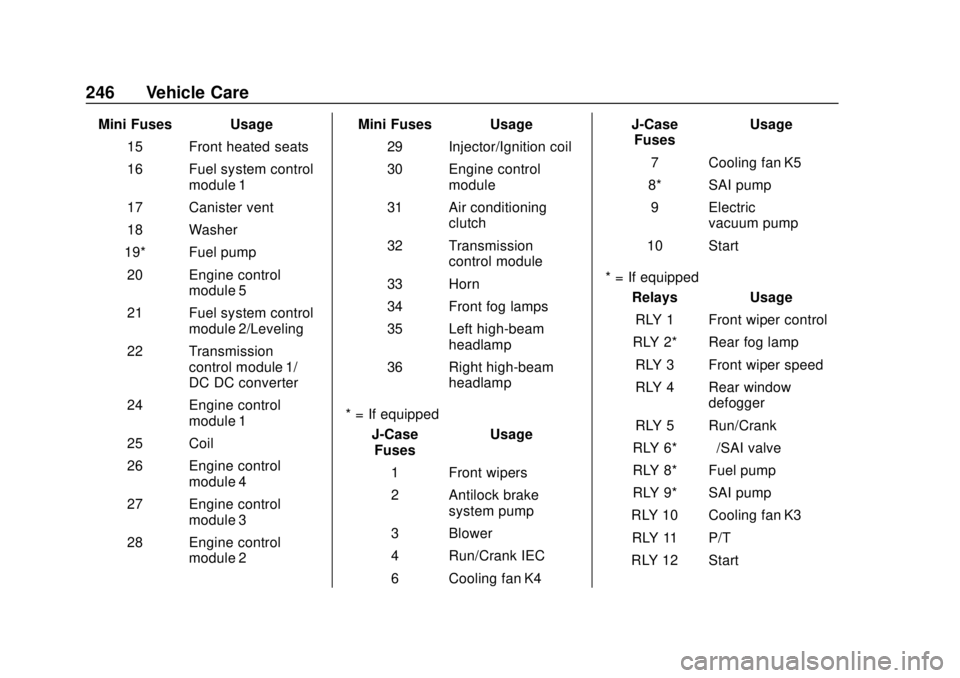
Mini Fuses Usage15 Front heated seats
16 Fuel system control module 1
17 Canister vent
18 Washer
19* Fuel pump 20 Engine control module 5
21 Fuel system control module 2/Leveling
22 Transmission control module 1/
DC DC converter
24 Engine control module 1
25 Coil
26 Engine control module 4
27 Engine control module 3
28 Engine control module 2 Mini Fuses Usage
29 Injector/Ignition coil
30 Engine control module
31 Air conditioning clutch
32 Transmission control module
33 Horn
34 Front fog lamps
35 Left high-beam headlamp
36 Right high-beam headlamp
* = If equipped J-CaseFuses Usage
1 Front wipers
2 Antilock brake system pump
3 Blower
4 Run/Crank IEC
6 Cooling fan K4 J-Case
Fuses Usage
7 Cooling fan K5
8* SAI pump 9 Electric vacuum pump
10 Start
* = If equipped Relays Usage
RLY 1 Front wiper control
RLY 2* Rear fog lamp RLY 3 Front wiper speed
RLY 4 Rear window defogger
RLY 5 Run/Crank
RLY 6* –/SAI valve
RLY 8* Fuel pump
RLY 9* SAI pump
RLY 10 Cooling fan K3 RLY 11 P/T
RLY 12 Start
Page 248 of 349

Chevrolet Sonic Owner Manual (GMNA-Localizing-U.S./Canada-11373973) -
2018 - crc - 10/9/17
Vehicle Care 247
RelaysUsage
RLY 13 Air conditioning clutch
RLY 14 High-beam headlamps
RLY 15 Cooling fan K1
* = If equipped 1.4L Engine
The vehicle may not be equipped
with all of the fuses, relays, and
features shown. Mini Fuses Usage
1 Antilock brake system valve
2 Sunroof
4* Rear fog lamp 5 Exterior rearview mirror/Power
window switch
6 Automatic occupant
sensing/ROS
7 Passive entry/ Passive start
8 Regulated voltage control
9 Rear wiper
10 –/Intelligent battery
sensor
11 Rear window defogger
12 Electric steering column lock
14 Heated Exterior rearview mirror
Page 249 of 349
Chevrolet Sonic Owner Manual (GMNA-Localizing-U.S./Canada-11373973) -
2018 - crc - 10/9/17
248 Vehicle Care
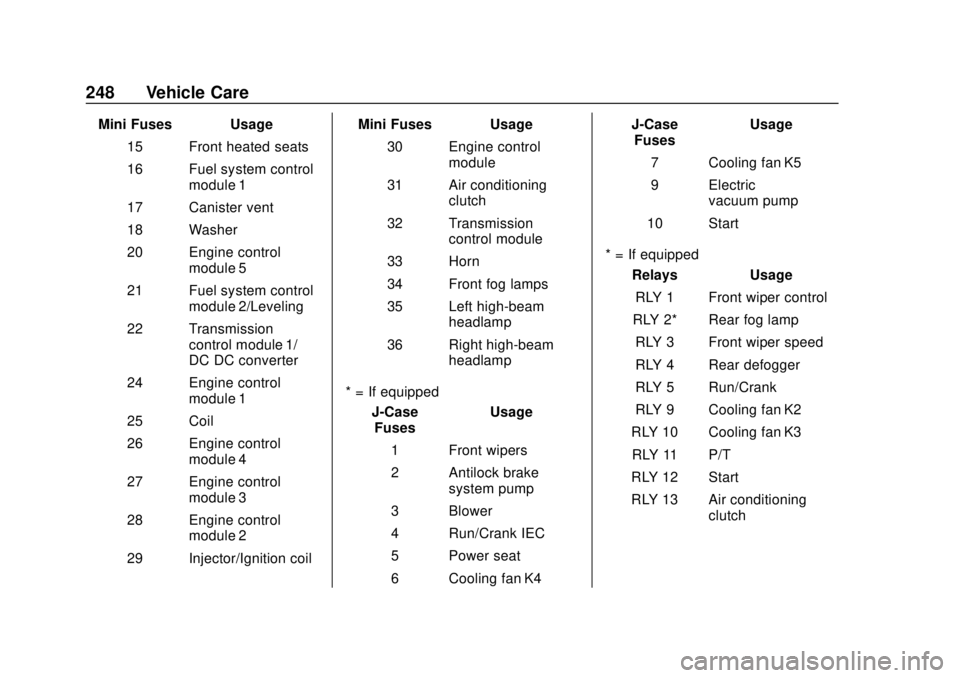
Mini Fuses Usage15 Front heated seats
16 Fuel system control module 1
17 Canister vent
18 Washer
20 Engine control module 5
21 Fuel system control module 2/Leveling
22 Transmission control module 1/
DC DC converter
24 Engine control module 1
25 Coil
26 Engine control module 4
27 Engine control module 3
28 Engine control module 2
29 Injector/Ignition coil Mini Fuses Usage
30 Engine control module
31 Air conditioning clutch
32 Transmission control module
33 Horn
34 Front fog lamps
35 Left high-beam headlamp
36 Right high-beam headlamp
* = If equipped J-CaseFuses Usage
1 Front wipers
2 Antilock brake system pump
3 Blower
4 Run/Crank IEC
5 Power seat
6 Cooling fan K4 J-Case
Fuses Usage
7 Cooling fan K5
9 Electric vacuum pump
10 Start
* = If equipped Relays Usage
RLY 1 Front wiper control
RLY 2* Rear fog lamp
RLY 3 Front wiper speed
RLY 4 Rear defogger
RLY 5 Run/Crank
RLY 9 Cooling fan K2
RLY 10 Cooling fan K3 RLY 11 P/T
RLY 12 Start
RLY 13 Air conditioning clutch
Page 250 of 349
Chevrolet Sonic Owner Manual (GMNA-Localizing-U.S./Canada-11373973) -
2018 - crc - 10/9/17
Vehicle Care 249
RelaysUsage
RLY 14 High-beam headlamps
RLY 15 Cooling fan K1
* = If equipped
Instrument Panel Fuse
Block
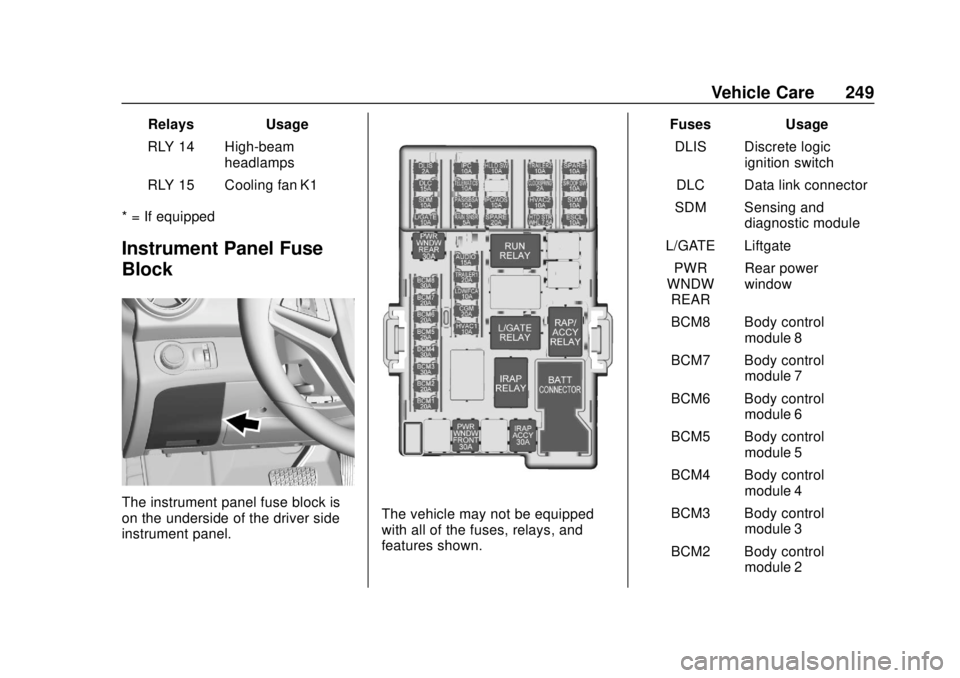
The instrument panel fuse block is
on the underside of the driver side
instrument panel.The vehicle may not be equipped
with all of the fuses, relays, and
features shown. Fuses Usage
DLIS Discrete logic ignition switch
DLC Data link connector
SDM Sensing and diagnostic module
L/GATE Liftgate PWR
WNDW REAR Rear power
window
BCM8 Body control module 8
BCM7 Body control module 7
BCM6 Body control module 6
BCM5 Body control module 5
BCM4 Body control module 4
BCM3 Body control module 3
BCM2 Body control module 2