2018 CHEVROLET SONIC Interior
[x] Cancel search: InteriorPage 133 of 349

Chevrolet Sonic Owner Manual (GMNA-Localizing-U.S./Canada-11373973) -
2018 - crc - 10/9/17
132 Lighting
Lighting
Exterior Lighting
Exterior Lamp Controls . . . . . . . 132
Headlamp High/Low-BeamChanger . . . . . . . . . . . . . . . . . . . . 133
Flash-to-Pass . . . . . . . . . . . . . . . . 133
Daytime Running Lamps (DRL) . . . . . . . . . . . . . . . 133
Automatic Headlamp System . . . . . . . . . . . . . . . . . . . . . . 134
Hazard Warning Flashers . . . . . 134
Turn and Lane-Change Signals . . . . . . . . . . . . . . . . . . . . . . 135
Fog Lamps . . . . . . . . . . . . . . . . . . . 135
Interior Lighting
Instrument Panel Illumination Control . . . . . . . . . . . . . . . . . . . . . . 136
Courtesy Lamps . . . . . . . . . . . . . . 136
Dome Lamps . . . . . . . . . . . . . . . . . 136
Reading Lamps . . . . . . . . . . . . . . 136
Lighting Features
Entry Lighting . . . . . . . . . . . . . . . . 137
Exit Lighting . . . . . . . . . . . . . . . . . . 137
Battery Load Management . . . 137
Battery Power Protection . . . . . 138
Exterior Lighting Battery Saver . . . . . . . . . . . . . . . . . . . . . . . 138Exterior Lighting
Exterior Lamp Controls
The exterior lamp control is on the
instrument panel to the outboard
side of the steering column.
There are four positions:
O: Turns the exterior lamps off and
deactivates the AUTO mode. Turn
to
Oagain to reactivate the
AUTO mode.
In Canada, the headlamps will
automatically reactivate when the
vehicle is shifted out of P (Park).
AUTO : Automatically turns the
exterior lamps on and off,
depending on outside lighting.
Page 137 of 349
Chevrolet Sonic Owner Manual (GMNA-Localizing-U.S./Canada-11373973) -
2018 - crc - 10/9/17
136 Lighting
Interior Lighting
Instrument Panel
Illumination Control
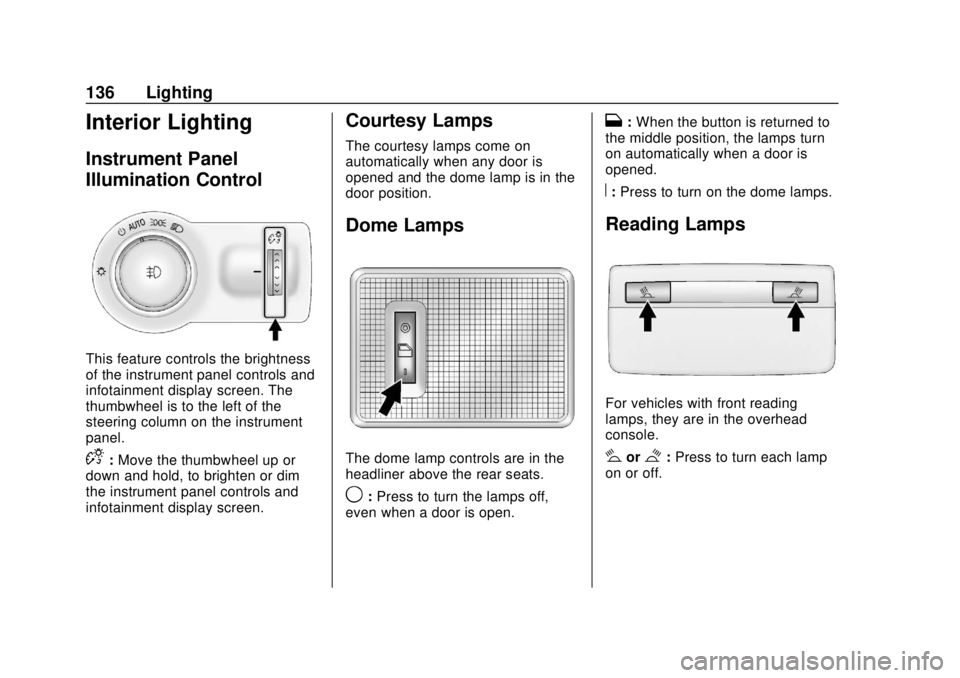
This feature controls the brightness
of the instrument panel controls and
infotainment display screen. The
thumbwheel is to the left of the
steering column on the instrument
panel.
D:Move the thumbwheel up or
down and hold, to brighten or dim
the instrument panel controls and
infotainment display screen.
Courtesy Lamps
The courtesy lamps come on
automatically when any door is
opened and the dome lamp is in the
door position.
Dome Lamps
The dome lamp controls are in the
headliner above the rear seats.
9: Press to turn the lamps off,
even when a door is open.
H: When the button is returned to
the middle position, the lamps turn
on automatically when a door is
opened.
R: Press to turn on the dome lamps.
Reading Lamps
For vehicles with front reading
lamps, they are in the overhead
console.
#or$:Press to turn each lamp
on or off.
Page 138 of 349

Chevrolet Sonic Owner Manual (GMNA-Localizing-U.S./Canada-11373973) -
2018 - crc - 10/9/17
Lighting 137
Lighting Features
Entry Lighting
Some exterior lamps and interior
lamps turn on briefly at night, or in
areas with limited lighting, when
K
is pressed on the Remote Keyless
Entry (RKE) transmitter. When a
door is opened, the interior lamps
come on if the dome lamp control is
in the Door position. They stay on
for about 20 seconds. When all of
the doors have been closed or the
ignition is turned on, they gradually
fade out.
This feature can be changed. See
“Vehicle Locator Lights”under
Vehicle Personalization 0129.
Exit Lighting
Some exterior lamps and interior
lamps come on at night, or in areas
with limited lighting, when the key is
removed from the ignition. The
exterior lamps and dome lamp
remain on for a set amount of time,
then automatically turn off. If equipped with Keyless Access,
the exterior lamps automatically turn
on when a door is opened after the
ignition is turned off. The dome
lamps also come on after the
ignition is turned off.
See
Ignition Positions (Key Access)
0 181 orIgnition Positions (Keyless
Access) 0183.
The exterior lamps turn off
immediately by turning the exterior
lamps control off.
This feature can be changed. See
Vehicle Personalization 0129.
Battery Load
Management
The vehicle has Electric Power
Management (EPM) that estimates
the battery's temperature and state
of charge. It then adjusts the voltage
for best performance and extended
life of the battery.
When the battery's state of charge
is low, the voltage is raised slightly
to quickly bring the charge back up.
When the state of charge is high,
the voltage is lowered slightly to prevent overcharging. If the vehicle
has a voltmeter gauge or a voltage
display on the Driver Information
Center (DIC), you may see the
voltage move up or down. This is
normal. If there is a problem, an
alert will be displayed.
The battery can be discharged at
idle if the electrical loads are very
high. This is true for all vehicles.
This is because the generator
(alternator) may not be spinning fast
enough at idle to produce all the
power needed for very high
electrical loads.
A high electrical load occurs when
several of the following are on, such
as: headlamps, high beams, fog
lamps, rear window defogger,
climate control fan at high speed,
heated seats, engine cooling fans,
trailer loads, and loads plugged into
accessory power outlets.
EPM works to prevent excessive
discharge of the battery. It does this
by balancing the generator's output
and the vehicle's electrical needs.
It can increase engine idle speed to
generate more power, whenever
Page 139 of 349
Chevrolet Sonic Owner Manual (GMNA-Localizing-U.S./Canada-11373973) -
2018 - crc - 10/9/17
138 Lighting
needed. It can temporarily reduce
the power demands of some
accessories.
Normally, these actions occur in
steps or levels, without being
noticeable. In rare cases at the
highest levels of corrective action,
this action may be noticeable to the
driver.
Battery Power Protection
The battery saver feature is
designed to protect the vehicle's
battery.
If some interior lamps are left on
and the ignition is turned off, the
battery rundown protection system
automatically turns the lamp off after
some time.
Exterior Lighting Battery
Saver
The exterior lamps turn off about
10 minutes after the ignition is
turned off, if the parking lamps or
headlamps have been manually left
on. This protects against draining
the battery. To restart the 10-minute
timer, turn the exterior lamp control
to the off position and then back to
the parking lamp or headlamp
position.
To keep the lamps on for more than
10 minutes, the ignition must be on
or in ACC/ACCESSORY.
Page 216 of 349

Chevrolet Sonic Owner Manual (GMNA-Localizing-U.S./Canada-11373973) -
2018 - crc - 10/9/17
Vehicle Care 215
Tire Changing . . . . . . . . . . . . . . . . 272
Compact Spare Tire . . . . . . . . . . 276
Jump Starting
Jump Starting - NorthAmerica . . . . . . . . . . . . . . . . . . . . . 277
Towing the Vehicle
Towing the Vehicle . . . . . . . . . . . 280
Recreational VehicleTowing . . . . . . . . . . . . . . . . . . . . . . 280
Appearance Care
Exterior Care . . . . . . . . . . . . . . . . . 283
Interior Care . . . . . . . . . . . . . . . . . . 288
Floor Mats . . . . . . . . . . . . . . . . . . . . 291
General Information
For service and parts needs, visit
your dealer. You will receive
genuine GM parts and GM-trained
and supported service people.
Genuine GM parts have one of
these marks:
California Proposition
65 Warning
{Warning
Most motor vehicles, including
this one, as well as many of its
service parts and fluids, contain
and/or emit chemicals known to
the State of California to cause
cancer and birth defects or other
reproductive harm. Engine
exhaust, many parts and
systems, many fluids, and some
component wear by-products
contain and/or emit these
chemicals. For more information
go to www.P65Warnings.ca.gov/
passenger-vehicle.
See Battery - North America 0235
and Jump Starting - North America
0 277 and the back cover.
Page 289 of 349
Chevrolet Sonic Owner Manual (GMNA-Localizing-U.S./Canada-11373973) -
2018 - crc - 10/12/17
288 Vehicle Care
Sheet Metal Damage
If the vehicle is damaged and
requires sheet metal repair or
replacement, make sure the body
repair shop applies anti-corrosion
material to parts repaired or
replaced to restore corrosion
protection.
Original manufacturer replacement
parts will provide the corrosion
protection while maintaining the
vehicle warranty.
Finish Damage
Quickly repair minor chips and
scratches with touch-up materials
available from your dealer to avoid
corrosion. Larger areas of finish
damage can be corrected in your
dealer's body and paint shop.
Chemical Paint Spotting
Airborne pollutants can fall upon
and attack painted vehicle surfaces
causing blotchy, ring-shaped
discolorations, and small, irregular
dark spots etched into the paint
surface. See“Finish Care”
previously in this section.
Interior Care
To prevent dirt particle abrasions,
regularly clean the vehicle's interior.
Immediately remove any soils.
Newspapers or dark garments can
transfer color to the vehicle’s
interior.
Use a soft bristle brush to remove
dust from knobs and crevices on the
instrument cluster. Using a mild
soap solution, immediately remove
hand lotions, sunscreen, and insect
repellent from all interior surfaces or
permanent damage may result.
Use cleaners specifically designed
for the surfaces being cleaned to
prevent permanent damage. Apply
all cleaners directly to the cleaning
cloth. Do not spray cleaners on any
switches or controls. Remove
cleaners quickly.
Before using cleaners, read and
follow all safety instructions on the
label. While cleaning the interior,
open the doors and windows to get
proper ventilation. To prevent damage, do not clean
the interior using the following
cleaners or techniques:
.
Never use a razor or any other
sharp object to remove soil from
any interior surface.
. Never use a brush with stiff
bristles.
. Never rub any surface
aggressively or with too much
pressure.
. Do not use laundry detergents or
dishwashing soaps with
degreasers. For liquid cleaners,
use approximately 20 drops per
3.8 L (1 gal) of water.
A concentrated soap solution will
create streaks and attract dirt.
Do not use solutions that contain
strong or caustic soap.
. Do not heavily saturate the
upholstery when cleaning.
. Do not use solvents or cleaners
containing solvents.
Page 290 of 349
Chevrolet Sonic Owner Manual (GMNA-Localizing-U.S./Canada-11373973) -
2018 - crc - 10/9/17
Vehicle Care 289
Interior Glass
To clean, use a terry cloth fabric
dampened with water. Wipe droplets
left behind with a clean dry cloth.
If necessary, use a commercial
glass cleaner after cleaning with
plain water.
Caution
To prevent scratching, never use
abrasive cleaners on automotive
glass. Abrasive cleaners or
aggressive cleaning may damage
the rear window defogger.
Cleaning the windshield with water
during the first three to six months
of ownership will reduce tendency
to fog.
Speaker Covers
Vacuum around a speaker cover
gently, so that the speaker will not
be damaged. Clean spots with water
and mild soap.
Coated Moldings
Coated moldings should be cleaned.
. When lightly soiled, wipe with a
sponge or soft, lint-free cloth
dampened with water.
. When heavily soiled, use warm
soapy water.
Fabric/Carpet/Suede
Start by vacuuming the surface
using a soft brush attachment. If a
rotating vacuum brush attachment is
being used, only use it on the floor
carpet. Before cleaning, gently
remove as much of the soil as
possible:
.Gently blot liquids with a paper
towel. Continue blotting until no
more soil can be removed.
. For solid soils, remove as much
as possible prior to vacuuming.
To clean:
1. Saturate a clean, lint-free colorfast cloth with water.
Microfiber cloth is
recommended to prevent lint
transfer to the fabric or carpet. 2. Remove excess moisture by
gently wringing until water does
not drip from the cleaning cloth.
3. Start on the outside edge of the soil and gently rub toward the
center. Fold the cleaning cloth
to a clean area frequently to
prevent forcing the soil in to the
fabric.
4. Continue gently rubbing the soiled area until there is no
longer any color transfer from
the soil to the cleaning cloth.
5. If the soil is not completely removed, use a mild soap
solution followed only by plain
water.
If the soil is not completely
removed, it may be necessary to
use a commercial upholstery
cleaner or spot lifter. Test a small
hidden area for colorfastness before
using a commercial upholstery
cleaner or spot lifter. If ring
formation occurs, clean the entire
fabric or carpet.
After cleaning, use a paper towel to
blot excess moisture.
Page 291 of 349
Chevrolet Sonic Owner Manual (GMNA-Localizing-U.S./Canada-11373973) -
2018 - crc - 10/9/17
290 Vehicle Care
Cleaning High Gloss Surfaces
and Vehicle Information and
Radio Displays
Use a microfiber cloth on high gloss
surfaces or vehicle displays. First,
use a soft bristle brush to remove
dirt that can scratch the surface.
Then gently clean by rubbing with a
microfiber cloth. Never use window
cleaners or solvents. Periodically
hand wash the microfiber cloth
separately, using mild soap. Do not
use bleach or fabric softener. Rinse
thoroughly and air dry before
next use.
Caution
Do not attach a device with a
suction cup to the display. This
may cause damage and would
not be covered by the vehicle
warranty.
Instrument Panel, Leather,
Vinyl, Other Plastic Surfaces,
Low Gloss Paint Surfaces, and
Natural Open Pore Wood
Surfaces
Use a soft microfiber cloth
dampened with water to remove
dust and loose dirt. For a more
thorough cleaning, use a soft
microfiber cloth dampened with a
mild soap solution.
Caution
Soaking or saturating leather,
especially perforated leather, as
well as other interior surfaces,
may cause permanent damage.
Wipe excess moisture from these
surfaces after cleaning and allow
them to dry naturally. Never use
heat, steam, or spot removers. Do
not use cleaners that contain
silicone or wax-based products.
Cleaners containing these
solvents can permanently change(Continued)
Caution (Continued)
the appearance and feel of
leather or soft trim, and are not
recommended.
Do not use cleaners that increase
gloss, especially on the instrument
panel. Reflected glare can decrease
visibility through the windshield
under certain conditions.
Caution
Use of air fresheners may cause
permanent damage to plastics
and painted surfaces. If an air
freshener comes in contact with
any plastic or painted surface in
the vehicle, blot immediately and
clean with a soft cloth dampened
with a mild soap solution.
Damage caused by air fresheners
would not be covered by the
vehicle warranty.