2018 CHEVROLET SONIC ABS
[x] Cancel search: ABSPage 197 of 349
Chevrolet Sonic Owner Manual (GMNA-Localizing-U.S./Canada-11373973) -
2018 - crc - 10/9/17
196 Driving and Operating
Brakes
Antilock Brake
System (ABS)
This vehicle has an Antilock Brake
System (ABS), an advanced
electronic braking system that helps
prevent a braking skid.
When the vehicle begins to drive
away, ABS checks itself.
A momentary motor or clicking noise
may be heard while this test is going
on, and it may even be noticed that
the brake pedal moves a little. This
is normal.
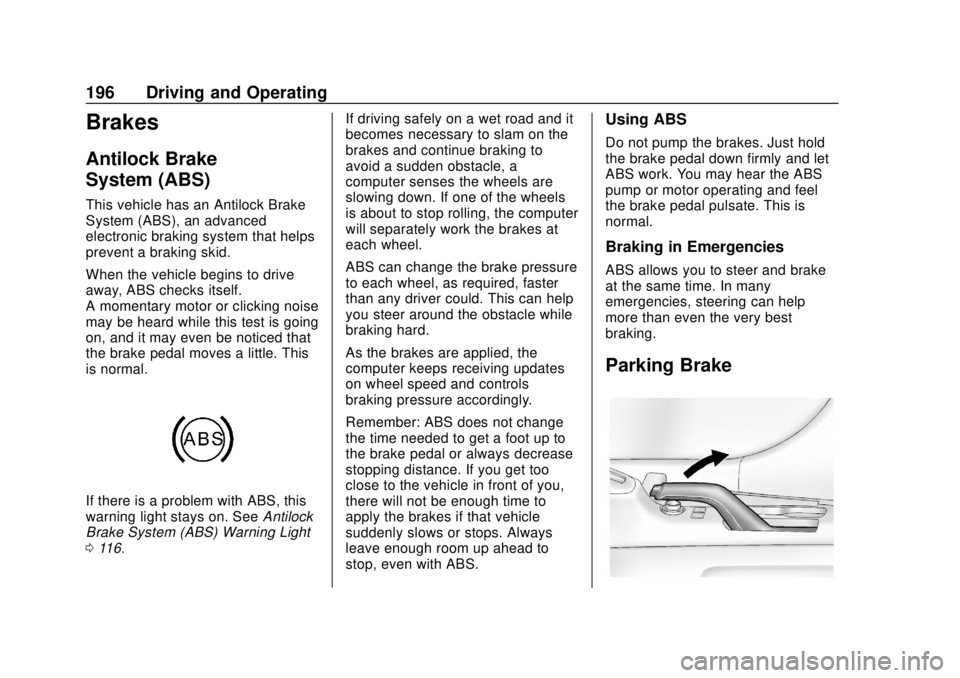
If there is a problem with ABS, this
warning light stays on. SeeAntilock
Brake System (ABS) Warning Light
0 116. If driving safely on a wet road and it
becomes necessary to slam on the
brakes and continue braking to
avoid a sudden obstacle, a
computer senses the wheels are
slowing down. If one of the wheels
is about to stop rolling, the computer
will separately work the brakes at
each wheel.
ABS can change the brake pressure
to each wheel, as required, faster
than any driver could. This can help
you steer around the obstacle while
braking hard.
As the brakes are applied, the
computer keeps receiving updates
on wheel speed and controls
braking pressure accordingly.
Remember: ABS does not change
the time needed to get a foot up to
the brake pedal or always decrease
stopping distance. If you get too
close to the vehicle in front of you,
there will not be enough time to
apply the brakes if that vehicle
suddenly slows or stops. Always
leave enough room up ahead to
stop, even with ABS.
Using ABS
Do not pump the brakes. Just hold
the brake pedal down firmly and let
ABS work. You may hear the ABS
pump or motor operating and feel
the brake pedal pulsate. This is
normal.
Braking in Emergencies
ABS allows you to steer and brake
at the same time. In many
emergencies, steering can help
more than even the very best
braking.
Parking Brake
Page 198 of 349
Chevrolet Sonic Owner Manual (GMNA-Localizing-U.S./Canada-11373973) -
2018 - crc - 10/9/17
Driving and Operating 197
With the brake pedal applied, pull
up firmly on the parking brake
handle without pressing the release
button.
SeeShifting Into Park (Automatic
Transmission) 0188 orParking
0 189. If the ignition is in the ON/
RUN position, the brake system
warning light will come on. See
Brake System Warning Light 0115.
To release the parking brake: 1. Hold the brake pedal down.
2. Pull the parking brake handle up until you can press the
release button.
3. Hold the release button in as you move the brake handle all
the way down.
Caution
Driving with the parking brake on
can overheat the brake system
and cause premature wear or
damage to brake system parts.
(Continued)
Caution (Continued)
Make sure that the parking brake
is fully released and the brake
warning light is off before driving.
Driving with the parking brake
applied will cause a warning chime
to sound an a DIC message to
display. Release the parking brake
or stop the vehicle.
Brake Assist
The Brake Assist feature is
designed to assist the driver in
stopping or decreasing vehicle
speed in emergency driving
conditions. This feature uses the
stability system hydraulic brake
control module to supplement the
power brake system under
conditions where the driver has
quickly and forcefully applied the
brake pedal in an attempt to quickly
stop or slow down the vehicle. The
stability system hydraulic brake
control module increases brake
pressure at each corner of the vehicle until the ABS activates.
Minor brake pedal pulsation or
pedal movement during this time is
normal and the driver should
continue to apply the brake pedal as
the driving situation dictates. The
Brake Assist feature will
automatically disengage when the
brake pedal is released or brake
pedal pressure is quickly
decreased.
Hill Start Assist (HSA)
This vehicle has a Hill Start Assist
(HSA) feature, which may be useful
when the vehicle is stopped on a
grade sufficient enough to activate
HSA. This feature is designed to
prevent the vehicle from rolling,
either forward or rearward, during
vehicle drive off. After the driver
completely stops and holds the
vehicle in a complete standstill on a
grade, HSA will be automatically
activated. During the transition
period between when the driver
releases the brake pedal and starts
to accelerate to drive off on a grade,
HSA holds the braking pressure for
Page 236 of 349

Chevrolet Sonic Owner Manual (GMNA-Localizing-U.S./Canada-11373973) -
2018 - crc - 10/9/17
Vehicle Care 235
when new brake linings are
installed. Add or remove fluid, as
necessary, only when work is done
on the brake/clutch hydraulic
system.
{Warning
If too much brake fluid is added, it
can spill on the engine and burn,
if the engine is hot enough. You
or others could be burned, and
the vehicle could be damaged.
Add brake fluid only when work is
done on the brake/clutch
hydraulic system.
When the brake/clutch fluid falls to a
low level, the brake warning light
comes on. See Brake System
Warning Light 0115.
Brake fluid absorbs water over time
which degrades the effectiveness of
the brake fluid. Replace brake fluid
at the specified intervals to prevent
increased stopping distance. See
Maintenance Schedule 0295. What to Add
Use only GM approved DOT 3
brake fluid from a clean, sealed
container. See
Recommended
Fluids and Lubricants 0304.
{Warning
The wrong or contaminated brake
fluid could result in damage to the
brake system. This could result in
the loss of braking leading to a
possible injury. Always use the
proper GM approved brake fluid.
Caution
If brake fluid is spilled on the
vehicle's painted surfaces, the
paint finish can be damaged.
Immediately wash off any painted
surface.
Battery - North America
The original equipment battery is
maintenance free. Do not remove
the cap and do not add fluid.
Refer to the replacement number
shown on the original battery label
when a new battery is needed. See
Engine Compartment Overview
0219 for battery location.
{Warning
WARNING: Battery posts,
terminals, and related
accessories contain lead and lead
compounds, chemicals known to
the State of California to cause
cancer and birth defects or other
reproductive harm. Batteries also
contain other chemicals known to
the State of California to cause
cancer. WASH HANDS AFTER
HANDLING. For more information
go to www.P65Warnings.ca.gov/
passenger-vehicle.
Page 239 of 349
Chevrolet Sonic Owner Manual (GMNA-Localizing-U.S./Canada-11373973) -
2018 - crc - 10/9/17
238 Vehicle Care
Caution
Allowing the wiper arm to touch
the windshield when no wiper
blade is installed could damage
the windshield. Any damage that
occurs would not be covered by
the vehicle warranty. Do not allow
the wiper arm to touch the
windshield.
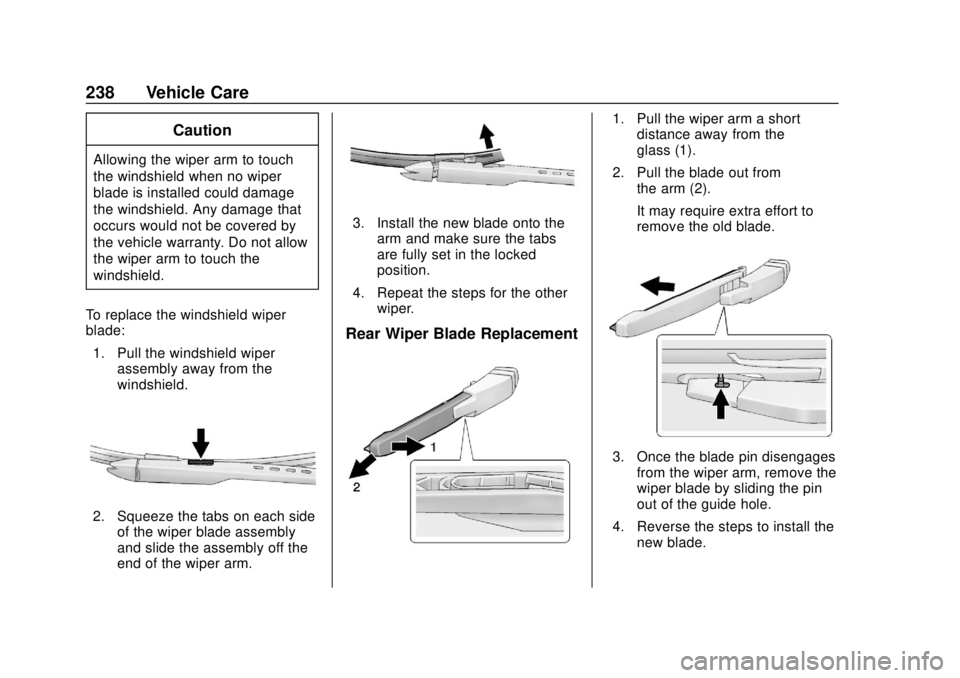
To replace the windshield wiper
blade: 1. Pull the windshield wiper assembly away from the
windshield.
2. Squeeze the tabs on each sideof the wiper blade assembly
and slide the assembly off the
end of the wiper arm.
3. Install the new blade onto the
arm and make sure the tabs
are fully set in the locked
position.
4. Repeat the steps for the other wiper.
Rear Wiper Blade Replacement
1. Pull the wiper arm a shortdistance away from the
glass (1).
2. Pull the blade out from the arm (2).
It may require extra effort to
remove the old blade.
3. Once the blade pin disengagesfrom the wiper arm, remove the
wiper blade by sliding the pin
out of the guide hole.
4. Reverse the steps to install the new blade.
Page 278 of 349

Chevrolet Sonic Owner Manual (GMNA-Localizing-U.S./Canada-11373973) -
2018 - crc - 10/9/17
Vehicle Care 277
If this vehicle has a compact spare
tire, it was fully inflated when new;
however, it can lose air over time.
Check the inflation pressure
regularly. It should be 420 kPa
(60 psi).
Stop as soon as possible and check
that the spare tire is correctly
inflated after being installed on the
vehicle. The compact spare tire is
designed for temporary use only.
The vehicle will perform differently
with the spare tire installed and it is
recommended that the vehicle
speed be limited to 80 km/h
(50 mph). To conserve the tread of
the spare tire, have the standard tire
repaired or replaced as soon as
convenient and return the spare tire
to the storage area.
When using a compact spare tire,
the AWD (if equipped), ABS, and
Traction Control systems may
engage until the spare tire is
recognized by the vehicle,
especially on slippery roads. Adjust
driving to reduce possible
wheel slip.Caution
When the compact spare is
installed, do not take the vehicle
through an automatic car wash
with guide rails. The compact
spare can get caught on the rails
which can damage the tire, wheel,
and other parts of the vehicle.
Do not use the compact spare on
other vehicles.
Do not mix the compact spare tire or
wheel with other wheels or tires.
They will not fit. Keep the spare tire
and its wheel together.
Caution
Tire chains will not fit the compact
spare. Using them can damage
the vehicle and the chains. Do not
use tire chains on the compact
spare.
Jump Starting
Jump Starting - North
America
For more information about the
vehicle battery, see Battery - North
America 0235.
If the battery has run down, try to
use another vehicle and some
jumper cables to start your vehicle.
Be sure to use the following steps to
do it safely.
{Warning
WARNING: Battery posts,
terminals, and related
accessories contain lead and lead
compounds, chemicals known to
the State of California to cause
cancer and birth defects or other
reproductive harm. Batteries also
contain other chemicals known to
the State of California to cause
cancer. WASH HANDS AFTER
(Continued)
Page 284 of 349

Chevrolet Sonic Owner Manual (GMNA-Localizing-U.S./Canada-11373973) -
2018 - crc - 10/9/17
Vehicle Care 283
2. Drive the front wheels onto thedolly.
3. Put an automatic transmission in P (Park) or a manual
transmission into 1 (First) gear.
4. Set the parking brake and turn the vehicle off.
5. Clamp the steering wheel in a straight-ahead position with a
clamping device designed for
towing.
6. Secure the vehicle to the dolly.
7. Release the parking brake.Dolly Towing from the Rear
Caution
Towing the vehicle from the rear
could damage it. Also, repairs
would not be covered by the
vehicle warranty. Never have the
vehicle towed from the rear.
Appearance Care
Exterior Care
Locks
Locks are lubricated at the factory.
Use a de-icing agent only when
absolutely necessary, and have the
locks greased after using. See
Recommended Fluids and
Lubricants 0304.
Washing the Vehicle
To preserve the vehicle's finish,
wash it often and out of direct
sunlight.
Caution
Do not use petroleum-based,
acidic, or abrasive cleaning
agents as they can damage the
vehicle's paint, metal, or plastic
parts. If damage occurs, it would
not be covered by the vehicle
warranty. Approved cleaning
products can be obtained from
(Continued)
Page 338 of 349

Chevrolet Sonic Owner Manual (GMNA-Localizing-U.S./Canada-11373973) -
2018 - crc - 10/9/17
Index 337
IndexA
Accessories andModifications . . . . . . . . . . . . . . . . . . 216
Accessory Power . . . . . . . . . . . . . . . 187
Add-On Electrical Equipment . . . 213
Additional Information OnStar . . . . . . . . . . . . . . . . . . . . . . . 331
Additional Maintenance and Care . . . . . . . . . . . . . . . . . . . . . . 301
Adjustments
Lumbar, Front Seats . . . . . . . . . . . . 56
Agreements Trademarks and License . . . . . 163
Air Cleaner/Filter, Engine . . . . . . . 226
Air Conditioning . . . . . . . . . . . . . . . . 165
Air Filter, Passenger
Compartment . . . . . . . . . . . . . . . . . 168
Air Intake . . . . . . . . . . . . . . . . . . . . . . . 168
Air Vents . . . . . . . . . . . . . . . . . . . . . . . 167
Airbag System Check . . . . . . . . . . . . . . . . . . . . . . . . . . 78
How Does an AirbagRestrain? . . . . . . . . . . . . . . . . . . . . . 72
Passenger Sensing System . . . . 73
What Makes an Airbag
Inflate? . . . . . . . . . . . . . . . . . . . . . . . . 71
What Will You See after an Airbag Inflates? . . . . . . . . . . . . . . . 72 Airbag System (cont'd)
When Should an Airbag
Inflate? . . . . . . . . . . . . . . . . . . . . . . . . 70
Where Are the Airbags? . . . . . . . . 69
Airbags Adding Equipment to theVehicle . . . . . . . . . . . . . . . . . . . . . . . . 78
Passenger Status Indicator . . . .112
Readiness Light . . . . . . . . . . . . . . . 111
Servicing Airbag-Equipped Vehicles . . . . . . . . . . . . . . . . . . . . . . . 77
System Check . . . . . . . . . . . . . . . . . . 67
Alarm Vehicle Security . . . . . . . . . . . . . . . . 44
All-Season Tires . . . . . . . . . . . . . . . . 251
AM-FM Radio . . . . . . . . . . . . . . . . . . . 144
Antenna Backglass . . . . . . . . . . . . . . . . . . . . 146
Multi-band . . . . . . . . . . . . . . . . . . . . 147
Antilock Brake System (ABS) . . . 196 Warning Light . . . . . . . . . . . . . . . . . .116
Appearance Care Exterior . . . . . . . . . . . . . . . . . . . . . . . 283
Interior . . . . . . . . . . . . . . . . . . . . . . . . 288
Apple CarPlay and Android Auto . . . . . . . . . . . . . . . . . . 158
Armrest Front Seat . . . . . . . . . . . . . . . . . . . . . . 58
Page 343 of 349

Chevrolet Sonic Owner Manual (GMNA-Localizing-U.S./Canada-11373973) -
2018 - crc - 10/9/17
342 Index
L
Labeling, Tire Sidewall . . . . . . . . . . 253
LampsCourtesy . . . . . . . . . . . . . . . . . . . . . . 136
Daytime Running (DRL) . . . . . . 133
Dome . . . . . . . . . . . . . . . . . . . . . . . . . 136
Exterior Controls . . . . . . . . . . . . . . 132
Exterior Lighting BatterySaver . . . . . . . . . . . . . . . . . . . . . . . 138
License Plate . . . . . . . . . . . . . . . . . 243
Malfunction Indicator
(Check Engine) . . . . . . . . . . . . . .113
On Reminder . . . . . . . . . . . . . . . . . 122
Reading . . . . . . . . . . . . . . . . . . . . . . 136
Lane Departure Warning (LDW) . . . . . . . . . . . . . . . . 207
Lane Departure Warning Light . . . . . . . . . . . . . . . . . . . . . . . . . . 117
Lap-Shoulder Belt . . . . . . . . . . . . . . . 63
LATCH System
Replacing Parts after aCrash . . . . . . . . . . . . . . . . . . . . . . . . . 93
LATCH, Lower Anchors and Tethers for Children . . . . . . . . . . . . 86
Liftgate . . . . . . . . . . . . . . . . . . . . . . . . . . 43 Lighting
Entry . . . . . . . . . . . . . . . . . . . . . . . . . 137
Exit . . . . . . . . . . . . . . . . . . . . . . . . . . . 137
Illumination Control . . . . . . . . . . . 136
Lights Airbag Readiness . . . . . . . . . . . . . . 111
Antilock Brake System(ABS) Warning . . . . . . . . . . . . . . .116
Brake System Warning . . . . . . . .115
Charging System . . . . . . . . . . . . . .113
Check Engine (Malfunction Indicator) . . . . . . . . . . . . . . . . . . . . .113
Cruise Control . . . . . . . . . . . . . . . . 122
Door Ajar . . . . . . . . . . . . . . . . . . . . . 122
Engine Coolant Temperature Warning . . . . . . . .119
Engine Oil Pressure . . . . . . . . . . 120
Flash-to-Pass . . . . . . . . . . . . . . . . . 133
Front Fog Lamp . . . . . . . . . . . . . . 121
High-Beam On . . . . . . . . . . . . . . . . 121
High/Low Beam Changer . . . . . 133
Hood Ajar . . . . . . . . . . . . . . . . . . . . 122
Immobilizer . . . . . . . . . . . . . . . . . . . 121
Lane Departure Warning . . . . . . .117
Low Fuel Warning . . . . . . . . . . . . 120
Operate Pedal . . . . . . . . . . . . . . . . .116 Lights (cont'd)
Reduced Engine Power . . . . . . 121
Seat Belt Reminders . . . . . . . . . . . 111
Service Vehicle Soon . . . . . . . . . .115
StabiliTrak OFF . . . . . . . . . . . . . . . .118
Tire Pressure . . . . . . . . . . . . . . . . . .119
Traction Control System
(TCS)/StabiliTrak . . . . . . . . . . . . .119
Traction Off . . . . . . . . . . . . . . . . . . . .118
Ultrasonic Parking Sensor . . . . .118
Up-Shift . . . . . . . . . . . . . . . . . . . . . . .117
Warning, Power Steering . . . . . .117
Load Compartment . . . . . . . . . . . . . 100
Locks Automatic Door . . . . . . . . . . . . . . . . . 40
Delayed Locking . . . . . . . . . . . . . . . . 40
Door . . . . . . . . . . . . . . . . . . . . . . . . . . . . 38
Lockout Protection . . . . . . . . . . . . . . 40
Safety . . . . . . . . . . . . . . . . . . . . . . . . . . 41
Loss of Control . . . . . . . . . . . . . . . . . 173
Low Fuel Warning Light . . . . . . . . . 120
Lower Anchors and Tethers for Children (LATCH
System) . . . . . . . . . . . . . . . . . . . . . . . . 86
Lumbar Adjustment . . . . . . . . . . . . . . 56 Front Seats . . . . . . . . . . . . . . . . . . . . . 56