2018 CHEVROLET SILVERADO 2500 automatic
[x] Cancel search: automaticPage 6 of 489

Chevrolet Silverado LD 1500 and Silverado 2500/3500 Owner Manual (GMNA-
Localizing-U.S./Canada-12162993) - 2019 - crc - 4/4/18
In Brief 5
In Brief
Instrument Panel
Instrument Panel . . . . . . . . . . . . . . . . 6
Initial Drive Information
Initial Drive Information . . . . . . . . . . 8
Remote Keyless Entry (RKE)System . . . . . . . . . . . . . . . . . . . . . . . . 8
Remote Vehicle Start . . . . . . . . . . . 9
Door Locks . . . . . . . . . . . . . . . . . . . . . 9
Windows . . . . . . . . . . . . . . . . . . . . . . . 10
Seat Adjustment . . . . . . . . . . . . . . . 11
Memory Features . . . . . . . . . . . . . . 13
Heated and Ventilated Seats . . . 14
Head Restraint Adjustment . . . . 14
Seat Belts . . . . . . . . . . . . . . . . . . . . . 14
Passenger Sensing System . . . 15
Mirror Adjustment . . . . . . . . . . . . . . 15
Steering Wheel Adjustment . . . . 17
Throttle and Brake Pedal Adjustment . . . . . . . . . . . . . . . . . . . 17
Interior Lighting . . . . . . . . . . . . . . . . 18
Exterior Lighting . . . . . . . . . . . . . . . 18
Windshield Wiper/Washer . . . . . . 19
Climate Controls . . . . . . . . . . . . . . . 20
Transmission . . . . . . . . . . . . . . . . . . 22
Four-Wheel Drive . . . . . . . . . . . . . . 23
Vehicle Features
Infotainment System . . . . . . . . . . . 24
Radio(s) . . . . . . . . . . . . . . . . . . . . . . . 24
Satellite Radio . . . . . . . . . . . . . . . . . 25
Portable Audio Devices . . . . . . . . 25
Bluetooth . . . . . . . . . . . . . . . . . . . . . . 25
Steering Wheel Controls . . . . . . . 25
Cruise Control . . . . . . . . . . . . . . . . . 26
Driver Information Center (DIC) . . . . . . . . . . . . . . . . . 26
Forward Collision Alert (FCA) System . . . . . . . . . . . . . . . . . . . . . . . 27
Forward Automatic Braking (FAB) (1500 Series) . . . . . . . . . . 27
Lane Departure Warning (LDW) . . . . . . . . . . . . . . . 27
Lane Keep Assist (LKA) . . . . . . . 28
Rear Vision Camera (RVC) . . . . 28
Park Assist . . . . . . . . . . . . . . . . . . . . 28
Power Outlets . . . . . . . . . . . . . . . . . 28
Universal Remote System . . . . . 29
Sunroof . . . . . . . . . . . . . . . . . . . . . . . . 29
Performance and Maintenance
Traction Control/Electronic Stability Control . . . . . . . . . . . . . . 30
Tire Pressure Monitor . . . . . . . . . . 30
Fuel (Diesel) . . . . . . . . . . . . . . . . . . . 31
Fuel (Gasoline) . . . . . . . . . . . . . . . . 31
E85 or FlexFuel . . . . . . . . . . . . . . . . 31 Engine Oil Life System . . . . . . . . 31
Driving for Better Fuel
Economy . . . . . . . . . . . . . . . . . . . . . 32
Roadside Assistance Program . . . . . . . . . . . . . . . . . . . . . . 32
Page 8 of 489

Chevrolet Silverado LD 1500 and Silverado 2500/3500 Owner Manual (GMNA-
Localizing-U.S./Canada-12162993) - 2019 - crc - 4/4/18
In Brief 7
1.Instrument Panel Illumination
Control 0178.
2. Integrated Trailer Brake Control (ITBC) System (If Equipped).
See Towing Equipment 0306.
3. Exterior Lamp Controls 0171.
Fog Lamps 0176 (If
Equipped).
4. Air Vents 0223.
5. Turn Signal Lever. See Turn
and Lane-Change Signals
0 175.
Windshield Wiper/Washer
0 128.
6. Favorite Switches (Out of View). See Steering Wheel
Controls 0127.
Volume Switches (Out of View).
See Steering Wheel Controls
0 127.
7. Instrument Cluster 0136.
8. Hazard Warning Flashers
0175.
9. Shift Lever. See Automatic
Transmission 0256. Tow/Haul Selector Button (If
Equipped). See
Tow/Haul
Mode 0261.
Range Selection Mode (If
Equipped). See Manual Mode
0 259.
10. Light Sensor. See Automatic
Headlamp System 0174.
11. Infotainment 0181.
12. Passenger Airbag On-Off Switch (If Equipped) (Out of
View). See Airbag On-Off
Switch 082.
13. Heated and Ventilated Front
Seats 063 (If Equipped).
14. Power Outlet 110/120 Volt Alternating Current (If
Equipped). See Power Outlets
0 130.
15. Power Outlets 0130 (If
Equipped).
16.
gTraction Control/Electronic
Stability Control 0273.
0Pedal Adjust Switch (If
Equipped). See Adjustable
Throttle and Brake Pedal
0 246.
{Exterior Cargo Lamps
0 177.
XPark Assist Button (If
Equipped). See Assistance
Systems for Parking or Backing
0 280.
ALane Keep Assist (LKA)
(1500 Series) 0287 (If
Equipped).
@Lane Departure Warning
(LDW) (2500/3500 Series)
0 286 (If Equipped).
5Hill Descent Control Switch
(If Equipped). See Hill Descent
Control (HDC) 0275.
qExhaust Brake Switch (If
Equipped). See “Exhaust
Brake” in the Duramax diesel
supplement.
Page 9 of 489

Chevrolet Silverado LD 1500 and Silverado 2500/3500 Owner Manual (GMNA-
Localizing-U.S./Canada-12162993) - 2019 - crc - 4/4/18
8 In Brief
gPower Take Off (PTO)
Switch (If Equipped). See the
Duramax diesel supplement.
Auxiliary Button (If Equipped).
See Add-On Electrical
Equipment 0318.
jPower Assist Steps 042 (If
Equipped).
17. Instrument Panel Storage
0122 (If Equipped).
18. Climate Control Systems (with
Heater Only) 0216 orClimate
Control Systems (with Air
Conditioning) 0218 (If
Equipped).
Dual Automatic Climate Control
System 0220 (If Equipped).
19. Parking Brake Release Handle (If Equipped). See Parking
Brake 0271.
20. Steering Wheel Controls 0127
(If Equipped).
Driver Information Center (DIC)
Controls (If Equipped). See
Driver Information Center
(DIC) (Base Level) 0154 or
Driver Information Center (DIC)
(Uplevel) 0156.
21. Hood Release. See Hood
0 326.
22. Horn 0128.
23. Steering Wheel Adjustment
0127 (Out of View).
24. Cruise Control 0276.
Heated Steering Wheel 0128
(If Equipped).
Forward Collision Alert (FCA)
System 0282 (If Equipped).
25. Data Link Connector (DLC) (Out of View). See Malfunction
Indicator Lamp 0146.
26. Parking Brake 0271.
27. Electronic Transfer Case Knob (If Equipped). See Four-Wheel
Drive 0262.
Card Holder (If Equipped). See
Instrument Panel Storage
0 122.
Initial Drive
Information
This section provides a brief
overview about some of the
important features that may or may
not be on your specific vehicle.
For more detailed information, refer
to each of the features which can be
found later in this owner ’s manual.
Remote Keyless Entry
(RKE) System
The Remote Keyless Entry (RKE)
transmitter functions may work from
up to 60 m (197 ft) away from the
vehicle.
Page 13 of 489
Chevrolet Silverado LD 1500 and Silverado 2500/3500 Owner Manual (GMNA-
Localizing-U.S./Canada-12162993) - 2019 - crc - 4/4/18
12 In Brief
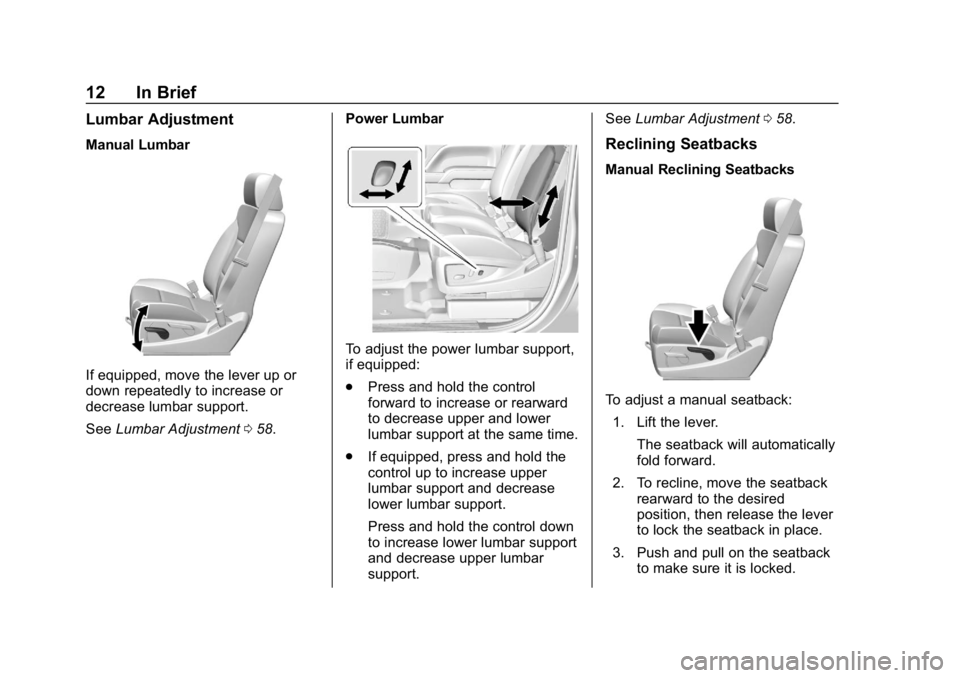
Lumbar Adjustment
Manual Lumbar
If equipped, move the lever up or
down repeatedly to increase or
decrease lumbar support.
SeeLumbar Adjustment 058. Power Lumbar
To adjust the power lumbar support,
if equipped:
.
Press and hold the control
forward to increase or rearward
to decrease upper and lower
lumbar support at the same time.
. If equipped, press and hold the
control up to increase upper
lumbar support and decrease
lower lumbar support.
Press and hold the control down
to increase lower lumbar support
and decrease upper lumbar
support. See
Lumbar Adjustment 058.
Reclining Seatbacks
Manual Reclining Seatbacks
To adjust a manual seatback:
1. Lift the lever. The seatback will automatically
fold forward.
2. To recline, move the seatback rearward to the desired
position, then release the lever
to lock the seatback in place.
3. Push and pull on the seatback to make sure it is locked.
Page 14 of 489
Chevrolet Silverado LD 1500 and Silverado 2500/3500 Owner Manual (GMNA-
Localizing-U.S./Canada-12162993) - 2019 - crc - 4/4/18
In Brief 13
To return the seatback to the upright
position:1. Lift the lever fully without applying pressure to the
seatback, and the seatback will
return to the upright position.
2. Push and pull on the seatback to make sure it is locked.
See Reclining Seatbacks 059.
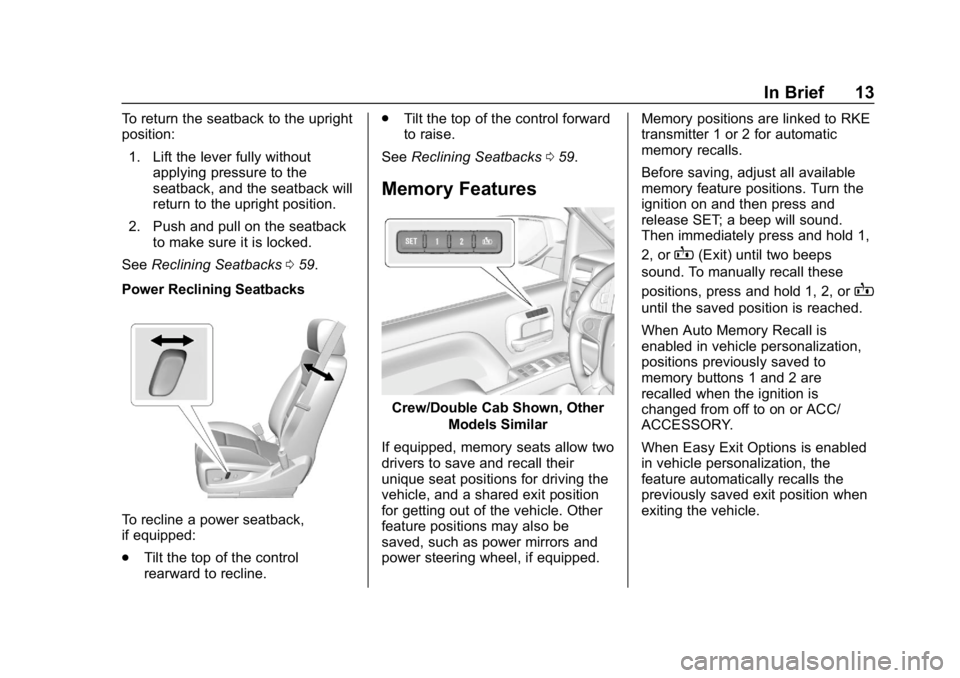
Power Reclining Seatbacks
To recline a power seatback,
if equipped:
. Tilt the top of the control
rearward to recline. .
Tilt the top of the control forward
to raise.
See Reclining Seatbacks 059.
Memory Features
Crew/Double Cab Shown, Other
Models Similar
If equipped, memory seats allow two
drivers to save and recall their
unique seat positions for driving the
vehicle, and a shared exit position
for getting out of the vehicle. Other
feature positions may also be
saved, such as power mirrors and
power steering wheel, if equipped. Memory positions are linked to RKE
transmitter 1 or 2 for automatic
memory recalls.
Before saving, adjust all available
memory feature positions. Turn the
ignition on and then press and
release SET; a beep will sound.
Then immediately press and hold 1,
2, or
B(Exit) until two beeps
sound. To manually recall these
positions, press and hold 1, 2, or
B
until the saved position is reached.
When Auto Memory Recall is
enabled in vehicle personalization,
positions previously saved to
memory buttons 1 and 2 are
recalled when the ignition is
changed from off to on or ACC/
ACCESSORY.
When Easy Exit Options is enabled
in vehicle personalization, the
feature automatically recalls the
previously saved exit position when
exiting the vehicle.
Page 17 of 489
Chevrolet Silverado LD 1500 and Silverado 2500/3500 Owner Manual (GMNA-
Localizing-U.S./Canada-12162993) - 2019 - crc - 4/4/18
16 In Brief
2. Press the arrows on the controlpad to move the mirror up,
down, right, or left.
3. Adjust each outside mirror so that a little of the vehicle and
the area behind it can be seen.
4. Keep the selector switch in the center position when not
adjusting either outside mirror.
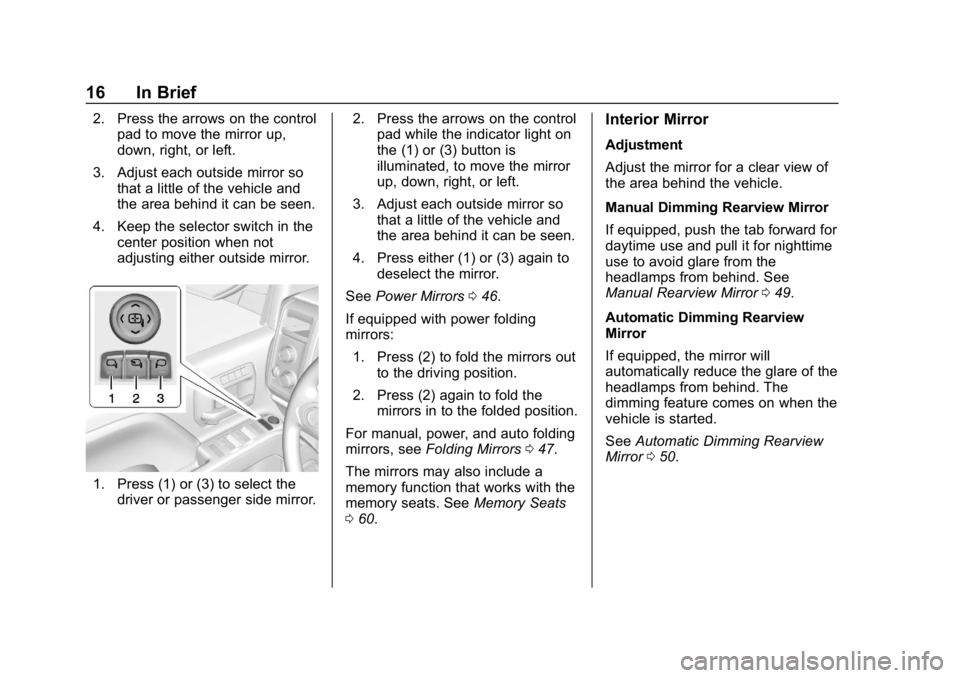
1. Press (1) or (3) to select thedriver or passenger side mirror. 2. Press the arrows on the control
pad while the indicator light on
the (1) or (3) button is
illuminated, to move the mirror
up, down, right, or left.
3. Adjust each outside mirror so that a little of the vehicle and
the area behind it can be seen.
4. Press either (1) or (3) again to deselect the mirror.
See Power Mirrors 046.
If equipped with power folding
mirrors: 1. Press (2) to fold the mirrors out to the driving position.
2. Press (2) again to fold the mirrors in to the folded position.
For manual, power, and auto folding
mirrors, see Folding Mirrors 047.
The mirrors may also include a
memory function that works with the
memory seats. See Memory Seats
0 60.
Interior Mirror
Adjustment
Adjust the mirror for a clear view of
the area behind the vehicle.
Manual Dimming Rearview Mirror
If equipped, push the tab forward for
daytime use and pull it for nighttime
use to avoid glare from the
headlamps from behind. See
Manual Rearview Mirror 049.
Automatic Dimming Rearview
Mirror
If equipped, the mirror will
automatically reduce the glare of the
headlamps from behind. The
dimming feature comes on when the
vehicle is started.
See Automatic Dimming Rearview
Mirror 050.
Page 19 of 489
Chevrolet Silverado LD 1500 and Silverado 2500/3500 Owner Manual (GMNA-
Localizing-U.S./Canada-12162993) - 2019 - crc - 4/4/18
18 In Brief
Interior Lighting
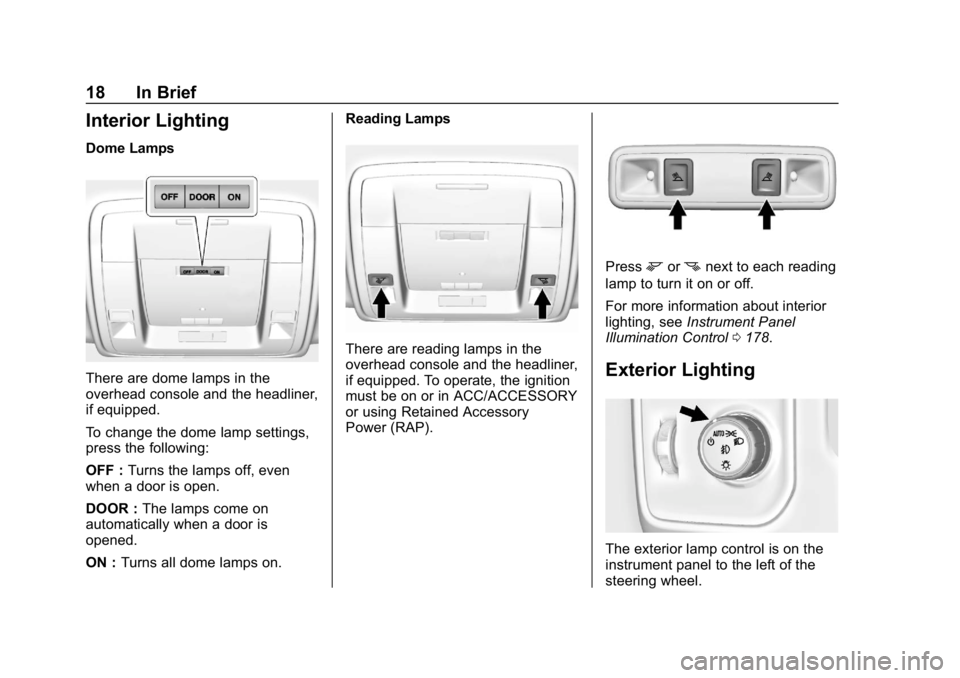
Dome Lamps
There are dome lamps in the
overhead console and the headliner,
if equipped.
To change the dome lamp settings,
press the following:
OFF :Turns the lamps off, even
when a door is open.
DOOR : The lamps come on
automatically when a door is
opened.
ON : Turns all dome lamps on. Reading Lamps
There are reading lamps in the
overhead console and the headliner,
if equipped. To operate, the ignition
must be on or in ACC/ACCESSORY
or using Retained Accessory
Power (RAP).
Pressmornnext to each reading
lamp to turn it on or off.
For more information about interior
lighting, see Instrument Panel
Illumination Control 0178.
Exterior Lighting
The exterior lamp control is on the
instrument panel to the left of the
steering wheel.
Page 20 of 489
Chevrolet Silverado LD 1500 and Silverado 2500/3500 Owner Manual (GMNA-
Localizing-U.S./Canada-12162993) - 2019 - crc - 4/4/18
In Brief 19
O:Turns off the automatic
headlamps and Daytime Running
Lamps (DRL). Turn the headlamp
control to
Oagain to turn the
automatic headlamps or DRL
back on.
For vehicles first sold in Canada, off
will only work when the vehicle is in
P (Park).
AUTO : Automatically turns on the
headlamps, parking lamps,
taillamps, instrument panel lights,
roof marker lamps (if equipped),
front/rear sidemarker lamps, and
license plate lamps.
;: Turns on the parking lamps
including all lamps, except the
headlamps.
5: Turns on the headlamps
together with the parking lamps and
instrument panel lights.
See:
. Exterior Lamp Controls 0171.
. Daytime Running Lamps (DRL)
0174.
. Fog Lamps 0176.
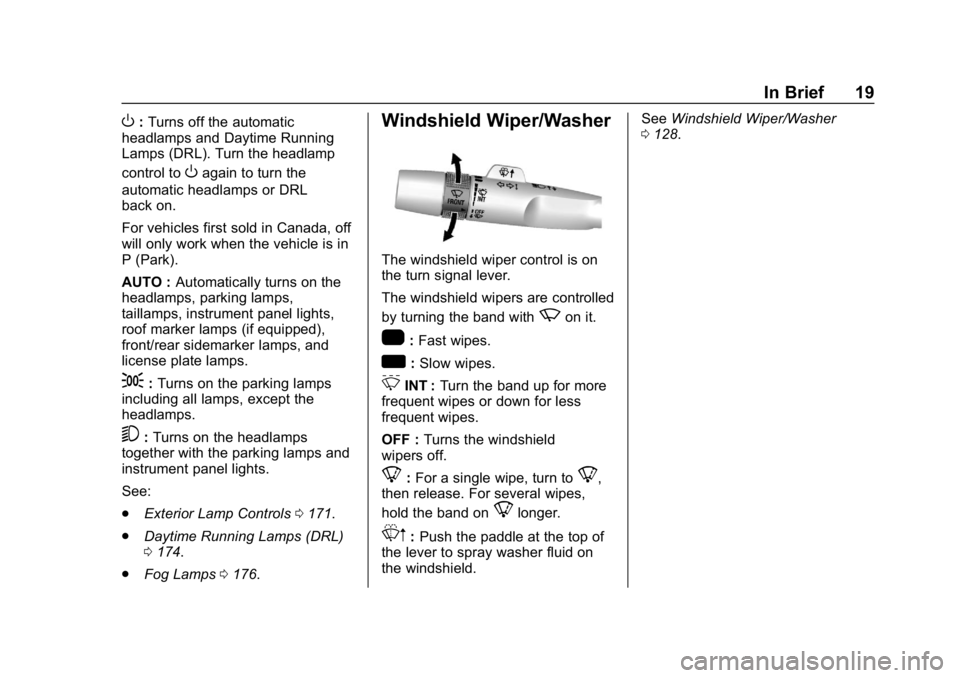
Windshield Wiper/Washer
The windshield wiper control is on
the turn signal lever.
The windshield wipers are controlled
by turning the band with
zon it.
1:Fast wipes.
w:Slow wipes.
3INT : Turn the band up for more
frequent wipes or down for less
frequent wipes.
OFF : Turns the windshield
wipers off.
8: For a single wipe, turn to8,
then release. For several wipes,
hold the band on
8longer.
Lm: Push the paddle at the top of
the lever to spray washer fluid on
the windshield. See
Windshield Wiper/Washer
0 128.