2018 CHEVROLET IMPALA instrument panel
[x] Cancel search: instrument panelPage 6 of 345

Chevrolet Impala Owner Manual (GMNA-Localizing-U.S./Canada-11348316) -
2018 - CRC - 8/22/17
In Brief 5
In Brief
Instrument Panel
Instrument Panel . . . . . . . . . . . . . . . . 6
Initial Drive Information
Initial Drive Information . . . . . . . . . . 8
Stop/Start System . . . . . . . . . . . . . . . 8
Remote Keyless Entry (RKE)System . . . . . . . . . . . . . . . . . . . . . . . . 8
Remote Vehicle Start . . . . . . . . . . . 8
Door Locks . . . . . . . . . . . . . . . . . . . . . 9
Trunk . . . . . . . . . . . . . . . . . . . . . . . . . . 10
Windows . . . . . . . . . . . . . . . . . . . . . . . 10
Seat Adjustment . . . . . . . . . . . . . . . 10
Memory Features . . . . . . . . . . . . . . 12
Second Row Seats . . . . . . . . . . . . 13
Heated and Ventilated Seats . . . 13
Head Restraint Adjustment . . . . 13
Seat Belts . . . . . . . . . . . . . . . . . . . . . 14
Passenger Sensing System . . . 14
Mirror Adjustment . . . . . . . . . . . . . . 14
Steering Wheel Adjustment . . . . 15
Interior Lighting . . . . . . . . . . . . . . . . 16
Exterior Lighting . . . . . . . . . . . . . . . 17
Windshield Wiper/Washer . . . . . . 17
Climate Controls . . . . . . . . . . . . . . . 18
Transmission . . . . . . . . . . . . . . . . . . 19
Vehicle Features
Infotainment System . . . . . . . . . . . 20
Steering Wheel Controls . . . . . . . 20
Cruise Control . . . . . . . . . . . . . . . . . 20
Driver Information Center (DIC) . . . . . . . . . . . . . . . . . 20
Forward Collision Alert (FCA) System . . . . . . . . . . . . . . . . . . . . . . . 21
Forward Automatic Braking (FAB) . . . . . . . . . . . . . . . . 21
Lane Departure Warning (LDW) . . . . . . . . . . . . . . . 21
Lane Change Alert (LCA) . . . . . . 22
Rear Vision Camera (RVC) . . . . 22
Rear Cross Traffic Alert (RCTA) System . . . . . . . . . . . . . . . . . . . . . . . 22
Parking Assist . . . . . . . . . . . . . . . . . 22
Power Outlets . . . . . . . . . . . . . . . . . 22
Universal Remote System . . . . . 23
Sunroof . . . . . . . . . . . . . . . . . . . . . . . . 23
Performance and Maintenance
Traction Control/Electronic Stability Control . . . . . . . . . . . . . . 24
Tire Pressure Monitor . . . . . . . . . . 24
Fuel . . . . . . . . . . . . . . . . . . . . . . . . . . . 25
E85 or FlexFuel . . . . . . . . . . . . . . . . 25
Engine Oil Life System . . . . . . . . 25
Driving for Better Fuel Economy . . . . . . . . . . . . . . . . . . . . . 26 Roadside Assistance
Program . . . . . . . . . . . . . . . . . . . . . . 26
Page 7 of 345

Chevrolet Impala Owner Manual (GMNA-Localizing-U.S./Canada-11348316) -
2018 - CRC - 8/22/17
6 In Brief
Instrument Panel
Page 8 of 345

Chevrolet Impala Owner Manual (GMNA-Localizing-U.S./Canada-11348316) -
2018 - CRC - 8/22/17
In Brief 7
1.Instrument Panel Illumination
Control 0142.
2. Air Vents 0154.
3. Trunk Release. See Trunk
0 39.
Parking Assist Button. See
Assistance Systems for
Parking or Backing 0192 (If
Equipped).
Lane Departure Warning
(LDW) Button. See Lane
Departure Warning (LDW)
0 200.
4. Turn Signal Lever. See Turn
and Lane-Change Signals
0 142.
5. Instrument Cluster 0110.
Driver Information Center (DIC)
0 125.
6. Windshield Wiper/Washer
0105.
7. Hazard Warning Flashers
0141.
8. Light Sensor. See Automatic
Headlamp System 0141. 9. Storage Area with USB Port
Inside (If Equipped). See
Instrument Panel Storage 099
and for the USB Port, see
Infotainment 0146.
10. Infotainment 0146.
11. Climate Control Systems
0147.
Dual Automatic Climate Control
System 0150.
12. Storage Area with Accessory Power Outlet Inside.
SeeCenter Console Storage
0 100 andPower Outlets
0 106.
13. Heated and Ventilated Front
Seats 059 (If Equipped).
14. Traction Control/Electronic
Stability Control 0181.
15. Shift Lever. See Automatic
Transmission 0175.
16. Ignition Positions 0167.
17. Steering Wheel Controls 0104.
Driver Information Center
Buttons. See Driver Information
Center (DIC) 0125. 18.
Steering Wheel Controls 0104
(Out of View).
19. Horn 0104.
20. Steering Wheel Adjustment
0104.
21. Cruise Control 0182 (If
Equipped).
Adaptive Cruise Control 0184
(If Equipped).
Heated Steering Wheel 0104
(If Equipped).
Forward Collision Alert (FCA)
System 0195 (If Equipped).
22. Instrument Panel Storage 099
(If Equipped).
Fuse Cover. See Instrument
Panel Fuse Block 0246.
23. Hood Release. See Hood
0 216.
24. Data Link Connector (Out of View). See Malfunction
Indicator Lamp (Check Engine
Light) 0118.
25. Electric Parking Brake 0178.
Page 17 of 345

Chevrolet Impala Owner Manual (GMNA-Localizing-U.S./Canada-11348316) -
2018 - CRC - 8/22/17
16 In Brief
Interior Lighting
Dome Lamps
The interior lamps control in the
overhead console controls both the
front and rear interior lamps.
To change the dome lamp settings,
press the following:
OFF :Turns the lamp off, even
when a door is open.
DOOR : The lamp comes on
automatically when a door is
opened.
ON : Turns the lamp on. Reading Lamps
Front Reading Lamps
Rear Reading Lamps
There are front and rear reading
lamps in the overhead console and
the headliner.
#or$: Press the button near
each lamp to turn it on or off.
For more information on interior
lighting, see Instrument Panel
Illumination Control 0142.
Page 18 of 345
Chevrolet Impala Owner Manual (GMNA-Localizing-U.S./Canada-11348316) -
2018 - CRC - 8/22/17
In Brief 17
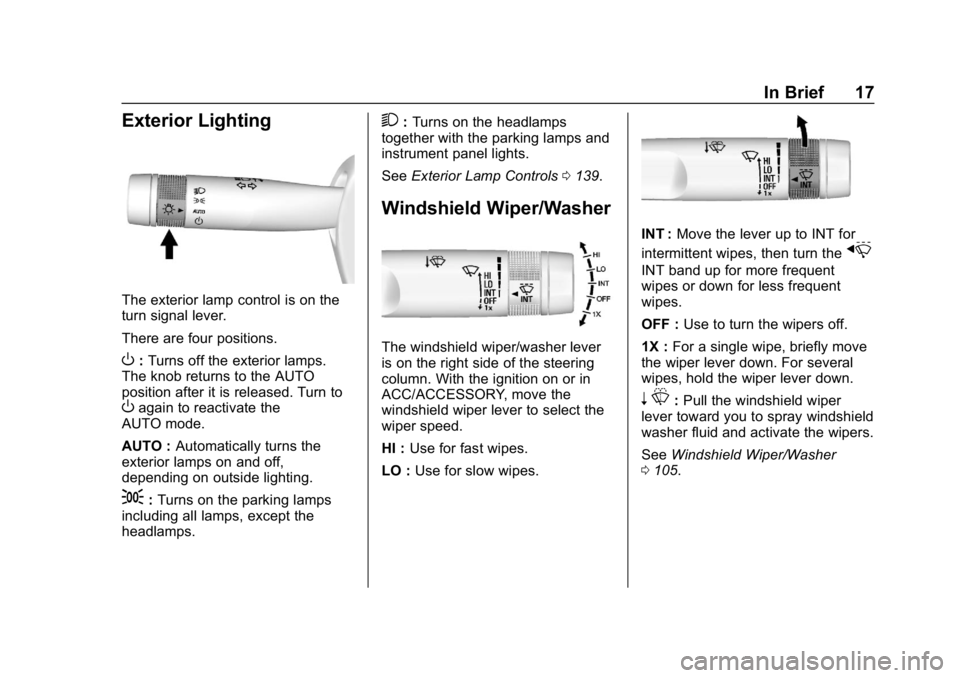
Exterior Lighting
The exterior lamp control is on the
turn signal lever.
There are four positions.
O:Turns off the exterior lamps.
The knob returns to the AUTO
position after it is released. Turn to
Oagain to reactivate the
AUTO mode.
AUTO : Automatically turns the
exterior lamps on and off,
depending on outside lighting.
;: Turns on the parking lamps
including all lamps, except the
headlamps.
2: Turns on the headlamps
together with the parking lamps and
instrument panel lights.
See Exterior Lamp Controls 0139.
Windshield Wiper/Washer
The windshield wiper/washer lever
is on the right side of the steering
column. With the ignition on or in
ACC/ACCESSORY, move the
windshield wiper lever to select the
wiper speed.
HI : Use for fast wipes.
LO : Use for slow wipes.
INT : Move the lever up to INT for
intermittent wipes, then turn the
x
INT band up for more frequent
wipes or down for less frequent
wipes.
OFF : Use to turn the wipers off.
1X : For a single wipe, briefly move
the wiper lever down. For several
wipes, hold the wiper lever down.
n L: Pull the windshield wiper
lever toward you to spray windshield
washer fluid and activate the wipers.
See Windshield Wiper/Washer
0 105.
Page 40 of 345

Chevrolet Impala Owner Manual (GMNA-Localizing-U.S./Canada-11348316) -
2018 - CRC - 8/22/17
Keys, Doors, and Windows 39
Lockout Protection Override
Lockout protection can be manually
overridden with the driver door open
by pressing and holding
Qon the
power door lock switch.
Unlocked Door Anti-Lockout
If Unlocked Door Anti-Lockout is
turned on and the vehicle is off, the
driver door is open, and locking is
requested, all the doors will lock and
the driver door will remain open.
Press the button again to lock the
driver door. The Unlocked Door
Anti-Lockout feature can be turned
on or off. See Vehicle
Personalization 0128.
Safety Locks
The rear door safety locks prevent
passengers from opening the rear
doors from inside the vehicle.
PressZ {to activate the safety
locks on the rear doors. The
indicator light in the switch will
illuminate when activated.
The rear door power windows are
also disabled. See Power Windows
0 45.
Press
Z {again to deactivate the
safety locks.
If a rear door handle is being pulled
at the same time the safety lock is
deactivated, that door will remain
locked and the indicator light may
flash. Release the handle, then
press the safety lock twice to
deactivate the safety locks.
Doors
Trunk
{Warning
Exhaust gases can enter the
vehicle if it is driven with the
liftgate, hatch/trunk open, or with
any objects that pass through the
seal between the body and the
hatch/trunk or liftgate. Engine
exhaust contains carbon
monoxide (CO) which cannot be
seen or smelled. It can cause
unconsciousness and even death.
If the vehicle must be driven with
the liftgate or hatch/trunk open:
. Close all of the windows.
. Fully open the air outlets on
or under the instrument
panel.
. Adjust the climate control
system to a setting that
brings in only outside air
(Continued)
Page 42 of 345

Chevrolet Impala Owner Manual (GMNA-Localizing-U.S./Canada-11348316) -
2018 - CRC - 8/22/17
Keys, Doors, and Windows 41
Vehicle Security
This vehicle has theft-deterrent
features; however, they do not make
the vehicle impossible to steal.
Vehicle Alarm System
This vehicle has an anti-theft alarm
system.
The indicator light, on the
instrument panel near the
windshield, indicates the status of
the system:
Off :Alarm system is disarmed. On Solid :
Vehicle is secured
during the delay to arm the system.
Fast Flash : Vehicle is unsecured.
A door, the hood, or the trunk
is open.
Slow Flash : Alarm system is
armed.
Arming the Alarm System
1. Close the trunk and the hood. Turn off the vehicle.
2. Lock the vehicle in one of three ways:
.Use the RKE transmitter.
. Use the Keyless Access
system.
. With a door open, press the
inside
Q.
3. After 30 seconds the alarm system will arm, and the
indicator light will begin to
slowly flash indicating the
alarm system is operating.
Pressing
Qon the RKE
transmitter a second time will bypass the 30-second delay
and immediately arm the alarm
system.
If the driver door is opened without
first unlocking with the RKE
transmitter, the lights will flash to
indicate pre-alarm. If the vehicle is
not started, or the door is not
unlocked by pressing
Kon the RKE
transmitter during the 10–second
pre-alarm, the alarm will be
activated.
If a door, the hood, or the trunk is
opened without first disarming the
system, the turn signals will flash for
about 30 seconds. The alarm
system will then re-arm to monitor
for the next unauthorized event.
The theft-deterrent alarm system will
not arm if the doors are locked with
the key.
Disarming the Alarm System
To disarm the alarm system or turn
off the alarm if it has been activated:
. Press
Kon the RKE transmitter.
Page 63 of 345

Chevrolet Impala Owner Manual (GMNA-Localizing-U.S./Canada-11348316) -
2018 - CRC - 8/22/17
62 Seats and Restraints
Seat Belts
This section describes how to use
seat belts properly, and some things
not to do.
{Warning
Do not let anyone ride where a
seat belt cannot be worn properly.
In a crash, if you or your
passenger(s) are not wearing
seat belts, injuries can be much
worse than if you are wearing
seat belts. You can be seriously
injured or killed by hitting things
inside the vehicle harder or by
being ejected from the vehicle. In
addition, anyone who is not
buckled up can strike other
passengers in the vehicle.
It is extremely dangerous to ride
in a cargo area, inside or outside
of a vehicle. In a collision,
passengers riding in these areas
are more likely to be seriously
injured or killed. Do not allow(Continued)
Warning (Continued)
passengers to ride in any area of
the vehicle that is not equipped
with seats and seat belts.
Always wear a seat belt, and
check that all passenger(s) are
restrained properly too.
This vehicle has indicators as a
reminder to buckle the seat belts.
See Seat Belt Reminders 0115.
Why Seat Belts Work
When riding in a vehicle, you travel
as fast as the vehicle does. If the
vehicle stops suddenly, you keep
going until something stops you.
It could be the windshield, the
instrument panel, or the seat belts!
When you wear a seat belt, you and
the vehicle slow down together.
There is more time to stop because
you stop over a longer distance and,
when worn properly, your strongest
bones take the forces from the seat
belts. That is why wearing seat belts
makes such good sense.
Questions and Answers About
Seat Belts
Q: Will I be trapped in the vehicle
after a crash if I am wearing a
seat belt?
A: You could be—whether you are
wearing a seat belt or not. Your
chance of being conscious
during and after a crash, so you
can unbuckle and get out, is
much greater if you are belted.