2018 CHEVROLET EXPRESS service
[x] Cancel search: servicePage 157 of 356
Chevrolet Express Owner Manual (GMNA-Localizing-U.S./Canada/Mexico-
11374212) - 2018 - crc - 2/2/18
156 Climate Controls
Climate Controls
Climate Control Systems
Climate Control Systems . . . . . 156
Rear Heating System . . . . . . . . . 158
Rear Climate ControlSystem . . . . . . . . . . . . . . . . . . . . . . 158
Air Vents
Air Vents . . . . . . . . . . . . . . . . . . . . . 161
Maintenance
Service . . . . . . . . . . . . . . . . . . . . . . . 161
Climate Control Systems
The heating, cooling, and ventilation for the vehicle can be controlled with
this system.
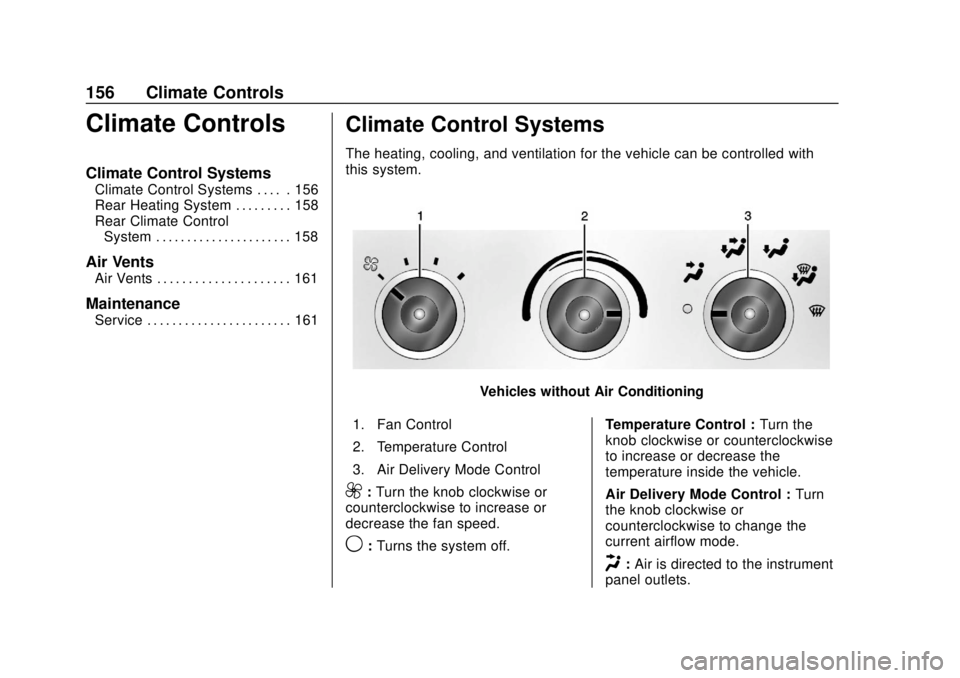
Vehicles without Air Conditioning
1. Fan Control
2. Temperature Control
3. Air Delivery Mode Control
9: Turn the knob clockwise or
counterclockwise to increase or
decrease the fan speed.
9: Turns the system off. Temperature Control :
Turn the
knob clockwise or counterclockwise
to increase or decrease the
temperature inside the vehicle.
Air Delivery Mode Control : Turn
the knob clockwise or
counterclockwise to change the
current airflow mode.
H: Air is directed to the instrument
panel outlets.
Page 162 of 356

Chevrolet Express Owner Manual (GMNA-Localizing-U.S./Canada/Mexico-
11374212) - 2018 - crc - 2/2/18
Climate Controls 161
Be sure to keep the area under the
front seats clear of any objects so
that the air inside of the vehicle can
circulate effectively.
For information on how to use the
main climate control system, see
Climate Control Systems0156. For
information on ventilation, see Air
Vents 0161.Air Vents
Use the outlets located near the
center and on the sides of the
instrument panel to change the
direction of airflow.
Operation Tips
.
Clear away any ice, snow or
leaves from the air inlets at the
base of the windshield that may
block the flow of air into the
vehicle.
. Use of non-GM approved hood
deflectors may adversely affect
the performance of the system.
. Clear snow off the hood to
improve visibility and help
decrease moisture drawn into
the vehicle.
. Keep the path under the front
seats clear of objects to help
circulate the air inside of the
vehicle more effectively.
Maintenance
Service
All vehicles have a label underhood
that identifies the refrigerant used in
the vehicle. The refrigerant system
should only be serviced by trained
and certified technicians. The air
conditioning evaporator should
never be repaired or replaced by
one from a salvage vehicle.
It should only be replaced by a new
evaporator to ensure proper and
safe operation.
During service, all refrigerants
should be reclaimed with proper
equipment. Venting refrigerants
directly to the atmosphere is harmful
to the environment and may also
create unsafe conditions based on
inhalation, combustion, frostbite,
or other health-based concerns.
Page 168 of 356

Chevrolet Express Owner Manual (GMNA-Localizing-U.S./Canada/Mexico-
11374212) - 2018 - crc - 2/2/18
Driving and Operating 167
Other Rainy Weather Tips
Besides slowing down, other wet
weather driving tips include:
.Allow extra following distance.
. Pass with caution.
. Keep windshield wiping
equipment in good shape.
. Keep the windshield washer fluid
reservoir filled.
. Have good tires with proper
tread depth. See Tires0255.
. Turn off cruise control.
Hill and Mountain Roads
Driving on steep hills or through
mountains is different than driving
on flat or rolling terrain. Tips include:
.Keep the vehicle serviced and in
good shape.
. Check all fluid levels and brakes,
tires, cooling system, and
transmission.
. Shift to a lower gear when going
down steep or long hills.
{Warning
Using the brakes to slow the
vehicle on a long downhill slope
can cause brake overheating, can
reduce brake performance, and
could result in a loss of braking.
Shift the transmission to a lower
gear to let the engine assist the
brakes on a steep downhill slope.
{Warning
Coasting downhill in N (Neutral)
or with the ignition off is
dangerous. This can cause
overheating of the brakes and
loss of steering assist. Always
have the engine running and the
vehicle in gear.
. Drive at speeds that keep the
vehicle in its own lane. Do not
swing wide or cross the
center line. .
Be alert on top of hills;
something could be in your lane
(e.g., stalled car, accident).
. Pay attention to special road
signs (e.g., falling rocks area,
winding roads, long grades,
passing or no-passing zones)
and take appropriate action.
Winter Driving
Driving on Snow or Ice
Snow or ice between the tires and
the road creates less traction or
grip, so drive carefully. Wet ice can
occur at about 0 °C (32 °F) when
freezing rain begins to fall. Avoid
driving on wet ice or in freezing rain
until roads can be treated.
For slippery road driving:
.Accelerate gently. Accelerating
too quickly causes the wheels to
spin and makes the surface
under the tires slick.
. Turn on Traction Control. See
Traction Control/Electronic
Stability Control 0188.
Page 176 of 356

Chevrolet Express Owner Manual (GMNA-Localizing-U.S./Canada/Mexico-
11374212) - 2018 - crc - 2/2/18
Driving and Operating 175
1 (ACC/ACCESSORY) :This is the
position in which you can operate
things like the radio and the
windshield wipers when the engine
is off.
2 (ON/RUN) : This position can be
used to operate the electrical
accessories and to display some
instrument cluster warning and
indicator lights. This position can
also be used for service and
diagnostics, and to verify the proper
operation of the malfunction
indicator lamp as may be required
for emission inspection purposes.
The switch stays in this position
when the engine is running.
If you leave the key in the ACC/
ACCESSORY or ON/RUN position
with the engine off, the battery could
be drained. You may not be able to
start the vehicle if the battery is
allowed to drain for an extended
period of time.
3 (START) : This is the position that
starts the engine. When the engine
starts, release the key. The ignition
switch returns to ON/RUN for
driving. A warning tone will sound when the
driver door is opened, the ignition is
in ACC/ACCESSORY or LOCK/OFF
and the key is in the ignition.
Starting the Engine
If the vehicle has a diesel engine,
see the Duramax diesel
supplement.
To place the transmission in the
proper gear:
Move the shift lever to P (Park) or
N (Neutral). The engine will not start
in any other position. To restart the
engine when the vehicle is already
moving, use N (Neutral) only.
Caution
If you add electrical parts or
accessories, you could change
the way the engine operates. Any
resulting damage would not be
covered by the vehicle warranty.
See
Add-On Electrical Equipment
0 212.
Caution
Do not try to shift to P (Park) if the
vehicle is moving. If you do, you
could damage the transmission.
Shift to P (Park) only when the
vehicle is stopped.
Caution
If the steering wheel is turned
until it reaches the end of its
travel, and is held in that position
while starting the vehicle, damage
may occur to the hydraulic power
steering system and there may be
loss of power steering assist.
Starting Procedure 1. With your foot off the accelerator pedal, turn the
ignition key to START. When
the engine starts, let go of the
key. The idle speed will go
down as your engine gets
warm. Do not race the engine
Page 181 of 356

Chevrolet Express Owner Manual (GMNA-Localizing-U.S./Canada/Mexico-
11374212) - 2018 - crc - 2/2/18
180 Driving and Operating
Shifting out of Park
The vehicle has an automatic
transmission shift lock control
system. You have to fully apply the
brakes before you can shift from
P (Park) when the ignition is on or in
ACC/ACCESSORY. SeeAutomatic
Transmission 0182.
The shift lock control system is
designed to:
. Prevent the ignition key from
being removed unless the shift
lever is in P (Park).
. Prevent movement of the shift
lever out of P (Park), unless the
ignition is on or in ACC/
ACCESSORY and the regular
brake pedal is applied.
The shift lock control system is
always functional except in the case
of a dead battery or low voltage
(less than 9 V) battery.
If the vehicle has an uncharged
battery or a battery with low voltage,
try charging or jump starting the
battery. See Jump Starting - North
America 0286. To shift out of P (Park):
1. Apply the brake pedal.
2. Turn the ignition on or to ACC/ ACCESSORY.
3. Move the shift lever to the desired position.
If you still are unable to shift out of
P (Park): 1. Ease the pressure on the shift lever.
2. While holding down the brake pedal, push the shift lever all
the way into P (Park).
3. Move the shift lever to the desired position.
If you are still having a problem
shifting, have the vehicle serviced.
Parking over Things
That Burn
{Warning
Things that can burn could touch
hot exhaust parts under the
vehicle and ignite. Do not park
over papers, leaves, dry grass,
or other things that can burn.
Page 195 of 356

Chevrolet Express Owner Manual (GMNA-Localizing-U.S./Canada/Mexico-
11374212) - 2018 - crc - 2/2/18
194 Driving and Operating
1. View displayed by thecamera
1. View displayed by thecamera
2. Corners of the rear bumper
Displayed images may be further or
closer than they appear. The area
displayed is limited and objects that
are close to either corner of the
bumper or under the bumper do not
display.
When the System Does Not
Seem To Work Properly
The RVC system might not work
properly or display a clear image if:
. It is dark.
. The sun or the beam of
headlamps is shining directly
into the camera lens.
. Ice, snow, mud, or anything else
builds up on the camera lens.
Clean the lens, rinse it with
water, and wipe it with a soft
cloth.
. The back of the vehicle is in an
accident. The position and
mounting angle of the camera
can change or the camera can
be affected. Be sure to have the
camera and its position and
mounting angle checked at your
dealer. Troubleshooting
If the vehicle is in R (Reverse) and
a blue screen is displayed in the
mirror and then the display shuts
off, see your dealer for service.
Parking Assist
If equipped, the Rear Parking Assist
(RPA) system uses sensors on the
rear bumper to assist with parking
and avoiding objects while in
R (Reverse).
{Warning
The parking assist system does
not detect children, pedestrians,
bicyclists, animals, or objects
below the bumper or that are too
close or too far from the vehicle.
It is not available at speeds
greater than 8 km/h (5 mph). To
prevent injury, death, or vehicle
damage, even with parking assist,
always check the area around the
vehicle and check all mirrors
before backing.
Page 196 of 356

Chevrolet Express Owner Manual (GMNA-Localizing-U.S./Canada/Mexico-
11374212) - 2018 - crc - 2/2/18
Driving and Operating 195
How the System Works
RPA comes on automatically when
the shift lever is moved into
R (Reverse). A single beep sounds
to indicate the system is working.
RPA operates only at speeds less
than 8 km/h (5 mph).
An obstacle detection is indicated
by beeps. The time between beeps
gets shorter as the vehicle
approaches the obstacle. Repeated
beeps are heard when the distance
is less than 30 cm (12 in).
To be detected, objects must be at
least 25 cm (10 in) off the ground
and below rear door level. Objects
must also be within 2.5 m (8 ft) from
the rear bumper. This distance may
be less during warmer or humid
weather.
Turning the System On and Off
The system can be disabled through
the Driver Information Center (DIC).
See“Park Assist” underDriver
Information Center (DIC) 0111.
RPA defaults to the on setting each
time the vehicle is started. Turn RPA off when towing a trailer.
When the System Does Not
Seem to Work Properly
The following messages may be
displayed on the DIC:
SERVICE PARK ASSIST :
If this
message occurs, take the vehicle to
your dealer for repair.
PARK ASSIST OFF : This message
occurs if the driver disables the
system or if the vehicle is driven
above 8 km/h (5 mph) in
R (Reverse).
PARK ASST BLOCKED SEE
OWNERS MANUAL : This
message can occur under the
following conditions:
. The sensors are not clean. Keep
the rear bumper free of mud,
dirt, snow, ice, slush, and frost.
The message may not clear until
frost or ice has melted all around
and inside the sensor.
. A trailer is attached to the
vehicle, or a bicycle or an object
hanging out of the rear door
during the current or last drive cycle. RPA will return to normal
operation after it is determined
the object is removed. This
could take a few drive cycles.
. A tow bar is attached to the
vehicle.
Other conditions may affect system
performance, such as vibrations
from a jackhammer or the
compression of air brakes on a very
large truck.
Side Blind Zone
Alert (SBZA)
If equipped, the SBZA system is a
lane-changing aid that assists
drivers with avoiding crashes that
occur with moving vehicles in the
side blind zone (or spot) areas. The
SBZA warning display will light up in
the corresponding outside side
mirror and will flash if the turn signal
is on.
Page 198 of 356

Chevrolet Express Owner Manual (GMNA-Localizing-U.S./Canada/Mexico-
11374212) - 2018 - crc - 2/2/18
Driving and Operating 197
SBZA can be disabled through the
Driver Information Center (DIC).
SeeDriver Information Center (DIC)
0 111. If SBZA is disabled by the
driver, the SBZA mirror displays will
not light up.
When the System Does Not
Seem to Work Properly
SBZA displays may not come on
when passing a vehicle quickly, for
a stopped vehicle, or when towing a
trailer. The SBZA detection zones
that extend back from the side of
the vehicle do not move further back
when a trailer is towed. Use caution
while changing lanes when towing a
trailer. SBZA may alert to objects
attached to the vehicle, such as a
trailer, bicycle, or object extending
out to either side of the vehicle. This
is normal system operation; the
vehicle does not need service.
SBZA may not always alert the
driver to vehicles in the side blind
zone, especially in wet conditions.
The system does not need to be
serviced. The system may light up
due to guardrails, signs, trees, shrubs, and other non-moving
objects. This is normal system
operation; the vehicle does not need
service.
SBZA may not operate when the
SBZA sensors in the left or right
corners of the rear bumper are
covered with mud, dirt, snow, ice,
or slush, or in heavy rainstorms. For
cleaning instructions, see "Washing
the Vehicle" under
Exterior Care
0 292. If the DIC displays the
system unavailable message after
cleaning both sides of the vehicle
toward the rear corners of the
vehicle, see your dealer.
If the SBZA displays do not light up
when vehicles are in the blind zone
and the system is clean, the system
may need service. Take the vehicle
to your dealer.
Radio Frequency Information
See Radio Frequency Statement
0 328.
Fuel
For diesel engine vehicles, see
“Fuel for Diesel Engines” in the
Duramax diesel supplement.
GM recommends the use of TOP
TIER
®detergent gasoline to keep
the engine cleaner and reduce
engine deposits. See
www.toptiergas.com for a list of TOP
TIER detergent gasoline marketers
and applicable countries.
If the vehicle has a yellow fuel cap
or a yellow sticker on the fuel door,
E85 or FlexFuel can be used. See
E85 or FlexFuel 0199.