2018 CHEVROLET CORVETTE door lock
[x] Cancel search: door lockPage 70 of 358

Chevrolet Corvette Owner Manual (GMNA-Localizing-U.S./Canada/Mexico-
11374030) - 2018 - CRC - 11/8/17
Seats and Restraints 69
locking feature may be
engaged. If this happens, let
the belt go back all the way
and start again.
Engaging the child restraint
locking feature in the front
outboard seating position may
affect the passenger sensing
system. SeePassenger
Sensing System 077.
If the shoulder portion of the
driver belt is pulled out all the
way, the Automatic Locking
Retractor (ALR) feature may be
engaged. If this happens, let
the belt go back all the way
and start again.
4. Push the latch plate into the buckle until it clicks.
Pull up on the latch plate to
make sure it is secure. If the
belt is not long enough, see
Seat Belt Extender 070.
Position the release button on
the buckle so that the seat belt
could be quickly unbuckled if
necessary.
5. To make the lap part tight, pull up on the shoulder belt.To unlatch the belt, push the button
on the buckle. The belt should
return to its stowed position.
Always stow the seat belt slowly.
If the seat belt webbing returns
quickly to the stowed position, the
retractor may lock and cannot be
pulled out. If this happens, pull the
seat belt straight out firmly to unlock
the webbing, and then release it.
If the webbing is still locked in the
retractor, see your dealer.
Before a door is closed, be sure the
seat belt is out of the way. If a door
is slammed against a seat belt,
damage can occur to both the seat
belt and the vehicle.
Page 75 of 358
Chevrolet Corvette Owner Manual (GMNA-Localizing-U.S./Canada/Mexico-
11374030) - 2018 - CRC - 11/8/17
74 Seats and Restraints
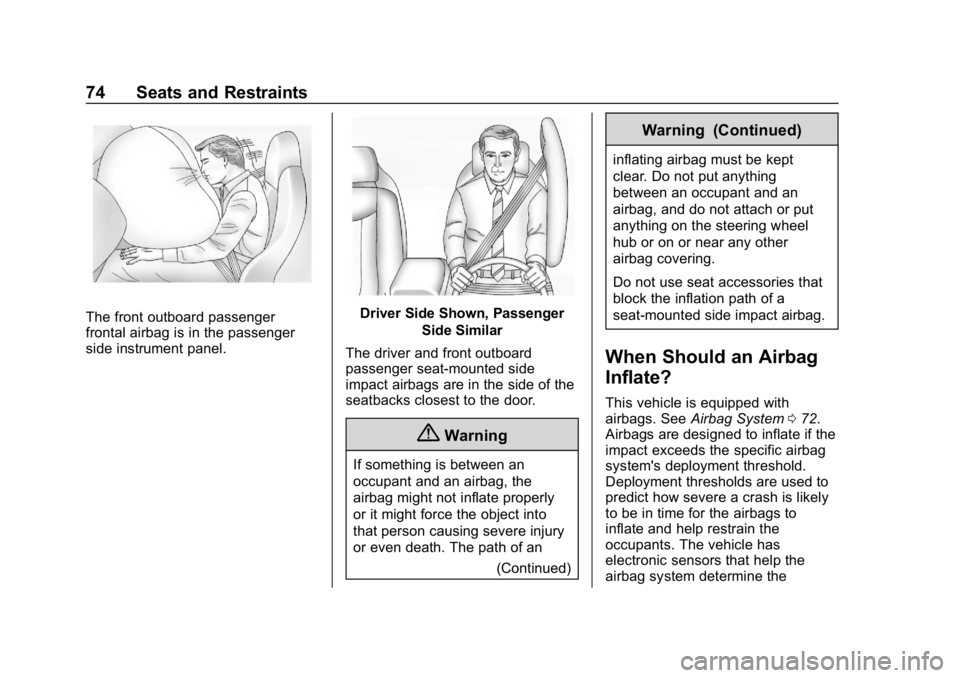
The front outboard passenger
frontal airbag is in the passenger
side instrument panel.Driver Side Shown, PassengerSide Similar
The driver and front outboard
passenger seat-mounted side
impact airbags are in the side of the
seatbacks closest to the door.
{Warning
If something is between an
occupant and an airbag, the
airbag might not inflate properly
or it might force the object into
that person causing severe injury
or even death. The path of an (Continued)
Warning (Continued)
inflating airbag must be kept
clear. Do not put anything
between an occupant and an
airbag, and do not attach or put
anything on the steering wheel
hub or on or near any other
airbag covering.
Do not use seat accessories that
block the inflation path of a
seat-mounted side impact airbag.
When Should an Airbag
Inflate?
This vehicle is equipped with
airbags. SeeAirbag System 072.
Airbags are designed to inflate if the
impact exceeds the specific airbag
system's deployment threshold.
Deployment thresholds are used to
predict how severe a crash is likely
to be in time for the airbags to
inflate and help restrain the
occupants. The vehicle has
electronic sensors that help the
airbag system determine the
Page 77 of 358

Chevrolet Corvette Owner Manual (GMNA-Localizing-U.S./Canada/Mexico-
11374030) - 2018 - CRC - 11/8/17
76 Seats and Restraints
Airbags should never be regarded
as anything more than a supplement
to seat belts.
What Will You See after
an Airbag Inflates?
After the frontal and seat-mounted
side impact airbags inflate, they
quickly deflate, so quickly that some
people may not even realize the
airbags inflated. Some components
of the airbag module may be hot for
several minutes. For location of the
airbags, seeWhere Are the
Airbags? 073.
The parts of the airbag that come
into contact with you may be warm,
but not too hot to touch. There may
be some smoke and dust coming
from the vents in the deflated
airbags. Airbag inflation does not
prevent the driver from seeing out of
the windshield or being able to steer
the vehicle, nor does it prevent
people from leaving the vehicle.
{Warning
When an airbag inflates, there
may be dust in the air. This dust
could cause breathing problems
for people with a history of
asthma or other breathing trouble.
To avoid this, everyone in the
vehicle should get out as soon as
it is safe to do so. If you have
breathing problems but cannot
get out of the vehicle after an
airbag inflates, then get fresh air
by opening a window or a door.
If you experience breathing
problems following an airbag
deployment, you should seek
medical attention.
The vehicle has a feature that may
automatically unlock the doors, turn
on the interior lamps and hazard
warning flashers, and shut off the
fuel system after the airbags inflate.
The feature may also activate,
without airbag inflation, after an
event that exceeds a predetermined
threshold. After turning the ignition off and then on again, the fuel
system will return to normal
operation; the doors can be locked,
the interior lamps can be turned off,
and the hazard warning flashers can
be turned off using the controls for
those features. If any of these
systems are damaged in the crash
they may not operate as normal.
{Warning
A crash severe enough to inflate
the airbags may have also
damaged important functions in
the vehicle, such as the fuel
system, brake and steering
systems, etc. Even if the vehicle
appears to be drivable after a
moderate crash, there may be
concealed damage that could
make it difficult to safely operate
the vehicle.
Use caution if you should attempt
to restart the engine after a crash
has occurred.
Page 97 of 358

Chevrolet Corvette Owner Manual (GMNA-Localizing-U.S./Canada/Mexico-
11374030) - 2018 - CRC - 11/8/17
96 Instruments and Controls
Instruments and
Controls
Controls
Steering Wheel Adjustment . . . . 97
Steering Wheel Controls . . . . . . . 97
Horn . . . . . . . . . . . . . . . . . . . . . . . . . . . 97
Windshield Wiper/Washer . . . . . . 97
Compass . . . . . . . . . . . . . . . . . . . . . . 98
Clock . . . . . . . . . . . . . . . . . . . . . . . . . . 98
Power Outlets . . . . . . . . . . . . . . . . . 99
Warning Lights, Gauges, and
Indicators
Warning Lights, Gauges, andIndicators . . . . . . . . . . . . . . . . . . . 100
Instrument Cluster . . . . . . . . . . . . 101
Speedometer . . . . . . . . . . . . . . . . . 106
Odometer . . . . . . . . . . . . . . . . . . . . . 106
Trip Odometer . . . . . . . . . . . . . . . . 106
Tachometer . . . . . . . . . . . . . . . . . . . 106
Fuel Gauge . . . . . . . . . . . . . . . . . . . 106
Boost Gauge . . . . . . . . . . . . . . . . . 107
Engine Coolant Temperature Gauge . . . . . . . . . . . . . . . . . . . . . . 108
Seat Belt Reminders . . . . . . . . . 109
Airbag Readiness Light . . . . . . . 109 Passenger Airbag Status
Indicator . . . . . . . . . . . . . . . . . . . . . 110
Charging System Light . . . . . . . . 111
Malfunction Indicator Lamp . . . 111
Brake System Warning Light . . . . . . . . . . . . . . . . . . . . . . . . 113
Electric Parking Brake Light . . . . . . . . . . . . . . . . . . . . . . . . 113
Service Electric Parking Brake Light . . . . . . . . . . . . . . . . . . . . . . . . 114
Antilock Brake System (ABS) Warning Light . . . . . . . . . . . . . . . 114
Traction Off Light . . . . . . . . . . . . . 114
Traction Control System (TCS)/ Electronic Stability Control
Light . . . . . . . . . . . . . . . . . . . . . . . . 115
Electronic Stability Control (ESC) Off Light . . . . . . . . . . . . . . 115
Engine Coolant Temperature Warning Light . . . . . . . . . . . . . . . 115
Tire Pressure Light . . . . . . . . . . . 116
Engine Oil Pressure Light . . . . . 116
Low Fuel Warning Light . . . . . . . 117
Security Light . . . . . . . . . . . . . . . . . 117
High-Beam On Light . . . . . . . . . . 117
Lamps On Reminder . . . . . . . . . . 117
Cruise Control Light . . . . . . . . . . 118
Door Ajar Light . . . . . . . . . . . . . . . 118
Information Displays
Driver Information Center (DIC) . . . . . . . . . . . . . . . . 118
Head-Up Display (HUD) . . . . . . 121
Vehicle Messages
Vehicle Messages . . . . . . . . . . . . 125
Engine Power Messages . . . . . 125
Vehicle Speed Messages . . . . . 126
Vehicle Personalization
Vehicle Personalization . . . . . . . 126
Universal Remote System
Universal Remote System . . . . 133
Universal Remote System Programming . . . . . . . . . . . . . . . 133
Universal Remote System Operation . . . . . . . . . . . . . . . . . . . 135
Page 99 of 358

Chevrolet Corvette Owner Manual (GMNA-Localizing-U.S./Canada/Mexico-
11374030) - 2018 - CRC - 11/8/17
98 Instruments and Controls
nL: Pull the windshield wiper
lever toward you to spray washer
fluid and activate the wipers. The
wipers will continue until the lever is
released or the maximum wash time
is reached. When the lever is
released, additional wipes may
occur depending on how long the
windshield washer had been
activated. See Washer Fluid0241
for information on filling the
windshield washer fluid reservoir.
Clear snow and ice from the wiper
blades and windshield before using
them. If frozen to the windshield,
carefully loosen or thaw them.
Damaged blades should be
replaced. See Wiper Blade
Replacement 0247.
Heavy snow or ice can overload the
wiper motor.
Wiper Parking
If the ignition is turned off while the
wipers are on LO, HI, or INT, they
will immediately stop. If the windshield wiper lever is then
moved to OFF before the driver
door is opened or within 10 minutes,
the wipers will restart and move to
the base of the windshield.
If the ignition is turned off while the
wipers are performing wipes due to
windshield washing, the wipers
continue to run until they reach the
base of the windshield.
Compass
The vehicle may have a compass
display on the center stack. The
compass receives its heading and
other information from the Global
Positioning System (GPS) antenna,
Electronic Stability Control, and
vehicle speed information.
The compass system is designed to
operate for a certain number of
miles or degrees of turn before
needing a signal from the GPS
satellites. When the compass
display shows CAL, drive the
vehicle for a short distance in an
open area where it can receive a
GPS signal. The compass systemwill automatically determine when a
GPS signal is restored and provide
a heading again.
Clock
The infotainment system controls
are used to access the time and
date settings through the menu
system. See
“Home Page” in the
infotainment manual for information
about how to use the menu system.
Setting the Clock
Time
To set the time:
1. From the Home Page, touch SETTINGS, then touch Time
and Date.
2. Touch Set Time, then touch
RorQto increase or
decrease hours or minutes,
and change AM or PM.
3. Touch 12-24 Hr for a 12 or 24 hour clock.
4. Touch
}to go back to the
previous menu.
Page 100 of 358

Chevrolet Corvette Owner Manual (GMNA-Localizing-U.S./Canada/Mexico-
11374030) - 2018 - CRC - 11/8/17
Instruments and Controls 99
Date
To set the date:1. Touch SETTINGS, then touch Time and Date.
2. Touch Set Date, then touch
RorQto increase or
decrease month, day, or year.
3. Touch
}to go back to the
previous menu.
Auto Set
When on, the time and date will
automatically update.
Auto set requires an active OnStar
service plan.
To set auto set: 1. Touch SETTINGS, then touch Time and Date.
2. Touch Set Time or Set Date.
3. Touch Auto Set, then select On-Cell Network or Off-Manual
to manually set the time
and date.
4. Touch
}to go back to the
previous menu. If auto set is on, the time displayed
on the clock may not update
immediately when driving into a new
time zone.
Clock Display
When on, the digital clock will show
on the infotainment display.
To set the clock display:
1. Touch SETTINGS, then touch Time and Date.
2. Touch Clock Display, then select Off or On.
3. Touch
}to go back to the
previous menu.
Power Outlets
Use the accessory power outlet to
plug in electrical equipment, such as
a cell phone or MP3 player.
There are three accessory power
outlets:
. In front of the cupholder. Open
the door compartment to access.
. Inside the center console
storage compartment. .
In the rear compartment.
Lift the cover to access and replace
when not in use.
The power outlets in front of the
cupholder and inside the center
console storage compartment are
powered when the ignition is on or
in ACC/ACCESSORY, or until the
driver door is opened within
10 minutes of turning off the vehicle.
See Retained Accessory Power
(RAP) 0182.
The rear compartment power outlet
is powered at all times. The
vehicle’s battery may run down if
the power outlet is used while the
ignition is off. Use this power outlet
for plugging in the battery
maintainer, if equipped.
{Warning
Power is always supplied to the
trunk outlet. Do not leave
electrical equipment plugged in
when the vehicle is not in use
because the vehicle could catch
fire and cause injury or death.
Page 129 of 358

Chevrolet Corvette Owner Manual (GMNA-Localizing-U.S./Canada/Mexico-
11374030) - 2018 - CRC - 11/8/17
128 Instruments and Controls
Select Off or On.
Maximum Start Up Volume
This feature sets the maximum
startup volume. If the vehicle is
started and the volume is greater
than this level, the volume is
adjusted to this level.
To set the maximum startup volume,
touch + or−to increase or
decrease.
Vehicle
Select and the following may
display:
. Climate and Air Quality
. Comfort and Convenience
. Lighting
. Power Door Locks
. Remote Lock, Unlock, Start
Climate and Air Quality
Select and the following may
display:
.Auto Fan Speed
. Auto Defog .
Auto Rear Defog
Auto Fan Speed
This feature will set the auto fan
speed.
Select Low, Medium, or High.
Auto Defog
When set to On, the front defog will
automatically react to temperature
and humidity conditions that may
cause fogging.
Select Off or On.
Auto Rear Defog
If equipped, this feature will
automatically turn on the rear defog.
Select Off or On.
Comfort and Convenience
Select and the following may
display:
. Auto Memory Recall
. Easy Exit Options
. Chime Volume
. Reverse Tilt Mirror Auto Memory Recall
This feature automatically recalls
the current driver
’s previously stored
1 or 2 button positions when the
ignition is changed from off to on or
ACC/ACCESSORY. See Memory
Seats 060.
Select Off or On.
Easy Exit Options
This feature automatically recalls
the previously stored Exit button
position when exiting the vehicle.
See Memory Seats 060.
Select Off or On.
Chime Volume
This allows the selection of the
chime volume level.
Touch + or −to adjust the volume.
Reverse Tilt Mirror
This allows the feature to be turned
on or off.
Select Off, On - Driver and
Passenger, On - Driver, or On -
Passenger.
Page 130 of 358

Chevrolet Corvette Owner Manual (GMNA-Localizing-U.S./Canada/Mexico-
11374030) - 2018 - CRC - 11/8/17
Instruments and Controls 129
Lighting
Select and the following may
display:
.Vehicle Locator Lights
. Exit Lighting
Vehicle Locator Lights
This feature will flash the turn signal
lamps and turn on some of the
exterior lamps when
Kon the
Remote Keyless Entry (RKE)
transmitter is pressed to locate the
vehicle.
Select Off or On.
Exit Lighting
This allows the selection of how
long the exterior lamps stay on
when leaving the vehicle when it is
dark outside.
Select Off, 30 Seconds, 60 Seconds,
or 120 Seconds.
Power Door Locks
Select and the following may
display:
. Unlocked Door Anti-Lockout .
Auto Door Unlock
. Delayed Door Lock
Unlocked Door Anti-Lockout
When on, this feature will keep the
driver door from locking when the
door is open. If Off is selected, the
Delayed Door Lock menu will be
available.
Select Off or On.
Auto Door Unlock
This allows selection of which of the
doors will automatically unlock when
the vehicle is shifted into P (Park)
with an automatic transmission or
when the vehicle is turned off with a
manual transmission.
Select Off, All Doors, or Driver Door.
Delayed Door Lock
When on, this feature will delay the
locking of the doors. To override the
delay, press the power door lock
switch on the door.
Select Off or On.
Remote Lock, Unlock, Start
Select and the following may
display:
. Remote Unlock Light Feedback
. Remote Lock Feedback
. Remote Door Unlock
. Remote Start Auto Cool Seats
. Remote Start Auto Heat Seats
. Passive Door Unlock
. Passive Door Lock
. Remote Left in Vehicle Alert
Remote Unlock Light Feedback
When on, the exterior lamps will
flash when unlocking the vehicle
with the RKE transmitter.
Select Off or Flash Lights.
Remote Lock Feedback
This allows selection of what type of
feedback is given when locking the
vehicle with the RKE transmitter.
Select Off, Lights and Horn, Lights
Only, or Horn Only.