2018 CHEVROLET CORVETTE C7 brake
[x] Cancel search: brakePage 4 of 353

Chevrolet Corvette Owner Manual (GMNA-Localizing-U.S./Canada/Mexico-
11374030) - 2018 - crc - 3/29/17
Introduction 3
{Danger
Danger indicates a hazard with a
high level of risk which will result
in serious injury or death.
{Warning
Warning indicates a hazard that
could result in injury or death.
Caution
Caution indicates a hazard that
could result in property or vehicle
damage.
A circle with a slash through it is a
safety symbol which means“Do
Not,” “Do not do this,” or“Do not let
this happen.”
Symbols
The vehicle has components and
labels that use symbols instead of
text. Symbols are shown along with
the text describing the operation or
information relating to a specific
component, control, message,
gauge, or indicator.
M: Shown when the owner ’s
manual has additional instructions
or information.
*: Shown when the service
manual has additional instructions
or information.
0: Shown when there is more
information on another page —
“see page.”
Vehicle Symbol Chart
Here are some additional symbols
that may be found on the vehicle
and what they mean. See the
features in this manual for
information.
9: Airbag Readiness Light
#:Air Conditioning
!:Antilock Brake System (ABS)
$:Brake System Warning Light
":Charging System
I: Cruise Control
`:Do Not Puncture
^:Do Not Service
B:Engine Coolant Temperature
O:Exterior Lamps
_: Flame/Fire Prohibited
.:Fuel Gauge
+: Fuses
3:Headlamp High/Low-Beam
Changer
j: LATCH System Child Restraints
*:Malfunction Indicator Lamp
::Oil Pressure
O:Power
/:Remote Vehicle Start
>:Seat Belt Reminders
7: Tire Pressure Monitor
Page 8 of 353

Chevrolet Corvette Owner Manual (GMNA-Localizing-U.S./Canada/Mexico-
11374030) - 2018 - crc - 3/29/17
In Brief 7
1.Air Vents 0151.
2. Turn Signal Lever. See Turn
and Lane-Change Signals
0 138.
Exterior Lamp Controls 0135.
3. Manual Shift Paddles (If Equipped). See Manual
Mode 0183.
Active Rev Match Paddles
(If Equipped). See Active Rev
Match 0188.
4. Instrument Cluster 099.
5. Windshield Wiper/Washer 095.
6. Instrument Panel Storage Button. See Instrument Panel
Storage 090.
7. Passenger Airbag Status Indicator. See Passenger
Sensing System 075.
8. Light Sensor. See Automatic
Headlamp System 0137.
9. Hazard Warning Flashers
0138.
10. Infotainment 0141. 11. Passenger Temperature
Control. See Dual Automatic
Climate Control System 0147.
Passenger Heated and
Ventilated Seat Controls
(If Equipped). See Heated and
Ventilated Front Seats 062.
12. Driver and Redundant Passenger Heated and
Ventilated Seat Controls
(If Equipped). See Heated and
Ventilated Front Seats 062.
13. Dual Automatic Climate Control
System 0147.
14. Electric Parking Brake 0190.
15. MODE SELECT Knob. See Competitive Driving Mode
0197.
16. Shift Lever (Manual Shown). SeeAutomatic Transmission
0 182 orManual Transmission
0 186.
17. Keyless Ignition. See Ignition
Positions 0175.
18. Bluetooth Controls. See “Steering Wheel Controls” in
the infotainment manual. Voice Recognition Controls.
See
“Steering Wheel Controls”
in the infotainment manual.
Driver Information Center (DIC)
Controls. See Driver
Information Center (DIC) 0116.
19. See “Steering Wheel Controls”
in the infotainment manual.
20. Horn 095.
21. Steering Wheel Adjustment
095 (Out of View).
22. Cruise Control 0201.
23. Hood Release (Out of View). SeeHood 0216.
24. Data Link Connector (DLC) (Out of View). See Malfunction
Indicator Lamp 0109.
25. Hatch/Trunk Release Button. SeeHatch (Trunk) 038.
Intrusion and Inclination
Sensors Disable Switch. See
Vehicle Alarm System 040.
26. Head-Up Display Controls (If Equipped). See Head-Up
Display (HUD) 0118.
27. Power Mirrors 043.
Page 11 of 353

Chevrolet Corvette Owner Manual (GMNA-Localizing-U.S./Canada/Mexico-
11374030) - 2018 - crc - 3/29/17
10 In Brief
Loss of Vehicle Electrical
Power
If the vehicle has lost battery power,
the doors can be opened manually.
From Inside the Vehicle
Pull the driver door release handle.
Pull the passenger door release
handle.
SeeDoor Locks 034.
Trunk Release
For automatic transmissions, the
vehicle must be in P (Park).
For manual transmissions, the
vehicle must be off or stationary
with the parking brake set. See
Electric Parking Brake 0190. To release the hatch/trunk:
.
Press}.
. Press and hold
son the
Remote Keyless Entry (RKE)
transmitter. See Remote Keyless
Entry (RKE) System 026.
Page 22 of 353

Chevrolet Corvette Owner Manual (GMNA-Localizing-U.S./Canada/Mexico-
11374030) - 2018 - crc - 3/29/17
In Brief 21
Universal Remote System
This system, if equipped, provides a
way to replace up to three remote
control transmitters used to activate
devices such as garage door
openers, security systems, and
home automation devices.
Read the instructions completely
before attempting to program the
Universal Remote system. Because
of the steps involved, it may be
helpful to have another person
available to assist you with
programming the Universal Remote
system.See
Universal Remote System
0 131 orUniversal Remote System
0 131.
Roof Panel
If equipped with a removable roof
panel, there are three release
handles. Two are at the front of the
roof panel and one is at the rear of
the roof panel. See “Removing the
Roof Panel” underRoof Panel 047.
Help may be needed to remove the
roof panel. Always store the roof
panel properly in the rear storage
compartment.
For more information:
. See “Storing the Roof Panel”
under Roof Panel 047.
. See “Installing the Roof Panel”
under Roof Panel 047.
Convertible
If equipped, the convertible top can
be automatically opened and
closed. For step-by-step
instructions, see Convertible Top
0 50.
Performance and
Maintenance
Traction Control/
Electronic Stability
Control
The Traction Control System (TCS)
limits wheel spin. The system turns
on automatically every time the
vehicle is started.
StabiliTrak is a computer controlled
system that helps the driver
maintain directional control of the
vehicle in difficult driving conditions.
This is accomplished by selectively
applying any one of the vehicle’s
brakes. The system turns on
automatically every time the vehicle
is started.
.
To turn off TCS, press and
release
gon the center console.
iilluminates in the instrument
cluster.
. To turn off both TCS and
StabiliTrak, press and hold
g,
until the Traction Off light
iand
Page 23 of 353

Chevrolet Corvette Owner Manual (GMNA-Localizing-U.S./Canada/Mexico-
11374030) - 2018 - crc - 3/29/17
22 In Brief
the StabiliTrak OFF lightg
illuminate in the instrument
cluster.
. Press and release
gagain to
turn on both systems.
See Traction Control/Electronic
Stability Control 0192.
The vehicle has Driver Mode
Control and may have Competitive
Driving Mode.
See Driver Mode Control 0194 and
Competitive Driving Mode 0197.
Tire Pressure Monitor
This vehicle may have a Tire
Pressure Monitor System (TPMS).
The low tire pressure warning light
alerts to a significant loss in
pressure of one of the vehicle's
tires. If the warning light comes on,
stop as soon as possible and inflate the tires to the recommended
pressure shown on the Tire and
Loading Information label. See
Vehicle Load Limits
0170. The
warning light will remain on until the
tire pressure is corrected.
The low tire pressure warning light
may come on in cool weather when
the vehicle is first started, and then
turn off as the vehicle is driven. This
may be an early indicator that the
tire pressures are getting low and
the tires need to be inflated to the
proper pressure.
The TPMS does not replace normal
monthly tire maintenance. Maintain
the correct tire pressures.
See Tire Pressure Monitor System
0 264.
Performance Vehicle
Features
Checking Engine Oil
Your vehicle may have a high
performance dry sump lubrication
system. This system operates differently than a standard engine
lubrication system. See
Engine Oil
0 222.
Check the oil level only after the
engine has been thoroughly warmed
up and then check between five and
10 minutes of shutoff. This ensures
that the oil level reading obtained
will be accurate.
Brake Noise
Under certain weather or operating
conditions, occasional brake squeal
may be heard with the vehicle's
performance braking system. This
brake system is designed for
superior fade resistance and
consistent operation using high
performance brake pads. Brake
squeal is normal and does not affect
system performance.
Tire Chatter/Hop
When driving at slow speeds and in
very tight turns, the vehicle may
have tire chatter/hop. This condition
is normal and the vehicle does not
require service.
Page 25 of 353

Chevrolet Corvette Owner Manual (GMNA-Localizing-U.S./Canada/Mexico-
11374030) - 2018 - crc - 3/29/17
24 In Brief
percentage is displayed. See
Driver Information Center (DIC)
0116.
2. Press and hold SEL on the DIC while the Oil Life display is
active. The oil life will change
to 100%.
See Engine Oil Life System 0227.
Car Wash Guidelines
Caution
Some automatic car washes can
cause damage to the vehicle,
wheels, or convertible top,
if equipped. Automatic car
washes are not recommended,
due to lack of clearance for the
undercarriage and/or wide rear
tires and wheels. See "Washing
the Vehicle" under Exterior Care
0 289
Driving for Better Fuel
Economy
Driving habits can affect fuel
mileage. Here are some driving tips
to get the best fuel economy
possible:
.
Avoid fast starts and accelerate
smoothly.
. Brake gradually and avoid
abrupt stops.
. Avoid idling the engine for long
periods of time.
. When road and weather
conditions are appropriate, use
cruise control.
. Always follow posted speed
limits or drive more slowly when
conditions require.
. Keep vehicle tires properly
inflated.
. Combine several trips into a
single trip.
. Replace the vehicle's tires with
the same TPC Spec number
molded into the tire's sidewall
near the size. .
Follow recommended scheduled
maintenance.
. Select Eco Mode for improved
fuel economy. This will result in
better Active Fuel Management
operation. See Active Fuel
Management 0180.
. For recommended shift speeds,
see Manual Transmission 0186.
Premium Fuel
Use the recommended fuel. See
Fuel 0206.
Roadside Assistance
Program
U.S.: 1-800-243-8872
TTY Users (U.S. Only):
1-888-889-2438
Canada: 1-800-268-6800
New Chevrolet owners are
automatically enrolled in the
Roadside Assistance Program.
See Roadside Assistance Program
0 320.
Page 29 of 353

Chevrolet Corvette Owner Manual (GMNA-Localizing-U.S./Canada/Mexico-
11374030) - 2018 - crc - 4/4/17
28 Keys, Doors, and Windows
start the engine from outside the
vehicle using the RKE transmitter.
SeeRemote Vehicle Start 033.
L:Press and release to initiate
vehicle locator. The exterior lamps
flash and the horn chirps three
times. Press and hold
Lfor
three seconds to sound the panic
alarm. The horn sounds and the
turn signal lamps flash for
30 seconds, or until
Lis pressed
again or the vehicle is started.
s: Press and hold to release
the hatch/trunk. If the engine is
running, the shift lever must be in
P (Park) for an automatic
transmission. For a manual
transmission, the shift lever must be
in Neutral with the parking
brake set.
M: If equipped, press and
release
K, then immediately press
and hold
Mcontinuously to open
the convertible top all the way. The
vehicle must be off to operate the
convertible top. Release the button
to stop movement. This button will
only open the convertible top.
Convertible Top
. Do not try to start the vehicle
while using the RKE transmitter
to open the convertible top.
Release both the RKE
transmitter button and ENGINE
START/STOP and wait a few
seconds before starting the
vehicle normally.
. The passive door unlock feature
may not operate properly while
using the RKE transmitter to
open the convertible top.
Keyless Access Operation
This vehicle has the Keyless
Access system that lets you unlock
and unlatch the doors and access
the trunk without removing the RKE
transmitter from your pocket, purse,
briefcase, etc. The RKE transmitter
must be within 1 m (3 ft) of the door
or trunk being opened. There will be
a touch pad on the inside of the
door handles. The Keyless Access system can be
programmed to unlock both doors
on the first door handle sensor
press from the driver door. See
Vehicle Personalization
0124.
If equipped with memory seats, RKE
transmitters 1 and 2 are linked to
seating positions of memory 1 or 2
See Memory Seats 058.
Keyless Unlocking
Press the door handle sensor to
unlock and open the doors if the
RKE transmitter is within 1 m (3 ft).
Pull the door handle to unlatch the
door. See Door Locks 034 and
“Passive Door Unlock” under
Vehicle Personalization 0124.
Passive Locking
Keyless Access will lock several
seconds after all doors are closed if
the vehicle is off and at least one
transmitter has been removed or
none remain in the vehicle.
The fuel door will also lock at
this time.
Page 33 of 353
Chevrolet Corvette Owner Manual (GMNA-Localizing-U.S./Canada/Mexico-
11374030) - 2018 - crc - 4/4/17
32 Keys, Doors, and Windows
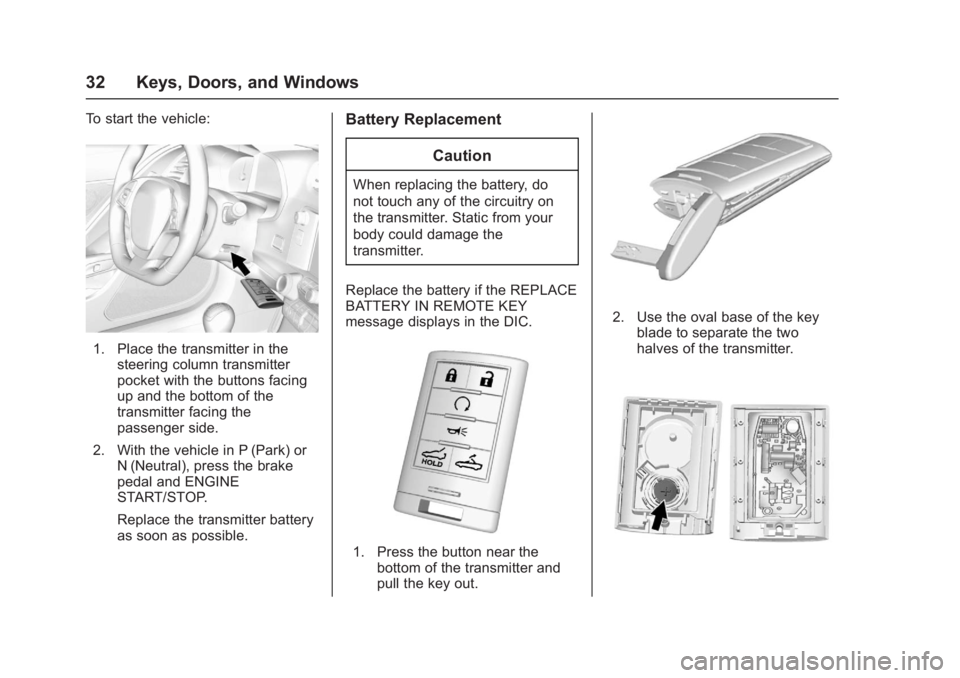
To start the vehicle:
1. Place the transmitter in thesteering column transmitter
pocket with the buttons facing
up and the bottom of the
transmitter facing the
passenger side.
2. With the vehicle in P (Park) or N (Neutral), press the brake
pedal and ENGINE
START/STOP.
Replace the transmitter battery
as soon as possible.
Battery Replacement
Caution
When replacing the battery, do
not touch any of the circuitry on
the transmitter. Static from your
body could damage the
transmitter.
Replace the battery if the REPLACE
BATTERY IN REMOTE KEY
message displays in the DIC.
1. Press the button near the bottom of the transmitter and
pull the key out.
2. Use the oval base of the key
blade to separate the two
halves of the transmitter.