2018 CHEVROLET CORVETTE C7 instrument cluster
[x] Cancel search: instrument clusterPage 121 of 353
Chevrolet Corvette Owner Manual (GMNA-Localizing-U.S./Canada/Mexico-
11374030) - 2018 - crc - 3/29/17
120 Instruments and Controls
button may clear the message. See
Driver Information Center (DIC)
0116.
D:Lift up and hold to brighten the
display. Press down and hold to dim
the display. Hold down to turn the
display off.
The HUD image will automatically
dim and brighten to compensate for
outside lighting. The HUD
brightness control can also be
adjusted as needed.
The HUD image can temporarily
light up depending on the angle and
position of the sunlight on the HUD
display. This is normal.
Polarized sunglasses could make
the HUD image harder to see.
Head-Up Display (HUD) Rotation
Option
This feature allows for adjusting the
angle of the HUD image.
Use the right steering wheel
controls to open and scroll through
different items and displays. While in the options menu, press
w
orxto scroll to the HUD rotation
page. Press
pwhile Head-Up
Display Rotation is highlighted to
enter Adjust Mode.
Press
worxto adjust the angle of
the HUD display. Press SEL to save
the setting. To cancel the setting,
press
o. The vehicle must be in
P (Park). See Instrument Cluster
0 99.
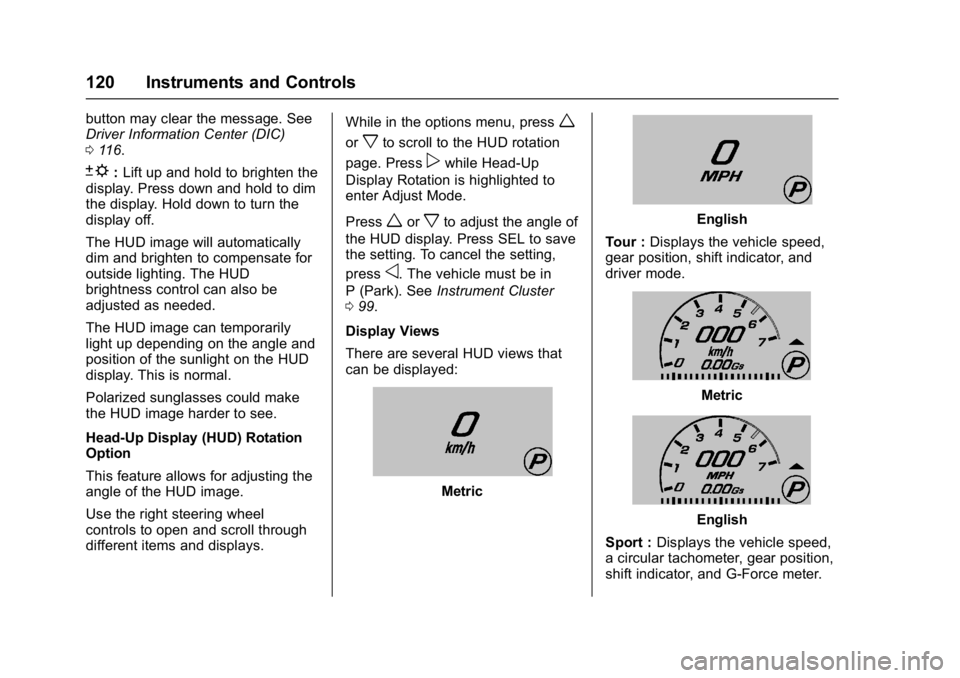
Display Views
There are several HUD views that
can be displayed:
Metric
English
Tour : Displays the vehicle speed,
gear position, shift indicator, and
driver mode.
Metric
English
Sport : Displays the vehicle speed,
a circular tachometer, gear position,
shift indicator, and G-Force meter.
Page 122 of 353

Chevrolet Corvette Owner Manual (GMNA-Localizing-U.S./Canada/Mexico-
11374030) - 2018 - crc - 3/29/17
Instruments and Controls 121
Metric
English
Track : Displays the vehicle speed,
a linear tachometer, gear position,
shift lights, and G-Force meter.
Metric
English
Timing : Displays a linear
tachometer, gear position, shift
lights, and performance or lap timer.
The performance or lap timer
content displayed depends on which
feature is currently in use in the
instrument cluster. See Instrument
Cluster 099.
Interrupts
The interrupt information temporarily
displays in any HUD view. Once
displayed, HUD returns to the
previous HUD view. Interrupts may
include:
. Audio Information
. Navigation Turn-by-Turn
Information
. Incoming Call Information
. Vehicle AlertsMetric
English
Audio : May display when a new
source, radio station, or media type
is selected.
Metric
Page 123 of 353

Chevrolet Corvette Owner Manual (GMNA-Localizing-U.S./Canada/Mexico-
11374030) - 2018 - crc - 3/29/17
122 Instruments and Controls
English
Navigation : Turn-by-turn
navigation information may be
displayed when Navigation is active
and an upcoming maneuver is
pending. It appears until the
maneuver is complete and then the
HUD display returns to the
previous view.
Metric
English
Phone : May display when an
incoming call is received from either
OnStar or a Bluetooth connected
phone. It appears momentarily until
the call is answered or ignored.
Metric
English
Vehicle Alerts : Alerts can be
dismissed in the instrument cluster.
All alerts are not displayed in
the HUD.
Care of the HUD
Clean the inside of the windshield to
remove any dirt or film that could
reduce the sharpness or clarity of
the HUD image.
Clean the HUD lens with a soft cloth
sprayed with glass cleaner. Wipe
the lens gently, then dry it.
HUD Troubleshooting
Check that:
. Nothing is covering the
HUD lens.
. HUD brightness setting is not
too dim or too bright.
Page 137 of 353

Chevrolet Corvette Owner Manual (GMNA-Localizing-U.S./Canada/Mexico-
11374030) - 2018 - crc - 3/29/17
136 Lighting
Exterior Lamps Off
Reminder
A warning chime will sound if the
exterior lamp control is left on in
either the headlamp or parking lamp
position and the driver door is
opened with the ignition off.
Headlamp High/
Low-Beam Changer
Push the turn signal lever away
from you and release to turn the
high beams on. To return to low
beams, push the lever again or pull
it toward you and release.
This indicator light turns on in the
instrument cluster when the
high-beam headlamps are on.
Flash-to-Pass
To use the flash-to-pass feature,
briefly pull the turn signal lever
toward you. The high-beam
indicator flashes to indicate to the
other driver that you intend to pass.
Daytime Running
Lamps (DRL)
DRL can make it easier for others to
see the front of your vehicle during
the day. DRL are required on all
vehicles first sold in Canada.
The DRL system makes the
dedicated lamps come on when the
following conditions are met:
.It is still daylight and the ignition
is on.
. The exterior lamp control is in
the AUTO position.
. The transmission is not in
P (Park) or the parking brake
is off.
When DRL are on, only the front
lamps will be on. The parking
lamps, taillamps, instrument panel lights, or other exterior lamps will
not be on when the DRL are
being used.
When it is dark enough outside, the
front lamps dim to parking lamps
and the normal low-beam
headlamps turn on.
When it is bright enough outside,
the regular lamps go off, and the
front DRL will take over. If the
vehicle is started in a dark garage,
the automatic headlamp system
comes on immediately. Once the
vehicle leaves the garage, it takes
approximately one minute for the
automatic headlamp system to
change to DRL if it is light outside.
During that delay, the instrument
cluster may not be as bright as
usual. Make sure the instrument
panel brightness knob is in the full
bright position. See
Instrument
Panel Illumination Control 0139.
If it is dark enough outside and the
exterior lamp control is off, a Driver
Information Center (DIC) message
may display.
Page 138 of 353

Chevrolet Corvette Owner Manual (GMNA-Localizing-U.S./Canada/Mexico-
11374030) - 2018 - crc - 3/29/17
Lighting 137
Turning the exterior lamp control to
off a second time, or turning on the
headlamps will remove the DIC
message. If the parking lamps were
turned on instead, the DIC message
will continue to be displayed.
The regular headlamp system
should be turned on when needed.
To turn off the DRL, turn the exterior
lamp control to
Oor shift into
P (Park). The DRL will stay off until
the control is toggled again or the
transmission is shifted out of
P (Park).
For vehicles, first sold in Canada,
the DRL can only be turned off
when the vehicle is parked.
Automatic Headlamp
System
When the exterior lamp control is
set to AUTO and it is dark enough
outside, the headlamps and parking
lamps come on automatically.
There is a light sensor on top of the
instrument panel. Do not cover the
sensor, otherwise the headlamps
will come on when they are not
needed.
The system may also turn on the
headlamps and parking lamps when
driving through a parking garage or
tunnel.
If the vehicle is started in a dark
garage, the automatic headlamp
system comes on immediately. If it
is light outside when the vehicle
leaves the garage, there is a slight
delay before the automatic
headlamp system changes to the
DRL. During that delay, the
instrument cluster may not be as
bright as usual. Make sure the
instrument panel brightness control is in the full bright position. See
Instrument Panel Illumination
Control
0139.
When it is bright enough outside,
the headlamps and parking lamps
will turn off or may change to
Daytime Running Lamps (DRL).
The automatic headlamp system
turns off when the exterior lamp
control is turned toOor the ignition
is off.
To turn automatic headlamp system
back on, turn the band to
Oagain,
then release it.
If the automatic headlamp system
has the headlamps turned on and
you turn the ignition off, the
headlamps will turn off. When the
driver door is opened the
headlamps and parking lamps will
illuminate for a period of time.
The length of the delayed
illumination period can be changed.
See “Exit Lighting” underVehicle
Personalization 0124.
The regular headlamp system
should be turned on when needed.
Page 139 of 353

Chevrolet Corvette Owner Manual (GMNA-Localizing-U.S./Canada/Mexico-
11374030) - 2018 - crc - 3/29/17
138 Lighting
Lights On with Wipers
If the windshield wipers are
activated in daylight with the engine
on and the exterior lamp control is in
AUTO, the headlamps, parking
lamps, and other exterior lamps will
come on. The time it takes for the
lamps to turn on depends on the
wiper speed. When the wipers are
turned off, the lamps turn off. To
disable, move the exterior lamp
control to
Oor;.
Hazard Warning Flashers
The hazard warning flashers warn
others that you have a problem. The
button is near the center of the
instrument panel.
|:Press to make the front and
rear turn signal lamps flash on and
off. Press again to turn the
flashers off.
The hazard warning flashers work
no matter what mode the ignition is
in, even if the ignition is turned off.
When the hazard warning flashers
are on, the turn signals will
not work.
Turn and Lane-Change
Signals
An arrow on the instrument cluster
flashes in the direction of the turn or
lane change.
Move the lever all the way up or
down to signal a turn.
Raise or lower the lever until the
arrow starts to flash to signal a lane
change. Hold it there until the lane
change is complete. If the lever is
briefly pressed and released, the
turn signal flashes three times.
If more flashes are desired,
continue to hold the lever.
The lever returns to its starting
position when it is released.
Page 185 of 353

Chevrolet Corvette Owner Manual (GMNA-Localizing-U.S./Canada/Mexico-
11374030) - 2018 - crc - 4/4/17
184 Driving and Operating
When using the Manual Paddle
Shift feature while in M (Manual
Mode), the current gear will be
displayed in the instrument cluster
or the Head-Up Display (HUD),
if equipped. SeeHead-Up Display
(HUD) 0118.
When accelerating the vehicle from
a stop in snowy and icy conditions,
shifting to 2 (Second) gear allows
the vehicle to gain more traction.
The Manual Paddle Shift system
can be deactivated by moving the
shift lever from M (Manual Mode)
back to D (Drive).When the shift lever is in D (Drive),
press either the right (+) plus paddle
or the left (−) minus paddle to place
the transmission in Temporary
Manual Paddle Shift mode. The
gear indicator next to the shift lever,
in the cluster, and in the HUD will
display an M, even though the shift
lever is still in D (Drive). To exit the
system, hold the (+) plus paddle for
more than one second. The system
will return to automatic shifting after
six seconds of cruising at a steady
speed, no manual shifts, no
aggressive cornering, or when the
vehicle comes to a stop.
While the Manual Paddle Shift gear
selection system is active, the
transmission will automatically
downshift through the gears as the
vehicle slows. The transmission will select 1 (First) gear as the vehicle
stops. From a stop, the vehicle will
start from and hold 1 (First) gear
unless the manual paddle shifts are
used to shift into a different gear,
or D (Drive) is selected.
If the left (−) minus paddle is held
down briefly, the transmission will
downshift to the lowest gear
possible for the vehicle speed. If the
paddle continues to be held as the
vehicle slows, downshifts will
continue to occur as vehicle speed
allows. This feature also works
while in Temporary Manual Paddle
Shift mode, but first press and
release the (−) minus paddle to
enter Temporary Manual Paddle
Shift mode, then press and hold the
(−) minus paddle briefly.
The Manual Paddle Shift system will
not allow an upshift or a downshift if
the vehicle speed is too fast or too
slow, nor will it allow a start from
3 (Third) or higher gear.
If upshifting does not occur when
needed, vehicle speed will be
limited to protect the engine.
Page 186 of 353

Chevrolet Corvette Owner Manual (GMNA-Localizing-U.S./Canada/Mexico-
11374030) - 2018 - crc - 4/4/17
Driving and Operating 185
When a requested shift is denied
due to the speed restrictions shown,
a DIC message will be displayed,
and the current gear remains
displayed in the instrument cluster
and HUD.
Manual Paddle Shift operation is
available for use with cruise control.
SeeCruise Control 0201.
The vehicle speeds required for
Manual Paddle Shift upshifts
depend on several vehicle inputs,
which will vary the allowed upshift
speed by a few km/h (mph).
For Vehicles with a 2.41:1 Axle
Ratio (RPO GXB)
. Upshifts to 3 (Third) gear require
approximately 25 km/h (16 mph).
. Upshifts to 4 (Fourth) gear
require approximately 37 km/h
(23 mph).
. Upshifts to 5 (Fifth) gear require
approximately 48 km/h (30 mph).
. Upshifts to 6 (Sixth) gear require
approximately 60 km/h (37 mph). .
Upshifts to 7 (Seventh) gear
require approximately 74 km/h
(46 mph).
. Upshifts to 8 (Eighth) gear
require approximately 95 km/h
(59 mph).
To prevent damage to the
powertrain, Manual Paddle
downshifts to a lower gear cannot
be done above certain speeds. The
maximum speed allowed for
downshifting of gears 1 (First)
through 7 (Seventh) are:
. Into 7 (Seventh) gear over
365 km/h (227 mph).
. Into 6 (Sixth) gear over 309 km/h
(192 mph).
. Into 5 (Fifth) gear over 243 km/h
(151 mph).
. Into 4 (Fourth) gear over
183 km/h (114 mph).
. Into 3 (Third) gear over 149 km/h
(93 mph).
. Into 2 (Second) gear over
100 km/h (62 mph).
. Into 1 (First) gear over 62 km/h
(39 mph). For Vehicles with a 2.73:1 Axle
Ratio (RPO GU2)
.
Upshifts to 3 (Third) gear require
approximately 24 km/h (15 mph).
. Upshifts to 4 (Fourth) gear
require approximately 34 km/h
(21 mph).
. Upshifts to 5 (Fifth) gear require
approximately 43 km/h (27 mph).
. Upshifts to 6 (Sixth) gear require
approximately 55 km/h (34 mph).
. Upshifts to 7 (Seventh) gear
require approximately 64 km/h
(40 mph).
. Upshifts to 8 (Eighth) gear
require approximately 82 km/h
(51 mph).
To prevent damage to the
powertrain, Manual Paddle
downshifts to a lower gear cannot
be done above certain speeds. The
maximum speed allowed for
downshifting of gears 1 (First)
through 7 (Seventh) are:
. Into 7 (Seventh) gear over
321 km/h (199 mph).