2018 CHEVROLET CORVETTE C7 radio controls
[x] Cancel search: radio controlsPage 132 of 353
Chevrolet Corvette Owner Manual (GMNA-Localizing-U.S./Canada/Mexico-
11374030) - 2018 - crc - 3/29/17
Instruments and Controls 131
Universal Remote
System
SeeRadio Frequency Statement
0 326.
The FCC Grant of Equipment
Authorization Certificate number is
NZLSAHL5B.
The Canadian Registration ID
number is 4112A-SAHL5B.
Universal Remote System
Programming
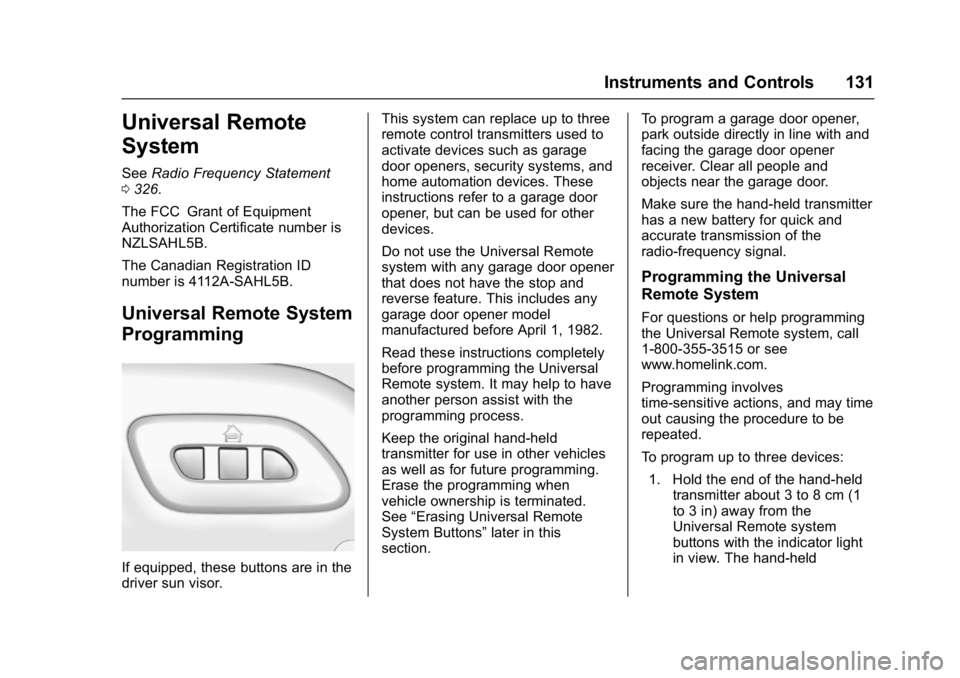
If equipped, these buttons are in the
driver sun visor. This system can replace up to three
remote control transmitters used to
activate devices such as garage
door openers, security systems, and
home automation devices. These
instructions refer to a garage door
opener, but can be used for other
devices.
Do not use the Universal Remote
system with any garage door opener
that does not have the stop and
reverse feature. This includes any
garage door opener model
manufactured before April 1, 1982.
Read these instructions completely
before programming the Universal
Remote system. It may help to have
another person assist with the
programming process.
Keep the original hand-held
transmitter for use in other vehicles
as well as for future programming.
Erase the programming when
vehicle ownership is terminated.
See
“Erasing Universal Remote
System Buttons” later in this
section. To program a garage door opener,
park outside directly in line with and
facing the garage door opener
receiver. Clear all people and
objects near the garage door.
Make sure the hand-held transmitter
has a new battery for quick and
accurate transmission of the
radio-frequency signal.
Programming the Universal
Remote System
For questions or help programming
the Universal Remote system, call
1-800-355-3515 or see
www.homelink.com.
Programming involves
time-sensitive actions, and may time
out causing the procedure to be
repeated.
To program up to three devices:
1. Hold the end of the hand-held transmitter about 3 to 8 cm (1
to 3 in) away from the
Universal Remote system
buttons with the indicator light
in view. The hand-held
Page 133 of 353
Chevrolet Corvette Owner Manual (GMNA-Localizing-U.S./Canada/Mexico-
11374030) - 2018 - crc - 3/29/17
132 Instruments and Controls
transmitter was supplied by the
manufacturer of the garage
door opener receiver.
2. At the same time, press and hold both the hand-held
transmitter button and one of
the three Universal Remote
system buttons to be used to
operate the garage door. Do
not release either button until
the indicator light changes from
a slow to a rapid flash. Then
release both buttons.
Some garage door openers
may require substitution of
Step 2 with the procedure
under “Radio Signals for
Canada and Some Gate
Operators” later in this section.
3. Press and hold the newly programmed Universal Remote
system button for five seconds
while watching the indicator
light and garage door
activation.
.If the indicator light stays on
continuously or the garage
door moves when the
button is pressed, then programming is complete.
There is no need to
complete Steps 4–6.
. If the indicator light does
not come on or the garage
door does not move, a
second button press may
be required. For a second
time, press and hold the
newly programmed button
for five seconds. If the light
stays on or the garage door
moves, programming is
complete.
. If the indicator light blinks
rapidly for two seconds,
then changes to a solid light
and the garage door does
not move, continue with
programming Steps 4–6.
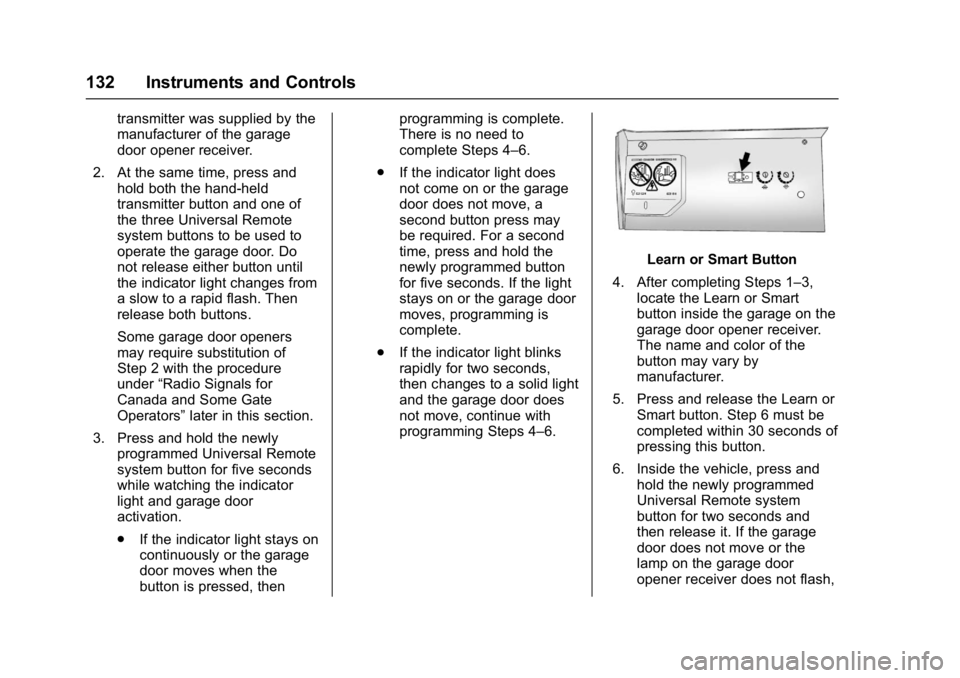
Learn or Smart Button
4. After completing Steps 1–3, locate the Learn or Smart
button inside the garage on the
garage door opener receiver.
The name and color of the
button may vary by
manufacturer.
5. Press and release the Learn or Smart button. Step 6 must be
completed within 30 seconds of
pressing this button.
6. Inside the vehicle, press and hold the newly programmed
Universal Remote system
button for two seconds and
then release it. If the garage
door does not move or the
lamp on the garage door
opener receiver does not flash,
Page 134 of 353
Chevrolet Corvette Owner Manual (GMNA-Localizing-U.S./Canada/Mexico-
11374030) - 2018 - crc - 3/29/17
Instruments and Controls 133
press and hold the same
button a second time for
two seconds, then release it.
Again, if the door does not
move or the garage door lamp
does not flash, press and hold
the same button a third time for
two seconds, then release it.
The Universal Remote system
should now activate the
garage door.
Repeat the process to program the
two remaining buttons.
Radio Signals for Canada and
Some Gate Operators
For questions or programming help
call 1-800-355-3515 or see
www.homelink.com.
Canadian radio-frequency laws and
some U.S. gate operators require
transmitter signals to time out or quit
after several seconds of
transmission. This may not be long
enough for the Universal Remote
system to pick up the signal during
programming. If the programming did not work,
replace Step 2 under
“Programming
the Universal Remote System” with
the following:
Press and hold the Universal
Remote system button while
pressing and releasing the
hand-held transmitter button every
two seconds until the signal has
been successfully accepted by the
Universal Remote system. The
Universal Remote system indicator
light will flash slowly at first and then
rapidly. Proceed with Step 3 under
“Programming the Universal Remote
System” to complete.Universal Remote System
Operation
Using the Universal Remote
System
Press and hold the appropriate
Universal Remote system button for
at least one-half second. The
indicator light will come on while the
signal is being transmitted.
Erasing Universal Remote
System Buttons
Erase all programmed buttons when
vehicle ownership is terminated.
To erase:
1. Press and hold the two outside buttons until the indicator light
begins to flash. This should
take about 10 seconds.
2. Release both buttons.
Page 250 of 353

Chevrolet Corvette Owner Manual (GMNA-Localizing-U.S./Canada/Mexico-
11374030) - 2018 - crc - 3/29/17
Vehicle Care 249
The vehicle may not be equipped
with all of the fuses, relays, and
features shown.Fuses Usage
1 Front wiper
2 Starter
3 ABS valves
4 Engine control module
5 Electric parking brake
6 Front HVAC
7 ABS pump
8 Logistics
9 Vacuum pump
10 Electronic rear differential module
11 Heated seat 1
12 Column lock module
13 Steering column
14 Glove box
15 Engine inside position Fuses Usage
16 Body control module 6
17 HVAC controls
18 Body control module 5
19 Heated seat 2
20 Body control module 7
21 Electric steering column lock
22 Display
23 Auxiliary outlet
24 Radio
25 Instrument cluster HUD
26 Interior rearview mirror
27 Ignition –odd
28 Ignition –even
29 Data link connector
30 Seat fan Fuses Usage
31 Fuel pump power module
32 Exhaust valve 1
33 Horn
34 Headlamp washer
35 A/C clutch
36 Engine outside position
37 Real time dampening
38 Intercooler
39 Left headlamp
40 Right headlamp
41 Headlamp washer pump
42 Exhaust valve 2
43 Reverse lockout
44 Electric rear differential module
45 Rear transmission cooler fan
Page 346 of 353

Chevrolet Corvette Owner Manual (GMNA-Localizing-U.S./Canada/Mexico-
11374030) - 2018 - crc - 4/5/17
Index 345
Electrical System (cont'd)Overload . . . . . . . . . . . . . . . . . . . . . 247
Rear Compartment Fuse
Block . . . . . . . . . . . . . . . . . . . . . . . . 251
Electronic Stability Control (ESC) Off Light . . . . . . . . . . . . . . . . 113
Emergency OnStar . . . . . . . . . . . . . . . . . . . . . . . 332
Engine
Air Cleaner/Filter . . . . . . . . . . . . . 229
Check Light (MalfunctionIndicator) . . . . . . . . . . . . . . . . . . . . 109
Compartment Overview . . . . . . . 217
Coolant Temperature Gauge . . . . . . . . . . . . . . . . . . . . . . 106
Coolant Temperature Warning Light . . . . . . . . . . . . . . . .114
Cooling System . . . . . . . . . . 232, 235
Drive Belt Routing . . . . . . . . . . . . 315
Exhaust . . . . . . . . . . . . . . . . . . . . . . 181
Oil Life System . . . . . . . . . . . . . . . 227
Oil Pressure Light . . . . . . . . . . . . .115
Overheating . . . . . . . . . . . . . . . . . . 236
Power Messages . . . . . . . . . . . . . 123
Running While Parked . . . . . . . . 181
Starting . . . . . . . . . . . . . . . . . . . . . . . 177
Entry Lighting . . . . . . . . . . . . . . . . . . . 140
Event Data Recorders . . . . . . . . . . 328 Exit Lighting . . . . . . . . . . . . . . . . . . . . 140
Extended Parking . . . . . . . . . . . . . . . 180
Extender, Seat Belt . . . . . . . . . . . . . . 68
Exterior Lamp Controls . . . . . . . . . 135
Exterior Lamps Off Reminder . . . 136
Exterior Lighting Battery
Saver . . . . . . . . . . . . . . . . . . . . . . . . . 140
F
Features
Memory . . . . . . . . . . . . . . . . . . . . . . . . . 12
Filter,
Engine Air Cleaner . . . . . . . . . . . 229
Flash-to-Pass . . . . . . . . . . . . . . . . . . . 136
Flashers, Hazard Warning . . . . . . 138
Flat Tire . . . . . . . . . . . . . . . . . . . . . . . . 275
Floor Mats . . . . . . . . . . . . . . . . . . . . . . 297
Fluid Automatic Transmission . . . . . . 228
Brakes . . . . . . . . . . . . . . . . . . . . . . . . 239
Washer . . . . . . . . . . . . . . . . . . . . . . . 237
Folding Mirrors . . . . . . . . . . . . . . . . . . 43
Frequency Statement Radio . . . . . . . . . . . . . . . . . . . . . . . . . 326
Front Air Dam . . . . . . . . . . . . . . . . . . 174
Front Seats Heated and Ventilated . . . . . . . . . . 62
Fuel . . . . . . . . . . . . . . . . . . . . . . . . . . . . 206 Additives . . . . . . . . . . . . . . . . . . . . . 207 Fuel (cont'd)
Economy Driving . . . . . . . . . . . . . . . 24
Filling a Portable Fuel
Container . . . . . . . . . . . . . . . . . . . 209
Filling the Tank . . . . . . . . . . . . . . . 207
Foreign Countries . . . . . . . . . . . . 207
Gauge . . . . . . . . . . . . . . . . . . . . . . . . 105
Low Fuel Warning Light . . . . . . . .115
Management, Active . . . . . . . . . . 180
Requirements, California . . . . . 207
Fuses . . . . . . . . . . . . . . . . . . . . . . . . . . 247 Engine Compartment FuseBlock . . . . . . . . . . . . . . . . . . . . . . . . 247
Rear Compartment Fuse
Block . . . . . . . . . . . . . . . . . . . . . . . . 251
G
Garage Door Opener . . . . . . . . . . . 131Programming . . . . . . . . . . . . . . . . . 131
Gas Strut(s) . . . . . . . . . . . . . . . . . . . . 244
Gauges Boost . . . . . . . . . . . . . . . . . . . . . . . . . 106
Engine CoolantTemperature . . . . . . . . . . . . . . . . 106
Fuel . . . . . . . . . . . . . . . . . . . . . . . . . . 105
Odometer . . . . . . . . . . . . . . . . . . . . . 104
Speedometer . . . . . . . . . . . . . . . . . 104
Tachometer . . . . . . . . . . . . . . . . . . . 104
Trip Odometer . . . . . . . . . . . . . . . . 104