2018 CHEVROLET CAMARO automatic transmission
[x] Cancel search: automatic transmissionPage 225 of 393

Chevrolet Camaro Owner Manual (GMNA-Localizing-U.S./Canada/Mexico-
11348325) - 2018 - CRC - 10/23/17
224 Driving and Operating
Manual Mode
Driver Shift Control (DSC)Caution
Driving with the engine at a high
rpm without upshifting while using
Driver Shift Control (DSC), could
damage the vehicle. Always
upshift when necessary while
using DSC.
DSC allows shifting an automatic
transmission similar to a manual
transmission. To use the DSC
feature:1. Move the shift lever to the left from D (Drive) into the side
gate marked with +/−.
2. Press the shift lever forward to upshift or rearward to
downshift.
While using the DSC feature, the
vehicle will have firmer, quicker
shifting. You can use this for sport
driving or when climbing or
descending hills, to stay in gear
longer, or to downshift for more
power or engine braking.
The transmission will only allow you
to shift into gears appropriate for the
vehicle speed and engine
revolutions per minute (rpm). The
transmission will not automatically
shift to the next lower gear if the
engine rpm is too high, nor to the
next higher gear when the maximum
engine rpm is reached. While in the DSC mode, the
transmission will automatically
downshift as the vehicle comes to a
stop. This will allow for more power
during take-off.
When accelerating the vehicle from
a stop in snowy and icy conditions,
you may want to shift into second
gear. A higher gear allows the
vehicle to gain more traction on
slippery surfaces.
Tap Shift
Tap Shift allows you to manually
control the automatic transmission.
To use Tap Shift, the shift lever must
Page 226 of 393

Chevrolet Camaro Owner Manual (GMNA-Localizing-U.S./Canada/Mexico-
11348325) - 2018 - CRC - 10/23/17
Driving and Operating 225
be in DSC mode. Vehicles with this
feature have indicators on the
steering wheel. The paddles are on
the back of the steering wheel. Tap
the left paddle (−) to downshift, and
the right paddle (+) to upshift. The
Driver Information Center (DIC)
display indicates the gear the
vehicle is in.
Holding the left paddle for an
extended time will downshift the
transmission to the lowest
available gear.
While in Manual Mode, the
transmission will prevent shifting to
a lower gear if the engine speed is
too high. If the tap down−(Minus)
paddle is held while the vehicle
slows down, the M in the DIC will
flash, and the downshift will be
allowed when vehicle speed is low
enough. Continuing to hold the tap
down −(Minus) paddle will not
cause the transmission to continue
downshifting. Each downshift must
be requested separately by
releasing and reapplying the tap
down −(Minus) paddle. Vehicles equipped with a Head-Up
Display (HUD) may also have shift
timing lights across the top of the
display.
The rows of lights get closer
together as the shift point gets
closer. Shift the transmission before
the lights come together in the
display. Shift immediately if the
lights are flashing.
See
Head-Up Display (HUD) 0134.
Temporary Tap Shift Mode allows
brief entry into Tap Shift Mode while
in D (Drive). Tapping either the
upshift or downshift control will
place the transmission in Tap Shift
Mode. Exit Tap Shift Mode by
holding the upshift control for
two seconds. The system will return
to automatic shifting after
seven seconds of driving at a
steady speed, or when the vehicle
comes to a stop. This may be used for sport driving
or when climbing or descending
hills, to stay in gear longer, or to
downshift for more power or engine
braking. The transmission will only
allow you to shift into gears
appropriate for the vehicle speed
and engine revolutions per minute
(rpm). The transmission will not
automatically shift to the next higher
gear if the engine rpm is too high.
If shifting is prevented for any
reason, the message SHIFT
DENIED will appear in the DIC,
indicating that the transmission has
not shifted gears. While in the Tap
Shift Mode, the transmission will not
automatically downshift on hard
acceleration.
When accelerating the vehicle from
a stop in snowy and icy conditions,
you may want to shift into
2 (Second) gear. A higher gear ratio
allows you to gain more traction on
slippery surfaces.
Page 232 of 393

Chevrolet Camaro Owner Manual (GMNA-Localizing-U.S./Canada/Mexico-
11348325) - 2018 - CRC - 10/23/17
Driving and Operating 231
Caution
Driving with the parking brake on
can overheat the brake system
and cause premature wear or
damage to brake system parts.
Make sure that the parking brake
is fully released and the brake
warning light is off before driving.
Automatic EPB Release
The EPB will automatically release if
the vehicle is running, placed into
gear, and an attempt is made to
drive away. Avoid rapid acceleration
when the EPB is applied, to
preserve parking brake lining life.
The EPB can also be used to
prevent roll back for vehicles with a
manual transmission taking off on a
hill. When no roll back is desired, an
applied EPB will allow both feet to
be used for the clutch and
accelerator pedals in preparation for
starting the vehicle moving in the
intended direction. In this case,
there is no need to press the switch
to release the EPB.
Brake Assist
This vehicle has a brake assist
feature designed to assist the driver
in stopping or decreasing vehicle
speed in emergency driving
conditions. This feature uses the
stability system hydraulic brake
control module to supplement the
power brake system under
conditions where the driver has
quickly and forcefully applied the
brake pedal in an attempt to quickly
stop or slow down the vehicle. The
stability system hydraulic brake
control module increases brake
pressure at each corner of the
vehicle until the ABS activates.
Minor brake pedal pulsation or
pedal movement during this time is
normal and the driver should
continue to apply the brake pedal as
the driving situation dictates. The
brake assist feature will
automatically disengage when the
brake pedal is released or brake
pedal pressure is quickly
decreased.
Hill Start Assist (HSA)
If equipped, Hill Start Assist (HSA)
may automatically activate when the
vehicle is stopped on a grade. This
feature is designed to prevent the
vehicle from rolling, either forward or
rearward, during vehicle drive off.
During the transition from releasing
the brake pedal to accelerating to
drive off on a grade, HSA holds the
braking pressure to prevent rolling.
HSA will not activate if the vehicle is
in a drive gear and facing downhill
or if the vehicle is facing uphill and
in R (Reverse).
Page 235 of 393

Chevrolet Camaro Owner Manual (GMNA-Localizing-U.S./Canada/Mexico-
11348325) - 2018 - CRC - 10/23/17
234 Driving and Operating
Driver Mode Control
Driver Mode Control attempts to add
a sportier feel, provide a more
comfortable ride, or assist in
different weather conditions or
terrain. This system simultaneously
changes the software calibration of
various sub-systems. Depending on
the option package, available
features, and mode selected, the
suspension, steering, and
powertrain will change calibrations
to achieve the desired mode
characteristics. If the vehicle is
equipped with Magnetic Ride
Control, selecting the various Driver
Modes adjusts the ride of the
vehicle to enhance the ride
performance for the road conditions
and the selected mode.
While in the Sport and/or Track
Modes, the vehicle monitors driving
behavior and automatically enables
Performance Shift Features in the
automatic transmission when
spirited driving is detected. These
features maintain lower
transmission gears to increase
available engine braking andimprove acceleration response. The
vehicle will exit these features and
return to normal operation after a
short period when no spirited driving
is detected.
Driver Mode Control Switch
The Driver Mode Control has three
or four modes: Tour, Sport, Snow/
Ice, and Track. Press
yorzon
the MODE switch on the center
console to make a mode selection. Pressing the switch will display a
graphic of all available ride modes
and change to the next mode. The
Tour and Sport Modes will feel
similar on a smooth road. Select a
new setting whenever driving
conditions change.
Tour Mode
Use for normal city and highway
driving to provide a smooth,
soft ride.
When selected, the Tour Mode
indicator will display in the Driver
Information Center (DIC).
Sport Mode
Use where road conditions or
personal preference demand a more
controlled response.
When selected, the Sport Mode
indicator will display in the DIC.
Page 236 of 393
Chevrolet Camaro Owner Manual (GMNA-Localizing-U.S./Canada/Mexico-
11348325) - 2018 - CRC - 10/23/17
Driving and Operating 235
When in Sport Mode, the automatic
transmission will shift automatically
but hold a lower gear longer than it
would in the normal driving mode
based on braking, throttle input, and
vehicle lateral acceleration. See
Automatic Transmission0221. The
steering will change to provide more
precise control. If the vehicle has
Magnetic Ride Control, the
suspension will change to provide
better cornering performance. If the
vehicle is equipped with Active
Exhaust, the exhaust valves will
open earlier and more often.
Competitive Driving Mode can be
accessed through this mode by
pressing the button with this
gicon
twice.
Snow/Ice Mode
Use when more traction is needed
during slippery conditions. The
automatic transmission will upshift
normally when the vehicle is
moving. The acceleration will adjust
to help provide a smoother launch.
The automatic transmission will also
shift differently to assist in
maintaining traction.
When selected, the Snow/Ice Mode
indicator will display in the DIC.
This feature is not intended for use
when the vehicle is stuck in sand,
mud, ice, snow, or gravel. If the
vehicle becomes stuck, see If the
Vehicle Is Stuck 0207.
Track Mode
Use when maximum vehicle
handling is desired.
When selected, the Track Mode
indicator will display in the DIC.
When in Track Mode, the automatic
transmission and steering will
function similar to Sport Mode. The
accelerator pedal is adjusted to give
maximum control during the highest
level of spirited driving. The
Magnetic Ride Control will be set to
the optimum level for vehicle
responsiveness. If the vehicle is
equipped with Active Exhaust, the
exhaust valves will open.
Competitive Driving Mode can be
accessed through this mode by
pressing the button with this
gicon.
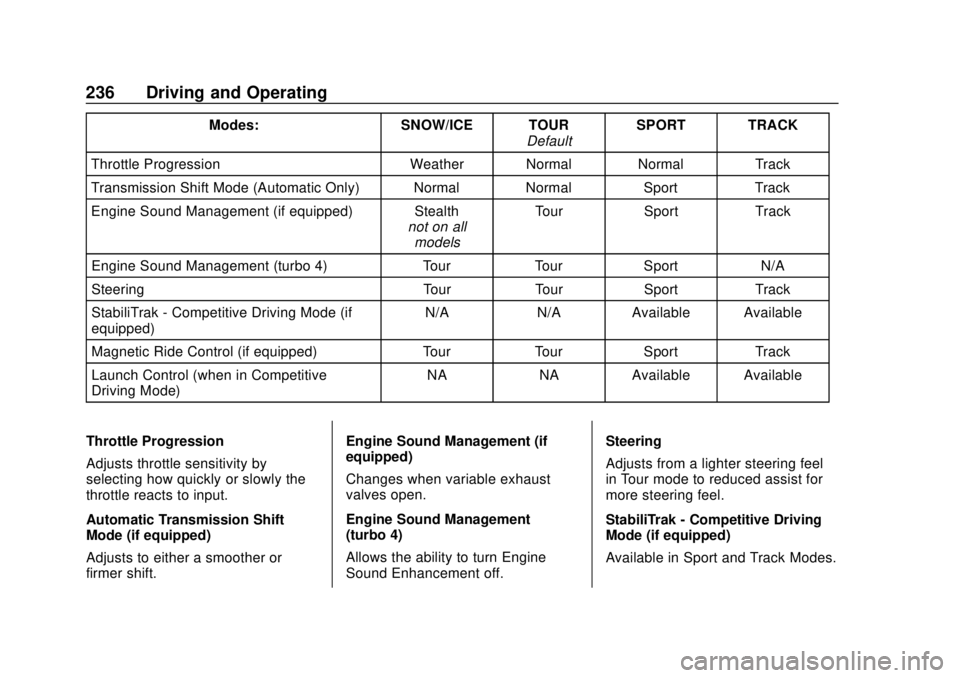
There are attributes that vary by
mode shown below. Not all vehicles
have all features, depending on the
vehicle options.
Page 237 of 393
Chevrolet Camaro Owner Manual (GMNA-Localizing-U.S./Canada/Mexico-
11348325) - 2018 - CRC - 10/23/17
236 Driving and Operating
Modes:SNOW/ICE TOUR
DefaultSPORT TRACK
Throttle Progression Weather Normal Normal Track
Transmission Shift Mode (Automatic Only) Normal Normal SportTrack
Engine Sound Management (if equipped) Stealth not on all
models Tour
Sport Track
Engine Sound Management (turbo 4) TourTourSport N/A
Steering TourTourSport Track
StabiliTrak - Competitive Driving Mode (if
equipped) N/A
N/AAvailable Available
Magnetic Ride Control (if equipped) TourTourSport Track
Launch Control (when in Competitive
Driving Mode) NA
NAAvailable Available
Throttle Progression
Adjusts throttle sensitivity by
selecting how quickly or slowly the
throttle reacts to input.
Automatic Transmission Shift
Mode (if equipped)
Adjusts to either a smoother or
firmer shift. Engine Sound Management (if
equipped)
Changes when variable exhaust
valves open.
Engine Sound Management
(turbo 4)
Allows the ability to turn Engine
Sound Enhancement off.
Steering
Adjusts from a lighter steering feel
in Tour mode to reduced assist for
more steering feel.
StabiliTrak - Competitive Driving
Mode (if equipped)
Available in Sport and Track Modes.
Page 239 of 393

Chevrolet Camaro Owner Manual (GMNA-Localizing-U.S./Canada/Mexico-
11348325) - 2018 - CRC - 10/23/17
238 Driving and Operating
This optional handling mode can be
selected by pressing the TCS/
StabiliTrak button on the console
two times. The appropriate message
displays in the Driver Information
Center (DIC).
When the TCS/StabiliTrak button is
pressed again, the TCS and
StabiliTrak systems are on. The
appropriate message displays
briefly in the DIC.
Launch Control
A Launch Control feature is
available, within Competitive Driving
Mode, to allow the driver to achieve
high levels of vehicle acceleration ina straight line. Launch Control is a
form of traction control that
manages tire spin while launching
the vehicle. This feature is intended
for use during closed course race
events where consistent zero to
sixty and quarter mile times are
desirable.
Launch Control is only available
when the following criteria are met:
.
Competitive Driving Mode is
selected.
. The vehicle is not moving.
. The steering wheel is pointing
straight.
Manual Transmissions
. The clutch is pressed and the
vehicle is in 1 (First) gear.
. The accelerator pedal is rapidly
applied to wide open throttle.
The Launch Control feature will
initially limit engine speed as the
driver rapidly applies the accelerator
pedal to wide open throttle. Allow
the engine rpm to stabilize.
A smooth, quick release of the clutch, while maintaining the fully
pressed accelerator pedal, will
manage wheel slip. Complete shifts
are described in
Manual
Transmission 0226.
Automatic Transmissions
. The brake pedal must be firmly
pressed to the floor, equivalent
to a panic brake event.
. The accelerator pedal is rapidly
applied to wide open throttle. (If
the vehicle rolls due to wide
open throttle, release the
throttle, press the brake pedal
more firmly, and re-apply the
accelerator to wide open
throttle.)
After the vehicle is launched, the
system continues in Competitive
Driving Mode.
Competitive Driving Mode and
Launch Control are systems
designed for a closed course race
track and not intended for use on
public roads. The systems are not
intended to compensate for lack of
driver experience or familiarity with
the race track.
Page 240 of 393

Chevrolet Camaro Owner Manual (GMNA-Localizing-U.S./Canada/Mexico-
11348325) - 2018 - CRC - 10/23/17
Driving and Operating 239
Limited-Slip Rear Axle
Vehicles with a limited-slip rear axle
can give more traction on snow,
mud, ice, sand, or gravel. When
traction is low, this feature allows
the drive wheel with the most
traction to move the vehicle. The
limited-slip rear axle also gives the
driver enhanced control when
cornering hard or completing a
maneuver, such as a lane change.
For vehicles with limited-slip
differential, driven under severe
conditions, the rear axle fluid should
be changed. SeeCompetitive
Driving Mode 0237 and
Maintenance Schedule 0337.
Cruise Control
If equipped with cruise control, the
vehicle can maintain a speed of
about 40 km/h (25 mph) or more
without keeping your foot on the
accelerator. Cruise control does not
work at speeds below 40 km/h
(25 mph).
{Warning
Cruise control can be dangerous
where you cannot drive safely at
a steady speed. Do not use
cruise control on winding roads or
in heavy traffic.
Cruise control can be dangerous
on slippery roads. On such roads,
fast changes in tire traction can
cause excessive wheel slip, and
you could lose control. Do not use
cruise control on slippery roads. If equipped with a manual
transmission, the cruise control will
remain active when the gears are
shifted. The cruise is disengaged if
the clutch is pressed for several
seconds.
If the StabiliTrak
®system begins to
limit wheel spin while using cruise
control, the cruise control
automatically disengages. See
Traction Control/Electronic Stability
Control 0232. When road
conditions allow you to safely use it
again, cruise control can be turned
back on.
Cruise control will disengage if
either TCS or StabiliTrak is
turned off.
Cruise control is not available when
using Competitive Driving Mode,
if equipped. See Competitive Driving
Mode 0237.
If the brakes are applied, cruise
control disengages.