2018 CHEVROLET CAMARO mirror
[x] Cancel search: mirrorPage 201 of 393

Chevrolet Camaro Owner Manual (GMNA-Localizing-U.S./Canada/Mexico-
11348325) - 2018 - CRC - 10/23/17
200 Driving and Operating
.Ease your foot off the
accelerator pedal and steer the
way you want the vehicle to go.
The vehicle may straighten out.
Be ready for a second skid if it
occurs.
. Slow down and adjust your
driving according to weather
conditions. Stopping distance
can be longer and vehicle
control can be affected when
traction is reduced by water,
snow, ice, gravel, or other
material on the road. Learn to
recognize warning clues —such
as enough water, ice, or packed
snow on the road to make a
mirrored surface —and slow
down when you have any doubt.
. Try to avoid sudden steering,
acceleration, or braking,
including reducing vehicle speed
by shifting to a lower gear. Any
sudden changes could cause
the tires to slide.
Remember: Antilock brakes help
avoid only the braking skid.Track Events and
Competitive Driving
{Danger
High-performance features are
intended for use only on closed
tracks by experienced and
qualified drivers and should not
be used on public roads.
High-speed driving, aggressive
cornering, hard braking, and other
high-performance driving can be
dangerous. Improper driver inputs
for the conditions may result in
loss of control of the vehicle,
which could injure or kill you or
others. Always drive safely.
If the vehicle is a Camaro High
Performance model, see the
additional items in the Camaro High
Performance supplement.
Track events or competitive driving
may affect the vehicle warranty. See
the warranty manual before using
the vehicle for racing or other
competitive driving. The Engine Sound Management
setting (if equipped) should not be
set to Stealth Mode during track
events and competitive driving. See
Driver Mode Control
0234.Engine Oil
Caution
If you use the vehicle for racing or
other competitive driving, the
engine may use more oil than it
would with normal use. Low oil
levels can damage the engine.
For information on how to add oil,
seeEngine Oil 0261.
Be sure to check the oil level
often during racing or other
competitive driving and keep the
level at or near the upper mark
that shows the proper operating
range on the engine oil dipstick.
Page 208 of 393

Chevrolet Camaro Owner Manual (GMNA-Localizing-U.S./Canada/Mexico-
11348325) - 2018 - CRC - 10/23/17
Driving and Operating 207
Assistance Program0359. To get
help and keep everyone in the
vehicle safe:
. Turn on the hazard warning
flashers.
. Tie a red cloth to an outside
mirror.
{Warning
Snow can trap engine exhaust
under the vehicle. This may
cause exhaust gases to get
inside. Engine exhaust contains
carbon monoxide (CO), which
cannot be seen or smelled. It can
cause unconsciousness and even
death.
If the vehicle is stuck in snow:
. Clear snow from the base of
the vehicle, especially any
blocking the exhaust pipe.
. Open a window about 5 cm
(2 in) on the vehicle side
that is away from the wind,
to bring in fresh air.
(Continued)
Warning (Continued)
.Fully open the air outlets on
or under the instrument
panel.
. Adjust the climate control
system to circulate the air
inside the vehicle and set
the fan speed to the highest
setting. See “Climate
Control Systems.”
For more information about CO,
see Engine Exhaust 0220.
To save fuel, run the engine for
short periods to warm the vehicle
and then shut the engine off and
partially close the window. Moving
about to keep warm also helps.
If it takes time for help to arrive,
when running the engine, push the
accelerator pedal slightly so the
engine runs faster than the idle
speed. This keeps the battery
charged to restart the vehicle and to
signal for help with the headlamps.
Do this as little as possible, to
save fuel.
If the Vehicle Is Stuck
Slowly and cautiously spin the
wheels to free the vehicle when
stuck in sand, mud, ice, or snow.
If stuck too severely for the traction
system to free the vehicle, turn the
traction system off and use the
rocking method. See Traction
Control/Electronic Stability Control
0 232.
{Warning
If the vehicle's tires spin at high
speed, they can explode, and you
or others could be injured. The
vehicle can overheat, causing an
engine compartment fire or other
damage. Spin the wheels as little
as possible and avoid going
above 56 km/h (35 mph).
Rocking the Vehicle to Get
it Out
Turn the steering wheel left and
right to clear the area around the
front wheels. Turn off any traction
Page 245 of 393
Chevrolet Camaro Owner Manual (GMNA-Localizing-U.S./Canada/Mexico-
11348325) - 2018 - CRC - 10/23/17
244 Driving and Operating
Warning (Continued)
vehicle before driving. Failure to
use proper care may result in
injury, death, or vehicle damage.
Parking Assist
With RPA, as the vehicle backs up
at speeds of less than 8 km/h
(5 mph), the sensors on the rear
bumper may detect objects up to
2.5 m (8 ft) behind the vehicle within
a zone 25 cm (10 in) high off the
ground and below bumper level.
These detection distances may be
shorter during warmer or humid
weather.
Blocked sensors will not detect
objects and can also cause false
detections. Keep the sensors clean
of mud, dirt, snow, ice, and slush;
and clean sensors after a car wash
in freezing temperatures.
{Warning
The Parking Assist system does
not detect children, pedestrians,
bicyclists, animals, or objects
located below the bumper or that
are too close or too far from the
vehicle. It is not available at
speeds greater than 8 km/h
(5 mph). To prevent injury, death,
or vehicle damage, even with
Parking Assist, always check the
area around the vehicle and
check all mirrors before moving
forward or backing.
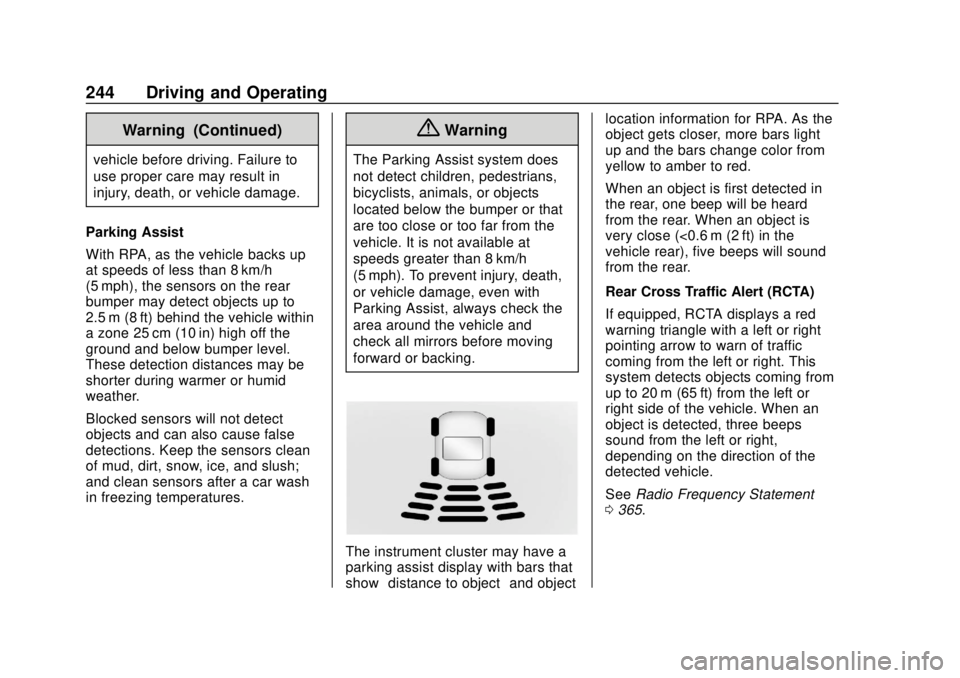
The instrument cluster may have a
parking assist display with bars that
show “distance to object” and objectlocation information for RPA. As the
object gets closer, more bars light
up and the bars change color from
yellow to amber to red.
When an object is first detected in
the rear, one beep will be heard
from the rear. When an object is
very close (<0.6 m (2 ft) in the
vehicle rear), five beeps will sound
from the rear.
Rear Cross Traffic Alert (RCTA)
If equipped, RCTA displays a red
warning triangle with a left or right
pointing arrow to warn of traffic
coming from the left or right. This
system detects objects coming from
up to 20 m (65 ft) from the left or
right side of the vehicle. When an
object is detected, three beeps
sound from the left or right,
depending on the direction of the
detected vehicle.
See
Radio Frequency Statement
0 365.
Page 246 of 393

Chevrolet Camaro Owner Manual (GMNA-Localizing-U.S./Canada/Mexico-
11348325) - 2018 - CRC - 10/23/17
Driving and Operating 245
Turning the Features On or Off
RPA and RCTA can be turned on or
off. See“Collision/Detection
Systems” underVehicle
Personalization 0138.
To turn the rear parking assist
symbols or guidance lines on or off,
see “Rear Camera” underVehicle
Personalization 0138.
Side Blind Zone
Alert (SBZA)
If equipped, the SBZA system is a
lane-changing aid that assists
drivers with avoiding crashes that
occur with moving vehicles in the
side blind zone (or spot) areas.
When the vehicle is in a forward
gear, the left or right side mirror
display will light up if a moving
vehicle is detected in that blind
zone. If the turn signal is activated
and a vehicle is also detected on
the same side, the display will flash
as an extra warning not to change
lanes. Since this system is part of the Lane Change Alert (LCA)
system, read the entire LCA section
before using this feature.
Lane Change Alert (LCA)
If equipped, the LCA system is a
lane-changing aid that assists
drivers with avoiding lane change
crashes that occur with moving
vehicles in the side blind zone (or
spot) areas or with vehicles rapidly
approaching these areas from
behind. The LCA warning display
will light up in the corresponding
outside side mirror and will flash if
the turn signal is on.
{Warning
LCA does not alert the driver to
vehicles outside of the system
detection zones, pedestrians,
bicyclists, or animals. It may not
provide alerts when changing
lanes under all driving conditions.
Failure to use proper care when
changing lanes may result in
(Continued)
Warning (Continued)
injury, death, or vehicle damage.
Before making a lane change,
always check mirrors, glance over
your shoulder, and use the turn
signals.
LCA Detection Zones
1. SBZA Detection Zone
2. LCA Detection Zone
The LCA sensor covers a zone of
approximately one lane over from
both sides of the vehicle, or 3.5 m
(11 ft). The height of the zone is
approximately between 0.5 m (1.5 ft)
and 2 m (6 ft) off the ground. The
Side Blind Zone Alert (SBZA)
Page 247 of 393

Chevrolet Camaro Owner Manual (GMNA-Localizing-U.S./Canada/Mexico-
11348325) - 2018 - CRC - 10/23/17
246 Driving and Operating
warning area starts at approximately
the middle of the vehicle and goes
back 5 m (16 ft). Drivers are also
warned of vehicles rapidly
approaching from up to 25 m (82 ft)
behind the vehicle.
How the System Works
The LCA symbol lights up in the
side mirrors when the system
detects a moving vehicle in the next
lane over that is in the side blind
zone or rapidly approaching that
zone from behind. A lit LCA symbol
indicates it may be unsafe to
change lanes. Before making a lane
change, check the LCA display,
check mirrors, glance over your
shoulder, and use the turn signals.
Left Side MirrorDisplayRight Side Mirror Display When the vehicle is started, both
outside mirror LCA displays will
briefly come on to indicate the
system is operating. When the
vehicle is in a forward gear, the left
or right side mirror display will light
up if a moving vehicle is detected in
the next lane over in that blind zone
or rapidly approaching that zone.
If the turn signal is activated in the
same direction as a detected
vehicle, this display will flash as an
extra warning not to change lanes.
LCA can be disabled through
vehicle personalization. See
“Collision/Detection Systems”
under
Vehicle Personalization 0138.
If LCA is disabled by the driver, the
LCA mirror displays will not light up.
When the System Does Not
Seem to Work Properly
The LCA system requires some
driving for the system to calibrate to
maximum performance. This
calibration may occur more quickly if
the vehicle is driving on a straight
highway road with traffic and
roadside objects (e.g., guardrails, barriers). During a trip, the LCA
system is not operational until the
vehicle first reaches a speed of
24 km/h (15 mph).
LCA displays may not come on
when passing a vehicle quickly or
for a stopped vehicle. LCA may alert
to objects attached to the vehicle,
such as a bicycle or object
extending out to either side of the
vehicle. Attached objects may also
interfere with the detection of
vehicles. This is normal system
operation; the vehicle does not need
service.
LCA may not always alert the driver
to vehicles in the next lane over,
especially in wet conditions or when
driving on sharp curves. The system
does not need to be serviced. The
system may light up due to
guardrails, signs, trees, shrubs, and
other non-moving objects. This is
normal system operation; the
vehicle does not need service.
LCA may not operate when the LCA
sensors in the left or right corners of
the rear bumper are covered with
mud, dirt, snow, ice, or slush, or in
Page 291 of 393

Chevrolet Camaro Owner Manual (GMNA-Localizing-U.S./Canada/Mexico-
11348325) - 2018 - CRC - 10/23/17
290 Vehicle Care
FusesUsage
F3 Electric parking brake
F4 –
F5 –
F6 Rear drive control module
F7 Right window 1
F8 –
F9 Left window 1
F10 Heated mirror 1 F11 –
F12 Heated steering wheel
F13 –
F14 HVAC control
F15 Video bypass module
F16 Display
F17 Camera
F18 – Fuses
Usage
F19 Front ventilated seat 1
F20 Reverse lamps
F21 –
F22 –
F23 Body control module 1
F24 –
F25 –
F26 –
F27 RGB lights
F28 Passive entry/ Passive start
battery 1
F29 Data link connector
F30 Canister vent
F31 Memory seat module folding top
F32 Memory seat module
F33 Wireless charger
F34 Engine control module battery Fuses
Usage
F35 Fuel pump/Fuel system control
module
F36 –
F37 Electric steering column lock
F38 Mirror window module
F39 Rear closure
F40 –
F41 Battery regulated voltage control
F42 SADS
F43 –
F44 Folding top solenoid
F45 Amplifier
F46 FPPM 22
F47 Shunt
F48 –
F49 Steering wheel
F50 Interior rearview mirror
Page 370 of 393

Chevrolet Camaro Owner Manual (GMNA-Localizing-U.S./Canada/Mexico-
11348325) - 2018 - CRC - 10/23/17
OnStar 369
OnStar
OnStar Overview
OnStar Overview . . . . . . . . . . . . . 369
OnStar Services
Emergency . . . . . . . . . . . . . . . . . . . 371
Security . . . . . . . . . . . . . . . . . . . . . . 371
Navigation . . . . . . . . . . . . . . . . . . . . 371
Connections . . . . . . . . . . . . . . . . . . 372
Diagnostics . . . . . . . . . . . . . . . . . . . 374
OnStar Additional Information
OnStar AdditionalInformation . . . . . . . . . . . . . . . . . . 375
OnStar Overview
Manual Rearview Mirror
Automatic Dimming Rearview
Mirror
QVoice Command Button
|Blue OnStar Button
URed Emergency Button
This vehicle may be equipped with a
comprehensive, in-vehicle system
that can connect to an OnStar
Advisor for Emergency, Security,
Navigation, Connections, and
Diagnostics Services. OnStar
services may require a paid service plan and data plan. OnStar requires
the vehicle battery and electrical
system, cellular service, and GPS
satellite signals to be available and
operating. OnStar acts as a link to
existing emergency service
providers. OnStar may collect
information about you and your
vehicle, including location
information. See OnStar
’s User
Terms, Privacy Statement, and
Software Terms for more details
including system limitations at
www.onstar.com (U.S.) or
www.onstar.ca (Canada).
Manual and Automatic
Dimming Rearview Mirrors
. Press the mirror controls.
If OnStar does not respond,
adjust finger position or remove
any gloves.
. Avoid touching the controls while
adjusting the mirror. To cancel a
command press
Q.
. Clean the mirror while the
vehicle is off to avoid making
calls.
Page 371 of 393

Chevrolet Camaro Owner Manual (GMNA-Localizing-U.S./Canada/Mexico-
11348325) - 2018 - CRC - 10/23/17
370 OnStar
Status Indicator
The OnStar system status light is
next to the OnStar controls on the
manual rearview mirror.
If the status light is:
.Solid Green: System is ready.
. Flashing Green: On a call.
. Red: Indicates a problem.
. Off: System is active. Press
|
twice to speak with an OnStar
Advisor.
For the automatic dimming rearview
mirror, the status is provided
through the Display on Demand
Icons.
. Three Color Icons: The system
is enabled and active.
. No Icons: The vehicle is in
motion or the OnStar service
plan is inactive.
. Blinking: Button has been
pressed.
. Solid: On a call.
.
~: Indicates a problem. OnStar Commands
Press
|or call 1-888-4ONSTAR
(1-888-466-7827) to speak to an
Advisor.
Functionality of the Voice Command
button may vary by vehicle and
region.
Press
Qto:
Open the OnStar app on the
infotainment display. See the
infotainment manual for information
on how to use the OnStar app.
OR
. Make a call, end a call,
or answer an incoming call.
. Give OnStar Hands-Free Calling
voice commands.
. Give OnStar Turn-by-Turn
Navigation voice commands.
. Obtain and customize the Wi-Fi
®
network name or SSID, and
password, if equipped. Press
|to connect to an
Advisor to:
. Verify account information or
update contact information.
. Get driving directions.
. Receive a Diagnostic check of
the vehicle's key operating
systems.
. Receive Roadside Assistance.
. Manage Wi-Fi Settings,
if equipped.
Press
Uto get a priority connection
to an OnStar Advisor available
24/7 to:
. Get help for an emergency.
. Be a Good Samaritan or
respond to an AMBER Alert.
. Get assistance in severe
weather or other crisis situations
and find evacuation routes.