2018 CHEVROLET BOLT EV remote start
[x] Cancel search: remote startPage 62 of 370
Chevrolet BOLT EV Owner Manual (GMNA-Localizing-U.S./Canada/Mexico-
11434431) - 2018 - crc - 2/14/18
Seats and Restraints 61
Warning (Continued)
heat, such as a blanket, cushion,
cover, or similar item. This may
cause the seat heater to
overheat. An overheated seat
heater may cause a burn or may
damage the seat.
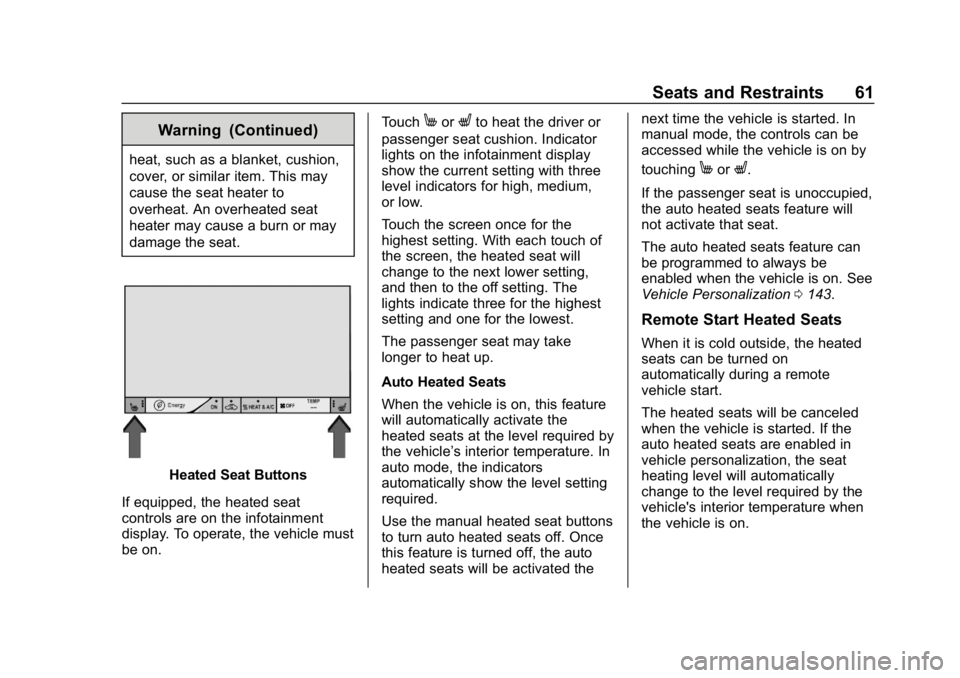
Heated Seat Buttons
If equipped, the heated seat
controls are on the infotainment
display. To operate, the vehicle must
be on. Touch
MorLto heat the driver or
passenger seat cushion. Indicator
lights on the infotainment display
show the current setting with three
level indicators for high, medium,
or low.
Touch the screen once for the
highest setting. With each touch of
the screen, the heated seat will
change to the next lower setting,
and then to the off setting. The
lights indicate three for the highest
setting and one for the lowest.
The passenger seat may take
longer to heat up.
Auto Heated Seats
When the vehicle is on, this feature
will automatically activate the
heated seats at the level required by
the vehicle’ s interior temperature. In
auto mode, the indicators
automatically show the level setting
required.
Use the manual heated seat buttons
to turn auto heated seats off. Once
this feature is turned off, the auto
heated seats will be activated the next time the vehicle is started. In
manual mode, the controls can be
accessed while the vehicle is on by
touching
MorL.
If the passenger seat is unoccupied,
the auto heated seats feature will
not activate that seat.
The auto heated seats feature can
be programmed to always be
enabled when the vehicle is on. See
Vehicle Personalization 0143.
Remote Start Heated Seats
When it is cold outside, the heated
seats can be turned on
automatically during a remote
vehicle start.
The heated seats will be canceled
when the vehicle is started. If the
auto heated seats are enabled in
vehicle personalization, the seat
heating level will automatically
change to the level required by the
vehicle's interior temperature when
the vehicle is on.
Page 63 of 370
Chevrolet BOLT EV Owner Manual (GMNA-Localizing-U.S./Canada/Mexico-
11434431) - 2018 - crc - 2/14/18
62 Seats and Restraints
The temperature performance of an
unoccupied seat may be reduced.
This is normal.
The heated seats will not turn on
during a remote start unless the
heated seat feature is enabled. See
Vehicle Personalization0143.Rear Seats
Rear Seat Reminder
If equipped, the message REAR
SEAT REMINDER LOOK IN REAR
SEAT displays under certain
conditions indicating there may be
an item or passenger in the rear
seat. Check before exiting the
vehicle.
This feature will activate when a
second row door is opened while
the vehicle is on or up to 10 minutes
before the vehicle is turned on.
There will be an alert when the
vehicle is turned off. The alert does
not directly detect objects in the rear
seat; instead, under certain
conditions, it detects when a rear
door is opened and closed,
indicating that there may be
something in the rear seat.
The feature is active only once each
time the vehicle is turned on and off,
and will require reactivation by
opening and closing the second row
doors. There may be an alert even
when there is nothing in the rear
seat; for example, if a child entered the vehicle through the rear door
and left the vehicle without the
vehicle being shut off.
The feature can be turned on or off.
See
Vehicle Personalization 0143.
Folding the Seatback
Either side of the seatback can be
folded down for more cargo space.
Fold a seatback only when the
vehicle is not moving.
Caution
Folding a rear seat with the seat
belts still fastened may cause
damage to the seat or the seat
belts. Always unbuckle the seat
belts and return them to their
normal stowed position before
folding a rear seat.
Page 111 of 370
Chevrolet BOLT EV Owner Manual (GMNA-Localizing-U.S./Canada/Mexico-
11434431) - 2018 - crc - 2/14/18
110 Instruments and Controls
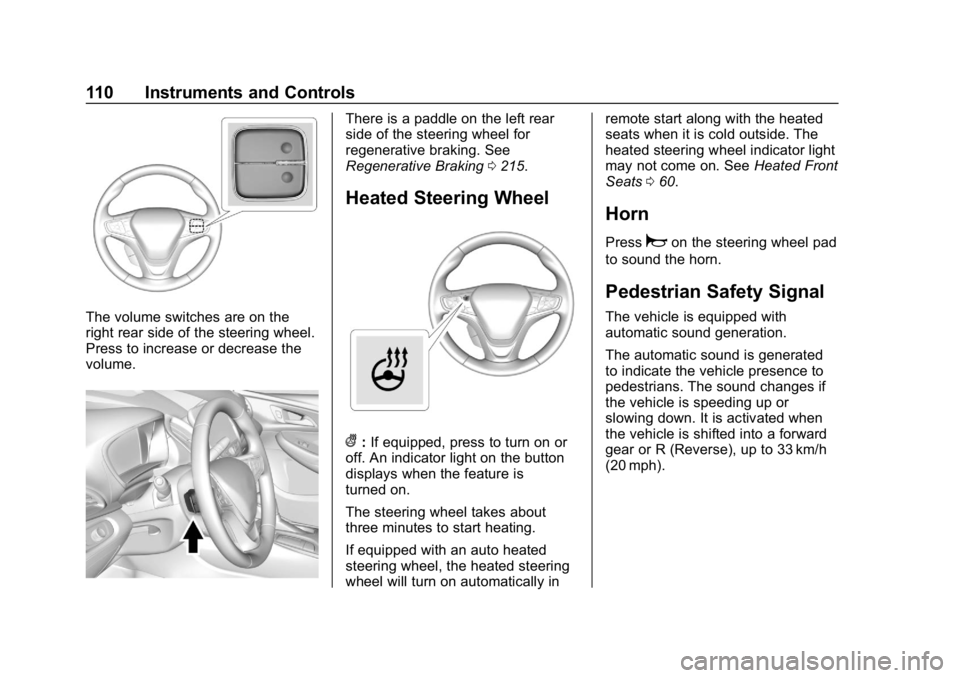
The volume switches are on the
right rear side of the steering wheel.
Press to increase or decrease the
volume.
There is a paddle on the left rear
side of the steering wheel for
regenerative braking. See
Regenerative Braking0215.
Heated Steering Wheel
(:If equipped, press to turn on or
off. An indicator light on the button
displays when the feature is
turned on.
The steering wheel takes about
three minutes to start heating.
If equipped with an auto heated
steering wheel, the heated steering
wheel will turn on automatically in remote start along with the heated
seats when it is cold outside. The
heated steering wheel indicator light
may not come on. See
Heated Front
Seats 060.
Horn
Pressaon the steering wheel pad
to sound the horn.
Pedestrian Safety Signal
The vehicle is equipped with
automatic sound generation.
The automatic sound is generated
to indicate the vehicle presence to
pedestrians. The sound changes if
the vehicle is speeding up or
slowing down. It is activated when
the vehicle is shifted into a forward
gear or R (Reverse), up to 33 km/h
(20 mph).
Page 145 of 370
Chevrolet BOLT EV Owner Manual (GMNA-Localizing-U.S./Canada/Mexico-
11434431) - 2018 - crc - 2/14/18
144 Instruments and Controls
Personalization Menu
The following list of menu items may
be available:
.Time and Date
. Rear Seat Reminder
. Language (Language)
. Teen Driver
. Radio Settings
. Vehicle
. Devices
. Device Remote Access
. Bluetooth Phone
. Apple CarPlay
. Android Auto
. KeyPass
. USB Auto Launch
. Wi-Fi
. Display Settings
. Rear Camera
. Return to Factory Settings
. Audible Touch Feedback .
Text Scroll
. Software Information
Each menu is detailed in the
following information.
Time and Date
Manually set the time and date. See
Clock 0114.
Rear Seat Reminder
This message displays under
certain conditions indicating there
may be an item or passenger in the
rear seat. Check before exiting the
vehicle.
This feature allows for a chime and
a message when the rear door has
been opened before or during
operation of the vehicle.
Select Off or On.
Language (Language)
Select Language, then select from
the available language(s).
Teen Driver
See Teen Driver 0181.
Radio Settings
To manage the radio features, see
“Radio Settings” underSettings
0 180.
Vehicle
Select and the following may
display:
.
Climate and Air Quality
. Comfort and Convenience
. Collision / Detection Systems
. Lighting
. Power Door Locks
. Remote Lock / Unlock / Start
Climate and Air Quality
Select and the following may
display:
. Auto Fan Speed
. Auto Heated Seats
. Auto Defog
Auto Fan Speed
This feature will set the maximum
auto fan speed.
Page 147 of 370

Chevrolet BOLT EV Owner Manual (GMNA-Localizing-U.S./Canada/Mexico-
11434431) - 2018 - crc - 2/14/18
146 Instruments and Controls
.Exit Lighting
Vehicle Locator Lights
This feature will flash the exterior
lamps and allows some of the
exterior lamps and most of the
interior lamps to turn on briefly
when
Kon the Remote Keyless
Entry (RKE) transmitter is pressed
to locate the vehicle.
Select Off or On.
Exit Lighting
This allows the selection of how
long the exterior lamps stay on
when leaving the vehicle when it is
dark outside.
Select Off, 30 Seconds, 60
Seconds, or 120 Seconds.
Power Door Locks
Select and the following may
display:
. Unlocked Door Anti Lock Out
. Auto Door Unlock
. Delayed Door Lock Unlocked Door Anti Lock Out
When on, this feature will keep the
driver door from locking when the
door is open. If Off is selected, the
Delayed Door Lock menu will be
available.
Select Off or On.
Auto Door Unlock
This allows selection of which of the
doors will automatically unlock when
the vehicle is shifted into P (Park).
Select Off, All Doors, or Driver Door.
Delayed Door Lock
When on, this feature will delay the
locking of the doors. To override the
delay, press the power door lock
switch on the door.
Select Off or On.
Remote Lock / Unlock / Start
Select and the following may
display:
.
Remote Unlock Light Feedback
. Remote Lock Feedback
. Remote Door Unlock .
Remote Start Auto Heat Seats
. Passive Door Unlock
. Passive Door Lock
. Remote Left in Vehicle Alert
Remote Unlock Light Feedback
When on, the exterior lamps will
flash when unlocking the vehicle
with the RKE transmitter.
Select Off or Flash Lights.
Remote Lock Feedback
This allows selection of what type of
feedback is given when locking the
vehicle with the RKE transmitter.
Select Off, Lights and Horn, Lights
Only, or Horn Only.
Remote Door Unlock
This allows selection of which doors
will unlock when pressing
Kon the
RKE transmitter.
Select All Doors or Driver Door.
Page 148 of 370
Chevrolet BOLT EV Owner Manual (GMNA-Localizing-U.S./Canada/Mexico-
11434431) - 2018 - crc - 2/14/18
Instruments and Controls 147
Remote Start Auto Heat Seats
If equipped and turned on, this
feature will turn the heated seats on
when using remote start on
cold days.
Select Off or On.
Passive Door Unlock
This allows the selection of what
doors will unlock when using the
button on the outside driver door
handle to unlock the vehicle.
Select All Doors or Driver
Door Only.
Passive Door Lock
This allows passive locking to be
turned on or off and selects
feedback.
Select Off, On with Horn
Chirp, or On.
Remote Left in Vehicle Alert
This feature sounds an alert when
the RKE transmitter is left in the
vehicle. This menu also enables
Remote No Longer in Vehicle Alert.
Select Off or On.Devices
This shows status of the connected
device.
Touch Add Device if a device needs
to be added.
Device Remote Access
This will allow devices to control
system functionality and
access data.
Select Off or On.
Bluetooth Phone
This allows the connected Bluetooth
phone to be configured. See
“Bluetooth Phone”inSettings 0180.
. My Number
. Privacy
. Sort Contacts
. Resync Device Contacts
My Number
This displays the phone number of
the connected Bluetooth device. Privacy
This allows call alerts to appear on
the infotainment display.
Select Off or On.
Sort Contacts
Touch to sort by first or last name.
Resync Device Contacts
This resyncs the contacts on the
phone.
Apple CarPlay
This feature allows Apple devices to
be connected to the infotainment
system through a USB port.
Select Off or On.
Android Auto
This feature allows Android devices
to be connected to the infotainment
system through a USB port.
Select Off or On.
KeyPass
Select and the following may
display:
.
KeyPass
Page 157 of 370
Chevrolet BOLT EV Owner Manual (GMNA-Localizing-U.S./Canada/Mexico-
11434431) - 2018 - crc - 2/14/18
156 Lighting
Lighting Features
Entry Lighting
Some exterior lamps and the interior
lamps turn on briefly at night when
the Remote Keyless Entry (RKE)
transmitter
Kis pressed. See
Remote Keyless Entry (RKE)
System Operation 033. The lights
turn off immediately when the
vehicle is started or automatically
after a brief period.
This feature can be turned on or off.
See “Vehicle Locator Lights” under
Vehicle Personalization 0143.
Exit Lighting
Some exterior lamps come on at
night when the vehicle is turned off
and the driver door is opened.
Some interior lamps also come on
when the vehicle is turned off. The
exterior lamps and interior lamps
remain on after the door is closed
for a brief period and then turn off.
This feature can be turned on or off.
See Vehicle Personalization 0143.
Battery Power Protection
The battery saver feature is
designed to protect the vehicle's
12-volt battery.
If some interior lamps and/or the
headlamps are left on and the
vehicle is turned off, the battery
rundown protection system
automatically turns the lamp off after
some time.
Exterior Lighting Battery
Saver
The exterior lamps turn off about
10 minutes after the ignition is
turned off, if the parking lamps or
headlamps have been manually left
on. This protects against draining
the battery. To restart the 10-minute
timer, turn the exterior lamp control
to the off position and then back to
the parking lamp or headlamp
position.
To keep the lamps on for more than
10 minutes, the ignition must be on
or in ACC/ACCESSORY.
Page 183 of 370
Chevrolet BOLT EV Owner Manual (GMNA-Localizing-U.S./Canada/Mexico-
11434431) - 2018 - crc - 2/14/18
182 Infotainment System
5. Place the Remote KeylessEntry (RKE) transmitter key in
the transmitter pocket. See
Remote Keyless Entry (RKE)
System Operation 033 for the
transmitter pocket location.
6. From the Teen Driver Menu, select Key Registration.
.If the transmitter key is in
the transmitter pocket, it will
identify whether the
transmitter key is registered
or unregistered.
. If the transmitter key is not
registered, the option to
register displays. Select
Register and a confirmation
message displays.
. If the transmitter key is
already registered, the
option to unregister
displays. If Unregister is
selected, the transmitter
key is no longer registered
and a confirmation
message displays. If a Teen Driver transmitter key and
a non-Teen Driver transmitter key
are both present at start up, the
vehicle will recognize the non-Teen
Driver transmitter key to start the
vehicle. The Teen Driver settings
will not be active.
Manage Settings
Use the PIN to change the following
settings:
Audio Volume Limit :
Allows a
maximum radio volume to be set.
Turn the audio volume limit On or
Off, and if equipped, choose the
maximum level for the audio
volume.
Teen Driver Speed Warning :
Allows for setting a visual and
audible warning when a certain
speed is exceeded. The speed
warning is selectable from 64 km/h
(40 mph) to 121 km/h (75 mph). The
speed warning does not limit the
speed of the vehicle.
Teen Driver Speed Limiter (If
Equipped) : Allows the maximum
speed of the vehicle to be limited to
137 km/h (85 mph). When the speed limiter is turned On and the vehicle
is started with a Teen Driver key, the
DIC displays a message that the top
speed is limited to 137 km/h
(85 mph).
When Teen Driver is Active:
.
The radio will mute when the
driver seat belt is not fastened,
and in some vehicles, when the
right front passenger seat belt is
not fastened. The audio from
any device paired to the vehicle
will also be muted.
. Certain electronic devices
placed on the front passenger
seat could cause the passenger
sensing system to falsely sense
an unbuckled front passenger
and mute the radio. See
Passenger Sensing System
077.
. Some safety systems, such as
Forward Automatic Braking,
if equipped and supported,
cannot be turned off.
. The gap setting for the Forward
Collision Alert, if equipped,
cannot be changed.