2018 CHEVROLET BOLT EV manual radio set
[x] Cancel search: manual radio setPage 161 of 370
Chevrolet BOLT EV Owner Manual (GMNA-Localizing-U.S./Canada/Mexico-
11434431) - 2018 - crc - 2/14/18
160 Infotainment System
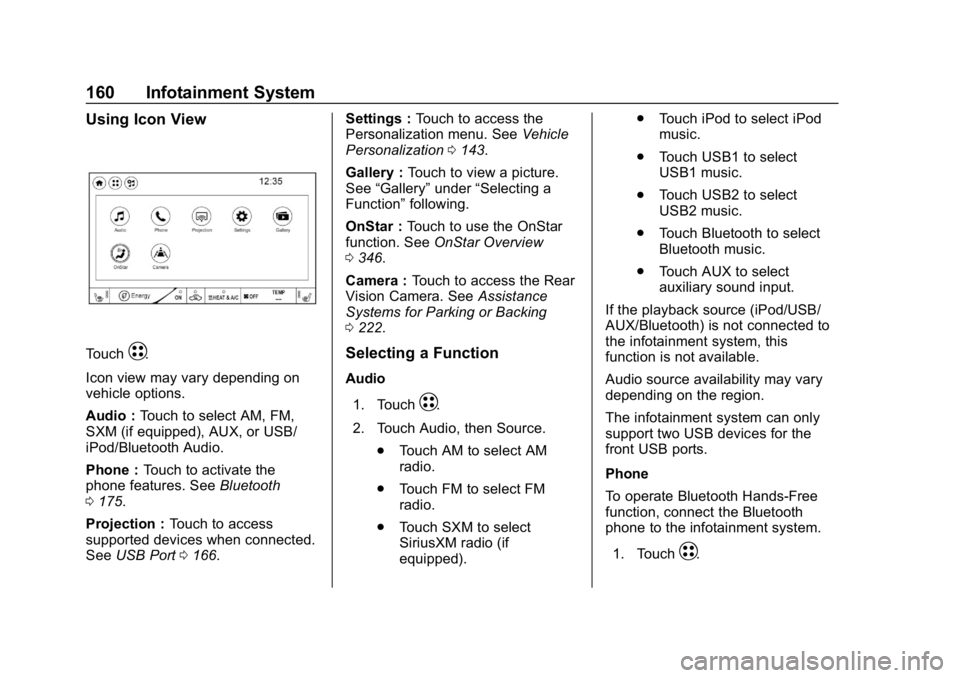
Using Icon View
TouchT.
Icon view may vary depending on
vehicle options.
Audio : Touch to select AM, FM,
SXM (if equipped), AUX, or USB/
iPod/Bluetooth Audio.
Phone : Touch to activate the
phone features. See Bluetooth
0 175.
Projection : Touch to access
supported devices when connected.
See USB Port 0166. Settings :
Touch to access the
Personalization menu. See Vehicle
Personalization 0143.
Gallery : Touch to view a picture.
See “Gallery” under“Selecting a
Function” following.
OnStar : Touch to use the OnStar
function. See OnStar Overview
0 346.
Camera : Touch to access the Rear
Vision Camera. See Assistance
Systems for Parking or Backing
0 222.Selecting a Function
Audio
1. Touch
T.
2. Touch Audio, then Source. .Touch AM to select AM
radio.
. Touch FM to select FM
radio.
. Touch SXM to select
SiriusXM radio (if
equipped). .
Touch iPod to select iPod
music.
. Touch USB1 to select
USB1 music.
. Touch USB2 to select
USB2 music.
. Touch Bluetooth to select
Bluetooth music.
. Touch AUX to select
auxiliary sound input.
If the playback source (iPod/USB/
AUX/Bluetooth) is not connected to
the infotainment system, this
function is not available.
Audio source availability may vary
depending on the region.
The infotainment system can only
support two USB devices for the
front USB ports.
Phone
To operate Bluetooth Hands-Free
function, connect the Bluetooth
phone to the infotainment system.
1. Touch
T.
Page 163 of 370
Chevrolet BOLT EV Owner Manual (GMNA-Localizing-U.S./Canada/Mexico-
11434431) - 2018 - crc - 2/14/18
162 Infotainment System
Radio
AM-FM Radio
Listening to AM-FM Radio
1. TouchT.
2. Touch Audio, then Source.
3. Touch FM or AM. The most recently listened to AM or FM
radio station is displayed.
RDS (Radio Data System) function
is only available in countries that
support this function.
Searching for Stations
Automatically
Pressgordto automatically
search for an available station with
good reception.
If RDS is supported, it will tune to
the station and may include
additional information such as time,
station identification, and program
information.
Searching for Stations Directly
1. Touch Tune. 2. Using the keypad, enter the
desired station number.
Touching the period between digits
is not necessary. The radio will add
it automatically at the correct
location.
Favorite Preset Operation
Saving Favorites 1. Select the band.
2. Select the desired station.
3. Touch
qor touch and hold the
favorite in the Favorites list to
overwrite.
4. To delete it from the Favorites list, touch
q, or swipe the
station from the list on the right.
Up to 15 radio stations can be
saved in the Favorites list.
Listening to Favorites Directly 1. Touch Favorites to see the list of favorites.
2. Touch the desired station. The steering wheel controls can
also be used to select favorites. See
Steering Wheel Controls
0109.
Using the AM or FM
Radio Menu
General Operation of the Menu
1. Select the desired band.
2. Touch Menu.
3. Touch the desired menu to select the item or to display the
item’s detailed menu.
4. Touch
qNow Playing to return
to the previous menu.
Current Station Information 1. From the FM Menu, touch Browse Audio.
2. Touch Current Station Information to display the
station information.
AM or FM Stations 1. From the AM or FM Menu, touch Browse Audio.
Page 164 of 370
Chevrolet BOLT EV Owner Manual (GMNA-Localizing-U.S./Canada/Mexico-
11434431) - 2018 - crc - 2/14/18
Infotainment System 163
2. Touch AM Stations or FMStations. The AM List or FM
List is displayed.
FM Categories 1. From the FM Menu, touch Browse Audio.
2. Touch FM Categories.
3. Touch the desired category and station.
The FM category list is only
available for RDS (Radio Data
System).
Update AM or FM Stations 1. From the FM or AM Menu, touch Browse Audio.
2. Touch Update AM Stations or Update FM Stations.
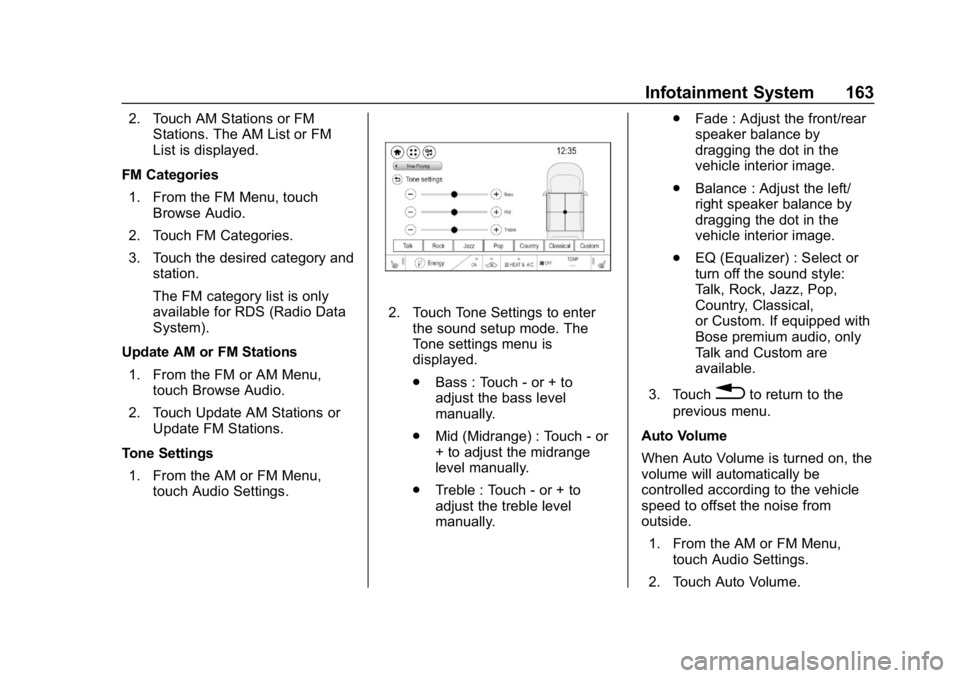
Tone Settings 1. From the AM or FM Menu, touch Audio Settings.
2. Touch Tone Settings to enterthe sound setup mode. The
Tone settings menu is
displayed.
.Bass : Touch - or + to
adjust the bass level
manually.
. Mid (Midrange) : Touch - or
+ to adjust the midrange
level manually.
. Treble : Touch - or + to
adjust the treble level
manually. .
Fade : Adjust the front/rear
speaker balance by
dragging the dot in the
vehicle interior image.
. Balance : Adjust the left/
right speaker balance by
dragging the dot in the
vehicle interior image.
. EQ (Equalizer) : Select or
turn off the sound style:
Talk, Rock, Jazz, Pop,
Country, Classical,
or Custom. If equipped with
Bose premium audio, only
Talk and Custom are
available.
3. Touch
0to return to the
previous menu.
Auto Volume
When Auto Volume is turned on, the
volume will automatically be
controlled according to the vehicle
speed to offset the noise from
outside. 1. From the AM or FM Menu, touch Audio Settings.
2. Touch Auto Volume.
Page 165 of 370
Chevrolet BOLT EV Owner Manual (GMNA-Localizing-U.S./Canada/Mexico-
11434431) - 2018 - crc - 2/14/18
164 Infotainment System
3. Select the desired option: Off,Low, Medium-Low, Medium,
Medium-High, or High.
RDS
The RDS function can be set
for FM. 1. From the FM Menu, touch Audio Settings.
2. Set RDS to On or Off.
Satellite Radio
Vehicles equipped with a SiriusXM®
satellite radio tuner and a valid
SiriusXM satellite radio subscription
can receive SiriusXM programming.
SiriusXM Satellite Radio
Service
SiriusXM is a satellite radio service
based in the 48 contiguous United
States and 10 Canadian provinces.
SiriusXM satellite radio has a wide
variety of programming and
commercial-free music, coast to
coast, and in digital-quality sound.
A fee is required to receive the
SiriusXM service. Refer to:
.
www.siriusxm.com or call
1-888-601-6296 (U.S.).
. www.siriusxm.ca or call
1-877-438-9677 (Canada).
Listening to SXM Radio
1. TouchT.
2. Touch Audio, then Source.
3. Touch SXM. The most recently listened to SXM channel is
displayed.
Searching for Channels
Automatically
Pressgordto automatically
search for available channels.
Searching for Channels
Directly
1. Touch Tune.
2. Using the keypad, enter the desired channel.
Searching for Channels Using
Favorites
Saving Favorites
1. Select the desired channel.
2. Touch
qor touch and hold the
favorite in the list to overwrite.
3. To delete a channel from Favorites, touch
q, or swipe
the channel from the list on the
right.
Up to 15 channels can be
saved in the Favorites list.
Listening to Favorites Directly 1. Touch Favorites to see the list of favorites.
2. Touch the desired channel.
Using the SXM Radio Menu
General Operation of the Menu 1. Touch Menu on the SXM radio screen.
2. Touch Browse Audio or Audio Settings to select and display
the item’ s detailed menu.
Page 166 of 370
Chevrolet BOLT EV Owner Manual (GMNA-Localizing-U.S./Canada/Mexico-
11434431) - 2018 - crc - 2/14/18
Infotainment System 165
3. TouchqNow Playing to return
to the previous screen.
Browse Audio
. Current Channel Information
Touch Current Channel
Information. The channel
information is displayed.
. SXM Channels
Touch SXM Channels. The SXM
List is displayed.
. SXM Categories
SXM categories are defined by
the SiriusXM service provider.
Touch SXM Categories, then
touch the desired category and
channel.
Audio Settings
. Tone Settings
Set up sound features from the
Tone Settings menu. See “Tone
Settings” under“AM-FM Radio”
previously in this section. .
Auto Volume
Volume will be automatically
controlled. See “Auto Volume”
under “AM-FM Radio” previously
in this section.
. Explicit Content Filter
Choose this menu item to turn
On or Off the filtering of explicit
channels from SXM. When
selected, this item will give a
brief description of the feature
and a list item can be set to On
or Off. From the SXM Menu,
touch Audio Settings. Set
Explicit Content Filter feature to
On or Off to allow for a filtered
list of channels.
Multi-Band Antenna
If equipped, the roof antenna is for
GPS (Global Positioning System).
Keep clear of obstructions for clear
reception.
Mobile Phone Usage
Mobile phone usage can cause
interference with the vehicle's radio.
Unplug the mobile phone or turn it
off if this occurs.
AM
The range for most AM stations is
greater than for FM, especially at
night. The longer range can cause
station frequencies to interfere with
each other. Static can occur when
things like storms and power lines
interfere with radio reception. When
this happens, try reducing the treble
on the radio.
Page 170 of 370
Chevrolet BOLT EV Owner Manual (GMNA-Localizing-U.S./Canada/Mexico-
11434431) - 2018 - crc - 2/14/18
Infotainment System 169
Scanning Forward or BackwardTouch and hold
gordduring
playback to rewind or fast
forward. Release
gordto
resume playback at normal
speed.
Playing Files Randomly Touch
Zduring playback.
Touch
Zagain to return to
normal playback.
Playing Files Repeatedly
1. Touch
"during playback.
2. Touch the desired option. .Repeat All: Plays all files
repeatedly.
. Repeat Song: Plays a
current file repeatedly.
. Repeat Off: Cancels the
repeat function.
Searching for a File by Using the
Favorites
Saving Favorites 1. Select the desired file. 2. Touch
q, or touch and hold the
favorite in the list to overwrite.
3. To delete it from the Favorites list, touch
q, or swipe the file
from the list on the right.
Up to 15 media files can be
saved in the Favorites list.
Listening to Favorites Directly 1. Touch the Favorites menu to see the Favorites list.
2. Touch the desired favorite to listen.
General Operation of the USB
Music Menu 1. Touch Menu on the USB music screen.
2. Touch the desired menu to select the item or to display the
item’s detailed menu.
3. Touch
qNow Playing to return
to the previous screen.
Browse Music 1. From the USB music menu, touch Browse Music. 2. Touch the desired item:
Playlists, Folders, Artists,
Songs, Albums, Genres, and
Composers.
3. Touch the desired music to listen.
The Infotainment Module will
recognize playlist files by the
extensions .asx, m3u, pls, wpl,
b4s, and .xspf.
Tone Settings
Set up sound features from the
Tone Settings menu. See “Tone
Settings” under“AM-FM Radio”
previously in this section.
Auto Volume
See “Auto Volume” under“AM-FM
Radio” previously in this section.
MTP (Media Transfer Protocol)
Player
Playing Music from a Supported
MTP Device
Connect the supported MTP device
containing music files to the
USB port.
Page 172 of 370
Chevrolet BOLT EV Owner Manual (GMNA-Localizing-U.S./Canada/Mexico-
11434431) - 2018 - crc - 2/14/18
Infotainment System 171
Returning to the Beginning of the
Current SongTouch
gafter two seconds of
playback time.
Scanning Forward or Backward Hold
gordduring playback
to rewind or fast forward.
Release
gordto resume
playback at normal speed.
Playing Files Randomly Touch
Zduring playback.
Touch
Zagain to return to
normal playback.
General Operation of the iPod
Music Menu 1. Touch Menu on the iPod music screen.
2. Touch the desired menu to select the item or to display the
item’s detailed menu.
3. Touch
qNow Playing to return
to the previous screen. Browse Music
1. From the iPod music menu, touch Browse Music.
2. Touch the desired music.
Tone Settings
Set up sound features from the
Tone Settings menu. See “Tone
Settings” under“AM-FM Radio”
previously in this section.
Auto Volume
Volume will be automatically
controlled. See “Auto Volume”under
“AM-FM Radio” previously in this
section.
Gallery (Pictures)
The infotainment system can view
picture files contained in the USB
storage device.
Before Using the Picture
System
. Only the following file extensions
are supported: *.jpg, *.bmp,
*.png, *.gif.
. Animated GIF is not supported. .
Some files may not operate due
to a different format or the
condition of the file.
Viewing a Picture
1. Connect the USB storage
device containing the picture
files to the USB port.
2. Press
{, thenT.
3. Touch Gallery, then select the desired picture folder.
4. Select the desired file.
. Touch the screen to hide the
control bar. Touch the screen
again to show the control bar.
. Some features are disabled
while the vehicle is in motion.
Viewing a Slide Show
.Touchzfrom the picture screen
and the slide show will play.
. Touch the screen to cancel the
slide show during slide show
playback.
Page 173 of 370
Chevrolet BOLT EV Owner Manual (GMNA-Localizing-U.S./Canada/Mexico-
11434431) - 2018 - crc - 2/14/18
172 Infotainment System
Viewing a Previous or Next
Picture
From the picture screen, touchSor
Tto view the previous or next
picture.
Rotating a Picture
From the picture screen, touchwto
rotate the picture.
Enlarging a Picture
From the picture screen, touchTto
enlarge the picture.
Using the USB Picture Menu
1. From the picture screen, touch Menu.
2. Touch the desired menu. .Slide Show Time: Select
the slide show interval.
. Clock/Temp Display: To
display the clock and
temperature on the full
screen, select On or Off.
. Display Settings: Adjust the
brightness and contrast. 3. After the setting is complete,
touch
0.
Auxiliary Devices
The AUX port is in the center
console. The infotainment system
can play auxiliary music connected
by the auxiliary device.
Playing Music from an
Auxiliary Device
Connect the auxiliary device
containing the music source to the
AUX port. Once connected with the
infotainment system, music can be
played from the device.
.If the auxiliary device is already
connected, touch
T, Audio,
Source, then AUX to play music
from the auxiliary device.
. Use an AUX cable with a
3.5 mm (1/8 in) type connector.
Tone Settings
From the AUX screen, touch Tone.
See “Tone Settings” under“AM-FM
Radio” previously in this section.
Bluetooth Audio
Bluetooth Music
If equipped, music may be played
from a paired Bluetooth device.
Refer to the Phone section for help
pairing a device.
Before Playing Bluetooth Music
.
The paired bluetooth device
must support Bluetooth profiles:
A2DP or AVRCP.
. Bluetooth music may not be
supported depending on the
mobile phone or Bluetooth
device.
. From the mobile phone or
Bluetooth device, find the
Bluetooth device type to set/
connect the item.
. A♪will appear on the screen to
indicate a successful Audio
Bluetooth connection.
. The sound played by the
Bluetooth device is delivered
through the infotainment system.