2018 CADILLAC ESCALADE media
[x] Cancel search: mediaPage 84 of 399

Cadillac Escalade Owner Manual (GMNA-Localizing-U.S./Canada/Mexico-
11349344) - 2018 - crc - 11/7/17
SEATS AND RESTRAINTS 83
the proper use and fit of seat belt
extenders see the instruction sheet
that comes with the extender.
Safety System Check
Periodically check the seat belt
reminder, seat belts, buckles, latch
plates, retractors, shoulder belt height
adjusters (if equipped), and seat belt
anchorages to make sure they are all
in working order. Look for any other
loose or damaged seat belt system
parts that might keep a seat belt
system from performing properly. See
your dealer to have it repaired. Torn
or frayed seat belts may not protect
you in a crash. They can rip apart
under impact forces. If a belt is torn
or frayed, have it replaced
immediately.
Make sure the seat belt reminder light
is working. SeeSeat Belt Reminders
0 134.
Keep seat belts clean and dry. See Seat
Belt Care 083.
Seat Belt Care
Keep belts clean and dry.
{Warning
Do not bleach or dye seat belt
webbing. It may severely weaken
the webbing. In a crash, they might
not be able to provide adequate
protection. Clean and rinse seat belt
webbing only with mild soap and
lukewarm water. Allow the webbing
to dry.
Seat belts should be properly cared for
and maintained.
Seat belt hardware should be kept dry
and free of dust or debris. As
necessary exterior hard surfaces and
seat belt webbing may be lightly
cleaned with mild soap and water.
Ensure there is not excessive dust or
debris in the mechanism. If dust or
debris exists in the system please see
the dealer. Parts may need to be
replaced to ensure proper
functionality of the system.
Replacing Seat Belt
System Parts after a Crash
{Warning
A crash can damage the seat belt
system in the vehicle. A damaged
seat belt system may not properly
protect the person using it,
resulting in serious injury or even
death in a crash. To help make sure
the seat belt systems are working
properly after a crash, have them
inspected and any necessary
replacements made as soon as
possible.
After a minor crash, replacement of
seat belts may not be necessary. But
the seat belt assemblies that were
used during any crash may have been
stressed or damaged. See your dealer
to have the seat belt assemblies
inspected or replaced.
New parts and repairs may be
necessary even if the seat belt system
was not being used at the time of the
crash.
Page 123 of 399
Cadillac Escalade Owner Manual (GMNA-Localizing-U.S./Canada/Mexico-
11349344) - 2018 - crc - 11/7/17
122 INSTRUMENTS AND CONTROLS
Clear ice and snow from the wiper
blades before using them. If frozen to
the windshield, carefully loosen or
thaw them. Damaged wiper blades
should be replaced. SeeWiper Blade
Replacement 0284.
Heavy snow or ice can overload the
wiper motor. An internal circuit
breaker to the motor will stop the
motor until it cools down.
Wiper Parking
If the ignition is turned off while the
wipers are on
w,1, or3INT,
they will immediately stop.
If
zFRONT is then moved to OFF
before the driver door is opened or
within 10 minutes, the wipers will
restart and move to the base of the
windshield.
If the ignition is turned off while the
wipers are performing wipes due to
windshield washing or Rainsense, the
wipers continue to run until they
reach the base of the windshield.
Rainsense
With Rainsense, a sensor near the top
center of the windshield detects the
amount of water on the windshield
and controls the frequency of the
windshield wiper.
Keep this area of the windshield clear
of debris to allow for best system
performance.
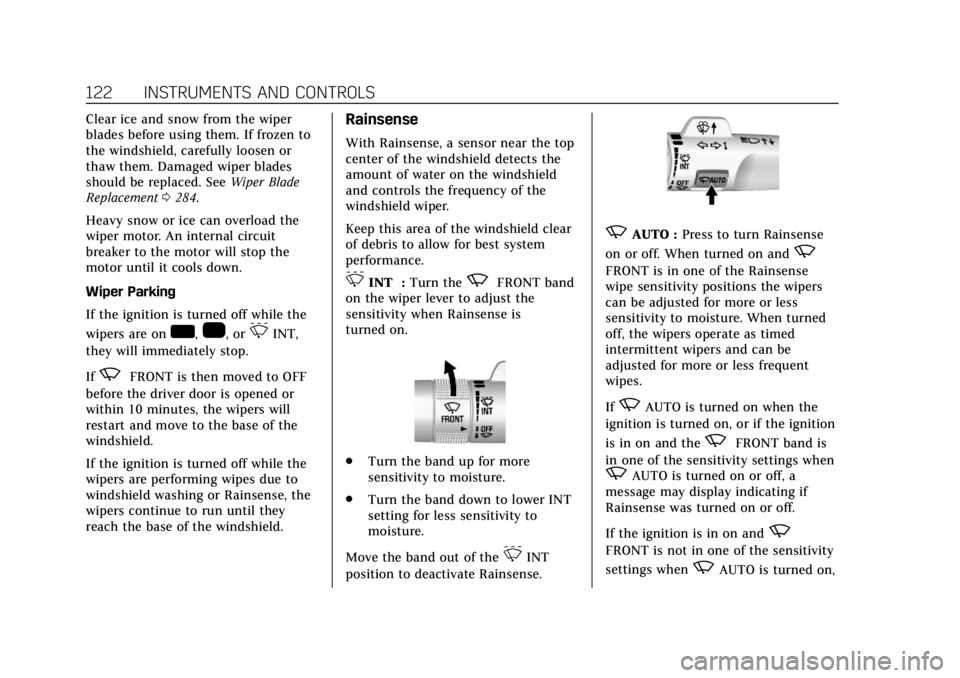
3INT : Turn thezFRONT band
on the wiper lever to adjust the
sensitivity when Rainsense is
turned on.
. Turn the band up for more
sensitivity to moisture.
. Turn the band down to lower INT
setting for less sensitivity to
moisture.
Move the band out of the
3INT
position to deactivate Rainsense.
zAUTO : Press to turn Rainsense
on or off. When turned on and
z
FRONT is in one of the Rainsense
wipe sensitivity positions the wipers
can be adjusted for more or less
sensitivity to moisture. When turned
off, the wipers operate as timed
intermittent wipers and can be
adjusted for more or less frequent
wipes.
If
zAUTO is turned on when the
ignition is turned on, or if the ignition
is in on and the
zFRONT band is
in one of the sensitivity settings when
zAUTO is turned on or off, a
message may display indicating if
Rainsense was turned on or off.
If the ignition is in on and
z
FRONT is not in one of the sensitivity
settings when
zAUTO is turned on,
Page 126 of 399
Cadillac Escalade Owner Manual (GMNA-Localizing-U.S./Canada/Mexico-
11349344) - 2018 - crc - 11/7/17
INSTRUMENTS AND CONTROLS 125
1. From the Home Page, touchSETTINGS, then touch Time
and Date.
2. Touch Set Date, then touch + or −to increase or decrease month,
day, or year.
3. Touch
[Back to go back to the
previous menu.
Auto Set
When on, the time and date will
automatically update.
To set auto set: 1. From the Home Page, touch SETTINGS, then touch Time
and Date.
2. Touch Set Time or Set Date.
3. Touch Auto Set, then select On-Cell Network or Off-Manual
to manually set the time
and date.
4. Touch
[Back to go back to the
previous menu.
If auto set is on, the time displayed on
the clock may not update immediately
when driving into a new time zone. In some regions, auto set may require
an active OnStar service plan,
if available.
Clock Display
When on, the digital clock will display
on the infotainment screen.
To set the clock display:
1. From the Home Page, touch SETTINGS, then touch Time
and Date.
2. Touch Clock Display, then select Off or On.
3. Touch
[Back to go back to the
previous menu.
Power Outlets
Power Outlets 12-Volt Direct Current
Accessory power outlets can be used
to plug in electrical equipment, such
as a cell phone or MP3 player.
The vehicle has five accessory power
outlets:
. One near the cupholders on the
center console
. One inside the center console .
One on the rear of the center
console
. One in the third row seat on the
driver side
. One in the rear cargo area on the
passenger side
Lift the cover to access and replace
when not in use.
The accessory power outlets are
powered as follows:
. The power outlet near the
cupholders on the center console
is powered in Retained Accessory
Power (RAP) mode. This outlet can
be configured to operate using
RAP or battery power. If the power
outlet is used while in the battery
power mode, this could cause
interference between the RKE
transmitter and the vehicle, and
the vehicle may not start. See
Ignition Positions 0199.
. The power outlets inside the
center console and on the rear of
the center console are powered
when the vehicle is started or the
ignition is in ACC/ACCESSORY,
Page 129 of 399

Cadillac Escalade Owner Manual (GMNA-Localizing-U.S./Canada/Mexico-
11349344) - 2018 - crc - 11/7/17
128 INSTRUMENTS AND CONTROLS
1. Remove all objects from thecharging pad. The system may
not charge if there are any
objects between the mobile
device and charging pad.
2. Place the mobile device face up against the alignment rib on the
charge pad.
3. The
}will display on theVon
the infotainment screen. This
indicates that the mobile device
is properly positioned and
charging. If a mobile device is
placed on the charging pad and
}does not display, remove the
mobile device from the pad, turn
it 180 degrees, and wait
three seconds before placing/
aligning the mobile device on the
pad again.
Software Acknowledgements
Certain Wireless Charging Module
product from LG Electronics, Inc.
("LGE") contains the open source
software detailed below. Refer to the
indicated open source licenses (as are
included following this notice) for the
terms and conditions of their use. OSS Notice Information
To obtain the source code that is
contained in this product, please visit
http://opensource.lge.com. In addition
to the source code, all referred license
terms, warranty disclaimers and
copyright notices are available for
download. LG Electronics will also
provide open source code to you on
CD-ROM for a charge covering the
cost of performing such distribution
(such as the cost of media, shipping,
and handling) upon email request to
[email protected]. This offer is
valid for three (3) years from the date
on which you purchased the product.
Freescale-WCT library
Copyright (c) 2012-2014 Freescale
Semiconductor, Inc.. All rights
reserved.
1. Redistributions of source code must retain the above copyright
notice, this list of conditions and
the following disclaimer.
2. Redistributions in binary form must reproduce the above
copyright notice, this list of
conditions and the following disclaimer in the documentation
and/or other materials provided
with the distribution.
3. Neither the name of the copyright holder nor the names
of its contributors may be used
to endorse or promote products
derived from this software
without specific prior written
permission.
THIS SOFTWARE IS PROVIDED BY
THE COPYRIGHT HOLDERS AND
CONTRIBUTORS "AS IS" AND ANY
EXPRESS OR IMPLIED WARRANTIES,
INCLUDING, BUT NOT LIMITED TO,
THE IMPLIED WARRANTIES OF
MERCHANTABILITY AND FITNESS
FOR A PARTICULAR PURPOSE ARE
DISCLAIMED. IN NO EVENT SHALL
THE COPYRIGHT HOLDER OR
CONTRIBUTORS BE LIABLE FOR ANY
DIRECT, INDIRECT, INCIDENTAL,
SPECIAL, EXEMPLARY, OR
CONSEQUENTIAL DAMAGES
(INCLUDING, BUT NOT LIMITED TO,
PROCUREMENT OF SUBSTITUTE
GOODS OR SERVICES; LOSS OF USE,
DATA, OR PROFITS; OR BUSINESS
INTERRUPTION) HOWEVER CAUSED
Page 136 of 399

Cadillac Escalade Owner Manual (GMNA-Localizing-U.S./Canada/Mexico-
11349344) - 2018 - crc - 11/7/17
INSTRUMENTS AND CONTROLS 135
When the vehicle is started, this light
flashes and a chime may come on to
remind passengers to fasten their seat
belt. Then the light stays on solid
until the belt is buckled. This cycle
continues several times if the
passenger remains or becomes
unbuckled while the vehicle is moving.
If the passenger seat belt is buckled,
neither the chime nor the light
comes on.
The front passenger seat belt reminder
light and chime may turn on if an
object is put on the seat such as a
briefcase, handbag, grocery bag,
laptop, or other electronic device. To
turn off the reminder light and/or
chime, remove the object from the
seat or buckle the seat belt.
Airbag Readiness Light
This light shows if there is an
electrical problem with the airbag
system. The system check includes
the airbag sensor(s), the passenger
sensing system, the pretensioners, the
airbag modules, the wiring, and the
crash sensing and diagnostic module.
For more information on the airbag
system, seeAirbag System 084.
The airbag readiness light comes on
for several seconds when the vehicle is
started. If the light does not come on
then, have it fixed immediately.
{Warning
If the airbag readiness light stays
on after the vehicle is started or
comes on while driving, it means
the airbag system might not be
working properly. The airbags in the
vehicle might not inflate in a crash,
or they could even inflate without a
crash. To help avoid injury, have
the vehicle serviced right away.
If there is a problem with the airbag
system, a Driver Information Center
(DIC) message may also come on.
Passenger Airbag Status
Indicator
The vehicle has a passenger sensing
system. See Passenger Sensing System
0 90 for important safety information.
The passenger airbag status indicator
is in the overhead console.
Page 151 of 399

Cadillac Escalade Owner Manual (GMNA-Localizing-U.S./Canada/Mexico-
11349344) - 2018 - crc - 11/7/17
150 INSTRUMENTS AND CONTROLS
Metric
English
Audio/Phone View : This displays the
speed view along with audio/phone
information. The current radio station,
media type, and incoming calls will be
displayed.
All HUD views may briefly display
audio information when the driver
uses the steering wheel controls to
adjust the audio settings appearing in
the instrument cluster.
Incoming phone calls appearing in the
instrument cluster may also display in
any HUD view.
Metric
English
Navigation View : This displays the
speed view along with Turn-by-Turn
Navigation information. The compass
heading is displayed when navigation
routing is not active.
Navigation Turn-by-Turn Alerts
shown in the instrument cluster may
also be displayed in any HUD view.
Metric
English
Performance View : This displays the
speedometer reading, rpm reading,
transmission positions, and gear shift
indicator.
Care of the HUD
Clean the inside of the windshield to
remove any dirt or film that could
reduce the sharpness or clarity of the
HUD image.
Clean the HUD lens with a soft cloth
sprayed with glass cleaner. Wipe the
lens gently, then dry it.
Page 152 of 399

Cadillac Escalade Owner Manual (GMNA-Localizing-U.S./Canada/Mexico-
11349344) - 2018 - crc - 11/7/17
INSTRUMENTS AND CONTROLS 151
HUD Troubleshooting
Check that:
.Nothing is covering the HUD lens.
. HUD brightness setting is not too
dim or too bright.
. HUD is adjusted to the proper
height.
. Polarized sunglasses are not worn.
. Windshield and HUD lens are
clean.
If the HUD image is not correct,
contact your dealer.
The windshield is part of the HUD
system. See Windshield Replacement
0 285.
Vehicle Messages
Messages displayed on the DIC
indicate the status of the vehicle or
some action that may be needed to
correct a condition. Multiple messages
may appear one after another.
The messages that do not require
immediate action can be
acknowledged and cleared by pressing
SEL. The messages that require
immediate action cannot be cleared
until that action is performed.
All messages should be taken
seriously; clearing the message does
not correct the problem.
If a SERVICE message appears, see
your dealer.
Follow the instructions given in the
messages. The system displays
messages regarding the following
topics:
.
Service Messages
. Fluid Levels
. Vehicle Security
. Brakes .
Ride Control Systems
. Driver Assistance Systems
. Cruise Control
. Lighting and Bulb Replacement
. Wiper/Washer Systems
. Doors and Windows
. Seat Belts
. Airbag Systems
. Engine and Transmission
. Tire Pressure
. Battery
Engine Power Messages
ENGINE POWER IS REDUCED
This message displays when the
vehicle's propulsion power is reduced.
Reduced propulsion power can affect
the vehicle's ability to accelerate.
If this message is on, but there is no
observed reduction in performance,
proceed to your destination. The
performance may be reduced the next
time the vehicle is driven. The vehicle
may be driven while this message is
Page 154 of 399

Cadillac Escalade Owner Manual (GMNA-Localizing-U.S./Canada/Mexico-
11349344) - 2018 - crc - 11/7/17
INSTRUMENTS AND CONTROLS 153
Rear Seat Reminder
This allows for a chime and a message
when the rear door has been opened
before or during operation of the
vehicle.
Select Off or On.
Language
Select Language, then select from the
available language(s).
The selected language will display on
the system, and voice recognition will
reflect the selected language.
Video Voice-Over
When activated, the RSI will read
aloud menu titles, menu listings,
pop-ups, alerts, and file titles from
audio and video media.
Select Off or On.
Valet Mode
This will lock the infotainment system
and steering wheel controls. It may
also limit access to vehicle storage
locations, if equipped.To enable valet mode:
1. Enter a four-digit code on the keypad.
2. Select Enter to go to the confirmation screen.
3. Re-enter the four-digit code.
Touch LOCK or UNLOCK to lock or
unlock the system. Touch Back to go
back to the previous menu.
Teen Driver
See “Teen Driver” under“Settings ”in
the infotainment manual.
Radio
Select to display the Radio menu and
the following may display:
. Manage Favorites
. Number of Favorites Shown
. Audible Touch Feedback
. Bose AudioPilot
. Auto Volume
. Maximum Startup Volume
. Audio Cue Volume Manage Favorites
This allows favorites to be edited. See
“Manage Favorites
”in “Settings” under
“Radio ”in the infotainment manual.
Number of Favorites Shown
Touch to set the number of favorites
to display.
Select the desired number or select
Auto and the infotainment system will
automatically adjust the number of
favorites shown.
Audible Touch Feedback
This allows Audible Touch Feedback
to be turned on or off.
Select Off or On.
Bose AudioPilot
This allows Bose AudioPilot to be
turned on or off.
Select Off or On.
Auto Volume
This feature adjusts the volume based
on vehicle speed and ambient noise.
Select Off, Low, Medium-Low,
Medium, Medium-High, or High.