2018 CADILLAC CT6 MPG
[x] Cancel search: MPGPage 162 of 445
Cadillac CT6 Owner Manual (GMNA-Localizing-U.S./Canada-11292458) -
2018 - crc - 2/14/17
INSTRUMENTS AND CONTROLS 161
Programmable Charging
Disabled
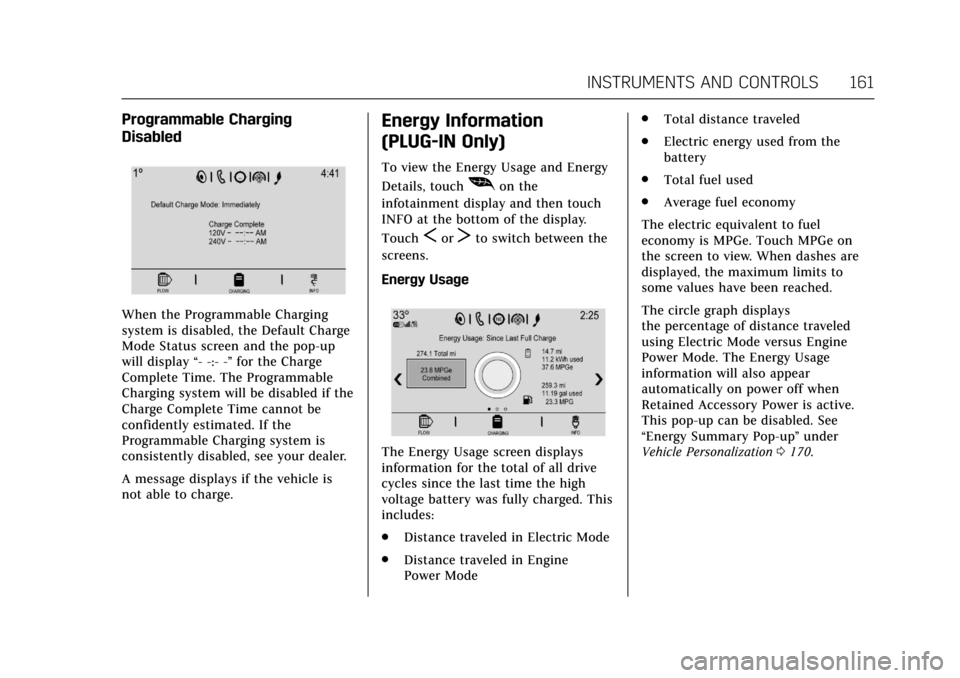
When the Programmable Charging
system is disabled, the Default Charge
Mode Status screen and the pop-up
will display“- -:- -”for the Charge
Complete Time. The Programmable
Charging system will be disabled if the
Charge Complete Time cannot be
confidently estimated. If the
Programmable Charging system is
consistently disabled, see your dealer.
A message displays if the vehicle is
not able to charge.
Energy Information
(PLUG-IN Only)
To view the Energy Usage and Energy
Details, touch
[on the
infotainment display and then touch
INFO at the bottom of the display.
Touch
SorTto switch between the
screens.
Energy Usage
The Energy Usage screen displays
information for the total of all drive
cycles since the last time the high
voltage battery was fully charged. This
includes:
. Distance traveled in Electric Mode
. Distance traveled in Engine
Power Mode .
Total distance traveled
. Electric energy used from the
battery
. Total fuel used
. Average fuel economy
The electric equivalent to fuel
economy is MPGe. Touch MPGe on
the screen to view. When dashes are
displayed, the maximum limits to
some values have been reached.
The circle graph displays
the percentage of distance traveled
using Electric Mode versus Engine
Power Mode. The Energy Usage
information will also appear
automatically on power off when
Retained Accessory Power is active.
This pop-up can be disabled. See
“Energy Summary Pop-up ”under
Vehicle Personalization 0170.
Page 164 of 445
Cadillac CT6 Owner Manual (GMNA-Localizing-U.S./Canada-11292458) -
2018 - crc - 2/14/17
INSTRUMENTS AND CONTROLS 163
DIC Information Display Options
The info displays on the DIC can be
turned on or off through the
Options menu.1. Press SEL while viewing the Options page in one of the
interactive display zones on the
cluster.
2. Scroll to Info Pages and press SEL.
3. Press
yorzto move through
the list of possible info displays.
4. Press SEL while an item is highlighted to select or deselect
that item. When an item is
selected, a checkmark will appear
next to it.
DIC Information Displays
The following is the list of all possible
DIC information displays. Some of the
information displays may not be
available for your particular vehicle.
Speed (Base Cluster) : Shows the
vehicle speed in either kilometers per
hour (km/h) or miles per hour (mph). Trip A or Trip B, Average Fuel
Economy, and Average Speed (Base
Cluster) / Trip 1 or Trip 2 and
Average Fuel Economy (Uplevel
Cluster) :
The Trip display shows the
current distance traveled, in either
kilometers (km) or miles (mi), since
the trip odometer was last reset. The
trip odometer can be reset by pressing
and holding SEL while this display is
active.
The Average Fuel Economy display
shows the approximate average liters
per 100 kilometers (L/100 km) or
miles per gallon (mpg). This number
is calculated based on the number of
L/100 km (mpg) recorded since the
last time this menu item was reset.
This number reflects only the
approximate average fuel economy
that the vehicle has right now, and
will change as driving conditions
change. The Average Fuel Economy
can be reset along with the trip
odometer by pressing and holding SEL
while this display is active.
Fuel Range : Shows the approximate
distance the vehicle can be driven
without refueling. LOW will be
displayed when the vehicle is low on fuel. The fuel range estimate is based
on an average of the vehicle's fuel
economy over recent driving history
and the amount of fuel remaining in
the fuel tank.
Electric Range (PLUG-IN) :
Shows
the approximate distance the vehicle
can be driven on battery power. The
electric range estimate is based on the
average of the vehicle's electrical
energy economy over recent driving
history and the amount of charge left
in the battery.
Total Range (PLUG-IN) : Shows the
remaining distance the vehicle can be
driven combining the electric range
and fuel range.
Average Fuel Economy (Base
Cluster) : Shows the approximate
average liters per 100 kilometers
(L/100 km) or miles per gallon (mpg).
This number is calculated based on
the number of L/100 km (mpg)
recorded since the last time this menu
item was reset. This number reflects
only the approximate average fuel
economy that the vehicle has right
now, and will change as driving
conditions change. The Average Fuel
Page 165 of 445
Cadillac CT6 Owner Manual (GMNA-Localizing-U.S./Canada-11292458) -
2018 - crc - 2/14/17
164 INSTRUMENTS AND CONTROLS
Economy can be reset by pressing and
holding SEL while this display is
active.
Coolant Temperature (PLUG-IN) :
Displays the coolant temperature in
either degrees Celsius (°C) or degrees
Fahrenheit (°F).
Instantaneous Fuel Economy :Shows
the current fuel economy in either
liters per 100 kilometers (L/100 km) or
miles per gallon (mpg). This number
reflects only the approximate fuel
economy that the vehicle has right
now and changes frequently as driving
conditions change.
EV Operation Gauge (PLUG-IN) :
This display shows the driver how
close the vehicle is to exiting
electric mode.
Total Power Gauge (PLUG-IN) : This
display shows the vehicle’s power
consumption from both the battery
and the engine. When the vehicle is
consuming power from the battery
and/or engine the bars are filled
yellow. When regenerating, green
filling is displayed. For invalid data, no
filled bars are shown. Average Speed :
Shows the average
speed of the vehicle in kilometers per
hour (km/h) or miles per hour (mph).
This average is calculated based on
the various vehicle speeds recorded
since the last reset of this value. The
average speed can be reset by pressing
and holding SEL while this display is
active.
Timer : This display can be used as a
timer. To start the timer, press SEL
while this display is active. The
display will show the amount of time
that has passed since the timer was
last reset. To stop the timer, press SEL
briefly while this display is active and
the timer is running. To reset the
timer to zero, press and hold SEL
while this display is active.
Compass (Uplevel Cluster) : Shows
the direction the vehicle is driving.
Speed Limit : Shows the current
speed limit. The information for this
page comes from a roadway database.
Speed Warning : Allows the driver to
set a speed that they do not want to
exceed. To set the Speed Warning,
press SEL when Speed Warning is
displayed. Press
yorzto adjust the value. This feature can be turned off
by pressing and holding SEL while
viewing this page. If the selected
speed limit is exceeded, a pop-up
warning is displayed and a chime may
sound.
Cruise Set Speed :
Shows the speed
the cruise control or Adaptive Cruise
Control is set to.
Follow Distance : If equipped, the
current follow time to the vehicle
ahead is displayed as a time value on
this page.
Driver Assistance (Uplevel
Cluster) : May show information for
Lane Keep Assist (LKA), Lane
Departure Warning (LDW), Adaptive
Cruise Control (ACC), and Forward
Collision Alert (FCA). The display
shows if there is a vehicle detected
ahead, and the current FCA timing
setting. In addition, when ACC is not
engaged, the current follow time to
the vehicle ahead is displayed as a
time value on this page.
Battery Voltage : Shows the current
battery voltage.